avatarJ3

Free AI web copilot to create summaries, insights and extended knowledge, download it at here

11786

Abstract

:800/1*AVSaXfLLVS7EJwnLp-DFmg.png"><figcaption></figcaption></figure><div id="2588"><pre><span class="hljs-built_in">df</span>[(<span class="hljs-built_in">df</span>[<span class="hljs-string">'Temperature_°C'</span>]<14) | (<span class="hljs-built_in">df</span>[<span class="hljs-string">'Temperature_°C'</span>]>22)]</pre></div><figure id="319e"><img src="https://cdn-images-1.readmedium.com/v2/resize:fit:800/1*DHsMI4T_k3h6XWPeJ3bSQQ.png"><figcaption></figcaption></figure><h1 id="4057">4 — SET AND RESET INDEX</h1><p id="347e">Transform the old index into a column:</p><div id="6604"><pre><span class="hljs-attr">resetted_df</span> = df.reset_index()</pre></div><div id="14b1"><pre><span class="hljs-attribute">resetted_df</span></pre></div><figure id="1fb7"><img src="https://cdn-images-1.readmedium.com/v2/resize:fit:800/1*RZeQ31PiIi1mXl0nqvaj9A.png"><figcaption></figcaption></figure><p id="00fc">Return index column as real index:</p><div id="db2b"><pre>resetted_df.set_<span class="hljs-meta">index</span>(<span class="hljs-string">'index'</span>)</pre></div><figure id="0e2d"><img src="https://cdn-images-1.readmedium.com/v2/resize:fit:800/1*_WbBQ8Ppvr1Y22VFaXNnWA.png"><figcaption></figcaption></figure><h1 id="8fc8">5 — MISSING DATA</h1><p id="c08a">Creating DataFrame From Dictionary:</p><div id="c53e"><pre><span class="hljs-built_in">dict</span> <span class="hljs-operator">=</span> {<span class="hljs-string">'A'</span><span class="hljs-operator">:</span>[<span class="hljs-number">1</span>,<span class="hljs-number">2</span>,np.<span class="hljs-literal">nan</span>],<span class="hljs-string">'B'</span><span class="hljs-operator">:</span>[<span class="hljs-number">5</span>, np.<span class="hljs-literal">nan</span>, np.<span class="hljs-literal">nan</span>],<span class="hljs-string">'C'</span><span class="hljs-operator">:</span>[<span class="hljs-number">1</span>,<span class="hljs-number">2</span>,<span class="hljs-number">3</span>]}</pre></div><p id="4faa">Creating a DataFrame from dictionary:</p><div id="e6ac"><pre><span class="hljs-attribute">df</span> <span class="hljs-operator">=</span> pd.DataFrame(dict) df</pre></div><figure id="b65c"><img src="https://cdn-images-1.readmedium.com/v2/resize:fit:800/1*lkMn2bmolTJyt-9ibBLo-g.png"><figcaption></figcaption></figure><h2 id="119a">Note that the First Line (Zero) and the Last Column (C) are Complete!</h2><p id="6cff">axis=0 is the default; Returning the First Line ( Zero ):</p><div id="bcef"><pre>df<span class="hljs-selector-class">.dropna</span>()</pre></div><figure id="f5f7"><img src="https://cdn-images-1.readmedium.com/v2/resize:fit:800/1*a9jJO0ZaCKCIHqrUV8DlbA.png"><figcaption></figcaption></figure><p id="10ec">Returning the Last Column ( C ):</p><div id="eae2"><pre>df.dropna(<span class="hljs-attribute">axis</span>=1)</pre></div><figure id="fa00"><img src="https://cdn-images-1.readmedium.com/v2/resize:fit:800/1*KSSdp9M0KTuBvTgq4tvE3g.png"><figcaption></figcaption></figure><p id="f306">Returning if the Column has at least 2 elements:</p><div id="3c28"><pre>df.dropna(<span class="hljs-attribute">axis</span>=1, <span class="hljs-attribute">thresh</span>=2)</pre></div><figure id="9b1f"><img src="https://cdn-images-1.readmedium.com/v2/resize:fit:800/1*igm-SO1teD9r3J0P185kQg.png"><figcaption></figcaption></figure><p id="1349">Filling the blank values:</p><div id="0114"><pre>df<span class="hljs-selector-class">.fillna</span>(value =<span class="hljs-string">'FILL_VALUE'</span>)</pre></div><figure id="d414"><img src="https://cdn-images-1.readmedium.com/v2/resize:fit:800/1*tyk4GGVdMbHBHIfo820feA.png"><figcaption></figcaption></figure><p id="82f0">Filling the blank cells with the MEAN OF COLUMN ‘A’:</p><div id="52b7"><pre>df<span class="hljs-selector-class">.fillna</span>(value=df<span class="hljs-selector-attr">[<span class="hljs-string">'A'</span>]</span><span class="hljs-selector-class">.mean</span>())</pre></div><figure id="8ae5"><img src="https://cdn-images-1.readmedium.com/v2/resize:fit:800/1*dpLGWZucbwFAHrlU3RacAw.png"><figcaption></figcaption></figure><p id="63fa">Letting Pandas sort out how best to fill the table (<b>ff</b>ill — <b>f</b>luid <b>f</b>ill:)</p><div id="0912"><pre>df.ffill<span class="hljs-comment">()</span></pre></div><figure id="0654"><img src="https://cdn-images-1.readmedium.com/v2/resize:fit:800/1*GRHodgUUOkDnt0kBI9ZgIA.png"><figcaption></figcaption></figure><h1 id="2f09">6 — GROUP BY</h1><div id="b7d5"><pre><span class="hljs-attr">company</span> = [<span class="hljs-string">'GOOG'</span>, <span class="hljs-string">'GOOG'</span>, <span class="hljs-string">'MSTF'</span>, <span class="hljs-string">'MSTF'</span>, <span class="hljs-string">'FB'</span>, <span class="hljs-string">'FB'</span>]</pre></div><p id="5f22">More list:</p><div id="4bee"><pre><span class="hljs-attr">person</span> = [<span class="hljs-string">'Sam'</span>, <span class="hljs-string">'Charlie'</span>, <span class="hljs-string">'Amy'</span>, <span class="hljs-string">'Vanessa'</span>, <span class="hljs-string">'Carl'</span>, <span class="hljs-string">'Sarah'</span>]</pre></div><p id="f20b">Once more list:</p><div id="61d2"><pre>sales = [<span class="hljs-number">200,120,340</span>,<span class="hljs-number">124,245,350</span>]</pre></div><p id="4141">Save an empty DataFrame:</p><div id="e544"><pre><span class="hljs-attribute">df</span> <span class="hljs-operator">=</span> pd.DataFrame()</pre></div><p id="1d09">Join it all in the newly created DataFrame:</p><div id="8f6e"><pre><span class="hljs-built_in">df</span>[<span class="hljs-string">'company'</span>] = company <span class="hljs-built_in">df</span>[<span class="hljs-string">'person'</span>] = person <span class="hljs-built_in">df</span>[<span class="hljs-string">'sales'</span>] = sales</pre></div><div id="f90b"><pre><span class="hljs-built_in">df</span></pre></div><figure id="5f0e"><img src="https://cdn-images-1.readmedium.com/v2/resize:fit:800/1*COlIYekNxh2dEfrxbH5l5A.png"><figcaption></figcaption></figure><p id="a5d0">Run groupby():</p><div id="9bca"><pre><span class="hljs-attr">bycompany</span> = df.groupby(<span class="hljs-string">'company'</span>)</pre></div><p id="a02d">Here is the aggregate functions:</p><div id="3dc1"><pre>bycompany.<span class="hljs-built_in">sum</span>()</pre></div><figure id="21fa"><img src="https://cdn-images-1.readmedium.com/v2/resize:fit:800/1*kJsU0oIGwk90W_nu9BRRTg.png"><figcaption>Sum</figcaption></figure><div id="426b"><pre>bycompany.<span class="hljs-built_in">std</span>()</pre></div><figure id="a171"><img src="https://cdn-images-1.readmedium.com/v2/resize:fit:800/1*kjQDsO8y1yrkToJ5iDUEpg.png"><figcaption>Standard Deviation</figcaption></figure><div id="6498"><pre>bycompany.<span class="hljs-built_in">count</span>()</pre></div><figure id="a703"><img src="https://cdn-images-1.readmedium.com/v2/resize:fit:800/1*SBZ3paRbneVZST3QHuiy1Q.png"><figcaption>Counting</figcaption></figure><div id="1693"><pre>bycompany.<span class="hljs-built_in">max</span>()</pre></div><figure id="c988"><img src="https://cdn-images-1.readmedium.com/v2/resize:fit:800/1*O4gE-EF-JsRgKJRE7NCRhg.png"><figcaption>Maximum</figcaption></figure><div id="97b6"><pre>bycompany.<span class="hljs-built_in">min</span>()</pre></div><figure id="d253"><img src="https://cdn-images-1.readmedium.com/v2/resize:fit:800/1*jGHD-0IaA2JRDcuGEAZcqQ.png"><figcaption>Minimum</figcaption></figure><div id="8b3e"><pre>bycompany.<span class="hljs-built_in">describe</span>()</pre></div><figure id="3df5"><img src="https://cdn-images-1.readmedium.com/v2/resize:fit:800/1*bS4675oPDz7y1s6NnLvIDg.png"><figcaption>Describing</figcaption></figure><div id="ff77"><pre>bycompany.<span class="hljs-built_in">describe</span>().<span class="hljs-built_in">transpose</span>()</pre></div><figure id="02fd"><img src="https://cdn-images-1.readmedium.com/v2/resize:fit:800/1*S13cr1Nis2CIdIlXcDTp4Q.png"><figcaption>Transposing</figcaption></figure><h1 id="2f08">7 — Multilevel DataFrame — CROSS SECTION</h1><p id="eeaa">Let’s create a multilevel DataFrame:</p><div id="c8d0"><pre><span class="hljs-attr">outside</span> = [<span class="hljs-string">'G1'</span>, <span class="hljs-string">'G1'</span>, <span class="hljs-string">'G1'</span>, <span class="hljs-string">'G2'</span>, <span class="hljs-string">'G2'</span>, <span class="hljs-string">'G2'</span>] <span class="hljs-attr">inside</span> = [<span class="hljs-number">1</span>,<span class="hljs-number">2</span>,<span class="hljs-number">3</span>,<span class="hljs-number">1</span>,<span class="hljs-number">2</span>,<span class="hljs-number">3</span>] <span class="hljs-attr">hier_index</span> = list(zip(outside, inside))</pre></div><div id="cdce"><pre><span class="hljs-attr">hier_index</span> = pd.MultiIndex.from_tuples(hier_index)</pre></div><p id="58d8"><b>Create a Multilevel DataFrame:</b></p><div id="6c46"><pre>df = pd<span class="hljs-selector-class">.DataFrame</span>(np<span class="hljs-selector-class">.random</span><span class="hljs-selector-class">.randn</span>(<span class="hljs-number">6</span>,<span class="hljs-number">2</span>), hier_index, <span class="hljs-selector-attr">[<span class="hljs-string">'A'</span>, <span class="hljs-string">'B'</span>]</span>)</pre></div><div id="a776"><pre><span class="hljs-built_in">df</span></pre></div><figure id="99a5"><img src="https://cdn-images-1.readmedium.com/v2/resize:fit:800/1*ApfueVQNlkvC2JIwUUu70g.png"><figcaption></figcaption></figure><p id="1fc7">Separating Group 1:</p><div id="305f"><pre>df<span class="hljs-selector-class">.loc</span><span class="hljs-selector-attr">[<span class="hljs-string">'G1'</span>]</span></pre></div><figure id="84f6"><img src="https://cdn-images-1.readmedium.com/v2/resize:fit:800/1*h3WT-MHPZB4ZxIqPchIYcA.png"><figcaption></figcaption></figure><p id="4dcc">Or Group 2:</p><div id="0a53"><pre>df<span class="hljs-selector-class">.loc</span><span class="hljs-selector-attr">[<span class="hljs-string">'G2'</span>]</span></pre></div><figure id="e69c"><img src="https://cdn-images-1.readmedium.com/v2/resize:fit:800/1*sSuRj5OrxhxLFTLcObWtjw.png"><figcaption></figcaption></figure><p id="3eee">In Group 2, return row one:</p><div id="f0a9"><pre>df<span class="hljs-selector-class">.loc</span><span class="hljs-selector-attr">[<span class="hljs-string">'G2'</span>]</span><span class="hljs-selector-class">.loc</span><span class="hljs-selector-attr">[1]</span></pre></div><div id="ae02"><pre><span class="hljs-attribute">A</span> -<span class="hljs-number">1</span>.<span class="hljs-number">000487</span> <span class="hljs-attribute">B</span> -<span class="hljs-number">2</span>.<span class="hljs-number">259334</span> <span class="hljs-attribute">Name</span>: <span class="hljs-number">1</span>, dtype: float64</pre></div><p id="cee5">Or specific value:</p><div id="1dcd"><pre>df<span class="hljs-selector-class">.loc</span><span class="hljs-selector-attr">[<span class="hljs-string">'G2'</span>]</span><span class="hljs-selector-class">.loc</span><span class="hljs-selector-attr">[1]</span><span class="hljs-selector-attr">[0]</span></pre></div><div id="a98c"><pre><span class="hljs-deletion">-1.0004870600502171</span></pre></div><p id="5c9d">Now the Index names:</p><div id="86af"><pre>df.<span class="hljs-keyword">index</span>.names</pre></div><p id="ea01">It’s blank…</p><div id="a64c"><pre><span class="hljs-function"><span class="hljs-title">FrozenList</span><span class="hljs-params">([None, None])</span></span></pre></div><p id="8763">This is just a Pandas index names object types. All it’s saying here is that these indices don’t have any names but you can go ahead and do say equals and then pass in a list of names.</p><p id="2c7b">Let’s name each index:</p><div id="3dfa"><pre>df<span class="hljs-selector-class">.index</span><

Options

span class="hljs-selector-class">.names</span> = <span class="hljs-selector-attr">[<span class="hljs-string">'Groups'</span>, <span class="hljs-string">'Num'</span>]</span></pre></div><div id="4f00"><pre><span class="hljs-built_in">df</span></pre></div><figure id="9296"><img src="https://cdn-images-1.readmedium.com/v2/resize:fit:800/1*yNeC1O0Tje4YcXlEOTUvnw.png"><figcaption></figcaption></figure><p id="3ed6">Cross Section (xs):</p><div id="efed"><pre>df.xs(1, <span class="hljs-attribute">level</span>=<span class="hljs-string">'Num'</span>)</pre></div><figure id="19e1"><img src="https://cdn-images-1.readmedium.com/v2/resize:fit:800/1*73_IGdFlmMkTEHx5MX31vg.png"><figcaption>Level Num=1 for Group 1 and Group 2</figcaption></figure><div id="9905"><pre>df.xs(3, <span class="hljs-attribute">level</span>=<span class="hljs-string">'Num'</span>)</pre></div><figure id="91be"><img src="https://cdn-images-1.readmedium.com/v2/resize:fit:800/1*jfp3YkSVpMToDYaTSAkvRw.png"><figcaption>Repeating for the extremes values (3)</figcaption></figure><h1 id="afe5">8 — PIVOT TABLE</h1><div id="b3ac"><pre><span class="hljs-attr">A</span> = [<span class="hljs-string">"G2"</span>, <span class="hljs-string">"G2"</span>, <span class="hljs-string">"G2"</span>, <span class="hljs-string">"G2"</span>, <span class="hljs-string">"G2"</span>, <span class="hljs-string">"G1"</span>, <span class="hljs-string">"G1"</span>, <span class="hljs-string">"G1"</span>, <span class="hljs-string">"G1"</span>] <span class="hljs-attr">B</span> = [<span class="hljs-number">1</span>, <span class="hljs-number">1</span>, <span class="hljs-number">1</span>, <span class="hljs-number">2</span>, <span class="hljs-number">2</span>, <span class="hljs-number">1</span>, <span class="hljs-number">1</span>, <span class="hljs-number">2</span>, <span class="hljs-number">2</span>] <span class="hljs-attr">C</span> = [<span class="hljs-number">2</span>, <span class="hljs-number">1</span>, <span class="hljs-number">1</span>, <span class="hljs-number">2</span>, <span class="hljs-number">2</span>, <span class="hljs-number">1</span>, <span class="hljs-number">2</span>, <span class="hljs-number">2</span>, <span class="hljs-number">1</span>] <span class="hljs-attr">D</span> = [<span class="hljs-number">1</span>, <span class="hljs-number">2</span>, <span class="hljs-number">2</span>, <span class="hljs-number">1</span>, <span class="hljs-number">2</span>, <span class="hljs-number">1</span>, <span class="hljs-number">2</span>, <span class="hljs-number">1</span>, <span class="hljs-number">1</span>] <span class="hljs-attr">E</span> = [<span class="hljs-number">2</span>, <span class="hljs-number">1</span>, <span class="hljs-number">2</span>, <span class="hljs-number">2</span>, <span class="hljs-number">1</span>, <span class="hljs-number">1</span>, <span class="hljs-number">2</span>, <span class="hljs-number">2</span>, <span class="hljs-number">1</span>]</pre></div><p id="f4e1">Create an empty DataFrame:</p><div id="d9a8"><pre><span class="hljs-attribute">df</span> <span class="hljs-operator">=</span> pd.DataFrame()</pre></div><p id="26c6">Populating it:</p><div id="1911"><pre><span class="hljs-built_in">df</span>[<span class="hljs-string">'A'</span>] = A <span class="hljs-built_in">df</span>[<span class="hljs-string">'B'</span>] = B <span class="hljs-built_in">df</span>[<span class="hljs-string">'C'</span>] = C <span class="hljs-built_in">df</span>[<span class="hljs-string">'D'</span>] = D <span class="hljs-built_in">df</span>[<span class="hljs-string">'E'</span>] = E</pre></div><div id="e4da"><pre><span class="hljs-built_in">df</span></pre></div><figure id="55de"><img src="https://cdn-images-1.readmedium.com/v2/resize:fit:800/1*8aNL5NSwrEGrQ6eJV9zHHw.png"><figcaption></figcaption></figure><p id="cb46">Here is the pivot table:</p><div id="e47c"><pre>df.pivot_table(<span class="hljs-attribute">values</span>=<span class="hljs-string">'D'</span>, index=[<span class="hljs-string">'A'</span>, <span class="hljs-string">'B'</span>], columns=[<span class="hljs-string">'C'</span>], <span class="hljs-attribute">fill_value</span>=0 )</pre></div><figure id="51ef"><img src="https://cdn-images-1.readmedium.com/v2/resize:fit:800/1*tIVFdstC2YGk7Pgj9PM_YA.png"><figcaption></figcaption></figure><p id="2bc4">This example aggregates values by taking the sum:</p><div id="99fc"><pre>table = pd.pivot_table(df, <span class="hljs-attribute">values</span>=<span class="hljs-string">'D'</span>, index=[<span class="hljs-string">'A'</span>, <span class="hljs-string">'B'</span>],columns=[<span class="hljs-string">'C'</span>], <span class="hljs-attribute">aggfunc</span>=np.sum, <span class="hljs-attribute">fill_value</span>=0</pre></div><p id="c219">Calling the table object:</p><div id="9d0c"><pre><span class="hljs-selector-tag">table</span></pre></div><figure id="d9e0"><img src="https://cdn-images-1.readmedium.com/v2/resize:fit:800/1*B9FxJ13jEPztAaMJwAmE-Q.png"><figcaption></figcaption></figure><h1 id="e194">9 — MERGING, JOINING, and CONCATENATION</h1><p id="b641">2 DataFrames: left and right:</p><div id="6151"><pre>left = pd.<span class="hljs-symbol">DataFrame</span>({<span class="hljs-string">'key'</span>:[<span class="hljs-string">'K0'</span>,<span class="hljs-string">'K1'</span>,<span class="hljs-string">'K2'</span>,<span class="hljs-string">'K3'</span>], <span class="hljs-string">'A'</span>:[<span class="hljs-string">'A0'</span>,<span class="hljs-string">'A1'</span>,<span class="hljs-string">'A2'</span>,<span class="hljs-string">'A3'</span>], <span class="hljs-string">'B'</span>:[<span class="hljs-string">'B0'</span>,<span class="hljs-string">'B1'</span>,<span class="hljs-string">'B2'</span>,<span class="hljs-string">'B3'</span>], })</pre></div><div id="bf74"><pre><span class="hljs-built_in">left</span></pre></div><figure id="aa8e"><img src="https://cdn-images-1.readmedium.com/v2/resize:fit:800/1*W1Hw3NZXSjciJdvigga7eg.png"><figcaption></figcaption></figure><div id="e69a"><pre>right = pd.<span class="hljs-symbol">DataFrame</span>({<span class="hljs-string">'key'</span>:[<span class="hljs-string">'K0'</span>,<span class="hljs-string">'K1'</span>,<span class="hljs-string">'K2'</span>,<span class="hljs-string">'K3'</span>], <span class="hljs-string">'A'</span>:[<span class="hljs-string">'A4'</span>,<span class="hljs-string">'A5'</span>,<span class="hljs-string">'A6'</span>,<span class="hljs-string">'A7'</span>], <span class="hljs-string">'B'</span>:[<span class="hljs-string">'B4'</span>,<span class="hljs-string">'B5'</span>,<span class="hljs-string">'B6'</span>,<span class="hljs-string">'B7'</span>], })</pre></div><div id="980f"><pre><span class="hljs-built_in">right</span></pre></div><figure id="c22a"><img src="https://cdn-images-1.readmedium.com/v2/resize:fit:800/1*8teJlpx7EMNJxCP2wjwqkA.png"><figcaption></figcaption></figure><h2 id="bab2">Merging</h2><div id="178f"><pre>pd.<span class="hljs-built_in">merge</span>(left,<span class="hljs-literal">right</span>,how=<span class="hljs-string">'inner'</span>,<span class="hljs-keyword">on</span>=<span class="hljs-string">'key'</span>)</pre></div><figure id="a115"><img src="https://cdn-images-1.readmedium.com/v2/resize:fit:800/1*LvUAgeuXCgbo780Ryz5u_Q.png"><figcaption></figcaption></figure><h2 id="5278">Joining</h2><div id="f079"><pre>left.join(right, <span class="hljs-attribute">how</span>=<span class="hljs-string">'inner'</span>, <span class="hljs-attribute">lsuffix</span>=<span class="hljs-string">'_left'</span>, <span class="hljs-attribute">rsuffix</span>=<span class="hljs-string">'_right'</span>)</pre></div><figure id="777f"><img src="https://cdn-images-1.readmedium.com/v2/resize:fit:800/1*BtAZQHpQiB4iOEdm9hQtTA.png"><figcaption></figcaption></figure><h2 id="7fb8">Concatenation</h2><div id="4b7f"><pre>pd.concat([<span class="hljs-built_in">left</span>, <span class="hljs-built_in">right</span>])</pre></div><figure id="3e20"><img src="https://cdn-images-1.readmedium.com/v2/resize:fit:800/1*-GLaY3YNBroIoxLjM35GPg.png"><figcaption></figcaption></figure><div id="d611"><pre>pd.concat([<span class="hljs-built_in">left</span>, <span class="hljs-built_in">right</span>], axis=<span class="hljs-number">1</span>)</pre></div><figure id="7451"><img src="https://cdn-images-1.readmedium.com/v2/resize:fit:800/1*UAa0K_agWRPRuVZJXZOVxA.png"><figcaption>For more info: Official Pandas <a href="http://Merge, join, concatenate and compare">Link</a></figcaption></figure><div id="43be"><pre>print(<span class="hljs-comment">"I hope you enjoyed that lecture o/\nIf you find this post helpful, please click the applause button and subscribe to the page for more articles like this one.\nHave a Nice Day!"</span>)</pre></div><h2 id="5e0a">I hope you enjoyed that lecture o/ If you find this post helpful, please click the applause button and subscribe to the page for more articles like this one. Have a Nice Day!</h2><figure id="e485"><img src="https://cdn-images-1.readmedium.com/v2/resize:fit:800/0*dhr7bxa-xdVjLvGG"><figcaption>Photo from this <a href="https://foreignpolicy.com/2014/10/23/chinese-people-used-to-think-pandas-were-monsters/">link</a></figcaption></figure><p id="39eb">Until next time!</p><p id="726d">👉Jupiter notebook <a href="https://drive.google.com/drive/folders/1LygAT2RmNz-DLNswiCxCZWpBi4yICH6D?usp=sharing">link</a> :)</p><p id="9fb6">👉or collab <a href="https://drive.google.com/file/d/1rmrh2gA8PENEIqe6KOLacgOO_yN2-SgT/view?usp=sharing">link</a></p><p id="fd09">👉<a href="https://github.com/giljr/my_jupyter_notebook">git</a></p><h1 id="b0e3">Credits & References</h1><p id="d210"><b>Jose Portilla </b><a href="https://www.udemy.com/course/python-for-data-science-and-machine-learning-bootcamp/">Python for Data Science and Machine Learning Bootcamp </a>— Learn how to use NumPy, Pandas, Seaborn, Matplotlib, Plotly, Scikit-Learn, Machine Learning, Tensorflow, and more!</p><h1 id="169d">Related Posts</h1><p id="f4cd"><b>00</b>#Episode#PurePythonSeries — <a href="https://readmedium.com/lambda-in-python-421b0c18e825"><b>Lambda in Python </b></a>— Python Lambda Desmistification</p><p id="be55"><b>01</b>#Episode#PurePythonSeries — <a href="https://readmedium.com/send-emails-using-python-jupyter-notebook-94d14a5a5655"><b>Send Email in Python</b></a> — Using Jupyter Notebook — How To Send Gmail In Python</p><p id="977f"><b>02</b>#Episode#PurePythonSeries — <a href="https://readmedium.com/automate-your-email-marketing-with-python-f0d68234b789"><b>Automate Your Email With Python & Outlook</b></a><b> </b>— How To Create An Email Trigger System in Python</p><p id="d5b3"><b>03</b>#Episode#PurePythonSeries — <a href="https://readmedium.com/manipulating-files-with-python-3f9a781287e9"><b>Manipulating Files With Python</b></a> — Manage Your Lovely Photos With Python!</p><p id="ed60"><b>04</b>#Episode#PurePythonSeries — Pandas DataFrame Advanced — A Complete Notebook Review (this one)</p><p id="6910"><b>05</b>#Episode#PurePythonSeries — <a href="https://readmedium.com/is-this-leap-year-python-calendar-3d1a61f2c4a7"><b>Is This Leap Year? Python Calendar</b></a> — How To Calculate If The Year Is Leap Year and How Many Days Are In The Month</p><p id="8830"><b>06</b>#Episode#PurePythonSeries — <a href="https://readmedium.com/list-comprehension-in-python-c22c4b0a6a8a"><b>List Comprehension In Python </b></a>— Locked-in Secrets About List Comprehension</p><p id="99c1"><b>07</b>#Episode#PurePythonSeries — <a href="https://readmedium.com/graphs-in-python-b7d243737b77"><b>Graphs — In Python </b></a>— Extremely Simple Algorithms in Python</p><p id="5137"><b>08</b>#Episode#PurePythonSeries — <a href="https://readmedium.com/decorator-in-python-62c00f7e818"><b>Decorator in Python </b></a>— How To Simplifying Your Code And Boost Your Function</p></article></body>

Pandas DataFrame Advanced

A Complete Notebook Review #PurePythonSeries — Episode #04

INDEX

(1) Series

(2) DataFrame

(3) Conditional Selection

(4) Set and Reset Index

(5) Missing Data

(6) Group By

(7) Cross Section

(8) Pivot Table

(9) Merging, Joining and Concatenation

1 — PANDAS Series — How to Create From…

import pandas as pd

Let’s create four artifacts to see how to create a Series:

First, a List:

labels = ['a','b', 'c']

Second, another List:

my_data = [10,20,30]

Third, a Numpy array:

import numpy as np
arr = np.array(my_data)

And Finally, forth, a Dictionary:

dict = {'a':10, 'b':20, 'c':30}

Create Series FROM LISTS

pd.Series(data=my_data, index=labels)
a    10
b    20
c    30
dtype: int64

Or, ordering, first data, then labels:

pd.Series(my_data, labels)
a    10
b    20
c    30
dtype: int64

Create Series FROM ARRAY

pd.Series(arr)
0    10
1    20
2    30
dtype: int32

Or, setting labels:

pd.Series(arr, labels)
a    10
b    20
c    30
dtype: int32

Create Series FROM DICTIONARY

This is the easiest and most intuitive way…

pd.Series(dict)
a    10
b    20
c    30
dtype: int64

Isn’t it?

2 — PANDAS DATAFRAME — Structure

import matplotlib.pyplot as plt
%matplotlib inline
import pandas as pd
df = pd.DataFrame(data, index, columns)
df = pd.DataFrame(d   , i    , c)

Create a Pandas’ Dataframe by passing a dictionary:

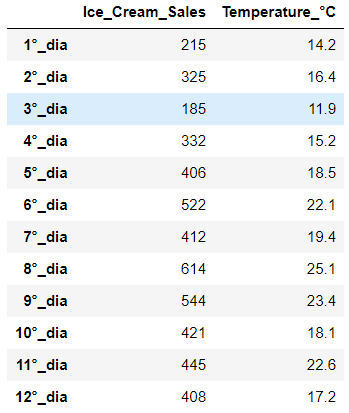
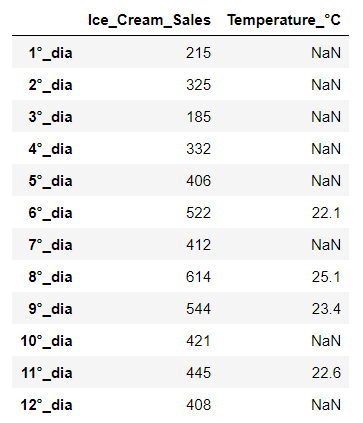
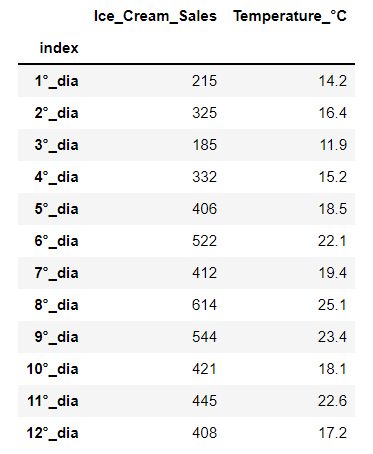
# Ice Cream Sale - Last 12 Sunny Days
# visit this guide for more info: table style
d = {'X': [215,325,185,332,406,522,412,614,544,421,445,408], 'Y': [14.2,16.4,11.9,15.2,18.5,22.1,19.4,25.1,23.4,18.1,22.6,17.2]}
df = pd.DataFrame(data=d)
df.index = ['1°_dia','2°_dia', '3°_dia','4°_dia','5°_dia','6°_dia','7°_dia','8°_dia','9°_dia','10°_dia','11°_dia','12°_dia']
df.columns = [  'Ice_Cream_Sales',  'Temperature_°C']
df

3 — Conditional Selection w/ DataFrame

Simple Conditional

df[df>20]
df[df['Temperature_°C']> 20]
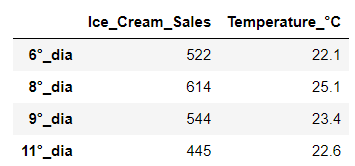
Return a subset of DataFrame

There are 2 general formats for GRABBING ELEMENTS from a DataFrame:
DOUBLE BRACKET FORMAT
df[line][column]
SINGLE BRACKET FORMAT
df[line,column]
(w/ comma, this is least prone to error!)

Multiple Lines Solution

boolser = df['Temperature_°C']>23 
result = df[boolser]
mycols = ['Temperature_°C', 'Ice_Cream_Sales']
result[mycols]
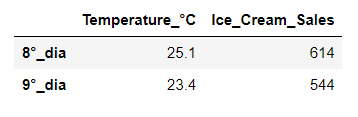
Single Line (All-in-One)

One_line Conditional Solution:

# Slicing w/ Double Bracket Format
# df[][]
# df[inequality][[pass_a_list_of_columns]]
# df[df[]>0][['','']]
df[df['Temperature_°C']>23][['Temperature_°C', 'Ice_Cream_Sales']]

Multiple Conditional Solution:

Python Use AND OR In Multiple Single Conditional

True and True
True

Again:

True and False
False

Once more:

True or True
True

Or:

True or False
True

But here, this Operation will return an ERROR :/

df[(df['Temperature_°C']>23) and (df['Temperature_°C']<26)]

Instead, use AMPERSAND (&) or PIPE( | ) as below:

df[(df['Temperature_°C']>23)  &  (df['Temperature_°C']<26)]
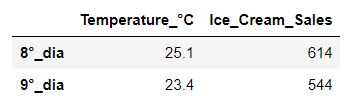
df[(df['Temperature_°C']<14)  |  (df['Temperature_°C']>22)]
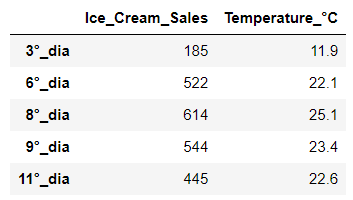
4 — SET AND RESET INDEX

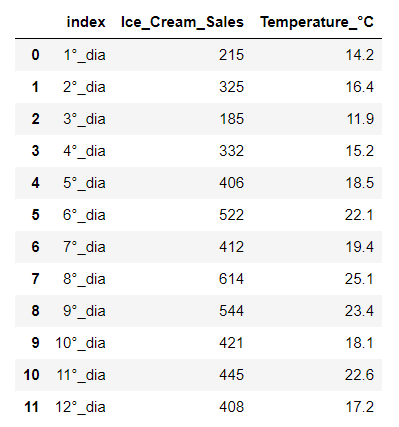
Transform the old index into a column:

resetted_df = df.reset_index()
resetted_df

Return index column as real index:

resetted_df.set_index('index')
5 — MISSING DATA

Creating DataFrame From Dictionary:

dict = {'A':[1,2,np.nan],'B':[5, np.nan, np.nan],'C':[1,2,3]}

Creating a DataFrame from dictionary:

df = pd.DataFrame(dict)
df
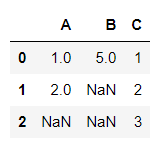
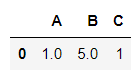
Note that the First Line (Zero) and the Last Column (C) are Complete!

axis=0 is the default; Returning the First Line ( Zero ):

df.dropna()
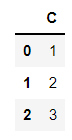
Returning the Last Column ( C ):

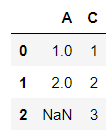
df.dropna(axis=1)
Returning if the Column has at least 2 elements:

df.dropna(axis=1, thresh=2)
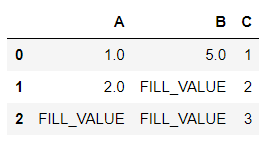
Filling the blank values:

df.fillna(value ='FILL_VALUE')
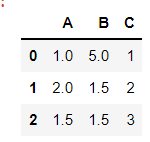
Filling the blank cells with the MEAN OF COLUMN ‘A’:

df.fillna(value=df['A'].mean())
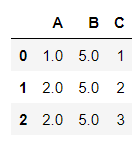
Letting Pandas sort out how best to fill the table (ffill — fluid fill:)

df.ffill()
6 — GROUP BY

company = ['GOOG', 'GOOG', 'MSTF', 'MSTF', 'FB', 'FB']

More list:

person = ['Sam', 'Charlie', 'Amy', 'Vanessa', 'Carl', 'Sarah']

Once more list:

sales = [200,120,340,124,245,350]

Save an empty DataFrame:

df = pd.DataFrame()

Join it all in the newly created DataFrame:

df['company'] = company
df['person'] = person
df['sales'] = sales
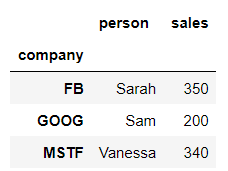
df
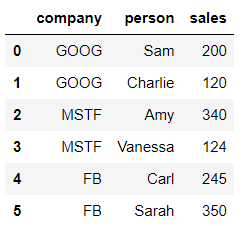
Run groupby():

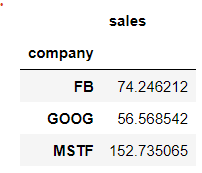
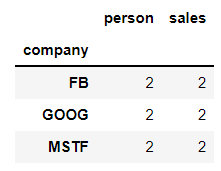
bycompany = df.groupby('company')

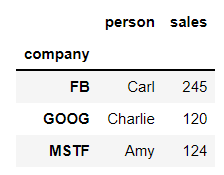
Here is the aggregate functions:

bycompany.sum()
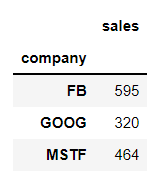
Sum
bycompany.std()
Standard Deviation
bycompany.count()
Counting
bycompany.max()
Maximum
bycompany.min()
Minimum
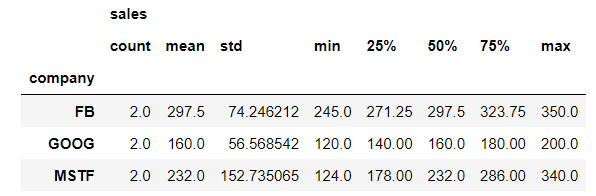
bycompany.describe()
Describing
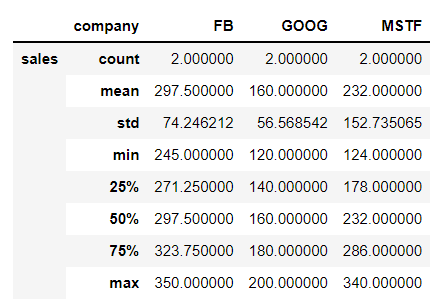
bycompany.describe().transpose()
Transposing

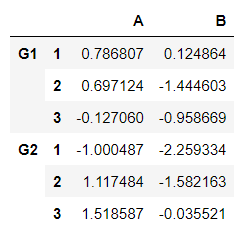
7 — Multilevel DataFrame — CROSS SECTION

Let’s create a multilevel DataFrame:

outside = ['G1', 'G1', 'G1', 'G2', 'G2', 'G2']
inside = [1,2,3,1,2,3]
hier_index = list(zip(outside, inside))
hier_index = pd.MultiIndex.from_tuples(hier_index)

Create a Multilevel DataFrame:

df = pd.DataFrame(np.random.randn(6,2), hier_index, ['A', 'B'])
df

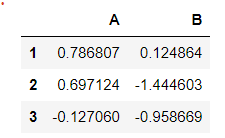
Separating Group 1:

df.loc['G1']

Or Group 2:

df.loc['G2']
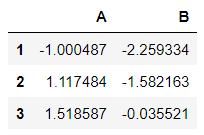
In Group 2, return row one:

df.loc['G2'].loc[1]
A   -1.000487
B   -2.259334
Name: 1, dtype: float64

Or specific value:

df.loc['G2'].loc[1][0]
-1.0004870600502171

Now the Index names:

df.index.names

It’s blank…

FrozenList([None, None])

This is just a Pandas index names object types. All it’s saying here is that these indices don’t have any names but you can go ahead and do say equals and then pass in a list of names.

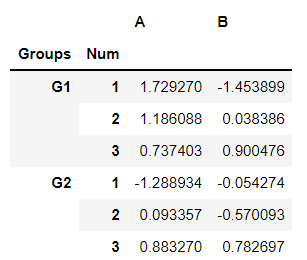
Let’s name each index:

df.index.names = ['Groups', 'Num']
df

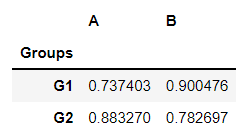
Cross Section (xs):

df.xs(1, level='Num')
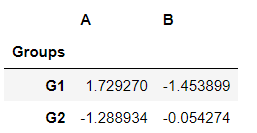
Level Num=1 for Group 1 and Group 2
df.xs(3, level='Num')
Repeating for the extremes values (3)

8 — PIVOT TABLE

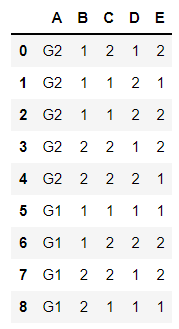
A = ["G2", "G2", "G2", "G2", "G2", "G1", "G1", "G1", "G1"]
B = [1, 1, 1, 2, 2, 1, 1, 2, 2]
C = [2, 1, 1, 2, 2, 1, 2, 2, 1]
D = [1, 2, 2, 1, 2, 1, 2, 1, 1]
E = [2, 1, 2, 2, 1, 1, 2, 2, 1]

Create an empty DataFrame:

df = pd.DataFrame()

Populating it:

df['A'] = A
df['B'] = B
df['C'] = C
df['D'] = D
df['E'] = E
df
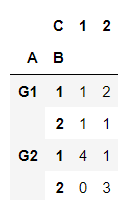
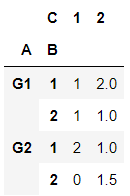
Here is the pivot table:

df.pivot_table(values='D', index=['A', 'B'], columns=['C'], fill_value=0 )
This example aggregates values by taking the sum:

table = pd.pivot_table(df, values='D', index=['A', 'B'],columns=['C'], aggfunc=np.sum, fill_value=0

Calling the table object:

table

9 — MERGING, JOINING, and CONCATENATION

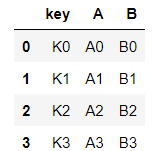
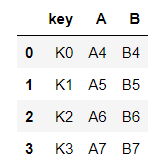
2 DataFrames: left and right:

left = pd.DataFrame({'key':['K0','K1','K2','K3'], 'A':['A0','A1','A2','A3'], 'B':['B0','B1','B2','B3'], })
left
right = pd.DataFrame({'key':['K0','K1','K2','K3'], 'A':['A4','A5','A6','A7'], 'B':['B4','B5','B6','B7'], })
right

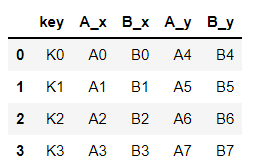
Merging

pd.merge(left,right,how='inner',on='key')
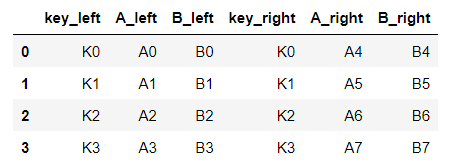
Joining

left.join(right, how='inner', lsuffix='_left', rsuffix='_right')
Concatenation

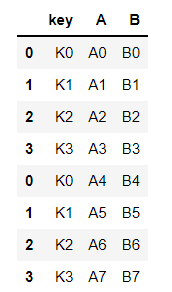
pd.concat([left, right])
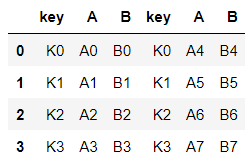
pd.concat([left, right], axis=1)
For more info: Official Pandas Link
print("I hope you enjoyed that lecture o/\nIf you find this post helpful, please click the applause button and subscribe to the page for more articles like this one.\nHave a Nice Day!")

I hope you enjoyed that lecture o/ If you find this post helpful, please click the applause button and subscribe to the page for more articles like this one. Have a Nice Day!

Photo from this link

Until next time!

👉Jupiter notebook link :)

👉or collab link

👉git

Credits & References

Jose Portilla Python for Data Science and Machine Learning Bootcamp — Learn how to use NumPy, Pandas, Seaborn, Matplotlib, Plotly, Scikit-Learn, Machine Learning, Tensorflow, and more!

Related Posts

00#Episode#PurePythonSeries — Lambda in Python — Python Lambda Desmistification

01#Episode#PurePythonSeries — Send Email in Python — Using Jupyter Notebook — How To Send Gmail In Python

02#Episode#PurePythonSeries — Automate Your Email With Python & Outlook — How To Create An Email Trigger System in Python

03#Episode#PurePythonSeries — Manipulating Files With Python — Manage Your Lovely Photos With Python!

04#Episode#PurePythonSeries — Pandas DataFrame Advanced — A Complete Notebook Review (this one)

05#Episode#PurePythonSeries — Is This Leap Year? Python Calendar — How To Calculate If The Year Is Leap Year and How Many Days Are In The Month

06#Episode#PurePythonSeries — List Comprehension In Python — Locked-in Secrets About List Comprehension

07#Episode#PurePythonSeries — Graphs — In Python — Extremely Simple Algorithms in Python

08#Episode#PurePythonSeries — Decorator in Python — How To Simplifying Your Code And Boost Your Function

Pandas Dataframe
Pandas Series
Pandas Tutorial
Jupyter Notebook
Missing Data
Recommended from ReadMedium