avatarJ3

Free AI web copilot to create summaries, insights and extended knowledge, download it at here

3257

Abstract

        </div>
    </figure></iframe></div></div></figure><p id="a13e">It results:</p><figure id="2167"><img src="https://cdn-images-1.readmedium.com/v2/resize:fit:800/0*MRH289QG2PZ-tcXU.png"><figcaption>16 faces detected \o/</figcaption></figure><p id="9553">08#step — Now Now the code show: blur all faces just in case of image rights’ claiming</p><p id="e93d">Paste this code:</p>
    <figure id="56d1">
        <div>
          <div>
            
            <iframe class="gist-iframe" src="/gist/giljr/4bc08bc7e37eb3bb7a6ef9a41ed0eaff.js" allowfullscreen="" frameborder="0" height="undefined" width="undefined">
          </div>
        </div>
    </figure></iframe></div></div></figure><figure id="f72f"><img src="https://cdn-images-1.readmedium.com/v2/resize:fit:800/1*YX6dErmgHGrvkm-Mcim7TQ.png"><figcaption>Here is the result again \o/ This technique can be used for filming children for example.</figcaption></figure><p id="6175">One single note, replace <code>cv2.imshow()</code> with this:</p><div id="b222"><pre><span class="hljs-keyword">from</span> google.colab.patches <span class="hljs-keyword">import</span> cv2_imshow</pre></div><div id="96ab"><pre>(<span class="hljs-name"><span class="hljs-built_in">...</span></span>)</pre></div><div id="0424"><pre><span class="hljs-function"><span class="hljs-title">cv2_imshow</span><span class="hljs-params">()</span></span></pre></div><p id="fd70">09#step — print(Thank you very much!”)</p><p id="d26b">That’s it!</p><div id="92ee"><pre><span class="hljs-function"><span class="hljs-title">print</span><span class="hljs-params">(<span class="hljs-string">"That's it! Thank you very much"</span>)</span><span class="hljs-title">That</span></span><span class="hljs-string">'s it! Thank you very much</span></pre></div><p id="ae28">👉<a href="https://github.com/giljr/my_jupyter_notebook">Github</a> (PPY-14)</p><p id="90ea">👉<a href="https://gist.github.com/giljr/d865afd57841add5d58adac49057fd60">Google Colab Jupyter Notebook</a></p><h1 id="c86b">Related Posts</h1><p id="750c"><b>00</b>#Episode#PurePythonSeries — <a href="https://readmedium.com/lambda-in-python-421b0c18e825"><b>Lambda in Python </b></a>— Python Lambda Desmistification</p><p id="3667"><b>01</b>#Episode#PurePythonSeries — <a href="https://readmedium.com/send-emails-using-python-jupyter-notebook-94d14a5a5655"><b>Send Email in Python</b></a> — Using Jupyter Notebook — How To Send Gmail In Python</p><p id="a874"><b>02</b>#Episode#PurePythonSeries — <a href="https://readmedium.com/automate-your-email-marketing-with-python-f0d68234b789"><b>Automate Your Email With Python &amp; Outlook</b></a><b> </b>— How To Create An Email Trigger System in Python</p><p id="de10"><b>03</b>#Episode#PurePythonSeries — <a href="https://readmedium.com/manipulating-files-with-python-3f9a781287e9"><b>Manipulating Files With Python</b></a> — Manage Your Lovely Photos With Python!</p><p id="a16c"><b>04</b>#Episode#PurePythonSeries — <a href="https://readmedium.com/pandas-dataframe-advanced-48f83a5b097f"><b>Pandas DataFrame Advanced </b></a>— A Complete Notebook Review</p><p id="1113"><b>05</b>#Episode#PurePythonSeries — <a href="https://readmedium.com/is-this-leap-year-python-calendar-3d1a61f2c4

Options

a7"><b>Is This Leap Year? Python Calendar</b> </a>— How To Calculate If The Year Is Leap Year and How Many Days Are In The Month</p><p id="adc4"><b>06</b>#Episode#PurePythonSeries — <a href="https://readmedium.com/list-comprehension-in-python-c22c4b0a6a8a"><b>List Comprehension In Python </b></a>— Locked-in Secrets About List Comprehension</p><p id="df7e"><b>07</b>#Episode#PurePythonSeries — <a href="https://readmedium.com/graphs-in-python-b7d243737b77"><b>Graphs — In Python </b></a>— Extremely Simple Algorithms in Python</p><p id="78b6"><b>08</b>#Episode#PurePythonSeries — <a href="https://readmedium.com/decorator-in-python-62c00f7e818"><b>Decorator in Python</b></a> — How To Simplifying Your Code And Boost Your Function</p><p id="12a1"><b>12#</b>Episode#PurePythonSeries — <a href="https://readmedium.com/advanced-python-technologies-d3dbdf1d70cb"><b>Advanced Python Technologies</b> </a><a href="https://readmedium.com/advanced-python-technologies-d3dbdf1d70cb">qrcode, Speech Recognition in Python, Google Speech Recognition</a> #PurePythonSeries</p><p id="3cf2"><b>13#</b>Episode#PurePythonSeries — <a href="https://readmedium.com/advanced-python-technologies-ii-33d2d6888583">Advanced Python Technologies II</a>— qFace Recognition w/ Jupyter Notebook & Ubuntu #PurePythonSeries</p><p id="1df9"><b>14#</b>Episode#PurePythonSeries — Advanced Python Technologies III — Face Recognition w/ Colab #PurePythonSeries (this one)</p><p id="1624"><b>15#</b>Episode#PurePythonSeries — <a href="https://readmedium.com/iss-tracking-project-python-af4b5fa47a28"><b>ISS Tracking Project</b></a> — Get an Email alert when International Space Station (ISS) is above of us in the sky, at night</p><p id="f486"><b>16#</b>Episode#PurePythonSeries — <a href="https://readmedium.com/using-gemini-chat-on-collab-2626fb035176"><b>Using Gemini Chat on Collab</b></a> — Random Number Generation, List Manipulation & Rock-Paper-Scissors Game Implementations (this one)</p><p id="bc74"><b>17#</b>Episode#PurePythonSeries — Python — <a href="https://readmedium.com/python-basics-2ce557a80f42"><b>Basics</b> </a>— Functions, OOP, file handling, calculator, loops (this one)</p><p id="4dd1"><b>18#</b>Episode#PurePythonSeries — Python — <a href="https://readmedium.com/efficient-file-handling-in-python-0d952971ebc9"><b>Efficient File Handling in Python</b></a><b> </b>— Best Practices and Common Methods</p><p id="7a99"><b>19#</b>Episode#PurePythonSeries — Python — <a href="https://readmedium.com/how-to-securely-save-credentials-in-python-dd5c6983741a"><b>How To Securely Save Credentials in Python</b> </a>— Like API tokens, passwords, or other sensitive data</p><h1 id="2ecc">Credits & References</h1><p id="98ba"><b>HARVARD CS50— lecture 6 —Python — DAVID MALAN <a href="https://cs50.harvard.edu/x/2021/weeks/6/"></a></b><a href="https://cs50.harvard.edu/x/2021/weeks/6/">https://cs50.harvard.edu/x/2021/weeks/6/</a> <a href="https://you.com/search?q=libstdc%2B%2B.so.6%3A%20version%20%60glibcxx_3.4.29%27">https://you.com/search?q=libstdc%2B%2B.so.6%3A%20version%20%60glibcxx_3.4.29%27</a></p><p id="8b77"><b>face-recognition </b><a href="https://pypi.org/project/face-recognition/">https://pypi.org/project/face-recognition/</a></p></article></body>

Advanced Python Technologies III

Face Recognition w/ Colab #PurePythonSeries — Episode #14

Hi, this time let’s use Google Colaboratory.

Face recognition library works well here, but there’s a secret that I’ll tell you right away:
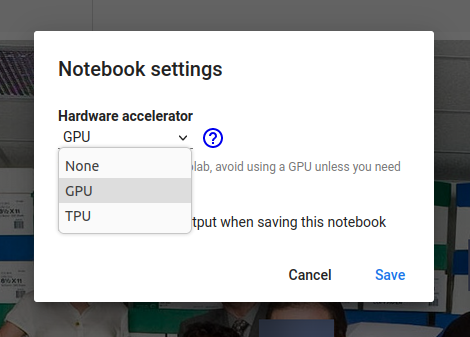
Go to Runtime > Change runtime type > Choose GPU and hit save and you are ready to go \o/

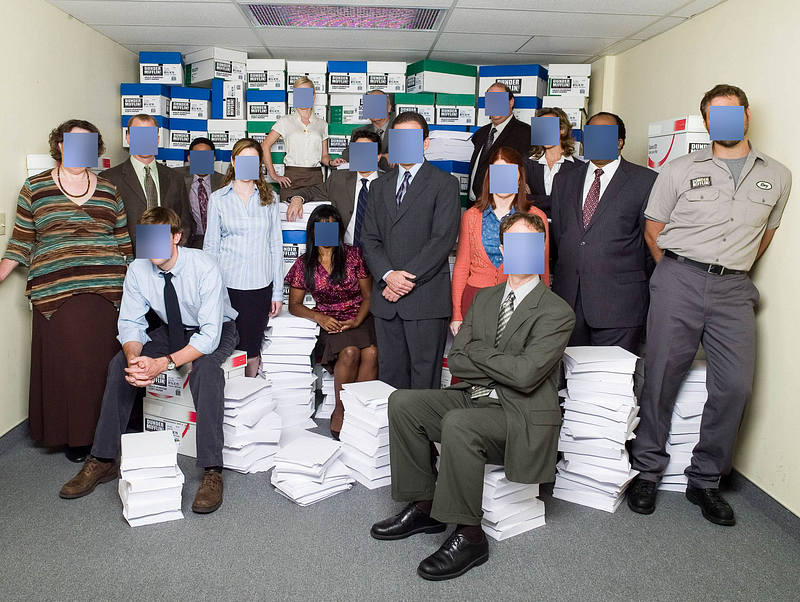
Here is the result for code below:

All faces were detected and blurred
Let’s get Started:

00#step — HARDWARE

Laptop: Dell Inc. G3 3590 8,0 GiB RAM
Processor : Intel® Core™ i7-9750H CPU @ 2.60GHz × 12
OS: Ubuntu 22.04.1 LTS (Jammy Jellyfish)
GPU: GeForce GTX 1660 Ti Mobile (NVIDIA TU1166M)

Note: Forget It All: Let's Use Google Resources \o/

01#step — Access Google colab and get a Jupyter Notebook to work with.

02#step — Importing face recognition right away !

pip install face-recognition

03#step — Import cmake

pip install cmake

04#step — Import OpenCV

pip install opencv-python

05#step — Testing face recognition

import face_recognition

If you pass, paradise is ahead!

06#step —First let’s detect all the faces. Please download to the Jupyter Notebook directory this image:

The code bellow will detect all the 16 faces in this photo
oficce.jpg

07#step — Paste this code in the next cell

It results:

16 faces detected \o/

08#step — Now Now the code show: blur all faces just in case of image rights’ claiming

Paste this code:

Here is the result again \o/ This technique can be used for filming children for example.

One single note, replace cv2.imshow() with this:

from google.colab.patches import cv2_imshow
(...)
cv2_imshow()

09#step — print(Thank you very much!”)

That’s it!

print("That's it! Thank you very much")That's it! Thank you very much

👉Github (PPY-14)

👉Google Colab Jupyter Notebook

Related Posts

00#Episode#PurePythonSeries — Lambda in Python — Python Lambda Desmistification

01#Episode#PurePythonSeries — Send Email in Python — Using Jupyter Notebook — How To Send Gmail In Python

02#Episode#PurePythonSeries — Automate Your Email With Python & Outlook — How To Create An Email Trigger System in Python

03#Episode#PurePythonSeries — Manipulating Files With Python — Manage Your Lovely Photos With Python!

04#Episode#PurePythonSeries — Pandas DataFrame Advanced — A Complete Notebook Review

05#Episode#PurePythonSeries — Is This Leap Year? Python Calendar — How To Calculate If The Year Is Leap Year and How Many Days Are In The Month

06#Episode#PurePythonSeries — List Comprehension In Python — Locked-in Secrets About List Comprehension

07#Episode#PurePythonSeries — Graphs — In Python — Extremely Simple Algorithms in Python

08#Episode#PurePythonSeries — Decorator in Python — How To Simplifying Your Code And Boost Your Function

12#Episode#PurePythonSeries — Advanced Python Technologies qrcode, Speech Recognition in Python, Google Speech Recognition #PurePythonSeries

13#Episode#PurePythonSeries — Advanced Python Technologies II— qFace Recognition w/ Jupyter Notebook & Ubuntu #PurePythonSeries

14#Episode#PurePythonSeries — Advanced Python Technologies III — Face Recognition w/ Colab #PurePythonSeries (this one)

15#Episode#PurePythonSeries — ISS Tracking Project — Get an Email alert when International Space Station (ISS) is above of us in the sky, at night

16#Episode#PurePythonSeries — Using Gemini Chat on Collab — Random Number Generation, List Manipulation & Rock-Paper-Scissors Game Implementations (this one)

17#Episode#PurePythonSeries — Python — Basics — Functions, OOP, file handling, calculator, loops (this one)

18#Episode#PurePythonSeries — Python — Efficient File Handling in Python — Best Practices and Common Methods

19#Episode#PurePythonSeries — Python — How To Securely Save Credentials in Python — Like API tokens, passwords, or other sensitive data

Credits & References

HARVARD CS50— lecture 6 —Python — DAVID MALAN https://cs50.harvard.edu/x/2021/weeks/6/ https://you.com/search?q=libstdc%2B%2B.so.6%3A%20version%20%60glibcxx_3.4.29%27

face-recognition https://pypi.org/project/face-recognition/

Face Recognition
Python3
Opencv Python
Blur Detection
Colab
Recommended from ReadMedium