
Advanced Python Technologies II
Face Recognition w/ Jupyter Notebook & Ubuntu #PurePythonSeries — Episode #13
Hi, Let’s play with face recognition in Linux Ubuntu and Anaconda Jupyter?
We will use https://pypi.org/project/face-recognition/ library.
Please visit ageitgey / face_recognition Public Github. It is awesome!
Let’s get started!
00#step — HARDWARE
Laptop: Dell Inc. G3 3590 8,0 GiB RAM
Processor : Intel® Core™ i7-9750H CPU @ 2.60GHz × 12
OS: Ubuntu 22.04.1 LTS (Jammy Jellyfish)
GPU: GeForce GTX 1660 Ti Mobile (NVIDIA TU1166M) Note: GPU acceleration (via nvidia’s CUDA library) is required for good performance with this model. You’ll also want to enable CUDA support when compiling dlib.
01#step —Installing Anaconda
Anaconda DistributionDownloadFor Linux
Python 3.9 • 64-Bit (x86) Installer • 737 MBanaconda --version
anaconda Command line client (version 1.7.2)02#step — Go To Terminal and confirm your Python version
python --version
Python 3.7.6Note: see History — 1.2.3 (2018–08–21): Officially supporting Python 3.7
If your version is not that…try:
sudo apt-get install python3.7or sudo python3.7 setup.py install
03#step — Install CMake on Ubuntu Software store:

Note: CMake is an open-source, cross-platform tool that uses compiler and platform independent configuration files to generate native build tool files specific to your compiler and platform.
04#step — First Commands
sudo apt update
sudo apt install net-tools
sudo apt install curl gitNote: These are all my packages installed initially: conda list initial (339 packages installed)
05#step — On Terminal type
jupyter-labThis command will open a New Tab on your Browser (Mine is Firefox 106.0.1–64 bit)
...
[I 2022-10-22 16:30:20.564 ServerApp] jupyterlab | extension was successfully loaded.
[I 2022-10-22 16:30:20.567 ServerApp] nbclassic | extension was successfully loaded.
[I 2022-10-22 16:30:20.568 ServerApp] Serving notebooks from local directory: /home/j3
[I 2022-10-22 16:30:20.568 ServerApp] Jupyter Server 1.21.0 is running at:
[I 2022-10-22 16:30:20.568 ServerApp] http://localhost:8888/lab?token=b059e1c29e838805a0b94eabbe16626e1a705f509b8490ee
[I 2022-10-22 16:30:20.568 ServerApp]  or http://127.0.0.1:8888/lab?token=b059e1c29e838805a0b94eabbe16626e1a705f509b8490ee
[I 2022-10-22 16:30:20.568 ServerApp] Use Control-C to stop this server and shut down all kernels (twice to skip confirmation).
[C 2022-10-22 16:30:20.609 ServerApp]

    To access the server, open this file in a browser:
        file:///home/j3/.local/share/jupyter/runtime/jpserver-3621-open.html
    Or copy and paste one of these URLs:
        http://localhost:8888/lab?token=b059e1c29e838805a0b94eabbe16626e1a705f509b8490ee
     or http://127.0.0.1:8888/lab?token=b059e1c29e838805a0b94eabbe16626e1a705f509b8490ee
...
06#step — Install dlib inside Jupyter notebook :)
!pip install dlibRequirement already satisfied: dlib in /home/j3/anaconda3/lib/python3.7/site-packages (19.24.0)Note: Many, many thanks to Davis King (@nulhom) for creating dlib and for providing the trained facial feature detection and face encoding models used in this library. For more information on the ResNet that powers the face encodings, check out his blog post.
07#step — Install cmake
!pip install cmakeRequirement already satisfied: cmake in /home/j3/anaconda3/lib/python3.7/site-packages (3.24.1.1)08#step — Install Open CV
!pip install opencv-pythonRequirement already satisfied: opencv-python in /home/j3/anaconda3/lib/python3.7/site-packages (4.6.0.66)
Requirement already satisfied: numpy>=1.14.5; python_version >= "3.7" in /home/j3/anaconda3/lib/python3.7/site-packages (from opencv-python) (1.18.1)Note: OpenCV is a library of programming functions mainly aimed at real-time computer vision.
09#step — Install Face Recognition package
!pip install face_recognitionRequirement already satisfied: face_recognition in /home/j3/anaconda3/lib/python3.7/site-packages (1.3.0)
Requirement already satisfied: dlib>=19.7 in /home/j3/anaconda3/lib/python3.7/site-packages (from face_recognition) (19.24.0)
Requirement already satisfied: Pillow in /home/j3/anaconda3/lib/python3.7/site-packages (from face_recognition) (7.0.0)
Requirement already satisfied: face-recognition-models>=0.3.0 in /home/j3/anaconda3/lib/python3.7/site-packages (from face_recognition) (0.3.0)
Requirement already satisfied: numpy in /home/j3/anaconda3/lib/python3.7/site-packages (from face_recognition) (1.18.1)
Requirement already satisfied: Click>=6.0 in /home/j3/anaconda3/lib/python3.7/site-packages (from face_recognition) (7.0)10#step — Dealing With GLIBCXX_3.4.29 in anaconda issue :/
wget -O - -q 'https://gist.githubusercontent.com/dte/8954e405590a360614dcc6acdb7baa74/raw/d1b5a01ed0b9252654016d2a9a435dc8b4c045e7/install-CUDA-docker-nvidia-docker.sh' | sudo bashAnd
conda install -c conda-forge gxx_linux-64==11.1.0Note: These are all my packages at the final: conda list final (359 packages 21 more :)
11#step — Let’s code: detect all the faces. Please download for the Jupyter Notebook directory these images:

oficce.jpg

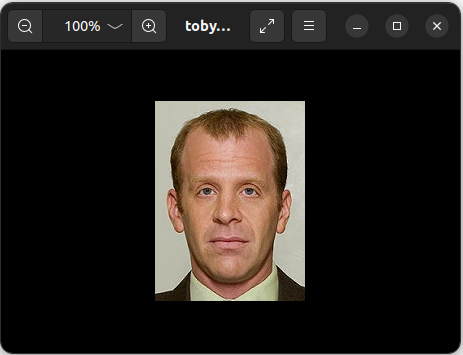
12#step — Let’s Recognize faces in images and identify who he are:
Download Toby mugshot:

print("That's it! Thank you very much")That's it! Thank you very much👉Github (PPY-13)
👉Google Drive (PPY-13)
Related Posts
00#Episode#PurePythonSeries — Lambda in Python — Python Lambda Desmistification
01#Episode#PurePythonSeries — Send Email in Python — Using Jupyter Notebook — How To Send Gmail In Python
02#Episode#PurePythonSeries — Automate Your Email With Python & Outlook — How To Create An Email Trigger System in Python
03#Episode#PurePythonSeries — Manipulating Files With Python — Manage Your Lovely Photos With Python!
04#Episode#PurePythonSeries — Pandas DataFrame Advanced — A Complete Notebook Review
05#Episode#PurePythonSeries — Is This Leap Year? Python Calendar — How To Calculate If The Year Is Leap Year and How Many Days Are In The Month
06#Episode#PurePythonSeries — List Comprehension In Python — Locked-in Secrets About List Comprehension
07#Episode#PurePythonSeries — Graphs — In Python — Extremely Simple Algorithms in Python
08#Episode#PurePythonSeries — Decorator in Python — How To Simplifying Your Code And Boost Your Function
12#Episode#PurePythonSeries — Advanced Python Technologies — qrcode, Speech Recognition in Python, Google Speech Recognition #PurePythonSeries
13#Episode#PurePythonSeries — Advanced Python Technologies II— qFace Recognition w/ Jupyter Notebook & Ubuntu#PurePythonSeries (this one)
14#Episode#PurePythonSeries — Advanced Python Technologies III — Face Recognition w/ Colab
15#Episode#PurePythonSeries — ISS Tracking Project — Get an Email alert when International Space Station (ISS) is above of us in the sky, at night
16#Episode#PurePythonSeries — Using Gemini Chat on Collab — Random Number Generation, List Manipulation & Rock-Paper-Scissors Game Implementations
17#Episode#PurePythonSeries — Python — Basics — Functions, OOP, file handling, calculator, loops
18#Episode#PurePythonSeries — Python — Efficient File Handling in Python — Best Practices and Common Methods
19#Episode#PurePythonSeries — Python — How To Securely Save Credentials in Python — Like API tokens, passwords, or other sensitive data
Credits & References
HARVARD CS50— lecture 6 —Python — DAVID MALAN https://cs50.harvard.edu/x/2021/weeks/6/ https://you.com/search?q=libstdc%2B%2B.so.6%3A%20version%20%60glibcxx_3.4.29%27
face-recognition — https://pypi.org/project/face-recognition/
Anaconda — https://www.digitalocean.com/community/tutorials/how-to-
Ubuntu — install-the-anaconda-python-distribution-on-ubuntu-20-04
CMake — https://vitux.com/how-to-install-cmake-on-ubuntu/
make-cxx-compiler-notfound — https://askubuntu.com/questions/152653/cmake-fails-with-cmake-error-your-cxx-compiler-cmake-cxx-compiler-notfound
anaconda gcc is 4.8.5. — https://stackoverflow.com/questions/44773296/libstdc-so-6-version-glibcxx-3-4-20-not-found
Install GLIBCXX_3.4.29 in anaconda — https://stackoverflow.com/questions/68205760/install-glibcxx-3-4-29-in-anaconda
Install GitHub Desktop — https://gist.github.com/berkorbay/6feda478a00b0432d13f1fc0a50467f1
https://gist.github.com/berkorbay/6feda478a00b0432d13f1fc0a50467f1


