
How does auto-configuration work in Spring Boot?
Demystifying the Magic: Understanding the Inner Workings of Spring Boot’s Auto-Configuration Feature
Hello folks, Auto-configuration is one of the most important feature of Spring Boot that simplifies the configuration process for Spring applications by automatically providing default configuration settings based on the classpath and the presence of specific dependencies. It allows developers to quickly set up a Spring application with sensible default configurations without having to manually configure each component.
It’s also one of the popular Spring Boot Questions and at the same time many Java developer struggle to answer this question as they are not able to explain how this feature work? How Spring Boot configure things for you?
I have been answering popular Spring questions in my earlier article like RequestParam vs PathVariable annotations, difference between @Contorller and @RestController annotation, @Bean vs @Component annotation, and @Controller vs @Service @Repository, if you haven’t read them yet, you should read them before your interview, and in this article, I will explain how Auto-configuration works in Spring Boot.
By the way, if you are new to Spring Framework and want to learn Spring in depth and looking for resources then you can also checkout following online courses:
- Spring Master Class — Beginner to Expert
- Spring & Hibernate for Beginners
- Learn Spring: The Certification Class
- Master Microservices with Spring Boot and Spring Cloud
All of these are top rated courses to learn Spring framework in depth but if you need free resources you can also checkout these free Spring framework courses:
How Auto-Configuration works in Spring Boot? Explained
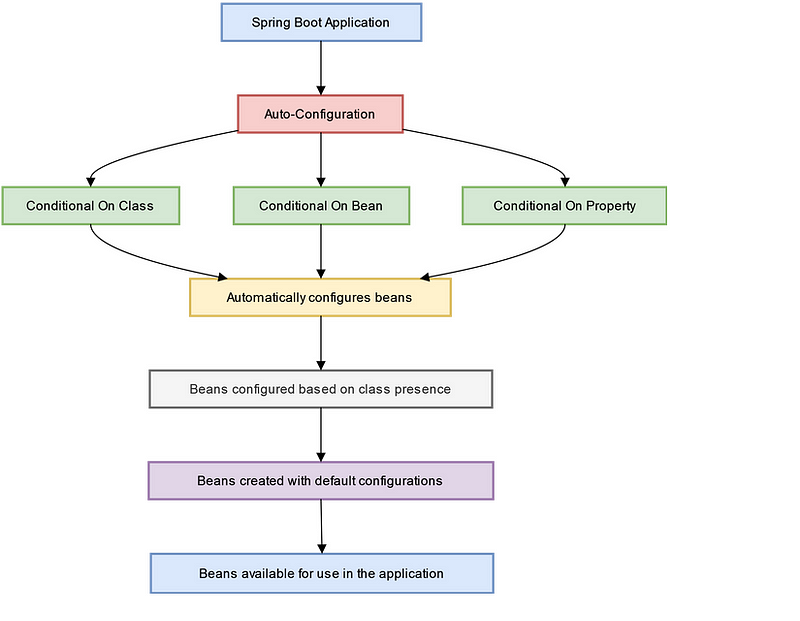
Spring Boot auto-configuration is based upon three things, classpath scanning, conditionals annotations and configuration properties. They use combination of these three things to setup default configuration for you.
Here’s how auto-configuration works in Spring Boot:
1. Classpath scanning
Spring Boot scans the classpath for specific libraries and dependencies that are commonly used in typical Spring applications. These libraries are known as “starters” and they provide a set of pre-configured settings for specific use cases, such as web applications, data access, security, etc.
2. Conditionals:
Auto-configuration in Spring Boot relies on conditional logic to determine which configurations to apply based on the presence or absence of certain classes or properties in the classpath.
For example, if the application has the “spring-web” starter in its classpath, Spring Boot automatically configures a web-based application with default settings such as servlets, filters, and other web-related components.
3. Configuration properties
Spring Boot uses a set of predefined configuration properties that are automatically bound to the corresponding Spring beans. These properties can be specified in various ways, such as through application.properties or application.yml files, environment variables, command-line arguments, or custom property sources.
Auto-configuration uses these configuration properties to set up default values for various components in the application.
Here is an nice diagram which explains how auto-configuration works in Spring Boot:
Spring Boot also provides various mechanisms for developers to customize the auto-configuration process. For example, developers can exclude specific auto-configuration classes, specify their own configuration classes, or provide custom configuration properties to override the default settings.
Another worth remembering thing is that Auto-configuration classes in Spring Boot are ordered based on their specificity, allowing developers to control the order in which configurations are applied.
This allows for fine-grained control over the configuration process and allows developers to override default settings or provide custom configurations as needed.
In short, auto-configuration in Spring Boot simplifies the configuration process for Spring applications, reduces boilerplate code, and allows developers to quickly set up a fully functional Spring application with sensible default settings.
It promotes convention over configuration, allowing developers to focus on writing business logic rather than spending time on tedious configuration tasks.
How Spring Boot Configure JDBC and Kafka based upon JAR file? AutoConfiguration Example
Here’s an example of how auto-configuration works in Spring Boot with the JDBC (Java Database Connectivity) starter:
When you include the “spring-boot-starter-jdbc” dependency in your Spring Boot application, Spring Boot automatically scans the classpath and detects the presence of the JDBC driver for your database, such as MySQL or PostgreSQL.
If JDBC drive is present then Spring Boot can also automatically configures a DataSource bean with default settings, such as connection pool properties, database URL, username, and password. It also configures a JdbcTemplate bean for simplified database operations.
Spring Boot provides default configuration properties for the DataSource bean, such as “spring.datasource.url”, “spring.datasource.username”, and “spring.datasource.password”. These properties can be specified in the application.properties or application.yml file, and Spring Boot automatically binds them to the corresponding DataSource bean.
If you need to customize the default settings, you can specify your own configuration properties or provide custom configuration classes. For example, you can override the default DataSource settings with your own database properties, or you can provide a custom DataSource bean with specific configuration settings.
Similarly, auto-configuration works with other components in Spring Boot, such as Kafka and Microservices. For example, when you include the “spring-kafka” starter, Spring Boot automatically configures Kafka-related beans, such as KafkaTemplate and KafkaListenerContainer, based on the presence of the Kafka client library.
Similarly, when you include the “spring-cloud-starter-netflix-eureka-client” starter for building Microservices with Eureka, Spring Boot automatically configures a EurekaClient bean for service discovery and registration with Eureka server.
Overall, auto-configuration in Spring Boot simplifies the configuration process for various components, reduces boilerplate code, and allows developers to quickly set up fully functional applications with sensible default settings.
What are pros and cons of Auto-configuration?
Here are Pros of Auto-Configuration in Spring Boot:
1. Simplified configuration:
Auto-configuration automatically configures beans and settings based on the presence of dependencies in the classpath, reducing the need for manual configuration. This simplifies the configuration process and reduces boilerplate code.
2. Faster development:
Auto-configuration allows developers to quickly set up a fully functional application with sensible default settings, enabling faster development and prototyping. It eliminates the need to spend time on manual configuration and allows developers to focus on writing business logic.
3. Flexibility
Auto-configuration in Spring Boot provides flexibility to override default settings and customize the behavior of beans as needed. Developers can specify their own configuration properties or provide custom configuration classes to customize the auto-configured beans according to their requirements.
4. Consistency
Auto-configuration promotes consistency across Spring Boot projects by providing standardized configuration patterns for different components. This ensures that similar components in different projects follow the same configuration conventions, making it easier to maintain and understand the configuration across different projects.
There is no free lunch, everything comes at the cost of something and auto-configuration is no exception
Here are Cons of Auto-Configuration in Spring Boot:
1. Potential conflicts
Auto-configuration relies on classpath scanning and conditionals to determine the presence of dependencies, which can potentially result in conflicts if multiple dependencies provide conflicting auto-configuration settings. This may require manual intervention to resolve conflicts and ensure correct configuration.
2. Reduced visibility
Auto-configuration may hide complex configuration details and make it difficult to understand the exact configuration being applied. Developers may need to refer to the Spring Boot documentation or source code to understand the underlying auto-configuration logic, which can be challenging for complex configurations.
3. Overriding default behavior:
While auto-configuration provides flexibility to override default settings, it may require additional effort to customize the behavior of auto-configured beans. Developers need to be aware of the auto-configuration logic and the sequence of configurations to properly override the default behavior.
4. Version compatibility
Auto-configuration is dependent on the versions of dependencies present in the classpath. In case of version conflicts or changes in auto-configuration behavior between different versions of dependencies, it may require manual intervention to ensure compatibility and proper functioning of the application.
Can you disable auto-configuration in spring boot?
Yes, it is possible to disable auto-configuration in Spring Boot by using the exclude attribute of the @EnableAutoConfiguration annotation or by specifying the spring.autoconfigure.exclude property in the application properties or YAML file.
This is also one of the follow up question interviewer ask on Spring boot interviews.
Here’s how you can disable auto-configuration using the exclude attribute of @EnableAutoConfiguration annotation:
@SpringBootApplication
@EnableAutoConfiguration(exclude = {AutoConfigurationClass1.class, AutoConfigurationClass2.class})
public class NewSpringBootApplication {
    // ...
}
In the above example, AutoConfigurationClass1 and AutoConfigurationClass2 are the classes of the auto-configuration classes that you want to exclude from being applied.
Alternatively, you can specify the spring.autoconfigure.exclude property in the application properties or YAML file, like this:
spring.autoconfigure.exclude=\
com.example.AutoConfigurationClass1,\
com.example.AutoConfigurationClass2
In the above example, com.example.AutoConfigurationClass1 and com.example.AutoConfigurationClass2 are the fully qualified class names of the auto-configuration classes that you want to exclude from being applied.
Disabling auto-configuration can be useful in cases where you want to explicitly control the configuration of beans or when you want to avoid conflicts between different auto-configuration classes.
However, it should be used with caution, as it may affect the expected behavior of the Spring Boot application and may require manual configuration for certain components or features.
Java and Spring Interview Preparation Material
Before any Java and Spring Developer interview, I always use to read the below resources
Grokking the Java Interview
Grokking the Java Interview: click here
I have personally bought these books to speed up my preparation.
You can get your sample copy here, check the content of it and go for it
Grokking the Java Interview [Free Sample Copy]: click here

If you want to prepare for the Spring Boot interview you follow this consolidated ebook, it also contains microservice questions from spring boot interviews.
Grokking the Spring Boot Interview
You can get your copy here — Grokking the Spring Boot Interview

Conclusion
That’s all about how auto-configuration works in Spring Boot. Auto-configuration is a powerful feature of Spring Boot that simplifies the configuration of a Spring application by automatically providing default configurations based on the classpath and dependencies.
It allows developers to quickly get up and running with a Spring Boot application without having to manually configure every component or feature.
As explained, Auto-configuration in Spring Boot works by scanning the classpath for certain conditions, such as the presence of specific classes or properties, and automatically configuring beans and components accordingly.
It leverages the Spring Boot Starter dependencies, which are curated sets of dependencies that include the necessary libraries for common use cases, such as JDBC, Kafka, or Microservices, to provide out-of-the-box configurations.
However, auto-configuration also have some drawbacks, such as potential conflicts between different auto-configuration classes or unexpected behavior due to automatic configurations. It’s important to understand how auto-configuration works and be aware of its pros and cons when developing a Spring Boot application.
It’s also worth noting that, Spring Boot provides options to disable auto-configuration for specific auto-configuration classes or globally, allowing developers to have more fine-grained control over the application’s configuration.
In short, auto-configuration is a powerful and convenient feature of Spring Boot that can greatly simplify the development of Spring applications. By understanding how it works and its implications, developers can effectively leverage auto-configuration to streamline their development process and build robust and efficient Spring Boot applications.
By the way, if you are new to Spring Framework and want to learn Spring in depth and looking for resources then you can also checkout following online courses:
- Spring Master Class — Beginner to Expert
- Spring & Hibernate for Beginners
- Learn Spring: The Certification Class
- Master Microservices with Spring Boot and Spring Cloud
All of these are top rated courses to learn Spring framework in depth but if you need free resources you can also checkout these free Spring framework courses:


