
Difference between @RequestParam and @PathVariable in Spring MVC?
How to choose between the @RequestParam and @PathVariable in Spring MVC
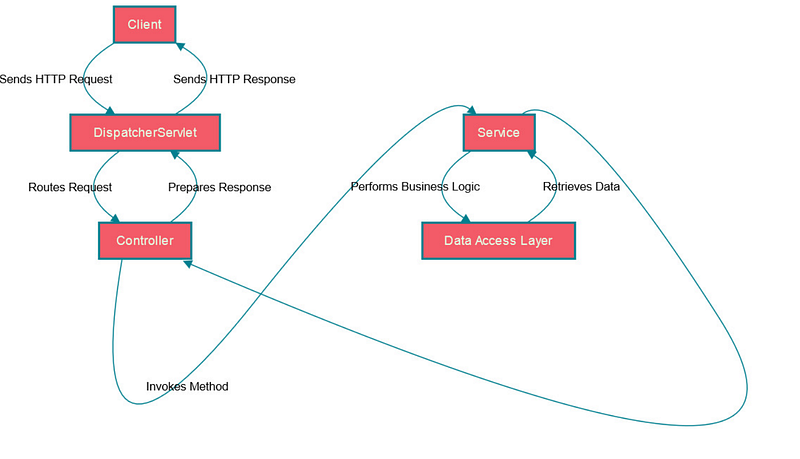
Hello folks, if you are preparing for Java and Spring Interview then you must prepare for questions like difference between X and Y like difference between RequestParam and PathVariable annotation, they are very popular on both phone interviews as well as on face-to-face interviews.
In last couple of articles I have explained difference between @Contorller and @RestController annotation, @Bean vs @Component annotation, and @Controller vs @Service @Repository and in this article, I will explain the difference between PathVariable and RequestParam annotations in Spring Framework.
By the way, if you are preparing for Java and programming interview then In my earlier articles, I have also shared 25 Advanced Java questions, 21 Software Design Pattern questions, 10 Microservice Scenario based questions, 20 SQL queries from Interviews, 50 Microservices questions, 60 Tree Data Structure Questions, 15 System Design Questions, and 35 Core Java Questions and 21 Lambda and Stream questions which you can use for your Java interview preparation.
Now, coming back to the question, If you have been doing Java development then you know that Spring MVC is a popular web framework for building Java-based web applications.
When designing RESTful APIs with Spring MVC, Java developers often come across two common annotations for handling request parameters: @RequestParam and @PathVariable.
While they may seem similar, there are important differences between these two annotations that developers need to understand in order to use them effectively.
For example, @RequestParam is used to capture query parameters or form parameters from the URL, while @PathVariable is used to capture values from the URL path.
They also have different syntax, usage, and behavior in handling URL parameters in Spring MVC applications.
In this article, we will explore the key differences between @RequestParam and @PathVariable in Spring MVC. We will discuss how these annotations work, their use cases, and when to choose one over the other.
Understanding these differences will help developers make informed decisions when designing RESTful APIs with Spring MVC and ensure that their applications are robust and efficient. It will also help you to do well on your interviews.
By the way, if you are new to Spring Framework and want to learn Spring in depth and looking for resources then you can also checkout following online courses:
- Spring Master Class — Beginner to Expert
- Spring & Hibernate for Beginners
- Learn Spring: The Certification Class
- Master Microservices with Spring Boot and Spring Cloud
All of these are top rated courses to learn Spring framework in depth but if you need free resources you can also checkout these free Spring framework courses:
What is @RequestParam annotation in Spring MVC?
As the name suggest, In Spring MVC, @RequestParam is an annotation used to bind request parameters from a URL or a form submission to method parameters in a Spring MVC controller.
It allows developers to retrieve values from query parameters, form data, or request headers and use them in their controller methods.
Here’s an example of using @RequestParam in a Spring MVC controller method:
@RequestMapping("/user")
public String getUser(@RequestParam("id") int userId) {
    // Logic to fetch user details by userId
    // ...
    return "user";
}
In the above example, the @RequestParam annotation is used to bind the “id” query parameter from the URL to the “userId” method parameter.
The value of the “id” parameter will be automatically passed to the “userId” parameter in the controller method, allowing developers to retrieve and use it in their business logic.
For example, if the URL for this endpoint is “/user?id=123”, the value of 123 will be bound to the “userId” parameter in the controller method. This is quite convenient for backend developer who need to either save this data or pass to another Microservice.
When to use @RequestParam annotation?
The @RequestParam annotation in Spring MVC is typically used when you want to retrieve values from query parameters, form data, or request headers in a Spring MVC controller method.
Here are some common scenarios where @RequestParam can be used:
- Retrieving query parameters
You can use
@RequestParamto retrieve query parameters from the URL. For example, if you have a URL like“/user?id=123&name=john”, you can use@RequestParamto retrieve the values of “id” and “name” query parameters and use them in your controller method. - Retrieving form data
If you have a form submission from a client, you can use
@RequestParamto bind the form data to method parameters in your controller method. For example, if you have a form with fields like“username”,“email”, and“password”,you can use@RequestParamto retrieve the values of these fields and use them in your controller method. - Retrieving request headers
You can use
@RequestParamto retrieve values from request headers, such as“Authorization”,“Accept”,or“Content-Type”. This can be useful when you need to access information from headers in your controller method to make decisions or perform certain actions based on the header values.
In short, @RequestParam is used in Spring MVC when you need to retrieve values from query parameters, form data, or request headers in your controller methods. It provides a convenient way to bind these values to method parameters, making it easy to work with data sent by clients in HTTP requests.
What is @PathVariable annotation in Spring MVC?
The @PathVariable annotation in Spring MVC is used to capture and bind a value from a URL path segment to a method parameter in a controller method. It allows you to extract dynamic values from the URL path and use them in your controller logic.
Here’s an example:
Suppose you have a URL pattern like “/users/{id}” where “{id}” is a path variable representing the user ID. You can use @PathVariable to capture the value of “{id}” and bind it to a method parameter in your controller method. Here’s an example:
@GetMapping("/users/{id}")
public ResponseEntity<User> getUserById(@PathVariable("id") Long userId) {
    // Logic to retrieve user by ID
    User user = userService.getUserById(userId);
    if (user != null) {
        return ResponseEntity.ok(user);
    } else {
        return ResponseEntity.notFound().build();
    }
}
In this example, the value of “{id}” from the URL path is captured and bound to the “userId” parameter in the “getUserById” controller method.
This allows you to access the user ID in your controller logic and use it to retrieve the corresponding user from a data source, such as a database or a service.
Note that @PathVariable is used to capture values from the URL path, whereas @RequestParam is used to retrieve values from query parameters, form data, or request headers. @PathVariable is typically used when you want to capture values that are part of the URL path, such as IDs, slugs, or other dynamic parts of the URL.
When to use @PathVariable annotation?
The @PathVariable annotation in Spring MVC is typically used when you want to capture values from the URL path, such as IDs, slugs, or other dynamic parts of the URL. Here are some common scenarios where you might use @PathVariable:
- Capturing resource IDs
If you have a RESTful API that follows a URL pattern like “/users/{id}” or
“/products/{id}”, where“{id}”represents a resource ID, you can use@PathVariableto capture the value of “{id}” and use it in your controller logic to retrieve the corresponding resource. - Capturing slugs or friendly URLs
If you have URLs that contain human-readable slugs or friendly names, such as
“/blog/posts/{slug}”or“/products/{slug}”, where“{slug}”represents a slug or friendly name, you can use@PathVariableto capture the value of“{slug}”and use it in your controller logic to retrieve the corresponding resource. - Capturing version numbers or other dynamic parts
If you have URLs that contain dynamic parts, such as version numbers, dates, or other variables, you can use
@PathVariableto capture these values and use them in your controller logic to determine the appropriate behavior or data retrieval based on the dynamic parts.
In general, @PathVariable is used when you need to capture dynamic values from the URL path and use them in your controller logic to retrieve resources, perform operations, or determine behavior based on the URL path. It provides a powerful way to handle dynamic parts of the URL in your Spring MVC application.
What is difference between @RequestParam and @PathVAriable in Spring?
Now that you know the basics of both @RequestParam and @PathVaraible annotation, its time to look at how they differ and when to use the according.
As I said, In Spring MVC, both @RequestParam and @PathVariable are used to capture values from the URL, but they are used in different ways and for different purposes.
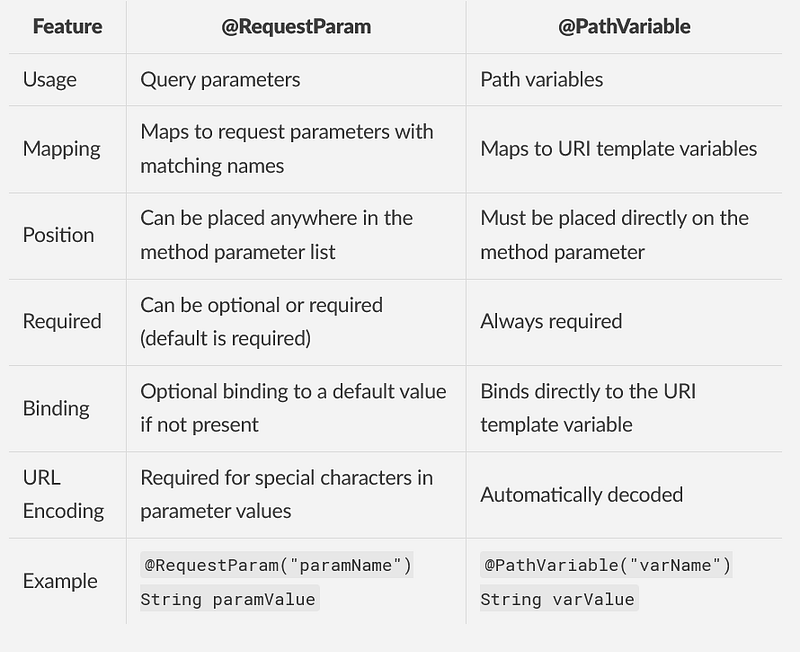
Here are the main differences between @RequestParam and @PathVariable in Spring:
1. Usage
The @RequestParam is used to capture query parameters or form parameters from the URL, whereas @PathVariable is used to capture values from the URL path.
2. Syntax
The @RequestParam is used with the name attribute to specify the name of the query parameter or form parameter, while @PathVariable is used with the value attribute to specify the placeholder or variable in the URL path.
3. URL pattern
@RequestParam captures values from the query parameters or form parameters in the URL, which are usually appended to the URL after a “?” symbol. For example: “/users?name=john&age=30”. On the other hand, @PathVariable captures values from the URL path itself, which is usually separated by slashes (“/”). For example: “/users/{id}”.
4. Optional vs. Required:
By default, @RequestParam parameters are considered optional, as they can have a default value specified and can be omitted from the URL without causing an error. However, @PathVariable parameters are considered required, as they are part of the URL path and must be provided in the URL for the mapping to match.
5. Data type conversion:
@RequestParam parameters are automatically converted to the specified data type in the controller method, based on the request parameters or form parameters in the URL. However, 1 parameters are automatically converted to the specified data type based on the type of the variable in the URL path.
6. Flexibility:
@RequestParam provides more flexibility in terms of handling multiple query parameters, optional parameters, and default values. On the other hand, @PathVariable provides more flexibility in terms of capturing dynamic parts of the URL path, such as resource IDs, slugs, or other variables.
Also here is a nice table highlighting the difference between @RequestParam and @PathVariable in Spring Framework for your reference
Java and Spring Interview Preparation Material
Before any Java and Spring Developer interview, I always use to read the below resources
Grokking the Java Interview: click here
I have personally bought these books to speed up my preparation.
You can get your sample copy here, check the content of it and go for it
Grokking the Java Interview [Free Sample Copy]: click here

If you want to prepare for the Spring Boot interview you follow this consolidated eBook, it also contains microservice questions from spring boot interviews.
Grokking the Spring Boot Interview
You can get your copy here — Grokking the Spring Boot Interview

That’s all about the difference between @RequestParam and @PathVariable in Spring MVC. Just remember that, @RequestParam is used to capture query parameters or form parameters from the URL, while @PathVariable is used to capture values from the URL path.
They have different syntax, usage, and behavior in handling URL parameters in Spring MVC applications.
By the way, if you are new to Spring Framework and want to learn Spring in depth and looking for resources then you can also checkout following online courses:
- Spring Master Class — Beginner to Expert
- Spring & Hibernate for Beginners
- Learn Spring: The Certification Class
- Master Microservices with Spring Boot and Spring Cloud
All of these are top rated courses to learn Spring framework in depth but if you need free resources you can also checkout these free Spring framework courses:
This one isalso an important question for Spring framework interviews and you must prepare for it. Additionally, you can also prepare Java Microservices questions like difference between API Gateway and Load Balancer, SAGA Pattern, how to manage transactions in Microservices, and difference between SAGA and CQRS Pattern, they are quite popular on interviews.
Other Java and Microservices articles you may like


