
Craft review, is it a minimalist dream come true?

Modern times, I like to think we are living in one. Technology is traveling so fast — to the point of not being able to get caught up with it. The point is adjusting. We have to adjust and accept change otherwise we will get changed.
My life has become pretty interesting ever since I was introduced to the concept of minimalism. Minimalism seems to have made prominent changes in our lives no matter how we react with its promises.
Technology, it has been entangled with design — and design has been entangled with simplicity; and simplicity is a form of minimalism.
Today I will review Craft, an application developed by Luki Labs. It is a fantastic approach for those who want to organize their digital life, learn something new, and want to create structural writings to enhance their lives.
There are many uses cases to the Craft application. You can be a student and organize your educational materials in it. You can be a programmer, and manage your coding documentation. Be a designer, you can create an entire structure for your team’s design language in it. The possibility? It’s endless.
The Review
In the first glance, it looks simple, almost bare minimum is visible. Most important areas to notice are the navigation section, the top toolbar which allows you to search, create documents and access more options for your current folder helping you manage documents.
The Inbox
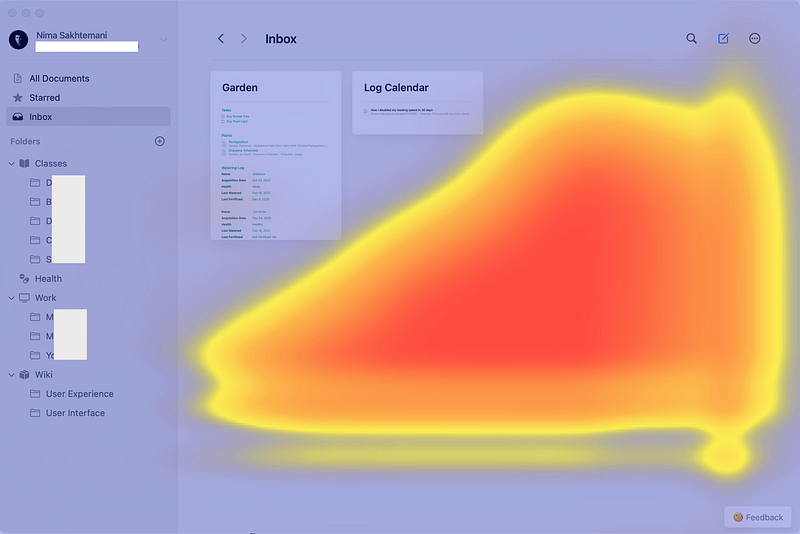
Taking a look the heat map which was generated by an A.I. to find the most noticeable areas of attention, it is clear that the first time user will get confused for lack thereof button placement in the bottom right section of the application.
Why did I find it a little confusing? Since it is designed to work on iPads and iPhones and design integrity is important for applications supported to run on multiple devices, we need to consider where users usually touch the screen; in this case, on a Mac using the Touchpad it is easy to locate and click certain buttons but the act of finding a functionality for the first time user has its learning curves.
Editor’s Ease of Use
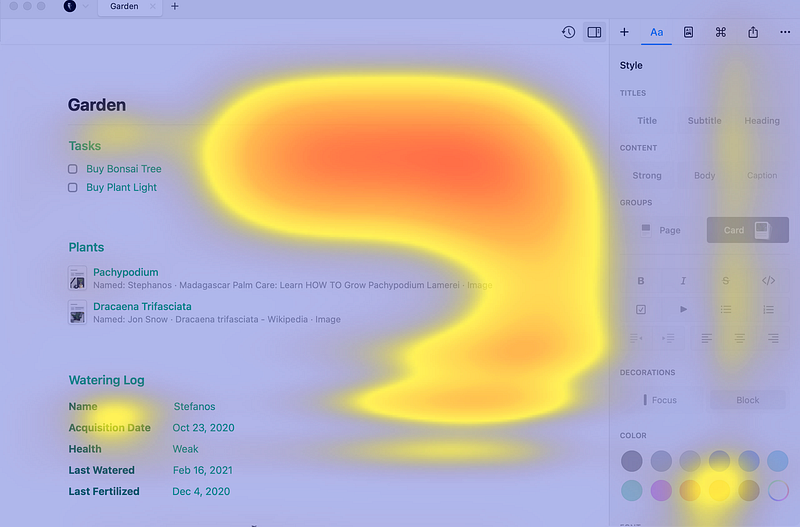
The editor seems to do ok in my tests, the important functions are visible and accessible, specially, the right toolbar for editing your text’s visuals.
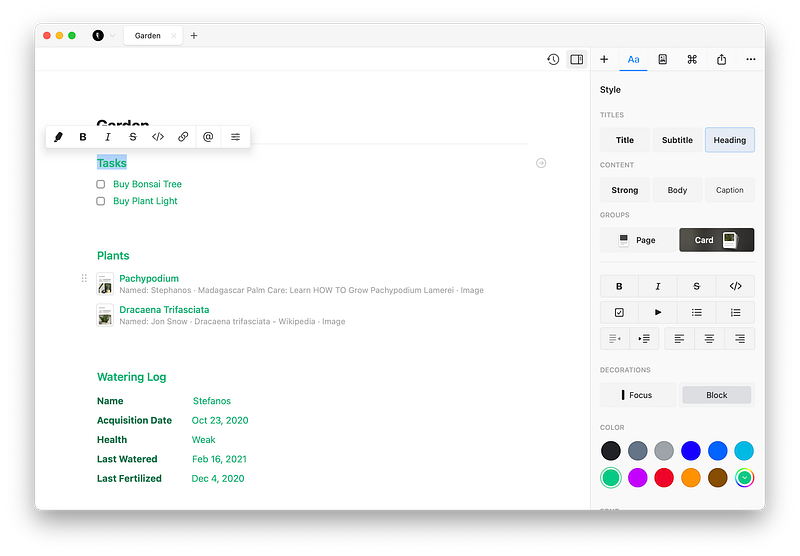
Jakob’s Ten Usability Heuristic, Rule #7 states Flexibility and Efficiency of Use which means providing shortcuts to expert users to speed up the interaction that are usually hidden for novice users
Managing Multiple Documents
A great feature that is usually missed in many applications is the use of tabs within a window. Craft does it quite well. You can use CMD+click to open any document in a new tab. Having said that, I have a few ideas about the tabs to see in the new updates:
- Ability to use mouse hover and see a preview of a tab using Macs, and iPads.
- Navigate between tabs with keyboard shortcuts
- Putting two tabs side by side to manage multiple documents at once
- Including an icon for each tabs
Navigation and Structures
I love the design trend that is currently in use with note-taking apps — I’m talking about the left navigation pan to include for the use of organizing files, notes, and folders. Navigating to your projects, and documents is easy, and files open quickly. Craft gives you the ability to include an icon for your folders and sub folders which makes the application feel more customizable. I have hopes for the addition of two things here: one, being able to import my own svg icons, and two, having more default icon options as I am not a fan of using emojis for my folders.
Document Structures
In the editor you have four sections:
- Insert: which lets you drag and drop content blocks; it is particularly helpful for iPad users who are used to drag and drop.
- Style: which lets you customize the typeface, colors, and add pages and cards; it is great for novice users trying to get used to the editor.
- Page Details: which allows you to show and hide additional detail about the page such as cover image, enable spelling, and get statistics of your writing.
- Actions: which help you use additional functionalities of the editor such as being able to find certain texts, move blocks and add comments.
- Share: which allows you to export in PDF, MS Word, and many other formats; it also allows sending the document to many famous productivity applications and invite others to view your document.
- Actions: which you learn, send feedback, and access frequently asked questions.
Having all these explained, what amazes me is how futuristic and organized everything is. Craft to me seems like an application that is designed specifically for the users’ needs.
Many of design trends are arbitrary and not functional, yet, Craft seems to have found the border in which it doesn’t break any mental models and reaches certain visual design that belongs to 2021 and the future.
Preferences
- Craft supports dark mode, and it can adapt itself to the way the system is set.
- It offers further customization by allowing you to change the interface color. You can make all the text bolder, and reduce the animations if you don’t like them.
- It supports spelling corrections, but it is a little bit basic in its functionality. Being able to connect my grammarly account for the spelling would be a great option, or at least having a dedicated engine to correct my grammar mistakes would be a plus one.
- I can change Craft’s language to nine other languages.
- When you don’t know if your internet is broken or Craft’s servers are malfunctioning, you have a section to see the network status and report any synchronization errors.
- It also allows you to send feedback, however, it is not a form or a webpage, instead, it opens your email client and lets you composes a message.
Overall Experience
I ran Craft on 3 devices; my iPhone 7 running iOS 14, my iPad Pro running iPadOS 14, and my MacBook Pro running macOS Big Sur. Almost no bugs, no performance issues, and lots of tiny quick animations made the experience feel optimized and suitable for a user like me. Now… who is a user like me, and what are my use cases? I’ll explain below.
How It Helps Me:
At the moment my life has encountered three major problems:
- Lack of a place to store my medical history
- Having digital clutter & wanting an organized data management system
- Lack of structure for the classes I partake
Case I: Medical History
One of the most critical areas in life where you need to be as precise as possible is your medical documents and their history. When something happens you need to tell your doctor about the previous medications, and treatments you were on. They are most vital for your health. I had issues with it, having too many files in random semi-organized folders which created a hassle for me to find something as simple as a hematology test result, so I used Craft to create a main folder, then subfolders for each section of my health.
Here is a sample of the structure:
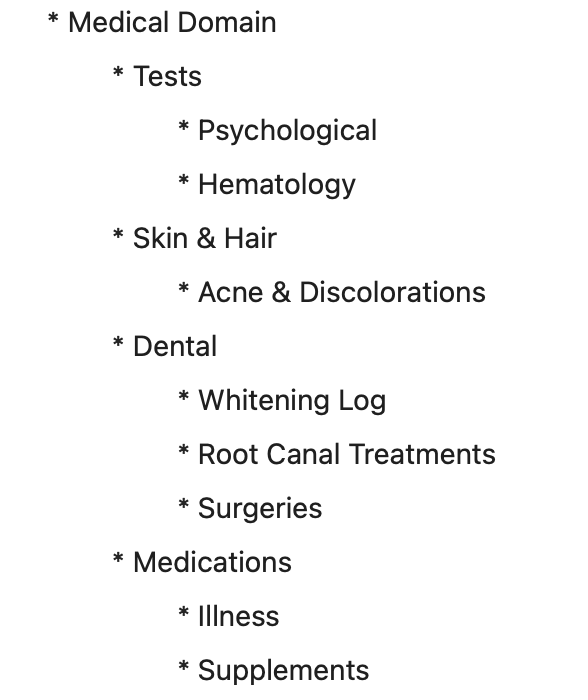
I didn’t include many of the folders and sub-folders for protecting my privacy, but you can see a structure in which I organized my history, so it could be easily used by my doctors when something is wrong, or when they need to look at my medical history.
The problem I had with my journey into creating different sections here was the inability to create tables within documents, but I suppose that could be in the product’s roadmap somewhen in the future.
Some of the things I need to fully max out the capabilities of my medical history are:
- Being able to share an entire folder with its sub-folders and documents.
- Create a dedicated document to act as a table of content for each section of my body.
- A database or a table structure, something like what Notion offers to create a log in which one’s able to add columns and properties to the table.
Case II: Digital Clutter
It is a dream to find a note or a document with ease, specially when it is educational documents. I have used Craft to store the notes from the books I read, and honestly, it is excellent at it. You can add attachments, write down tons of stuff into it. Many times you write too much and to find what you are looking for, you need to spend a lot of time finding it. That is a problem and when I used Notion, I could link a specific text to a section in that document then organize those links as the table of content and access them with ease. This is one of the features I hope Craft brings in the newer releases.
Case III: Education & Classes
The easy user experience of Craft helps me to sort the content I have written from a class. I simply create a main document for that class, add a tasks section, and a homework section then each section gets its own dedicated card which helps me find everything quickly. Craft is specially useful for Math and Coding classes as it explicitly supports entering formulas and writing codes in blocks.
In Summary
Craft can almost satisfy most of my needs, but I wish the app could provide more dedicated options for people interested in different expertise. I’m a researcher/designer, and I love to be able to draw diagrams in my document. An architect would enjoy being able to include a preview of their CAD files too. A user interface designer would love to be able to import a preview of a Sketch or a Figma file. Based on each profession, being able to add the particular needs of that user would help Craft become more than a note-taking app and that is a brighter future in my opinion.
How It Can Help You
You can use Craft as a simple note-taking application, not utilizing its organizational features.
Or you can deep dive into what it offers and improves your productivity. As an advanced note-taking app, Craft is flexible enough to help you become more organized and become more productive specially on your journey to learn something new. At this stage, it is more suited for students and teachers but seeing how fast and careful the team is adding features, I suppose new capabilities will arrive soon.
So… Is It a Minimalist Dream Come True?
Sort of. Not entirely, though. Nothing is perfect, and Craft definitely isn’t one. There is still a steep learning curve. Some features need to exist before I can call it enough for most people; features like notifications for specific documents and specially their tasks. One unnecessary but cool to have feature would be the ability to support Apple Watches. I also don’t think there are enough iOS 14 widgets available for the app as it offers only one type of widget. Finally, having integration with Siri would be a nice touch for those who use automations and prefer to use their voice for creating notes.
All in all, it is a great package and I suggest it to anyone who is looking to organize their content. It has top-notch performance with a great organization system.
You can download Craft for free and the subscription cost is $4.99/month or $44.99/year.
Acknowledgement
I would like to thank you for reading this article. I like reviewing products, specially the great minimal ones. If you enjoyed this review, make sure to give some claps, and share it with people who you think would benefit by reading my review.
Below I have included some of my previous articles, I will be happy if you read them too and hear if they have brought you any value.


