
AWS- OIDC Identity Provider For EKS Cluster With Terraform
When you create an Amazon EKS cluster, it is by default configured as an OpenID Connect (OIDC) identity provider (IdP). This means that it can be used to provide federated access to AWS resources, just like Google, Microsoft, and Facebook IdPs. AWS also supports IdPs compatible with OIDC to establish trust relationships to access AWS accounts. This means that you can use your EKS OIDC IdP to access AWS services using the IAM identity federation.
NOTE: We have already created the Amazon EKS cluster Link: AWS — Provision EKS Cluster Using Terraform Resources Link: Provision Amazon EKS Cluster Using Terraform Modules
What is an identity provider in AWS?
An identity provider (IdP) is a trusted entity that provides authentication services to users. In AWS, an IdP can be used to manage user identities outside of AWS and to federate access to AWS resources.
There are two main types of IdPs that can be used with AWS:
- SAML 2.0 IdPs: SAML 2.0 is a standard XML-based protocol for exchanging authentication and authorization data between different systems. AWS supports a wide range of SAML 2.0 IdPs, including Google Apps, Okta, and Microsoft Active Directory Federation Services (AD FS).
- OpenID Connect (OIDC) IdPs: OIDC is an open standard based on OAuth 2.0 that allows applications to verify the identity of users and obtain access tokens. AWS supports a variety of OIDC IdPs, including Amazon Cognito, Facebook, and Google Login.
What is OpenID Connect (OIDC)?
OpenID Connect (OIDC) is an open standard for authentication and authorization that is built on top of OAuth 2.0. OIDC IdPs are identity providers that support the OIDC standard.
OIDC IdPs provide a number of benefits, including:
- Security: OIDC IdPs use strong authentication and authorization protocols to protect user identities and data.
- Convenience: OIDC IdPs allow users to sign in to applications using their existing credentials. This can make it easier for users to access applications and reduce the need to manage multiple passwords.
- Scalability: OIDC IdPs can be used to manage user identities at scale. This can be helpful for organizations with a large number of users.
Using an OIDC IdP with EKS has several benefits:
- Improved security: OIDC IdPs can provide strong authentication and authorization capabilities.
- Increased convenience: OIDC IdPs allow users to sign in to EKS using their existing credentials from their IdP. This can make it easier for users to access EKS and reduce the need to manage multiple passwords.
- Enhanced scalability: OIDC IdPs can be used to manage user identities at scale.
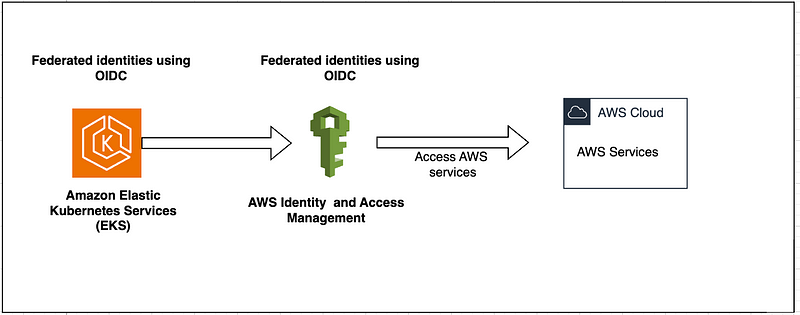
- To use an IdP with AWS, you must first create an IAM identity provider.
- When you configure an OIDC identity provider in AWS IAM, you are essentially establishing a trust relationship between your AWS account and the OIDC identity provider.
- This enables you to use the identity provider for federated identity and access management in AWS.
- Once you have created an IAM identity provider, you can create IAM roles that map to the different roles in your IdP. You can then assign these IAM roles to users in your IdP.
Prerequisite
- AWS Account: You should have an active AWS account with the necessary permissions to create and manage resources.
- Terraform: Terraform is an infrastructure provisioning tool you will need to install on your local machine.
- Basic Knowledge: Ensure you have a fundamental understanding of AWS, Terraform & Kubernetes.
- Amazon EKS cluster up and running: AWS — Provision EKS Cluster Using Terraform Resources
To create an IAM OIDC identity provider for the EKS cluster using Terraform:
To set up an identity provider in AWS using Terraform, we will create a Terraform configuration file that defines the identity provider and its associated resources. Once the identity provider is set up, we can use it to create IAM roles for service accounts in the EKS cluster. This would allow service accounts to access AWS resources using the identity provider’s credentials. (Later Section)
1- OIDC Setup:
- provider.tf
The provider is responsible for authenticating and establishing a connection with your AWS account. To declare the connection to the provider in Terraform, you need to specify the provider block in your Terraform configuration file and give it a name
provider.tf.
terraform {
  required_providers {
    aws = {
      source  = "hashicorp/aws"
       version = "5.21.0" # which means  version equal to 5.21.0
    }
    kubernetes = {
      source  = "hashicorp/kubernetes"
      version = "2.21.1"
    }
    tls = {
      source = "hashicorp/tls"
      version = "4.0.4"
    }
  }
  required_version = ">= 0.13"
}

provider "aws" {
  region = var.region
  #   profile = "default" #AWS Credentials Profile (profile = "default") configured on local
  #   access_key = var.aws_access_key
  #   secret_key = var.aws_secret_key
}
- backend.tf
A file in Terraform is used to configure and specify the settings for a remote backend where Terraform should store its state files. Let’s name it as
backend.tf
terraform {
  cloud {
    organization = "organization_name"

    workspaces {
      name = "workspaces_name_2"
    }
  }
}- locals.tf
A file used to define local values and expressions that can be used within your configuration. Let’s name it as
locals.tf.
# Define Local Values in Terraform
locals {
  organization = var.organization
  team         = var.team
  environment  = var.environment
  name         = "${local.organization}-${local.team}-${local.environment}"
  tags = {
    organization = local.organization
    department   = local.team
    environment  = local.environment
  }
  eks_cluster_name = data.terraform_remote_state.eks_terraform_cluster.outputs.eks_cluster_id
}- variables.tf
Define all the Terraform common variables for AWS resources used. File name as
variables.tf
# AWS Region
variable "region" {
  description = "Region in which AWS Resources to be created"
  type        = string
  default     = ""
}
# Environment Variable
variable "environment" {
  description = "Environment Variable used as a prefix"
  type        = string
  default     = ""
}
# organization Division
variable "organization" {
  description = "organization- Infrastructure belongs"
  type        = string
  default     = ""
}
# team Variable
variable "team" {
  description = "organization team for  Infrastructure belongs"
  type        = string
  default     = ""
}


# EKS OIDC ROOT CA Thumbprint, eks oidc root ca thumbprint
variable "eks_oidc_root_ca_thumbprint" {
  type        = string
  description = "Thumbprint of Root CA for EKS OIDC, Valid until 2037"
  default     = "9e99a48a9960b14926bb7f3b02e22da2b0ab7280"
}
- terraform.tfvars
A file that allows you to set and store values for your variables. This separation is useful for maintaining clean and modular Terraform code. let’s keep all the common variable values in a file named
terraform.tfvars
# Generic Variables
region       = "us-east-1"
environment  = "dev"
organization = "aws"
team = "team"- remote-state-datasource.tf
The terraform_remote_state data source is used to fetch state data from a remote backend. File named as
remote-state-datasource.tf.
### The terraform_remote_state data source uses the latest state snapshot from a specified state backend to retrieve the root module output values from some other Terraform configuration.

data "terraform_remote_state" "eks_terraform_cluster" {
  backend = "remote"
  config = {
    organization = "organization_name"
    workspaces = {
      name = "workspaces_name_1"
    }
  }
}

### Get an authentication token to communicate with an EKS cluster.
data "aws_eks_cluster" "eks_cluster" {
  name = data.terraform_remote_state.eks_terraform_cluster.outputs.eks_cluster_id
}

data "aws_eks_cluster_auth" "eks_cluster" {
  name = data.terraform_remote_state.eks_terraform_cluster.outputs.eks_cluster_id
}

data "aws_partition" "current" {}

data "tls_certificate" "eks_cluster_issuer_url" {
  url = data.terraform_remote_state.eks_terraform_cluster.outputs.cluster_oidc_issuer_url
}


# Define Terraform Kubernetes Provider
provider "kubernetes" {
  host                   = data.terraform_remote_state.eks_terraform_cluster.outputs.eks_cluster_endpoint
  cluster_ca_certificate = base64decode(data.terraform_remote_state.eks_terraform_cluster.outputs.eks_cluster_certificate_authority_data)
  token                  = data.aws_eks_cluster_auth.eks_cluster.token
}
NOTE: Terraform ‘workspaces_name_1’ is used to store the state file for EKS cluster.
- eks-cluster-oidc.tf Provides an IAM OpenID Connect provider.
# Use this data source to lookup information about the current AWS partition in which Terraform is working.
# reference : https://registry.terraform.io/providers/hashicorp/aws/4.1.0/docs/data-sources/partition
# reference : https://registry.terraform.io/providers/hashicorp/aws/latest/docs/resources/iam_openid_connect_provider.html
# reference : https://registry.terraform.io/providers/hashicorp/aws/4.1.0/docs/data-sources/partition


### AWS IAM Open ID Connect Provider. A list of server certificate thumbprints for the OpenID Connect identity provider's server certificate
resource "aws_iam_openid_connect_provider" "eks_terrform_cluster_oidc_provider" {
  client_id_list  = ["sts.${data.aws_partition.current.dns_suffix}"]
  thumbprint_list = [var.eks_oidc_root_ca_thumbprint]
  url             = data.tls_certificate.eks_cluster_issuer_url.url
  tags = {
    name = "${local.eks_cluster_name}-eks-oidc"
  }
}


############################################################################################################
### Output: AWS IAM Open ID Connect Provider ARN
############################################################################################################

output "eks_cluster_openid_connect_provider_arn" {
  description = "The ARN assigned by AWS IAM Open ID Connect"
  value       = aws_iam_openid_connect_provider.eks_terrform_cluster_oidc_provider.arn
}

### Extract OIDC URL from OIDC Provider ARN (sample - arn:aws:iam::<AWS_ACCOUNT>:oidc-provider/oidc.eks.us-east-1.amazonaws.com/id/5700AC86C6B34A7183C27AA3697C5A4B)
locals {
  eks_cluster_openid_connect_provider_arn_extract_from_arn = element(split("oidc-provider/", "${aws_iam_openid_connect_provider.eks_terrform_cluster_oidc_provider.arn}"), 1)
}

### OIDC (Open ID Connect) Provider URL
output "eks_cluster_openid_connect_provider_arn_extract_from_arn" {
  description = "AWS IAM Open ID Connect Provider extract from ARN"
  value       = local.eks_cluster_openid_connect_provider_arn_extract_from_arn
}
2- Apply Terraform:
$ terraform fmt --recursive ## formatting
$ terraform init
$ terraform plan
$ terraform apply --auto-approve
terraform fmt --recursive: Formats all Terraform configuration files in the directories, ensuring consistent code styleterraform init: Initializes the Terraform project by downloading the required providers and modulesterraform plan: Generates an execution plan that shows the changes Terraform will make to the infrastructure without actually applyingterraform apply: Applies the Terraform configuration to provision or modify infrastructure according to the defined plan
3- Verify resources:
## OpenID Connect Configuration Endpoint
$ curl - https://<OpenID Connect provider URL>/.well-known/openid-configuration ljg- EKS Cluster:

- Cluster Overview:
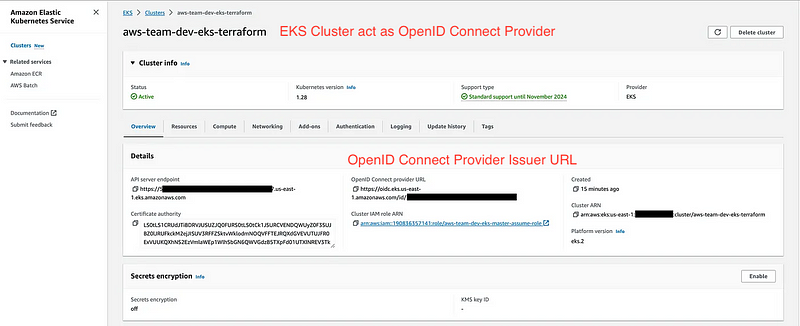
- Identify Provider
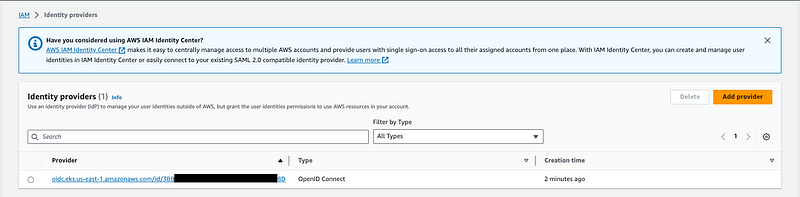
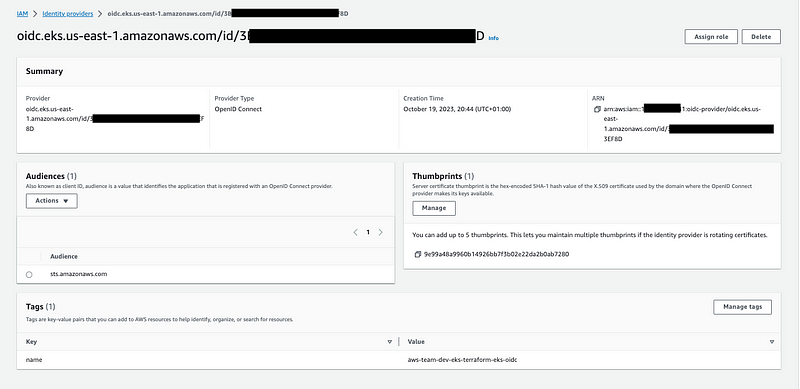
4- Delete the cluster:
Once we no longer need this infrastructure, we can clean up to reduce costs.
# Destroy the cluster/resources
$ terraform destroy -auto-approve
NEXT:
EKS IRSA — IAM Roles for Service Accounts (IRSA)
I trust that you have found this user-friendly.
Please share your thoughts and experiences after following the steps outlined. Your feedback is valuable and helps us improve the quality.
Topics:
- AWS — Provision EKS Cluster Using Terraform Resources
- Provision Amazon EKS Cluster Using Terraform Modules
- Provision GKE Cluster with Terraform Using Module
- AWS — How To Import Existing Resources Using Terraform
- AWS Resource Using Terraform Via Github Actions
- Terraform Checks in Github Actions Using Terraform tools
- GitHub Actions with Terraform on GCP
- Kubernetes Cluster: Make it Easy To Manage With Tools
- Terraform Tools That You Need
Do not forget the 👏✌️❤️ if you like this content! Also, I will be glad if you hit the follow button so you get notified of my new posts.
Stackademic
Thank you for reading until the end. Before you go:
- Please consider clapping and following the writer! 👏
- Follow us on Twitter(X), LinkedIn, and YouTube.
- Visit Stackademic.com to find out more about how we are democratizing free programming education around the world.


