
GCP- Terraform Checks in Github Actions Using Terraform Tools
How to integrate these checks into a GitHub Actions workflow, enhancing the quality of our Terraform projects.
Terraform is a widely used Infrastructure as Code (IAC) tool that simplifies deployment for large companies managing multiple infrastructures. This article explores the best Terraform tools for various tasks, enabling precise and efficient project planning and delivery.
Terraform serves as an IAC automation tool, capable of managing diverse cloud service providers and custom in-house solutions. It has become a favorite tool among DevOps engineers. In this article, we’ll focus on several essential tools (Tflint, Tfsec, Checkov) and best practices to ensure clean Terraform code.
For More Info about tools: Terraform Tools That You Need
GitHub Actions is a continuous integration and continuous delivery (CI/CD) platform that allows you to automate your software development workflow. GitHub Actions uses a workflow language called YAML to define your automation.
In this tutorial, we will demonstrate how to integrate these checks into a GitHub Actions workflow, enhancing the quality of our Terraform projects.
Prerequisites
- Terraform is installed on your local machine.
- Google Cloud SDK installed on your local machine.
- Google Cloud Platform project set up.
- Service Account to interact with Google Cloud from GitHub Terraform Workflow
$  gcloud iam service-accounts create github-action-gcp --display-name "github-action-gcp"
$ gcloud projects add-iam-policy-binding <Procject-ID> \
            --member='serviceAccount:github-action-gcp@<Procject-ID>.iam.gserviceaccount.com' \
            --role='roles/editor'
NOTE: Also read about “GitHub Actions with Terraform on GCP”, about how to integrate GitHub Actions with Terraform to manage Google Cloud Platform (GCP) services.
The folder structure is as below:
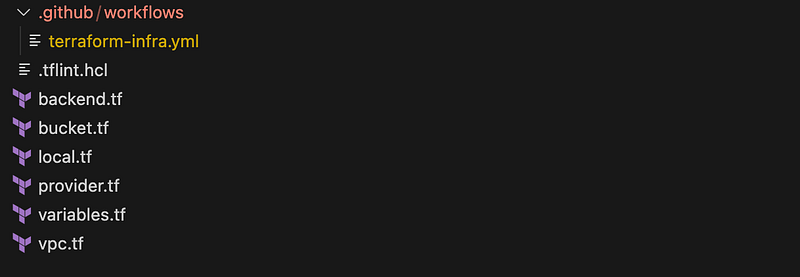
The high-level file .github/workflows/terraform-infra.yml will be as below:
name: 'Terraform-infra'

# Runs your workflow when you push a commit
on:
  push:
    branches: [ "main" ]
  pull_request:

permissions:
  contents: read

jobs:
  tflint-checks: # TFLint tool for linter

  tfsec-checks: # tfsec for security vulnerabilities

  checkov-checks: # static analysis tool

  terraform-infra: # workflow to provison the structure
                   # Assuming this is already defined.
Let’s start:
The below file is the same as the previous topic with adding VPC resources as well “GitHub Actions with Terraform on GCP”.
1- terraform file:
The terraform files to create the resources are as below.
- provider.tf To declare the connection to the Google provider in Terraform, you need to specify the provider block in your Terraform configuration file.
terraform {
  required_version = ">= 1.0"
  required_providers {
    google = {
      source  = "hashicorp/google"
      version = "~> 4.69.1"
    }
  }
}

provider "google" {
  project = var.project_id
  region  = var.region
}- variables.tf Declare the variables used in the Terraform files.
variable "project_id" {
  # type    = string #### Enable after TFLint
  default = "gcp-project-390708"
}

variable "region" {
  # type    = string #### Enable after TFLint
  default = "europe-west2"
}- backend.tf To configure the backend for storing and retrieving the Terraform state.
terraform {
  backend "gcs" {
    bucket = "github-action-gcp-bucket"
    prefix = "GithubAction"
  }
}- main.tf To provision a VPC and Bucket in GCP.
# Reaource: create Bucket Creation
resource "google_storage_bucket" "Cloud_function_bucket" {
  name                        = "github-action-with-terraform-${var.project_id}"
  location                    = var.region
  project                     = var.project_id
  force_destroy               = true
  uniform_bucket_level_access = true
}


# Reaource: create VPC using module
module "vpc" {
  source       = "terraform-google-modules/network/google"
  version      = "7.1.0"
  project_id   = var.project_id
  network_name = "github-action-terraform-vpc"
  routing_mode = "REGIONAL" #REGIONAL/GLOBAL

  subnets = [
    {
      subnet_name      = "eu-west-subnet"
      subnet_ip        = "10.10.10.0/24"
      subnet_region    = var.region
      # subnet_flow_logs = "true"  #### Enable after tfsec
    }
  ]
}- .github/workflows/terraform-infra.yml This GitHub Terraform Workflow is as below:
name: 'Terraform-infra'

# Runs your workflow when you push a commit
on:
  push:
    branches: [ "main" ]
  pull_request:

permissions:
  contents: read

jobs:
  terraform-infra:
    name: 'Terraform-infra'
    runs-on: ubuntu-latest
    environment: dev
    # needs: checkov-checks
    # if: ${{ needs.checkov-checks.outputs.checkov-passed == 'true' }}

    # Use the Bash shell regardless whether the GitHub Actions runner is ubuntu-latest, macos-latest, or windows-latest
    defaults:
      run:
        shell: bash

    steps:
    # Checkout the repository to the GitHub Actions runner
    - name: Checkout
      uses: actions/checkout@v3


    # Install the latest version of Terraform CLI and configure the Terraform CLI configuration file with a Terraform Cloud user API token
    # reference - https://github.com/hashicorp/setup-terraform
    - name: Setup Terraform
      uses: hashicorp/setup-terraform@v2
      with:
        cli_config_credentials_token: ${{ secrets.TERROFORM_TOKEN }}

    # Initialize a new or existing Terraform working directory by creating initial files, loading any remote state, downloading modules, etc.
    - name: Terraform Init
      run: terraform init
      env:
        GOOGLE_CREDENTIALS: ${{ secrets.GOOGLE_CREDENTIALS }}

    # Checks that all Terraform configuration files adhere to a canonical format
    - name: Terraform Format
      run: terraform fmt -check

    # Generates an execution plan for Terraform
    - name: Terraform Plan
      run: terraform plan -input=false
      env:
        GOOGLE_CREDENTIALS: ${{ secrets.GOOGLE_CREDENTIALS }}

      # On push to "main", build or change infrastructure according to Terraform configuration files
      # Note: It is recommended to set up a required "strict" status check in your repository for "Terraform Cloud". See the documentation on "strict" required status checks for more information: https://help.github.com/en/github/administering-a-repository/types-of-required-status-checks
    - name: Terraform Apply
      if: github.ref == 'refs/heads/main' && github.event_name == 'push'
      run: terraform apply -auto-approve -input=false
      env:
        GOOGLE_CREDENTIALS: ${{ secrets.GOOGLE_CREDENTIALS }}
We have defined all the terraform files to provision the resources in the GCP cloud by implementing the terraform tools.
Let start’s adding Terraform Tools:-
- TFLint: TFLint is an essential linter for Terraform that not only checks for possible errors in your configuration but also helps identify provider-specific issues for major cloud providers. By using TFLint, you can catch potential errors before they occur during a Terraform run. It provides warnings about deprecated syntax, and unused declarations, and enforces best practices and naming conventions. With TFLint, you can maintain a clean and reliable Terraform codebase, ensuring that your infrastructure is well-defined and follows industry best practices.
1- Create a .tflint.hcl file and install the plugin
# Reference: https://github.com/terraform-linters/tflint
# GCP Reference: https://github.com/terraform-linters/tflint-ruleset-google
# On local to initialize a configuration file for TFLint in your Terraform project: tflint --init
plugin "google" {
    enabled = true
    version = "0.24.0"
    source  = "github.com/terraform-linters/tflint-ruleset-google"
}
2- Github Actions- Workflow For TFLint:
This GitHub Actions workflow is designed to perform linting checks on Terraform code using TFLint. The workflow runs on the ubuntu-latest runner and is defined under the tflint-checks job.
This helps to catch potential issues and errors in the code early in the development process.
jobs:
  tflint-checks:
    name: 'tflint-checks'
    runs-on: ubuntu-latest
    environment: dev

    # Use the Bash shell regardless whether the GitHub Actions runner is ubuntu-latest, macos-latest, or windows-latest
    defaults:
      run:
        shell: bash

    steps:
    # Checkout the repository to the GitHub Actions runner
    - name: Checkout
      uses: actions/checkout@v3

    # Reference - https://github.com/terraform-linters/setup-tflint
    # reference - https://github.com/actions/cache
    # TFLint - Terraform Check
    - uses: actions/cache@v3
      name: Cache plugin dir
      with:
        path: ~/.tflint.d/plugins
        key: ${{ matrix.os }}-tflint-${{ hashFiles('.tflint.hcl') }}

    - uses: terraform-linters/setup-tflint@v2
      name: Setup TFLint
      with:
        tflint_version: v0.44.1

    # Print TFLint version
    - name: Show version
      run: tflint --version

    # Install plugins
    - name: Init TFLint
      run: tflint --init

    # Run tflint command in each directory recursively # use --force if you want to continue with workflow although errors are there
    - name: Run TFLint
      run: tflint -f compact --recursive

    outputs:
      tflint-passed: true


  terraform-infra:
  .
  .
  .
  ## github action workflow to provison the infra as it.
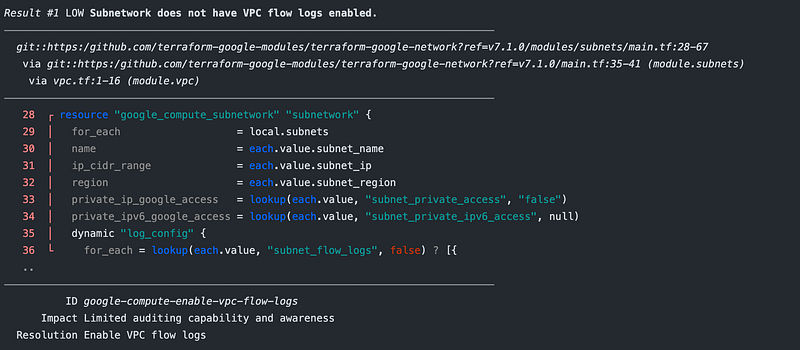
We have intentionally introduced some errors in the Terraform code to test and observe the TFLint checks in action.

- Tfsec: tfsec uses static analysis of your terraform code to spot potential misconfigurations. It helps identify potential security risks and misconfigurations in Terraform code. It is designed to analyze Terraform configurations and provide feedback on any security-related issues or best practices violations. It helps to ensure that your infrastructure-as-code (IAC) is following security best practices and adhering to security standards. Some of the security checks performed by tfsec include:
- Identifying access keys and sensitive information hardcoded in the code.
- Checking for overly permissive permissions and resource exposure.
- Detecting insecure communication settings.
- Verifying that security best practices are followed for cloud resources.
jobs:
  tflint-checks:
  .
  .
  .
  # github action workfow of tflint

  tfsec-checks:
    name: 'tfsec-checks'
    runs-on: ubuntu-latest
    environment: dev
    # tflint-checks need to be checked first
    needs: tflint-checks
    if: ${{ needs.tflint-checks.outputs.tflint-passed == 'true' }}

    # Use the Bash shell regardless whether the GitHub Actions runner is ubuntu-latest, macos-latest, or windows-latest
    defaults:
      run:
        shell: bash

    steps:
    # Checkout the repository to the GitHub Actions runner
    - name: Checkout
      uses: actions/checkout@v3

    # Tfsec - Security scanner for your Terraform code
    # Reference - https://github.com/aquasecurity/tfsec-action
    - name: Run Tfsec
      uses: aquasecurity/[email protected]

    outputs:
        tfsec-passed: true


  terraform-infra:
  .
  .
  .
  ## github action workflow to provison the infra as it.
We have intentionally introduced some errors in the Terraform code to test and observe the tfsec checks in action. Case-1: Update the resource
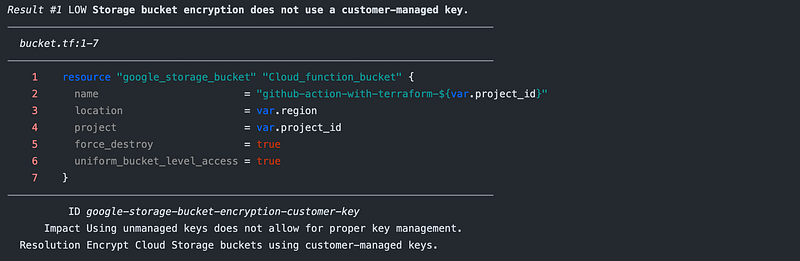
Case-2:To ignore the error we add the below syntax in the terraform code :
tfsec:ignore:
Case-3:To ignore the error add below as soft_fail in yml file
    - name: Run Tfsec
      uses: aquasecurity/[email protected]
      with:
soft_fail: true- Checkov: Checkov is an open-source static analysis tool specifically designed for Infrastructure as Code (IAC). It is a powerful tool that can help you to identify and fix security misconfigurations in your IAC code before deployment. The benefits of using Checkov are as below:
- Identifies security misconfigurations: Checkov can identify a wide range of security misconfigurations, including: - Insecure permissions - Open ports - Vulnerable software - Unused resources
- Complies with industry standards: Checkov can scan your IAC code against a set of pre-defined policies and best practices, including: - CIS Benchmarks - NIST 800–53 - PCI DSS
- Automates security checks: Checkov can be integrated into your CI/CD pipelines or GitHub Actions workflows so that security checks are run automatically every time your IAC code is changed.
name: 'Terraform-infra'

# Runs your workflow when you push a commit
on:
  push:
    branches: [ "main" ]
  pull_request:

permissions:
  contents: read

jobs:
  tflint-checks:
  .
  .
  .
  # github action workfow of tflint

  tfsec-checks:
  .
  .
  .
  ## github action workflow to provison the infra as it.


  checkov-checks:
    name: 'checkov-checks'
    runs-on: ubuntu-latest
    environment: dev
    needs: tfsec-checks
    if: ${{ needs.tfsec-checks.outputs.tfsec-passed == 'true' }}

    # Use the Bash shell regardless whether the GitHub Actions runner is ubuntu-latest, macos-latest, or windows-latest
    defaults:
      run:
        shell: bash

    steps:
    # Checkout the repository to the GitHub Actions runner
    - name: Checkout
      uses: actions/checkout@v3


    # Checkov - Prevent cloud misconfigurations and find vulnerabilities during build-time in infrastructure as code
    # Reference: https://github.com/bridgecrewio/checkov
    # Reference: https://github.com/bridgecrewio/checkov-action

    - name: Checkov GitHub Action
      uses: bridgecrewio/checkov-action@v12
      with:
        # This will add both a CLI output to the console and create a results.sarif file
        output_format: cli,sarif
        output_file_path: console,results.sarif
        quiet: false # optional: display only failed checks
        soft_fail: false # optional: do not return an error code if there are failed checks
        # skip_check: CKV_TF_1,CKV_GCP_62,CKV_GCP_114,CKV_GCP_78   # optional: skip a specific check_id
        log_level: ERROR # optional: set log level. Default WARNING


    # - name: Run Checkov
    #   run: |
    #         docker run --tty --rm -v ${{ github.workspace }}:/tf --workdir /tf bridgecrew/checkov --directory /tf --skip-check CKV_TF_1 --skip-check CKV_GCP_62 --skip-check CKV_GCP_114 --skip-check CKV_GCP_78

    outputs:
      checkov-passed: true


  terraform-infra:
  .
  .
  .
  ## github action workflow to provison the infra as it.
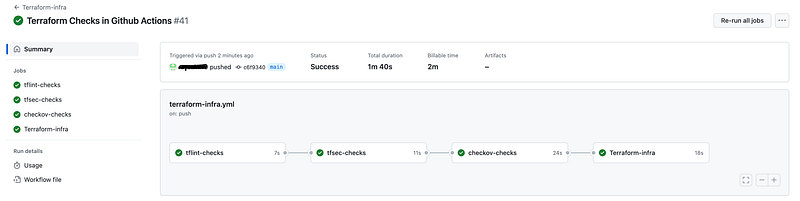
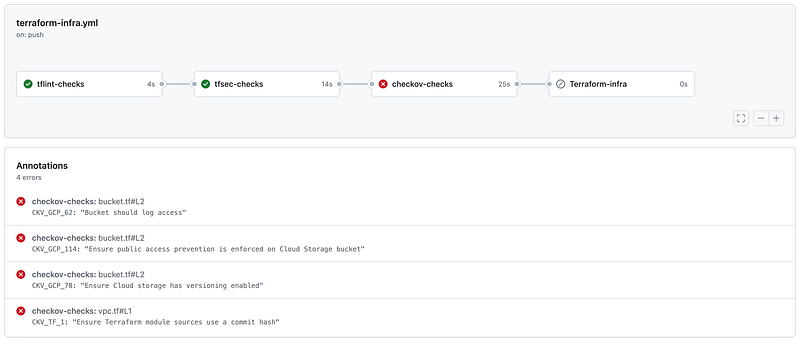
We have intentionally introduced some errors in the Terraform code to test and observe the Checkov checks in action.
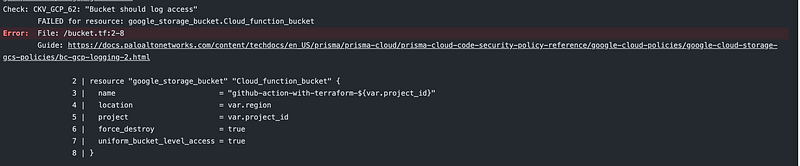
Observation:
The GitHub action workflow will be shown below.
If any workflow fails, the GitHub workflow is marked as failed.
Cloud storage Resource:

I trust that you have found this user-friendly.
Please share your thoughts and experiences after following the steps outlined. Your feedback is valuable and helps us improve the quality.
Topics:
- Terraform Tools That You Need
- GitHub Actions with Terraform on GCP
- Provision GKE Cluster with Terraform Using Module
- Deploy Cloud Functions on GCP with Terraform- (Environment -1st Gen)
- Deploy Cloud Functions on GCP with Terraform (2nd Gen Environment)
Do not forget the 👏✌️❤️ if you like this content! Also, I will be glad if you hit the follow button so you get notified of my new posts.
You can also follow me on LinkedIn!
Thank you!


