
Different Terraform Tools You Will Need
Explore different Terraform tools and find out which ones are best suited for certain tasks.
Terraform is a widely used IAC tool that makes deployment seamlessly easy for large companies that are developing and managing multiple infrastructures.
The best Terraform tools for different tasks. And with the help of tools like these, you can plan and deliver your work with a precise and intelligent approach. This article will discuss the different Terraform tools and which ones are best suited for different tasks.
- tfenv: tfenv is a version manager for Terraform that enables you to switch between different versions of Terraform on your development machine. This is useful when working with projects that require specific versions. For example, to switch to version 0.14.7 of Terraform, you can use the following command.
GitHub URL: https://github.com/tfutils/tfenv
$ tfenv use 0.14.7- tfvars: This tool helps you manage Terraform variables. It allows you to store Terraform variables in a central location, and it also provides a way to encrypt Terraform variables.
GitHub URL: https://github.com/shihanng/tfvar
$ variables.tf

variable "project_id" {
  description = "The project ID to host the cluster in"
  default     = ""
}
variable "cluster_name" {
  description = "The name for the GKE cluster"
  default     = ""
}
variable "env_name" {
  description = "The environment for the GKE cluster"
  default     = "dev"
}
variable "region" {
  description = "The region to host the cluster in"
  default     = ""
}
$ tfvar .
cluster_name = ""
env_name     = "dev"
project_id   = ""
region = ""- tflint: tflint is a tool that helps you lint your Terraform code. It checks your Terraform code for errors and potential problems, and it also provides suggestions for improving your code.
GitHub URL: https://github.com/terraform-linters/tflint
variable "project_id" {
  description = "The project ID to host the cluster in"
  default     = ""
}
variable "cluster_name" {
  description = "The name for the  cluster"
  default     = ""
}
$ tflint .This will lint all of the Terraform files in the current directory. If there are any errors or problems, tflint will report them.
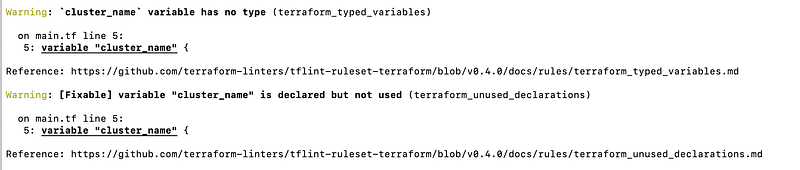
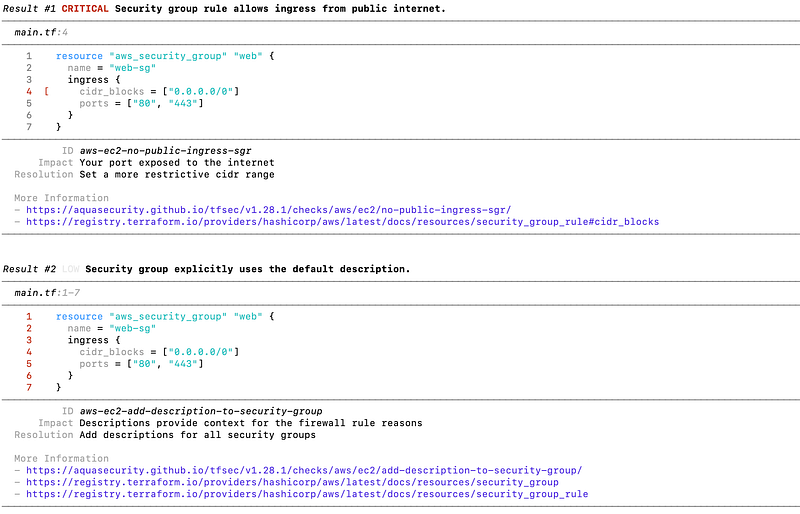
- tfsec: This tool helps you find security vulnerabilities in your Terraform code. It scans your Terraform code for known security vulnerabilities, and it also provides suggestions for fixing these vulnerabilities. To use tfsec, you can run it from the command line:
GitHub URL: https://github.com/aquasecurity/tfsec
resource "aws_security_group" "web" {
  name = "web-sg"
  ingress {
    cidr_blocks = ["0.0.0.0/0"]
    ports = ["80", "443"]
  }
}
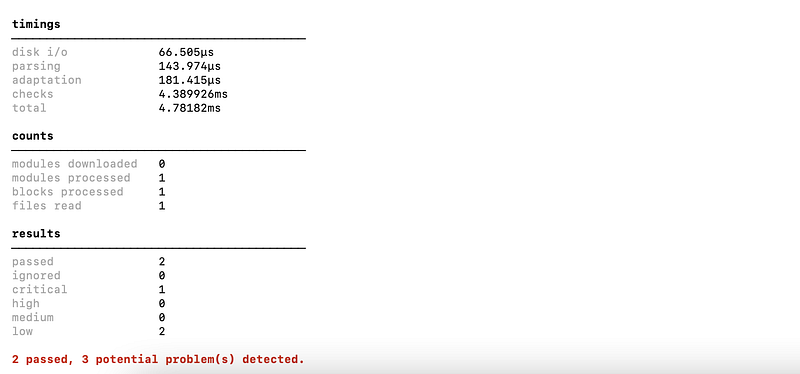
$ tfsec .This will scan all of the Terraform files in the current directory. If there are any security vulnerabilities, tfsec will report them.
- tfkit: Tfkit is a collection of Terraform tools that can be used to lint, test, and deploy Terraform code. It includes the following tools:
tflint: This tool lints Terraform code and checks it for errors and potential problems.
tftest: This tool runs unit tests against Terraform code.
tfdeploy: This tool deploys Terraform code to a cloud provider.
GitHub URL: https://github.com/voidful/TFkit
- terraformer:
A CLI tool that generates
tf/jsonandtfstatefiles based on existing infrastructure (reverse Terraform).
GitHub URL: https://github.com/GoogleCloudPlatform/terraformer
- inframap: Inframap is a tool that can be used to visualize your Terraform infrastructure. It reads your tfstate or HCL to generate a graph specific for each provider, showing only the resources that are most important/relevant.
GitHub URL: https://github.com/cycloidio/inframap
- Terraform Cloud: This is a cloud-based service for managing Terraform. It allows you to store Terraform code, variables, and state files in the cloud. It also provides a web-based interface for managing your Terraform projects.
- Terraform Enterprise: This is a commercial version of Terraform Cloud. It includes additional features, such as role-based access control and auditing.
Here are some of the other tools that can help:
- Terragrunt: Enhance Terraform with Advanced Features Terragrunt is a popular open-source tool that provides a simplified and consistent approach to managing Terraform deployments. It helps automate and standardize common Terraform tasks, such as initializing, configuring, and executing Terraform modules or configurations across multiple environments or projects.
https://terragrunt.gruntwork.io/
- Terratest: Automate Infrastructure Testing Ensuring the correctness and stability of your infrastructure deployments is critical. Terratest enables automated testing of Terraform code, including unit tests and integration tests. With Terratest, you can programmatically create and destroy infrastructure, validate expected behaviors, and detect issues early in the development cycle, leading to more reliable and resilient deployments.
https://terratest.gruntwork.io/
- Argonaut:
A tool that can be used to automate the deployment of Terraform projects to AWS, GCP, and Azure. It uses a declarative syntax to define the deployment process, which makes it easy to understand and maintain.
To use Argonaut, you first need to create a
.argonaut.yamlfile. This file defines the deployment process, including the following:
The Terraform project to deploy
The cloud provider to deploy to
The environment variables to use
The post-deployment steps to run
- Infracost: A tool that helps you estimate the cost of your Terraform infrastructure. It works by analyzing your Terraform code and comparing it to the cloud provider’s pricing.
https://www.infracost.io/
- terradozer: Terradozer is a tool that can be used to destroy all resources created by Terraform. It is a command-line tool that takes a Terraform state file as input and destroys all resources it finds in it. Terradozer does not need any *.tf files to work.
GitHub URL: https://github.com/jckuester/terradozer
- terramate: Terramate helps implement and maintain highly scalable Terraform projects by adding powerful capabilities such as code generation, stacks, orchestration, change detection, data sharing, and more.
Github URL: https://github.com/terramate-io/terramate
- Terrascan: Terrascan is a static code analyzer for Infrastructure as Code. It can be installed and run in a number of different ways and is most commonly used in automated pipelines to identify policy violations before insecure infrastructure is provisioned.
$ terrascan scan
I trust that you have found this user-friendly.
Please share your thoughts and experiences after following the steps outlined. Your feedback is valuable and helps us improve the quality.
Topics:
- AWS Resource Using Terraform Via Github Actions
- Terraform Checks in Github Actions Using Terraform tools
- GitHub Actions with Terraform on GCP
- Provision GKE Cluster with Terraform Using Module
- Provision GKE Cluster with Terraform Using Module
Do not forget the 👏✌️❤️ if you like this content! Also, I will be glad if you hit the follow button so you get notified of my new posts.
You can also follow me on LinkedIn!
Thank you!


