avatarManoj Saini

Free AI web copilot to create summaries, insights and extended knowledge, download it at here

8031

Abstract

<span class="hljs-attr">runs-on:</span> <span class="hljs-string">ubuntu-latest</span>
<span class="hljs-attr">environment:</span> <span class="hljs-string">production</span>
<span class="hljs-comment"># #Enable the below env once secrets are udpate in github and terraform workspace</span>
<span class="hljs-comment"># env:</span>
<span class="hljs-comment">#   AWS_ACCESS_KEY_ID: ${{ secrets.AWS_ACCESS_KEY_ID}}</span>
<span class="hljs-comment">#   AWS_SECRET_ACCESS_KEY: ${{ secrets.AWS_SECRET_ACCESS_KEY}}</span>


<span class="hljs-comment"># Use the Bash shell regardless whether the GitHub Actions runner is ubuntu-latest, macos-latest, or windows-latest</span>
<span class="hljs-attr">defaults:</span>
  <span class="hljs-attr">run:</span>
    <span class="hljs-attr">shell:</span> <span class="hljs-string">bash</span>

<span class="hljs-attr">steps:</span>
<span class="hljs-comment"># Checkout the repository to the GitHub Actions runner</span>
<span class="hljs-bullet">-</span> <span class="hljs-attr">name:</span> <span class="hljs-string">Checkout</span>
  <span class="hljs-attr">uses:</span> <span class="hljs-string">actions/checkout@v3</span>

<span class="hljs-comment"># Install the latest version of Terraform CLI and configure the Terraform CLI configuration file with a Terraform Cloud user API token</span>
<span class="hljs-bullet">-</span> <span class="hljs-attr">name:</span> <span class="hljs-string">Setup</span> <span class="hljs-string">Terraform</span>
  <span class="hljs-attr">uses:</span> <span class="hljs-string">hashicorp/setup-terraform@v1</span>
  <span class="hljs-attr">with:</span>
    <span class="hljs-attr">cli_config_credentials_token:</span> <span class="hljs-string">${{</span> <span class="hljs-string">secrets.TF_API_TOKEN</span> <span class="hljs-string">}}</span>

<span class="hljs-comment"># Initialize a new or existing Terraform working directory by creating initial files, loading any remote state, downloading modules, etc.</span>
<span class="hljs-bullet">-</span> <span class="hljs-attr">name:</span> <span class="hljs-string">Terraform</span> <span class="hljs-string">Init</span>
  <span class="hljs-attr">run:</span> <span class="hljs-string">terraform</span> <span class="hljs-string">init</span>

<span class="hljs-comment"># Checks that all Terraform configuration files adhere to a canonical format</span>
<span class="hljs-bullet">-</span> <span class="hljs-attr">name:</span> <span class="hljs-string">Terraform</span> <span class="hljs-string">Format</span>
  <span class="hljs-attr">run:</span> <span class="hljs-string">terraform</span> <span class="hljs-string">fmt</span> <span class="hljs-string">-check</span>

<span class="hljs-comment"># Generates an execution plan for Terraform</span>
<span class="hljs-bullet">-</span> <span class="hljs-attr">name:</span> <span class="hljs-string">Terraform</span> <span class="hljs-string">Plan</span>
  <span class="hljs-attr">run:</span> <span class="hljs-string">terraform</span> <span class="hljs-string">plan</span> <span class="hljs-string">-input=false</span>

  <span class="hljs-comment"># On push to "main", build or change infrastructure according to Terraform configuration files</span>
  <span class="hljs-comment"># <span class="hljs-doctag">Note:</span> It is recommended to set up a required "strict" status check in your repository for "Terraform Cloud". See the documentation on "strict" required status checks for more information: https://help.github.com/en/github/administering-a-repository/types-of-required-status-checks</span>
<span class="hljs-bullet">-</span> <span class="hljs-attr">name:</span> <span class="hljs-string">Terraform</span> <span class="hljs-string">Apply</span>
  <span class="hljs-attr">if:</span> <span class="hljs-string">github.ref</span> <span class="hljs-string">==</span> <span class="hljs-string">'refs/heads/main'</span> <span class="hljs-string">&amp;&amp;</span> <span class="hljs-string">github.event_name</span> <span class="hljs-string">==</span> <span class="hljs-string">'push'</span>
  <span class="hljs-attr">run:</span> <span class="hljs-string">terraform</span> <span class="hljs-string">apply</span> <span class="hljs-string">-auto-approve</span> <span class="hljs-string">-input=false</span></pre></div><h1 id="1e09">3- Configure secret on GitHub Action:</h1><p id="9940">The next step is to use the <code>AWS_ACCESS_KEY_ID</code> and <code>AWS_SECRET_ACCESS_KEY</code> credentials and create a secret named <code>AWS_ACCESS_KEY_ID and AWS_SECRET_ACCESS_KEY</code>in your GitHub repository.

Also, add <code>TF_API_TOKEN</code> fetch from Terraform workspace</p><figure id="e40c"><img src="https://cdn-images-1.readmedium.com/v2/resize:fit:800/1*qgXlx3mSd7OY7r07u7ilfg.png"><figcaption></figcaption></figure><h1 id="56bf">4- terraform file:</h1><p id="4b30">The terraform files to create the resources are as below.</p><ul><li><b>provider.tf</b> To declare the connection to the AWS Provider in Terraform, you need to specify the provider block in your Terraform configuration file.</li></ul><div id="1b36"><pre>terraform { required_providers { aws = { <span class="hljs-built_in">source</span> = <span class="hljs-string">"hashicorp/aws"</span> version = <span class="hljs-string">">= 5.5.0"</span> } } required_version = <span class="hljs-string">">= 0.13"</span> }

provider <span class="hljs-string">"aws"</span> { region = <span class="hljs-string">"us-east-1"</span> <span class="hljs-comment"># access_key = var.aws_access_key</span> <span class="hljs-comment"># secret_key = var.aws_secret_key</span> }</pre></div><ul><li><b>variables.tf</b> Declare the variables used in the Terraform files.</li></ul><div id="3094"><pre>#### VPC Variables defined #######

variable <span class="hljs-string">"vpc_name"</span> { <span class="hljs-keyword">type</span> = <span class="hljs-type">string</span> description = <span class="hljs-string">"Name to be used on all the resources as identifier"</span> } variable <span class="hljs-string">"public_subnets"</span> { <span class="hljs-keyword">type</span> = list(<span class="hljs-type">string</span>) description = <span class="hljs-string">"A list of public subnets inside the VPC"</span> <span class="hljs-keyword">default</span> = [<span class="hljs-string">"10.0.101.0/24"</span>, <span class="hljs-string">"10.0.102.0/24"</span>, <span class="hljs-string">"10.0.103.0/24"</span>] } variable <span class="hljs-string">"private_subnets"</span> { <span class="hljs-keyword">type</span> = list(<span class="hljs-type">string</span>) description = <span class="hljs-string">"A list of private subnets inside the VPC"</span> <span class="hljs-keyword">default</span> = [<span class="hljs-string">"10.0.1.0/24"</span>, <span class="hljs-string">"10.0.2.0/24"</span>, <span class="hljs-string">"10.0.3.0/24"</span>] }

variable <span class="hljs-string">"azs"</span> { <span class="hljs-keyword">type</span> = list(<span class="hljs-type">string</span>) description = <span class="hljs-string">"A list of availability zones specified as argument to this module"</span> <span class="hljs-keyword">default</span> = [<span class="hljs-string">"us-east-1a"</span>, <span class="hljs-string">"us-east-1b"</span>, <span class="hljs-string">"us-east-1c"</span>] } variable <span class="hljs-string">"enable_nat_gateway"</span> { <span class="hljs-keyword">type</span> = <span class="hljs-type">bool</span> description = <span class="hljs-string">"Should be true if you want to provision NAT Gateways for each of your private networks"</span> <span class="hljs-keyword">default</span> = <span class="hljs-string">"false"</span> } variable <span class="hljs-string">"enable_vpn_gateway"</span> { <span class="hljs-keyword">type</span> = <span class

Options

="hljs-type">bool</span> description = <span class="hljs-string">"Should be true if you want to create a new VPN Gateway resource and attach it to the VPC"</span> <span class="hljs-keyword">default</span> = <span class="hljs-string">"false"</span> }

variable <span class="hljs-string">"one_nat_gateway_per_az"</span> { <span class="hljs-keyword">type</span> = <span class="hljs-type">bool</span> description = <span class="hljs-string">"Should be true if you want only one NAT Gateway per availability zone"</span> <span class="hljs-keyword">default</span> = <span class="hljs-string">"false"</span> } variable <span class="hljs-string">"enable_dns_hostnames"</span> { <span class="hljs-keyword">type</span> = <span class="hljs-type">bool</span> description = <span class="hljs-string">"Should be true to enable DNS hostnames in the VPC"</span> <span class="hljs-keyword">default</span> = <span class="hljs-string">"true"</span> } variable <span class="hljs-string">"enable_dns_support"</span> { <span class="hljs-keyword">type</span> = <span class="hljs-type">bool</span> description = <span class="hljs-string">"Should be true to enable DNS support in the VPC"</span> <span class="hljs-keyword">default</span> = <span class="hljs-string">"true"</span> } variable <span class="hljs-string">"vpc_tags"</span> { <span class="hljs-keyword">type</span> = <span class="hljs-keyword">map</span>(<span class="hljs-type">string</span>) <span class="hljs-keyword">default</span> = { Terraform = <span class="hljs-string">"true"</span> Environment = <span class="hljs-string">"dev"</span> } }</pre></div><ul><li><b>backend.tf</b> To configure the backend for storing and retrieving the Terraform state.</li></ul><div id="992b"><pre>terraform { cloud { organization = <span class="hljs-string">"raysaini19"</span>

workspaces {
  name = <span class="hljs-string">"github-action-with-aws-terraform"</span>
}

} }</pre></div><ul><li><b>terraform.tfvars:</b> To define input variables and their values for vpc</li></ul><div id="393f"><pre><span class="hljs-comment">#### VPC ###</span> <span class="hljs-attr">vpc_name</span> = <span class="hljs-string">"github-action-vpc"</span> <span class="hljs-attr">enable_nat_gateway</span> = <span class="hljs-literal">true</span> <span class="hljs-attr">enable_vpn_gateway</span> = <span class="hljs-literal">true</span></pre></div><ul><li>vpc.tf To provision a VPC in AWS.</li></ul><div id="12ef"><pre><span class="hljs-keyword">module</span> <span class="hljs-string">"vpc"</span> { source = <span class="hljs-string">"terraform-aws-modules/vpc/aws"</span> version = <span class="hljs-string">"5.0.0"</span>

name = <span class="hljs-keyword">var</span>.<span class="hljs-type">vpc_name</span> <span class="hljs-variable">cidr</span> <span class="hljs-operator">=</span> <span class="hljs-string">"10.0.0.0/16"</span>

azs = <span class="hljs-keyword">var</span>.<span class="hljs-type">azs</span> <span class="hljs-variable">private_subnets</span> <span class="hljs-operator">=</span> <span class="hljs-keyword">var</span>.<span class="hljs-type">private_subnets</span> <span class="hljs-variable">public_subnets</span> <span class="hljs-operator">=</span> <span class="hljs-keyword">var</span>.<span class="hljs-type">public_subnets</span>

<span class="hljs-variable">enable_nat_gateway</span> <span class="hljs-operator">=</span> <span class="hljs-keyword">var</span>.<span class="hljs-type">enable_nat_gateway</span> <span class="hljs-variable">enable_vpn_gateway</span> <span class="hljs-operator">=</span> <span class="hljs-keyword">var</span>.<span class="hljs-type">enable_vpn_gateway</span> <span class="hljs-variable">one_nat_gateway_per_az</span> <span class="hljs-operator">=</span> <span class="hljs-keyword">var</span>.<span class="hljs-type">one_nat_gateway_per_az</span>

<span class="hljs-variable">enable_dns_hostnames</span> <span class="hljs-operator">=</span> <span class="hljs-keyword">var</span>.<span class="hljs-type">enable_dns_hostnames</span> <span class="hljs-variable">enable_dns_support</span> <span class="hljs-operator">=</span> <span class="hljs-keyword">var</span>.<span class="hljs-type">enable_dns_support</span>

<span class="hljs-variable">tags</span> <span class="hljs-operator">=</span> <span class="hljs-keyword">var</span>.vpc_tags }</pre></div><ul><li>output.tf To define outputs that can be retrieved after applying your Terraform configuration</li></ul><div id="7607"><pre>output <span class="hljs-string">"vpc_id"</span> { value = <span class="hljs-keyword">module</span>.vpc.<span class="hljs-type">vpc_id</span> <span class="hljs-variable">description</span> <span class="hljs-operator">=</span> <span class="hljs-string">"VPC ID"</span> } output <span class="hljs-string">"public_subnets"</span> { value = <span class="hljs-keyword">module</span>.vpc.<span class="hljs-type">public_subnets</span> <span class="hljs-variable">description</span> <span class="hljs-operator">=</span> <span class="hljs-string">"VPC public subnets' IDs list"</span> } output <span class="hljs-string">"private_subnets"</span> { value = <span class="hljs-keyword">module</span>.vpc.<span class="hljs-type">private_subnets</span> <span class="hljs-variable">description</span> <span class="hljs-operator">=</span> <span class="hljs-string">"VPC private subnets' IDs list"</span> }</pre></div><p id="1cfc">When a new commit containing files is pushed to the GitHub repository, the GitHub workflow will be triggered, and the Terraform actions defined in the workflow will be executed.</p><p id="e18d"><b>Observation:</b></p><blockquote id="bf81"><p><b>Github action workflow:</b></p></blockquote><figure id="293a"><img src="https://cdn-images-1.readmedium.com/v2/resize:fit:800/1*v1a3MVu9mnMAm0iqqr0MxA.png"><figcaption></figcaption></figure><blockquote id="2b8c"><p><b>terraform workspace pipeline:</b></p></blockquote><figure id="6a81"><img src="https://cdn-images-1.readmedium.com/v2/resize:fit:800/1*v1a3MVu9mnMAm0iqqr0MxA.png"><figcaption></figcaption></figure><blockquote id="f770"><p><b>Terraform state file:</b></p></blockquote><figure id="6f3c"><img src="https://cdn-images-1.readmedium.com/v2/resize:fit:800/1*ki9q54Czr5oktwU_yZvSsQ.png"><figcaption></figcaption></figure><h1 id="a944">5- Destroy:</h1><p id="a0a0">To destroy Terraform-provisioned infrastructure. Comment out the main.tf</p><h1 id="7c72">Optional: Terraform Checks in Github Actions Using Terraform tools :</h1><p id="4955">Integrate Terraform checks into a GitHub Actions workflow, enhancing the quality of Terraform projects.</p><p id="07fd">I trust that you have found this user-friendly.</p><p id="9bdd">Please share your thoughts and experiences after following the steps outlined. Your feedback is valuable and helps us improve the quality.</p><h1 id="dff2">Topics:</h1><ul><li><a href="https://readmedium.com/terraform-tool-447568c12425">Terraform Tools That You Need</a></li><li><a href="https://readmedium.com/terraform-checks-in-github-actions-using-terraform-tools-5dd32d1c24bd">Terraform Checks in Github Actions Using Terraform tools</a></li><li><a href="https://readmedium.com/github-actions-with-terraform-on-gcp-b78db5a3556a">GitHub Actions with Terraform on GCP</a></li><li><a href="https://readmedium.com/provision-gke-cluster-with-terraform-ee787457f3e">Provision GKE Cluster with Terraform Using Module</a></li><li><a href="https://readmedium.com/provision-gke-cluster-with-terraform-ee787457f3e">Provision GKE Cluster with Terraform Using Module</a></li></ul><p id="33a8">Do not forget the 👏<b>✌️❤️</b> if you like this content! Also, I will be glad if you hit the follow button so you get notified of my new posts.</p><p id="aedd">You can also follow me on <a href="https://www.linkedin.com/in/manoj-kumar-saini/"><b>LinkedIn</b></a><b>!</b></p><p id="1581">Thank you!</p></article></body>

AWS- Resource Using Terraform Via Github Actions

GitHub Actions is a continuous integration and continuous delivery (CI/CD) platform that allows you to automate your software development workflow. GitHub Actions uses a workflow language called YAML to define your automation.

In this tutorial, We will demonstrate how to create AWS resources using Terraform via GitHub Actions. The Terraform pipeline and state file will be in the Terraform workspace.

Prerequisites

  • Terraform: Terraform is an infrastructure provisioning tool that you’ll need to install on your local machine.
  • AWS Account: You should have an active AWS account with the necessary permissions to create and manage resources.
  • AWS shared credentials: AWS access key ID and secret access key as environment variables (AWS_ACCESS_KEY_ID and AWS_SECRET_ACCESS_KEY) with an admin role.

Lets’s begin:

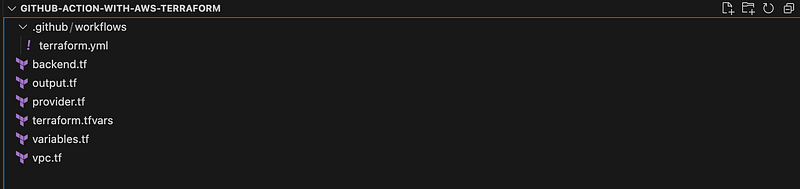
The folder structure is as below:
Below are the credentials required :

  • AWS Credentials : Assuming we have AWS_ACCESS_KEY_ID and AWS_SECRET_ACCESS_KEY environment variables are used to authenticate with AWS services
  • Terraform API token : TF_API_TOKEN an environment variable is used to authenticate with Terraform Cloud or Terraform Enterprise

1- Configuring terraform Workspace:

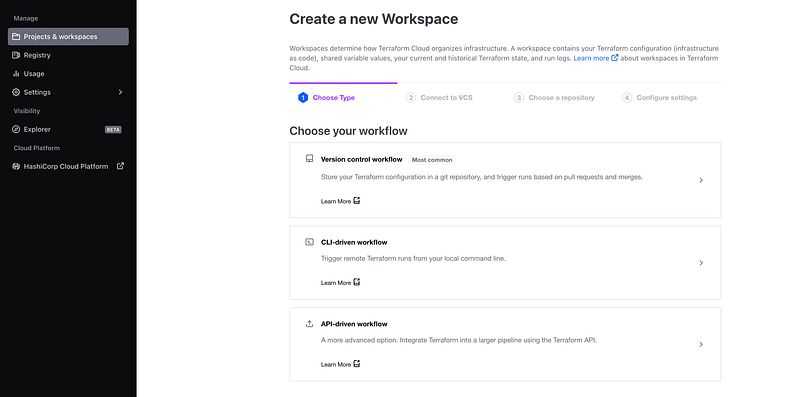
To create a Terraform workspace on Terraform Cloud. Click the Workspaces tab and Click the Create Workspace button. Select: API-driven workflow
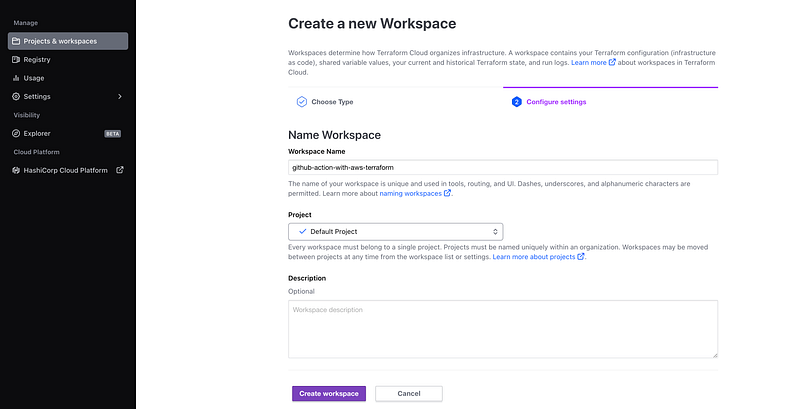
Enter a name for the workspace and Click the Create button.
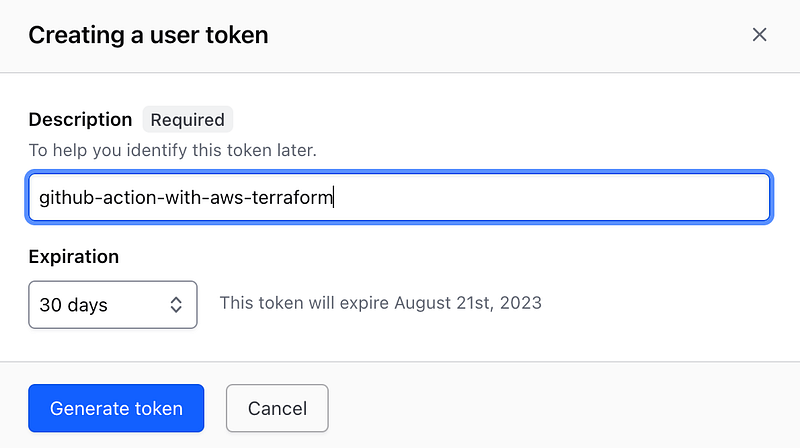
Also, you need the token to authenticate with Terraform Cloud
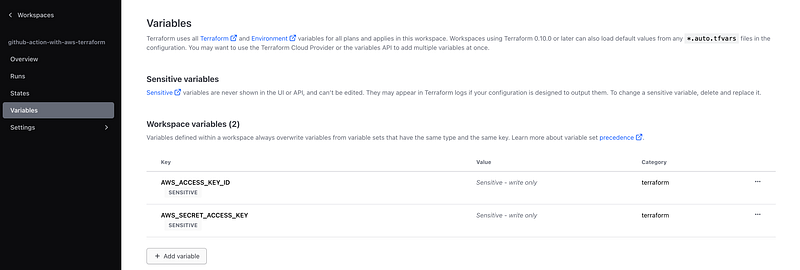
You need to add the AWS credentials in Terraform workspace.
2- Configuring Repos:

  • Configure terraform Workflow: To create a GitHub Terraform Workflow, access the “Actions” tab on your GitHub repository (First create the new empty repo) and search for “terraform” as shown in the below image.
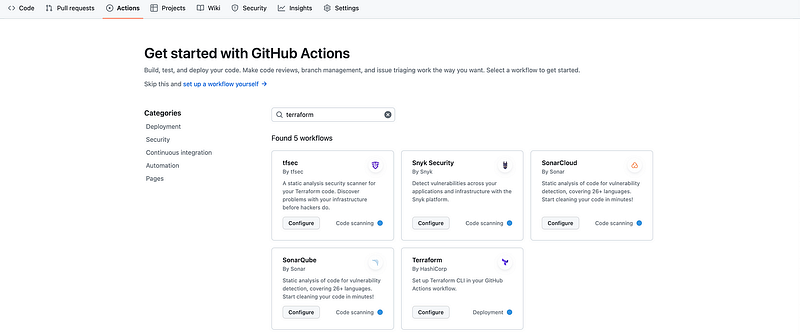
To configure Terraform by HashiCorp, click the “Configure” button, which will open a new window presenting a template for integration.

The initial workflow file will be presented as follows:
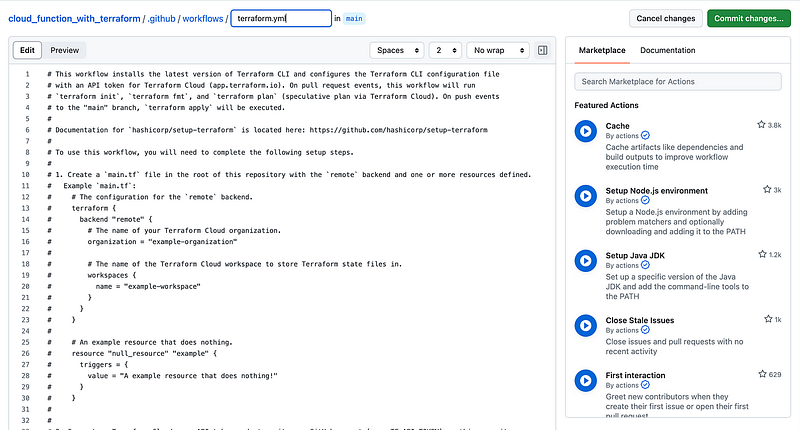
Examine the initial workflow file that is provided and, if suitable, accept it as the foundation for your integration.

Click “Start Commit” to proceed with the integration process.

# This workflow installs the latest version of Terraform CLI and configures the Terraform CLI configuration file
# with an API token for Terraform Cloud (app.terraform.io). On pull request events, this workflow will run
# `terraform init`, `terraform fmt`, and `terraform plan` (speculative plan via Terraform Cloud). On push events
# to the "main" branch, `terraform apply` will be executed.
#
# Documentation for `hashicorp/setup-terraform` is located here: https://github.com/hashicorp/setup-terraform
#
# To use this workflow, you will need to complete the following setup steps.
#
# 1. Create a `main.tf` file in the root of this repository with the `remote` backend and one or more resources defined.
#   Example `main.tf`:
#     # The configuration for the `remote` backend.
#     terraform {
#       backend "remote" {
#         # The name of your Terraform Cloud organization.
#         organization = "example-organization"
#
#         # The name of the Terraform Cloud workspace to store Terraform state files in.
#         workspaces {
#           name = "example-workspace"
#         }
#       }
#     }
#
#     # An example resource that does nothing.
#     resource "null_resource" "example" {
#       triggers = {
#         value = "A example resource that does nothing!"
#       }
#     }
#
#
# 2. Generate a Terraform Cloud user API token and store it as a GitHub secret (e.g. TF_API_TOKEN) on this repository.
#   Documentation:
#     - https://www.terraform.io/docs/cloud/users-teams-organizations/api-tokens.html
#     - https://help.github.com/en/actions/configuring-and-managing-workflows/creating-and-storing-encrypted-secrets
#
# 3. Reference the GitHub secret in step using the `hashicorp/setup-terraform` GitHub Action.
#   Example:
#     - name: Setup Terraform
#       uses: hashicorp/setup-terraform@v1
#       with:
#         cli_config_credentials_token: ${{ secrets.TF_API_TOKEN }}

name: 'Terraform'

on:
  push:
    branches: [ "main" ]
  pull_request:

permissions:
  contents: read

jobs:
  terraform:
    name: 'Terraform'
    runs-on: ubuntu-latest
    environment: production
    # #Enable the below env once secrets are udpate in github and terraform workspace
    # env:
    #   AWS_ACCESS_KEY_ID: ${{ secrets.AWS_ACCESS_KEY_ID}}
    #   AWS_SECRET_ACCESS_KEY: ${{ secrets.AWS_SECRET_ACCESS_KEY}}


    # Use the Bash shell regardless whether the GitHub Actions runner is ubuntu-latest, macos-latest, or windows-latest
    defaults:
      run:
        shell: bash

    steps:
    # Checkout the repository to the GitHub Actions runner
    - name: Checkout
      uses: actions/checkout@v3

    # Install the latest version of Terraform CLI and configure the Terraform CLI configuration file with a Terraform Cloud user API token
    - name: Setup Terraform
      uses: hashicorp/setup-terraform@v1
      with:
        cli_config_credentials_token: ${{ secrets.TF_API_TOKEN }}

    # Initialize a new or existing Terraform working directory by creating initial files, loading any remote state, downloading modules, etc.
    - name: Terraform Init
      run: terraform init

    # Checks that all Terraform configuration files adhere to a canonical format
    - name: Terraform Format
      run: terraform fmt -check

    # Generates an execution plan for Terraform
    - name: Terraform Plan
      run: terraform plan -input=false

      # On push to "main", build or change infrastructure according to Terraform configuration files
      # Note: It is recommended to set up a required "strict" status check in your repository for "Terraform Cloud". See the documentation on "strict" required status checks for more information: https://help.github.com/en/github/administering-a-repository/types-of-required-status-checks
    - name: Terraform Apply
      if: github.ref == 'refs/heads/main' && github.event_name == 'push'
      run: terraform apply -auto-approve -input=false

3- Configure secret on GitHub Action:

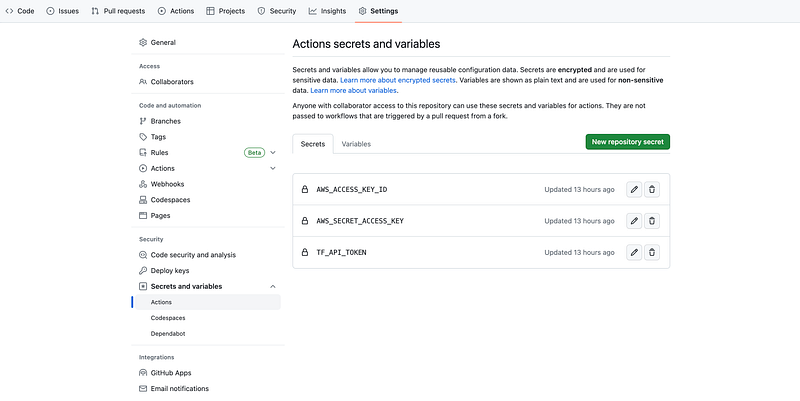
The next step is to use the AWS_ACCESS_KEY_ID and AWS_SECRET_ACCESS_KEY credentials and create a secret named AWS_ACCESS_KEY_ID and AWS_SECRET_ACCESS_KEYin your GitHub repository. Also, add TF_API_TOKEN fetch from Terraform workspace
4- terraform file:

The terraform files to create the resources are as below.

  • provider.tf To declare the connection to the AWS Provider in Terraform, you need to specify the provider block in your Terraform configuration file.
terraform {
  required_providers {
    aws = {
      source  = "hashicorp/aws"
      version = ">= 5.5.0"
    }
  }
  required_version = ">= 0.13"
}


provider "aws" {
  region = "us-east-1"
  #   access_key = var.aws_access_key
  #   secret_key = var.aws_secret_key
}
  • variables.tf Declare the variables used in the Terraform files.
#### VPC Variables defined #######

variable "vpc_name" {
  type        = string
  description = "Name to be used on all the resources as identifier"
}
variable "public_subnets" {
  type        = list(string)
  description = "A list of public subnets inside the VPC"
  default     = ["10.0.101.0/24", "10.0.102.0/24", "10.0.103.0/24"]
}
variable "private_subnets" {
  type        = list(string)
  description = "A list of private subnets inside the VPC"
  default     = ["10.0.1.0/24", "10.0.2.0/24", "10.0.3.0/24"]
}

variable "azs" {
  type        = list(string)
  description = "A list of availability zones specified as argument to this module"
  default     = ["us-east-1a", "us-east-1b", "us-east-1c"]
}
variable "enable_nat_gateway" {
  type        = bool
  description = "Should be true if you want to provision NAT Gateways for each of your private networks"
  default     = "false"
}
variable "enable_vpn_gateway" {
  type        = bool
  description = "Should be true if you want to create a new VPN Gateway resource and attach it to the VPC"
  default     = "false"
}

variable "one_nat_gateway_per_az" {
  type        = bool
  description = "Should be true if you want only one NAT Gateway per availability zone"
  default     = "false"
}
variable "enable_dns_hostnames" {
  type        = bool
  description = "Should be true to enable DNS hostnames in the VPC"
  default     = "true"
}
variable "enable_dns_support" {
  type        = bool
  description = "Should be true to enable DNS support in the VPC"
  default     = "true"
}
variable "vpc_tags" {
  type = map(string)
  default = {
    Terraform   = "true"
    Environment = "dev"
  }
}
  • backend.tf To configure the backend for storing and retrieving the Terraform state.
terraform {
  cloud {
    organization = "raysaini19"

    workspaces {
      name = "github-action-with-aws-terraform"
    }
  }
}
  • terraform.tfvars: To define input variables and their values for vpc
#### VPC ###
vpc_name           = "github-action-vpc"
enable_nat_gateway = true
enable_vpn_gateway = true
  • vpc.tf To provision a VPC in AWS.
module "vpc" {
  source  = "terraform-aws-modules/vpc/aws"
  version = "5.0.0"

  name = var.vpc_name
  cidr = "10.0.0.0/16"

  azs             = var.azs
  private_subnets = var.private_subnets
  public_subnets  = var.public_subnets

  enable_nat_gateway     = var.enable_nat_gateway
  enable_vpn_gateway     = var.enable_vpn_gateway
  one_nat_gateway_per_az = var.one_nat_gateway_per_az

  enable_dns_hostnames = var.enable_dns_hostnames
  enable_dns_support   = var.enable_dns_support

  tags = var.vpc_tags
}
  • output.tf To define outputs that can be retrieved after applying your Terraform configuration
output "vpc_id" {
  value       = module.vpc.vpc_id
  description = "VPC ID"
}
output "public_subnets" {
  value       = module.vpc.public_subnets
  description = "VPC public subnets' IDs list"
}
output "private_subnets" {
  value       = module.vpc.private_subnets
  description = "VPC private subnets' IDs list"
}

When a new commit containing files is pushed to the GitHub repository, the GitHub workflow will be triggered, and the Terraform actions defined in the workflow will be executed.

Observation:

Github action workflow:

terraform workspace pipeline:

Terraform state file:

5- Destroy:

To destroy Terraform-provisioned infrastructure. Comment out the main.tf

Optional: Terraform Checks in Github Actions Using Terraform tools :

Integrate Terraform checks into a GitHub Actions workflow, enhancing the quality of Terraform projects.

I trust that you have found this user-friendly.

Please share your thoughts and experiences after following the steps outlined. Your feedback is valuable and helps us improve the quality.

Topics:

Do not forget the 👏✌️❤️ if you like this content! Also, I will be glad if you hit the follow button so you get notified of my new posts.

You can also follow me on LinkedIn!

Thank you!

DevOps
Terraform
AWS
Github Actions
Infrastructure
Recommended from ReadMedium