avatarBill WANG

Free AI web copilot to create summaries, insights and extended knowledge, download it at here

1457

Abstract

e second stage of our discussion on <a href="https://readmedium.com/implement-cis-hardening-build-kit-on-rhel9-stage-1-85cc489a708e">performing hardening using the CIS build kit</a>, with a specific focus on security vulnerability scan reports. This information isn’t limited to CIS paying users; it’s relevant to all AWS clients who seek to obtain security vulnerability scan reports for their EC2 instances.</p><p id="98b6">In my case, I am currently working on an AWS hardening report, I use AWS managed service, called <a href="https://docs.aws.amazon.com/inspector/v2/APIReference/Welcome.html"><b>Inspector v2</b></a>. If your situation involves different public cloud providers or if your company has license on other scan tools , such as Qualys (<a href="https://www.qualys.com/">https://www.qualys.com/</a>), you should be able to contact them to obtain a similar report as well.</p><h1 id="a1f1">Review scan report in AWS Inspector v2</h1><p id="7d98">Recommend to compare the differences before and after hardening, you can run the scan before hardening and check again after hardening.</p><ul><li>Before hardening, get the current latest RHEL 9 AMI Image id, it is</li></ul><div id="ff77"><pre>ami-062680d0a2ee357d0</pre></div><p id="b8ac">Use this AMI to create a new AWS ec2 instance directly, and wait for the Inspector scan report.</p><p id="c323">Notes: when create the instance, make sure it is <b>SSM agent enabled</b>, which need a specia

Options

l IAM policy <code>AmazonSSMManagedInstanceCore</code>assigned in its IAM instance profile</p><figure id="f80c"><img src="https://cdn-images-1.readmedium.com/v2/resize:fit:800/1*kSRYapf7IUjdz1lf_iVGSg.png"><figcaption></figcaption></figure><ul><li>create another instance from above AMI, run the hardening script with <code>yum update</code>as well. After hardening, wait for Inspector v2 report</li></ul><p id="9f22">You will see the report in critical and high are reduced.</p><h2 id="3103">Images before yum update and CIS hardening</h2><figure id="6921"><img src="https://cdn-images-1.readmedium.com/v2/resize:fit:800/1*_it56nmH92dSogdDiFtEcQ.png"><figcaption></figcaption></figure><h2 id="2ead">Images after CIS hardening</h2><p id="18f5">If there is no fingings on that instance, you would not see it in Inspector <code>Findings: By instance</code> list, it still appeared in Inspector <code>Account management, instance, scanning</code> list</p><figure id="a1ac"><img src="https://cdn-images-1.readmedium.com/v2/resize:fit:800/1*mO3KrmjAcnQqObxo0DGi3A.png"><figcaption></figcaption></figure><p id="a3a7">Sometime, you can’t get any report from the instance which has been hardening. That means no findings found. This makes me confused at beginning, because I don’t know if the inspector did the scan or not. I have reported to AWS and ask for improvement, such as, still report it, with 0 item. but we need wait for this feature.</p></article></body>

Review scan report with AWS Inspector V2 — Stage 2

Follow up on my Virtual machine blogs about

Several series for the topic:

  • Stage 1 — implement CIS hardeing, this is discussed (in this blog)
  • Stage 2 — Review scan report with AWS Inspector V2 after CIS hardening in this blog

This marks the second stage of our discussion on performing hardening using the CIS build kit, with a specific focus on security vulnerability scan reports. This information isn’t limited to CIS paying users; it’s relevant to all AWS clients who seek to obtain security vulnerability scan reports for their EC2 instances.

In my case, I am currently working on an AWS hardening report, I use AWS managed service, called Inspector v2. If your situation involves different public cloud providers or if your company has license on other scan tools , such as Qualys (https://www.qualys.com/), you should be able to contact them to obtain a similar report as well.

Review scan report in AWS Inspector v2

Recommend to compare the differences before and after hardening, you can run the scan before hardening and check again after hardening.

  • Before hardening, get the current latest RHEL 9 AMI Image id, it is
ami-062680d0a2ee357d0

Use this AMI to create a new AWS ec2 instance directly, and wait for the Inspector scan report.

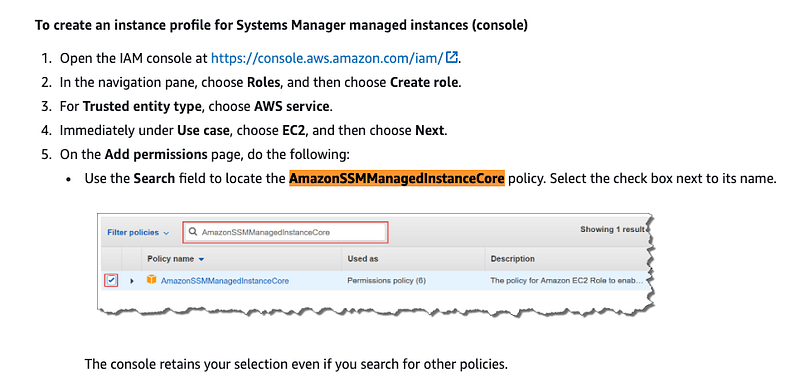
Notes: when create the instance, make sure it is SSM agent enabled, which need a special IAM policy AmazonSSMManagedInstanceCoreassigned in its IAM instance profile
  • create another instance from above AMI, run the hardening script with yum updateas well. After hardening, wait for Inspector v2 report

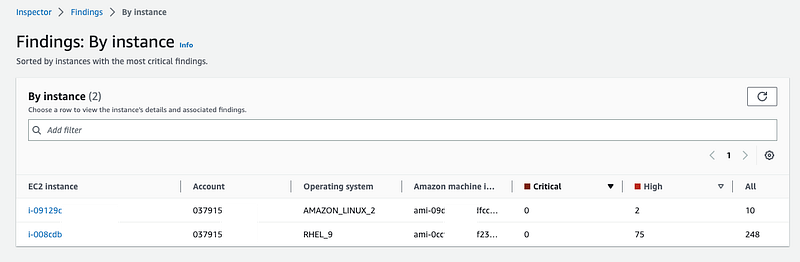
You will see the report in critical and high are reduced.

Images before yum update and CIS hardening
Images after CIS hardening

If there is no fingings on that instance, you would not see it in Inspector Findings: By instance list, it still appeared in Inspector Account management, instance, scanning list
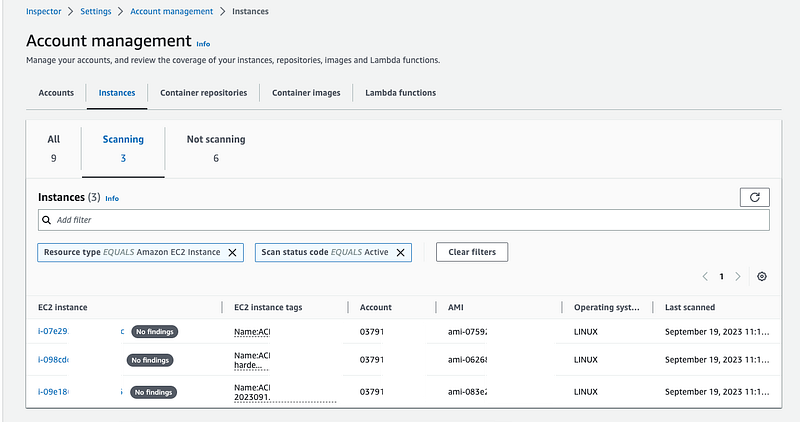
Sometime, you can’t get any report from the instance which has been hardening. That means no findings found. This makes me confused at beginning, because I don’t know if the inspector did the scan or not. I have reported to AWS and ask for improvement, such as, still report it, with 0 item. but we need wait for this feature.

DevOps
AWS
Best Practices
Aws Inspector
Security Vulnerabilities
Recommended from ReadMedium