
React -TypeScript — How to add interface with functional component typed props beginner guide :)
In this article, I’m going to discuss how to add interface with functional component typed props beginner guide :)
Before we start please find below important technologies definitions
PropTypes
PropTypes are a mechanism to ensure that components use the correct data type and pass the right data, and that components use the right type of props, and that receiving components receive the right type of props.
Basic Prop Types Examples
Download tools :
- Node — https://nodejs.org/en/download/ —
- Visual Studio or any editor for coding —
- Chrome browser
- React version → > 16.8
Let’s Start
STEP 1
Open any existing project with functional component . Here i am using newly setup react project with typescript.
or
if you want to learn how to setup or install typescript with create react app — please follow this link https://kirtikau.medium.com/how-to-install-typescript-with-cra-create-react-app-beginner-guide-1e11a9579c83
STEP 2
Open the App.js
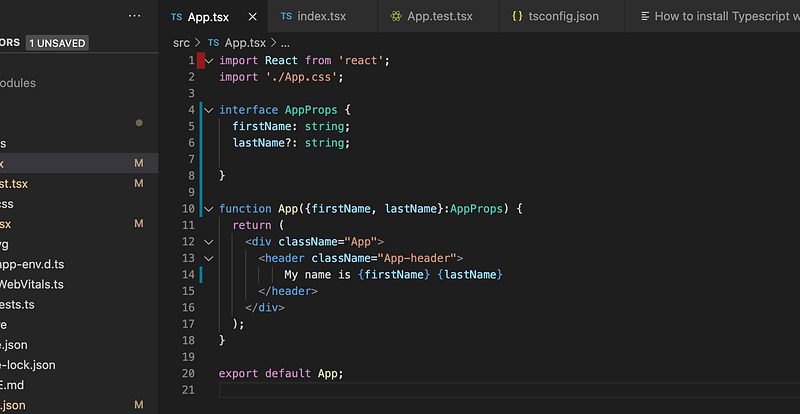
For example, let’s annotate a component App that accepts 2 props:
firstName (a string) — mandatory and lastName (a string) — optional
Declaring Type of Props : You can use type or interface.
Here for example — firstName is the mandatory and lastName is optional
Note : If you declare the interface with special symbol ?means it is optional.
interface AppProps {
       firstName: string;
       lastName?: string;
  }
function App({firstName, lastName}:AppProps) {return (<div className="App"><header className="App-header">My name is {firstName} {lastName}</header></div>);}

STEP 3
Now when render the component, you would have to set the prop values according to the props type.
Here open the index.js
ReactDOM.render(<React.StrictMode><App firstName ={'kirti '} /><App firstName ={'kirti '} lastName={'kaushal'} /></React.StrictMode>,document.getElementById('root'));STEP 4
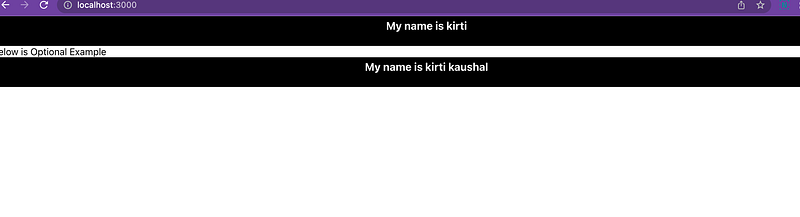
Run your project and navigate to http://localhost:3000 to check the result .
STEP 5 : Props validation
Let’s provide the component with the wrong set of props, or wrong value types, then TypeScript will warn you at compile time about the wrong prop value.
Here as example —
passing firstName as 1 (integer) not a string so you will get error as below

Conclusion
Typing components is especially useful to validate the component props. And it help earlier to validate the component.
This is the explanatory medium story of How to add interface in functional component If you have any doubts, please mail me at [email protected]
Source Code —
Other Articles — Please follow me below
Share knowledge and kind is cool :)
Happy Learning Stay Safe :)


