
How to Use and Implement Context and useContext Hook with example React Hook’s — Beginner Guide
In this tutorial, we’ll be learning How to Use and Implement Context and useContext Hooks with example React’s Hooks

Before we start please find below the important definitions:
Hooks — Hooks are a new addition in React 16.8. They let you use state and other React features without writing a class.
a) Context — Context provides a way to pass data through the component tree without having to pass props down manually at every level. Context provides a way to share values like these between components without having to explicitly pass a prop through every level of the tree.
When to Use Context
When you need to share data globally like current authenticated user, theme, or preferred language.
Advantages
we can avoid passing props through intermediate elements
b) useContext — Accepts a context object (the value returned from React.createContext) and returns the current context value for that context.
A component calling
useContextwill always re-render when the context value changes.
Note: If re-rendering the component is expensive, you can optimize memorization.
Prerequisites :
Download software’s
Node.js (Version 8 or newer) — https://nodejs.org/en/download/
Chrome — https://www.google.com/chrome/
Visual Studio Code (you can use any other editor or IDE
Getting Started
Set up a Create React App
1 ) Create a new React Application running the following commands in your command terminal
Check out https://create-react-app.dev/docs/getting-started/ if need more info for the below commands
npx create-react-app create-react-app-context
cd create-react-app-context
yarn start
Then open http://localhost:3000/ to see your app and you will see the app in the browser as below

2) Once the application is created,
You should have an App.js file already generated inside the src/ folder
When to Use Context
Context is designed to share data that can be considered “global” for a tree of React components, such as the current authenticated user, theme, or preferred language.
3) Step 1 - Create a Context component
create two new files named theme-context.js and lang-context.js
In src/ create a theme-context.js and lang-context.js
React.createContext
Creates a Context object. When React renders a component that subscribes to this Context object it will read the current context value from the closest matching
Providerabove it in the tree.
Note:
a) The
defaultValuethe argument is only used when a component does not have a matching Provider above it in the tree.
b) passing
undefinedas a Provider value does not cause consuming components to usedefaultValue.
a)theme-context.js — —
You can see the default value example as below file

b) lang-context.js — -
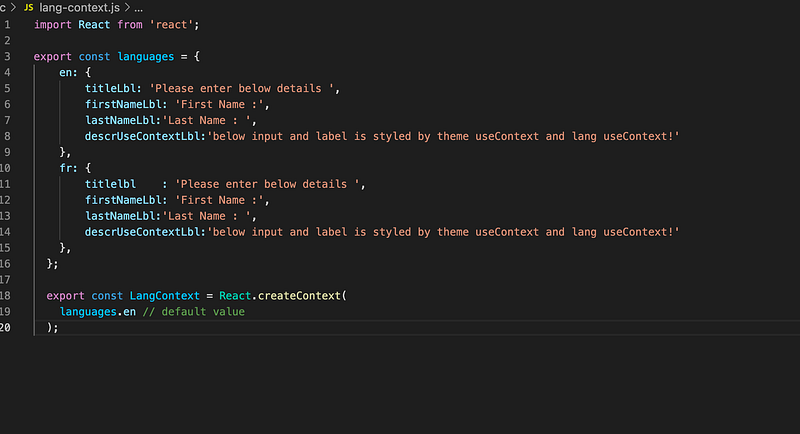
Note :
Using context, we can avoid passing props through intermediate elements
Context.Provider
Every Context object comes with a Provider React component that allows consuming components to subscribe to context changes.
All consumers that are descendants of a Provider will re-render whenever the Provider’s value prop changes. The propagation from Provider to its descendant consumers (including .contextType and useContext)
4) STEP 2 — USE Context Provider
In src/ open the index.js and add the ThemContext Provider with themes.light value

Context.Consumer
A React component that subscribes to context changes. Using this component lets you subscribe to a context within a functional component
4) STEP 3: Let’s Consume it
In src/ open the ThemeTypo.js and add the below code to consume it
ThemedTypo

Open the browser and you will see below screen

4) ThemedInput —
We can also consume default value without provider :)

HOOKS — UseContext Example
5) UseContext hook Example —
useContext
const value = useContext(MyContext);Accepts a context object (the value returned from React.createContext) and returns the current context value for that context. The current context value is determined by the value prop of the nearest <MyContext.Provider> above the calling component in the tree.
Open the User.js and add useContext hook in your file as below
here you will find-lang for the first name and Lastname is implemented by useContext.

6) App.js- is showing how to use ThemeTypo as an independent component.

Please follow the official links
Github code -
Conclusion:
This is the explanatory medium story of How to Use and Implement Context and useContext Hook with example React Hook’s — Beginner Guide if you have any doubts, please mail me at [email protected]
Happy learning and Stay Safe.
Please find my few more articles :)


