avatarClive Wilson

Free AI web copilot to create summaries, insights and extended knowledge, download it at here

6557

Abstract

nt? Which one is the most appropriate? Google won’t show both because that’s a waste of space when screen space is already so limited, and showing both would serve only to confuse, anyway.</p><p id="c6c3">For this reason, Google really doesn’t like duplicate content, but it won’t tell you it found two (or more) versions. Instead, it will show the searcher only one — the one of its choosing, and ignore the others. Not just ignore them, but not even index them, as though they don’t exist. This is not good for people wanting to drive traffic (visitors/readers) to their own website AND be able to publish elsewhere too.</p><p id="cf31"><b>Here’s how canonical linking works: </b>If you have two or more versions of the same article, decide which is to be your ‘primary’ article. It can be difficult as you may be among them at different audiences, but not everything in this world has a perfect solution. Look at a hot, sunny day and ice cream.</p><p id="e7f2"><b>Scenario one: </b>You have published one article in two different locations; Medium and your own website, and you have decided you want Medium to be the primary source of your article — the one Google will add to its index.</p><p id="f25f">On your own website, the individual article page (the ‘secondary’ version), you’ll need to enter the full web address (URL) of the Medium article (the ‘primary’ version). This way, when Google discovers both versions it will choose to index your Medium article and present that in search results, and will not be confused by the second version. Google is a happy bunny.</p><p id="6a58"><b>Scenario two: </b>You have published one article in two different locations; Medium and your own website, and you have decided you want your own website to be the primary source of your article — the one Google will add to its index.</p><p id="9591">Medium is aware that you may want to use its platform to share content with your followers, but that you may also have a different audience for content on your own website, so they have kindly included a canonical link feature that enables you to enter the address of your ‘primary’ article if you have decided you want the Medium version to be ‘secondary’.</p><h2 id="c4f0">Here’s how to set the canonical link:</h2><ol><li>First, publish your new article on your own website.</li><li>Copy the URL (the full web address, include <a href="https://www">https://www</a>.) of the article from your website.</li><li>Publish the same article on Medium. <b>But</b>… you must add a footnote saying ‘Originally published on yourwebsite.com’ (with a link to your website/blog section/article). If you don’t do this the editors will see the original too, believe the Medium version is plagiarising the original, and reject it.</li><li>On your medium article go to; Story settings, Advanced settings, tick Customize Canonical Link (you can do this before or after it’s published).</li><li>Paste-in the direct link (in point 2) from the version on your website.</li></ol><p id="8808">The reason for point 3 is to let Medium/the editor know you’re publishing a copy. The reason for point 4 is to let Google know your website version is the primary version.</p><figure id="fd8c"><img src="https://cdn-images-1.readmedium.com/v2/resize:fit:800/1*qIZ3Ecm8kTz201lIyF_uWw.png"><figcaption></figcaption></figure><h1 id="9d08">Plagiarism</h1><p id="ce34" type="7">“Plagiarism is the practice of taking someone else’s work or ideas and passing them off as one’s own.”</p><p id="0050">Medium defines it as:</p><p id="ab07" type="7">“…as any act of taking the words and/or ideas of others and presenting them as original or without proper acknowledgement or permission.”</p><p id="e111">Play-ja-rism is most commonly seen in website development, where entire sections of content are copied and pasted from one website to another. It happens because the originating website has great quality content, written by skilled copywriters, and it saves the owner of the new website having to pay a copywriter to create new content.</p><p id="16d4">However, it happens on Medium too where authors take content written and published by someone else and copy part or all of it into a Medium draft, and either self-publish or submit it to a publication.</p><p id="4594">Wilful plagiarism is a disgusting business. It’s incredibly unprofessional, it’s lazy and is likely to break copyright laws, giving rise to legal possible action.</p><h2 id="d23b">How to not get caught up in plagiarism</h2><p id="ea2c">It’s simple. Write your own fresh, unique content. Don’t be afraid to use other people’s content as inspiration and for guidance, facts and figures, but do not blatantly steal their content.</p><p id="6431">If you want to use something specifically from someone else’s article, whether it’s text, a quote, an image, a chart, etc., contact them, explain why you want to use something and for what purpose, and get their written permission to do so. If you include certain elements (and these should not be large blocks of text) cite the permission and original source location in your article.</p><p id="30d5">Read and understand Medium’s ‘<a href="https://help.medium.com/hc/en-us/articles/360041640213-Plagiarism-Guidelines">Plagiarism Guidelines</a></p><figure id="edb9"><img src="https://cdn-images-1.readmedium.com/v2/resize:fit:800/1*qIZ3Ecm8kTz201lIyF_uWw.png"><figcaption></figcaption></figure><h1 id="51dd">Additional settings</h1><p id="ed36">The ‘Addition Settings’ menu is a bit of a mystery to some people, but it’s full of useful things to know and do that you should become familiar with, especially when you’re ready to publish (or submit) an article.</p><figure id="a841"><img src="https://cdn-images-1.readmedium.com/v2/resize:fit:800/1*A8WUewbiEl7zl18AOyEGyw.png"><figcaption></figcaption></figure><p id="a075">With an article in draft mode, click the three dots top-right between the Publish button and your profile icon.</p><p id="68e0">The menu provides additional functionality for your article, including a way for you to enter details that will help search engines find your article.</p><p id="35b6">You can also enter the category tags you’d like to use for the article that helps Medium users find your article.</p><p id="fcb6"><b>TIP:</b> People who have a free Medium account and only occasionally read articles are subject to a limit of three free article reads per month. If you’d like to share your article with friends who use a free account you will see a ‘friends’ link menu item in Additional Settings, o

Options

nce your article has been published. Share the link with them and they’ll be able to read your article even if they have reached their monthly limit.</p><figure id="d1aa"><img src="https://cdn-images-1.readmedium.com/v2/resize:fit:800/1*qIZ3Ecm8kTz201lIyF_uWw.png"><figcaption></figcaption></figure><h1 id="b5a4">Pre-flight checks</h1><p id="8e7e">Before an aircraft takes off, the captain and first officer run through a final pre-flight procedure to recheck the things they’ve previously checked. For them, it could be the difference between life and death.</p><p id="9792">Now, nobody will die if you accidentally screw-up an article, but running through your own ‘pre-flight check’ before you press the submit button is always worth the time and effort, especially if you’re submitting to a publication. The more you check and correct, the more chance you’ll have of your article being published.</p><figure id="f7d2"><img src="https://cdn-images-1.readmedium.com/v2/resize:fit:800/1*qIZ3Ecm8kTz201lIyF_uWw.png"><figcaption></figcaption></figure><h1 id="b16d">Looking after your editors.</h1><p id="9f02">Everything in this seven-part series will help you create and present clean, easy to read, engaging articles. It will also make reviewing your content prior to publishing much easier for the publication editor.</p><p id="c472">Remember; the more difficult you make it for the editors, or the harder you make them work to get your article up to the required standard, the longer it’ll take to get published. Nobody enjoys being at the back of the queue.</p><figure id="1ffd"><img src="https://cdn-images-1.readmedium.com/v2/resize:fit:800/1*qIZ3Ecm8kTz201lIyF_uWw.png"><figcaption></figcaption></figure><h2 id="ac12">Summary — part seven</h2><p id="8bee">There is so much good content out there in books, newspapers, articles and other sources, that it’s no wonder there’s some duplication. And it’s also a testament to our staggering ingenuity that we’re individually able to piece together the same few thousand words in a different order to make millions upon millions of unique pieces of content, and we have been doing so for millennia.</p><p id="1187">There’s no reason to stop now, but be judicious with what you create from what inspires you.</p><figure id="cb90"><img src="https://cdn-images-1.readmedium.com/v2/resize:fit:800/1*qIZ3Ecm8kTz201lIyF_uWw.png"><figcaption></figcaption></figure><h1 id="06a1">Seven-Part Series Conclusion</h1><p id="a7fd">Writing is a journey we’re all on. It’s easy for some, and tough for others, but we rarely run out of ideas because life’s rich tapestry is exactly that — rich.</p><p id="0343">Occasionally the newest writers create something so profound and thought-provoking, it has the professionals quaking in their boots. All it needs is observation, experiences, insight, thought and a keyboard — a burning desire to get it out there so we can all read it.</p><p id="0ba2">Medium is an incredible platform on which to begin and/or continue your journey into writing, and we are privileged to have so many people involved in making it work for us, every single day — those nice Medium people.</p><p id="e1e8">Ideas are everywhere. Wherever you are, whatever you’re doing, keep a physical or digital notepad with you at all times. You never know where the next lightning bolt of inspiration will come from.</p><p id="1855">I wish you the very best of luck and good fortune on your journey.</p><figure id="655b"><img src="https://cdn-images-1.readmedium.com/v2/resize:fit:800/1*qIZ3Ecm8kTz201lIyF_uWw.png"><figcaption></figcaption></figure><h1 id="614e">Series links:</h1><blockquote id="c185"><p><a href="https://readmedium.com/part-1-creating-better-content-your-why-journey-editors-challenges-and-why-are-you-writing-562006343f75"><b><i>Part 1. </i></b><i>Your ‘Why’ Journey, Editors’ Challenges, and Why Are You Writing?</i></a></p></blockquote><blockquote id="312d"><p><a href="https://readmedium.com/creating-better-content-publishing-options-writing-spelling-punctuation-and-capitalization-92cd909724c9"><b><i>Part 2.</i></b><i> Self-publishing vs Publications, The Challenge of Good Writing, plus Language, Spelling, Punctuation and Capitalisation.</i></a></p></blockquote><blockquote id="1016"><p><a href="https://readmedium.com/part-3-creating-better-content-grammar-using-the-right-words-and-online-tools-156af305c0ea"><b><i>Part 3.</i></b><i> Grammar, Using The Right Words, and Online Tools</i></a></p></blockquote><blockquote id="f208"><p><a href="https://medium.com/technical-excellence/part-4-creating-better-content-outline-and-structure-clich%C3%A9s-and-jargon-audience-editing-and-afe190e74a80"><b><i>Part 4.</i></b><i> Outline and Structure, Clichés and Jargon, Audience, Editing and Reading Aloud</i></a></p></blockquote><blockquote id="7278"><p><a href="https://readmedium.com/creating-better-content-page-structure-and-styling-main-headings-and-subheadings-and-using-314cfa7b185f"><b><i>Part 5. </i></b><i>Page Structure and Styling, Main Headings and Subheadings, and Using images</i></a></p></blockquote><blockquote id="1d42"><p><a href="https://readmedium.com/part-6-creating-better-content-photos-and-graphics-weblinks-67ac6458dc6b"><b><i>Part 6.</i></b><i> Photos and Graphics, Weblinks</i></a></p></blockquote><blockquote id="e448"><p><a href="https://readmedium.com/part-7-creating-better-content-duplicate-content-and-plagiarism-additional-settings-pre-flight-309aafcab5c3"><b><i>Part 7.</i></b><i> Duplicate Content and Plagiarism, Additional Settings, Pre-Flight Checks, Looking After your Editors</i></a></p></blockquote><figure id="cdcc"><img src="https://cdn-images-1.readmedium.com/v2/resize:fit:800/1*qIZ3Ecm8kTz201lIyF_uWw.png"><figcaption></figcaption></figure><h2 id="74ec">About the author: Clive Wilson</h2><div id="35c5" class="link-block"> <a href="https://readmedium.com/an-introduction-from-clive-wilson-f6adac5d15e7"> <div> <div> <h2>A bit about Clive Wilson</h2> <div><h3>From school dunce to Mission Impossible and beyond</h3></div> <div><p>medium.com</p></div> </div> <div> <div style="background-image: url(https://miro.readmedium.com/v2/resize:fit:320/1*DQGhE1sUZAqgEjzx_VS0xA.jpeg)"></div> </div> </div> </a> </div><figure id="c725"><img src="https://cdn-images-1.readmedium.com/v2/resize:fit:800/1*qIZ3Ecm8kTz201lIyF_uWw.png"><figcaption></figcaption></figure></article></body>

CREATING BETTER CONTENT: SEVEN-PART SERIES

Part 7. Creating Better Content: Duplicate Content and Plagiarism, Additional Settings, Pre-Flight Checks, Looking After your Editors

A seven-part series that explains why it’s important to create your best content, not just any content
Photo by Calum MacAulay on Unsplash

In parts one, two, three, four, five and six of this series, we’ve covered; Beginning your journey, The challenges editors face, Why You’re writing, Self-publishing vs publications, The challenge of good writing, plus Language, spelling, punctuation and capitalisation, Understanding grammar, Using the right words, Online tools to aid your writing, Creating your content, Page structure and styling, and Photos, graphics and Web links.

In this final article, part seven, we’ll look at Duplicate content and plagiarism, Additional settings, Pre-flight checks and Looking after your editors.

Duplicate content and plagiarism

Creative types like to create. We find platforms to upload our content to so others can see and enjoy what we do. As writers, in particular, this may be your own website, LinkedIn, Medium, Vocal Media, NewsBreak or any one of many others. It’s great that we can do that, but it can be problematic.

It’s important to understand the difference between Duplicate content and plagiarism if you want to avoid their deadly traps.

Duplicate Content — external

An innocent mistake a writer can make when submitting an article to Medium (self-published or to a publication) is that it’s previously published elsewhere online. It may be content they’ve written for their own website or an article published on another platform, such as News Break, Vocal Media, and so on.

It’s an easy mistake, but when it happens, it’s not clear to Medium if the content you’re submitting now is owned by you, or someone else. All they can see is that the content exists elsewhere. And they do check.

If you authored both articles, you simply need to let Medium know. The simplest way is to add a footnote to your article that points to the original article. The text should say something like: “Originally published on yourwebsite.com”, and embed the link to it in the website address (do not paste the entire URL in the footnote). This visual note is specifically to inform Medium or a publication editor that you’re aware there is a previous version published elsewhere which they can check if needs be. Failing to include this notification may prevent your article from being published.

If you didn’t author both articles, that’s a completely different scenario known as plagiarism (see below) and is possibly the quickest way to have your account suspended.

Duplicate Content — internal (within Medium)

A frequently asked question goes something like this; “Can I submit my article to a publication if I have already self-published it?”

An article is a single entity that may exist in multiple locations within Medium at any one time. For example. if you have self-published your article and later submit it to a publication, who accepts and publishes it, the article is no longer self-published, it’s now published in a publication.

If you later request to remove the article from the publication, it will become self-published again and no longer exist within the publication.

What you must never, ever do, is make a copy of your self-published article and submit the copy to one or more publications. You cannot even unlist an article and then create a new version to submit for publication as the original content remains in existence.

Medium’s ‘No Duplicate Content’ rule will not allow:

  • Taking a published story to unlisted, then re-publishing the same content into a new post
  • Republishing a duplicate version of an existing Medium story on Medium
  • Cross-posting stories in publications. If your story is already included in a publication, you may not publish another instance of the same story for inclusion in another publication

Canonical linking

Can-on-ik-al linking is a little techy trick that’s used where you need to let Google know which of the two or more versions of your identical (or near-identical) articles is the one it should add to its search engine listings because it won’t add both.

Here’s why you need to use canonical linking: Google’s sole purpose in life (aside from earning $181 billion dollars in 2020, of course) is to present the most appropriate results that match, as close as it’s possible to be, the search phrase entered in the search bar.

How can it do that if there are two or more versions of the same content? Which one is the most appropriate? Google won’t show both because that’s a waste of space when screen space is already so limited, and showing both would serve only to confuse, anyway.

For this reason, Google really doesn’t like duplicate content, but it won’t tell you it found two (or more) versions. Instead, it will show the searcher only one — the one of its choosing, and ignore the others. Not just ignore them, but not even index them, as though they don’t exist. This is not good for people wanting to drive traffic (visitors/readers) to their own website AND be able to publish elsewhere too.

Here’s how canonical linking works: If you have two or more versions of the same article, decide which is to be your ‘primary’ article. It can be difficult as you may be among them at different audiences, but not everything in this world has a perfect solution. Look at a hot, sunny day and ice cream.

Scenario one: You have published one article in two different locations; Medium and your own website, and you have decided you want Medium to be the primary source of your article — the one Google will add to its index.

On your own website, the individual article page (the ‘secondary’ version), you’ll need to enter the full web address (URL) of the Medium article (the ‘primary’ version). This way, when Google discovers both versions it will choose to index your Medium article and present that in search results, and will not be confused by the second version. Google is a happy bunny.

Scenario two: You have published one article in two different locations; Medium and your own website, and you have decided you want your own website to be the primary source of your article — the one Google will add to its index.

Medium is aware that you may want to use its platform to share content with your followers, but that you may also have a different audience for content on your own website, so they have kindly included a canonical link feature that enables you to enter the address of your ‘primary’ article if you have decided you want the Medium version to be ‘secondary’.

Here’s how to set the canonical link:

  1. First, publish your new article on your own website.
  2. Copy the URL (the full web address, include https://www.) of the article from your website.
  3. Publish the same article on Medium. But… you must add a footnote saying ‘Originally published on yourwebsite.com’ (with a link to your website/blog section/article). If you don’t do this the editors will see the original too, believe the Medium version is plagiarising the original, and reject it.
  4. On your medium article go to; Story settings, Advanced settings, tick Customize Canonical Link (you can do this before or after it’s published).
  5. Paste-in the direct link (in point 2) from the version on your website.

The reason for point 3 is to let Medium/the editor know you’re publishing a copy. The reason for point 4 is to let Google know your website version is the primary version.

Plagiarism

“Plagiarism is the practice of taking someone else’s work or ideas and passing them off as one’s own.”

Medium defines it as:

“…as any act of taking the words and/or ideas of others and presenting them as original or without proper acknowledgement or permission.”

Play-ja-rism is most commonly seen in website development, where entire sections of content are copied and pasted from one website to another. It happens because the originating website has great quality content, written by skilled copywriters, and it saves the owner of the new website having to pay a copywriter to create new content.

However, it happens on Medium too where authors take content written and published by someone else and copy part or all of it into a Medium draft, and either self-publish or submit it to a publication.

Wilful plagiarism is a disgusting business. It’s incredibly unprofessional, it’s lazy and is likely to break copyright laws, giving rise to legal possible action.

How to not get caught up in plagiarism

It’s simple. Write your own fresh, unique content. Don’t be afraid to use other people’s content as inspiration and for guidance, facts and figures, but do not blatantly steal their content.

If you want to use something specifically from someone else’s article, whether it’s text, a quote, an image, a chart, etc., contact them, explain why you want to use something and for what purpose, and get their written permission to do so. If you include certain elements (and these should not be large blocks of text) cite the permission and original source location in your article.

Read and understand Medium’s ‘Plagiarism Guidelines

Additional settings

The ‘Addition Settings’ menu is a bit of a mystery to some people, but it’s full of useful things to know and do that you should become familiar with, especially when you’re ready to publish (or submit) an article.
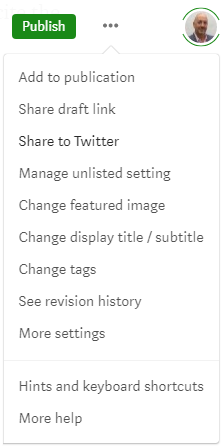
With an article in draft mode, click the three dots top-right between the Publish button and your profile icon.

The menu provides additional functionality for your article, including a way for you to enter details that will help search engines find your article.

You can also enter the category tags you’d like to use for the article that helps Medium users find your article.

TIP: People who have a free Medium account and only occasionally read articles are subject to a limit of three free article reads per month. If you’d like to share your article with friends who use a free account you will see a ‘friends’ link menu item in Additional Settings, once your article has been published. Share the link with them and they’ll be able to read your article even if they have reached their monthly limit.

Pre-flight checks

Before an aircraft takes off, the captain and first officer run through a final pre-flight procedure to recheck the things they’ve previously checked. For them, it could be the difference between life and death.

Now, nobody will die if you accidentally screw-up an article, but running through your own ‘pre-flight check’ before you press the submit button is always worth the time and effort, especially if you’re submitting to a publication. The more you check and correct, the more chance you’ll have of your article being published.

Looking after your editors.

Everything in this seven-part series will help you create and present clean, easy to read, engaging articles. It will also make reviewing your content prior to publishing much easier for the publication editor.

Remember; the more difficult you make it for the editors, or the harder you make them work to get your article up to the required standard, the longer it’ll take to get published. Nobody enjoys being at the back of the queue.

Summary — part seven

There is so much good content out there in books, newspapers, articles and other sources, that it’s no wonder there’s some duplication. And it’s also a testament to our staggering ingenuity that we’re individually able to piece together the same few thousand words in a different order to make millions upon millions of unique pieces of content, and we have been doing so for millennia.

There’s no reason to stop now, but be judicious with what you create from what inspires you.

Seven-Part Series Conclusion

Writing is a journey we’re all on. It’s easy for some, and tough for others, but we rarely run out of ideas because life’s rich tapestry is exactly that — rich.

Occasionally the newest writers create something so profound and thought-provoking, it has the professionals quaking in their boots. All it needs is observation, experiences, insight, thought and a keyboard — a burning desire to get it out there so we can all read it.

Medium is an incredible platform on which to begin and/or continue your journey into writing, and we are privileged to have so many people involved in making it work for us, every single day — those nice Medium people.

Ideas are everywhere. Wherever you are, whatever you’re doing, keep a physical or digital notepad with you at all times. You never know where the next lightning bolt of inspiration will come from.

I wish you the very best of luck and good fortune on your journey.

Series links:

Part 1. Your ‘Why’ Journey, Editors’ Challenges, and Why Are You Writing?

Part 2. Self-publishing vs Publications, The Challenge of Good Writing, plus Language, Spelling, Punctuation and Capitalisation.

Part 3. Grammar, Using The Right Words, and Online Tools

Part 4. Outline and Structure, Clichés and Jargon, Audience, Editing and Reading Aloud

Part 5. Page Structure and Styling, Main Headings and Subheadings, and Using images

Part 6. Photos and Graphics, Weblinks

Part 7. Duplicate Content and Plagiarism, Additional Settings, Pre-Flight Checks, Looking After your Editors

About the author: Clive Wilson

Remote Working
Writing
Content Creation
Business
Marketing
Recommended from ReadMedium