
MQTT QoS
How To Set QoS at Mosquitto Broker — MQTT — Episode #04
What is the objective of the QoS (Quality of Service)?
To guarantee delivery?
Will there be delivery confirmation on the MQTT protocol?
If a positive answer, believe me, we will have more traffic on the network (I will prove it here — hold on!).
By default, MQTT uses QoS 0: Fire and Forget fashion.
Remember, MQTT is over TCP.
TCP is connection-oriented.
TCP provides an error-checking and recovery mechanism.
So far, so good!
But if throughput is not a concern in your IoT device (on rare occasions), extend the QoS levels to your choice:
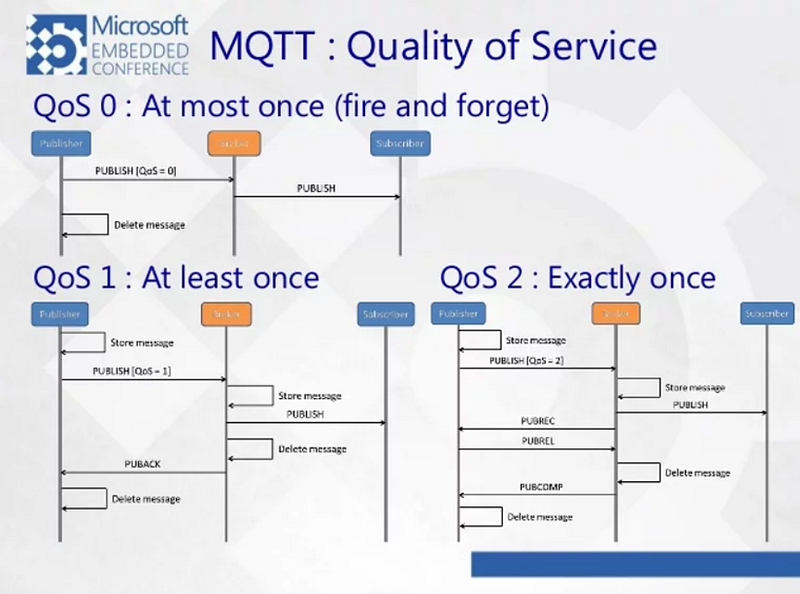
QoS 0: when we prefer that the message will arrive at most once; the message will be received or it won't, there isn't a chance of a duplicate; at most once; fire and forget;QoS 1: when we want the message to arrive at least once but don’t care if it arrives twice (or more); at least once;QoS 2: when we want the message to arrive exactly once. A higher QOS value means a slower transfer; exactly once.See these sentences about MQTT QoS:
If a message is published with QoS 2 and the client is subscribed to a topic with QoS 0, then the message will be delivered to that client with QoS 0;It matches the level of the lowest service requires by the subscriber.
Next, if another customer is subscribed to the same topic, but with QoS 2, he will receive the message with QoS 2;Who should be concerned with the message must be the one who subscribes.
Now, lastly, if a subscriber is registered with QoS 2 and the message is published with QoS 0, the message will be delivered with QoS 0.The subscriber is unable to upgrade the message already posted.
Let’s get down to practice!
01#Step — On Windows, open three prompt Terminals (one as administrator) and type on Terminal #01 (I assumed you follow this MQTT series:)
mosquito - c mosquitto.conf -vAt Terminal #02:
mosquitto_sub -h localhost -p 1883 -u user1 - P 321 -t temperature -q 2And Finally at Terminal #03:
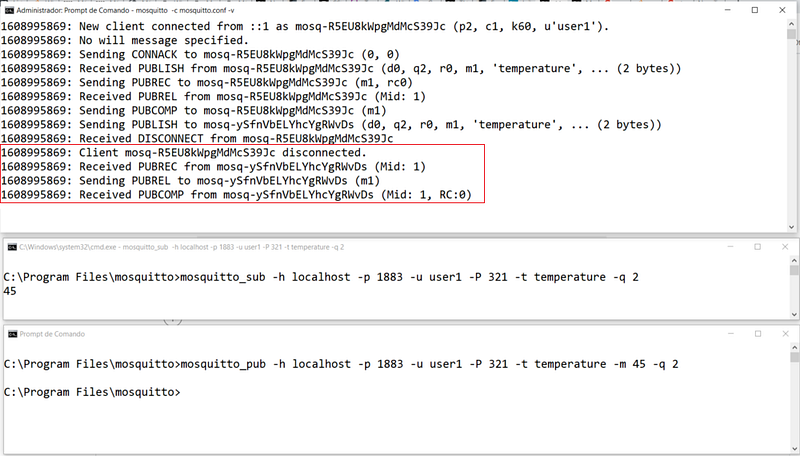
mosquitto_pub -h localhost -p 1883 -u user1 - P 321 -t temperature -m 45 -q 2See everything working below:
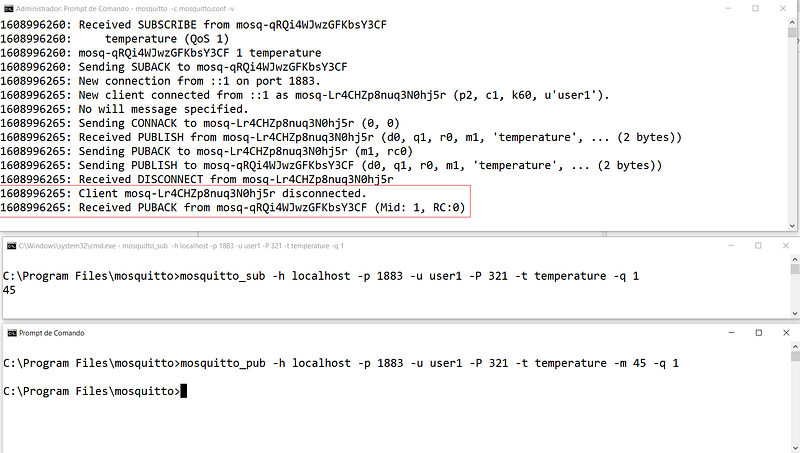
Now let’s set the level of QoS to 1:
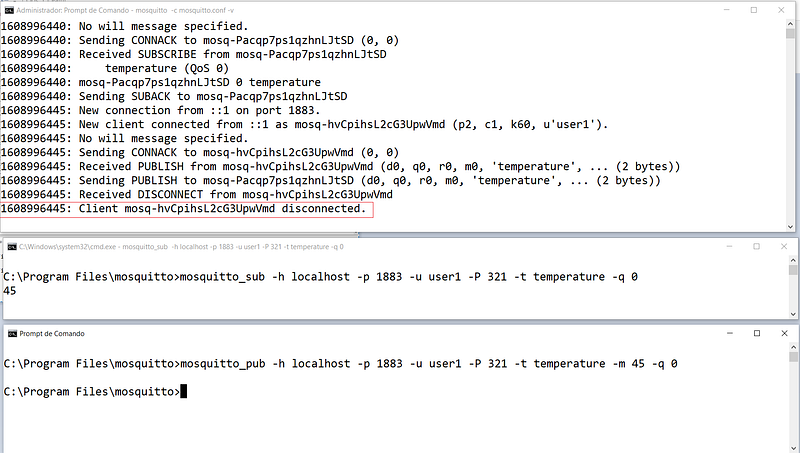
Now the lowest possible level, QoS 0:
Explanation
As soon as the client disconnects, depending on the QoS level of the message, more messages are exchanged or none :/
See that as soon as the client disconnects with QoS 2 (Fig 2), we still have 3 messages being generated. They are two-way confirmations.
See that as soon as the client disconnects with QoS 1(Fig 3), we have only 1 message being generated. It is a one-way confirmation.
See that as soon as the client disconnects with QoS 0(Fig 4), we have no message back. Fire & Forget. The default for MQTT. TCP is our last resource, right?!
That’s it for now!
In the next Mosquitto Episode, we will be dealing with TLS/SSL.
See you soon!
Bye!
More Theory about MQTT
The notion of physical devices connected to the Internet and passing data to and receiving data from it is the spine of a realistic implementation of an IoT solution.The IoT revolution holds a lot of promise, the implications of which are only viable if there is effective machine-to-machine (M2M) communication, and to aim for real-time M2M communication over the Internet.A communication protocol can be thought of as a language that is used by two or more machines to talk to each other. It is a set of rules that are followed by the two devices in order to make sense out of the messages that they pass to each other. Communication Protocols are extremely essential in distributed systems, where different parts of the same process are carried out at more than one location, significantly distant from each other.TCP/IP x UDP/IP
Protocols considering communication with the Internet were always a tradeoff between unreliable and slow:
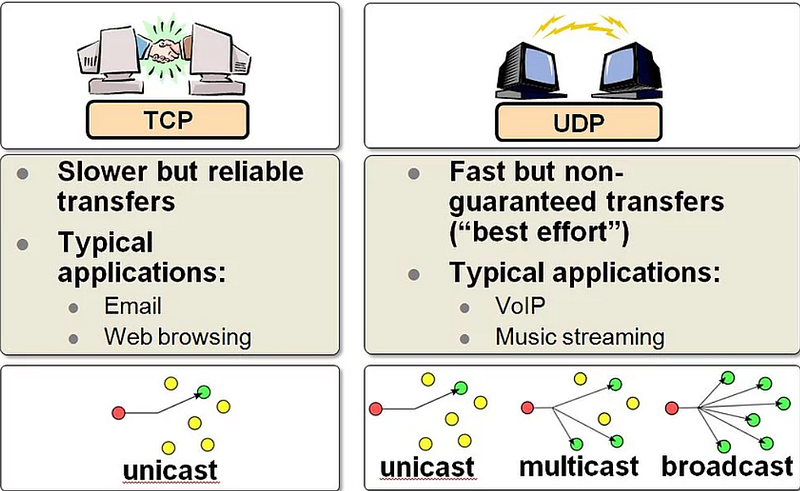
Another aspect of Internet protocol architecture is the TCP/IP stack.
This method of communication is reliable, as it accounts for all the data that is being sent but is also slow, because of all the verification procedures.
MQTT or MQ Telemetry Transport is a lightweight connectivity protocol geared for IoT applications.
It is based on the TCP/IP stack which uses the publish/subscribe method for transportation of data. It is open-ended and supports a high level of scaling, which makes it an ideal platform for the development of the Internet of Things (IoT) solutions.
MQTT uses the publish/subscribe method for the transportation of data.
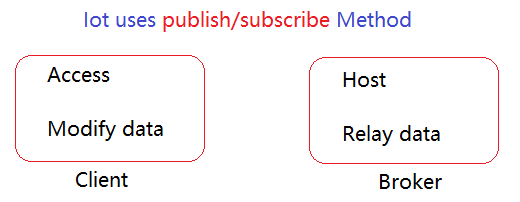
If you relay something, you pass it to another person.
A client can publish data regarding a certain parameter to the broker under a topic. Another client interested in this topic can subscribe to this topic and receive regular updates on messages under the topic.
MQTT offers a quality of service (QoS), which from an IoT standpoint is essentially the priority attached to the message. An important message should reach the destination in any case, so it’s given a better QoS, so that transmission may be slow, but delivery is guaranteed. A dynamic data source that prioritizes speed over efficiency, though, is assigned a lower QoS, so that it’s more of a fire-and-forget affair, like UDP.
Notes from https://www.element14.com/:
That's pretty much how MQTT functions:MQTT consists of two broad categories of participating devices. They are called brokers and clients. The clients are those devices which can access or modify data, and brokers are those which host and relay data.MQTT works on a paradigm called the publish/subscribe method. A client can publish data regarding a certain parameter to the broker under a topic. Another client interested in this toopic can subscribe to this topic and receive regular updates on messages under the topic.MQTT offers a quality of service, which from an IoT standpoint is essentially the priority attached to the message. An important message should reach the destination in any case, so it's given a better QoS, so that transmission may be slow, but delivery is guaranteed. A dynamic data source that prioritizes speed over efficiency, though, is assigned a lower QoS, so that it's more of a fire-and-forget affair, like UDP.MQTT can retain the last good message received under a topic, which it sends to subscribers who subscribe after the chain has been set in motion. This allows asynchronous connection of subscribers within an existing network of clients and brokers. This also provides a facility to check for redundancy and data loss.An MQTT client has a property called the Last will and testament. This property enables a client which has disconnected abruptly to send a message to the broker. An SOS call of sorts, which can be used for autonomous regeneration of a wireless sensor network, detection and debugging of stray nodes and outliers as well as a routine to ensure a faultless cycle in data flow of a wireless sensor network.Related Posts
01# Episode — Mosquitto — Intro To MQTT — It is Suitable for the Internet of Things Applications — MQTT
02# Episode — Mosquitto — User Access Configurations Setups — Editing mosquitto.conf File to Configure SSL Authentications — MQTT
03# Episode — Mosquitto — ACLs — Wildcards & ACL — access control lists — MQTT
04# Episode — Mosquitto — MQTT QoS — How To Set QoS at Mosquitto Broker — MQTT (this one)
05# Episode — Mosquitto — Bulletproof TLS & SSL Mosquitto — How To Set Up Mosquitto Broker/Client Keys & Certificates — MQTT
06# Episode — Mosquitto — Mosquitto Bridge — How To Bridge Two Mosquitto Brokers — MQTT
07…be tuned for the upcoming post about MQTT and IoT o/
Credits & references
Microgênios — Treinamento em Sistemas Embarcados — Microchip Regional Partner — Microchip Certified Brazilian Training Education Company & a Simplício-Owned enterprise o/
Understanding MQTT QOS Levels- Part 2 by steve
Summary cmds
mosquito - c mosquitto.conf -vmosquitto_sub -h localhost -p 1883 -u user1 - P 321 -t temperature -m 45 -q 2mosquitto_pub -h localhost -p 1883 -u user1 - P 321 -t temperature -m 45 -q 2mosquitto_sub -h localhost -p 1883 -u user1 - P 321 -t temperature -m 45 -q 1mosquitto_pub -h localhost -p 1883 -u user1 - P 321 -t temperature -m 45 -q 1mosquitto_sub -h localhost -p 1883 -u user1 - P 321 -t temperature -m 45 -q 0mosquitto_pub -h localhost -p 1883 -u user1 - P 321 -t temperature -m 45 -q 0


