
Mosquitto Bridge
How To Bridge Two Mosquitto Brokers — MQTT — Episode # 06
Mosquitto has a feature called bridging which basically lets you connect two (or more) brokers together.
Here are our bridge configurations(br-me-to-broker0):
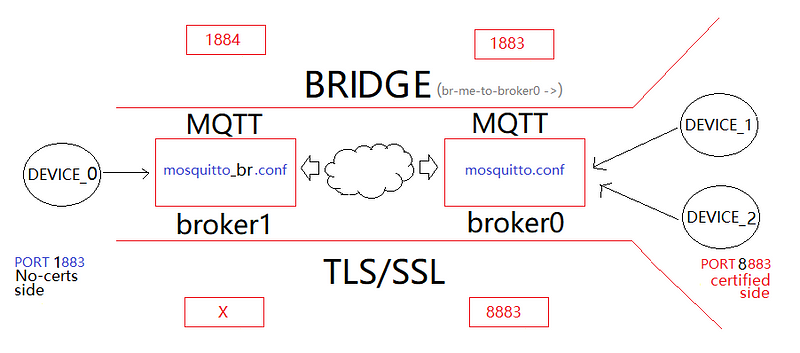
We will open two instances of the brokers, broker0, and broker1;
The broker1 will be responsible for implementing the bridge solution (for this we will modify the conf file at the BRIDGE session — see Table 1 below);
To fully understand this lesson, you can download the two configuration files from my google drive and open them in your notepad++.
I’m sure it will worth the effort!
Let’s get it on!
01#Step — For broker0, Open conf file in your notepad++ and edit theses lines in mosquitto.conf (assumed you’ve come from the last MQTT episode):
Line#Description
210 # Port to use for the default listener.
211 port 1883
...
310 tls_version tlsv1.2
...
373 # listener port-number [ip address/host name]
374 listener 8883
...
431 # Certificate based SSL/TLS support453 # Path to the PEM encoded    server certificate.
...
450 cafile C:\Program Files\mosquitto\certs\ca.crt
...
454 certfile C:\Program Files\mosquitto\certs\server.crt
...
457 keyfile C:\Program Files\mosquitto\certs\server.key
...
651 allow_anonymous false
...
669 password_file C:\Program Files\mosquitto\passwordfile.pwd
...
728 acl_file C:\Program Files\mosquitto\acl.acl
In summary: the default configuration plus TLS/SSL; no anonymous client and ACL rules, as usual, nothing fancy, right? (you can download this file from my google drive right away:).
Please refer to the second and third MQTT episodes to fully understand it all:)
Fine! So far, so good!
02#Step — For broker1, Copy/paste mosquitto.conf and save it as mosquitto_br.conf (this will implement the bridge, named br-me-to-broker0);
Here is the configurations line by line (do not worry about details now; in Table 1 I’ll explain everything — just get it running in front of you!):
Line#Description
210 # Port to use for the default listener.
211 port 1884
...
310 tls_version tlsv1.2
...
373 # listener port-number [ip address/host name]
374 #listener
...
431 # Certificate based SSL/TLS support453 # Path to the PEM encoded    server certificate.
...
450 #cafile
...
454 #certfile
...
457 #keyfile
...
651 allow_anonymous false
...
669 password_file C:\Program Files\mosquitto\passwordfile.pwd
...
728 acl_file C:\Program Files\mosquitto\acl.acl
...
755# =========================================================
756 # Bridges
757# =========================================================
...
792 connection br-me-to-broker0
793 address LAPTOP-JAYTHREE:8883
794 topic # both 0
...
817 cleansession false
...
839 notifications false
...
851 remote_clientid broker0
...
857 remote_password 123
...
863 remote_username admin
...
909 start_type automatic
...
922 try_private true
...
936 bridge_cafile C:\Program Files\mosquitto\certs\ca.crt
...
952 bridge_insecure false
...
955 bridge_certfile :\Program Files\mosquitto\certs\server.crt
...
958 bridge_keyfile C:\Program Files\mosquitto\certs\server.key
Save mosquitto_br.conf file. Now testing…
03#Step — For the test, open 6 prompts Terminals (2 of them as Administrator:)
Come on, it is a piece of cake!
At Terminal #1 (as admin), type:
mosquitto -c mosquitto.conf -vMosquitto will listen on Ports 1883 & 8883.
Fine!
At Terminal #2 (as admin), type:
mosquitto -c mosquitto_br.conf -vThe mosquitto will listen only on Port 1884 and, internally, by DN LAPTOP-JAYTHREE:8883 connect to the bridge. See Fig 2:
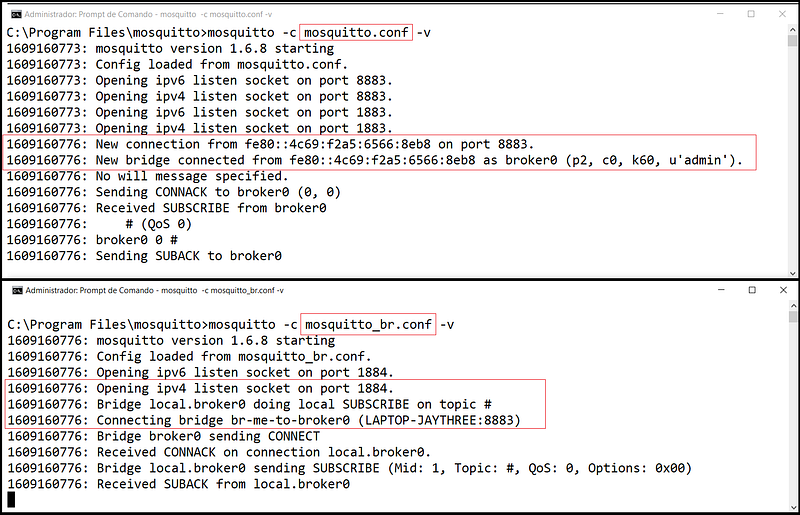
Watch out for the initialization message on both brokers;
The broker1 will connect to broker0 through the bridge named br-me-to-broker0 (via LAPTOP-JAYTHREE:8883) and will subscribe to all topics at broker0 (Fig 2 red frames).
Let’s publish and subscribe topic temperature with a common user1 (contained inside acl.acl file):
On Terminal #3 (subscription — broker0 to broker1 way):
mosquitto_sub -h localhost -p 1884 -u user1 -P 321 -t temperatureOn Terminal #4 (publishing):
mosquitto_pub -h LAPTOP-JAYTHREE -p 8883 -u user1 -P 321 --cafile ca.crt -t temperature -m 47On Terminal #5 (subscription — broker1 to broker0 way):
mosquitto_sub -h LAPTOP-JAYTHREE -p 8883 -u user1 -P 321 --cafile ca.crt -t temperatureOn Terminal #6(publishing):
mosquitto_pub -h localhost -p 1884 -u user1 -P 321 -t temperature -m 48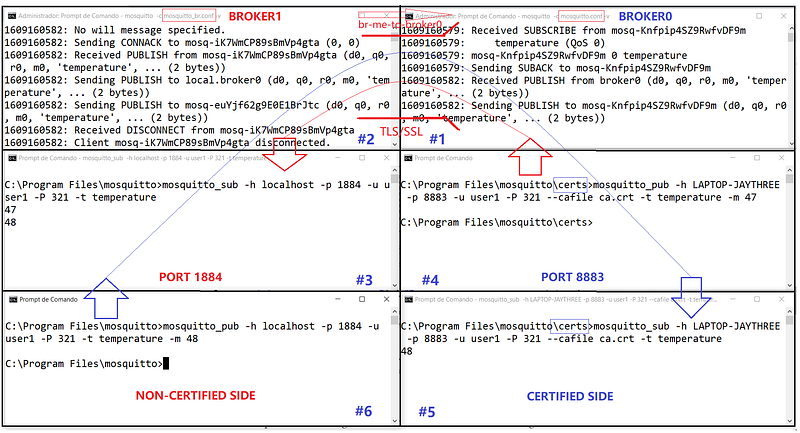
Tested and approved in both directions; both the certified and non-certified sides send published messages and the other side receives all messages perfectly.
Our bridge is working fine!
Although the mosquitto_br.conf instance disables the secure port (8883, no Extra listener), it does use it in the bridge (via LAPTOP-JAYTHREE:8883); this instance is responsible for loading all communication certificates that will be used between the brokers. This fact is very curious about this solution!
Summary table:
I hope you enjoy this experiment!
It takes all day to bring it to you on a silver tray:)
That’s all for now.
Thanks!
Bye!
Download All Files For This Project
Summary (cmds)
mosquitto -c mosquitto.conf -vmosquitto -c mosquitto_bd.conf -vmosquitto_sub -h localhost -p 1884 -u user1 -P 321 -t temperaturemosquitto_pub -h LAPTOP-JAYTHREE -p 8883 -u user1 -P 321 --cafile ca.crt -t temperature -m 47mosquitto_sub -h LAPTOP-JAYTHREE -p 8883 -u user1 -P 321 --cafile ca.crt -t temperaturemosquitto_pub -h localhost -p 1884 -u user1 -P 321 -t temperature -m 48Related Posts
01# Episode — Mosquitto — Intro To MQTT — It is Suitable for the Internet of Things Applications — MQTT
02# Episode — Mosquitto — User Access Configurations Setups — Editing mosquitto.conf File to Configure SSL Authentications — MQTT
03# Episode — Mosquitto — ACLs — Wildcards & ACL — access control lists — MQTT
04# Episode — Mosquitto — MQTT QoS — How To Set QoS at Mosquitto Broker — MQTT
05# Episode — Mosquitto — Bulletproof TLS & SSL Mosquitto — How To Set Up Mosquitto Broker/Client Keys & Certificates — MQTT
06# Episode — Mosquitto — Mosquitto Bridge — How To Bridge Two Mosquitto Brokers — MQTT(this one)
07…be tuned for the upcoming post about MQTT and IoT o/
Credits & References
Microgênios — Treinamento em Sistemas Embarcados — Microchip Regional Partner — Microchip Certified Brazilian Training Education Company & A Simplício-Owned-Awesome Enterprise o/
Want to clarify things around Certs?— please, visit: https://codebayblog.wordpress.com/2016/07/17/first-blog-post/ — (credits: larryl79 Nov/2021)


