avatarJ3

Free AI web copilot to create summaries, insights and extended knowledge, download it at here

7971

Abstract

type this (2):</p><div id="7aa1"><pre><span class="hljs-attribute">tls_version</span> tlsv1.<span class="hljs-number">2</span></pre></div><figure id="7546"><img src="https://cdn-images-1.readmedium.com/v2/resize:fit:800/1*9VgwnZKn65OHHho0Y3Wgrw.png"><figcaption>Fig 14. Defines the version of the TLS protocol to use for this listener (tlsv1.2)</figcaption></figure><p id="5314">Now for the secure port, <i>Ctrl + F</i> to find <b><i>listener port-number</i></b> string and locate #listener entry (line 374); uncomment it and type:</p><div id="067f"><pre><span class="hljs-attribute">listener</span> <span class="hljs-number">8883</span></pre></div><figure id="c938"><img src="https://cdn-images-1.readmedium.com/v2/resize:fit:800/1*qFOnKaxZPdi9SRNTcTfDBQ.png"><figcaption>Fig 15. Locate Extra Listeners and set the secure listener port (8883)</figcaption></figure><figure id="39af"><img src="https://cdn-images-1.readmedium.com/v2/resize:fit:800/1*3J_uOQvk931Ld-I2Xdt9LA.png"><figcaption>Fig 16. Enabling secure port 8883</figcaption></figure><p id="79f7">Now <i>Ctrl + F</i> to find <b><i>Certificate based SSL/TLS</i></b> <b><i>support</i></b> (1) string and locate #cafile, #certifle, and #keyfile entries (lines 450/457); uncomment it and type (2–4):</p><div id="a52a"><pre>cafile C:<span class="hljs-string">\Program</span> Files<span class="hljs-string">\mosquitto\certs\ca.crt</span> certfile C:<span class="hljs-string">\Program</span> Files<span class="hljs-string">\mosquitto\certs\server.crt</span> keyfile C:<span class="hljs-string">\Program</span> Files<span class="hljs-string">\mosquitto\certs\server.key</span></pre></div><figure id="152a"><img src="https://cdn-images-1.readmedium.com/v2/resize:fit:800/1*qwbeGHmkbTf3W4uJT5aLZQ.png"><figcaption>Fig 17. Fit for your platform accordingly, obviously ;)</figcaption></figure><p id="ef0a">Now Let’s enable the port listener for default communication.</p><p id="f0a7"><i>Ctrl + F</i> to find <b><i>port 1883</i></b> string (1); Locate #port 1883<i> </i>entry (Line 211), and uncomment it (2), and type:</p><div id="2cc6"><pre><span class="hljs-attribute">port</span> <span class="hljs-number">1883</span></pre></div><figure id="1930"><img src="https://cdn-images-1.readmedium.com/v2/resize:fit:800/1*4YO1fBOBkSFNg_2qqTaJxQ.png"><figcaption>Fig 18. Unable the default port: 1883</figcaption></figure><figure id="2dce"><img src="https://cdn-images-1.readmedium.com/v2/resize:fit:800/1*LD26n3Fe0We_iObndDcb7A.png"><figcaption>Fig 19. Type this to the unable mosquitto default port</figcaption></figure><p id="1d77">Finally, <i>Ctrl + F</i> to find <b><i>Extra listeners</i></b> string (1); Locate #listener entry (line 374), and uncomment it (2), and type:</p><div id="547b"><pre><span class="hljs-attribute">listener</span> <span class="hljs-number">8883</span></pre></div><figure id="e190"><img src="https://cdn-images-1.readmedium.com/v2/resize:fit:800/1*2UTeQZlqgPSmmQUVdpcyHQ.png"><figcaption>Fig 20. This will unable mosquito secure port listener :)</figcaption></figure><p id="cc9d">Save <i>mosquitto.conf</i> file and touché \o/</p><p id="6472">09 # STEP — Let’s test!</p><p id="34f4">Open three terminals (one as Administrator); on Terminal #1, type:</p><div id="ac8c"><pre>mosquitto -<span class="hljs-keyword">c</span> mosquitto.conf -v</pre></div><p id="0b7a">Open another terminal; on Terminal #2, type:</p><div id="d226"><pre>mosquitto_sub -h laptop-jaythree -<span class="hljs-selector-tag">p</span> <span class="hljs-number">8883</span> -u user1 -<span class="hljs-selector-tag">P</span> <span class="hljs-number">321</span> <span class="hljs-attr">--cafile</span> ca<span class="hljs-selector-class">.crt</span> -t temperature</pre></div><p id="5c5b">And finally, open the last terminal; on Terminal #3 type:</p><div id="510f"><pre><span class="hljs-attribute">mosquitto_pub</span> -h laptop-jaythree -p <span class="hljs-number">8883</span> -u user1 -P <span class="hljs-number">321</span> --cafile ca.crt -t temperature -m <span class="hljs-number">45</span></pre></div><p id="6a01">Everything must be working on port 8883!</p><figure id="9bb1"><img src="https://cdn-images-1.readmedium.com/v2/resize:fit:800/1*rBZrXNj5XMFTxzF6IUVicw.png"><figcaption>Fig 21. Runnig on SSL/TLS</figcaption></figure><p id="c87d">Now, let's see if the unsecured port is open too:</p><p id="6dc1">10 # STEP — Transmitting without certification:</p><p id="8c2e">On Terminal #2, above, type: Ctrl+C, to stop the subscription, and enter:</p><div id="7877"><pre><span class="hljs-attribute">mosquitto_sub</span> -h localhost -p <span class="hljs-number">1883</span> -u user1 -P <span class="hljs-number">321</span> -t temperature</pre></div><p id="434f">On Terminal #3, type:</p><div id="8f2b"><pre><span class="hljs-attribute">mosquitto_pub</span> -h localhost -p <span class="hljs-number">1883</span> -u user1 -P <span class="hljs-number">321</span> -t temperature -m <span class="hljs-number">48</span></pre></div><p id="79c0">Everything must be working on port 1883!</p><figure id="8b67"><img src="https://cdn-images-1.readmedium.com/v2/resize:fit:800/1*UdG4_SBZi2ljePUFxzDqMw.png"><figcaption>Fig 22. Running as default 1883 port</figcaption></figure><p id="b616">The broker listens on both ports: 1883 and 8883. Fantastic!</p><p id="55b5">Security represents a noble concern, however, we must bear in mind that the speed (and system resources) are critically impacted (see Wireshark pcap files in our resources), so internally we can exchange messages publicly but when transferring these messages via remote brokers, we can use a secure tunnel using TTL / SSL as described.</p><p id="2a94">In our next episode, we will use <b>bridges </b>between brokers.</p><p id="78f4">That’s it for now!</p><p id="f5d9">SUMMARY (cmds sequences):</p><div id="43e8"><pre>openssl genrsa -des3 -<span class="hljs-keyword">out</span> ca.<span class="hljs-keyword">key</span> 2048</pre></div><div id="8991"><pre>openssl req -<span class="hljs-built_in">new</span> -x509 -days <span class="hljs-number">1826</span> -<span class="hljs-built_in">key</span> ca.<span class="hljs-built_in">key</span> -out ca.crt</pre></div><div id="88f1"><pre>openssl genrsa -<span class="hljs-keyword">out</span> <span class="hljs-keyword">server</span>.key <span class="hljs-number">2048</span></pre></div><div id="18d8"><pre>openssl req -<span class="hljs-built_in">new</span> -<span class="hljs-keyword">out</span> <span class="hljs-keyword">server</span>.csr -key <span class="hljs-keyword">server</span>.key</pre></div><div id="284d"><pre>openssl x509 -req -<span class="hljs-keyword">in</span> server.csr -<span class="hljs-keyword">CA</span> <span class="hljs-keyword">ca</span>.crt -CAkey <span class="hljs-keyword">ca</span>.key -CAcreateserial -<span class="hljs-keyword">out</span> server.crt -days 360</pre></div><div id="0d27"><pre>server<span class="hljs-selector-class">.crt</span> ca<span class="hljs-selector-class">.srl</span> server<span class="hljs-selector-class">.csr</span> server<span class="hljs-selector-class">.key</span> ca<span class="hljs-selector-class">.crt</span> ca<span class="hljs-selector-class">.key</span> CA.pl</pre></div><div id="e37d"><pre><span class="hljs-attribute">port</span> <span class="hljs-number">1883</span> <span class="hljs-attribute">cafile</span> …\ca.crt <span class="hljs-attribute">certfile</span> …\server.crt <span class="hljs-attribute">keyfile</span> …\server.key <span class="hljs-attribute">tls</span>-version2.<span class="hljs-number">1</span> <span class="hljs-attribute">listener</span> <span class="hljs-number">8883</span></pre></div><div id="9c54"><pre>mosquitto -c mosquitto<span class="hljs-selector-class">.conf</span> -v mosquitto_sub -h laptop-jaythree -<span class="hljs-selector-tag">p</span> <span class="hljs-number">8883</span> -u user1 -P <span class="hljs-number">321</span> <span class="hljs-attr">--cafile</span> ca<span class="hljs-selector-class">.crt</span>

Options

-t temperature mosquitto_pub -h laptop-jaythree -<span class="hljs-selector-tag">p</span> <span class="hljs-number">8883</span> -u user1 -P <span class="hljs-number">321</span> <span class="hljs-attr">--cafile</span> ca<span class="hljs-selector-class">.crt</span> -t temperature -m <span class="hljs-number">45</span></pre></div><div id="b62e"><pre><span class="hljs-attribute">mosquitto_sub</span> -h localhost -p <span class="hljs-number">1883</span> -u user1 -P <span class="hljs-number">321</span> -t temperature <span class="hljs-attribute">mosquitto_pub</span> -h localhost -p <span class="hljs-number">1883</span> -u user1 -P <span class="hljs-number">321</span> -t temperature -m <span class="hljs-number">48</span></pre></div><p id="2498"><a href="https://drive.google.com/drive/folders/1YdFTpnn66W2oEDV9iiUna6KxZiSyiL7a?usp=sharing">Download All The Files For This Project</a></p><h1 id="e22c">Related Posts</h1><p id="29f7">01# Episode — <b>Mosquitto </b><a href="https://readmedium.com/mosquitto-intro-to-mqtt-ea4f7ea589ba"><b>Intro To MQTT</b></a><b> </b>— It is Suitable for the Internet of Things Applications — MQTT</p><p id="5884">02# Episode — Mosquitto — <a href="https://readmedium.com/mosquitto-user-access-configurations-setups-2f95dc593adf"><b>User Access Configurations Setups — </b>Editing mosquitto.conf File to Configure SSL Authentications </a>— MQTT</p><p id="d65d">03# Episode — Mosquitto<a href="https://readmedium.com/mosquitto-acls-ac062aea3f9"><b>ACLs — Wildcards & ACL — access control lists</b></a> — MQTT</p><p id="b4db">04# Episode — Mosquitto —<a href="https://readmedium.com/mqtt-qos-ef1ef4498405"> <b>MQTT QoS </b></a>— How To Set QoS at Mosquitto Broker — MQTT</p><p id="8106">05# Episode — Mosquitto — <b>Bulletproof TLS & SSL Mosquitto </b>— How To Set Up Mosquitto Broker/Client Keys & Certificates— MQTT (this one)</p><p id="f31e">06# Episode — Mosquitto — <a href="https://readmedium.com/mosquitto-bridge-5b44e9687fb3"><b>Mosquitto Bridge</b></a><b> </b>— How To Bridge Two Mosquitto Brokers — MQTT</p><p id="2a34">07…<b>be tuned</b> for the upcoming post about MQTT and IoT o/</p><h2 id="5162">Credits & References</h2><p id="1ef6"><a href="https://ead.microgenios.com.br/">Microgênios — Treinamento em Sistemas Embarcados — Microchip Regional Partner</a> — Microchip Certified Brazilian Training Education Company & a Simplício-Owned enterprise o/</p><p id="836c">How to avoid the expensive handshake process? trust store: <a href="http://www.freekb.net/Article?id=1797">http://www.freekb.net/Article?id=1797</a></p><div id="49c3" class="link-block"> <a href="https://slproweb.com/products/Win32OpenSSL.html"> <div> <div> <h2>Win32/Win64 OpenSSL Installer for Windows - Shining Light Productions</h2> <div><h3>http://www.openssl.org/)</h3></div> <div><p>slproweb.com</p></div> </div> <div> <div style="background-image: url(https://miro.readmedium.com/v2/resize:fit:320/0*zyZsw9YnbPVSLExM)"></div> </div> </div> </a> </div><div id="17f5" class="link-block"> <a href="https://mcuoneclipse.com/2017/04/14/enable-secure-communication-with-tls-and-the-mosquitto-broker/"> <div> <div> <h2>Enable Secure Communication with TLS and the Mosquitto Broker</h2> <div><h3>MQTT is a lightweight and broadly used internet protocol (see "MQTT with lwip and NXP FRDM-K64F Board"). And probably…</h3></div> <div><p>mcuoneclipse.com</p></div> </div> <div> <div style="background-image: url(https://miro.readmedium.com/v2/resize:fit:320/0*oFbIADGYLjF43s2X)"></div> </div> </div> </a> </div><div id="9ce8" class="link-block"> <a href="https://www.fehcom.de/qmail/smtptls.html"> <div> <div> <h2>Tutorial: SMTP Transport Layer Security</h2> <div><h3>2014-12-01 - 3rd revision Chapter 1: Introduction Chapter 2: Origin and Scope of the TLS Protocol Chapter 3: Protocol…</h3></div> <div><p>www.fehcom.de</p></div> </div> <div> <div style="background-image: url(https://miro.readmedium.com/v2/resize:fit:320/0*YNXC4qvZHGAvld50)"></div> </div> </div> </a> </div><div id="5a16" class="link-block"> <a href="https://cheapsslsecurity.com/blog/what-is-ssl-tls-handshake-understand-the-process-in-just-3-minutes/"> <div> <div> <h2>What is SSL/TLS Handshake? How Does TLS Work? - Quick Guide</h2> <div><h3>As it goes with all handshakes, the SSL/TLS Handshake is where it all starts. The SSL/TLS handshake involves a series…</h3></div> <div><p>cheapsslsecurity.com</p></div> </div> <div> <div style="background-image: url(https://miro.readmedium.com/v2/resize:fit:320/0*2OGYoHlFqG2VvqaR)"></div> </div> </div> </a> </div><div id="f6f2" class="link-block"> <a href="https://www.wst.space/ssl-part-4-tls-handshake-protocol/"> <div> <div> <h2>SSL/TLS for dummies part 4 - Understanding the TLS Handshake Protocol | WST</h2> <div><h3>In the 3rd part of the blog series Certificate Authorities were discussed in depth. If anyone is here without reading…</h3></div> <div><p>www.wst.space</p></div> </div> <div> <div style="background-image: url(https://miro.readmedium.com/v2/resize:fit:320/0*tYfCgQlGEbDsBFAP)"></div> </div> </div> </a> </div><div id="7881" class="link-block"> <a href="https://www.feistyduck.com/library/openssl-cookbook/online/index.html"> <div> <div> <h2>OpenSSL Cookbook</h2> <div><h3>A Short Guide to the Most Frequently Used OpenSSL Features and Commands</h3></div> <div><p>www.feistyduck.com</p></div> </div> <div> <div style="background-image: url(https://miro.readmedium.com/v2/resize:fit:320/)"></div> </div> </div> </a> </div><p id="d3d3"><a href="https://stackoverflow.com/questions/9233316/what-is-the-smallest-possible-http-and-https-data-request">What is the smallest possible http and https data request</a> by StackOverflow</p><p id="e632"><a href="https://en.wikipedia.org/wiki/Public_key_infrastructure">Public key infrastructure</a> by Wikipedia</p><p id="ffbc"><a href="https://www.windows-commandline.com/control-panel-run-command/">https://www.windows-commandline.com/control-panel-run-command/</a> by commandline.com</p><p id="1d24">The New Illustrated TLS Connection — Every byte explained and reproduce by d<a href="https://tls13.ulfheim.net/">https://tls13.ulfheim.net/</a></p><p id="cf64">Epoch & Unix Timestamp Conversions Tool by h<a href="https://www.epochconverter.com/">ttps://www.epochconverter.com/</a></p><blockquote id="eada"><p>This was a triumph. I’m making a note here: HUGE SUCCESS. It’s hard to overstate my satisfaction. (‘Still Alive’ by Jonathan Coulton: <a href="https://www.youtube.com/redirect?q=http%3A%2F%2Fwww.jonathancoulton.com&amp;v=Y6ljFaKRTrI&amp;redir_token=QUFFLUhqbWY2bm85b2YwbUMxZm8yTUQ4Z09TSkJDa1B3QXxBQ3Jtc0tsZFpQRjd6YWItRmpsRzRqTDExOTFLTjl2UEFHSHEtOGJqLUQ3d0Rmb3YySzlVMEd5TFNCektUWldQTUxjNG9XMURUSkl1YlFQSEktTmJTSlFmblZPb2xld2c5MElSOU9MZjJjdmRRLUZYX05JZzFTQQ%3D%3D&amp;event=video_description">http://www.jonathancoulton.com</a>) —song <a href="https://youtu.be/Y6ljFaKRTrI">link</a></p></blockquote></article></body>

Bulletproof TLS & SSL Mosquitto

How To Set Up Mosquitto Broker/Client Keys & Certificates— MQTT — Episode #05

This article deals with how to set up the Mosquitto broker to communicate with a client using TLS/SSL protocol.

In other words, it is about how to configure the Mosquitto broker to communicate with an MQTT client using the TLS/SSL (Transport Layer Security/Secure Socket Layer) protocol.

TLS is the successor of SSL and is often used as a combination of TLS/SSL.

To use TLS between the broker and the client, a set of keys and certificates has to be generated and deployed, along with configuration settings on the broker’s conf file and the client/server Keystore.
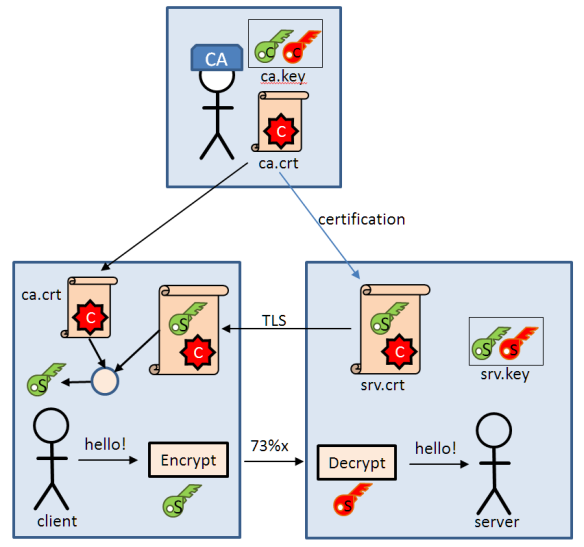
Fig 1. exchange of keys and certificates; From this Post by Erich Styger

And here is the expensive handshake process negotiated between the broker and a client who understands to exchange confidential information between each other:
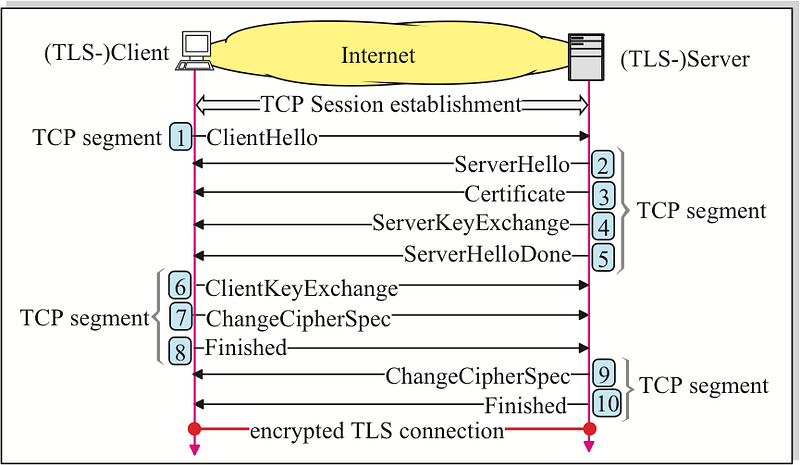
Fig 2 . Look for Wireshark captures in my google drive— image from fehcom page

Let’s get started!

First, go to slproweb dot com OpenSSL site:

https://slproweb.com/products/Win32OpenSSL.html

And install this app:

Win64 OpenSSL v1.1.1i Light

This software is enough for what we need so far (3MB Installer).
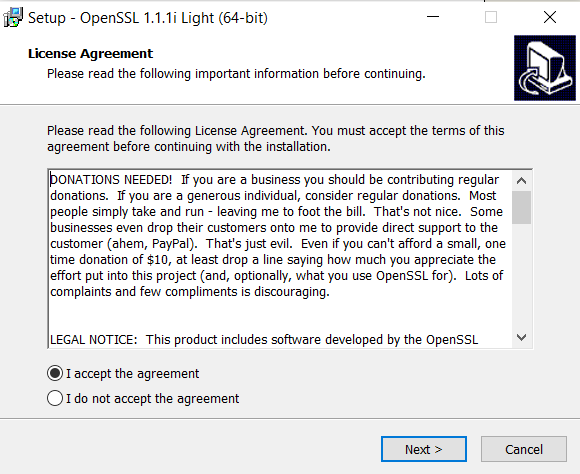
Fig 3. Installing OpenSSL App; Accepting the terms :)
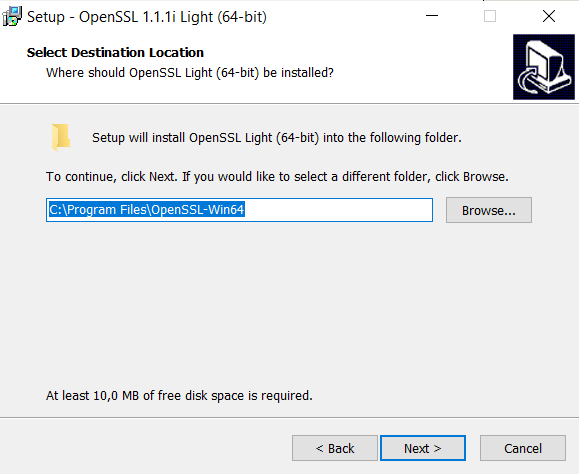
Fig 4. This is where the app will be installed (we need to go to this directory)
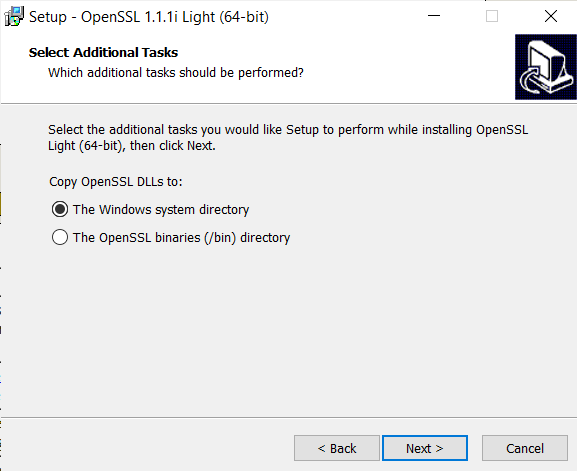
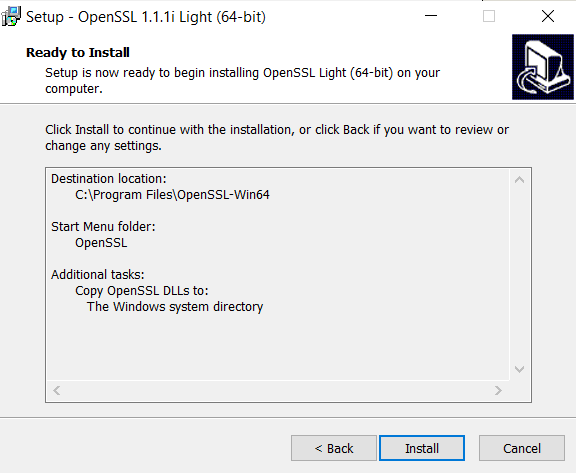
Fig 5. We use the default setup
Fig 6. You can Donate to Shining Light Productions to help them upgrade this app :)

Here is my machine (Windows 10 Home Single Language, v.20H) setup:

  • Key and certificate generation: Win64 OpenSSL v1.1.1i Light;
  • Mosquitto version 1.6.8;
  • MQTT v3.1.1 broker.

Fine! Now let’s get to the real work:

Open cmd prompter (execute as administrator).

Access the OpenSSL-Win64 directory created in the above installation process:

cd C:\Program Files\OpenSSL-Win64
cd bin
cd dir
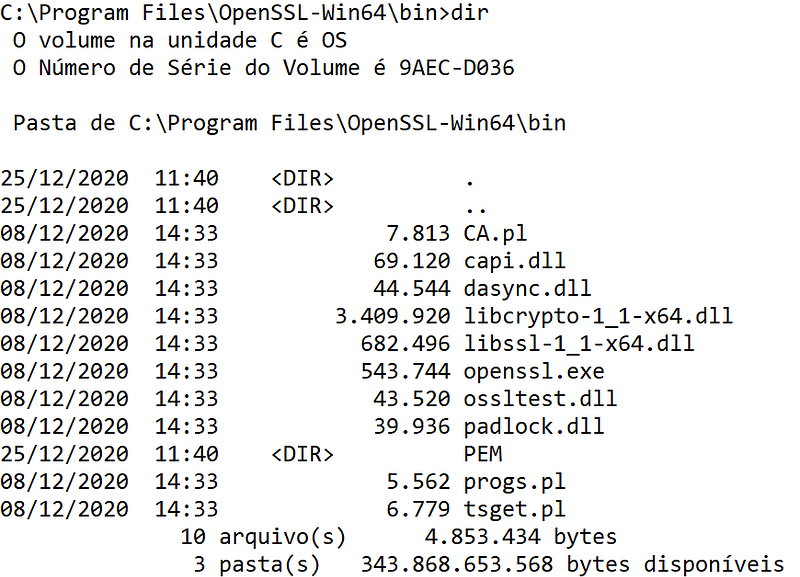
Fig 7. Here is the result of dir cmd; we will use OpenSSL app o/

Type cls to clean the screen, and #WeAreReadyToGo!

For our PKI, run theses scripts in theses very sequences:

01 # STEP —generating ca.key:

openssl genrsa -des3 -out ca.key 2048
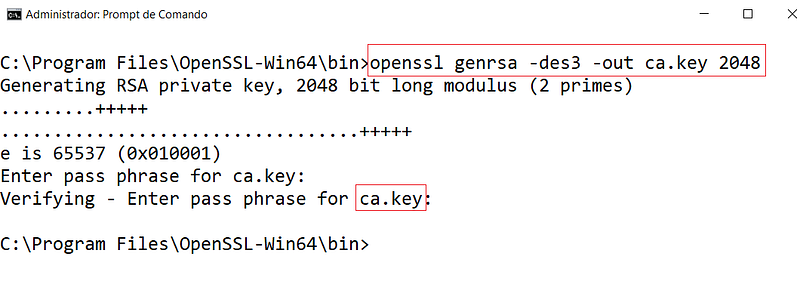
Fig 8. Generating the client private key.

02 # STEP — generating ca.crt:

openssl req -new -x509 -days 1826 -key ca.key -out ca.crt
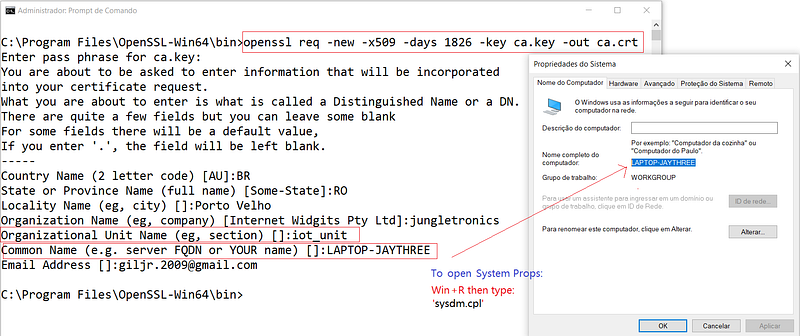
Fig 9. To generate this client certificate you will have to fill in your personal email details and DNS name of the machine you are operating; watch out for the unit_name (this must be unique)

03 # STEP — generating server.key

openssl genrsa -out server.key 2048
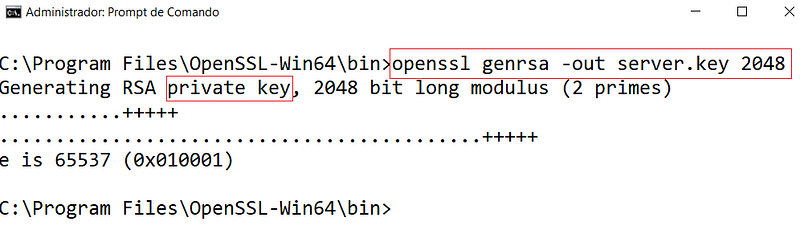
Fig 10. Generating the server private key.

04 # STEP — generating server csr:

openssl req -new -out server.csr -key server.key
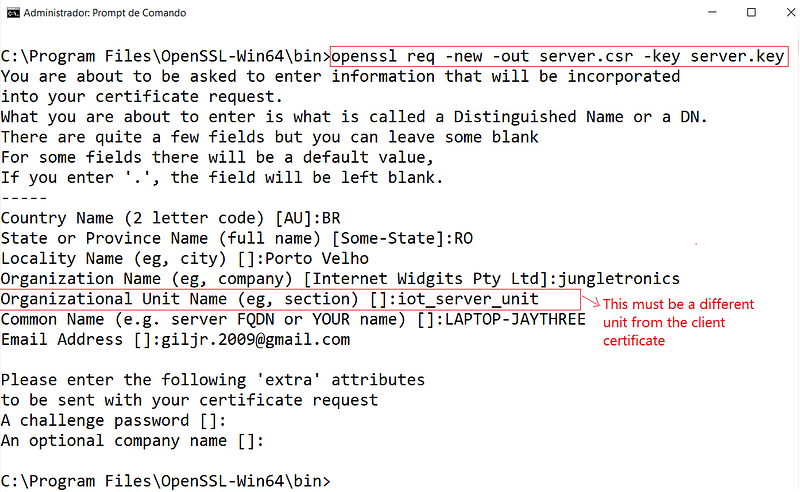
Fig 11. note: unit-name must be different from the ca.crt

05 # STEP — generating server.crt

openssl x509 -req -in server.csr -CA ca.crt -CAkey ca.key -CAcreateserial -out server.crt -days 360

Fig 6. Generating ca.key

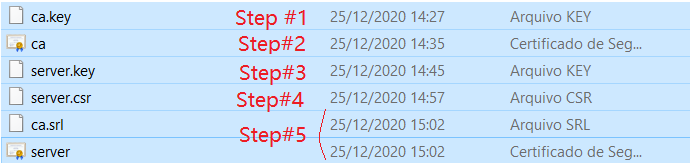
06 # STEP — end up with these files:

Fig 12. Here are the artifacts generated by each step above, chronologically organized:)
ca.key
ca.crt
server.key
server.crt
ca.srl
server.csr

07 # STEP —Return to your mosquito installation directory and create a directory /certs and transfer all these files into there:
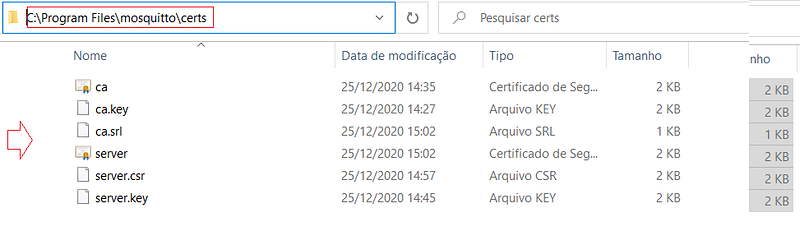
Fig 13. transferred all files generated by the OpenSSL program to the directory/certs of the mosquitto installation.

08 # STEP — open mosquitto.conf file (attention: this is the main step to be taken):

Ctrl + F to find tls_version string (1); Locate #tls_version entry (line 310), uncomment it and type this (2):

tls_version tlsv1.2
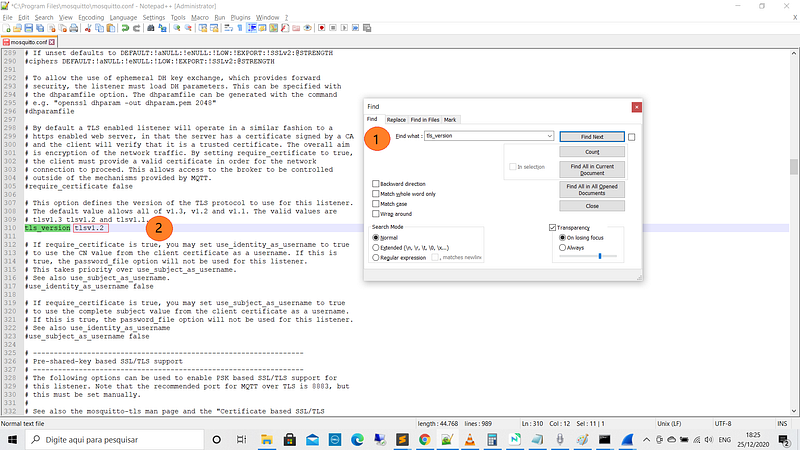
Fig 14. Defines the version of the TLS protocol to use for this listener (tlsv1.2)

Now for the secure port, Ctrl + F to find listener port-number string and locate #listener entry (line 374); uncomment it and type:

listener 8883
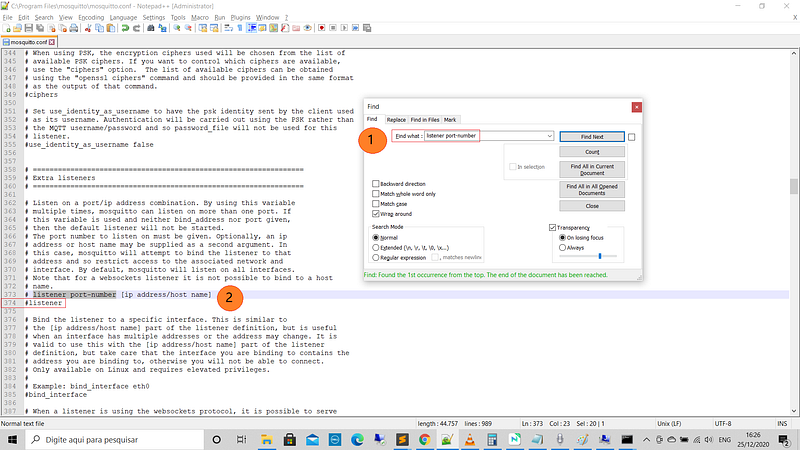

Fig 15. Locate Extra Listeners and set the secure listener port (8883)
Fig 16. Enabling secure port 8883

Now Ctrl + F to find Certificate based SSL/TLS support (1) string and locate #cafile, #certifle, and #keyfile entries (lines 450/457); uncomment it and type (2–4):

cafile C:\Program Files\mosquitto\certs\ca.crt 
certfile C:\Program Files\mosquitto\certs\server.crt
keyfile C:\Program Files\mosquitto\certs\server.key
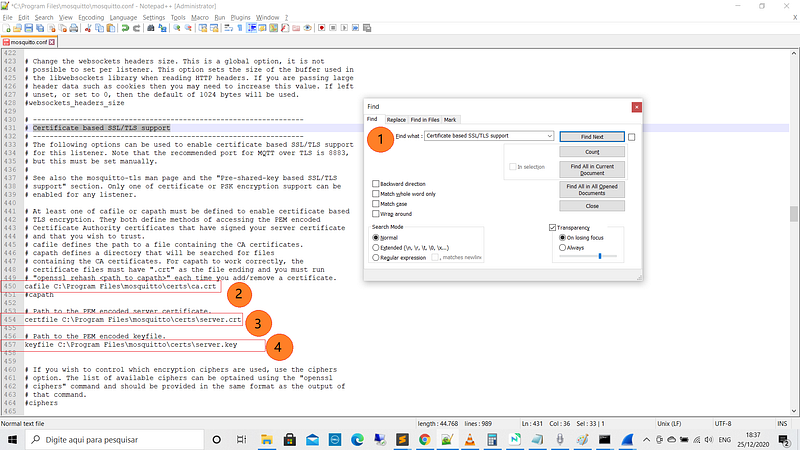
Fig 17. Fit for your platform accordingly, obviously ;)

Now Let’s enable the port listener for default communication.

Ctrl + F to find port 1883 string (1); Locate #port 1883 entry (Line 211), and uncomment it (2), and type:

port 1883
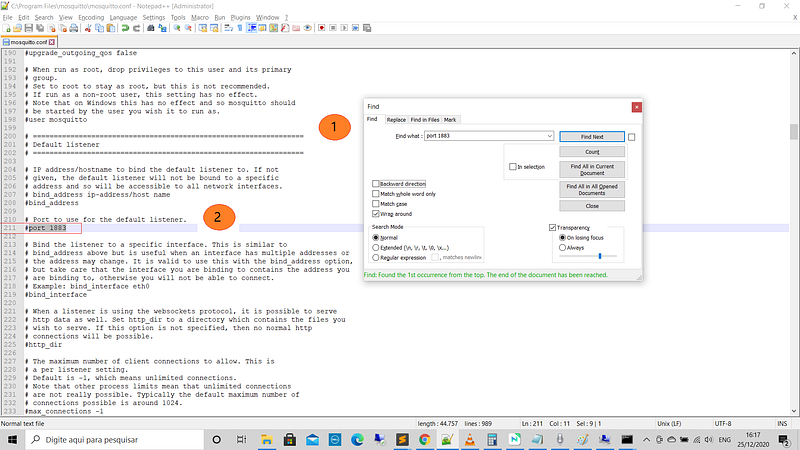

Fig 18. Unable the default port: 1883
Fig 19. Type this to the unable mosquitto default port

Finally, Ctrl + F to find Extra listeners string (1); Locate #listener entry (line 374), and uncomment it (2), and type:

listener 8883
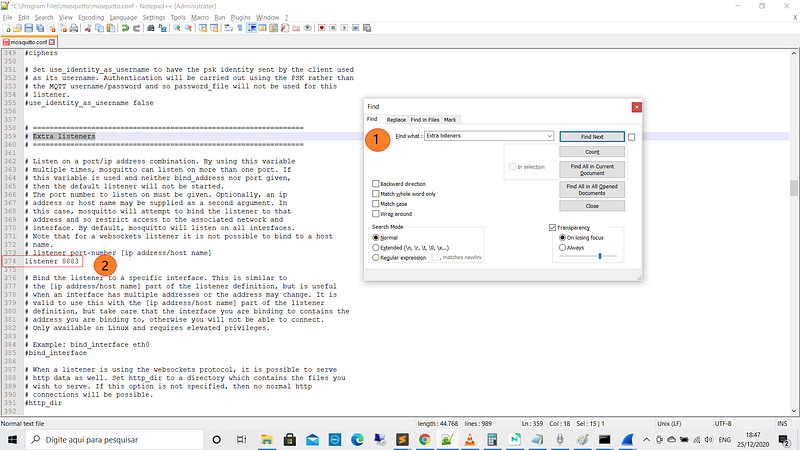
Fig 20. This will unable mosquito secure port listener :)

Save mosquitto.conf file and touché \o/

09 # STEP — Let’s test!

Open three terminals (one as Administrator); on Terminal #1, type:

mosquitto -c mosquitto.conf -v

Open another terminal; on Terminal #2, type:

mosquitto_sub -h laptop-jaythree -p 8883 -u user1 -P 321 --cafile ca.crt -t temperature

And finally, open the last terminal; on Terminal #3 type:

mosquitto_pub -h laptop-jaythree -p 8883 -u user1 -P 321 --cafile ca.crt -t temperature -m 45

Everything must be working on port 8883!
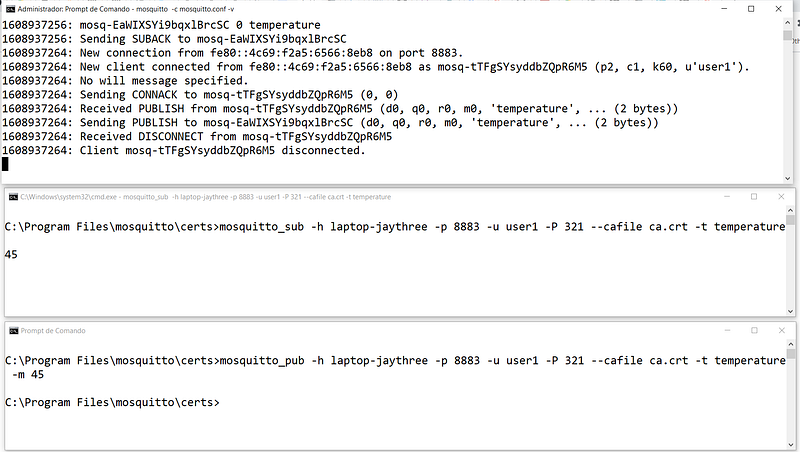
Fig 21. Runnig on SSL/TLS

Now, let's see if the unsecured port is open too:

10 # STEP — Transmitting without certification:

On Terminal #2, above, type: Ctrl+C, to stop the subscription, and enter:

mosquitto_sub -h localhost -p 1883 -u user1 -P 321 -t temperature

On Terminal #3, type:

mosquitto_pub -h localhost -p 1883 -u user1 -P 321 -t temperature -m 48

Everything must be working on port 1883!
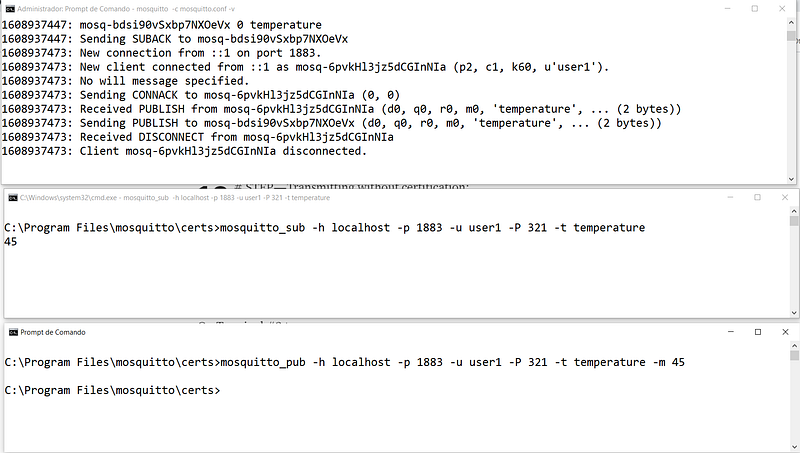
Fig 22. Running as default 1883 port

The broker listens on both ports: 1883 and 8883. Fantastic!

Security represents a noble concern, however, we must bear in mind that the speed (and system resources) are critically impacted (see Wireshark pcap files in our resources), so internally we can exchange messages publicly but when transferring these messages via remote brokers, we can use a secure tunnel using TTL / SSL as described.

In our next episode, we will use bridges between brokers.

That’s it for now!

SUMMARY (cmds sequences):

openssl genrsa -des3 -out ca.key 2048
openssl req -new -x509 -days 1826 -key ca.key -out ca.crt
openssl genrsa -out server.key 2048
openssl req -new -out server.csr -key server.key
openssl x509 -req -in server.csr -CA ca.crt -CAkey ca.key -CAcreateserial -out server.crt -days 360
server.crt
ca.srl
server.csr
server.key
ca.crt
ca.key
CA.pl
port 1883
cafile …\ca.crt
certfile …\server.crt
keyfile …\server.key
tls-version2.1
listener 8883
mosquitto -c mosquitto.conf -v
mosquitto_sub -h laptop-jaythree -p 8883 -u user1 -P 321 --cafile ca.crt -t temperature
mosquitto_pub -h laptop-jaythree -p 8883 -u user1 -P 321 --cafile ca.crt -t temperature -m 45
mosquitto_sub -h localhost -p 1883 -u user1 -P 321 -t temperature
mosquitto_pub -h localhost -p 1883 -u user1 -P 321 -t temperature -m 48

Download All The Files For This Project

Related Posts

01# Episode — Mosquitto Intro To MQTT — It is Suitable for the Internet of Things Applications — MQTT

02# Episode — Mosquitto — User Access Configurations Setups — Editing mosquitto.conf File to Configure SSL Authentications — MQTT

03# Episode — MosquittoACLs — Wildcards & ACL — access control lists — MQTT

04# Episode — Mosquitto — MQTT QoS — How To Set QoS at Mosquitto Broker — MQTT

05# Episode — Mosquitto — Bulletproof TLS & SSL Mosquitto — How To Set Up Mosquitto Broker/Client Keys & Certificates— MQTT (this one)

06# Episode — Mosquitto — Mosquitto Bridge — How To Bridge Two Mosquitto Brokers — MQTT

07…be tuned for the upcoming post about MQTT and IoT o/

Credits & References

Microgênios — Treinamento em Sistemas Embarcados — Microchip Regional Partner — Microchip Certified Brazilian Training Education Company & a Simplício-Owned enterprise o/

How to avoid the expensive handshake process? trust store: http://www.freekb.net/Article?id=1797

What is the smallest possible http and https data request by StackOverflow

Public key infrastructure by Wikipedia

https://www.windows-commandline.com/control-panel-run-command/ by commandline.com

The New Illustrated TLS Connection — Every byte explained and reproduce by dhttps://tls13.ulfheim.net/

Epoch & Unix Timestamp Conversions Tool by https://www.epochconverter.com/

This was a triumph. I’m making a note here: HUGE SUCCESS. It’s hard to overstate my satisfaction. (‘Still Alive’ by Jonathan Coulton: http://www.jonathancoulton.com) —song link

Mqtt
Mqtt Broker
Mqtt Client
Tls Handshake
Ssl Certificate
Recommended from ReadMedium