
Mosquitto — ACLs
Wildcards & ACL — Access Control Lists — MQTT — Episode #03
We left the previous episode by not allowing anonymous clients to access mosquitto services.
Now if you planning to strengthen your MQTT service, then access control lists (ACL) are mandatory. We need to configure the Access Control Lists (ACL) file.
Mosquitto broker supports this ACL feature through the simple configuration file.
There is another option: through plugins. if you want to venture into Mosquitto Authentication systems to get started please consider following this link:)
This post deals with a simple file configuration option:/
0° Step — Confirming that the configuration of mosquitto.conf is right!
Open the mosquitto.conf file using the following configurations (from the last episode) and look for these 2 entries:
# Defaults to true if no other security options are set.
# If `password_file` or `psk_file` is set, or if an authentication
# plugin is loaded which implements
# username/password or TLS-PSK checks, then `allow_anonymous`
# defaults to false.line:651
allow_anonymous false
# See the TLS client require_certificate and
# use_identity_as_username options for alternative authentication
# options. If an auth_plugin is used as well as password_file, the
# auth_plugin check will be made first.line:669
password_file C:\Program Files\mosquitto\passwordfile.pwdNote: 1- to locate each line, Ctrl+ F and look for allow_anonymous, password_file; 2 - stop and restart mosquitto service before and after this file modifications:)This allow_anonymous false is used to prevent mosquitto’s clients without username and password to connecting to the broker.
Now to give the location of the mosquitto.conf file to the server by setting password_file entries like above is shown.
Just Fine! Let’s continue our progress…
But, wait!
What would happen if we start the mosquitto service just like that?
mosquitto -vAnswer: the configuration file will not be loaded and all the security work that is done by us in this post would be in vain:/
1° Step — Start mosquitto broker service:
So to start mosquitto from now on use this command at prompter:
mosquitto -c mosquitto.conf -v2° Step — Creating a new user:
In this post, we are going to use this utility program, mosquitto_passwd:
The mosquitto_passwd program is a tool for managing password files for the mosquitto MQTT broker.
Synopsis:mosquitto_passwd [ -c | -D ] passwordfile username
mosquitto_passwd -b passwordfile username password
mosquitto_passwd -U passwordfileOptions:
-b
Run in batch mode. This allows the password to be provided at the command line which can be convenient but should be used with care because the password will be visible on the command line and in the command history.
-c
Create a new password file. If the file already exists, it will be overwritten.
-D
Delete the specified user from the password file.
-U
This option can be used to upgrade/convert a password file with plain text passwords into one using hashed passwords. It will modify the specified file. It does not detect whether passwords are already hashed, so using it on a password file that already contains hashed passwords will generate new hashes based on the old hashes and render the password file unusable.
To create another user, named user1, type this command at prompter:
mosquitto_passwd -b passwordfile.pwd user1 321Here we are creating a new user, user1, using batch mode, presenting the password in the command (be careful not to compromise the password) and to differentiate it from our admin password, whose password was set to 123, we chose password 321 for this new user.

If you open the passwordfile.pwd file in notepadd++ you’ll see this:

If eventually, you need to delete this new user, user1, use this command:
mosquitto_passwd -D passwordfile.pwd user1Or if you need to update the password of this user, type:
mosquitto_passwd -U passwordfile.pwd user1 <SetNewPassword>3° Step — Wildcard & Topic filters:
Now let’s see some issue about the wildcard:
A topic filter/subscription is allowed to have wildcards in it, a topic isn’t.
So:
mosquitto_pub -h localhost -u admin -P 123 -p 1883 -t "foo/bar/baz"
If the user1 want to subscribe to this topic:
mosquitto_sub -h localhost -u user1 -P 321 -p 1883 -t "foo/+/baz"
or
mosquitto_sub -h localhost -u user1 -P 321 -p 1883 -t "foo/#"
These commands should do the same effect.
By using + or # wildcard you can simplify your code:)
This is safe because if you subscribe to # then you will still only receive messages that are allowed by the ACLs that are checked for publishing messages.
Now, related to topic filters:
mosquitto_topic_matches_sub("foo/+")
This should do makes you subscribe to the topic above. Please read this thread #1589 for more information.
Note: if you want to receive System messages use this wildcard:
$SYS/#4° Step — ACL — Creating the file:
Not only can you restrict access to the Mosquitto MQTT broker using a username and password you can also restrict access to topics using an ACL (Access control list).
A default file (aclfile.example) is provided with the installation.
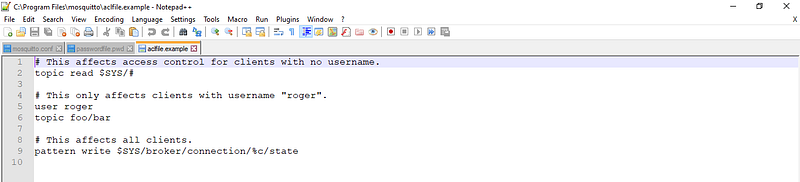
The general rule is that, by default, you are denied access unless explicitly allowed.For some example see these entries:
# Give user1 full access to everything
user user1
topic readwrite #
# Allow user2 read/write to topic foo/bar/baz
user user2
topic foo/bar/## Allow user3 read to topic foo/bar/baz
user user3
topic read foo/## Allow jaythree read/write to anything
user jaythree
topic #Note: when readwrite or read or write is omitted the default is readwrite (full access)
Open notepad++ as administrator and type this (save as acl.acl):
user admin
topic readwrite #

user user1
topic readwrite temperatureNote: user1 will be allowed to read/write at this topic temperature, only (general rule you see…).

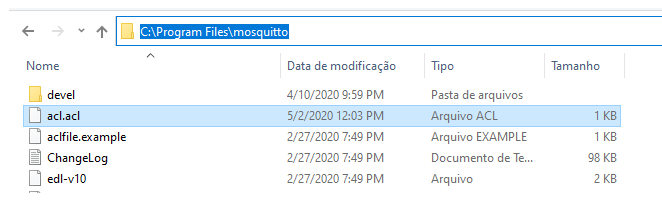
Now go to mosquitto.conf and uncomment this piece of code (line 728) and type:
acl_file C:\Program Files\mosquitto\acl.acl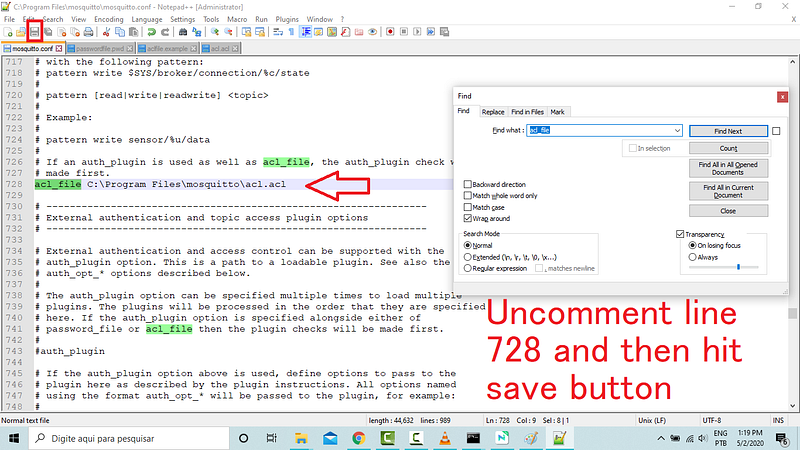
ACLs do not inhibit the connection with the broker. It just prevents unauthorized topics from being signed within the ACLS.
Now, let’s test:
5° Step — Preparing 3 Prompters Terminals to Test:
Open Three Terminals (as admin); type these commands in each one:
cd.. (2x)                       // go to c:/> directory
cd C:\Program Files\mosquitto   // change to mosquitto directory
cls                             // clear the screen;)
6° Step — user1 access:
1° Step —Let’s run the server:
On Term1, in C:\Program Files\mosquitto\ directory, type:
mosquitto -c mosquitto.conf -vAs we run the server with -v (verbose) all event will be dump to the terminal
At other two terminals in sequence for sub & pub clients, type:
Term_2, For _sub, in C:\Program Files\mosquitto\ directory, type:
mosquitto_sub -h localhost -u user1 -P 321 -p 1883 -t temperatureTerm_3, For _pub, in C:\Program Files\mosquitto\ directory, type:
mosquitto_pub -h localhost -u user1 -P 321 -p 1883 -t temperature -m 45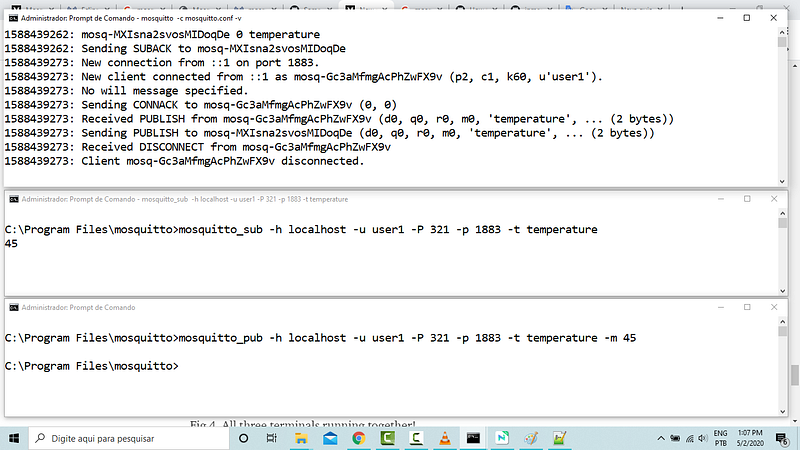
See the dump file in the admin broker terminal above. See that the client user1 was successful in publishing at topic temperature:)
7° Step — Now, what happens if they try to publish in foo topic?
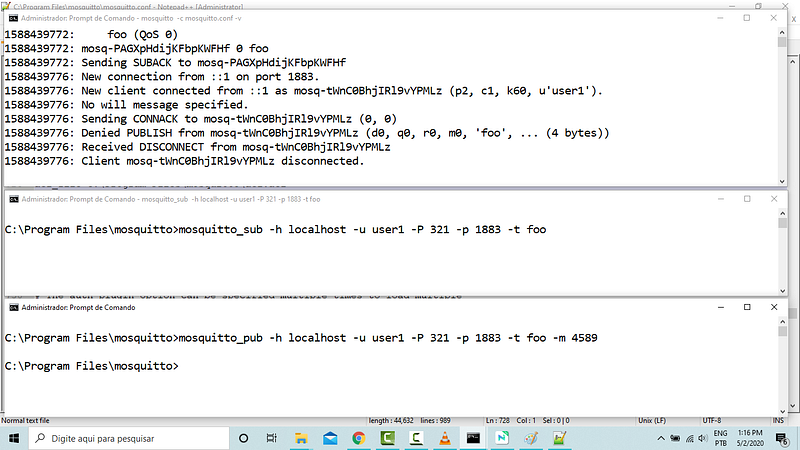
client disconnected without saving values...a silent protection:)
Only topics authorized inside acl.acl file is allowed to write!
8° Step — But the administrator admin can publish any topic:
Remember the wildcard # provided for the admin user? To test run these commands in two other windows:
mosquitto_sub -h localhost -u user1 -P 321 -p 1883 -t foomosquitto_pub -h localhost -u admin -P 123 -p 1883 -t foo -m 45And that is all for this post!
In the next episode, we’re gonna treat about: QoS: Quality of Service.
If you have any questions I will be glad to answer or modify this tutorial to make it clearer!
Bye!
MQTT Related Posts
01# Episode — Mosquitto — Intro To MQTT — It is Suitable for the Internet of Things Applications — MQTT
02# Episode — Mosquitto — User Access Configurations Setups — Editing mosquitto.conf File to Configure SSL Authentications — MQTT
03# Episode — Mosquitto — Mosquitto — ACLs — Wildcards & ACL — access control lists — MQTT (this one)
04# Episode — Mosquitto — MQTT QoS — How To Set QoS at Mosquitto Broker — MQTT
05# Episode — Mosquitto — Bulletproof TLS & SSL Mosquitto — How To Set Up Mosquitto Broker/Client Keys & Certificates — MQTT
06# Episode — Mosquitto — Mosquitto Bridge — How To Bridge Two Mosquitto Brokers — MQTT
07…be tuned for the upcoming post about MQTT and IoT o/
Credits & References:
mosquitto_passwd man page by mosquitto.org
Mosquitto ACL -Configuring and Testing MQTT Topic Restrictions by steves-internet-guide.com
Eclipse Mosquitto™ — An open source MQTT broker by mosquitto.org
Microgênios — Treinamento em Sistemas Embarcados — Microchip Regional Partner — Microchip Certified Brazilian Training Education Company & A Simplício-Owned-Awesome Enterprise o/