avatarJ3

Free AI web copilot to create summaries, insights and extended knowledge, download it at here

6688

Abstract

:&gt;</b> and <b>type:</b></p><p id="471c"><b>C:&gt;mosquitto -v</b></p><figure id="0f40"><img src="https://cdn-images-1.readmedium.com/v2/resize:fit:800/1*4MZ2gfSJwRwEUSJ5bCMPHQ.png"><figcaption>Fig 1 you must be running prompter as administrator; at the first time window asks credentials permissions:) <b>MQTT </b>server runs at <b>PORT 1883</b>; If secure communication (<b>SLL/TLS</b>), it will run at <b>PORT 8883;</b></figcaption></figure><p id="be4f"><b>Step </b>—Set mosquitto service as <b>Manual</b>;</p><p id="c73b">Go to Services > Properties > Initializations > and set it as <b>Manual</b></p><figure id="e0f0"><img src="https://cdn-images-1.readmedium.com/v2/resize:fit:800/1*UE9Yr-NUly0MjDhXD4nk8w.png"><figcaption>Fig 4. Setting mosquitto service as <b>Manual</b> Now we want to have control over <b>mosquitto broker</b> initialization. Click ok and save it all.</figcaption></figure><p id="19e9"><b>Step </b>— Testing the installations; at the console, type:</p><p id="00cd"><b>C:\mosquitto - -help</b></p><figure id="d407"><img src="https://cdn-images-1.readmedium.com/v2/resize:fit:800/1*1nKoSTyJfy2nhxEWZBKzOw.png"><figcaption>Fig 7. Testing mosquitto installation;</figcaption></figure><p id="39cf"><b>Step</b> — As the broker’s clients can be <b>server</b>, <b>publisher</b>, <b>subscriber</b>, and <b>password services, </b>mosquitto API brings us these <b>four </b>executables <b>programs</b>.</p><figure id="4dc8"><img src="https://cdn-images-1.readmedium.com/v2/resize:fit:800/1*Qw4Z9KAIe6OpsAlVLTKO1g.png"><figcaption>Fig. <b>Mosquitto API</b> is composed of these <b>four </b>programs: <b>Broker</b>, <b>Publisher</b>, <b>Subscriber,</b> and <b>Password</b> Service.</figcaption></figure><p id="7319">9 Step — <b>Communications test;</b></p><p id="7ef4">Now let’s <b>consume</b> <b>pub </b>and <b>sub-services from the API </b>and <b>get communication </b>in the publisher/subscriber pattern.</p><p id="3c6e">But this is an issue for the <b>next </b>Mosquitto Series <b>post</b>.</p><p id="e890">Bye, for now, o/</p><p id="015c"><a href="https://drive.google.com/open?id=14NUsp4GwCPNeA4tBg9p4_X-LGLXTFPj-">Download All Files For This Project</a></p><h2 id="193d">Related Posts</h2><p id="2c50">01 # Episode — <b>Mosquitto </b><b>Intro To MQTT </b>— It is Suitable for the Internet of Things Applications — MQTT (this one)</p><p id="7f38">02# Episode — Mosquitto — <a href="https://readmedium.com/mosquitto-user-access-configurations-setups-2f95dc593adf"><b>User Access Configurations Setups — Editing mosquitto.conf File to Configure SSL Authentications </b></a>— MQTT</p><p id="c405">03# Episode — Mosquitto — <a href="https://readmedium.com/mosquitto-acls-ac062aea3f9"><b>Mosquitto</b><b>ACLs — Wildcards & ACL — access control lists</b></a> — MQTT</p><p id="5aab">04# Episode — Mosquitto — <a href="https://readmedium.com/mqtt-qos-ef1ef4498405"><b>MQTT QoS </b></a>— How To Set QoS at Mosquitto Broker — MQTT</p><p id="b416">05# Episode — Mosquitto — <a href="https://readmedium.com/bulletproof-tls-ssl-mosquitto-e662c62a269b"><b>Bulletproof TLS & SSL Mosquitto</b></a> — How To Set Up Mosquitto Broker/Client Keys & Certificates — MQTT</p><p id="7302">06# Episode — Mosquitto — <a href="https://readmedium.com/mosquitto-bridge-5b44e9687fb3"><b>Mosquitto Bridge</b></a><b> </b>— How To Bridge Two Mosquitto Brokers — MQTT</p><p id="33eb">07…<b>be tuned</b> for the upcoming post about MQTT and IoT o/</p><div id="35ee"><pre>From: https:<span class="hljs-regexp">//</span>developer.ibm.com<span class="hljs-regexp">/articles/i</span>ot-mqtt-why-good-<span class="hljs-keyword">for</span>-iot/</pre></div><div id="3057"><pre><span class="hljs-symbol">Notes:</span> Why not other protocols:</pre></div><div id="15f1"><pre>Most developers are already familiar <span class="hljs-keyword">with</span> HTTP web services. So, why <span class="hljs-keyword">not</span> just have IoT devices connect <span class="hljs-built_in">to</span> web services? The device could <span class="hljs-built_in">send</span> <span class="hljs-keyword">in</span> its data <span class="hljs-keyword">as</span> <span class="hljs-keyword">a</span> HTTP request <span class="hljs-keyword">and</span> receive updates <span class="hljs-built_in">from</span> <span class="hljs-keyword">the</span> <span class="hljs-keyword">system</span> <span class="hljs-keyword">as</span> <span class="hljs-keyword">the</span> HTTP response. This request <span class="hljs-keyword">and</span> response pattern does have some severe limitations:</pre></div><div id="39ac"><pre><span class="hljs-selector-class">.HTTP</span> is <span class="hljs-selector-tag">a</span> synchronous protocol</pre></div><div id="5c90"><pre>The client waits <span class="hljs-keyword">for</span> the <span class="hljs-keyword">server</span> <span class="hljs-keyword">to</span> respond. That <span class="hljs-keyword">is</span> a requirement <span class="hljs-keyword">for</span> web browsers, but it comes at the <span class="hljs-keyword">cost</span> <span class="hljs-keyword">of</span> poor scalability. <span class="hljs-keyword">In</span> the world <span class="hljs-keyword">of</span> IoT, the <span class="hljs-keyword">large</span> number <span class="hljs-keyword">of</span> devices <span class="hljs-keyword">and</span> most likely an unreliable / high latency network have made synchronous communication problematic. An asynchronous messaging protocol <span class="hljs-keyword">is</span> much more suitable <span class="hljs-keyword">for</span> IoT applications. The sensors can send <span class="hljs-keyword">in</span> readings, <span class="hljs-keyword">and</span> let the network figure <span class="hljs-keyword">out</span> the optimal <span class="hljs-type">path</span> <span class="hljs-keyword">and</span> <span class="hljs-keyword">timing</span> <span class="hljs-keyword">for</span> delivery <span class="hljs-keyword">to</span> its destination devices <span class="hljs-keyword">and</span> services;</pre></div><div id="046e"><pre>.HTTP <span class="hljs-keyword">is</span> one-way</pre></div><div id="958f"><pre>The client must initiate <span class="hljs-keyword">the</span> connection. In an IoT <span class="hljs-built_in">application</span>, <span class="hljs-keyword">the</span> devices <span class="hljs-keyword">or</span> sensors are typically clients, which means <span class="hljs-keyword">that</span> they cannot passively receive commands <span class="hljs-keyword">from</span> <span class="hljs-keyword">the</span> network;</pre></div><div id="1584"><pre><span class="hljs-selector-class">.HTTP</span> is <span class="hljs-selector-tag">a</span> <spa

Options

n class="hljs-number">1</span>-<span class="hljs-number">1</span> protocol</pre></div><div id="8a40"><pre>The client makes a request, <span class="hljs-keyword">and</span> the <span class="hljs-keyword">server</span> responds. It <span class="hljs-keyword">is</span> difficult <span class="hljs-keyword">and</span> expensive <span class="hljs-keyword">to</span> broadcast a message <span class="hljs-keyword">to</span> <span class="hljs-keyword">all</span> devices <span class="hljs-keyword">on</span> the network, which <span class="hljs-keyword">is</span> a common use <span class="hljs-keyword">case</span> <span class="hljs-keyword">in</span> IoT applications;</pre></div><div id="507a"><pre>.HTTP <span class="hljs-keyword">is</span> a heavy weight protocol <span class="hljs-keyword">with</span> many headers and rules</pre></div><div id="48ba"><pre>It <span class="hljs-keyword">is</span> <span class="hljs-built_in">not</span> suitable for constrained networks.</pre></div><div id="b552"><pre>For <span class="hljs-keyword">the</span> <span class="hljs-keyword">above</span> reasons, most high performance scalable systems use an asynchronous messaging bus, rather than web services, <span class="hljs-keyword">for</span> internal data exchange. In fact, <span class="hljs-keyword">the</span> most popular messaging protocol used <span class="hljs-keyword">in</span> enterprise middleware systems <span class="hljs-keyword">is</span> called AMQP (Advanced Message Queuing Protocol). However, <span class="hljs-keyword">in</span> <span class="hljs-keyword">the</span> high-performance environment, computing power <span class="hljs-keyword">and</span> network latency are typically <span class="hljs-keyword">not</span> a concern. AMQP <span class="hljs-keyword">is</span> designed <span class="hljs-keyword">for</span> reliability <span class="hljs-keyword">and</span> interoperability <span class="hljs-keyword">in</span> enterprise applications. It has a rich feature <span class="hljs-keyword">set</span>, <span class="hljs-keyword">but</span> <span class="hljs-keyword">it</span> <span class="hljs-keyword">is</span> <span class="hljs-keyword">not</span> suitable <span class="hljs-keyword">for</span> resource-constrained IoT applications. Besides AMQP, there are other popular messaging protocols. For example, <span class="hljs-keyword">the</span> XMPP (Extensible Messaging <span class="hljs-keyword">and</span> Presence Protocol) <span class="hljs-keyword">is</span> a peer-<span class="hljs-keyword">to</span>-peer instant messaging (IM) protocol. It <span class="hljs-keyword">is</span> heavy <span class="hljs-keyword">on</span> features <span class="hljs-keyword">that</span> support IM use cases, such <span class="hljs-keyword">as</span> presence <span class="hljs-keyword">and</span> media attachments. Compared <span class="hljs-keyword">with</span> MQTT, <span class="hljs-keyword">it</span> requires much more resources both <span class="hljs-keyword">on</span> <span class="hljs-keyword">the</span> device <span class="hljs-keyword">and</span> <span class="hljs-keyword">on</span> <span class="hljs-keyword">the</span> network. So, what makes <span class="hljs-keyword">the</span> MQTT so lightweight <span class="hljs-keyword">and</span> flexible? A key feature <span class="hljs-keyword">of</span> <span class="hljs-keyword">the</span> MQTT protocol <span class="hljs-keyword">is</span> <span class="hljs-keyword">its</span> publish <span class="hljs-keyword">and</span> subscribe model. As <span class="hljs-keyword">with</span> all messaging protocols, <span class="hljs-keyword">it</span> decouples <span class="hljs-keyword">the</span> publisher <span class="hljs-keyword">and</span> consumer <span class="hljs-keyword">of</span> data.</pre></div><h2 id="a94c">References & Credits</h2><p id="3760"><a href="https://mosquitto.org/">Eclipse Mosquitto™</a> An open-source MQTT broker</p><p id="45cc"><a href="https://ead.microgenios.com.br/">Microgênios — Treinamento em Sistemas Embarcados — Microchip Regional Partner</a> — Microchip Certified Brazilian Training Education Startup & a Simplício-owned enterprise o/</p><p id="b188"><a href="https://www.researchgate.net/profile/Hany_Atlam/publication/327845273_Internet_of_Things_State-of-the-art_Challenges_Applications_and_Open_Issues/links/5ba8fea9a6fdccd3cb6f7dd4/Internet-of-Things-State-of-the-art-Challenges-Applications-and-Open-Issues.pdf">Internet of Things: State-of-the-art, Challenges, Applications, and Open Issues</a> — Article (PDF Available) <i>in</i> the <a href="https://www.researchgate.net/journal/2042-4655_International_Journal_of_Intelligent_Computing_Research">International Journal of Intelligent Computing Research</a></p><p id="4782"><a href="https://ead.microgenios.com.br/">Microgênios — Treinamento em Sistemas Embarcados — Microchip Regional Partner</a> — Microchip Certified Brazilian Training Education Company & a Simplício-Owned enterprise o/</p><p id="368d"><a href="https://stackoverflow.com/questions/9233316/what-is-the-smallest-possible-http-and-https-data-request">What is the smallest possible http and https data request</a> by <a href="https://stackoverflow.com/">https://stackoverflow.com/</a></p><p id="f70b"><a href="https://developer.ibm.com/articles/iot-mqtt-why-good-for-iot/">Getting to know MQTT</a> — Why MQTT is one of the best network protocols for the Internet of Things by <a href="https://developer.ibm.com/technologies/messaging/articles/">IBM Articles</a></p><p id="e741"><a href="https://developer.ibm.com/blogs/open-source-ibm-mqtt-the-messaging-protocol-for-iot/">MQTT is the leading protocol for connecting IoT devices</a> by <a href="https://developer.ibm.com/technologies/messaging/articles/">IBM Articles</a></p><p id="ec97"><a href="https://en.wikipedia.org/wiki/MQTT">MQTT </a>by <a href="https://en.wikipedia.org/">Wikipedia</a></p><p id="a6bb"><a href="https://docs.oasis-open.org/mqtt/mqtt/v5.0/mqtt-v5.0.html">MQTT Version 5.0 — OASIS Standard — 07 March 2019</a> by <a href="https://www.oasis-open.org/">OASIS</a></p><blockquote id="234e"><p>The Internet of Things has the potential to change the world, just as the Internet did. Maybe even more so.</p></blockquote><p id="a449">by Kevin Ashton, who is t<a href="https://www.researchgate.net/publication/327845273_Internet_of_Things_State-of-the-art_Challenges_Applications_and_Open_Issues">he founder of MIT auto-identification center</a> in 1999.</p><p id="9993">(edited @ Dez 2020 — test again and no libs need; add notes:)</p><p id="02cd">(edited @ Jan 2021 — correcting the minimum for HTTP header: 400 -> 16; adding StackOverflow link :)</p></article></body>

Mosquitto — Intro To MQTT

It is Suitable for the Internet of Things Applications — MQTT — Episode #01

Hi, let us install mosquitto broker (v 1.6.8) in your machine & reconfigure its service in Win10 so we can start & stop it manually.

In late 2016 I’ve already posted about MQTT using ESP8266 & MIT Inventor and Adafruit MQTT Broker…for codes & how-to-use it, please check it out here:

5º Episode — KidsTronics — Adafruit-IO Meets ESP8266, Arduino & MIT App Inventor 2 — Hello World for Adafruit-io & MQTT Protocol

But now, as a grown-Arduino-man…well, not that much 😅…I’ll deal with this IoT-prone protocol more deeply and install a mosquitto broker on my own pc

Welcome to MQTT!

Fig 1. Mosquitto is the broker server that implements the MQTT protocol.

But first…I’d like to thank my followers, especially Mr. Zoltán Groska — Happy new year and thank you for your support o/

The MQTT protocol (implemented by mosquitto) provides a lightweight method of carrying out messaging using a publish/subscribe model.

Designed as an extremely lightweight publish/subscribe messaging transport, it is useful for connections with remote locations where a small code footprint is required and/or network bandwidth is at a premium.

Why use MQTT?

For the IoT apps!

As IoT devices communicate via broker servers with sensors and actuators distributed at the computer networks, but not with people, normal HTTP protocol would be cumbersome… HTTP header is up to 16 bytes long!

IoT device needs often one single byte

HTTP server tends to disconnect clients often and it does not know when the clients have disconnected.

IoT devices need to receive updates often and have a guaranteed connection with the brokers...

The web traffic for IoT app needs speed, low-data-footprint, low throughput, and frequent updates, rather than ultra-high digital data throughput.

That’s why MQTT is so important for the IoT app!

Installations Procedures for Mosquitto

Mosquitto is highly portable and available for a wide range of platforms.

I will use Windows 10 (Windows 10 Home Single Language — Version 10.0.18362 Compilation 18362). In an upcoming post, I will implement it in RPi :)

Please refer to mosquitto official page first:)

Step — Go to https://mosquitto.org/download/ and for Windows get this file:

mosquitto-1.6.8-install-windows-x64.exe
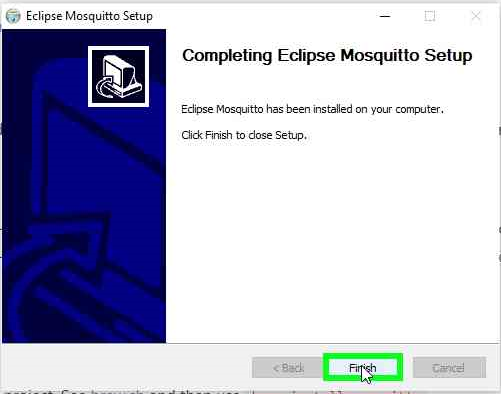
Fig 2. Finishing mosquitto installation on win 10

Step Adding Dependencies files (.dll)

As you complete the Mosquitto installation, please copy/paste these dependencies files into the Mosquitto root directory (you can download these .dlls directly from my google drive below):

Edited:
nowadays, Dez 2020, there is no need to load these libs; 
skip this step :)
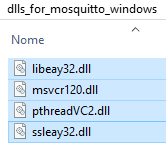
Fig 3. Mosquitto will not run without these files at C:\Program Files\mosquitto directory

Administrator credentials might be asked as you are dealing with systems files;)
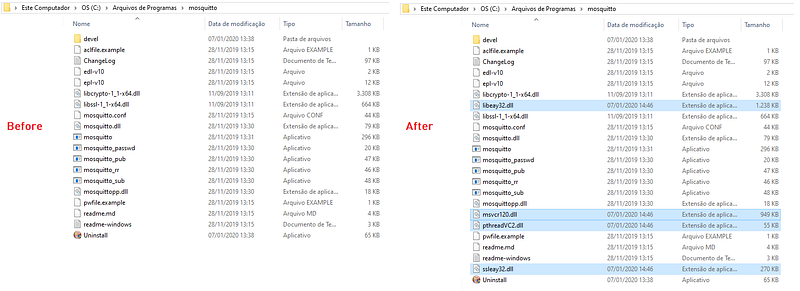
Fig 3. Here is where I have installed mosquitto broker server in my windows 10 platform; these extras .ddl files are related to licenses policies :/

Step — Go to Windows Explorer > MyComputer, left mouse click go to Properties > Advanced Systems Configurations

hint: Ctrl+R, type: 
sysdm.cpl (System Properties)
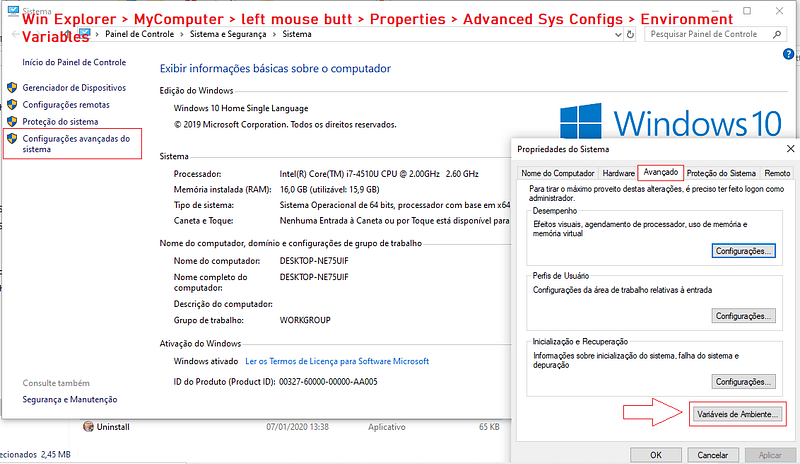
Fig 4. Go to Windows Explorer > MyComputer > left mouse click > Goto Properties > Advanced Systems Configurations

Step — Click Environment Variables (1), Path (2), New (3) and paste C:\>Program Files\mosquitto directory (4), pointing to mosquitto’s .dll & .exe files location. Click ok.
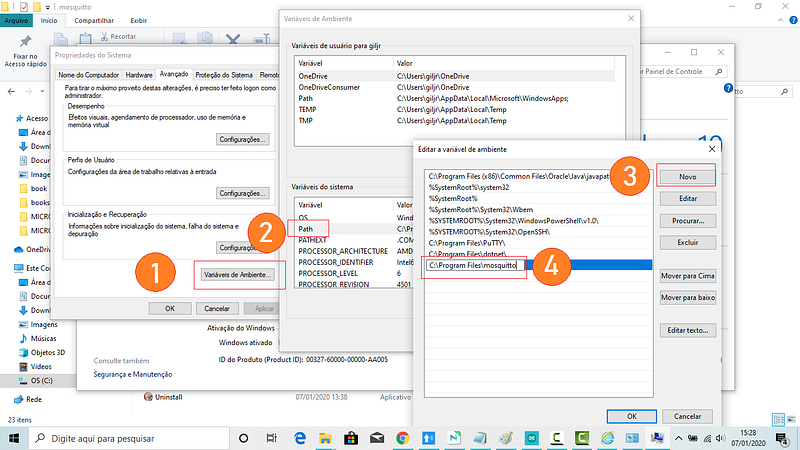
Fig 5. Setting Environment path: Now when you type at the console, mosquitos commands will be recognized;

Step — Open Cmd Prompter, go to C:\> and type:

C:\>mosquitto -v
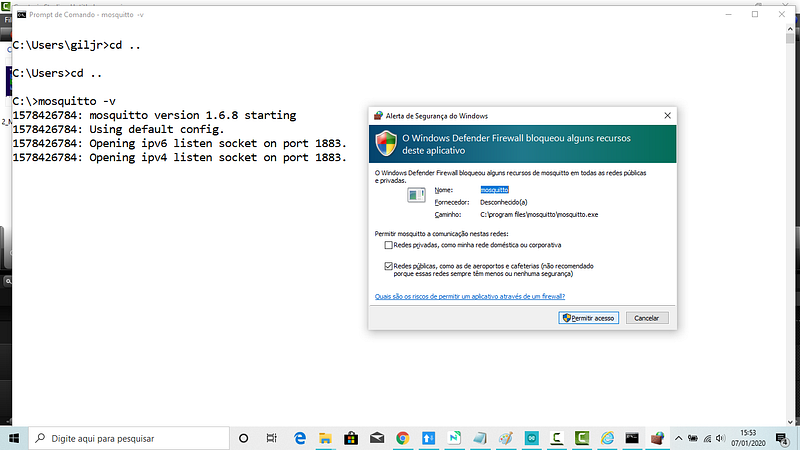
Fig 1 you must be running prompter as administrator; at the first time window asks credentials permissions:) MQTT server runs at PORT 1883; If secure communication (SLL/TLS), it will run at PORT 8883;

Step —Set mosquitto service as Manual;

Go to Services > Properties > Initializations > and set it as Manual
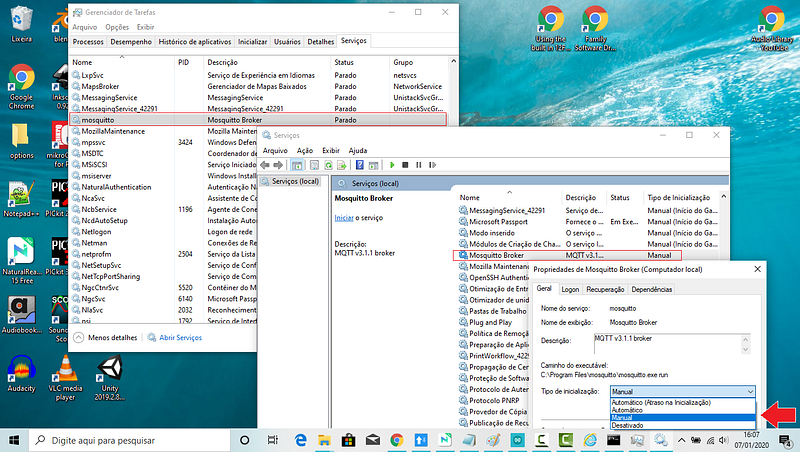
Fig 4. Setting mosquitto service as Manual Now we want to have control over mosquitto broker initialization. Click ok and save it all.

Step — Testing the installations; at the console, type:

C:\mosquitto - -help
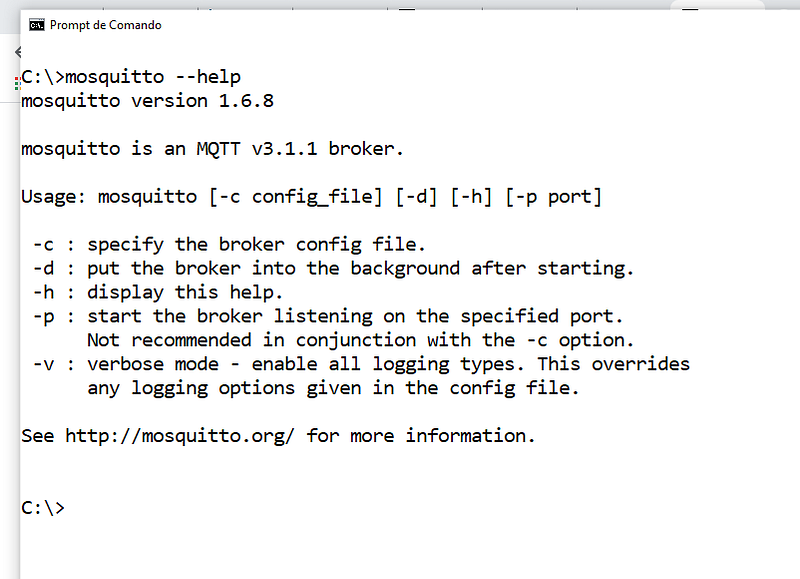
Fig 7. Testing mosquitto installation;

Step — As the broker’s clients can be server, publisher, subscriber, and password services, mosquitto API brings us these four executables programs.
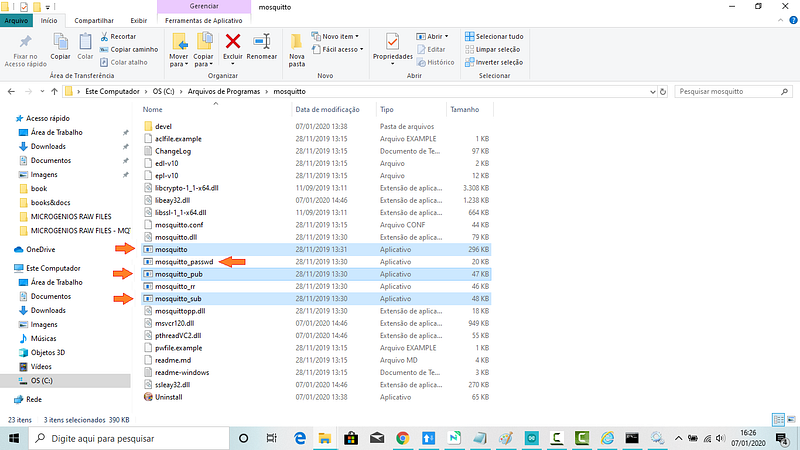
Fig. Mosquitto API is composed of these four programs: Broker, Publisher, Subscriber, and Password Service.

9 Step — Communications test;

Now let’s consume pub and sub-services from the API and get communication in the publisher/subscriber pattern.

But this is an issue for the next Mosquitto Series post.

Bye, for now, o/

Download All Files For This Project

Related Posts

01 # Episode — Mosquitto Intro To MQTT — It is Suitable for the Internet of Things Applications — MQTT (this one)

02# Episode — Mosquitto — User Access Configurations Setups — Editing mosquitto.conf File to Configure SSL Authentications — MQTT

03# Episode — Mosquitto — MosquittoACLs — Wildcards & ACL — access control lists — MQTT

04# Episode — Mosquitto — MQTT QoS — How To Set QoS at Mosquitto Broker — MQTT

05# Episode — Mosquitto — Bulletproof TLS & SSL Mosquitto — How To Set Up Mosquitto Broker/Client Keys & Certificates — MQTT

06# Episode — Mosquitto — Mosquitto Bridge — How To Bridge Two Mosquitto Brokers — MQTT

07…be tuned for the upcoming post about MQTT and IoT o/

From: https://developer.ibm.com/articles/iot-mqtt-why-good-for-iot/
Notes: Why not other protocols:
Most developers are already familiar with HTTP web services. So, why not just have IoT devices connect to web services? The device could send in its data as a HTTP request and receive updates from the system as the HTTP response. This request and response pattern does have some severe limitations:
.HTTP is a synchronous protocol
The client waits for the server to respond. That is a requirement for web browsers, but it comes at the cost of poor scalability. In the world of IoT, the large number of devices and most likely an unreliable / high latency network have made synchronous communication problematic. An asynchronous messaging protocol is much more suitable for IoT applications. The sensors can send in readings, and let the network figure out the optimal path and timing for delivery to its destination devices and services;
.HTTP is one-way
The client must initiate the connection. In an IoT application, the devices or sensors are typically clients, which means that they cannot passively receive commands from the network;
.HTTP is a 1-1 protocol
The client makes a request, and the server responds. It is difficult and expensive to broadcast a message to all devices on the network, which is a common use case in IoT applications;
.HTTP is a heavy weight protocol with many headers and rules
It is not suitable for constrained networks.
For the above reasons, most high performance scalable systems use an asynchronous messaging bus, rather than web services, for internal data exchange. 
In fact, the most popular messaging protocol used in enterprise middleware systems is called AMQP (Advanced Message Queuing Protocol). 
However, in the high-performance environment, computing power and network latency are typically not a concern. AMQP is designed for reliability and interoperability in enterprise applications. It has a rich feature set, but it is not suitable for resource-constrained IoT applications.
Besides AMQP, there are other popular messaging protocols. For example, the XMPP (Extensible Messaging and Presence Protocol) is a peer-to-peer instant messaging (IM) protocol. It is heavy on features that support IM use cases, such as presence and media attachments. Compared with MQTT, it requires much more resources both on the device and on the network.
So, what makes the MQTT so lightweight and flexible? A key feature of the MQTT protocol is its publish and subscribe model. As with all messaging protocols, it decouples the publisher and consumer of data.

References & Credits

Eclipse Mosquitto™ An open-source MQTT broker

Microgênios — Treinamento em Sistemas Embarcados — Microchip Regional Partner — Microchip Certified Brazilian Training Education Startup & a Simplício-owned enterprise o/

Internet of Things: State-of-the-art, Challenges, Applications, and Open Issues — Article (PDF Available) in the International Journal of Intelligent Computing Research

Microgênios — Treinamento em Sistemas Embarcados — Microchip Regional Partner — Microchip Certified Brazilian Training Education Company & a Simplício-Owned enterprise o/

What is the smallest possible http and https data request by https://stackoverflow.com/

Getting to know MQTT — Why MQTT is one of the best network protocols for the Internet of Things by IBM Articles

MQTT is the leading protocol for connecting IoT devices by IBM Articles

MQTT by Wikipedia

MQTT Version 5.0 — OASIS Standard — 07 March 2019 by OASIS

The Internet of Things has the potential to change the world, just as the Internet did. Maybe even more so.

by Kevin Ashton, who is the founder of MIT auto-identification center in 1999.

(edited @ Dez 2020 — test again and no libs need; add notes:)

(edited @ Jan 2021 — correcting the minimum for HTTP header: 400 -> 16; adding StackOverflow link :)

Mqtt
Mqtt Broker
Mosquitto
Iot Platform
Windows 10
Recommended from ReadMedium