
Explain Your Model with the SHAP Values

Better Interpretability Leads to Better Adoption
Is your highly-trained model easy to understand? A sophisticated machine learning algorithm usually can produce accurate predictions, but its notorious “black box” nature does not help adoption at all. Think about this: If you ask me to swallow a black pill without telling me what’s in it, I certainly don’t want to swallow it. The interpretability of a model is like a label on a drug bottle. We need to make our effective pill transparent for easy adoption.
How can we do that? The SHAP value is a great tool among others like LIME (see my post “Explain Your Model with LIME”), InterpretML (see my post “Explain Your Model with Microsoft’s InterpretML”), or ELI5. The SHAP value also is an important tool in Explainable AI or Trusted AI, an emerging development in AI (see my post “An Explanation for eXplainable AI”). In this article, I will present to you what the Shapley value is and how the SHAP (SHapley Additive exPlanations) value emerges from the Shapley concept. I will demonstrate how SHAP values increase model transparency. This article also comes with Python code in the end for you to produce nice results in your applications, or you can download the notebook in this github. The SHAP api has more recent development, as documented in “The SHAP with More Elegant Charts” and “The SHAP Values with H2O Models”.
What is the Shapley Value?
Let me explain the Shapley value with a story: Assume Ann, Bob, and Cindy together were hammering an “error” wood log, 38 inches, to the ground. After work, they went to a local bar for a drink and I, a mathematician, came to join them. I asked a very bizarre question: “What is everyone’s contribution (in inches)?”

How to answer this question? I listed all the permutations and came up with the data in Table A.(Some of you already asked me how to come up with this table. See my note at the end of the article.) When the ordering is A, B, C, the marginal contributions of the three are 2, 32, and 4 inches respectively.
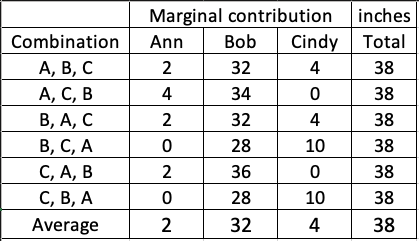
Table (A) shows the coalition of (A,B) or (B,A) is 34 inches, so the marginal contribution of C to this coalition is 4 inches. I took the average of all the permutations for each person to get each individual’s contribution: Ann is 2 inches, Bob is 32 inches and Cindy is 4 inches. That’s the way to calculate the Shapley value: It is the average of the marginal contributions across all permutations. I will describe the calculation in the formal mathematical term at the end of this post. But now, let’s see how it is applied in machine learning.
I called the wood log the “error” log for a special reason: It is the loss function in the context of machine learning. The “error” is the difference between the actual value and prediction. The hammers are the predictors to attack the error log. How do we measure the contributions of the hammers (predictors)? The Shapley values!
From the Shapley Value to SHAP (SHapley Additive exPlanations)
The SHAP (SHapley Additive exPlanations) deserves its own space rather than an extension of the Shapley value. Inspired by several methods (1,2,3,4,5,6,7) on model interpretability, Lundberg and Lee (2016) proposed the SHAP value as a united approach to explaining the output of any machine learning model. Three benefits worth mentioning here.
- The first one is global interpretability — the collective SHAP values can show how much each predictor contributes, either positively or negatively, to the target variable. This is like the variable importance plot but it is able to show the positive or negative relationship for each variable with the target (see the SHAP value plot below).
- The second benefit is local interpretability — each observation gets its own set of SHAP values (see the individual SHAP value plot below). This greatly increases its transparency. We can explain why a case receives its prediction and the contributions of the predictors. Traditional variable importance algorithms only show the results across the entire population but not on each individual case. The local interpretability enables us to pinpoint and contrast the impacts of the factors.
- Third, the SHAP values can be calculated for any tree-based model, while other methods use linear regression or logistic regression models as the surrogate models.
Model Interpretability Does Not Mean Causality
It is important to point out the SHAP values do not provide causality. In the “identify causality” series of articles, I demonstrate econometric techniques that identify causality. Those articles cover the following techniques: Regression Discontinuity (see “Identify Causality by Regression Discontinuity”), Difference in differences (DiD)(see “Identify Causality by Difference in Differences”), Fixed-effects Models (See “Identify Causality by Fixed-Effects Models”), and Randomized Controlled Trial with Factorial Design (see “Design of Experiments for Your Change Management”).
Join Medium with my referral link — Chris Kuo/Dr. Dataman
How to Use SHAP in Python?
I am going to use the red wine quality data in Kaggle.com to do the analysis. There are 1,599 wine samples. The column for the target is the quality rating from low to high (0–10). The input variables are the content of each wine sample including fixed acidity, volatile acidity, citric acid, residual sugar, chlorides, free sulfur dioxide, total sulfur dioxide, density, pH, sulphates and alcohol.
In this post, I build a random forest regression model and will use the TreeExplainer in SHAP. Some readers have asked if there is one SHAP Explainer for any ML algorithm — either tree-based or non-tree-based algorithms. Yes, there is. It is called the KernelExplainer. You can read my second post “Explain Any Models with the SHAP Values — Use the KernelExplainer”, in which I show that if your model is a tree-based machine learning model, you should use the tree explainer TreeExplainer() that has been optimized to render fast results. If your model is a deep learning model, use the deep learning explainer DeepExplainer(). For all other types of algorithms (such as KNNs), use KernelExplainer(). Also, the SHAP api has more recent development. See “The SHAP with More Elegant Charts”.
For readers who want to get deeper into the Machine Learning algorithms, you can check my post “My Lecture Notes on Random Forest, Gradient Boosting, Regularization, and H2O.ai”. For deep learning, check “Explaining Deep Learning in a Regression-Friendly Way”. For RNN/LSTM/GRU, check “A Technical Guide on RNN/LSTM/GRU for Stock Price Prediction”.
The SHAP value works for either the case of continuous or binary target variable. The binary case is achieved in the notebook here.
(A) Variable Importance Plot — Global Interpretability
First install the SHAP module by doing pip install shap. We are going to produce the variable importance plot. A variable importance plot lists the most significant variables in descending order. The top variables contribute more to the model than the bottom ones and thus have high predictive power. The shap.summary_plot function with plot_type=”bar” lets you produce the variable importance plot.

Readers may want to save the above summary plot. Although the SHAP does not have built-in functions, you can save the plot by using matplotlib:
The SHAP value plot can show the positive and negative relationships of the predictors with the target variable. The code shap.summary_plot(shap_values, X_train)produces the following plot:
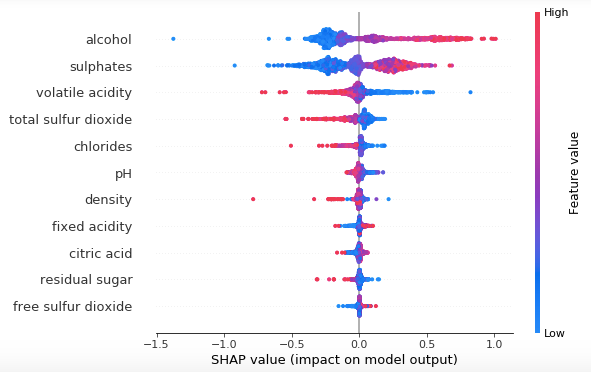
This plot is made of all the dots in the train data. It delivers the following information:
- Feature importance: Variables are ranked in descending order.
- Impact: The horizontal location shows whether the effect of that value is associated with a higher or lower prediction.
- Original value: Color shows whether that variable is high (in red) or low (in blue) for that observation.
- Correlation: A high level of the “alcohol” content has a high and positive impact on the quality rating. The “high” comes from the red color, and the “positive” impact is shown on the X-axis. Similarly, we will say the “volatile acidity” is negatively correlated with the target variable.
(B) SHAP Dependence Plot — Global Interpretability
You may ask how to show a partial dependence plot. A partial dependence plot shows the marginal effect of one or two features on the predicted outcome of a machine learning model (J. H. Friedman 2001). It tells whether the relationship between the target and a feature is linear, monotonic or more complex. I provide more detail in “How Is the Partial Dependent Plot Calculated?”
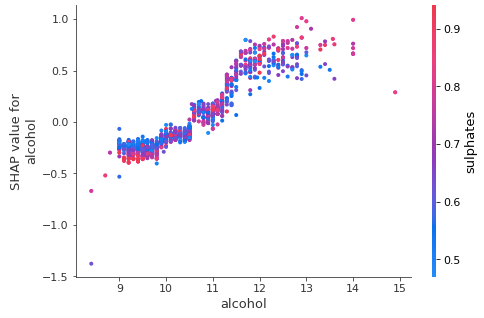
To create a dependence plot, you only need one line of code: shap.dependence_plot(“alcohol”, shap_values, X_train). The function automatically includes another variable that your chosen variable interacts most with. The following plot shows there is an approximately linear and positive trend between “alcohol” and the target variable, and “alcohol” interacts with “sulphates” frequently.
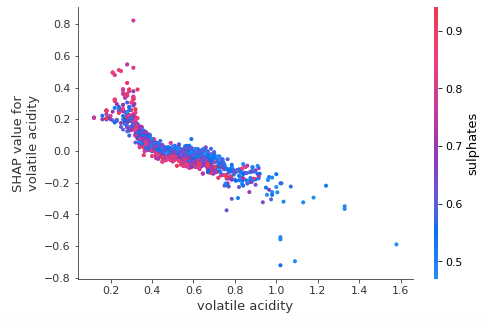
Suppose you want to know “volatile acidity”, as well as the variable that it interacts with the most, you can do shap.dependence_plot(“volatile acidity”, shap_values, X_train). The plot below shows there exists an approximately linear but negative relationship between “volatile acidity” and the target variable. This negative relationship is already demonstrated in the variable importance plot Exhibit (K).
(C) Individual SHAP Value Plot — Local Interpretability
Your machine learning model produces the prediction for a record. How do you make sense of the prediction? The explainability for any individual observation is the most critical step to convince your audience to adopt your model. Let me illustrate the interpretations with several examples. I arbitrarily select some observations and show them in Table (C):
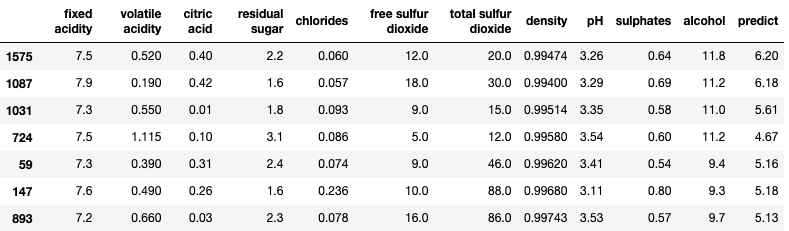
If you use Jupyter notebook, you will need to initialize it with initjs(). To save the repeating work, I write a small function shap_plot(j) to produce the SHAP values for several observations in Table (C).
(C.1) Interpret Observation 1
Let me walk you through the above code step by step. The shap.force_plot() takes three values: (i) the base value (explainerModel.expected_value[0]), (ii) the SHAP values (shap_values_Model[j][0]) and (iii) the matrix of feature values (S.iloc[[j]]). The base value or the expected value is the average of the model output over the training data X_train. It is the base value used in the following plot.
When I execute shap_plot(0) I get the result for the first row in Table (C):

Let me break this elegant plot in great detail:
- The output value is the prediction for that observation (the prediction of the first row in Table (C) is 6.20).
- The base value: The original paper explains that the base value E(y_hat) is “the value that would be predicted if we did not know any features for the current output.” In other words, it is the mean prediction, or mean(yhat). You may wonder why it is 5.62. This is because the mean prediction of Y_test is 5.62. You can test it out by
Y_test.mean()which produces 5.62. - Red/blue: Features that push the prediction higher (to the right) are shown in red, and those pushing the prediction lower are in blue.
- Alcohol: has a positive impact on the quality rating. The alcohol content of this wine is 11.8 (as shown in the first row of Table (C)) which is higher than the average value 10.41. So it pushes the prediction to the right.
- pH: has a negative impact on the quality rating. A lower than the average pH (=3.26 < 3.30) drives the prediction to the right.
- Sulphates: is positively related to the quality rating. A lower than the average Sulphates (= 0.64 < 0.65) pushes the prediction to the left.
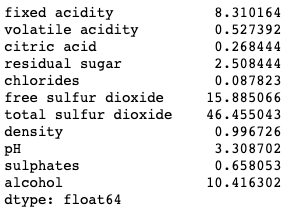
- You may wonder how we know the average values of the predictors. Remember the SHAP model is built on the training data set. The means of the variables are:
X_train.mean()
(C.2) Interpret Observation 2
What is the result for the 2nd observation in Table (C)? Let’s doshap_plot(1):

(C.3) Interpret Observation 3
How about the 3rd observation in Table (C)? Let’s do shap_plot(2):

(C.4) Interpret Observation 4
Just to do one more before you become bored. The 4th observation in Table B is this: shap_plot(3)

Conclusion
In this article we learn why a model needs to be explainable. We learn the SHAP values, and how the SHAP values help to explain the predictions of your machine learning model. It is helpful to remember the following points:
- Each feature has a shap value contributing to the prediction.
- The final prediction = the average prediction + the shap values of all features.
- The shap value of a feature can be positive or negative.
- If a feature is positively correlated to the target, a value higher than its own average will contribute positively to the prediction.
- If a feature is negatively correlated to the target, a value higher than its own average will contribute negatively to the prediction.
Things that the SHAP Values Do Not Do
Since I published this article, its sister article “Explain Any Models with the SHAP Values — Use the KernelExplainer”, and the recent development, “The SHAP with More Elegant Charts”, readers have shared with me questions from their meetings with their clients. The questions are not about the calculation of the SHAP values, but the audience thought what SHAP values can do. One main comment is “Can you identify the drivers for us to set strategies?”
The above comment is plausible, showing the data scientists already delivered effective content. However, this question concerns correlation and causality. The SHAP values do not identify causality, which is better identified by experimental design or similar approaches. For readers who are interested, please read my two other articles “Design of Experiments for Your Change Management” or “Machine Learning or Econometrics?”
The Model Explanability Article Series
For those of you who are interested in model explanability, the following sequence will be helpful:
Part I: Explain Your Model with the SHAP Values
Part II: The SHAP with More Elegant Charts
Part III: How Is the Partial Dependent Plot Calculated?
Part VI: An Explanation for eXplainable AI
Part V: Explain Any Models with the SHAP Values — Use the KernelExplainer
Part VI: The SHAP Values with H2O Models
Part VII: Explain Your Model with LIME
Part VIII: Explain Your Model with Microsoft’s InterpretML
Ending Note: Shapley Value in the Mathematical Form
Twenty-something years ago when I was a graduate student learning cooperative games and the Shapley value, I wasn’t quite sure any real-world applications but I was drawn to the elegance of the Shapley value concept. Twenty years later I see the Shapley value concept is applied successfully to machine learning. In the above story, I describe it in a layman’s term, here I am going to explain it in the mathematical form.
Lloyd Shapley came up with this solution concept for a cooperative game in 1953. Shapley wants to calculate the contribution of each player in a coalition game. Assume there are N players and S is a subset of the N players. Let v(S) be the total value of the S players. When player i join the S players, Player i’s marginal contribution is v(S∪{i}) − v(S). If we take the average of the contribution over the possible different permutations in which the coalition can be formed, we get the right contribution of player i:

Shapley establishes the following four Axioms in order to achieve a fair contribution:
- Axiom 1: Efficiency. The sum of the Shapley values of all agents equals the value of the total coalition.
- Axiom 2: Symmetry. All players have a fair chance to join the game. That’s why Table A above lists all the permutations of the players.
- Axiom 3: Dummy. If player i contributes nothing to any coalition S, then the contribution of Player i is zero, i.e. , φᵢ(v)=0. Obviously we need to set the boundary value.
- Axiom 4: Additivity. For any pair of games v, w: φ(v+w)=φ(v)+φ(w), where (v+w)(S)=v(S)+w(S) for all S. This property enables us to do the simple arithmetic summation.
I apply the Shapley value calculation to Table (A) to get the marginal contribution:

Remember that the order of a combination matters. Let’s go through Table (A.1) to compute Ann’s Shapley value. There are 6 permutations in the column “Combination”. The first one is A, B, C. There is no one before A. So A’s marginal contribution is v(A) — v(0). The third combination “B, A, C” says Ann enters after B, and C enters after A. A’s marginal contribution to the union of B and A is v(B, A) — v(B). C is after A so it does not impact A. Let’s look at the last combination “C, B, A”. Before A enters, there are already C and B. So A’s marginal contribution is v(C,B,A) — v(C, B).
In real life, it is hard to ask the three hammers to take turns repeatedly to record the Shapley values for Table A. However, it is quite natural in a machine-learning setting. Let’s take either the random forest or gradient boosting algorithm to illustrate this concept. Variables enter the machine learning model sequentially or repeatedly in the trees of the model. In every step of tree growth, the algorithms evaluate each of the variables equally to settle on the variable that contributes the most. Thousands of trees are constructed. It is imaginable that various permutations of the variables will be available. Therefore the marginal contribution of each variable can be calculated.
Readers are recommended to purchase books by Chris Kuo:

- The explainable AI: https://a.co/d/cNL8Hu4
- Transfer learning for image classification: https://a.co/d/hLdCkMH
- Modern time series anomaly detection: https://a.co/d/ieIbAxM
- Handbook of Anomaly Detection: https://a.co/d/5sKS8bI


