-0-4a-wotiom.html">Motor de Passo <b>NEMA 17</b>–3,5 kgf.cm / 0,4A — Wotiom</a> → Resistência por Fase: <b>20Ω</b> ±10%</p><div id="6abe"><pre>QUICK <span class="hljs-keyword">NOTES</span> <span class="hljs-keyword">ABOUT</span> EASYDRIVE:</pre></div><div id="0c39"><pre>- <span class="hljs-keyword">Brian </span><span class="hljs-keyword">Schmalz, </span>the EasyDriver designer, is very knowledgeable <span class="hljs-keyword">and </span>courteous<span class="hljs-comment">; Excellent support in his website;</span></pre></div><div id="c0ec"><pre>- The most likely <span class="hljs-built_in">cause</span> of problems with killing EasyDrivers has always <span class="hljs-keyword">been </span><span class="hljs-keyword">bad </span>wiring - <span class="hljs-keyword">either </span><span class="hljs-keyword">between </span>the power supply <span class="hljs-keyword">and </span>the ED <span class="hljs-keyword">or </span><span class="hljs-keyword">between </span>the ED <span class="hljs-keyword">and </span>the motor. It<span class="hljs-string">'s critical that these connections are never broken while under power. Also shorts between motor coil wires must be avoided; (answered by Brian Schmalz via email)</span></pre></div><div id="7c6a"><pre>- The motors I was using :/<span class="hljs-keyword">before</span> killing <span class="hljs-keyword">my</span> ED board:/ are <span class="hljs-keyword">not</span> good ones <span class="hljs-keyword">for</span> use <span class="hljs-keyword">with</span> <span class="hljs-keyword">the</span> Easy Driver. It's coil resistance <span class="hljs-keyword">is</span> too high (<span class="hljs-keyword">as</span> indicated <span class="hljs-keyword">by</span> <span class="hljs-keyword">the</span> rating <span class="hljs-keyword">of</span> <span class="hljs-number">12</span>V). So I should look <span class="hljs-keyword">for</span> another <span class="hljs-keyword">and</span> find <span class="hljs-keyword">some</span> motors <span class="hljs-keyword">with</span> <span class="hljs-number">2</span> <span class="hljs-keyword">to</span> <span class="hljs-number">4</span>V coils <span class="hljs-keyword">to</span> be driven <span class="hljs-keyword">by</span> <span class="hljs-keyword">the</span> ED <span class="hljs-keyword">to</span> have better performance <span class="hljs-keyword">with</span> microstepping. (Brian Schmalz's advice);</pre></div><div id="20da"><pre>- This battery <span class="hljs-keyword">is</span> probably fine; <span class="hljs-keyword">at</span> <span class="hljs-keyword">first</span> I thought <span class="hljs-keyword">that</span> <span class="hljs-number">1500</span>mah would be too much amperage. <span class="hljs-keyword">but</span> Brian said <span class="hljs-keyword">that</span> this would be a good battery. <span class="hljs-keyword">the</span> problem <span class="hljs-keyword">is</span> <span class="hljs-keyword">the</span> battery connections <span class="hljs-keyword">with</span> <span class="hljs-keyword">the</span> ED <span class="hljs-keyword">or</span> <span class="hljs-keyword">the</span> ED <span class="hljs-keyword">with</span> <span class="hljs-keyword">the</span> motor;</pre></div><div id="de9f"><pre>- My project can <span class="hljs-keyword">be </span>nicely driven <span class="hljs-keyword">either </span><span class="hljs-keyword">by </span>H-<span class="hljs-keyword">bridge </span>chips like the L293D, <span class="hljs-keyword">or </span><span class="hljs-keyword">by </span>more feature-rich motor drivers like the EasyDriver <span class="hljs-keyword">or </span><span class="hljs-keyword">both </span>together;</pre></div><div id="a71e"><pre><span class="hljs-operator">-</span> ED<span class="hljs-operator">:</span> It works well. Easy <span class="hljs-keyword">to</span> <span class="hljs-keyword">use</span> <span class="hljs-keyword">with</span> literally any microcontroller you can imagine. I <span class="hljs-keyword">use</span> mine <span class="hljs-keyword">with</span> a 5v Arduino UNO;</pre></div><div id="1311"><pre>- Just beware <span class="hljs-keyword">of</span> EMI. The A/B pads <span class="hljs-keyword">and</span> traces <span class="hljs-keyword">leading</span> <span class="hljs-keyword">to</span> them, along <span class="hljs-keyword">with</span> those pins <span class="hljs-keyword">on</span> the chip, <span class="hljs-keyword">and</span> your cabling <span class="hljs-keyword">leading</span> <span class="hljs-keyword">to</span> the stepper motor, will throw <span class="hljs-keyword">off</span> a ton <span class="hljs-keyword">of</span> EMI. This <span class="hljs-keyword">is</span> <span class="hljs-keyword">not</span> a fault <span class="hljs-keyword">of</span> the board, it’s just what happens <span class="hljs-keyword">when</span> you switch a stepper motor. It can mess <span class="hljs-keyword">with</span> nearby microcontrollers <span class="hljs-keyword">and</span> ICs. So be careful how you lay <span class="hljs-keyword">out</span> your project - put <span class="hljs-keyword">some</span> distance <span class="hljs-keyword">between</span> the EasyDriver + stepper motor <span class="hljs-keyword">and</span> other components <span class="hljs-keyword">if</span> you can. <span class="hljs-keyword">If</span> you can’t keep them isolated <span class="hljs-keyword">by</span> distance, shield sensitive components <span class="hljs-keyword">with</span> conductive, grounded material;</pre></div><div id="a8e7"><pre>- The chip can <span class="hljs-keyword">get</span> hot <span class="hljs-keyword">to</span> <span class="hljs-keyword">the</span> touch. Please <span class="hljs-keyword">considering</span> adding a heat sink <span class="hljs-keyword">to</span> <span class="hljs-keyword">the</span> top <span class="hljs-keyword">of</span> <span class="hljs-keyword">the</span> chip;</pre></div><div id="f922"><pre><span class="hljs-bullet">- </span>Overall, ED worth the price;</pre></div><div id="5301"><pre>- ED: This <span class="hljs-keyword">is</span> so easy <span class="hljs-keyword">to</span> <span class="hljs-keyword">use</span>. <span class="hljs-keyword">With</span> the example code from the Brian<span class="hljs-symbol">'s</span> website, it <span class="hljs-keyword">is</span> very straight forward <span class="hljs-keyword">on</span> how <span class="hljs-keyword">to</span> <span class="hljs-keyword">use</span> this driver;</pre></div><div id="3035"><pre>- It <span class="hljs-keyword">does</span> <span class="hljs-keyword">get</span> very warm. But <span class="hljs-keyword">if</span> you use <span class="hljs-keyword">the</span> sleep mode when <span class="hljs-keyword">the</span> motor <span class="hljs-keyword">does</span> <span class="hljs-keyword">not</span> need <span class="hljs-keyword">to</span> be <span class="hljs-keyword">on</span>, <span class="hljs-keyword">the</span> driver board has <span class="hljs-built_in">time</span> too cool down;</pre></div><div id="0a1f"><pre>- Works great, <span class="hljs-keyword">but </span>chip get hot <span class="hljs-built_in">at</span> .<span class="hljs-number">5</span> amp. If you need more ampere you can <span class="hljs-keyword">bought </span>the larger, slightly more expensive, <span class="hljs-keyword">Big </span>Easy Driver version(<span class="hljs-number">2</span> amp amp), <span class="hljs-keyword">and </span>solve your heating problems once <span class="hljs-keyword">and </span>for all!</pre></div><div id="371e"><pre>- <span class="hljs-keyword">If</span> you don<span class="hljs-comment">'t intent to change the micro-step options on the fly so maybe you should hard wired those and just used the direction and step controls can be a good option;</span></pre></div><div id="82eb"><pre>- These will <span class="hljs-keyword">get</span> warm, even hot <span class="hljs-keyword">in</span> <span class="hljs-keyword">some</span> cases. The chip <span class="hljs-keyword">is</span> syncing a lot <span class="hljs-keyword">of</span> power <span class="hljs-keyword">and</span> <span class="hljs-keyword">that</span> shows <span class="hljs-keyword">through</span> heat. If you are <span class="hljs-built_in">running</span> this <span class="hljs-keyword">on</span> <span class="hljs-keyword">the</span> higher <span class="hljs-keyword">end</span> <span class="hljs-keyword">of</span> <span class="hljs-keyword">the</span> spec, <span class="hljs-keyword">it</span> <span class="hljs-keyword">is</span> suggested <span class="hljs-keyword">that</span> you manage <span class="hljs-keyword">the</span> heat <span class="hljs-keyword">with</span> a heat sink <span class="hljs-keyword">on</span> <span class="hljs-keyword">the</span> chip;</pre></div><div id="3ddb"><pre>- There’s a great <span class="hljs-keyword">library</span> that you can <span class="hljs-keyword">use</span> <span class="hljs-keyword">for</span> these called the AccelStepper <span class="hljs-keyword">library</span>. It incorporates acceleration <span class="hljs-keyword">and</span> deceleration quite easily;</pre></div><div id="c593"><pre>- Programming it <span class="hljs-keyword">is</span> a snap <span class="hljs-keyword">using</span> the AccelStepper <span class="hljs-keyword">library</span><span class="hljs-punctuation">;</span></pre></div><div id="8434"><pre>- We suggest everyone <span class="hljs-keyword">should </span><span class="hljs-built_in">at</span> least glance <span class="hljs-built_in">at</span> the Atmel manual for the Arduino chip an try using some registers <span class="hljs-keyword">directly </span><span class="hljs-keyword">or </span>use chipKIT uC32: <span class="hljs-keyword">Basic </span>Microcontroller <span class="hljs-keyword">Board </span>with Uno R3 Headers;</pre></div><div id="33f3"><pre>- <span class="hljs-keyword">If</span> you are <span class="hljs-keyword">in</span> a hurry <span class="hljs-keyword">to</span> just make things <span class="hljs-keyword">work</span> this really <span class="hljs-keyword">is</span> a great simple driver. Make sure <span class="hljs-keyword">to</span> take <span class="hljs-type">time</span> <span class="hljs-keyword">to</span> adjust the <span class="hljs-keyword">current</span> <span class="hljs-keyword">limit</span> <span class="hljs-keyword">for</span> your motor <span class="hljs-keyword">using</span> the test <span class="hljs-type">point</span> <span class="hljs-keyword">before</span> plugging the motor <span class="hljs-keyword">in</span> - there <span class="hljs-keyword">is</span> a voltage <span class="hljs-keyword">to</span> <span class="hljs-keyword">current</span> formula <span class="hljs-keyword">in</span> the manual. <span class="hljs-keyword">For</span> low <span class="hljs-keyword">cost</span> this <span class="hljs-keyword">is</span> very useful;</pre></div><div id="a85e"><pre>- It puts <span class="hljs-keyword">out</span> a lot <span class="hljs-keyword">of</span> heat, <span class="hljs-keyword">if</span> you’re <span class="hljs-keyword">using</span> a motor <span class="hljs-keyword">to</span> its <span class="hljs-keyword">full</span> capability, consider a fan <span class="hljs-keyword">when</span> mounting these somewhere;</pre></div><div id="305c"><pre>- The pot <span class="hljs-keyword">is</span> super small, watch out <span class="hljs-keyword">when</span> turning <span class="hljs-literal">it</span> <span class="hljs-keyword">with</span> a metal screw driver; <span class="hljs-literal">it</span> can slip:/</pre></div><div id="684b"><pre>- watch out <span class="hljs-keyword">to</span> <span class="hljs-keyword">not</span> touched <span class="hljs-keyword">the</span> capacitors <span class="hljs-keyword">beneath</span> <span class="hljs-keyword">it</span>, <span class="hljs-keyword">it</span> can spark <span class="hljs-keyword">and</
Options
span> <span class="hljs-keyword">the</span> chip would stop working;</pre></div><div id="ae39"><pre>- Works <span class="hljs-keyword">as</span> advertised, easy <span class="hljs-keyword">to</span> use, just follow Sparkfun guides <span class="hljs-keyword">on</span> <span class="hljs-keyword">the</span> product webpage;</pre></div><div id="1905"><pre>- Make sure <span class="hljs-keyword">to</span> head their note asking you <span class="hljs-keyword">to</span> <span class="hljs-keyword">not</span> connect/disconnect the motor <span class="hljs-keyword">while</span> the driver <span class="hljs-keyword">is</span> <span class="hljs-literal">on</span>; this will kill your EasyDriver so don’t <span class="hljs-keyword">do</span> <span class="hljs-literal">it</span>!</pre></div><div id="9e0e"><pre>- <span class="hljs-keyword">Do</span> <span class="hljs-literal">not</span> loosely wired your motor <span class="hljs-keyword">to</span> the board<span class="hljs-comment">; it could came off during testing and your driver are died; </span></pre></div><div id="eddd"><pre><span class="hljs-operator">-</span> works great <span class="hljs-keyword">when</span> you <span class="hljs-keyword">use</span> it correctly… Easy <span class="hljs-keyword">to</span> blow <span class="hljs-keyword">when</span> you don’t <span class="hljs-keyword">use</span> it correctly (see my video);</pre></div><div id="a3fb"><pre>- There was a catastrophe: one of my <span class="hljs-keyword">boards </span>got killed so I had to improve the soldering <span class="hljs-keyword">and </span>study this <span class="hljs-keyword">board </span>even more;</pre></div><div id="b82e"><pre>- I <span class="hljs-keyword">did </span><span class="hljs-keyword">blow </span>one up , <span class="hljs-keyword">but </span>it so cheap<span class="hljs-comment">; It was a no brainer to replace than to fix it;</span></pre></div><div id="a61a"><pre>- Purchased <span class="hljs-literal">two</span> boards anticipating; In <span class="hljs-keyword">case</span> <span class="hljs-keyword">of</span> you burn <span class="hljs-keyword">the</span> <span class="hljs-keyword">first</span> <span class="hljs-literal">one</span> ;)</pre></div><div id="05a6"><pre>- made sure <span class="hljs-selector-tag">to</span> solder proper terminals <span class="hljs-selector-tag">to</span> the driver; <span class="hljs-selector-tag">I</span> published this <span class="hljs-selector-tag">video</span> demo <span class="hljs-selector-tag">to</span> help you out;)</pre></div><div id="7ad3"><pre>- It may take <span class="hljs-keyword">a</span> little experimentation <span class="hljs-built_in">to</span> <span class="hljs-built_in">get</span> <span class="hljs-keyword">the</span> windings connected correctly (this <span class="hljs-built_in">post</span> may help you <span class="hljs-keyword">in</span> discover <span class="hljs-keyword">it</span> [LINK HERE!]). If <span class="hljs-keyword">the</span> motor misses <span class="hljs-keyword">or</span> runs rough reverse <span class="hljs-keyword">the</span> winding pairs <span class="hljs-keyword">until</span> proper operation. The advantage <span class="hljs-keyword">of</span> operating <span class="hljs-keyword">as</span> <span class="hljs-keyword">a</span> bipolar motor is direction can be reversed simply <span class="hljs-keyword">by</span> swapping <span class="hljs-keyword">the</span> wire pairs. That doesn<span class="hljs-string">'t apply in unipolar mode; (Lewis Loflin)</span></pre></div><div id="4b08"><pre>- The <span class="hljs-keyword">board </span>works well <span class="hljs-keyword">and </span>easy to program for;
After running full rotations <span class="hljs-keyword">and </span>near high speed the chip gets <span class="hljs-keyword">extremely </span>hot <span class="hljs-keyword">and </span>the motor can starts acting <span class="hljs-keyword">jerky. </span>Probably a heat sink will solve that;</pre></div><div id="a693"><pre><span class="hljs-operator">-</span> Very simple <span class="hljs-keyword">to</span> <span class="hljs-keyword">use</span> following Sparkfun’s hook<span class="hljs-operator">-</span>up guide; Works <span class="hljs-keyword">as</span> promised; </pre></div><div id="4c63"><pre><span class="hljs-operator">-</span> <span class="hljs-keyword">Like</span> <span class="hljs-keyword">all</span> <span class="hljs-keyword">of</span> the boards <span class="hljs-keyword">from</span> sparkfun it was very well built;</pre></div><div id="a12a"><pre>- Lots <span class="hljs-keyword">of</span> options so <span class="hljs-literal">it</span> nice <span class="hljs-keyword">to</span> have around so <span class="hljs-keyword">when</span> you need <span class="hljs-keyword">to</span> <span class="hljs-keyword">throw</span> a project together <span class="hljs-keyword">is</span> a good choice;</pre></div><div id="6422"><pre>- The central IC <span class="hljs-keyword">does</span> <span class="hljs-keyword">get</span> very hot. Technician would recommend putting <span class="hljs-keyword">it</span> <span class="hljs-keyword">in</span> sleep mode whenever you can; </pre></div><div id="9c2d"><pre><span class="hljs-comment">(Above adapted from Sparkfun page)</span></pre></div><div id="6796"><pre>- The EasyDriver can supplies enough <span class="hljs-keyword">current</span> <span class="hljs-keyword">to</span> drive the L298N which <span class="hljs-keyword">is</span> a few milliamps at most <span class="hljs-keyword">and</span> <span class="hljs-keyword">no</span> calibration <span class="hljs-keyword">is</span> required. <span class="hljs-keyword">If</span> <span class="hljs-keyword">using</span> ED <span class="hljs-keyword">to</span> drive the L298 be certain <span class="hljs-keyword">to</span> <span class="hljs-keyword">connect</span> the motor voltage <span class="hljs-keyword">on</span> Easy Driver <span class="hljs-keyword">to</span> <span class="hljs-number">5</span> volts <span class="hljs-keyword">or</span> you will blow the L298N; (Lewis Loflin)</pre></div><div id="1c55"><pre>- Minimum Delay Between Steps: <span class="hljs-number">2</span>s - With bipollar stepper motor <span class="hljs-keyword">if</span> you don't have enough <span class="hljs-built_in">delay</span> <span class="hljs-keyword">between</span> <span class="hljs-keyword">the</span> steps <span class="hljs-keyword">the</span> motor will stall; this <span class="hljs-keyword">is</span> an electrical device ... there's inductance envolve here ... <span class="hljs-keyword">if</span> there <span class="hljs-keyword">isn't</span> a little bit <span class="hljs-keyword">of</span> <span class="hljs-built_in">delay</span> <span class="hljs-keyword">and</span> <span class="hljs-keyword">if</span> you <span class="hljs-keyword">try</span> <span class="hljs-keyword">to</span> switch <span class="hljs-keyword">it</span> so fast, <span class="hljs-keyword">it</span> will just stall; (Lewis Loflin)
</pre></div><p id="cb22">Well, hopefully, this post has given you a solid understanding…or not that much :/… on how the<b> EasyDriver stepper motor</b> works (I think you guys get the idea, at least:)</p><p id="353f">So where do we go from here?</p><p id="ea2d"><a href="https://readmedium.com/drv8825-high-current-stepper-motor-driver-carrier-b51eead97fe8"><b>DRV8825 </b></a>— Stepper Motor Driver Carrier, High Current.</p><p id="9147">Bye for now!</p><p id="b724"><b>Credits & References:</b></p><p id="be09"><a href="http://www.schmalzhaus.com">Brian Schmalz</a></p><p id="9fbb"><a href="https://learn.sparkfun.com/tutorials/easy-driver-hook-up-guide?_ga=2.261104269.1282057081.1538421378-1502777702.1510789918">Easy Driver Hook-up Guide</a></p><p id="97c7"><a href="https://youtu.be/B86nqDRskVU">28BYJ-48 Stepper Motor and ULN2003 Driver Intro</a></p><p id="3b66"><a href="https://youtu.be/15K9N1yVnhc">28BYJ-48 Stepper Motor Disassembly</a></p><p id="db37"><a href="https://www.sparkfun.com/datasheets/Robotics/A3967.pdf">A3967 Datasheet</a></p><p id="785a"><a href="http://jimmyis4u.blogspot.com/2008/12/stepper-motor-interfacing-with.html">Stepper motor interfacing with Microcontrollers tutorial</a></p><p id="d71d"><a href="https://channel9.msdn.com/Shows/themakershow/8">The Maker Show: Episode 8 — Driving Your Stepper Motor with an Arduino</a></p><p id="27f5"><a href="https://drive.google.com/open?id=1QN6ogr-bAyJ7_3h-PLKBHgkkNcl7gOe-">Download All Files For This Project</a></p><h2 id="a7d8">Videos for this Article:</h2><p id="4f9b"><a href="https://youtu.be/B2tbvYKHjKw">EasyDriver — Stepper Motor Driver — <b>LAB </b>01 — Ardu_Serie # 48</a></p><p id="d15b"><a href="https://youtu.be/_oFlxumT0-U"><b>Soldering</b> EasyDriver’s Pin — Ardu_Serie#48</a></p><p id="2321"><a href="https://youtu.be/xIoV73xO-wQ">EASYDRIVER <b>PINOUT</b>: Brian Schmalz — A3967 IC — Bi-Polar Motors — .75A@30v peak</a></p><p id="5341"><a href="https://youtu.be/6IyJpCWOtWg">Soldering EasyDriver v4.4 — <b>Improved </b>Technical <b>Soldering</b></a></p><h2 id="6248">Related Posts:</h2><p id="3927"><a href="https://readmedium.com/meet-j3c3-3383e9254afd">Meet DoRobot — Assembly Techniques J3 Caterpillar-Crawler-Chassis v 1.0 — ArduSerie#46</a></p><p id="d286"><a href="https://readmedium.com/j3c3-controlling-motor-db024ea23bdb"><b>L9100S </b>— Toy Driver Easy To Use — Toy-low-voltage-h-bridge-easy-to-use-motor — .8A@12v peak — Ardu_Serie#47</a></p><p id="d6e2"><a href="https://readmedium.com/easydriver-4-wire-stepper-motor-driver-9f32b233efe6"><b>EASYDRIVER</b></a>: 4-Wire-Stepper Motor Driver<a href="https://readmedium.com/j3c3-controlling-motor-db024ea23bdb"> — </a><a href="http://www.schmalzhaus.com/">Brian Schmalz</a> Design on <a href="https://cdn.sparkfun.com/datasheets/Robotics/A3967-Datasheet.pdf">A3967 IC</a> — Bi-Polar Motors — .75A@30v peak — Making Using These a Breeze! Ardu_Serie#48</p><p id="6cd6"><a href="https://readmedium.com/drv8825-high-current-stepper-motor-driver-carrier-b51eead97fe8"><b>DRV8825</b></a> — High Current Stepper Motor Driver Carrier — Stepper Motor — Bipolar Mode — 2.5A@45v peak — Ardu_Serie #59</p><p id="623d"><a href="https://readmedium.com/l298n-dual-full-bridge-driver-337321f593ee"><b>L298N</b> </a>— Dual Full-Bridge Driver — Darlington Transistor Arrays Based — 3A@50v peak — Ardu-Serie#52</p><p id="7180"><a href="https://readmedium.com/tb6612fng-dual-dc-motor-driver-690abd44465d"><b>TB6612FNG</b></a>: Dual DC Motor Driver — SparkFun Motor Driver — [email protected] peak — Ardu-Serie#49</p><p id="9d14"><a href="https://readmedium.com/a4988-stepper-motor-driver-carrier-bc25497a9d9c"><b>A4988</b></a><b> </b>— Stepper Motor Driver Carrier — Allegro’s A4988 — Bipolar Stepper Motor Driver — 2A@35v peak — Ardu-Serie#53</p><p id="9161"><a href="https://readmedium.com/adafruit-motor-shield-v1-v2-2fa1430edaf9"><b>Adafruit Motor Shield v1 & v2</b></a>–4 DC Motors or 2 Stepper Motor or 2 Servos — 1.2A@25v & 3.2A@15v peak — Ardu-Serie#54</p><p id="271b"><a href="https://readmedium.com/ifr-520-mos-module-dorobot-4a3dd45ba2b7"><b>IFR 520 MOS</b></a> — Module + DoRobot — Switch Heavy DC Loads — 10A@100v peak — Ardu-Serie#60</p><p id="fdbc"><a href="https://readmedium.com/l9110-h-bridge-module-4c9bbb038200"><b>L9110 H-bridge module + DoRobot</b> </a>— DC Stepper Motor Driver Board — .8A@12 v peak — Ardu_Serie#62</p><p id="1229"><a href="https://readmedium.com/bts-7960b-high-current-pn-half-bridge-cc428153f82a"><b>BTS7960B- High Current PN Half Bridge</b></a> — High Current Motor Drive Applications — NovalithIC T M — 43A@24v peak — ArduSerie#64</p><p id="7652"><a href="https://readmedium.com/vnh2sp30-monster-moto-shield-745893d518a9"><b>VNH2SP30 — Monster Moto Shield</b></a><b> </b>— Use This Board In Extreme High-Demand Application — Full-Bridge Motor Drivers — 30A@16v peak — 30 Ardu_Serie#63</p></article></body>
EASYDRIVER: 4-Wire-Stepper Motor Driver
Brian Schmalz Design on A3967 IC — Bi-Polar Motors — .75A@30v peak — Making Using This a Breeze! Ardu_Serie#48
Hi, this post is part of my study of motor drivers on the hobbyist’s market. This time we will analyze EasyDriver: An Open Source Hardware Stepper Motor Driver.
What problem do we deal with;
Quick pinout description of ED board;
First attempts of Arduino’s codes and
How to UseED :) and not killing it :/
Quick notesabout EasyDriver 4.4 (ED) w/ Brian's advices \o/
What problems do we deal with:
Stepping motors are more complex than two-wire motors; there is the issue of the coils and the combination of their ends;
We need a low-cost solution to drive stepper motors; the industrial motor driver is very costly;
Breadboarding connections would be precarious for driving motor; I already killed one EasyDriver, two Adafruit v1, and v2 boards (see quick notes below).
We need fine current control for the stepper motors; Arduino cannot withstand above 40mA per pin; a minimally decent stepper motor needs to run in the house of one ampere, at least …
We need a fine control of the various phases and modes that we spin step motors, and on-the-fly :)
Let’s begin…
The Easy Driver is basically just a breakout board for this driver chip, A3967, so the datasheet is your best source of information about how it all works.
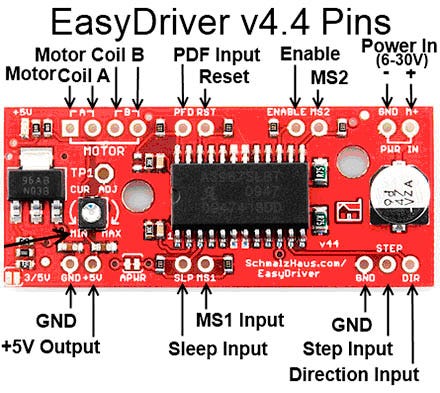
However, if all you need is a reference to the pins, here you go:
GND: There are three GND (Ground) pins on the Easy Driver. They are all connected together inside the board. Connect the negative side of your power supply, as well as from any other boards you are using to drive the Easy Driver to one or more of the GND pins;
M+: This is the power input to the EasyDriver. Connect this to the positive power supply lead. This should be a 6V to 30V, 2A (or more) power supply that is clean (low ripple);
A and B : (four pins) These are the motor connections. See below diagrams for how to hook these up. A and B are the two coils of the motor and can swap the two wires for a given coil (it will just reverse the direction of the motor). Make CERTAIN that this connection to the motor is solid, and NOT through a connector that has any chance of intermittent contact (which will fry the motor driver chip);
STEP: This needs to be a 0V to 5V (or 0V to 3.3V if you’ve set your Easy Driver that way) digital signal. Each rising edge of this signal will cause one step (or microstep) to be taken;
DIR (Direction): This needs to be a 0V to 5V (or 0V to 3.3V if you’ve set your Easy Driver up that way) digital signal. The level if this signal (high/low) is sampled on each rising edge of STEP to determine which direction to take the step (or microstep).That’s it — those are the only signals that you absolutely need to connect to anything. All the rest below are optional — in other words, the Easy Driver sets them to reasonable default values.
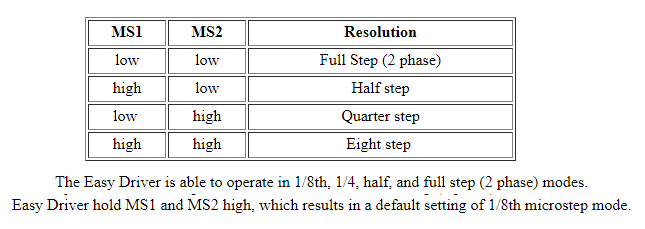
MS1/MS2: These digital inputs control the microstepping mode. Possible settings are (MS1/MS2) : full step (0,0), half step (1,0), 1/4 step (0,1), and 1/8 step (1,1 : default);
RST (reset): This normally high input signal will reset the internal translator and disable all output drivers when pulled low;
SLP (sleep): This normally high input signal will minimize power consumption by disabling internal circuitry and the output drivers when pulled low;
ENABLE: This normally low input signal will disable all outputs when pulled high;
PFD: This one is complicated — please see the datasheet for more information. We default it to slow decay mode, but you can override with your own voltage on this pin. (or by populating R17);
+5V: You see that the EasyDriver has a pin labeled 5V. What is it for? Well, there is a lot of confusion about this pin. It is NOT for powering the Easy Driver at 5V. In other words, it is NOT a power input or input of any kind. In fact, it’s an output pin! Yup, the EasyDriver’s 5V regulator has some extra juice, and so we brought out the 5V output of the regulator for you to use if you want. This means that you can connect other things to this pin that need 5V to operate, and the EasyDriver will power them. To a limit, of course. So, his is an OUTPUT pin that will provide either 5V (default) or 3.3V from the voltage regulator, at a small amount of current (say 50mA — depends on input voltage) to power a circuit that you may need power. If you cut jumper APWR (SJ1) then you can use the 5V pin as a VCC input to the Easy Driver, powering it with your own VCC supply;
3/5V JUMPER: What do this jumper do on the board? The way I designed the EasyDriver is with a power supply that can supply either 3.3V or 5V to the EasyDriver’s logic-level power rail (Vcc on the schematic). This allows people to use the Easy Driver with a microcontroller that output either 3.3V or 5V control signals;
APWR: The purpose of APWR is to allow users to disconnect the built-in logic power supply of the EasyDriver and power it using their own 5V or 3.3V logic level power supply. You might want to do this for power savings reasons. For example, if you’re using a 24V M+ motor power supply for the EasyDriver, the built-in voltage regulator (IC2 on the schematic) will get very hot because it’s dropping that 24V down to 5V and giving up all of that extra voltage as heat. This is very inefficient and will raise the temperature of the board;
LAB & Code
What hardware/software can I use to test my EasyDriver?
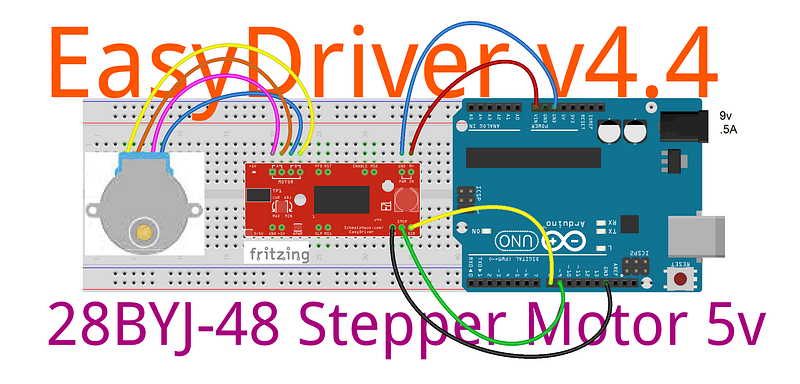
Here’s what I do. I solder headers in the pins of the EasyDriver and put it into a breadboard. I put the wires on my stepper motor to a 4-pin .100" male header and plug that into the breadboard so it connects properly to the EasyDriver. Then I take a PC power supply and use the 9V (.5A) from that into the Arduino Power DC Jack P4 2.1mm Female J4 and GND and M+ pins on the EasyDriver. Then I tie the DIR to pin 8 with a wire. Then I take a square wave with a frequency of about 500Hz from Arduino pin 9 and put it into the STEP pin. This I generate with a signal generator or an Arduino UNO. The motor should be spinning at this point. You can then take the DIR pin and write HIGH to see the motor go in the other direction. As the motor is running, you can slowly adjust the current adjust pot to see the effect that it has on the smoothness of the motor’s motion (video above and notes below:)
Some Example of Coil Resistance / DC Resistance (in descending order):
- Brian Schmalz, the EasyDriver designer, is very knowledgeable and courteous; Excellent support in his website;
- The most likely cause of problems with killing EasyDrivers has always been bad wiring - either between the power supply and the ED or between the ED and the motor. It's critical that these connections are never broken while under power. Also shorts between motor coil wires must be avoided; (answered by Brian Schmalz via email)
- The motors I was using :/before killing my ED board:/ are not good ones for use withthe Easy Driver. It's coil resistance is too high (as indicated bythe rating of12V). So I should look for another and find some motors with2to4V coils to be driven bythe ED to have better performance with microstepping. (Brian Schmalz's advice);
- This battery is probably fine; atfirst I thought that1500mah would be too much amperage. but Brian said that this would be a good battery. the problem isthe battery connections withthe ED orthe ED withthe motor;
- My project can be nicely driven either by H-bridge chips like the L293D, or by more feature-rich motor drivers like the EasyDriver or both together;
- ED: It works well. Easy tousewith literally any microcontroller you can imagine. I use mine with a 5v Arduino UNO;
- Just beware of EMI. The A/B pads and traces leadingto them, along with those pins on the chip, and your cabling leadingto the stepper motor, will throw off a ton of EMI. This isnot a fault of the board, it’s just what happens when you switch a stepper motor. It can mess with nearby microcontrollers and ICs. So be careful how you lay out your project - put some distance between the EasyDriver + stepper motor and other components if you can. If you can’t keep them isolated by distance, shield sensitive components with conductive, grounded material;
- The chip can get hot tothe touch. Please considering adding a heat sink tothe top ofthe chip;
- Overall, ED worth the price;
- ED: This is so easy touse. With the example code from the Brian's website, it is very straight forward on how touse this driver;
- It doesget very warm. But if you use the sleep mode when the motor doesnot need to be on, the driver board has time too cool down;
- Works great, but chip get hot at .5 amp. If you need more ampere you can bought the larger, slightly more expensive, Big Easy Driver version(2 amp amp), and solve your heating problems once and for all!
- If you don't intent to change the micro-step options on the fly so maybe you should hard wired those and just used the direction and step controls can be a good option;
- These will get warm, even hot insome cases. The chip is syncing a lot of power andthat shows through heat. If you are running this onthe higher endofthe spec, itis suggested that you manage the heat with a heat sink onthe chip;
- There’s a great library that you can usefor these called the AccelStepper library. It incorporates acceleration and deceleration quite easily;
- Programming it is a snap using the AccelStepper library;
- We suggest everyone should at least glance at the Atmel manual for the Arduino chip an try using some registers directly or use chipKIT uC32: Basic Microcontroller Board with Uno R3 Headers;
- If you are in a hurry to just make things work this really is a great simple driver. Make sure to take timeto adjust the currentlimitfor your motor using the test pointbefore plugging the motor in - there is a voltage tocurrent formula in the manual. For low cost this is very useful;
- It puts out a lot of heat, if you’re using a motor to its full capability, consider a fan when mounting these somewhere;
- The pot is super small, watch out when turning itwith a metal screw driver; it can slip:/
- watch out tonot touched the capacitors beneathit, it can spark andthe chip would stop working;
- Works as advertised, easy to use, just follow Sparkfun guides onthe product webpage;
- Make sure to head their note asking you tonot connect/disconnect the motor while the driver ison; this will kill your EasyDriver so don’t doit!
- Donot loosely wired your motor to the board; it could came off during testing and your driver are died;
- works great when you use it correctly… Easy to blow when you don’t use it correctly (see my video);
- There was a catastrophe: one of my boards got killed so I had to improve the soldering and study this board even more;
- I did blow one up , but it so cheap; It was a no brainer to replace than to fix it;
- Purchased two boards anticipating; In caseof you burn thefirstone ;)
- made sure to solder proper terminals to the driver; I published this video demo to help you out;)
- It may take a little experimentation togetthe windings connected correctly (this post may help you in discover it [LINK HERE!]). If the motor misses or runs rough reverse the winding pairs until proper operation. The advantage of operating asa bipolar motor is direction can be reversed simply by swapping the wire pairs. That doesn't apply in unipolar mode; (Lewis Loflin)
- The board works well and easy to program for;
- After running full rotations and near high speed the chip gets extremely hot and the motor can starts acting jerky. Probably a heat sink will solve that;
- Very simple touse following Sparkfun’s hook-up guide; Works as promised;
-Likeallof the boards from sparkfun it was very well built;
- Lots of options so it nice to have around so when you need tothrow a project together is a good choice;
- The central IC doesget very hot. Technician would recommend putting itin sleep mode whenever you can;
(Above adapted from Sparkfun page)
- The EasyDriver can supplies enough currentto drive the L298N which is a few milliamps at most andno calibration is required. Ifusing ED to drive the L298 be certain toconnect the motor voltage on Easy Driver to5 volts or you will blow the L298N; (Lewis Loflin)
- Minimum Delay Between Steps: 2s - With bipollar stepper motor if you don't have enough delaybetweenthe steps the motor will stall; this is an electrical device ... there's inductance envolve here ... if there isn't a little bit ofdelayandif you tryto switch it so fast, it will just stall; (Lewis Loflin)
Well, hopefully, this post has given you a solid understanding…or not that much :/… on how the EasyDriver stepper motor works (I think you guys get the idea, at least:)
So where do we go from here?
DRV8825 — Stepper Motor Driver Carrier, High Current.
EASYDRIVER: 4-Wire-Stepper Motor Driver — Brian Schmalz Design on A3967 IC — Bi-Polar Motors — .75A@30v peak — Making Using These a Breeze! Ardu_Serie#48
DRV8825 — High Current Stepper Motor Driver Carrier — Stepper Motor — Bipolar Mode — 2.5A@45v peak — Ardu_Serie #59