Free AI web copilot to create summaries, insights and extended knowledge, download it at here
9096
Abstract
ented-neural-networks-projects-d25a6476d72b?sk=022a810763e8e8366974c066fa9c1c85">Implemented Neural Networks Projects</a>, <a href="https://readmedium.com/implemented-opencv-projects-7406d9b89032?sk=eea2d41edcb2da4a87830dfb7d702524">Implemented OpenCV Projects</a>,<a href="https://readmedium.com/complete-ml-research-papers-summarized-a69afd5bb9bf?sk=54dcfdc31cf7c959192ebf666ca24cdd">Complete ML Research Papers Summarized</a>, <a href="https://readmedium.com/data-analytics-projects-series-b6abc25e4815?sk=571e1a7e344560ab7aa01d7af7004824&utm_campaign=Become%20a%20Tech%20Samurai&utm_medium=email&utm_source=Revue%20newsletter">Implemented Data Analytics projects</a></i></b>,<b><i> <a href="https://readmedium.com/implemented-data-visualization-projects-9576431db13d?sk=280a40c65eced3fd9febd11a40d68bf0">Implemented Data Visualization Projects</a>, <a href="https://readmedium.com/implemented-data-mining-projects-b448780b5869?sk=a41f09a7fe9c71566977dfd47ed76e9f">Implemented Data Mining Projects</a>, <a href="https://readmedium.com/implemented-natural-leaning-processing-projects-f5efa8c4cb31?sk=597f814c51b392abd8b2a9e28c1eebb5">Implemented Natural Leaning Processing Projects</a>, <a href="https://readmedium.com/day-1-of-30-days-of-machine-learning-ops-7c299e4b09be?sk=4ab48350a5c359fc157109e48b1d738f">MLOps </a>and <a href="https://readmedium.com/day-1-of-60-days-of-deep-learning-with-projects-series-4a5caa305cf6?sk=89f3d43dd450035546bf3a8cf85bb125">Deep Learning</a>, <a href="https://readmedium.com/60-days-of-applied-machine-learning-with-projects-series-cd975641da0a?sk=09cf1f30e912774cba6501c8bac5edde">Applied Machine Learning with Projects Series</a>, <a href="https://readmedium.com/30-days-of-pytorch-with-projects-series-737941e5aa4f?sk=d0ead140034be9f1fff27d059b525221">PyTorch with Projects Series</a>, <a href="https://readmedium.com/30-days-of-tensorflow-and-keras-with-projects-series-f52e0815d696?sk=945bb73c32bc967b7e056f894fab7626">Tensorflow and Keras with Projects Series</a>, <a href="https://readmedium.com/day-1-of-30-days-of-scikit-learn-series-with-projects-76341935e5fd?sk=44a6845c53109c2482c368bdb7924e46">Scikit Learn Series with Projects</a>, <a href="https://readmedium.com/day-1-of-15-days-of-time-series-analysis-and-forecasting-with-projects-series-5ba3b6cf7528?sk=7a5826927d95b8fd22deae9ee53bc54d">Time Series Analysis and Forecasting with Projects Series</a>, <a href="https://readmedium.com/day-1-of-ml-system-design-case-studies-series-ml-system-design-basics-dbf7765b3c0c?sk=9ce5aee0a8b5208be05ac5284872e91b">ML System Design Case Studies Series</a> videos will be published on our youtube channel ( just launched).</i></b></p><p id="4b19"><b><i>Subscribe today!</i></b></p><div id="1520" class="link-block">
<a href="https://www.youtube.com/@ignito5917/about">
<div>
<div>
<h2>Ignito</h2>
<div><h3>Excited to share that we have launched our Youtube channel — Ignito to cover all the projects and coding exercise for …</h3></div>
<div><p>www.youtube.com</p></div>
</div>
<div>
<div style="background-image: url(https://miro.readmedium.com/v2/resize:fit:320/0*N9OmxhpEw0AuQEey)"></div>
</div>
</div>
</a>
</div><h2 id="9083">Tech Newsletter —</h2><blockquote id="8abe"><p>If you are interested, you can join my newsletter through which I send tech interview tips, techniques, patterns, hacks — Software Development, ML, Data Science, Startups and Technology projects to more than 30K readers. You can subscribe to <b>Tech Brew :</b></p></blockquote><div id="8d5c" class="link-block">
<a href="https://naina0405.substack.com/">
<div>
<div>
<h2>Ignito</h2>
<div><h3>Data Science, ML, AI and more… Click to read Ignito, by Naina Chaturvedi, a Substack publication. Launched 7 months…</h3></div>
<div><p>naina0405.substack.com</p></div>
</div>
<div>
<div style="background-image: url(https://miro.readmedium.com/v2/resize:fit:320/0*_ER1J-h50iqAjH70)"></div>
</div>
</div>
</a>
</div><p id="b7b1">Let’s dive in!</p><p id="f009">To start with first import regular expressions —</p><div id="ec78"><pre><span class="hljs-keyword">import</span> re
regex = re.<span class="hljs-keyword">compile</span>(<span class="hljs-string">'\s+'</span>)</pre></div><p id="58ed">Regular Expressions are expressions/patterns used to find or match character combinations in text/strings.</p><p id="27ac">These are text-matching tool embedded in Python which are very useful in creating string searches/performing any modifications in Strings.</p><p id="7c10">Next we are going to see some RegEx functions —</p><h2 id="7de2">Split a string using regex</h2><div id="1297"><pre><span class="hljs-literal">t</span> = <span class="hljs-string">"Hello NewYork. Weather is awesome"</span>
print(<span class="hljs-name">regex</span>.split(<span class="hljs-name">t</span>))</pre></div><p id="3ce4">Output —</p><div id="84ab"><pre>[<span class="hljs-symbol">'Hello</span>', <span class="hljs-symbol">'NewYork.</span>', <span class="hljs-symbol">'Weather</span>', <span class="hljs-symbol">'is</span>', <span class="hljs-symbol">'awesome</span>']</pre></div><p id="3081">There’s one more way to split</p><div id="4a9f"><pre>re.<span class="hljs-built_in">split</span>(<span class="hljs-string">'\s'</span>, t)</pre></div><p id="7dcd">Output —</p><div id="e9b9"><pre>[<span class="hljs-symbol">'Hello</span>', <span class="hljs-symbol">'NewYork.</span>', '', '', <span class="hljs-symbol">'Weather</span>', <span class="hljs-symbol">'is</span>', <span class="hljs-symbol">'awesome</span>']</pre></div><h2 id="85ac">Find all the occurrences of the pattern</h2><p id="bb8e">re.findall() : To find all the occurances of the given pattern in the input string</p><p id="d90b"><i>Syntax : re.findall(patterns, string)</i></p><p id="a6e3">Implementation —</p><div id="6ec9"><pre><span class="hljs-attr">regex</span> = re.compile(<span class="hljs-string">'\d+'</span>)</pre></div><div id="c0d1"><pre><span class="hljs-literal">t</span> = <span class="hljs-string">"10 Hello NewYork. Weather is awesome 002"</span>
print(<span class="hljs-name">regex</span>.findall(<span class="hljs-name">t</span>))</pre></div><p id="555c">Output —</p><div id="1e99"><pre>[<span class="hljs-symbol">'10</span>', <span class="hljs-symbol">'002</span>']</pre></div><p id="9c61"><b>Find anything but a digit —</b></p><div id="d9f8"><pre><span class="hljs-attr">regex</span> = re.compile(<span class="hljs-string">'\D+'</span>)</pre></div><div id="66fb"><pre><span class="hljs-literal">t</span> = <span class="hljs-string">"10 Hello NewYork. Weather is awesome 002"</span>
print(<span class="hljs-name">regex</span>.findall(<span class="hljs-name">t</span>))</pre></div><p id="560a">Output —</p><div id="faaf"><pre>[' Hello NewYork. Weather is awesome ']</pre></div><p id="4cb0"><b>Find any character including digits —</b></p><div id="516d"><pre><span class="hljs-attr">regex</span> = re.compile(<span class="hljs-string">'\w+'</span>)</pre></div><div id="b57c"><pre><span class="hljs-attribute">t</span> <span class="hljs-operator">=</span> <span class="hljs-string">"10 Hello NewYork. Weather is awesome 002"</span></pre></div><div id="90ed"><pre><span class="hljs-function"><span class="hljs-title">print</span><span class="hljs-params">(regex.findall(t)</span></span>)</pre></div><p id="65e5">Output —</p><div id="8382"><pre>[<span class="hljs-symbol">'10</span>', <span class="hljs-symbol">'Hello</span>', <span class="hljs-symbol">'NewYork</span>', <span class="hljs-symbol">'Weather</span>', <span class="hljs-symbol">'is</span>', <span class="hljs-symbol">'awesome</span>', <span class="hljs-symbol">'002</span>']</pre></div><p id="b1cf"><b>Find group of characters —</b></p><div id="b9a7"><pre><span class="hljs-attr">regex</span> = re.compile(<span class="hljs-string">'[a-zA-Z]+'</span>)</pre></div><div id="ce89"><pre><span class="hljs-attribute">t</span> <span class="hljs-operator">=</span> <span class="hljs-string">"10 Hello NewYork. Weather is awesome 002"</span></pre></div><div id="5ac6"><pre><span class="hljs-function"><span class="hljs-title">print</span><span class="hljs-params">(regex.findall(t)</span></span>)</pre></div><p id="6b3e">Output —</p><div id="69fe"><pre>[<span class="hljs-symbol">'Hello</span>', <span class="hljs-symbol">'NewYork</span>', <span class="hljs-symbol">'Weather</span>', <span class="hljs-symbol">'is</span>', <span class="hljs-symbol">'awesome</span>']</pre></div><p id="f575"><b>Find exactly zero or one occurrence —</b></p><div id="d377"><pre><span class="hljs-built_in">print</span>(re.findall(<span class="hljs-string">r'Weath?er'</span>, t))</pre></div><p id="cbda">Output —</p><div id="1b69"><pre>[<span class="hljs-symbol">'Weather</span>']</pre></div><h2 id="98b9">Search for exp
Options
ression pattern</h2><p id="9460">re.search() : To find regular expression pattern in the given string input</p><p id="f71c"><i>Syntax : re.search(patterns, string)</i></p><p id="6e0e">Implementation —</p><div id="d722"><pre><span class="hljs-attr">regex</span> = re.compile(<span class="hljs-string">'\d+'</span>)</pre></div><div id="a4c8"><pre><span class="hljs-attribute">t</span> <span class="hljs-operator">=</span> <span class="hljs-string">"10 Hello NewYork. Weather is awesome 002"</span>
<span class="hljs-attribute">s</span> <span class="hljs-operator">=</span> regex.search(t)
print(s.group())</pre></div><p id="e073">Output —</p><div id="c696"><pre>10</pre></div><p id="735e"><b>Email —</b></p><div id="1e11"><pre><span class="hljs-attr">list_email</span> = <span class="hljs-string">"""[email protected]
[email protected]
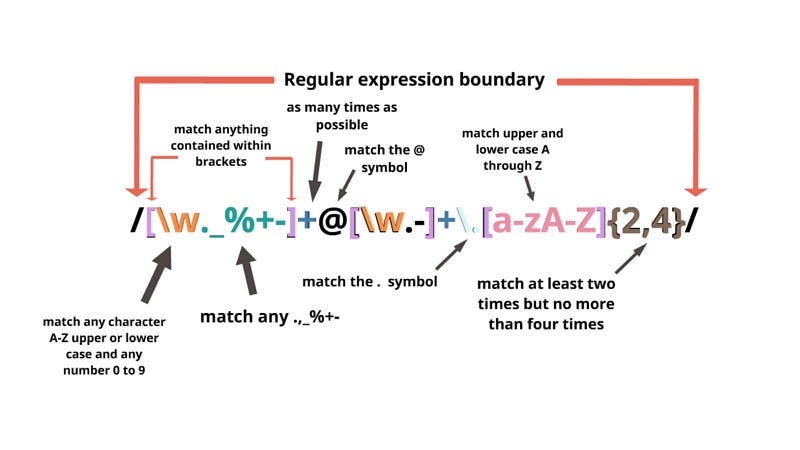
[email protected]"""</span></pre></div><div id="36b2"><pre>p = <span class="hljs-string">r'(\w+)@([A-Z0-9]+).([A-Z]{2,4})'</span>
<span class="hljs-built_in">print</span>(re.findall(p, list_email, flags=re.IGNORECASE))</pre></div><p id="2532">Output —</p><div id="206a"><pre>[(<span class="hljs-symbol">'abc</span>', <span class="hljs-symbol">'stripe</span>', <span class="hljs-symbol">'com</span>'), (<span class="hljs-symbol">'dummyaf</span>', <span class="hljs-symbol">'google</span>', <span class="hljs-symbol">'com</span>'), (<span class="hljs-symbol">'sch</span>', <span class="hljs-symbol">'amazon</span>', <span class="hljs-symbol">'com</span>')]</pre></div><p id="8bd5"><b>Retrieve words starting with particular alphabet —</b></p><div id="2390"><pre><span class="hljs-attr">regex</span> = re.compile(<span class="hljs-string">'([$maH]\w+)'</span>)</pre></div><div id="f77e"><pre><span class="hljs-attr">t</span> = <span class="hljs-string">"""Large-scale pretraining is fast becoming the norm in Vision-Language (VL) modeling. However, prevailing VL approaches are limited by the requirement for labeled data and the use of complex multi-step pretraining objectives. We present MAGMA - a simple method for augmenting generative language models with additional modalities using adapter-based finetuning. """</span></pre></div><div id="acdc"><pre><span class="hljs-function"><span class="hljs-title">print</span><span class="hljs-params">(regex.findall(t)</span></span>)</pre></div><p id="e97b">Output —</p><div id="3582"><pre>[<span class="hljs-symbol">'arge</span>', <span class="hljs-symbol">'ale</span>', <span class="hljs-symbol">'aining</span>', <span class="hljs-symbol">'ast</span>', <span class="hljs-symbol">'ming</span>', <span class="hljs-symbol">'anguage</span>', <span class="hljs-symbol">'modeling</span>', <span class="hljs-symbol">'However</span>', <span class="hljs-symbol">'ailing</span>', <span class="hljs-symbol">'approaches</span>', <span class="hljs-symbol">'are</span>', <span class="hljs-symbol">'mited</span>', <span class="hljs-symbol">'ment</span>', <span class="hljs-symbol">'abeled</span>', <span class="hljs-symbol">'ata</span>', <span class="hljs-symbol">'and</span>', <span class="hljs-symbol">'mplex</span>', <span class="hljs-symbol">'multi</span>', <span class="hljs-symbol">'aining</span>', <span class="hljs-symbol">'mple</span>', <span class="hljs-symbol">'method</span>', <span class="hljs-symbol">'augmenting</span>', <span class="hljs-symbol">'ative</span>', <span class="hljs-symbol">'anguage</span>', <span class="hljs-symbol">'models</span>', <span class="hljs-symbol">'additional</span>', <span class="hljs-symbol">'modalities</span>', <span class="hljs-symbol">'adapter</span>', <span class="hljs-symbol">'ased</span>']</pre></div><p id="8951"><b>Find in HTML page —</b></p><div id="89b1"><pre>import requests
<span class="hljs-attribute">f</span> <span class="hljs-operator">=</span> requests.get(<span class="hljs-string">"Link to html file"</span>)</pre></div><div id="5e5f"><pre>re.findall(<span class="hljs-string">'<.?>(.)</.*?>'</span>, f.<span class="hljs-built_in">text</span>)</pre></div><p id="2254"><i>Day 8 coming soon : Regular Expressions for text processing project</i></p><p id="810d"><b><i>For complete 60 days of Data Science and ML : Day 1 — Day 60 : Quick Recap of 60 days of Data Science and ML</i></b></p><div id="9d77" class="link-block">
<a href="https://readmedium.com/day-1-day-60-quick-recap-of-60-days-of-data-science-and-ml-6fc021643d1">
<div>
<div>
<h2>Day 1 — Day 60 : Quick Recap of 60 days of Data Science and ML</h2>
<div><h3>Connect the ML dots…</h3></div>
<div><p>medium.com</p></div>
</div>
<div>
<div style="background-image: url(https://miro.readmedium.com/v2/resize:fit:320/0*ZfJ1yKIzPLGABAI_.png)"></div>
</div>
</div>
</a>
</div><p id="1253"><b><i>Follow for more updates. Stay tuned and keep coding!</i></b></p><h1 id="21c3">For other projects, tune to —</h1><p id="b31f"><b>Build Machine Learning Pipelines( With Code)</b></p><div id="5b37" class="link-block">
<a href="https://medium.datadriveninvestor.com/build-machine-learning-pipelines-with-code-part-1-bd3ed7152124">
<div>
<div>
<h2>Build Machine Learning Pipelines( With Code) — Part 1</h2>
<div><h3>Complete implementation…</h3></div>
<div><p>medium.datadriveninvestor.com</p></div>
</div>
<div>
<div style="background-image: url(https://miro.readmedium.com/v2/resize:fit:320/0*KdToBD8RDMBH4jXM.png)"></div>
</div>
</div>
</a>
</div><p id="946c"><b>Recurrent Neural Network with Keras</b></p><div id="607d" class="link-block">
<a href="https://medium.datadriveninvestor.com/recurrent-neural-network-with-keras-b5b5f6fe5187">
<div>
<div>
<h2>Recurrent Neural Network with Keras</h2>
<div><h3>Project Implementation and cheatsheet…</h3></div>
<div><p>medium.datadriveninvestor.com</p></div>
</div>
<div>
<div style="background-image: url(https://miro.readmedium.com/v2/resize:fit:320/0*xs3Dya3qQBx6IU7C.png)"></div>
</div>
</div>
</a>
</div><p id="56e1"><b>Clustering Geolocation Data in Python using DBSCAN and K-Means</b></p><div id="2b3e" class="link-block">
<a href="https://medium.datadriveninvestor.com/clustering-geolocation-data-in-python-using-dbscan-and-k-means-3705d9f44522">
<div>
<div>
<h2>Clustering Geolocation Data in Python using DBSCAN and K-Means</h2>
<div><h3>Project Implementation…</h3></div>
<div><p>medium.datadriveninvestor.com</p></div>
</div>
<div>
<div style="background-image: url(https://miro.readmedium.com/v2/resize:fit:320/0*0uPCZnohdaPCO4NN.png)"></div>
</div>
</div>
</a>
</div><p id="a29c"><b>Facial Expression Recognition using Keras</b></p><div id="ccaa" class="link-block">
<a href="https://medium.datadriveninvestor.com/facial-expression-recognition-using-keras-cbdd661a0a54">
<div>
<div>
<h2>Facial Expression Recognition using Keras</h2>
<div><h3>Project Implementation…</h3></div>
<div><p>medium.datadriveninvestor.com</p></div>
</div>
<div>
<div style="background-image: url(https://miro.readmedium.com/v2/resize:fit:320/0*CGch7hzdjg1fpgKy.jpg)"></div>
</div>
</div>
</a>
</div><p id="0db7"><b>Hyperparameter Tuning with Keras Tuner</b></p><div id="6dff" class="link-block">
<a href="https://medium.datadriveninvestor.com/hyperparameter-tuning-with-keras-tuner-3a609d3fd85b">
<div>
<div>
<h2>Hyperparameter Tuning with Keras Tuner</h2>
<div><h3>Project Implementation….</h3></div>
<div><p>medium.datadriveninvestor.com</p></div>
</div>
<div>
<div style="background-image: url(https://miro.readmedium.com/v2/resize:fit:320/0*jlaEz8AZaptNWHEr.png)"></div>
</div>
</div>
</a>
</div><p id="fed8"><b>Custom Layers in Keras</b></p><div id="e4fd" class="link-block">
<a href="https://medium.datadriveninvestor.com/custom-layers-in-keras-de5f793217aa">
<div>
<div>
<h2>Custom Layers in Keras</h2>
<div><h3>Code implementation …</h3></div>
<div><p>medium.datadriveninvestor.com</p></div>
</div>
<div>
<div style="background-image: url(https://miro.readmedium.com/v2/resize:fit:320/0*1IH67KJadqeqeO01.png)"></div>
</div>
</div>
</a>
</div></article></body>