avatarNaina Chaturvedi

Free AI web copilot to create summaries, insights and extended knowledge, download it at here

5544

Abstract

YiwDi7NivmyYMOD4.png"><figcaption>Pic credits : dev community</figcaption></figure><p id="4c39">Some basics that you should know —</p><blockquote id="130b"><p>[ab] means either ”a” or ”b”</p></blockquote><blockquote id="6d8a"><p>[a-c] means ”a” ”b” or ”c”</p></blockquote><blockquote id="3215"><p>[^a-c] # anything but a, b, c</p></blockquote><blockquote id="de42"><p>Wild cards which is ”.” means ”any character”</p></blockquote><blockquote id="320d"><p>”bat” matches ”bt”, ”bat”, ”baat”, ”baaat” etc.</p></blockquote><blockquote id="6798"><p>”ba+t” matches ”bat”, ”baat” etc. but not ”bt”</p></blockquote><blockquote id="6a00"><p>/[A-Z]/ → matches an uppercase letter</p></blockquote><blockquote id="e733"><p>/[a-z]/ → matches a lowercase letter</p></blockquote><blockquote id="1497"><p>/[0–9]/ → matches a single digit</p></blockquote><blockquote id="b19f"><p>C{1,4} means at least one and no more than four C’s</p></blockquote><blockquote id="87df"><p>C{5,5} means exactly five C’s</p></blockquote><blockquote id="843b"><p>cdf{2, }: matches ‘cd’ followed by 2 or more ‘c’</p></blockquote><blockquote id="9113"><p><i>char is </i>Escaped special character</p></blockquote><blockquote id="f771"><p>/[1234567890]/ → any digit</p></blockquote><h2 id="04aa">Functions —</h2><blockquote id="4d9c"><p>start()–return the starting position of the match</p></blockquote><blockquote id="56d4"><p>end()–return the ending position of the match</p></blockquote><blockquote id="1990"><p>span()–return (start,end) as a tuple</p></blockquote><blockquote id="3fc6"><p>group()–return the string that matched</p></blockquote><blockquote id="8aa8"><p>group()–the whole string</p></blockquote><h2 id="684e">Quantifiers —</h2><blockquote id="9952"><p>? is 0 or more times</p></blockquote><blockquote id="32f9"><p>+? is 1 or more times</p></blockquote><blockquote id="ed15"><p>?? is 0 or 1 time</p></blockquote><blockquote id="e810"><p>{<i>n</i>}? is Exactly <i>n</i> times</p></blockquote><blockquote id="b1b1"><p>{<i>n,</i>}? is At least <i>n</i> times</p></blockquote><blockquote id="38cf"><p>{<i>n,m</i>}? is From <i>n</i> to <i>m</i> times</p></blockquote><p id="acab"><b>Find and replace matched patterns —</b></p><blockquote id="7d8b"><p>Validate match : Regex.IsMatch</p></blockquote><blockquote id="dfff"><p>Retrieve single match : Regex.Match (first)</p></blockquote><blockquote id="b3f9"><p>Regex.Matches : Retrieve all matches</p></blockquote><blockquote id="0578"><p>Replace match: Regex.Replace</p></blockquote><blockquote id="3234"><p>Divide text : Regex.Split</p></blockquote><p id="5184"><b>Functions commonly used —</b></p><ul><li>re.search() : To find regular expression pattern in the given string input</li></ul><p id="9103"><i>Syntax : re.search(patterns, string)</i></p><ul><li>re.match() : To match the input string if the regex pattern is found</li></ul><p id="16c4"><i>Syntax : re.match(patterns, string)</i></p><ul><li>re.sub() : To substitute a substring with another string input</li></ul><p id="67d5"><i>Syntax : re.sub(patterns, substitute_substring, input string)</i></p><ul><li>re.compile()</li></ul><p id="a6d7"><i>Syntax : re.compile(patterns, repl, string)</i></p><ul><li>re.findall() : To find all the occurances of the given pattern in the input string</li></ul><p id="aaa1"><i>Syntax : re.findall(patterns, string)</i></p><ul><li>re.split() : To split the string based on the pattern</li></ul><p id="bb10"><i>Syntax : re.split(pattern, string, maxsplit=0, flags=0)</i></p><ul><li>re.purge() : To clear regex cache</li></ul><p id="59ef" type="7">Regular expressions (regex) are a powerful tool for matching patterns in text, and they are widely used in natural language processing (NLP) for tasks such as tokenization, text cleaning, and information extraction.</p><p id="7a04">A regular expression is a sequence of characters that defines a search pattern. The basic building blocks of a regular expression are:</p><ol><li><i>Literals: These are characters that match themselves, such as “a”, “b”, “1”, or “.”</i></li><li><i>Special characters: These are characters that have a special meaning in regular expressions, such as “*”, “+”, “?”, “^”, “”, and “.”</i></li><li><i>Character classes: These are sets of characters that can match any one character within the set, such as “[a-z]” (any lowercase letter) or “[0–9]” (any digit).</i></li><li><i>Anchors: These are special characters that match the position of the text, rather than the text itself, such as “^” (start of line) and “” (end of line)</i></li><li><i>Groups and Alternation: These are special characters that allow to group and alternate different parts of the pattern.</i></li></ol><p id="a43e">Once a regular expression is defined, it can be used to search through a piece of text to find matches. The process of matching a regular expression to text is called pattern matching.</p><p id="2bac">For example, in NLP, a regular expression can be used to find all occurrences of email addresses in a text, or to remove all non-alphabetic characters from a text. Regular expressions can also be used for tokenization, splitting a text into individual words or sentences, by matching patterns of whitespace or punctuation.</p><p id="06c9">One of the best documentation for the reference —</p><div id="17fe" class="link-block"> <a href="https://docs.python.org/3/library/re.html"> <div> <div> <h2>re - Regular expression operations - Python 3.10.2 documentation</h2> <div><h3>This module prov

Options

ides regular expression matching operations similar to those found in Perl. Both patterns and strings…</h3></div> <div><p>docs.python.org</p></div> </div> <div> <div style="background-image: url(https://miro.readmedium.com/v2/resize:fit:320/)"></div> </div> </div> </a> </div><p id="3fe6">In the next post, we will see how these basic regex concepts can be used in NLP through a project.</p><p id="4258"><i>Day 7 : Coming soon!</i></p><p id="94ac"><b><i>For complete 60 days of Data Science and ML : Day 1 — Day 60 : Quick Recap of 60 days of Data Science and ML</i></b></p><div id="9d77" class="link-block"> <a href="https://readmedium.com/day-1-day-60-quick-recap-of-60-days-of-data-science-and-ml-6fc021643d1"> <div> <div> <h2>Day 1 — Day 60 : Quick Recap of 60 days of Data Science and ML</h2> <div><h3>Connect the ML dots…</h3></div> <div><p>medium.com</p></div> </div> <div> <div style="background-image: url(https://miro.readmedium.com/v2/resize:fit:320/0*ZfJ1yKIzPLGABAI_.png)"></div> </div> </div> </a> </div><p id="1253"><b><i>Follow for more updates. Stay tuned and keep coding!</i></b></p><h1 id="21c3">For other projects, tune to —</h1><p id="b31f"><b>Build Machine Learning Pipelines( With Code)</b></p><div id="5b37" class="link-block"> <a href="https://medium.datadriveninvestor.com/build-machine-learning-pipelines-with-code-part-1-bd3ed7152124"> <div> <div> <h2>Build Machine Learning Pipelines( With Code) — Part 1</h2> <div><h3>Complete implementation…</h3></div> <div><p>medium.datadriveninvestor.com</p></div> </div> <div> <div style="background-image: url(https://miro.readmedium.com/v2/resize:fit:320/0*KdToBD8RDMBH4jXM.png)"></div> </div> </div> </a> </div><p id="946c"><b>Recurrent Neural Network with Keras</b></p><div id="607d" class="link-block"> <a href="https://medium.datadriveninvestor.com/recurrent-neural-network-with-keras-b5b5f6fe5187"> <div> <div> <h2>Recurrent Neural Network with Keras</h2> <div><h3>Project Implementation and cheatsheet…</h3></div> <div><p>medium.datadriveninvestor.com</p></div> </div> <div> <div style="background-image: url(https://miro.readmedium.com/v2/resize:fit:320/0*xs3Dya3qQBx6IU7C.png)"></div> </div> </div> </a> </div><p id="56e1"><b>Clustering Geolocation Data in Python using DBSCAN and K-Means</b></p><div id="2b3e" class="link-block"> <a href="https://medium.datadriveninvestor.com/clustering-geolocation-data-in-python-using-dbscan-and-k-means-3705d9f44522"> <div> <div> <h2>Clustering Geolocation Data in Python using DBSCAN and K-Means</h2> <div><h3>Project Implementation…</h3></div> <div><p>medium.datadriveninvestor.com</p></div> </div> <div> <div style="background-image: url(https://miro.readmedium.com/v2/resize:fit:320/0*0uPCZnohdaPCO4NN.png)"></div> </div> </div> </a> </div><p id="a29c"><b>Facial Expression Recognition using Keras</b></p><div id="ccaa" class="link-block"> <a href="https://medium.datadriveninvestor.com/facial-expression-recognition-using-keras-cbdd661a0a54"> <div> <div> <h2>Facial Expression Recognition using Keras</h2> <div><h3>Project Implementation…</h3></div> <div><p>medium.datadriveninvestor.com</p></div> </div> <div> <div style="background-image: url(https://miro.readmedium.com/v2/resize:fit:320/0*CGch7hzdjg1fpgKy.jpg)"></div> </div> </div> </a> </div><p id="0db7"><b>Hyperparameter Tuning with Keras Tuner</b></p><div id="6dff" class="link-block"> <a href="https://medium.datadriveninvestor.com/hyperparameter-tuning-with-keras-tuner-3a609d3fd85b"> <div> <div> <h2>Hyperparameter Tuning with Keras Tuner</h2> <div><h3>Project Implementation….</h3></div> <div><p>medium.datadriveninvestor.com</p></div> </div> <div> <div style="background-image: url(https://miro.readmedium.com/v2/resize:fit:320/0*jlaEz8AZaptNWHEr.png)"></div> </div> </div> </a> </div><p id="fed8"><b>Custom Layers in Keras</b></p><div id="e4fd" class="link-block"> <a href="https://medium.datadriveninvestor.com/custom-layers-in-keras-de5f793217aa"> <div> <div> <h2>Custom Layers in Keras</h2> <div><h3>Code implementation …</h3></div> <div><p>medium.datadriveninvestor.com</p></div> </div> <div> <div style="background-image: url(https://miro.readmedium.com/v2/resize:fit:320/0*1IH67KJadqeqeO01.png)"></div> </div> </div> </a> </div></article></body>

Day 6: 30 days of Natural Language Processing Series with Projects

Regular Expressions in NLP — Part 1…
Pic credits : devcommunity

Welcome back peeps. Hope all’s well at your end. In this post we will cover the basics of regular expressions in NLP.

Some of the other best Series —

30 Days of Natural Language Processing ( NLP) Series

30 days of Data Engineering with projects Series

60 days of Data Science and ML Series with projects

100 days : Your Data Science and Machine Learning Degree Series with projects

23 Data Science Techniques You Should Know

Tech Interview Series — Curated List of coding questions

Complete System Design with most popular Questions Series

Complete Data Visualization and Pre-processing Series with projects

Complete Python Series with Projects

Complete Advanced Python Series with Projects

Kaggle Best Notebooks that will teach you the most

Complete Developers Guide to Git

All the Data Science and Machine Learning Resources

210 Machine Learning Projects

30 days of Machine Learning Ops

Tech Newsletter —

If you are interested, you can join my newsletter through which I send tech interview tips, techniques, patterns, hacks — Software Development, ML, Data Science, Startups and Technology projects to more than 30K readers. You can subscribe to Tech Brew :

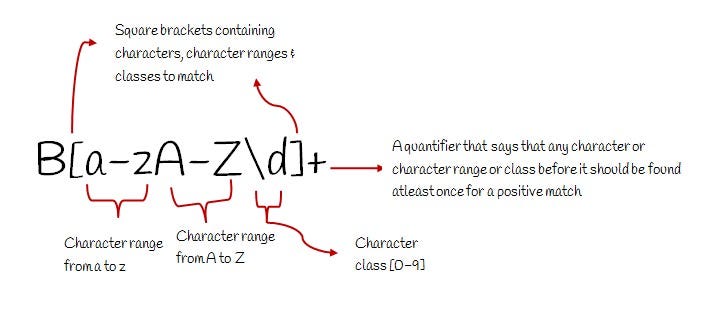
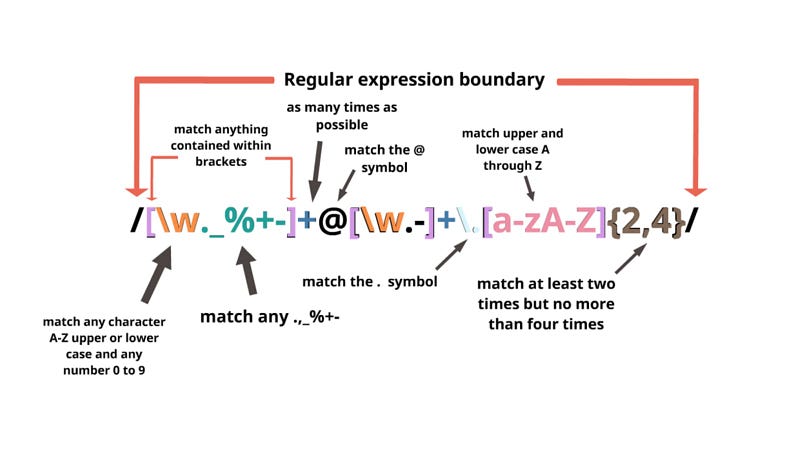
Regular Expressions ( RegEx) is an important topic in NLP — these are nothing but the expressions/patterns used to find or match character combinations in text/strings. These are text-matching tool embedded in Python which are very useful in creating string searches/performing any modifications in Strings.
Pic credits : dev community

Some basics that you should know —

[ab] means either ”a” or ”b”

[a-c] means ”a” ”b” or ”c”

[^a-c] # anything but a, b, c

Wild cards which is ”.” means ”any character”

”ba*t” matches ”bt”, ”bat”, ”baat”, ”baaat” etc.

”ba+t” matches ”bat”, ”baat” etc. but not ”bt”

/[A-Z]/ → matches an uppercase letter

/[a-z]/ → matches a lowercase letter

/[0–9]/ → matches a single digit

C{1,4} means at least one and no more than four C’s

C{5,5} means exactly five C’s

cdf{2, }: matches ‘cd’ followed by 2 or more ‘c’

\char is Escaped special character

/[1234567890]/ → any digit

Functions —

start()–return the starting position of the match

end()–return the ending position of the match

span()–return (start,end) as a tuple

group()–return the string that matched

group()–the whole string

Quantifiers —

*? is 0 or more times

+? is 1 or more times

?? is 0 or 1 time

{n}? is Exactly n times

{n,}? is At least n times

{n,m}? is From n to m times

Find and replace matched patterns —

Validate match : Regex.IsMatch

Retrieve single match : Regex.Match (first)

Regex.Matches : Retrieve all matches

Replace match: Regex.Replace

Divide text : Regex.Split

Functions commonly used —

  • re.search() : To find regular expression pattern in the given string input

Syntax : re.search(patterns, string)

  • re.match() : To match the input string if the regex pattern is found

Syntax : re.match(patterns, string)

  • re.sub() : To substitute a substring with another string input

Syntax : re.sub(patterns, substitute_substring, input string)

  • re.compile()

Syntax : re.compile(patterns, repl, string)

  • re.findall() : To find all the occurances of the given pattern in the input string

Syntax : re.findall(patterns, string)

  • re.split() : To split the string based on the pattern

Syntax : re.split(pattern, string, maxsplit=0, flags=0)

  • re.purge() : To clear regex cache

Regular expressions (regex) are a powerful tool for matching patterns in text, and they are widely used in natural language processing (NLP) for tasks such as tokenization, text cleaning, and information extraction.

A regular expression is a sequence of characters that defines a search pattern. The basic building blocks of a regular expression are:

  1. Literals: These are characters that match themselves, such as “a”, “b”, “1”, or “.”
  2. Special characters: These are characters that have a special meaning in regular expressions, such as “*”, “+”, “?”, “^”, “$”, and “.”
  3. Character classes: These are sets of characters that can match any one character within the set, such as “[a-z]” (any lowercase letter) or “[0–9]” (any digit).
  4. Anchors: These are special characters that match the position of the text, rather than the text itself, such as “^” (start of line) and “$” (end of line)
  5. Groups and Alternation: These are special characters that allow to group and alternate different parts of the pattern.

Once a regular expression is defined, it can be used to search through a piece of text to find matches. The process of matching a regular expression to text is called pattern matching.

For example, in NLP, a regular expression can be used to find all occurrences of email addresses in a text, or to remove all non-alphabetic characters from a text. Regular expressions can also be used for tokenization, splitting a text into individual words or sentences, by matching patterns of whitespace or punctuation.

One of the best documentation for the reference —

In the next post, we will see how these basic regex concepts can be used in NLP through a project.

Day 7 : Coming soon!

For complete 60 days of Data Science and ML : Day 1 — Day 60 : Quick Recap of 60 days of Data Science and ML

Follow for more updates. Stay tuned and keep coding!

For other projects, tune to —

Build Machine Learning Pipelines( With Code)

Recurrent Neural Network with Keras

Clustering Geolocation Data in Python using DBSCAN and K-Means

Facial Expression Recognition using Keras

Hyperparameter Tuning with Keras Tuner

Custom Layers in Keras

Machine Learning
Data Science
Programming
Tech
Artificial Intelligence
Recommended from ReadMedium