
Day 4: 30 days of Natural Language Processing Series with Projects
SpaCy part 2…
Welcome back peeps. This is the second part of SpaCy where we will cover some of the basics and advanced concepts of SpaCy. For the SpaCy part 1 —
Some of the other best Series —
100 days : Your Data Science and Machine Learning Degree Series with projects
Complete Data Visualization and Pre-processing Series with projects
Projects Videos —
All the projects, data structures, SQL, algorithms, system design, Data Science and ML , Data Analytics, Data Engineering, , Implemented Data Science and ML projects, Implemented Data Engineering Projects, Implemented Deep Learning Projects, Implemented Machine Learning Ops Projects, Implemented Time Series Analysis and Forecasting Projects, Implemented Applied Machine Learning Projects, Implemented Tensorflow and Keras Projects, Implemented PyTorch Projects, Implemented Scikit Learn Projects, Implemented Big Data Projects, Implemented Cloud Machine Learning Projects, Implemented Neural Networks Projects, Implemented OpenCV Projects,Complete ML Research Papers Summarized, Implemented Data Analytics projects, Implemented Data Visualization Projects, Implemented Data Mining Projects, Implemented Natural Leaning Processing Projects, MLOps and Deep Learning, Applied Machine Learning with Projects Series, PyTorch with Projects Series, Tensorflow and Keras with Projects Series, Scikit Learn Series with Projects, Time Series Analysis and Forecasting with Projects Series, ML System Design Case Studies Series videos will be published on our youtube channel ( just launched).
Subscribe today!
Tech Newsletter —
If you are interested, you can join my newsletter through which I send tech interview tips, techniques, patterns, hacks — Software Development, ML, Data Science, Startups and Technology projects to more than 30K readers. You can subscribe to Tech Brew :
For the NLP pre-requisites —
Lets’ dive in the second part of SpaCy —
Linguistics annotations
Linguistics annotations in natural language processing (NLP) refer to the process of adding structured information to text in order to capture its linguistic features, such as syntax, semantics, and pragmatics.
This information is typically added in the form of tags, labels, or other metadata that can be used to analyze the text and perform specific NLP tasks. Some common types of linguistic annotations in NLP include:
- Part-of-Speech (POS) Tagging: The process of identifying the role of each word in a sentence (e.g. noun, verb, adjective)
- Syntactic Parsing: The process of analyzing the grammatical structure of a sentence to determine the relationships between words.
- Semantic Role Labelling (SRL): The process of identifying the semantic roles of different words in a sentence.
- Coreference resolution: The process of identifying and linking mentions of the same entity across a text.
- Named-entity recognition (NER): The process of identifying and classifying named entities, such as persons, organizations, and locations
- Chunking: The process of grouping words into “chunks” or “noun phrases”
It gives a detailed peek into a text’s grammatical structure.
import spacynlp = spacy.load("en_core_web_sm")
doc = nlp("Neywork is a city of dreams. It has a population of 20.1 million")
for t in doc:
print(t.text, t.pos_, t.dep_)Output —
Neywork PROPN nsubj
is AUX ROOT
a DET det
city NOUN attr
of ADP prep
dreams NOUN pobj
. PUNCT punct
It PRON nsubj
has VERB ROOT
a DET det
population NOUN dobj
of ADP prep
20.1 NUM compound
million NUM pobj
Part of Speech tagging
It’s a NLP technique which is used in the tasks like language understanding, information extraction, feature engineering etc to automatically assign POS tags to all the words of a sentence.
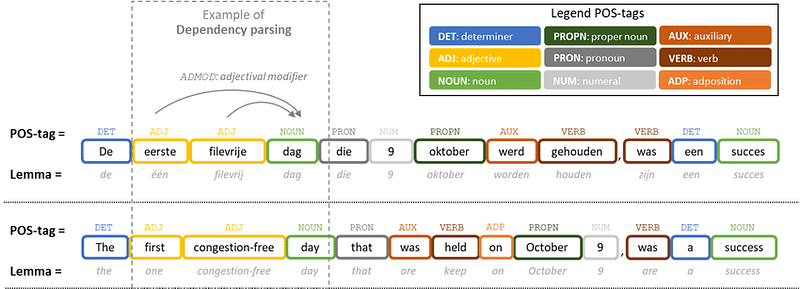
Part-of-speech (POS) tagging is a natural language processing (NLP) task that involves identifying the grammatical role of each word in a sentence, such as a noun, verb, adjective, or adverb. POS tagging is an important step in many NLP tasks, such as syntactic parsing, semantic role labeling, and text generation.
There are different methods for POS tagging, but the most common method is based on statistical models, specifically, Hidden Markov Models (HMM) and Conditional Random Fields (CRF)
The basic process of POS tagging is as follows:
- Tokenization: The first step is to break the text down into individual words, which will be the basic units for POS tagging.
- Feature extraction: The next step is to extract relevant features from each word that can be used to predict its POS tag. These features can include the word itself, its prefix and suffix, its capitalization, and its context (e.g. the words that come before and after it).
- Training: The next step is to train a statistical model on a large annotated corpus of text, where each word has been manually labeled with its POS tag. The model learns to predict the POS tag of a word based on the features extracted in step 2.
- Tagging: Once the model is trained, it can be used to predict the POS tag of new words. This is done by applying the model to each word in the new text, and using the model’s prediction as the POS tag.
- Evaluation: The final step is to evaluate the performance of the model on a separate set of text that has been manually annotated with POS tags. This allows to measure how well the model is able to predict the correct POS tag for each word.
import spacynlp = spacy.load("en_core_web_sm")
doc = nlp("Neywork is the city of dreams. It has a population of 20.1 million")for t in doc:
print(t.text, t.lemma_, t.pos_, t.tag_, t.dep_,
t.shape_, t.is_alpha, t.is_stop)Output —
TEXT LEMMA POS TAG DEP SHAPE ALPHA STOP
-------------------------------------------
Neywork Neywork PROPN NNP nsubj Xxxxx True False
is be AUX VBZ ROOT xx True True
the the DET DT det xxx True True
city city NOUN NN attr xxxx True False
of of ADP IN prep xx True True
dreams dream NOUN NNS pobj xxxx True False
. . PUNCT . punct . False False
It it PRON PRP nsubj Xx True True
has have VERB VBZ ROOT xxx True True
a a DET DT det x True True
population population NOUN NN dobj xxxx True False
of of ADP IN prep xx True True
20.1 20.1 NUM CD compound dd.d False False
million million NUM CD pobj xxxx True FalseNamed Entities
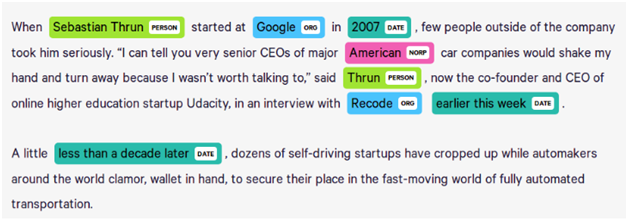
Entities are nothing but proper names that represent information about persons, locations, organizations etc i.e real world objects. It is available as Doc ents property.
import spacynlp = spacy.load("en_core_web_sm")
doc = nlp("NewYork is the city of dreams. It has the population of 20.1 million")for e in doc.ents:
print(e.text, e.start_char, e.end_char, e.label_)Output —
NewYork 0 7 ORG
20.1 million 54 66 CARDINAL
Word Vectors
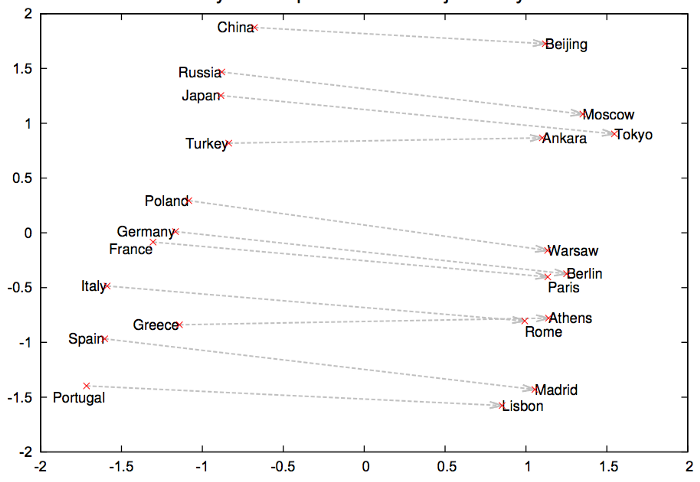
In order to preserve the semantic information, in Word2vector each word is represented as a vector of 32 or more dimension instead of a number.
import spacynlp = spacy.load("en_core_web_md")
tokens = nlp("python java php newyork data")for t in tokens:
print(t.text, t.has_vector, t.vector_norm, t.is_oov)Output —
python True 7.2741637 False
java True 7.489749 False
php True 8.073938 False
newyork True 6.6223097 False
data True 7.1505103 False
Similarity
It’s a NLP technique which is used to compare words, text spans and documents and find how similar they are to each other.
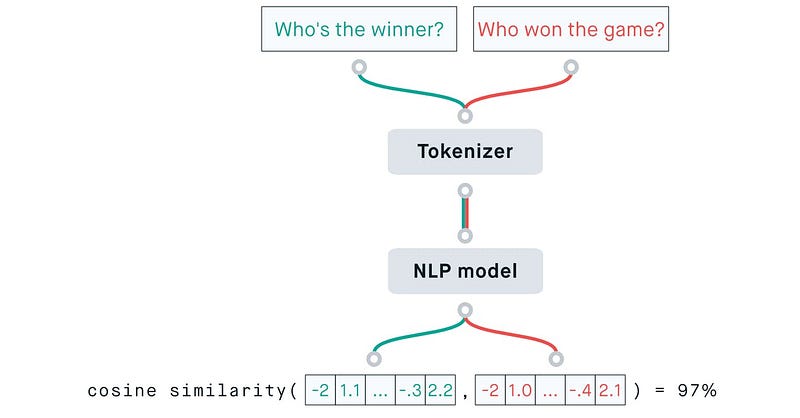
import spacynlp = spacy.load("en_core_web_md")
doc1 = nlp("Books are great")
doc2 = nlp("Wild is a great book by Cheryl Strayed")print(doc1, "<->", doc2, doc1.similarity(doc2))Output —
Books are great <-> Wild is a great book by Cheryl Strayed 0.7321118470519549Vocabs, Lexemes and Matcher
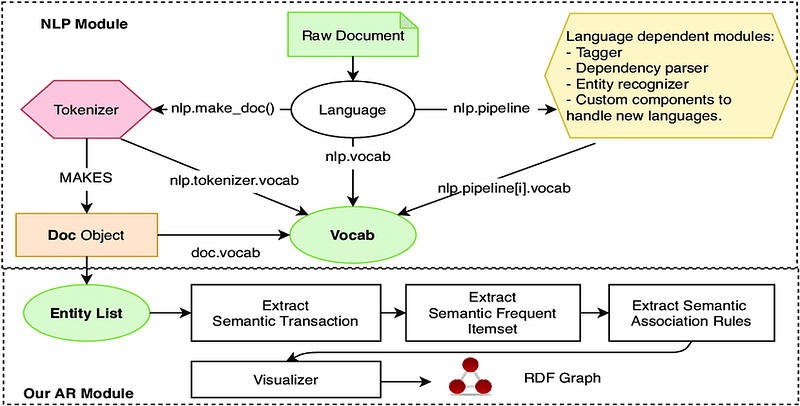
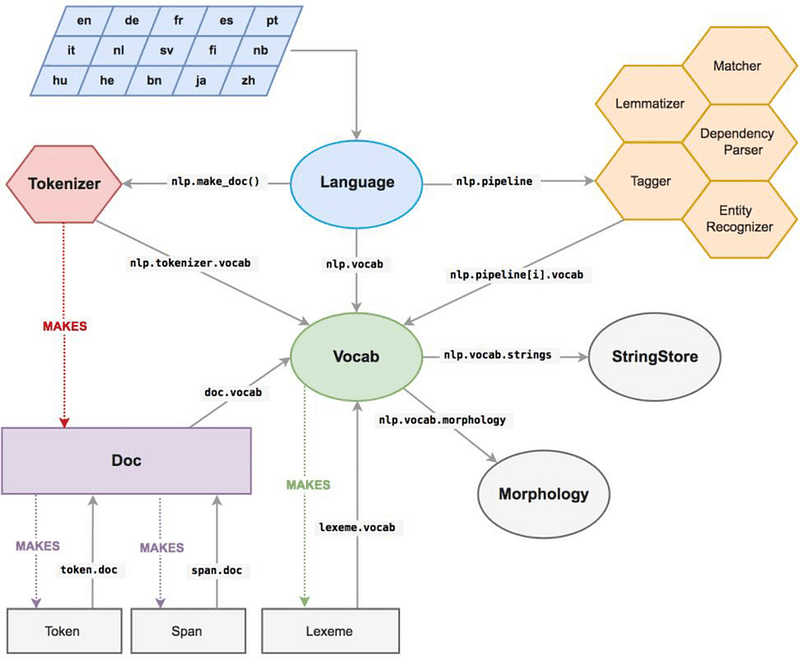
In natural language processing (NLP), a vocab is a collection of words and their corresponding numerical IDs, which are used to represent the words in a computational model. A lexeme is a base form of a word, often used as a key to retrieve word forms from a lexicon or a word-to-ID mapping in a vocab.
- The Matcher in spaCy is a utility class that helps to match sequences of tokens in a document based on their text, tag, or attributes. It can be used to find specific words, phrases, or patterns in a text, and can be useful for tasks such as named entity recognition, part-of-speech tagging, and more.
- For example, the Matcher can be used to identify specific named entities in a text by matching patterns of tokens based on their text, POS tags, and other attributes. The Matcher can be trained on a specific set of patterns, and then used to match those patterns against new text.
- In summary, a vocab is a collection of words and their corresponding numerical IDs, a lexeme is a base form of a word, and Matcher is a utility class that helps to match sequences of tokens in a document based on their text, tag, or attributes, it can be used to find specific words, phrases, or patterns in a text.
SpaCy stores the data in the vocabulary and encodes all the strings into the hash values.
- Orth: It’s the hash value of the lexeme.
- Shape: It’s the abstract word shape of the lexeme.
- Prefix: By default, the first letter of the word string.
- Suffix: By default, the last three letters of the word string.
import spacynlp = spacy.load("en_core_web_sm")
doc = nlp("I love books")
print(doc.vocab.strings["books"])
print(doc.vocab.strings[17837313582142403287])Output —
17837313582142403287
books
nlp = spacy.load("en_core_web_sm")doc = nlp("I love books")for word in doc:l = doc.vocab[word.text]print(l.text, l.orth, l.shape_, l.prefix_, l.suffix_,l.is_alpha, l.is_digit, l.is_title, l.lang_)Output —
I 4690420944186131903 X I I True False True en
love 3702023516439754181 xxxx l ove True False False en
books 17837313582142403287 xxxx b oks True False False en
Spans from Matcher —
import spacy
from spacy.matcher import Matcher
from spacy.tokens import Span
nlp = spacy.blank("en")
matcher = Matcher(nlp.vocab)
matcher.add("PERSON", [[{"lower": "Steve"}, {"lower": "Jobs"}]])
doc = nlp("Steve Jobs was one of the founder of Apple")m = matcher(doc)
for match_id, start, end in m:
span = Span(doc, start, end, label=match_id)
print(span.text, span.label_)Day 5: Coming soon!
Follow for more updates, stay tuned and of-course let me end this post with a quote by Steve Jobs ;)
“Your time is limited, so don’t waste it living someone else’s life.”
For other projects, tune to —
Build Machine Learning Pipelines( With Code)
Recurrent Neural Network with Keras
Clustering Geolocation Data in Python using DBSCAN and K-Means
Facial Expression Recognition using Keras
Hyperparameter Tuning with Keras Tuner
Custom Layers in Keras


