
Creating a Common Deployment Container That Requires MFA
ACM.377 Leveraging a container and my new directory structure for running deployment jobs
~~~~~~~~~~~~~~~~~~~~~~~~~~~~~~~~~~~~~~~~~~~~~~~~~~~~~~~~~~~
⚙️ Check out my series on Automating Cybersecurity Metrics. The Code.
🔒 Related Stories: Cybersecurity | AWS Security | Appsec | Secure Code
💻 Free Content on Jobs in Cybersecurity | ✉️ Sign up for the Email List
~~~~~~~~~~~~~~~~~~~~~~~~~~~~~~~~~~~~~~~~~~~~~~~~~~~~~~~~~~~
In the last post I created my initial rootadmin role, and I explained why I am using both a role and a user. The user manages credentials and uses the console. The role requires MFA to assume and perform automation.
In this post, I want to test passing my root admin credentials into a container and running a script. Why? Because then I can enforce the requirement that MFA credentials must be provided for every deployment.
I demonstrated the proof of concept in these two prior posts:
Phew that was farther back than I thought.
I am going to start with that container base and incorporate my new directory structure so I have a container I can use for any deployment job.
Moving the new directory structure into the container
Here’s what I did first to set up my directory structure for building this container.
Create a folder called /awsdeploy.
Copy over my last container test with the EC2 instance to my aws deploy folder.
Copy the /deploy and /resources folder into my awsdeploy folder.
Copy random scripts into a folder at the same level as /awsdeploy named /scripts_adhoc. That’s for any random script I was testing or may need to run that’s not inside the container.
/awsdeploy
  /deploy
  /resources
  build.sh
  Dockerfile
  userdata.sh
/scripts_adhoc
I modify the Dockerfile to pull in the /deploy and /resources code into my container.
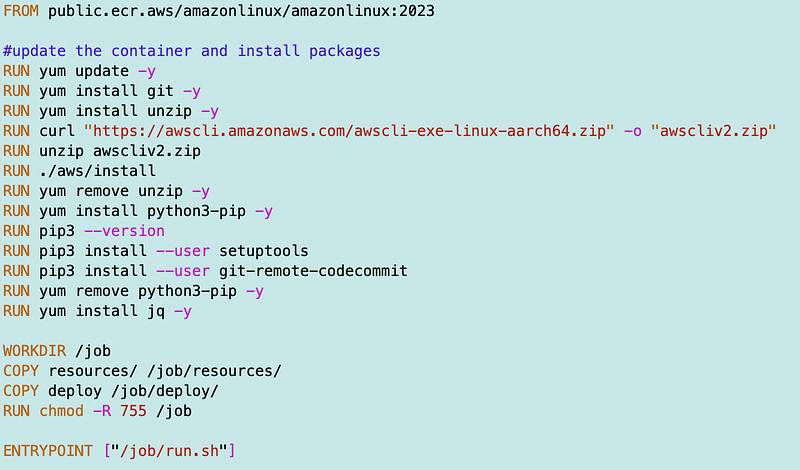
I build the container and verify it exists:

I may not need git for every deployment job but I want to have a common container for deployments so I’ll leave that in there for now. If you wanted to be more restrictive for security reasons you could create multiple containers with the minimal software required to run each job.
Determining what script to execute when the container runs
What I did in the prior post was execute the run.sh file when the container ran to move some code around between code repositories. The run.sh script parsed credentials out of the arguments passed into the container on execution and used those credentials to perform its work.
Now what I want to do for this container is change the run.sh script to parse out the credentials and the name of the script to run in the /deploy directory. I can run any script included in my container and it will deploy the specified resources that script deploys.
Parameters for scripts
What if I have to pass in parameters for the script to use upon execution? I thought about passing a parameter list in but that can get messy and complicated. This is the method I want to try out:
- A parameter can be created in Parameter Store to store the parameters passed into the function, as long as it’s not something that needs to be kept secret.
- Sensitive data should always be stored in a secret, encrypted with a customer managed KMS key.
A deployment job and pull any parameters or secrets at run time.
Parallel deployments and what containers should run
So I’m thinking about the parameter name. What should it be? Should a container only create one resource or will a script create many resources?
Think about my script to create my initial governance architecture I wrote about in this post:
What if I want to build things faster? Some resources can be deployed at the same time. One container could spin up another container and pass in the credentials. However each container requires credentials from an active session that was created using a role that requires MFA to assume.
That’s pretty high level and I need to think through the details but seems doable. A container can run a deployment script that spins up other containers to deploy each resource.
Parameter names
So how should I name the parameters in Parameter Store so we know what’s what? If I want to easily be able to align parameters with types and resources deployed in cloudformation I can align the parameter names to the cloud formation stacks.
[role]-[category]-[type]-[resourcename]
How should the parameters be structured? Well, I don’t really like JSON. I’m going to keep it simple. The parameter list for a resource will for now look like this (something I’ve done before):
key1=value
key2=value
key3=value
I think that will work but if I must change this to JSON or YAML later I will.
Creating parameters for a resource
So how do the parameters get created in Parameter Store so the values can be set? Every template has a list of parameters. Perhaps I could write a function to generate a parameter for a resource prior to deploying it. If the parameter does not exist, a skeleton gets created and the job exits saying that the parameters need to be set.
Testing containers outside an EC2 instance
I have a userdata.sh script that gets the credentials, pulls a container, passes in the credentials, and runs the container. It seems like we can use this same userdata script to test the container.
A simple test
As a simple test, I want to change my run.sh script to run a script using my rootadmin credentials.
I create a new script:
/deploy/rootadmin/listroles.sh
I add the following of code:
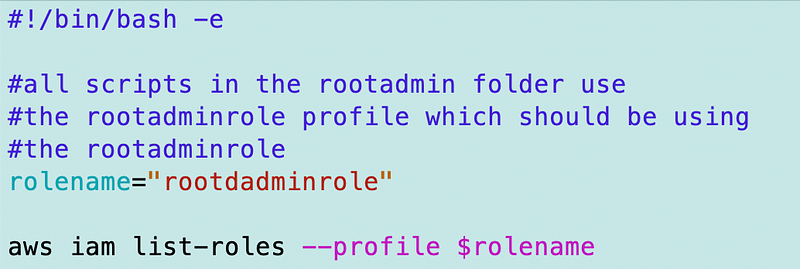
Note that I always know which profile to use based on the directory from which the script gets executed so it can be hardcoded. I explained deployment directories in a prior post.
I move the code in run.sh that is not applicable to my generic script here:
/deploy/appadmin/githubtocodecommit.sh
I change my run.sh script as follows, removing the repository specific code and passing in a script, which gets executed at the bottom.
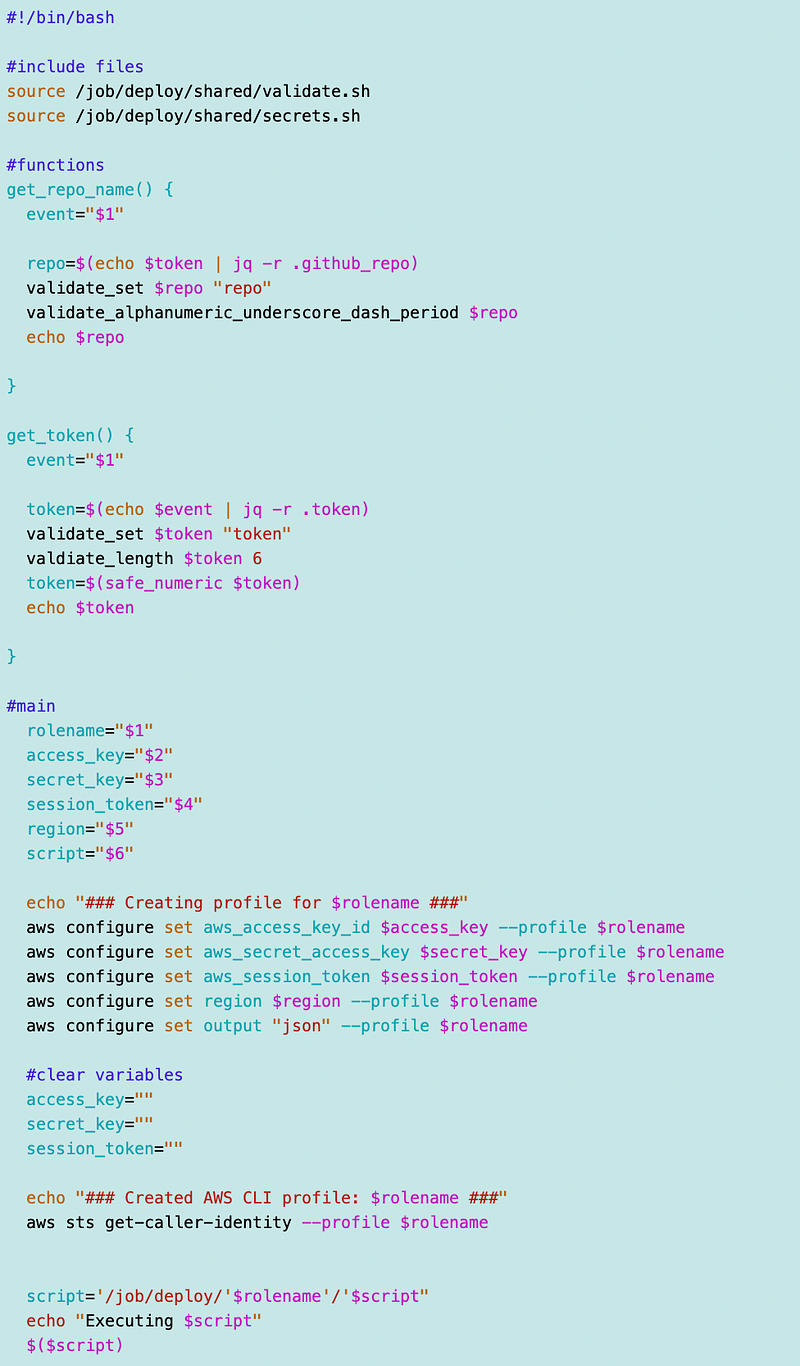
I also copied the secrets.sh and validate.sh to the /deploy/common folder for now and changed the path. I added the run.sh to the job folder in the container.
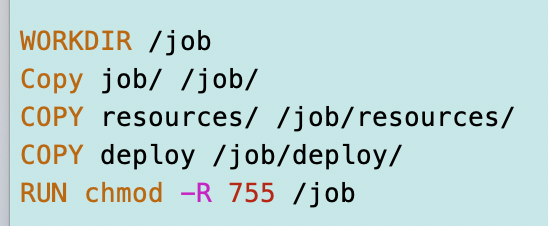
Now my container works pretty much the same way as before, except that I’ve got a new directory structure for deployment scripts and resource specific code and templates. I’m passing in which script to execute. As far as obtaining the credentials and leveraging them in the script I don’t really need to make changes.
Alright let’s take a look at the userdata.sh script and see if I can use that.
Recall that my credentials were stored in a secret:
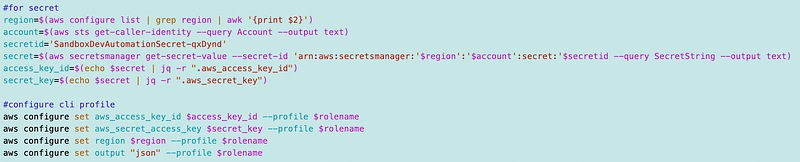
I will need to create a new secret with my rootadmin credentials created in a prior post and replace the secret name above. I’m hardcoding the secret name for testing right now.
So I ran the command and I had to adjust various things but I hit a snag on this:
I’m getting an error saying STS is disabled in the remote account region but it’s not. That error is wrong and I wish that AWS would correct the error message to be accurate as I’ve had problems with this before and still not sure what is causing it.
I know it’s inaccurate for the reasons explained in that post and likely has to do with networking.
I copy my script over to Cloud Shell on the account where I’m testing and I get past the error. This further indicates to me that the problem is likely networking and the error message is completely inaccurate.
But once I get past that problem I realize I have to install docker in the CloudShell environment. Then the problem is I try to install and use docker and I’m getting errors over there because that account does not have permission to access ECR in the other account where the container exists.
So I haven’t proven that I can call the passed in script yet but I’m sure that will work, and hopefully you get the idea. I already proved I can pass in and use credentials in my last POC.
I have a few options at this point that I can think of:
- Create a public repository in a separate network that is open to the world. I don’t really want to do that.
- Give the remote account access to my ECR repository which is currently pinned down to a private networking with a VPC Endpoint. I could set up some remote roles and so on. There are various ways to do that.
- I could find some other way to make the container accessible to the other account (I have some ideas on that I may address later.
- For myself, I could set up a new repository in the new account and copy the container to it, but the whole point of this is using a container to set things up before anything exists so that really misses the point.
- People can download the code and build the container themselves for use in their own repository. That works, but same as the last option. People have to already have a repository where they can push the container so it’s not ideal for a brand new account.
Well, I’m not going to solve that problem in this post, but you get the idea where I’m going with this container and how to use it. This idea will continue to evolve.
Related stories:
Follow for updates.
Teri Radichel | © 2nd Sight Lab 2023
About Teri Radichel:
~~~~~~~~~~~~~~~~~~~~
⭐️ Author: Cybersecurity Books
⭐️ Presentations: Presentations by Teri Radichel
⭐️ Recognition: SANS Award, AWS Security Hero, IANS Faculty
⭐️ Certifications: SANS ~ GSE 240
⭐️ Education: BA Business, Master of Software Engineering, Master of Infosec
⭐️ Company: Penetration Tests, Assessments, Phone Consulting ~ 2nd Sight Lab
Need Help With Cybersecurity, Cloud, or Application Security?
~~~~~~~~~~~~~~~~~~~~~~~~~~~~~~~~~~~~~~~~~~~~~~~~~~~~~~~~~~~~~
🔒 Request a penetration test or security assessment
🔒 Schedule a consulting call
🔒 Cybersecurity Speaker for PresentationFollow for more stories like this:
~~~~~~~~~~~~~~~~~~~~~~~~~~~~~~~~~~~~~~~~~~~~~~~~~~~~~~~~~~~~~
❤️ Sign Up my Medium Email List
❤️ Twitter: @teriradichel
❤️ LinkedIn: https://www.linkedin.com/in/teriradichel
❤️ Mastodon: @teriradichel@infosec.exchange
❤️ Facebook: 2nd Sight Lab
❤️ YouTube: @2ndsightlab