
Using a Deployment Container That Requires MFA to Deploy Resources to an Account In Another AWS Organization and a Different Region
ACM.380 Accessing a private ECR repository and using the container to deploy resources in the remote account
~~~~~~~~~~~~~~~~~~~~~~~~~~~~~~~~~~~~~~~~~~~~~~~~~~~~~~~
⚙️ Check out my series on Automating Cybersecurity Metrics | Code.
🔒 Related Stories: AWS Security | Secure Code | IAM
💻 Free Content on Jobs in Cybersecurity | ✉️ Sign up for the Email List
~~~~~~~~~~~~~~~~~~~~~~~~~~~~~~~~~~~~~~~~~~~~~~~~~~~~~~~
In the last post I figured out that STS is simply not going to work cross-account in a private network with VPC endpoints (as far as I know at this point.)
I want to test deploying resources to an external AWS account and I can do that in a public VPC but I need to access my private repository.
Whomever I allow to access that private repository also needs permission to access the KMS key.
I don’t want to grant cross-account access to that key so for the moment, I’m going to use my local role that has access to the private repository but from a public VPC.
That would not work if I have a requirement to only access the repository from specified VPC Endpoints, which I hope to add later. But it’s not there at the moment so I’ll go ahead and use it for the moment.
The reason I couldn’t access the ECR repository earlier is because I was trying to pull down the image with the remote account. That account does not have access to the repository. But my SandboxAdmin does.
So I need to pull down the image with the SandboxAdmin first and then assume the role in the other account to run the deployment.
The other thing I realized was that I was using my remote account number in the pull request. Oops.
So now that we know we can make this work in a public network I’m going to use the host I deployed in the public network to get this done.
Again, not ideal but at the moment I want to keep moving forward. If I was at a large company and really wanted to address this I would talk to my AWS account manager about it if support could not provide a solution. And if there is a solution, I hope it will be added to the AWS documentation. If it’s there I couldn’t find it.
So anyway what do I need to do to get this working?
I fire up my instance in my public network, to which I also added VPC Flow Logs since I’m doing more than a quick test.
I navigate to my awsdeploy container folder.
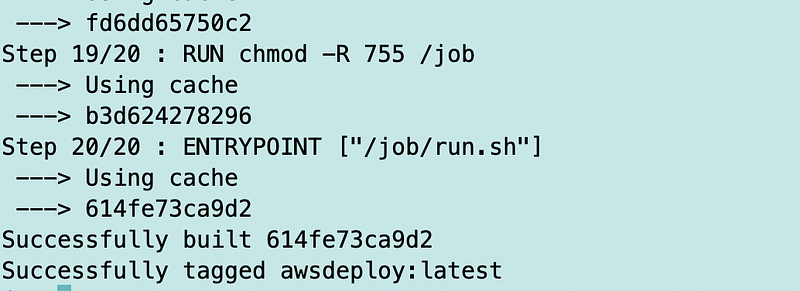
I test building the container and it works.
./build.sh
Recall that I’ve defined my role at the top of the script as rootadminrole and that is the role I’m assuming in the remote account to deploy resources.
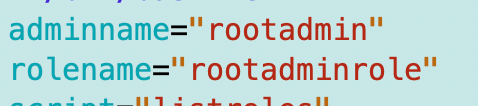
I’m going to add a local and a remote role.

The local admin role obtains the secret to assume the credentials
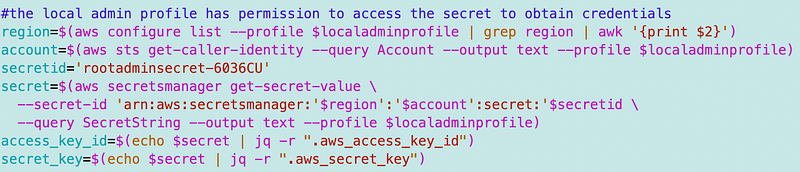
Recall that we configured the AWS CLI with our role name.

I need to change that to remoterolename now.

Then we use that role profile to get the account ID. Which account? The remote account.

We use that account id in the code that assumes the remote role.
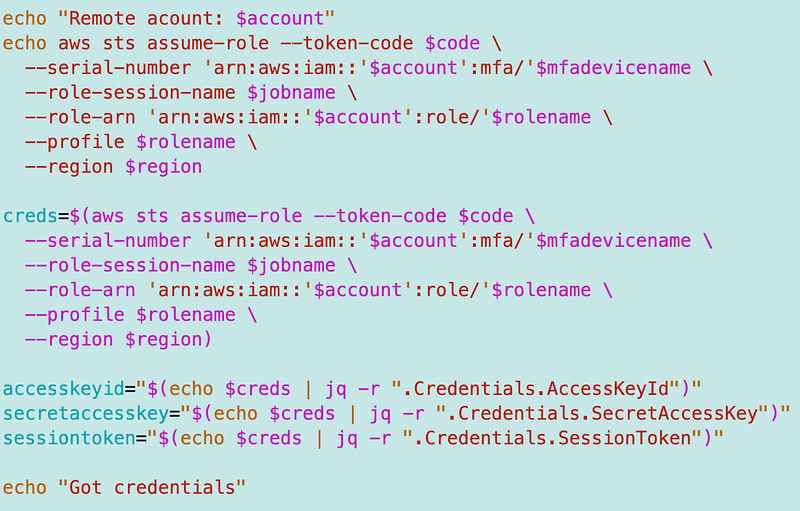
The problem is I’m also using that account number to access the repository, which is in the local account where I’m setting “pass” below.
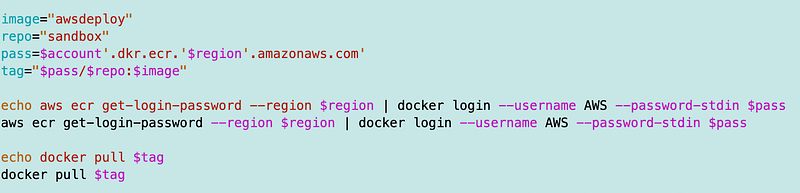
What I need to do is change that code to use the local account.

That code pulls down the container down to the local machine where it can be executed. We pass in the script that we want to run and the credentials we want the container to use as before.

And this is where I get the dreaded error about the wrong region again and it all clicks. I had to put the region into the STS command to force it to use the local endpoint earlier I believe. Or something. Maybe it was just a typo on my part.
I am using two different regions in each account and I was using the region for the account where ECR is located instead of the remote account region where the role I’m assuming is located. So I had to add two different regions as well as two different accounts.
I get the local region dynamically.

I have to hardcode the remote region which happens to be us-east-1.

I set the region for the CLI profile for the remote account to the remote region.
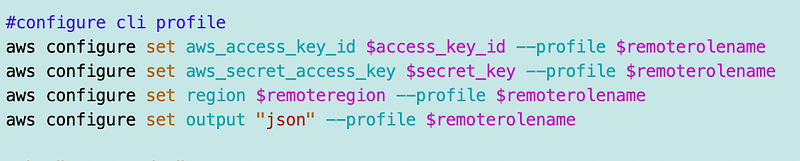
The assume role command uses that region:
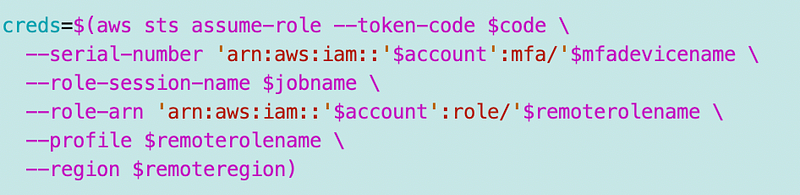
The ECR command uses the local region:

But here’s what happens when I do that. Initially the command goes very slowly and eventually it works. Finally I take a look at tcpdump again like I did in the last post and I can see that the requests are trying to reach a us-east-2 endpoint and that is resolving to public, not private IP addresses.
So I changed the commands to use us-east-2 — the same region as my local subnet. When I do that both commands run quickly.
Well, that’s cool. But what if I want my CloudFormation stacks to end up in us-east-2 in the other account? When I try to run the CloudFormation commands in us-east-2 are those going to be very slow or not work at all also? That’s a bit frustrating as I don’t want to set up all my private infrastructure all over again in us-east-1. I also presume MSPs working for multiple clients who have resources in different regions don’t want to do this either when assuming remote roles.
At any rate the correct error message for the original problem should be:
“The role you are trying to assume [rolename] does not exist in the specified region [region].”
Then it would have been super obvious and saved me like a day of troubleshooting.
I’m not sure about the slowness problem and what is supposed to be happening there, but it seems like the remote calls to us-east-2 should also be resolving to private IP addresses.
Ok wait a minute. When I change the sts call back to us-east-2 I’m getting this call again.
An error occurred (RegionDisabledException) when calling the AssumeRole operation: STS is not activated in this region for account:xxxxxxxxxxxx. Your account administrator can activate STS in this region using the IAM Console.
Argh.
I change the region back to us-east-1 and it works.
Now I’m getting this weird response when I try to log into ECR:
Error response from daemon: login attempt to https://xxxxxxxxxxxx.dkr.ecr.us-east-2.amazonaws.com/v2/ failed with status: 400 Bad Request
WARNING! Your password will be stored unencrypted in /home/ec2-user/.docker/config.json.
Configure a credential helper to remove this warning. See
https://docs.docker.com/engine/reference/commandline/login/#credentials-store
Login Succeeded
So which is it? Login failed, or login succeeded? I should look into the credential helper, but still. That error message…
Now I’m back to the assume role command taking forever.
And the root problem is that DNS requests to a region besides the one your private network is in resolve to a public IP address. I added that to the prior post.
And after all that I finally have a script that pulls down my container and executes the run script in my container.
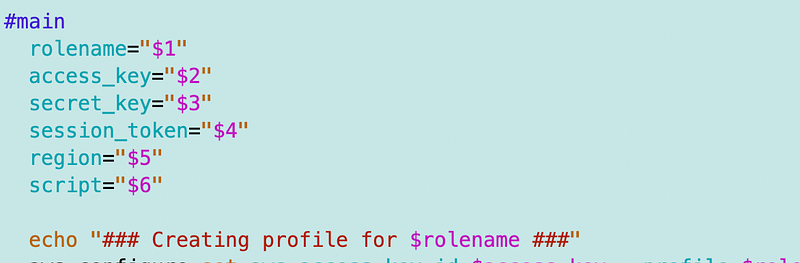
But it’s getting some kind of error:
unexpected EOF while looking for matching `”’
I had an extra quote in my script variable in the run.sh file I created in an earlier post. Fix, build, push.
Wait for the assume-role command to finally work while my dinner is getting cold and my husband is yelling at me to come eat. AWS is not good for my marriage at the moment. 😆
I know I can fix this. It’s clear what’s going on I need to go for now. I’ll start using this container to deploy things in future posts and see if it works.
Please AWS, make cross-region requests work with private IPs for a reasonable price. I figured this was possible and updated my prior post on this topic but it’s an expensive proposition most likely for a small business.
I might be back to my public container solution in the AWS Marketplace or end up pushing containers to other repos or something.
Follow for updates.
Teri Radichel | © 2nd Sight Lab 2023
About Teri Radichel:
~~~~~~~~~~~~~~~~~~~~
⭐️ Author: Cybersecurity Books
⭐️ Presentations: Presentations by Teri Radichel
⭐️ Recognition: SANS Award, AWS Security Hero, IANS Faculty
⭐️ Certifications: SANS ~ GSE 240
⭐️ Education: BA Business, Master of Software Engineering, Master of Infosec
⭐️ Company: Penetration Tests, Assessments, Phone Consulting ~ 2nd Sight Lab
Need Help With Cybersecurity, Cloud, or Application Security?
~~~~~~~~~~~~~~~~~~~~~~~~~~~~~~~~~~~~~~~~~~~~~~~~~~~~~~~~~~~~~
🔒 Request a penetration test or security assessment
🔒 Schedule a consulting call
🔒 Cybersecurity Speaker for PresentationFollow for more stories like this:
~~~~~~~~~~~~~~~~~~~~~~~~~~~~~~~~~~~~~~~~~~~~~~~~~~~~~~~~~~~~~
❤️ Sign Up my Medium Email List
❤️ Twitter: @teriradichel
❤️ LinkedIn: https://www.linkedin.com/in/teriradichel
❤️ Mastodon: @teriradichel@infosec.exchange
❤️ Facebook: 2nd Sight Lab
❤️ YouTube: @2ndsightlab