
CloudFormation for AWS Batch Roles and Policies
ACM.337 Creating reusable roles and policies where possible for AWS Batch ECS EC2 compute environment
~~~~~~~~~~~~~~~~~~~~~~~~~~~~~~~~~~~~~~~~~~~~~~~~~~~~~~~
⚙️ Check out my series on Automating Cybersecurity Metrics | Code.
🔒 Related Stories: AWS Security | Secure Code | Batch | IAM
💻 Free Content on Jobs in Cybersecurity | ✉️ Sign up for the Email List
~~~~~~~~~~~~~~~~~~~~~~~~~~~~~~~~~~~~~~~~~~~~~~~~~~~~~~~
In the last post, I added some protection against cross-service confused deputy attacks in my generic AWS Service Role CloudFormation template. We still have more to add, but it’s a start. I use that template below to create the required roles to run an AWS Batch Job.
In this post, I’m going to use the above template and try to build out the roles required by AWS Batch to run a Job for my specific use case.
As noted there are three options for compute environments:
- ECS / Fargate
- ECS / EC2
- Kubernetes
I went over the pros and cons of those approaches in prior posts. In this post I’m setting up the roles for the ECS/EC2 compute environment.
I already tried to work out what those roles should be in these two posts and took a look at creating a Batch Compute Environment.
Since those posts I’ve dug up the default policies in the AWS Managed policies list. We can use those to copy and create our own policies with adjustments if needed.
Just a note on what I am not covering in this post:
- IAM Roles for users who are allowed to schedule the execution of Batch jobs or configure AWS Batch
- Resource policies that allow AWS batch to access resources such as KMS keys, AWS CodeCommit, secrets, etc.
- Resource policies applied to AWS Batch or ECS to restrict which principals can access resources for those services, if any such resource policies exist. I haven’t run across any yet.
- Service Control Policies to restrict the user of Batch within your organization.
In this post I am creating the roles and resources we need to run a Batch job and I presume your user has permission to create these resources and execute a job at the moment.
We will have to adjust KMS key, Secrets Manager, and AWS CodeCommit policies in an upcoming post.
A visual for the roles we are going to create
Here’s a visual representation of the AWS Service roles we are going to create, meaning IAM roles that can be assumed by an AWS service (not Service Linked Roles.)
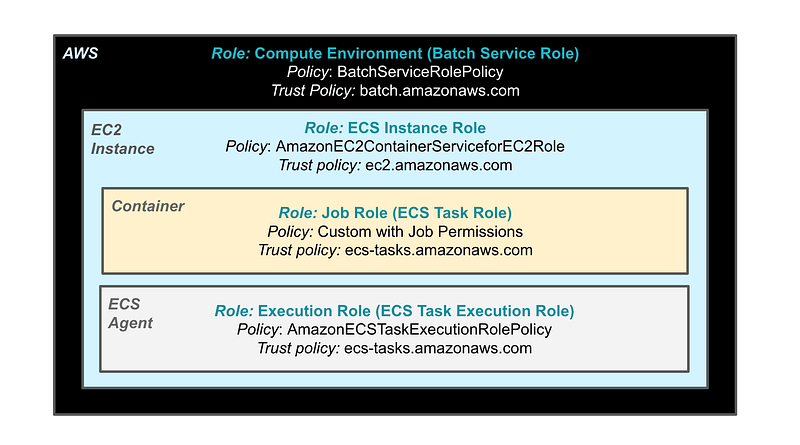
The diagram above shows the following:
- The name of the architectural component that gets assigned the role. Each component is represented with a different colored box.
- The role as named in the UI and roughly as named in the title of the documentation. I think it would be clearer if AWS removed some extraneous words from the titles. It would also help if these roles were named consistently across services, the UI, and in the documentation, and the policies matched the role names.
- The next line has the default AWS policy that you can review in the IAM Dashboard, if there is one.
- The last line shows the service that assumes each role in its corresponding trust policy.
In addition, I am going to convert the following I created earlier for Lambda to use for Batch:
- The user with credentials and MFA used to assume a role.
- The role and policy the user can assume
Documentation for the Service roles
Here are links to the documentation for the above roles.
Compute Environment Role assumed by the Batch service:
The AWS Batch service role has permission on the AWS platform to make calls to many services to create the resources required to manage and schedule batch jobs for you.
When I tested this, the managed option for ECS creates a new ECS cluster, for example.
I would think the policy for the unmanaged option would require less permissions but no time to test all of that right now or create two separate policies. I am going to start with the managed option and make just a few modifications to the default AWS policy as noted in prior posts.
ECS Instance Role assumed by the EC2 service:
I find this documentation confusing.
AWS Batch compute environments are populated with Amazon ECS container instances. They run the Amazon ECS container agent locally. The container instances that run the agent require an IAM policy and role for these services to recognize that the agent belongs to you. You must create an IAM role and an instance profile for the container instances to use when they’re launched. Otherwise, you can’t create a compute environment and launch container instances into it.
There is a separate role for the ECS agent below. Why would the ECS agent need to use the permissions assigned to the EC2 instance role if it has its own specific role? But, that’s what it says.
I think this is the same or similar to the IAM role described here in the ECS documentation. I don’t know why the documentation is repeated instead of just linking to it. It would be interesting to review the differences, if any, in detail. However, I am trying to get something done here.
Job Container (Task) Role assumed by ecs-tasks.amazonaws.com:
Your Amazon ECS tasks can have an IAM role associated with them. The permissions granted in the IAM role are assumed by the containers running in the task.
It would be clearer if AWS removed the extraneous words in the titles of this role and the next. One is for your task so your task is allowed to do the things it needs to do. The next role is to allow the ECS agent to run your task (e.g., start the container). So the titles could simply be Task Role and Task Execution Role, respectively.
Role for ECS Agent (which runs on an EC2 instance) assumed by ecs-tasks:
This line from the documentation doesn’t really describe the role.
The task execution role grants the Amazon ECS container and Fargate agents permission to make AWS API calls on your behalf.
But I glean from overall evaluation that the agents trigger your containers to start running.
The agent may perform the following:
- Log to CloudWatch
- Pull images from container registries
- Authenticate to a private registry
- If the task (job) definition accesses secrets manager or SSM then this role would need permissions to retrieve those secrets.
There seems to be some overlap between the task execution role and the EC2 instance role.
I am hopeful that I do not need to grant this role access to secrets to use secrets in my container. I think secrets this role may need would be related to pulling containers from private non-AWS container registries but not sure.
Where the roles appear in the batch console:
When you create an EC2 Compute environment, the batch service role and instance role appear on step one.
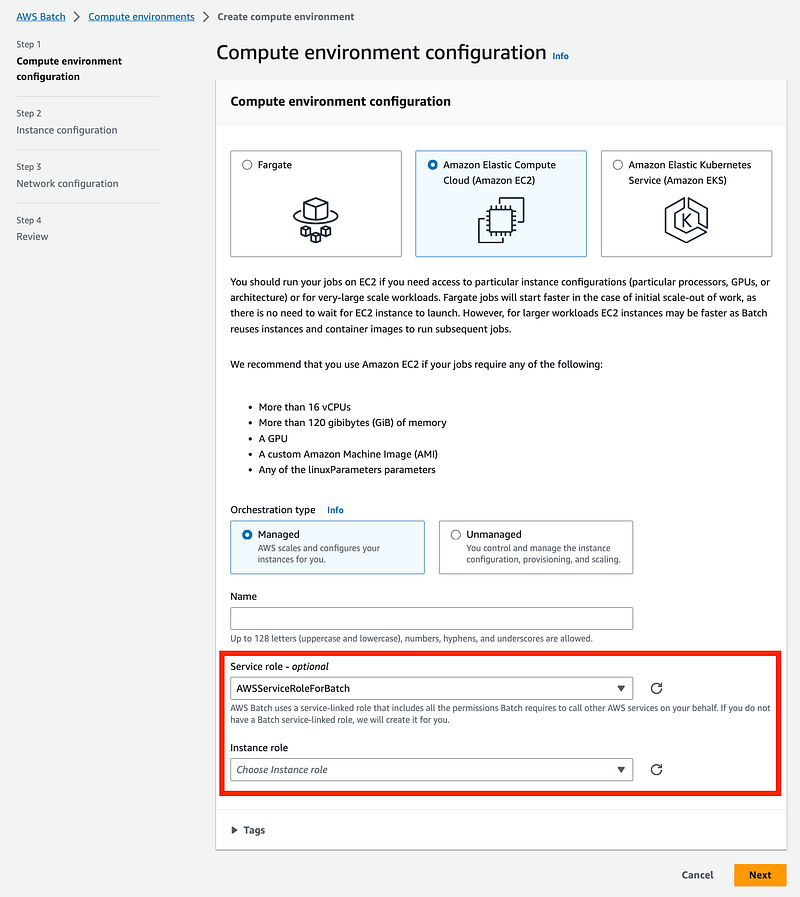
If you don’t create the above roles they are created for you. Note the policy considerations in my prior posts.
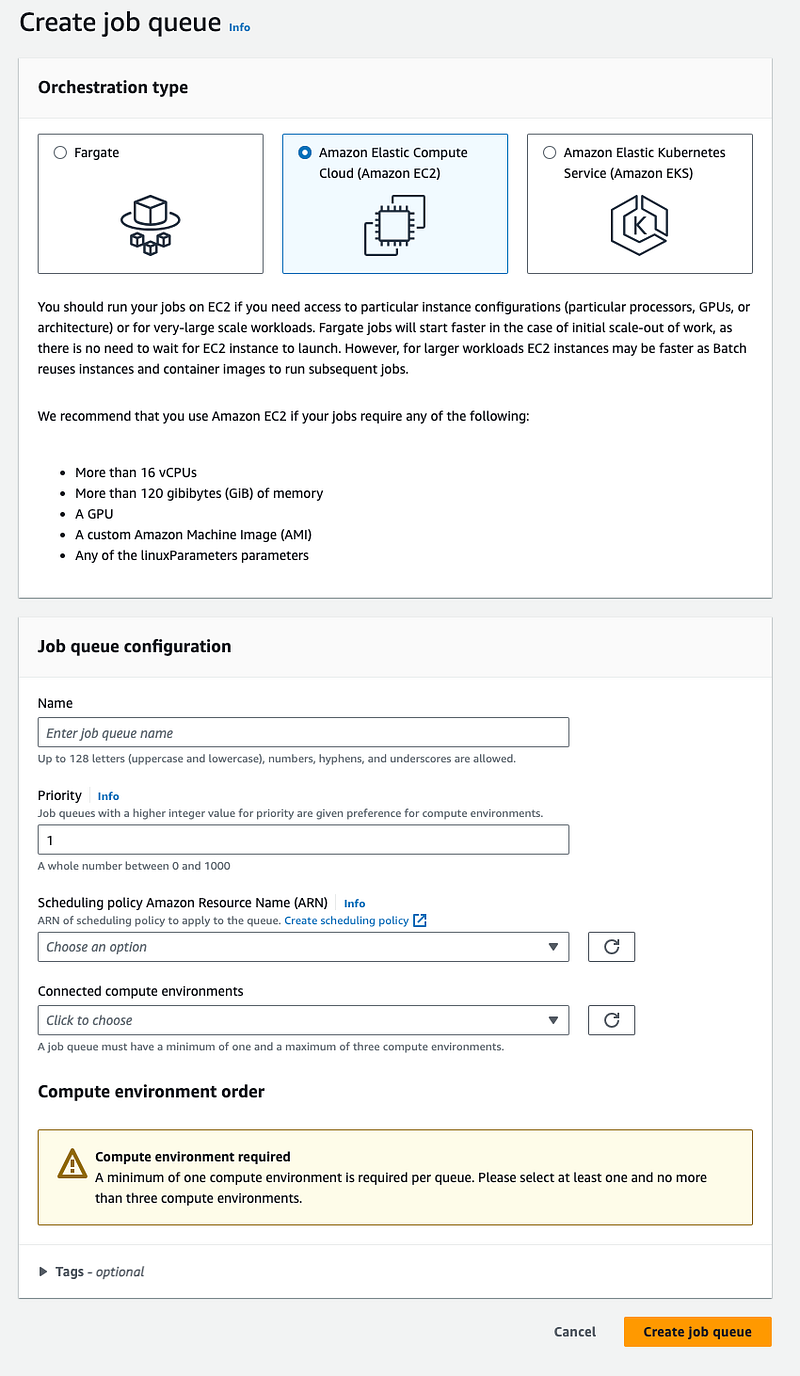
You connect a job queue to a compute environment.
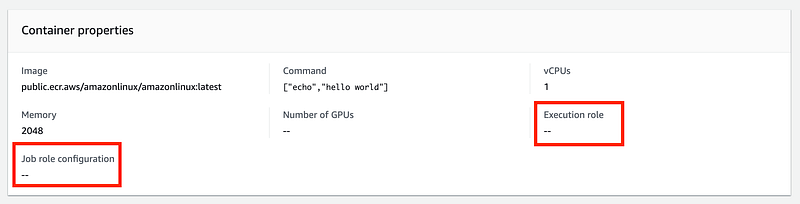
The job role and execution role are added to a job definition on step 2:
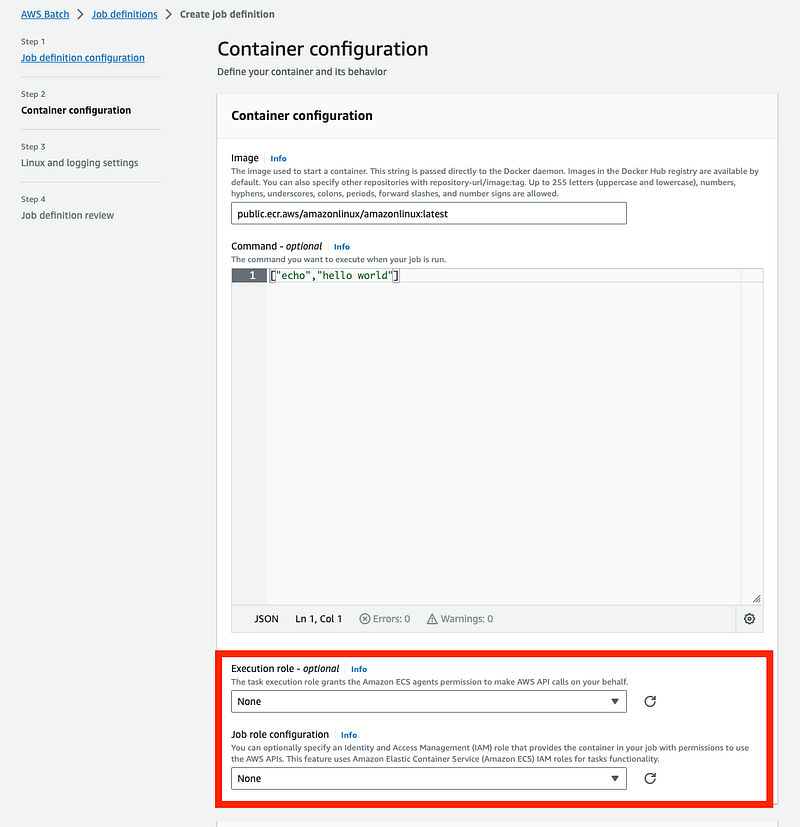
If you don’t add any role they are empty in the job definition configuration so these roles are not automatically created:
Single CloudFormation Template for Service Roles:
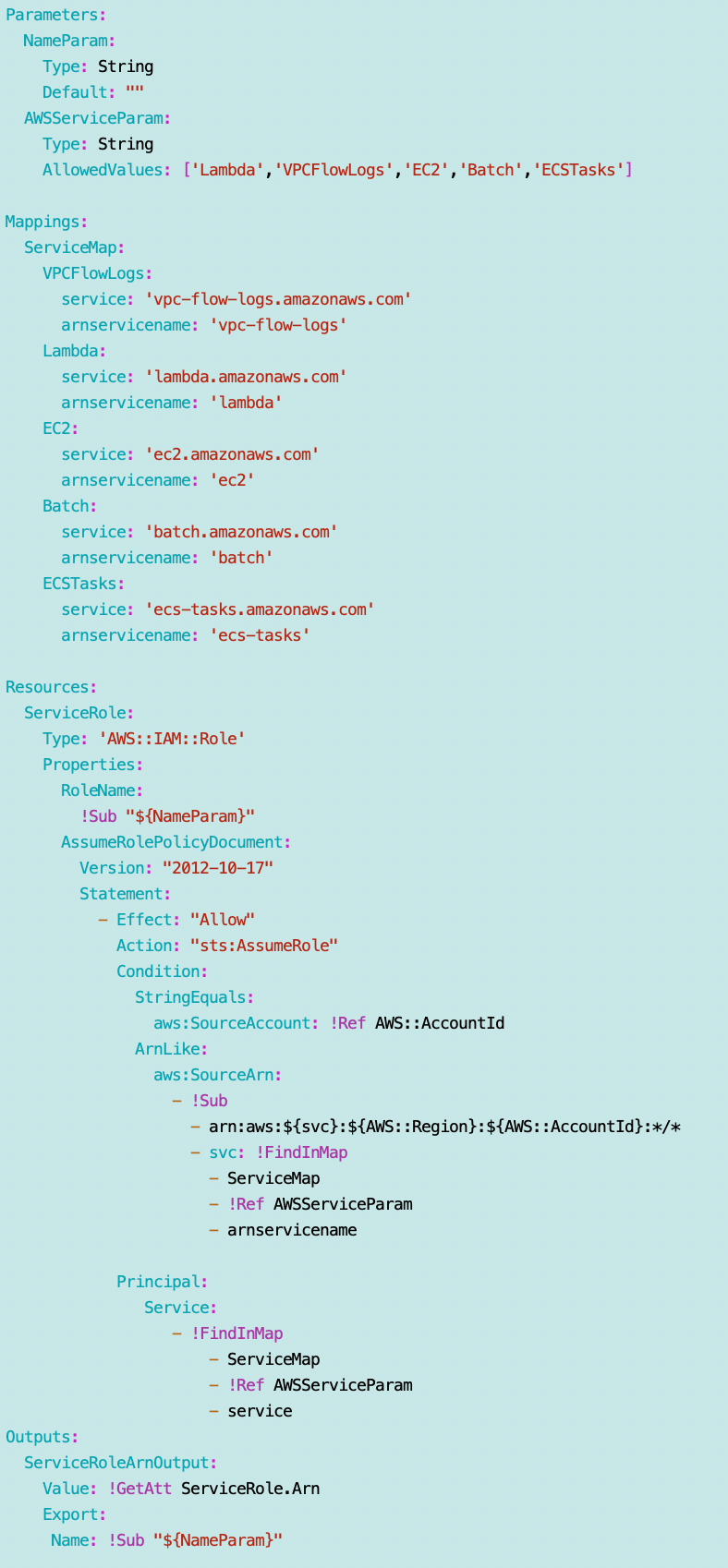
All of the service roles above can be deployed with the service role template I modified in the last post to include the confused deputy prevention code.
I will need to add the additional condition restrictions as recommended in the documentation if what I added is not sufficient.
As noted, I can also be more specific after reviewing the requests to only allow specific ARNs in the trust policies.
I may enhance that all later but for right now I want to see if I can assume MFA in a batch job. This is taking forever.
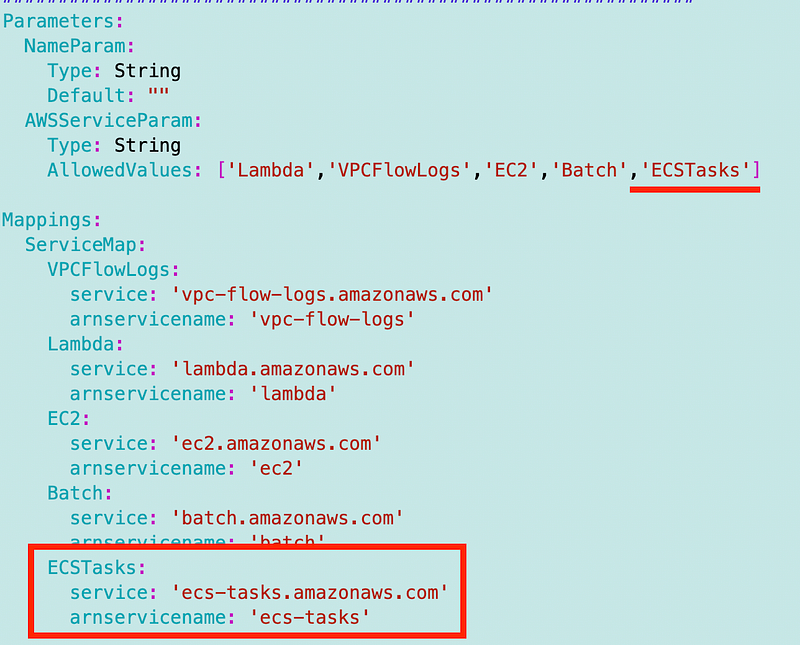
Note that I have to add the ecs-tasks services to my role as it is used in a trust policy above.
Here’s the whole role template with the condition I added in the last post:
In the spirit of micro-templates as I wrote about before, the roles and policies are in separate templates.
Each policy will need its own template because they are unique. However we can abstract the code from a service role into a common template.
I can deploy all the roles like this using my framework code as shown below using the single template, though I’ll later move the first three roles into a separate environment deployment script since they only need to be deployed once, not for every batch job.
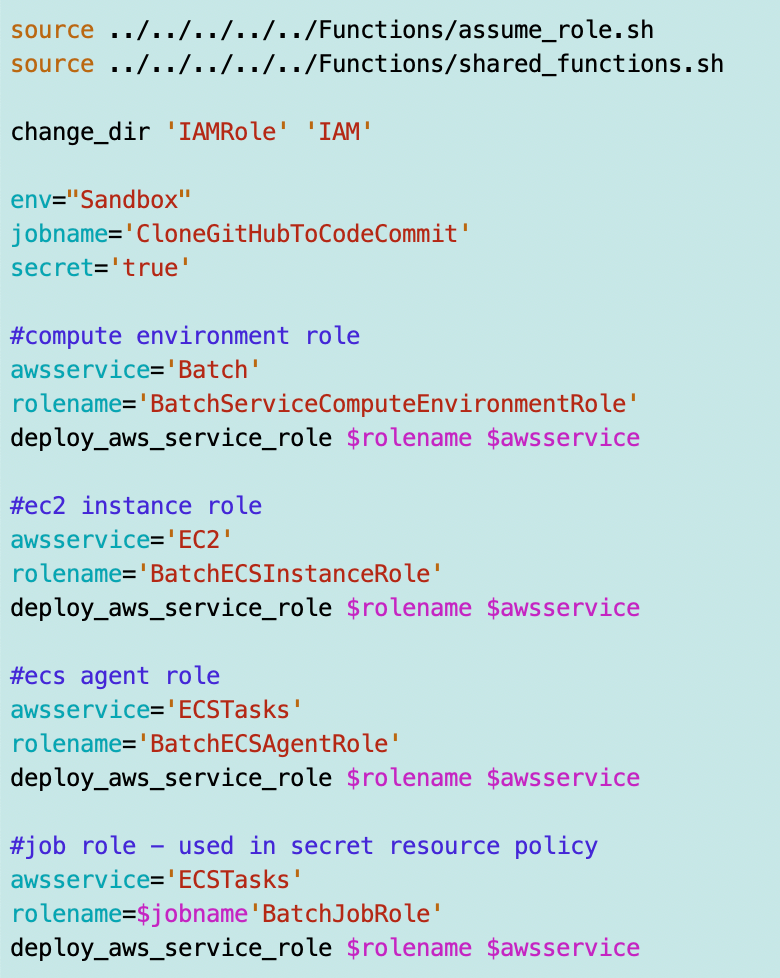
Once I create the policy template I can simply add a couple of lines to deploy the policies for the first three roles like this:
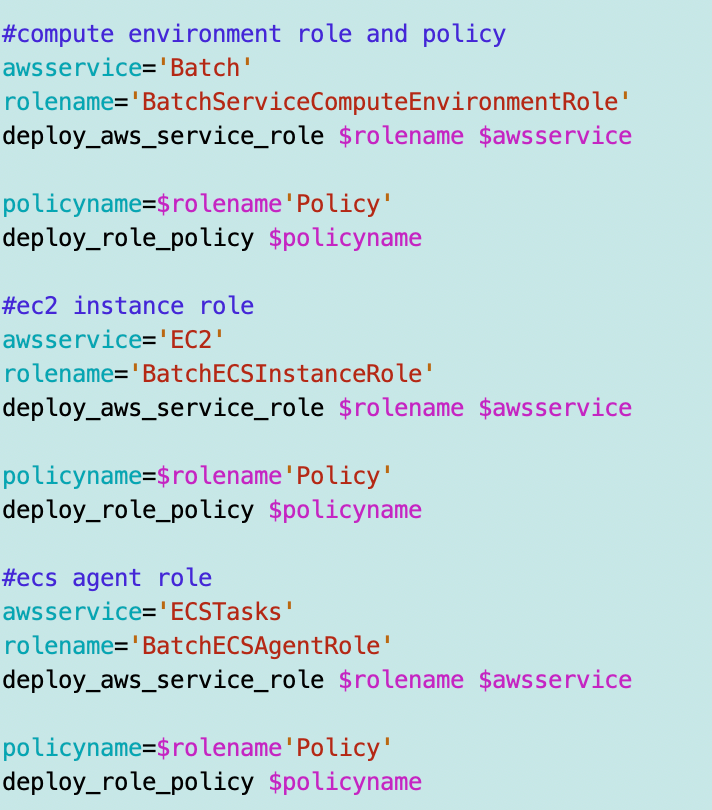
The last policy for the batch job is a bit more complicated as it has some dependencies. I’ll explain that further below. First let’s take a look at the policies for the roles above. I’m basing them off the default AWS policies in the AWS IAM console dashboard. Search for the default policy names in the diagram above to find them. I’m giving them different names for clarity when I deploy them.
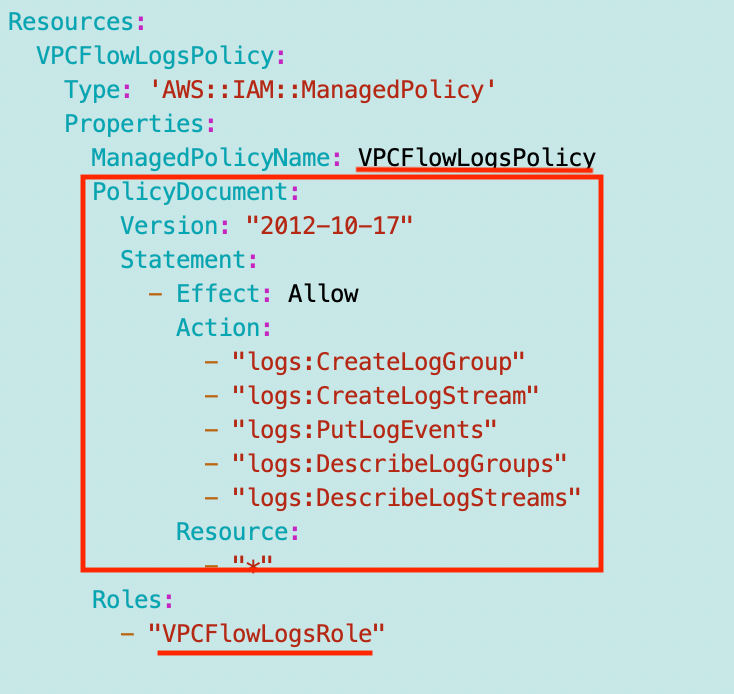
The first three policy templates will have the same format with the following variations:
- ManagedPolicyName is set to [Rolename]Policy
- The Policy Document changes and I show the Policy Document for each role in the following sections.
- I set the Role name to which the policy applies.
This is an example of the VPCFlowLogsPolicy since it’s short. Our policies below are much longer. I provide the policy and role name and the policy document which you can plug into the format below. Eventually I’ll publish this on GitHub as well.
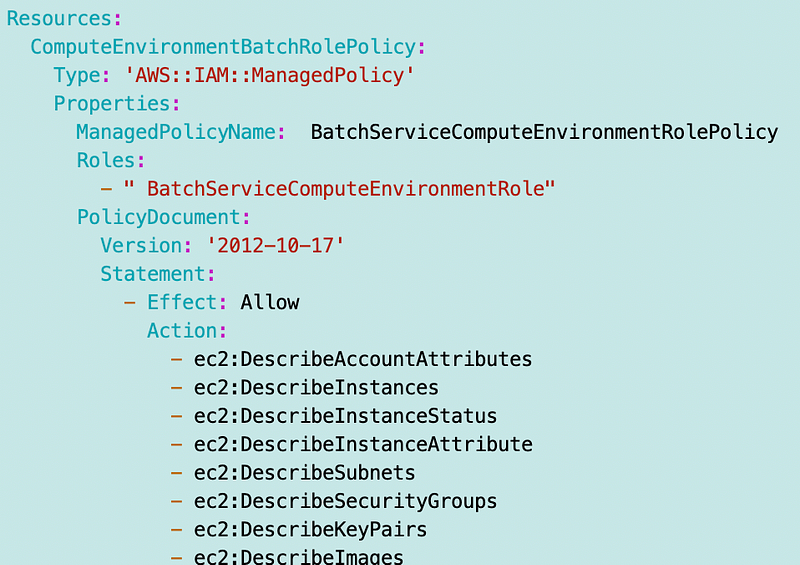
Batch Service Compute Environment Policy
As shown in the diagram and documentation above the default policy used for the compute environment is the BatchServiceRolePolicy.
My name for this role and policy:
- BatchServiceComputeEnvironmentRole
- BatchServiceComputeEnvironmentRolePolicy
The trust policy needs to use batch.amazonaws.com so I will pass in the parameter BATCH when deploying the role.
I converted the policy to yaml and have highlighted the things I would like to remove below. I explained why I removed those things in a prior post.
- I don’t use the Chinese endpoint
- The conditions would not deploy via CloudFormation
- I don’t want the service to create Service Linked Roles that are not subject to Service Control Policies in my account.
If this does not work, I may have to resort to another option for deploying batch jobs. Alternatively, I could run the service and allow it to create those roles, and then delete them and create them manually as IAM roles instead of Service Linked Roles and see if that works. We’ll see what happens.
Version: '2012-10-17'
Statement:
  - Effect: Allow
    Action:
      - ec2:DescribeAccountAttributes
      - ec2:DescribeInstances
      - ec2:DescribeInstanceStatus
      - ec2:DescribeInstanceAttribute
      - ec2:DescribeSubnets
      - ec2:DescribeSecurityGroups
      - ec2:DescribeKeyPairs
      - ec2:DescribeImages
      - ec2:DescribeImageAttribute
      - ec2:DescribeSpotInstanceRequests
      - ec2:DescribeSpotFleetInstances
      - ec2:DescribeSpotFleetRequests
      - ec2:DescribeSpotPriceHistory
      - ec2:DescribeVpcClassicLink
      - ec2:DescribeLaunchTemplateVersions
      - ec2:RequestSpotFleet
      - autoscaling:DescribeAccountLimits
      - autoscaling:DescribeAutoScalingGroups
      - autoscaling:DescribeLaunchConfigurations
      - autoscaling:DescribeAutoScalingInstances
      - eks:DescribeCluster
      - ecs:DescribeClusters
      - ecs:DescribeContainerInstances
      - ecs:DescribeTaskDefinition
      - ecs:DescribeTasks
      - ecs:ListClusters
      - ecs:ListContainerInstances
      - ecs:ListTaskDefinitionFamilies
      - ecs:ListTaskDefinitions
      - ecs:ListTasks
      - ecs:DeregisterTaskDefinition
      - ecs:TagResource
      - ecs:ListAccountSettings
      - logs:DescribeLogGroups
      - iam:GetInstanceProfile
      - iam:GetRole
    Resource: '*'
  - Effect: Allow
    Action:
      - logs:CreateLogGroup
      - logs:CreateLogStream
    Resource: arn:aws:logs:*:*:log-group:/aws/batch/job*
  - Effect: Allow
    Action:
      - logs:PutLogEvents
    Resource: arn:aws:logs:*:*:log-group:/aws/batch/job*:log-stream:*
  - Effect: Allow
    Action:
      - autoscaling:CreateOrUpdateTags
    Resource: '*'
    #Condition:
    #  'Null':
    #    aws:RequestTag/AWSBatchServiceTag: 'false'
  - Effect: Allow
    Action: iam:PassRole
    Resource:
      - '*'
    Condition:
      StringEquals:
        iam:PassedToService:
          - ec2.amazonaws.com
          #- ec2.amazonaws.com.cn
          - ecs-tasks.amazonaws.com
  #- Effect: Allow
  #  Action: iam:CreateServiceLinkedRole
  #  Resource: '*'
  #  Condition:
  #    StringEquals:
  #      iam:AWSServiceName:
  #        - spot.amazonaws.com
  #        - spotfleet.amazonaws.com
  #        - autoscaling.amazonaws.com
  #        - ecs.amazonaws.com
  - Effect: Allow
    Action:
      - ec2:CreateLaunchTemplate
    Resource: '*'
   # Condition:
   #  'Null':
   #     aws:RequestTag/AWSBatchServiceTag: 'false'
  - Effect: Allow
    Action:
      - ec2:TerminateInstances
      - ec2:CancelSpotFleetRequests
      - ec2:ModifySpotFleetRequest
      - ec2:DeleteLaunchTemplate
    Resource: '*'
    #Condition:
    #  'Null':
    #    aws:ResourceTag/AWSBatchServiceTag: 'false'
  - Effect: Allow
    Action:
      - autoscaling:CreateLaunchConfiguration
      - autoscaling:DeleteLaunchConfiguration
    Resource: >-
      arn:aws:autoscaling:*:*:launchConfiguration:*:launchConfigurationName/AWSBatch*
  - Effect: Allow
    Action:
      - autoscaling:CreateAutoScalingGroup
      - autoscaling:UpdateAutoScalingGroup
      - autoscaling:SetDesiredCapacity
      - autoscaling:DeleteAutoScalingGroup
      - autoscaling:SuspendProcesses
      - autoscaling:PutNotificationConfiguration
      - autoscaling:TerminateInstanceInAutoScalingGroup
    Resource: arn:aws:autoscaling:*:*:autoScalingGroup:*:autoScalingGroupName/AWSBatch*
  - Effect: Allow
    Action:
      - ecs:DeleteCluster
      - ecs:DeregisterContainerInstance
      - ecs:RunTask
      - ecs:StartTask
      - ecs:StopTask
    Resource: arn:aws:ecs:*:*:cluster/AWSBatch*
  - Effect: Allow
    Action:
      - ecs:RunTask
      - ecs:StartTask
      - ecs:StopTask
    Resource: arn:aws:ecs:*:*:task-definition/*
  - Effect: Allow
    Action:
      - ecs:StopTask
    Resource: arn:aws:ecs:*:*:task/*/*
  - Effect: Allow
    Action:
      - ecs:CreateCluster
      - ecs:RegisterTaskDefinition
    Resource: '*'
    #Condition:
    #  'Null':
    #    aws:RequestTag/AWSBatchServiceTag: 'false'
  - Effect: Allow
    Action: ec2:RunInstances
    Resource:
      - arn:aws:ec2:*::image/*
      - arn:aws:ec2:*::snapshot/*
      - arn:aws:ec2:*:*:subnet/*
      - arn:aws:ec2:*:*:network-interface/*
      - arn:aws:ec2:*:*:security-group/*
      - arn:aws:ec2:*:*:volume/*
      - arn:aws:ec2:*:*:key-pair/*
      - arn:aws:ec2:*:*:launch-template/*
      - arn:aws:ec2:*:*:placement-group/*
      - arn:aws:ec2:*:*:capacity-reservation/*
      - arn:aws:ec2:*:*:elastic-gpu/*
      - arn:aws:elastic-inference:*:*:elastic-inference-accelerator/*
      - arn:aws:resource-groups:*:*:group/*
  - Effect: Allow
    Action: ec2:RunInstances
    Resource: arn:aws:ec2:*:*:instance/*
    #Condition:
    #  'Null':
    #    aws:RequestTag/AWSBatchServiceTag: 'false'
  - Effect: Allow
    Action:
      - ec2:CreateTags
    Resource:
      - '*'
    Condition:
      StringEquals:
        ec2:CreateAction:
          - RunInstances
          - CreateLaunchTemplate
          - RequestSpotFleet
So my final policy is like this [Truncated from the above policy, less the things I commented out]
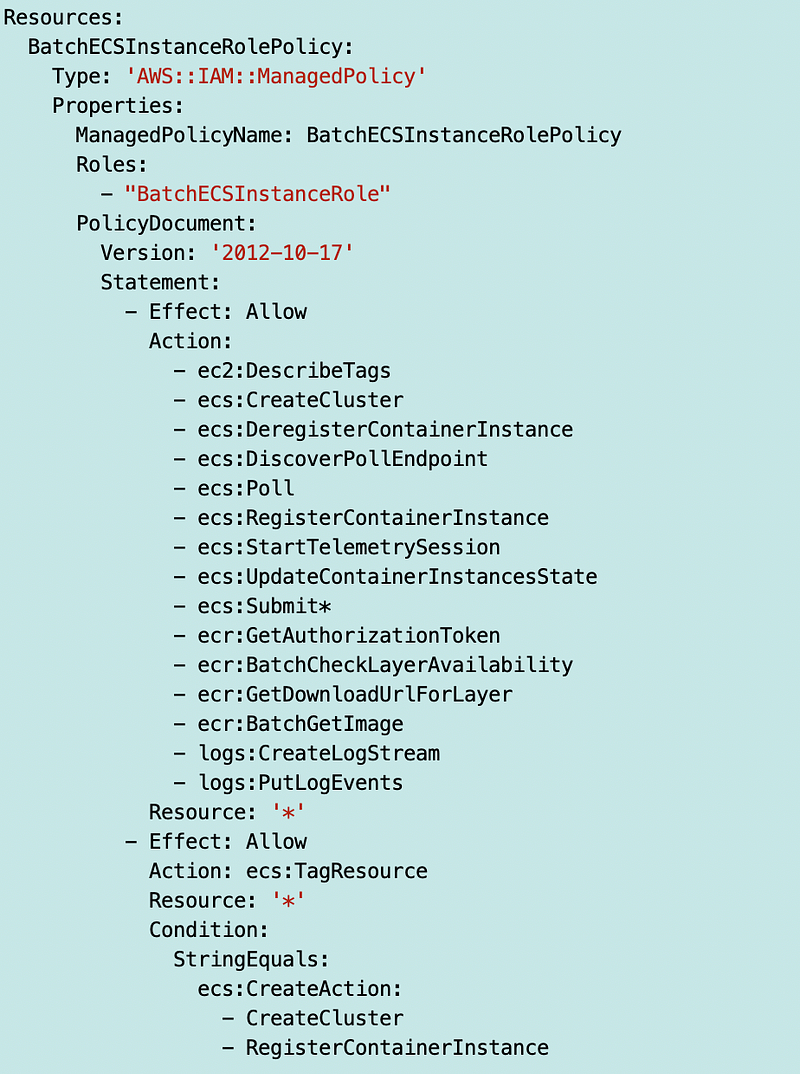
ECS EC2 Instance Role Policy
The default policy for this role is AmazonEC2ContainerServiceforEc2Role.
My role and policy name will be:
- BatchECSInstanceRole
- BatchECSInstanceRolePolicy
The trust policy needs to use ec2.amazonaws.com so I will pass in the parameter EC2 when deploying the role and add the EC2 service to my common service role template.
Here’s the policy document converted to YAML. I’m just going to leave this as is and test it out to see which permissions are required for my use case.
Version: '2012-10-17'
Statement:
  - Effect: Allow
    Action:
      - ec2:DescribeTags
      - ecs:CreateCluster
      - ecs:DeregisterContainerInstance
      - ecs:DiscoverPollEndpoint
      - ecs:Poll
      - ecs:RegisterContainerInstance
      - ecs:StartTelemetrySession
      - ecs:UpdateContainerInstancesState
      - ecs:Submit*
      - ecr:GetAuthorizationToken
      - ecr:BatchCheckLayerAvailability
      - ecr:GetDownloadUrlForLayer
      - ecr:BatchGetImage
      - logs:CreateLogStream
      - logs:PutLogEvents
    Resource: '*'
  - Effect: Allow
    Action: ecs:TagResource
    Resource: '*'
    Condition:
      StringEquals:
        ecs:CreateAction:
          - CreateCluster
          - RegisterContainerInstance
So here’s my template:
ECS Agent Role Policy (Task Execution Role)
The role for the ECS agent on the EC2 instance uses the AmazonECSTaskExecutionRolePolicy. The ECS agent executes the tasks or in other words starts and runs containers on the EC2 host.
My role name and policy will be:
- BatchECSAgentRole
- BatchECSAgentRolePolicy
The trust policy needs to use ecs-tasks.amazonaws.com so I will pass in the parameter ECSTasks when deploying the role and add the ecs-tasks service to my common service role template.
The AWS role policy document converted to YAML looks like this:
Version: '2012-10-17'
Statement:
  - Effect: Allow
    Action:
      - ecr:GetAuthorizationToken
      - ecr:BatchCheckLayerAvailability
      - ecr:GetDownloadUrlForLayer
      - ecr:BatchGetImage
      - logs:CreateLogStream
      - logs:PutLogEvents
    Resource: '*'
Best practice would be to be more specific with the resources but for now, here’s my template:
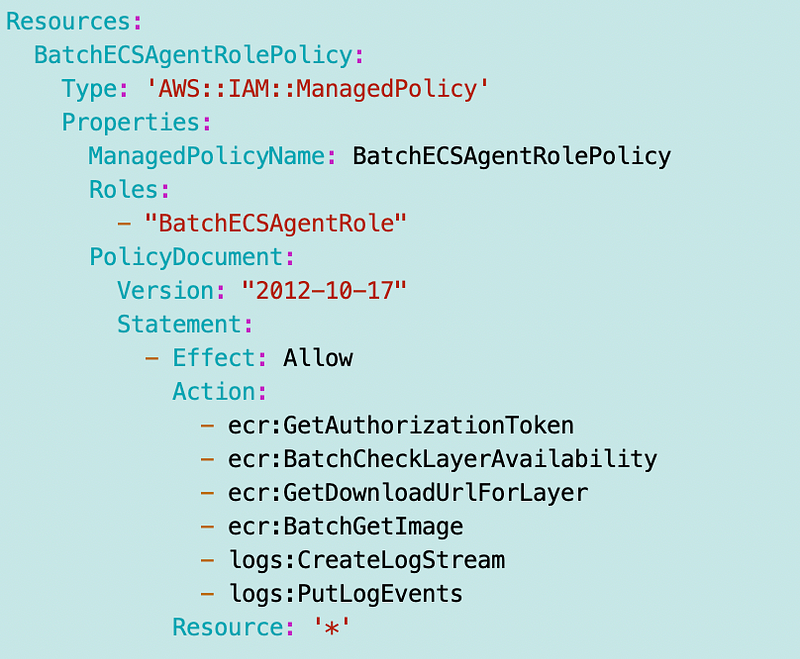
Here’s what I don’t understand at this point. Why does the EC2 service role on the Instance need the overlapping permissions in the above ECS agent policy? The ECS agent has its own role and so should not be picking up permissions from the EC2 instance, right? By putting those permissions on the EC2 instance itself, any software running on the EC2 instance can use those permissions, not just the ECS Agent. Perhaps there is a reason. Will be interesting to review the logs.
Batch Job Role for Container
The batch job role for the container will be assigned to the container and have permissions to allow our job to do what we program it to do.
The name of the job will be:
- CloneGitHubToCodeCommit
So the name of the role will be as follows since the service that assumes the role is in the name, and the service that assumes this role is ecs-tasks.
- CloneGitHubToCodeCommitECSTasksRole
Note this differs slightly from the code at the top because I named the role to work with the policy deployment code below which names the policy $app$serviceRolePolicy. ($app is the job name passed into the function to deploy the policy.)
I changed the code above as follows:
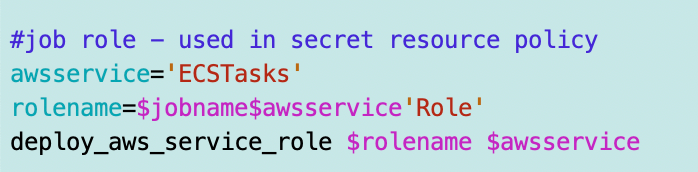
I had this service name in the role template. I changed it because I wanted to add Bach to the name — but perhaps I’ll change it back and adjust all roles accordingly later. Having the service in the name ensures you know what service can assume the role by looking at the name.
The trust policy needs to use ecs-tasks.amazonaws.com so I will pass in the parameter ECSTasks when deploying the role and add the ecs-tasks service to my common service role template.
The policy needs to reference a secret so I’ll cover that next.
Batch Job Secret
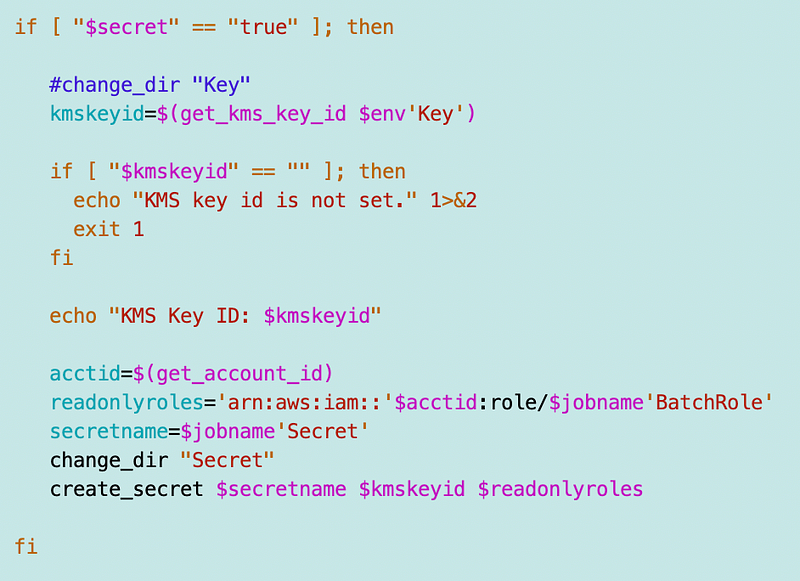
Before I can create a role that accesses a secret I need to create the Batch job secret. Recall that I’m naming lambda secrets in a generic way to use a single base policy for all Lambda functions. I can do the same for AWS Batch jobs.
[name_of_job]SecretMy job name and secret name will be:
- CloneGitHubToCodeCommitSecret
That way I can use a single template to deploy my commonly configured Batch jobs with an optional secret.
I pulled my secret code out of the Lambda code for now to deploy a secret using CloudFormation for this test.
For now I create the secret like this:
Generic Function for Deploying Application Policies
I think I wrote about this in one of my recent posts, but I took a look at what I would need to change in the Lambda policy deployment function and determined that the deployment for the Batch and Lambda policies are similar enough that I can use a common function named deploy_app_policy.
An application policy differs from the generic service policies above, but I am trying to use a single function and policy for Batch job and Lambda function policy deployments.
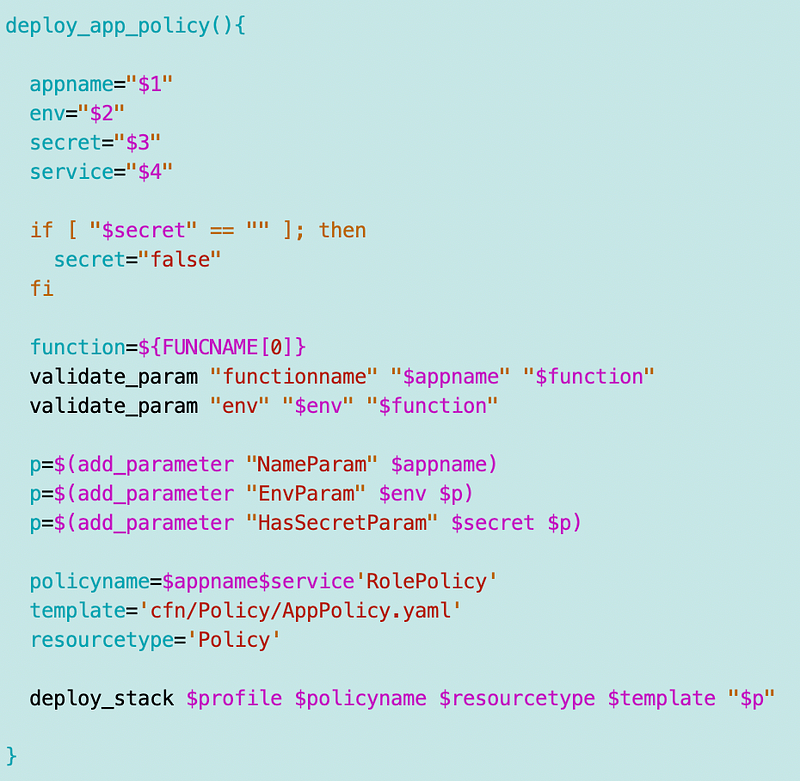
I can deploy the app policy for the job role after I deploy the secret.

Job Role for Container Policy (AppPolicy.yaml)
(or ECS Task Role or Job role configuration in the Batch console)
My policy name will be as follows when deployed by the above function:
- CloneGitHubToCodeCommitECSTasksRolePolicy
I will convert my Lambda policy to a Batch policy with whatever changes Batch requires.
Here’s the Lambda function policy:
Parameters:
  NameParam:
    Type: String
  EnvParam:
    Type: String
    AllowedValues:
      - Sandbox
  HasSecretParam:
    Type: String
    AllowedValues:
      - "true"
      - "false"
    Default: "false"

Conditions:
  HasSecret: !Equals
    - !Ref HasSecretParam
    - "true"

Resources:
  LambdaProcessPolicy:
    Type: 'AWS::IAM::ManagedPolicy'
    Properties:
      ManagedPolicyName: !Sub ${NameParam}LambdaPolicy
      PolicyDocument:
        Version: "2012-10-17"
        Statement:
          - Effect: Allow
            Action:
              - 'ec2:CreateNetworkInterface'
              - 'ec2:DescribeNetworkInterfaces'
              - 'ec2:DeleteNetworkInterface'
            Resource: '*'
          - Effect: Allow
            Action:
              - 'logs:CreateLogGroup'
              - 'logs:CreateLogStream'
              - 'logs:PutLogEvents'
            Resource: !Sub 'arn:aws:logs:${AWS::Region}:${AWS::AccountId}:log-group:/aws/lambda/${NameParam}:*'
          - !If
            - HasSecret
            -
              Effect: Allow
              Action:
                - secretsmanager:GetResourcePolicy
                - secretsmanager:GetSecretValue
                - secretsmanager:DescribeSecret
                - secretsmanager:ListSecretVersionIds
              Resource:
                -  Fn::ImportValue:
                    !Sub ${NameParam}Secret
            - !Ref AWS::NoValue

          - !If
            - HasSecret
            -
              Effect: Allow
              Action: secretsmanager:ListSecrets
              Resource: '*'
            - !Ref AWS::NoValue

          - !If
            - HasSecret
            -
              Effect: Allow
              Action:
                - kms:DescribeKey
                - kms:GenerateDataKey
                - kms:Decrypt
              Resource:
                - Fn::ImportValue:
                    !Sub ${EnvParam}Key
            - !Ref AWS::NoValue

      Roles:
        - !Sub ${NameParam}LambdaRole
I’m going to add a service param:
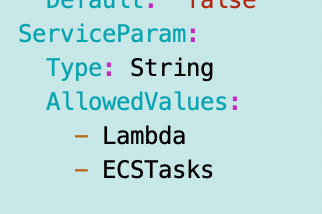
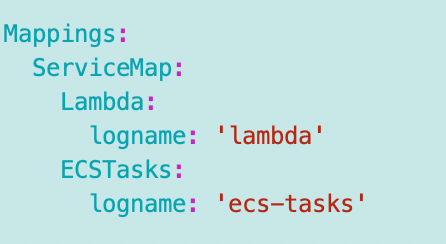
I’m going to snag my mappings from the service role template with a few changes. I need to see what the log format is for batch and then might need to adjust this. I don’t really need EC2 or ECSTasks in there yet but leaving for now.
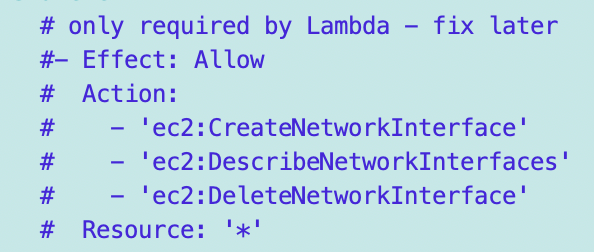
I need to add a condition for Lambda and only grant the network interface permissions for Lambda. Will fix later.
I want to change the log group logname:

But that won’t work — I need to reference the map with the FindInMap function. But right now I don’t know if the container even logs to CloudWatch yet or if this policy needs that ARN for Batch ECS-Tasks or what. So I’m going to do this until I figure that out:

Do I need anything else for Batch? I don’t see any other specific requirements in the AWS Batch or ECS documentation for this role.
The generic policy template is now AppPolicy.yaml and used in my generic function above.
Batch User with MFA
I had a Lambda user with credentials to test Lambda role assumption but already deleted that user. I am going to create a new user to test AWS Batch Job execution with MFA and repeat the steps I did with Lambda.
See the Lambda post for the manual steps to do the following if needed.
- Create developer credentials.
- Store them in the GitHub secret above.
- Assign an MFA device.
- Store the role name in the Batch secret.
My user name will be:
- CloneGitHubCodeCommitUser
MFA Role
I’ll create an MFA role that can be assumed by the MFA job user credentials. The role trust policy will have the MFA requirement I had for role assumption in the Lambda function test. Refer to the prior post if you need to know how to manually create that role for this test.
The role name will be:
- CloneGitHubCodeCommitUserMFARole
MFA Role Secret
The MFA role and policy I will create need to retrieve credentials for use with GitHub from a secret.
The role and policy will be:
- CloneGitHubCodeCommitMFASecret
Just as with Lambda I’ll add the GitHub credentials to this secret. I’ll grant the MFA Role access to this secret and the related encryption key. Again, see the prior post for Lambda if you need to know how to manually create this. If it works I’ll provide code later.
MFA Role Policy
I’m going to essentially convert my MFA role used with the Lambda function for use with this Batch job.
- CloneGitHubCodeCommitMFARolePolicy
The policy included the following permissions:
SecretsManager:GetValue
KMS:Decrypt
AWSCodeCommit:?

[We never got to CodeCommit because we couldn't assume the MFA role.
I will grant what access I think it needs, then review CloudTrail and
make changes if needed]
Sanity Check — use the roles to deploy batch resources manually
Just to make sure these roles work so far, I manually create the following in Batch to make sure I don’t get any errors using these roles and that I can select them as I showed in the prior posts on this topic:
- Compute Environment
- Batch Job Definition
So here’s something interesting. In the UI, I cannot choose the EC2 instance role I created above. The only role that I can choose is the role created by AWS:
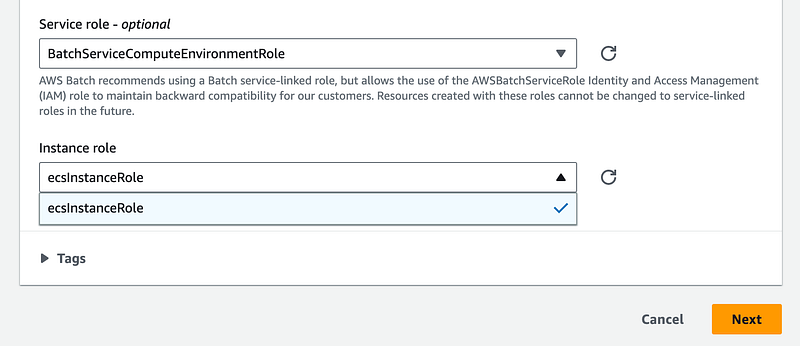
I double checked the differences between the two roles and besides the name don’t see anything. Would we be able to change the role name with CloudFormation? I don’t know. We’ll find out later.
This, interestingly enough, is the role that I had issues with when trying to create the policy. Somehow the policy I copied out of the AWS console had hidden characters in it and wouldn’t deploy until I removed them. Huh.
I was able to choose my ecs-tasks roles when creating a job definition:
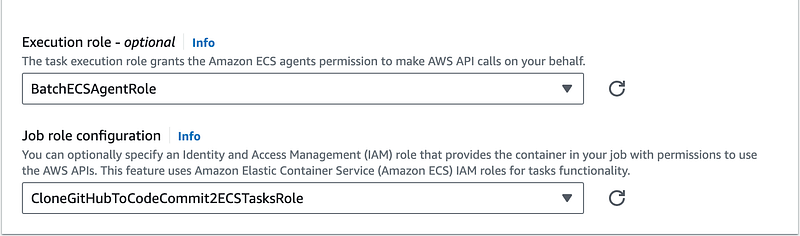
I successfully created the job definition.
I created a test job queue connected to the compute environment.
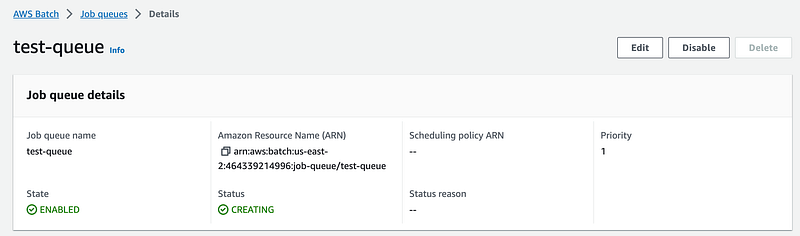
I submitted a job to the queue. That’s when I got an error saying the username I assigned to the job definition has characters that are not allowed. Perhaps that should be prevented in the UI.
Now once I submitted the job again, it took a very, very long time to fire up the job (in developer time which is very impatient time.) The thing about a batch job is that they sometimes need to run on a schedule and complete in a certain timeframe, but may not be instantaneous. But for example, running an End of Day batch job for a bank needs to run within a certain time frame to tally the totals before the start of the next day. If the job fails and needs to be executed again, it still needs to be completed before market open, for example, in the case of an investment trading platform such as one I worked on for Capital One Investing.
So finally I start clicking around and my second job submission just seemed to vanish into thin air.
So I tried it again. I gave the job submission a different name:
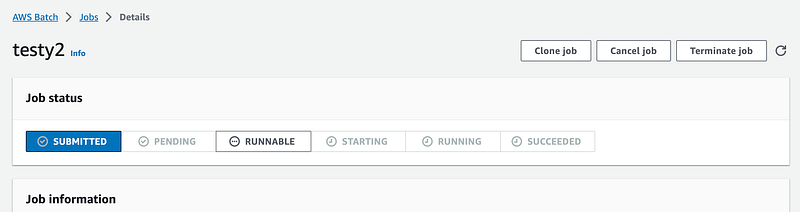
Then I headed back over to Jobs and refreshed the screen and the prior job showed up:
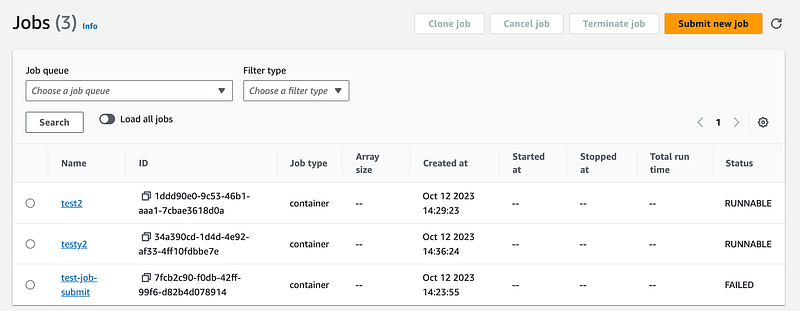
It’s still in the “runnable” state. This is a very long time to wait for a job to start in my experience with Batch jobs. Sometimes you need to execute a job right away. Even if using an EC2 instance this seems like a very long time.
Aha. Digging around some more I find this error hidden in my job queue. This really should be bubbled up to the main screen and the job screen.
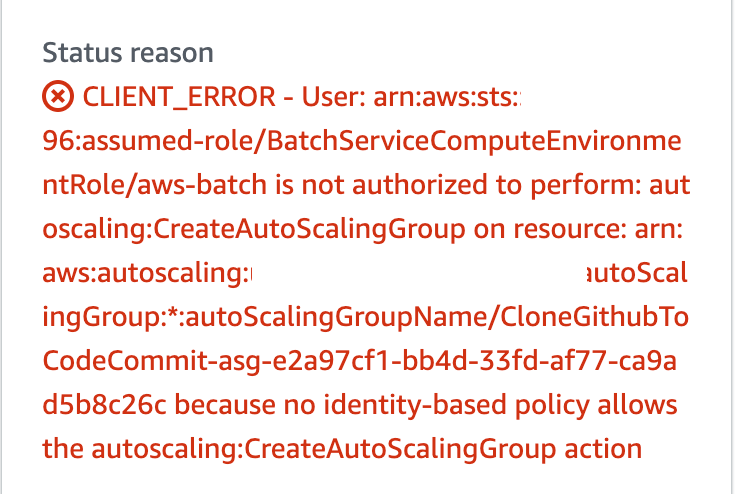
I’ll need to add that permission. Odd that it doesn’t exist with what I copied out of the IAM console.
Error deleting compute environments
I also got an error trying to delete compute environments. What I find interesting here is that the error relates to the Batch Service permission, not the permission of the user who is trying to delete the Compute Environment. So we’ll need to add these permissions to the Batch service compute environment role above to allow this deletion to occur apparently. I don’t really like that upon first thought but I need to ponder it a bit more.
More trial and error troubleshooting required
Well, this post is quite long and has taken some time. Obviously, it will be a bunch of trial and error to get all my roles and policies working correctly. This is enough for one post.
Follow for updates.
Teri Radichel | © 2nd Sight Lab 2023
About Teri Radichel:
~~~~~~~~~~~~~~~~~~~~
⭐️ Author: Cybersecurity Books
⭐️ Presentations: Presentations by Teri Radichel
⭐️ Recognition: SANS Award, AWS Security Hero, IANS Faculty
⭐️ Certifications: SANS ~ GSE 240
⭐️ Education: BA Business, Master of Software Engineering, Master of Infosec
⭐️ Company: Penetration Tests, Assessments, Phone Consulting ~ 2nd Sight Lab
Need Help With Cybersecurity, Cloud, or Application Security?
~~~~~~~~~~~~~~~~~~~~~~~~~~~~~~~~~~~~~~~~~~~~~~~~~~~~~~~~~~~~~
🔒 Request a penetration test or security assessment
🔒 Schedule a consulting call
🔒 Cybersecurity Speaker for PresentationFollow for more stories like this:
~~~~~~~~~~~~~~~~~~~~~~~~~~~~~~~~~~~~~~~~~~~~~~~~~~~~~~~~~~~~~
❤️ Sign Up my Medium Email List
❤️ Twitter: @teriradichel
❤️ LinkedIn: https://www.linkedin.com/in/teriradichel
❤️ Mastodon: @teriradichel@infosec.exchange
❤️ Facebook: 2nd Sight Lab
❤️ YouTube: @2ndsightlab


