
A Practical Guide to Gaming Monitors for Beginners
Here’s what to look out for when getting a gaming monitor.
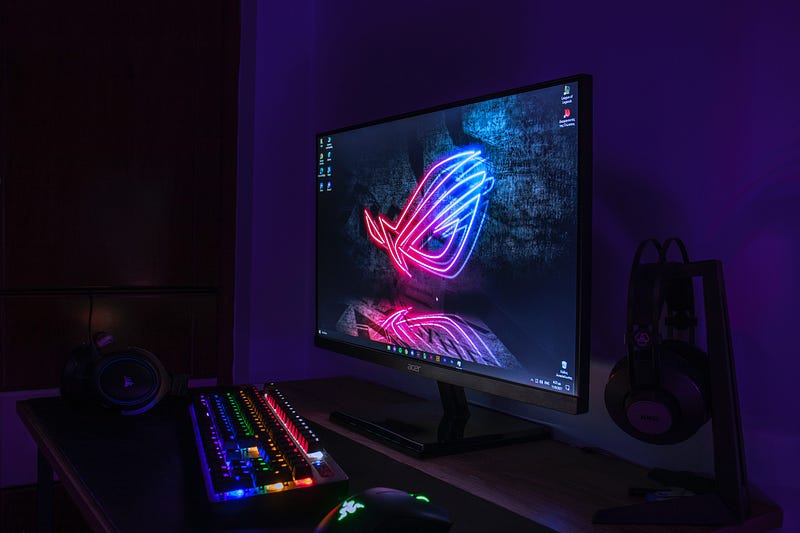
In this post, I briefly introduce gaming monitors and provide practical tips for choosing appropriate ones for your gaming needs.
What is a gaming monitor?
A gaming monitor is a computer display specifically designed for use with video games. It is typically a flat panel display that connects to a computer via VGA, DVI, HDMI, or DisplayPort.
Gaming monitors are designed to be able to display fast-moving graphics and visual effects with minimal lag, making them well-suited for fast-paced games that require quick reflexes.
They may also have features such as a high refresh rate, low input lag, and support for variable refresh rate technologies to further reduce lag and improve the gaming experience.
Some gaming monitors are also designed with additional features such as built-in speakers, USB ports, and ergonomic stands to provide a more immersive gaming experience.
Why do you need a high refresh on your monitor rate for gaming?
The refresh rate of a display refers to the number of times per second that the screen is redrawn. A high refresh rate means that the screen is refreshed more frequently, which can make the image on the screen appear smoother and more fluid.
In general, a higher refresh rate will result in a better gaming experience, as it can make fast-moving objects appear less blurry and reduce the appearance of “tearing,” where the image is split into two or more parts.
For gaming, a refresh rate of at least 60Hz is considered to be the minimum acceptable level. However, many gaming monitors now offer refresh rates of 144Hz or even higher, which can provide an even smoother and more responsive gaming experience.
It’s important to note that to take advantage of a high refresh rate, your computer’s graphics card and the game you are playing must also be able to support it.
Personally, I use a monitor with a 144Hz refresh rate. It was a massive upgrade over 60Hz. I especially noticed it in fast-paced games such as Overwatch, Rocket League, and Valorant.
What monitor resolution should you use for gaming?
The best resolution for gaming depends on a few factors, such as the size of your monitor and the capabilities of your graphics card. Here are some general guidelines to help you choose the best resolution for gaming:
If you have a small monitor (less than 24 inches), 720p (1280x720) is a good resolution to aim for.
For monitors that are 24 to 27 inches, 1080p (1920x1080) is a good resolution to aim for.
If you have a large monitor (27 inches or bigger) or a high-end graphics card, you can go for a higher resolution such as 1440p (2560x1440) or 4K (3840x2160).
Ultimately, the best resolution for you will depend on your personal preferences and the specific hardware that you have. You may want to try out different resolutions to see which one looks best to you. It’s also worth noting that higher resolutions can be more demanding on your graphics card, so you’ll need to ensure that your hardware is up to the task.
Personally, I use a 27-inch display with a 1440p resolution. I honestly don't see much of a difference between 1440p and 4K on a monitor this size. I also found that 27 inches is the perfect size for a monitor on a desktop gaming setup, for me at least.
What special gaming features should you look out for and keep in mind?
There are a few special features that you may want to consider when shopping for a gaming monitor:
Response time
This refers to how quickly the pixels on your monitor can change color. A lower response time can reduce ghosting (where images appear to trail behind moving objects) and other artifacts.
Adaptive sync
Some monitors support technologies like FreeSync or G-Sync, which can help to reduce screen tearing (where the image appears to be split into separate pieces) by synchronizing the refresh rate of the monitor with the frame rate of your graphics card.
Curved display:
Some gaming monitors have curved displays, which can provide a more immersive experience. However, the benefit of a curved display is largely a matter of personal preference.
High Dynamic Range
High Dynamic Range (HDR) can provide a wider range of colors and brighter highlights, making games look more realistic. However, not all games support HDR, and you’ll need a graphics card that can also handle it.
Ultrawide
Ultrawide monitors have a wider aspect ratio than standard monitors, which can provide a more immersive gaming experience. However, not all games support ultrawide resolutions, so you’ll need to ensure that your favorite games will work with an ultrawide monitor.
Out of these additional features, I use the following:
- A response time of 1 ms.
- G-Sync.
- A curved display.
- HDR.
I used to use an ultrawide monitor but switched to a regular 16:9 monitor since I wanted to create gaming YouTube videos, and I thought that an ultrawide aspect ratio would look a little weird in videos.
Additionally, after switching to a monitor with a low response time and G-Sync technology, I immediately noticed the difference between input lag and the smoothness of my games.
Final Words
Gaming monitors are specialized computer displays designed to display fast-moving graphics with minimal lag. High refresh rates and low input lag improve the gaming experience.
Resolution depends on monitor size and graphics card capabilities. Special features to consider include response time, adaptive sync, curvature, HDR, and additional ports and speakers.
If you’re looking into buying a new gaming monitor, make sure to do plenty of research to make sure you’re getting a good deal and make sure you‘re both getting the features you need and one that your PC can handle gaming with.
If you enjoy my posts, please consider following my profile since I post about exciting gaming-related news and talk about technology, design, and social media in my stories.
With that being said, thank you for reading my post, and have a good one.
Snapchat: Unleash Your Creativity and Transform Your Marketing: A Practical Guide
Instagram: Unleash Your Creativity and Transform Your Marketing
Here are my recent stories for new readers.
Unleash Your Creativity and Transform Your Marketing with Snapchat: A Practical Guide
If you are into poetry, you might check this contest to increase your chance of winning a prize from Vocal Media.
Earlier today, I posted a YouTube short and also repurposed it on TikTok about my first impression of Vocal Media. It is only a few seconds. Busy people like YouTube shorts as they are quick and to the point. They look like tweets under 140 characters.
Here is my YouTube short about Vocal Media.
My next goal is to create haikus in YouTube shorts. Who knows, I can earn $1000 by writing three lines!
As a YouTuber, I guide video producers based on my experience. You might check my recent article, which might be helpful.
How to Be a Successful Video Producer in 10 Steps and Monetize Your Content
If you are into podcasting and want to share your gaming experience in a podcast, earlier, I posted an article guiding new podcasters. I hope you find it helpful.
How to Become a Successful Podcaster with Minimum Investment in 10 Steps
I posted an article for aspiring game developers introducing six types of technologies, architectures, and design constructs.
A Practical Guide to Gaming Technologies for Aspiring Game Developers
I write about exciting software tools and training programs. For example, if you are a dog owner, you might enjoy my recent story introducing an attractive dog training program.
Recently, I introduced a program for FIFA gaming enthusiasts.
If you are into sports betting, I posted an article introducing a program.
An Introduction to ZCode™ VIP Club Pass for Sports Betting Enthusiasts
In my previous story, I touched on the health aspect of gaming as it is an important aspect. If you missed it, you might check it out here.
Updates on My Publication Duties for New Readers
Here is some excellent news for writers on Medium. A quick update on the potential opportunity for selected writers to monetize external views on Medium
Excellent News for Medium Writers to Earn from SEO Incentive Program in 2023
I posted a story about new writing content on Vocal for fiction writers.
$1000 Prize: A New Writing Contest for Fiction Writers on Vocal
I recently joined Vocal Media as a writer and found it interesting. There is a specific gaming community on Vocal. You might check my findings in the attached story.
If you are new to Vocal Media and would like to join as a member, you might use my referral. It will not cost you extra similar to Medium membership.
My new challenge is to learn about reviewing products, as discussed in the attached story.
Can We Really Make $300,000 with Product Reviews without Social Media and Existing Audience?
I posted a new bulletin for my other publication, Illumination Videos and Podcasts. If you are a YouTuber or Podcaster, you may join my publication. Here is the invitation.
Invitation to Write for ILLUMINATION Videos and Podcasts Publication
I shared my monthly writing challenge progress and updates from my publications. If you are a writer, you can join the 100-day writing challenge like many other writers and me.
I created my first curated collection for our new publication, ILLUMINATION Videos, and Podcasts. I invited YouTubers and podcasters. The collection has interesting videos from talented writers. I hope you will find some valuable stories and videos.
I recently posted my first curated collection for writers contributing to Illumination Gaming Publication. I hope you find some valuable pieces in this collection. I appreciate your support of these writers.
I Attempt to Solve a Problem of the New Writers with a Bit of Humor on YouTube and TikTok. And I created a new website for the Illumination Gaming publication.
If you are new to Medium, you can join by using my referral link. Promise, it won’t cost you extra. You can read my modest posts and the many beautiful stories of every other writer on this platform.
This post includes my Medium and Vocal Media referral links.


