avatarTeri Radichel

Free AI web copilot to create summaries, insights and extended knowledge, download it at here

9735

Abstract

e="background-image: url(https://miro.readmedium.com/v2/resize:fit:320/0*NvJVYwx_4vs7VePK)"></div> </div> </div> </a> </div><p id="f83d">Installed which in my Dockerfile:</p><div id="7142"><pre><span class="hljs-keyword">RUN</span><span class="language-bash"> yum install <span class="hljs-built_in">which</span> -y</span></pre></div><p id="f55b">Figure out where python is installed:</p><div id="f353"><pre><span class="hljs-built_in">which</span> python</pre></div><p id="e6df">Network errors. Again.</p><p id="d68e">Could not retrieve mirrorlist <a href="http://amazonlinux.default.amazonaws.com/2/core/latest/aarch64/mirror.list">http://amazonlinux.default.amazonaws.com/2/core/latest/aarch64/mirror.list</a> error was:</p><blockquote id="1b9e"><p>12: Timeout on <a href="http://amazonlinux.default.amazonaws.com/2/core/latest/aarch64/mirror.list:">http://amazonlinux.default.amazonaws.com/2/core/latest/aarch64/mirror.list:</a> (28, ‘Connection timeout after 5000 ms’)</p></blockquote><div id="3d5a" class="link-block"> <a href="https://readmedium.com/troubleshooting-software-installs-on-aws-private-networks-d6af09bf7e34"> <div> <div> <h2>Troubleshooting Software Installs on AWS Private Networks</h2> <div><h3>ACM.351 External and AWS repositories both slowing me down today</h3></div> <div><p>medium.com</p></div> </div> <div> <div style="background-image: url(https://miro.readmedium.com/v2/resize:fit:320/1*XUD0yYqh0cpJcNdD3xey4g.png)"></div> </div> </div> </a> </div><p id="9ed4">But then it worked thankfully.</p><figure id="c006"><img src="https://cdn-images-1.readmedium.com/v2/resize:fit:800/1*CEujInamuB5Tk5cJWbBuEA.png"><figcaption></figcaption></figure><p id="78b9">Ran which python2.7</p><figure id="7577"><img src="https://cdn-images-1.readmedium.com/v2/resize:fit:800/1*5-JfBv35T3U9FfFZnk00XA.png"><figcaption></figcaption></figure><p id="c2e0">Check path:</p><div id="ee23"><pre><span class="hljs-keyword">RUN</span><span class="language-bash"> <span class="hljs-built_in">echo</span> <span class="hljs-variable">PATH</span></span></pre></div><figure id="8bbf"><img src="https://cdn-images-1.readmedium.com/v2/resize:fit:800/1*woZtixSU6aPoPZeDv5_z5w.png"><figcaption></figcaption></figure><p id="8185">It’s already in the path. Plus I know that is not the issue because I looked at my local copy of this took and it’s using python 3.8.</p><p id="6412">I tried running the command locally on the container. It fails on no credentials. That’s expected. It seems like it’s getting past the command issue I get in Lambda.</p><figure id="0d81"><img src="https://cdn-images-1.readmedium.com/v2/resize:fit:800/1*vP7HK3i3rWAqldcx6vU9mg.png"><figcaption></figcaption></figure><p id="53ba">I figured out that I need to specify no profile and no @ if trying to use the default profile by testing locally and attempting to set credentials. I also don’t need the region.</p><div id="78c7"><pre><span class="hljs-attr">aws_repo</span>=<span class="hljs-string">"codecommit://repo"</span></pre></div><p id="a695">I definitely get a different error message when testing on Lambda versus locally so this seems like a Lambda issue, likely to do with the Lambda user and path. Let’s see what the path is in Lambda.</p><p id="3fb8">I’m adding the path to my error message in my errors.sh file. (Wrote about custom bash runtime error handling in prior posts.)</p><figure id="f58d"><img src="https://cdn-images-1.readmedium.com/v2/resize:fit:800/1*2GTfRsrDx5_vRr467vM0GQ.png"><figcaption></figcaption></figure><p id="3d29">I can see the path is the same.</p><figure id="891e"><img src="https://cdn-images-1.readmedium.com/v2/resize:fit:800/1*LmGmltRqJPyNs521IzkgJg.png"><figcaption></figcaption></figure><p id="c2d2">I check where the tool gets installed using which:</p><figure id="8131"><img src="https://cdn-images-1.readmedium.com/v2/resize:fit:800/1*Eb2ec-JF77mD1HwtRJ5Q5A.png"><figcaption></figcaption></figure><p id="5ab8">That tool is on the path. Let’s check the permissions.</p><figure id="4356"><img src="https://cdn-images-1.readmedium.com/v2/resize:fit:800/1*F5hucTtJzZXTkfqJitUumg.png"><figcaption></figcaption></figure><p id="896a">Looks like it’s executable but it’s owned by root and in the root group.</p><p id="f335">Let’s compare that to the AWS CLI since we know that works in Lambda.</p><figure id="65e7"><img src="https://cdn-images-1.readmedium.com/v2/resize:fit:800/1*TsgudxaHgixluYDIAV1BTw.png"><figcaption></figcaption></figure><figure id="8a4e"><img src="https://cdn-images-1.readmedium.com/v2/resize:fit:800/1*QyXsUKa-RKrLo1nQNjXlLg.png"><figcaption></figcaption></figure><figure id="4161"><img src="https://cdn-images-1.readmedium.com/v2/resize:fit:800/1*dc-8NcRfmGr8p7et9aTvtQ.png"><figcaption></figcaption></figure><p id="74b3">OK, well the permissions are different but AWS makes the Lambda OS read only except for the tmp directory. The location is different. What if we try to deploy into a different directory.</p><p id="b6e3">Back to this:</p><div id="7ddb"><pre>git: <span class="hljs-symbol">'remote</span>-codecommit' <span class="hljs-keyword">is</span> <span class="hljs-keyword">not</span> a git command. See <span class="hljs-symbol">'git</span> <span class="hljs-comment">--help'.</span></pre></div><p id="db35">At this point I’m annoyed. I wonder if I can just send commands to my Lambda function like this and execute them:</p><figure id="01ae"><img src="https://cdn-images-1.readmedium.com/v2/resize:fit:800/1*f8Opvu9e1UJtAgH7WSdxRw.png"><figcaption></figcaption></figure><p id="94e3">That didn’t work. It said command not found. Huh? So I print out the command. Looks ok.</p><figure id="1449"><img src="https://cdn-images-1.readmedium.com/v2/resize:fit:800/1*cCcVm1RljSIyTHyFkPDsww.png"><figcaption></figcaption></figure><p id="7ce5">I change my code to use the exec function:</p><figure id="ab25"><img src="https://cdn-images-1.readmedium.com/v2/resize:fit:800/1*ZFtR_al2oU4bEqsOjC1MvQ.png"><figcaption></figcaption></figure><p id="12f2">That works:</p><figure id="502a"><img src="https://cdn-images-1.readmedium.com/v2/resize:fit:800/1*P6KzZP1tzaVTRHK2c5zeeA.png"><figcaption></figcaption></figure><p id="a93c">OK, where is my executable.</p><figure id="8274"><img src="https://cdn-images-1.readmedium.com/v2/resize:fit:800/1*rPCVk2E2VJXhybjGXb8TSA.png"><figcaption></figcaption></figure><p id="457f">Well that returns nothing.</p><p id="73f0">So I run this (which I realize later had an extra quote in it but I was testing with the single quote because I was getting back empty strings…and anyway it didn’t work either way):</p><figure id="6c35"><img src="https://cdn-images-1.readmedium.com/v2/resize:fit:800/1*GrINAZFIuBFN92bdi3M3vA.png"><figcaption></figcaption></figure><p id="5745">And it sys the command cannot be found. It doesn’t exist. Or it’s not on the path.</p><figure id="082c"><img src="https://cdn-images-1.readmedium.com/v2/resize:fit:800/1*QBxgWMyv4fir-Oe_uyUwEQ.png"><figcaption></figcaption></figure><p id="24d3">Can I install it (oops quote but it didn’t work anyway without the quote either…)?</p><figure id="9db6"><img src="https://cdn-images-1.readmedium.com/v2/resize:fit:800/1*ORfWC0PxQzly5JR8g1rbSw.png"><figcaption></figcaption></figure><p id="95bd">I didn’t get an error with the command above initially.</p><p id="ef01">I finally figure out that any commands with spaces don’t work…</p><p id="0d9b">One last command. <i>whoami</i>.</p><figure id="4f95"><img src="https://cdn-images-1.readmedium.com/v2/resize:fit:800/1*UmIy9VE4Pfnp08x9eWywng.png"><figcaption></figcaption></figure><p id="7f45">I suppose this user is different every time.</p><p id="87c2">OK one more command.</p><p id="82ab">I can run a one-liner env command to get the path:</p><div id="ae21"><pre><span class="hljs-variable constant_">PATH</span>=<span class="hljs-regexp">/var/lang</span><span class="hljs-regexp">/lib:/lib</span>64<span class="hljs-symbol">:/usr/lib64</span><span class="hljs-symbol">:/var/runtime</span><span class="hljs-symbol">:/var/runtime/lib</span><span class="hljs-symbol">:/var/task</span><span class="hljs-symbol">:/var/task/lib</span><span class="hljs-symbol">:/opt/lib</span></pre></div><p id="b01f">Hmm.</p><p id="af41">Maybe we can push to one of the above folders to get this to work.</p><p id="1a6e">And now it’s time for dinner.</p><p id="a59c">Wasting so much time trying to figure this out.</p><p id="c082">####Time out####</p><p id="4a70">OK I’m back. I was rushing and misread something I think above.</p><p id="44db">I figured out spaces in commands were breaking due to my function and rather than fight with that I moved the minimal lines of code in line.</p><figure id="5aa8"><img src="https://cdn-images-1.readmedium.com/v2/resize:fit:800/1*Nz-_xZoXfGKfoFTDAn0IvQ.png"><figcaption></figcaption></figure><p id="0b6e">Now I can run commands with spaces. But variables don’t resolve.</p><p id="9d6e">echo PATH turns into “PATH”</p><p id="0888">Well I really just wanted to test installing to a location in the path.</p><p id="075f">Now, because I didn’t take a screenshot, I don’t know if something changed or I am delusional. But now. I am seeing two different paths when I run the env command:</p><div id="d978"><pre><span class="hljs-variable constant_">LD_LIBRARY_PATH</span>=<span class="hljs-regexp">/var/lang</span><span class="hljs-regexp">/lib:/lib</span>64<span class="hljs-symbol">:/usr/lib64</span><span class="hljs-symbol">:/var/runtime</span><span class="hljs-symbol">:/var/runtime/lib</span><span class="hljs

Options

-symbol">:/var/task</span><span class="hljs-symbol">:/var/task/lib</span><span class="hljs-symbol">:/opt/lib</span>

<span class="hljs-variable constant_">PATH</span>=<span class="hljs-regexp">/var/lang</span><span class="hljs-regexp">/bin:/usr</span><span class="hljs-regexp">/local/bin</span><span class="hljs-symbol">:/usr/bin/</span><span class="hljs-symbol">:/bin</span><span class="hljs-symbol">:/opt/bin</span> </pre></div><p id="c3d2">Hmm.</p><p id="287d">Trying some other things and getting this error again:</p><figure id="0712"><img src="https://cdn-images-1.readmedium.com/v2/resize:fit:800/1*-_OkANDZ5Qr8Xo1-jH68Ow.png"><figcaption></figcaption></figure><p id="92fe">No more mirrors to try again. If I just keep running it, then it eventually works. I don’t have room in my NACLs for more IP ranges. Wish AWS would fix this or maybe I’ll figure out that I’m doing something wrong.</p><div id="4d63" class="link-block"> <a href="https://readmedium.com/troubleshooting-software-installs-on-aws-private-networks-d6af09bf7e34"> <div> <div> <h2>Troubleshooting Software Installs on AWS Private Networks</h2> <div><h3>ACM.351 External and AWS repositories both slowing me down today</h3></div> <div><p>medium.com</p></div> </div> <div> <div style="background-image: url(https://miro.readmedium.com/v2/resize:fit:320/1*XUD0yYqh0cpJcNdD3xey4g.png)"></div> </div> </div> </a> </div><p id="b3e5">So I reinstalled which again and searched for the git-remote-codecommit package and get this error:</p><blockquote id="af15"><p>no git-remote-codecommit in (/var/lang/bin:/usr/local/bin:/usr/bin/:/bin:/opt/bin)</p></blockquote><p id="f399">OK so next thing I did was go back to my container. I installed git-remote-codecommit to various folders and ran the <i>which</i> command in my container. The only one that worked and produced an executable on the path was the default install with no target directory.</p><p id="82a9">Then the <i>which</i> command returns:</p><div id="25c2"><pre><span class="hljs-regexp">/usr/</span>local<span class="hljs-regexp">/bin/gi</span>t-remote-codecommit</pre></div><p id="933d">When I leave it at the default and test that command in Lambda I get the same path. So the path <i>does not</i> appear to be the issue.</p><p id="cafe">I’m back to this error:</p><blockquote id="040f"><p>remote-codecommit appears to be a git command, but we were not able to execute it. Maybe git-remote-codecommit is broken?</p></blockquote><p id="56e5">Maybe git-remote-codecommit is broken. I don’t know. I’m not in the mood to reverse engineer it. I really just want it to work.</p><p id="5fde">Now I absolutely know which folder the file is in, that is in the path and that it is in the same folder as other executables the container is running. Everyone should have executable permissions for the file but I go ahead and run the following command to give everyone all permissions to see if that makes a difference (the same permissions the AWS CLI has with one difference):</p><div id="dabe"><pre>chmod <span class="hljs-number">777</span> <span class="hljs-regexp">/usr/</span>local<span class="hljs-regexp">/bin/gi</span>t-remote-codecommit</pre></div><p id="de17">That did not make a difference and I don’t see why it would so I will revert it. The Lambda container should have a read-only file system.</p><p id="4cde">Since I am pretty positive the path is not the issue. I start to scrutinize my command. No matter how I test it, I cannot get it to work when I pass it in as a parameter, but maybe the special characters are throwing it off.</p><p id="0fc8">I try running it directly in my container. Nope. Same error message. Pretty sure I’m running it how it says to run it in the documentation. Do I really need to reverse-engineer this thing to get it to work?</p><p id="911a">Later…</p><p id="d7ed">Docker:</p><figure id="e5ee"><img src="https://cdn-images-1.readmedium.com/v2/resize:fit:800/1*IxBZoD_yDQpsFGozO7K4FA.png"><figcaption></figcaption></figure><p id="d193"><i>Directory: rie</i></p><p id="1ff4"><i>entry.sh</i></p><figure id="8441"><img src="https://cdn-images-1.readmedium.com/v2/resize:fit:800/1*17ZDRNOWSdWPLii3WPjI6g.png"><figcaption></figcaption></figure><p id="3171"><i>errors.sh</i></p><p id="f483">See link on error handling above.</p><p id="2515"><i>rie-bash.sh</i></p><figure id="cb3a"><img src="https://cdn-images-1.readmedium.com/v2/resize:fit:800/1*o5S7Il2pXIy2EwsSjm03FQ.png"><figcaption></figcaption></figure><p id="9032">Directory: <i>job</i></p><p id="605b"><i>handler.sh</i></p><figure id="0a22"><img src="https://cdn-images-1.readmedium.com/v2/resize:fit:800/1*VPp4BCdzWD7XrgIQdAqRVw.png"><figcaption></figcaption></figure><p id="956f"><i>init.sh, secrets.sh, and validate.sh </i>do not really matter for the purposes of this problem and were covered in prior posts in this series.</p><div id="7567" class="link-block"> <a href="https://readmedium.com/components-for-a-static-web-site-on-aws-8ed895a8cf0f"> <div> <div> <h2>Components of a Static Web Site on AWS</h2> <div><h3>ACM.227 Route 53, TLS, S3, API Gateway, CloudFront, WAF, and triggering Lambda Functions</h3></div> <div><p>medium.com</p></div> </div> <div> <div style="background-image: url(https://miro.readmedium.com/v2/resize:fit:320/1*VRsacGrH9UkJT8HHnDSKZQ.png)"></div> </div> </div> </a> </div><p id="6f77">Well, after thinking this over for a bit, I spent way too much time on this already so I’m going to back to read-only git credentials in a secret like I wrote about here:</p><div id="31c9" class="link-block"> <a href="https://readmedium.com/using-git-commands-with-aws-code-commit-6f5e34703e9c"> <div> <div> <h2>Using Git Commands with AWS Code Commit</h2> <div><h3>ACM.261 Setting up git credentials for AWS CodeCommit in the AWS IAM console</h3></div> <div><p>medium.com</p></div> </div> <div> <div style="background-image: url(https://miro.readmedium.com/v2/resize:fit:320/1*F8ZkG_30Ciyal1_HW83CHw.png)"></div> </div> </div> </a> </div><div id="e29a" class="link-block"> <a href="https://readmedium.com/using-a-secrets-manager-in-an-aws-lambda-function-in-a-private-network-7e596014ad0d"> <div> <div> <h2>Using a Secrets Manager in an AWS Lambda Function in a Private Network</h2> <div><h3>ACM.317 Lack of sufficient logging and generic error messages makes troubleshooting Lambda timeouts complicated</h3></div> <div><p>medium.com</p></div> </div> <div> <div style="background-image: url(https://miro.readmedium.com/v2/resize:fit:320/1*aItMry5bDlIbUDlGclCFcg.png)"></div> </div> </div> </a> </div><div id="cd71" class="link-block"> <a href="https://readmedium.com/keeping-credentials-out-of-github-53534dee341d"> <div> <div> <h2>Keeping Credentials Out of GitHub</h2> <div><h3>ACM.48: Manually creating a Lambda function to retrieve secrets from secrets manager</h3></div> <div><p>medium.com</p></div> </div> <div> <div style="background-image: url(https://miro.readmedium.com/v2/resize:fit:320/1*yZ_RnQu-VtFVjNhpvvxCDQ.png)"></div> </div> </div> </a> </div><p id="311b">Update. I figured this out and will publish the solution in my next post and link to it here:</p><p id="963f"><a href="https://readmedium.com/git-and-github-security-8728bef0a057">https://readmedium.com/git-and-github-security-8728bef0a057</a></p><p id="2a65">Follow for updates.</p><p id="4a3a">Teri Radichel | <i>© <a href="https://2ndsightlab.com/?source=post_page---------------------------">2nd Sight Lab</a> 2023</i></p><div id="8b5f"><pre><span class="hljs-section">About Teri Radichel:

⭐️ Author: Cybersecurity Books
⭐️ Presentations: Presentations by Teri Radichel
⭐️ Recognition: SANS Award, AWS Security Hero, IANS Faculty
⭐️ Certifications: SANS ~ GSE 240
⭐️ Education: BA Business, Master of Software Engineering, Master of Infosec
⭐️ Company: Penetration Tests, Assessments, Phone Consulting ~ 2nd Sight Lab</pre></div><div id="caae"><pre><span class="hljs-section">Need Help With Cybersecurity, Cloud, or Application Security?
~~~~~~~~~~~~~~~~~~~~~~~~~~~~~~~~~~~~~~~~~~~~~~~~~~~~~~~~~~~~~</span>
🔒 Request a penetration test or security assessment
🔒 Schedule a consulting call
🔒 Cybersecurity Speaker for Presentation</pre></div><div id="5a42"><pre>Follow <span class="hljs-keyword">for</span> more stories like <span class="hljs-keyword">this</span>:

❤️ Sign Up my Medium Email List ❤️ Twitter: <span class="hljs-meta">@teriradichel</span> ❤️ LinkedIn: https:<span class="hljs-comment">//www.linkedin.com/in/teriradichel</span> ❤️ Mastodon: <span class="hljs-meta">@teriradichel</span><span class="hljs-meta">@infosec</span>.exchange ❤️ Facebook: 2nd Sight Lab ❤️ YouTube: @2ndsightlab</pre></div><figure id="faf5"><img src="https://cdn-images-1.readmedium.com/v2/resize:fit:800/0*H9Ew1KCl-29nZiPR.jpeg"><figcaption></figcaption></figure></article></body>

Having problems using git-remote-codecommit on Lambda

Seems to be a common problem

~~~~~~~~~~~~~~~~~~~~~~~~~~~~~~~~~~~~~~~~~~~~~~~~~~~~~~~

⚙️ Check out my series on Automating Cybersecurity Metrics | Code.

🔒 Related Stories: Bugs | AWS Security | Secure Code

💻 Free Content on Jobs in Cybersecurity | ✉️ Sign up for the Email List

~~~~~~~~~~~~~~~~~~~~~~~~~~~~~~~~~~~~~~~~~~~~~~~~~~~~~~~

One of my stories on Git Security and AWS CodeCommit Security.

A lot of people are having problems using git-remote-codecommit including me.

The error messages are not very clear. I read some documentation that said that one of the errors could be a path issue or a syntax error. That’s pretty broad.

I wasted too much time just trying to rule out the path issue because I saw it in a bunch of places.

Now my command seems to match the AWS documentation. But perhaps I’ve been looking at this too long and not seeing something obvious.

I installed the tool on my container with a custom bash runtime.

I clearly had this tool working before in this post on requiring MFA for git actions with AWS CodeCommit:

So initially I just installed the tool using the default directory.
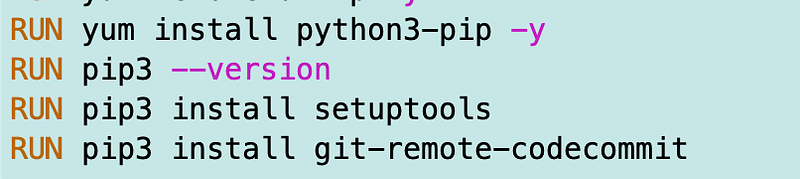
I ran my command from the above post got this error.

{ “errorMessage”: “An error occurred on line 55. Exit code 128. xxxx Cloning into ‘/tmp/dev.rainierrhododendrons.com’… fatal: ‘remote-codecommit’ appears to be a git command, but we were not able to execute it. Maybe git-remote-codecommit is broken?”, “error_type”: “invocation/xxxxxxxxxx” }

I thought maybe the problem was that I installed it as root and the user AWS uses for Lambda doesn’t have access to the root user directory.

I tried using the user directive but that doesn’t work because AWS changes the user when you deploy in Lambda.

pip install --user git-remote-codecommit

I tried installing to the tmp directory, changing permissions, and adding the directory to the path, which is git_remote_codecommit.

Now I get this error:

{ “errorMessage”: “An error occurred on line 55. Exit code 128. xxxxxxxx Cloning into ‘/tmp/dev.rainierrhododendrons.com’… git: ‘remote-codecommit’ is not a git command. See ‘git — help’.”, “error_type”: “invocation/xxxxxxxxxxx” }

I’m frustrated with this slowing me down because today’s post was supposed to be quick and simple. I’ll come back later and update this post when I figure it out.

It seems like a pip install in a Docker file based on Amazon Lambda custom runtime container should just work. Not sure what I’m doing wrong, if anything.

#### After walking the dog ####

Read this post:

Installed which in my Dockerfile:

RUN yum install which -y

Figure out where python is installed:

which python

Network errors. Again.

Could not retrieve mirrorlist http://amazonlinux.default.amazonaws.com/2/core/latest/aarch64/mirror.list error was:

12: Timeout on http://amazonlinux.default.amazonaws.com/2/core/latest/aarch64/mirror.list: (28, ‘Connection timeout after 5000 ms’)

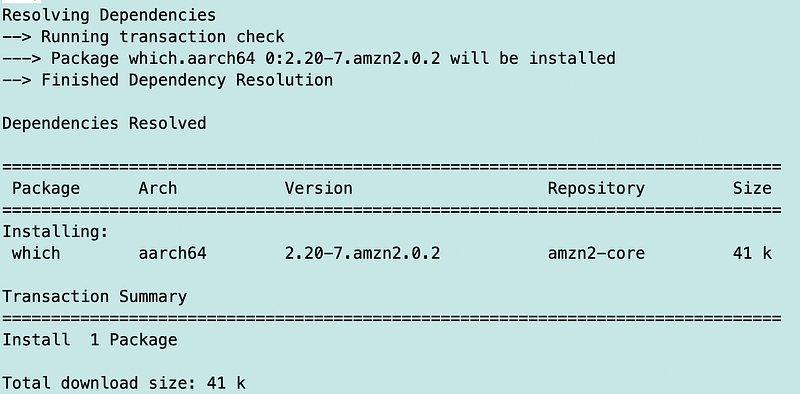
But then it worked thankfully.
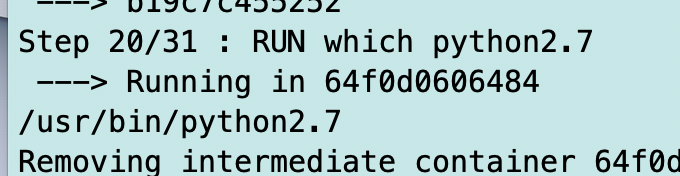
Ran which python2.7
Check path:

RUN echo $PATH

It’s already in the path. Plus I know that is not the issue because I looked at my local copy of this took and it’s using python 3.8.

I tried running the command locally on the container. It fails on no credentials. That’s expected. It seems like it’s getting past the command issue I get in Lambda.

I figured out that I need to specify no profile and no @ if trying to use the default profile by testing locally and attempting to set credentials. I also don’t need the region.

aws_repo="codecommit://$repo"

I definitely get a different error message when testing on Lambda versus locally so this seems like a Lambda issue, likely to do with the Lambda user and path. Let’s see what the path is in Lambda.

I’m adding the path to my error message in my errors.sh file. (Wrote about custom bash runtime error handling in prior posts.)

I can see the path is the same.

I check where the tool gets installed using which:

That tool is on the path. Let’s check the permissions.

Looks like it’s executable but it’s owned by root and in the root group.

Let’s compare that to the AWS CLI since we know that works in Lambda.
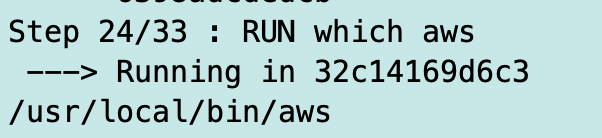
OK, well the permissions are different but AWS makes the Lambda OS read only except for the tmp directory. The location is different. What if we try to deploy into a different directory.

Back to this:

git: 'remote-codecommit' is not a git command. See 'git --help'.

At this point I’m annoyed. I wonder if I can just send commands to my Lambda function like this and execute them:
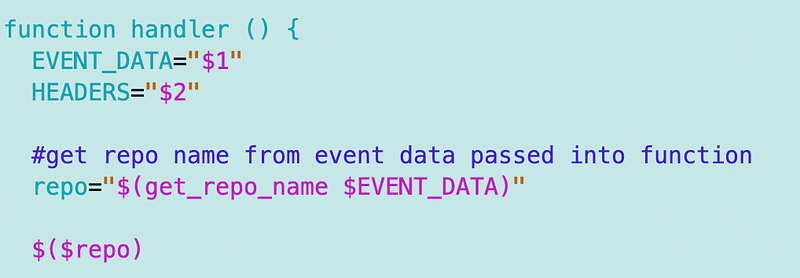
That didn’t work. It said command not found. Huh? So I print out the command. Looks ok.
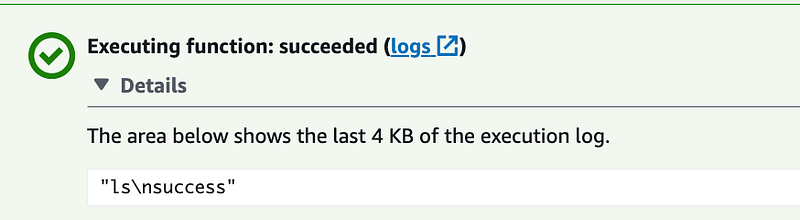
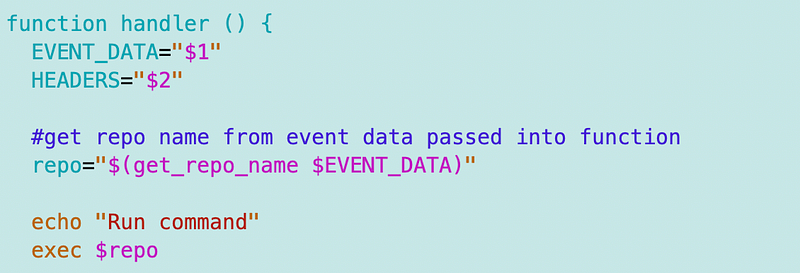
I change my code to use the exec function:
That works:

OK, where is my executable.
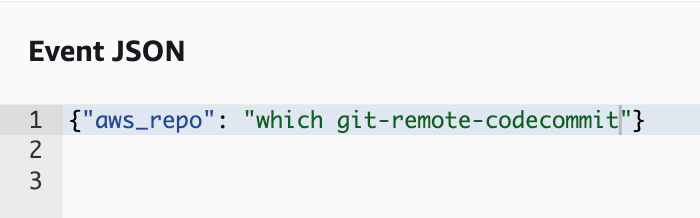
Well that returns nothing.

So I run this (which I realize later had an extra quote in it but I was testing with the single quote because I was getting back empty strings…and anyway it didn’t work either way):
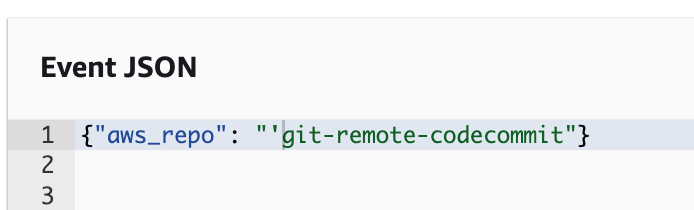
And it sys the command cannot be found. It doesn’t exist. Or it’s not on the path.

Can I install it (oops quote but it didn’t work anyway without the quote either…)?

I didn’t get an error with the command above initially.

I finally figure out that any commands with spaces don’t work…

One last command. whoami.
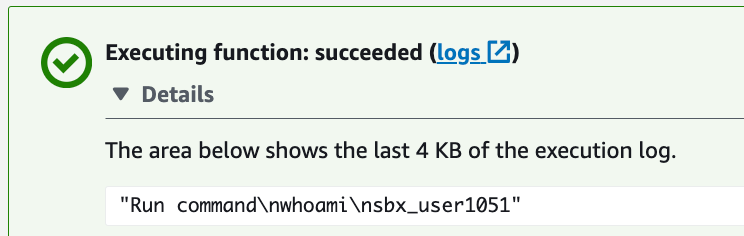
I suppose this user is different every time.

OK one more command.

I can run a one-liner env command to get the path:

PATH=/var/lang/lib:/lib64:/usr/lib64:/var/runtime:/var/runtime/lib:/var/task:/var/task/lib:/opt/lib

Hmm.

Maybe we can push to one of the above folders to get this to work.

And now it’s time for dinner.

Wasting so much time trying to figure this out.

####Time out####

OK I’m back. I was rushing and misread something I think above.

I figured out spaces in commands were breaking due to my function and rather than fight with that I moved the minimal lines of code in line.
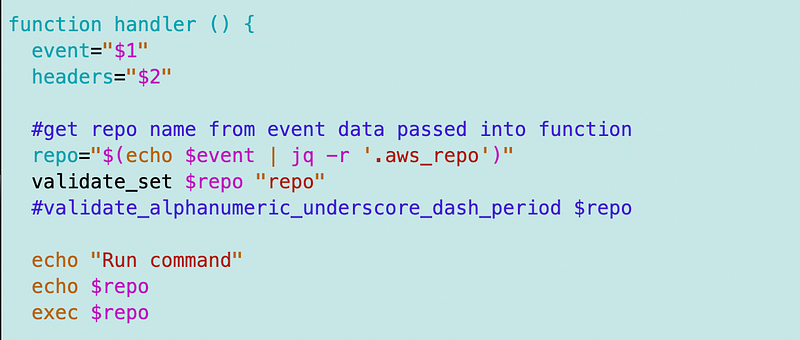
Now I can run commands with spaces. But variables don’t resolve.

echo $PATH turns into “$PATH”

Well I really just wanted to test installing to a location in the path.

Now, because I didn’t take a screenshot, I don’t know if something changed or I am delusional. But now. I am seeing two different paths when I run the env command:

LD_LIBRARY_PATH=/var/lang/lib:/lib64:/usr/lib64:/var/runtime:/var/runtime/lib:/var/task:/var/task/lib:/opt/lib

PATH=/var/lang/bin:/usr/local/bin:/usr/bin/:/bin:/opt/bin

Hmm.

Trying some other things and getting this error again:
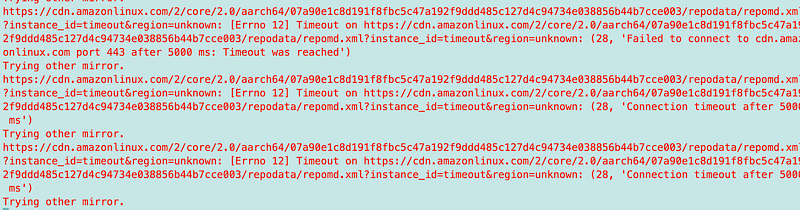
No more mirrors to try again. If I just keep running it, then it eventually works. I don’t have room in my NACLs for more IP ranges. Wish AWS would fix this or maybe I’ll figure out that I’m doing something wrong.

So I reinstalled which again and searched for the git-remote-codecommit package and get this error:

no git-remote-codecommit in (/var/lang/bin:/usr/local/bin:/usr/bin/:/bin:/opt/bin)

OK so next thing I did was go back to my container. I installed git-remote-codecommit to various folders and ran the which command in my container. The only one that worked and produced an executable on the path was the default install with no target directory.

Then the which command returns:

/usr/local/bin/git-remote-codecommit

When I leave it at the default and test that command in Lambda I get the same path. So the path does not appear to be the issue.

I’m back to this error:

remote-codecommit appears to be a git command, but we were not able to execute it. Maybe git-remote-codecommit is broken?

Maybe git-remote-codecommit is broken. I don’t know. I’m not in the mood to reverse engineer it. I really just want it to work.

Now I absolutely know which folder the file is in, that is in the path and that it is in the same folder as other executables the container is running. Everyone should have executable permissions for the file but I go ahead and run the following command to give everyone all permissions to see if that makes a difference (the same permissions the AWS CLI has with one difference):

chmod 777 /usr/local/bin/git-remote-codecommit

That did not make a difference and I don’t see why it would so I will revert it. The Lambda container should have a read-only file system.

Since I am pretty positive the path is not the issue. I start to scrutinize my command. No matter how I test it, I cannot get it to work when I pass it in as a parameter, but maybe the special characters are throwing it off.

I try running it directly in my container. Nope. Same error message. Pretty sure I’m running it how it says to run it in the documentation. Do I really need to reverse-engineer this thing to get it to work?

Later…

Docker:
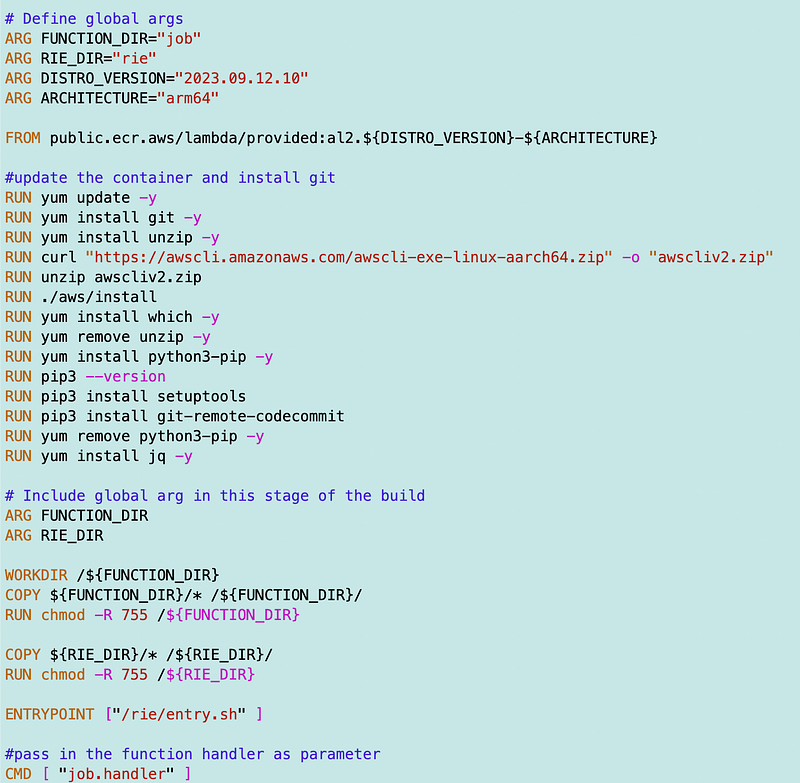
Directory: rie

entry.sh
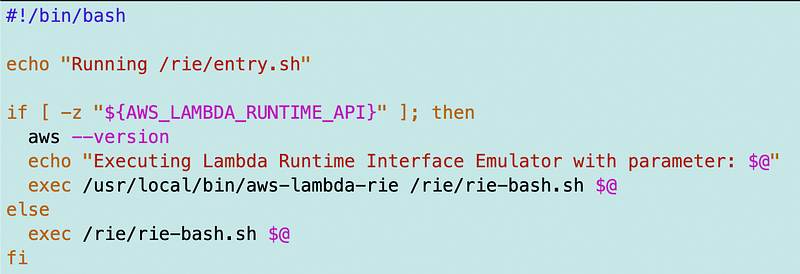
errors.sh

See link on error handling above.

rie-bash.sh
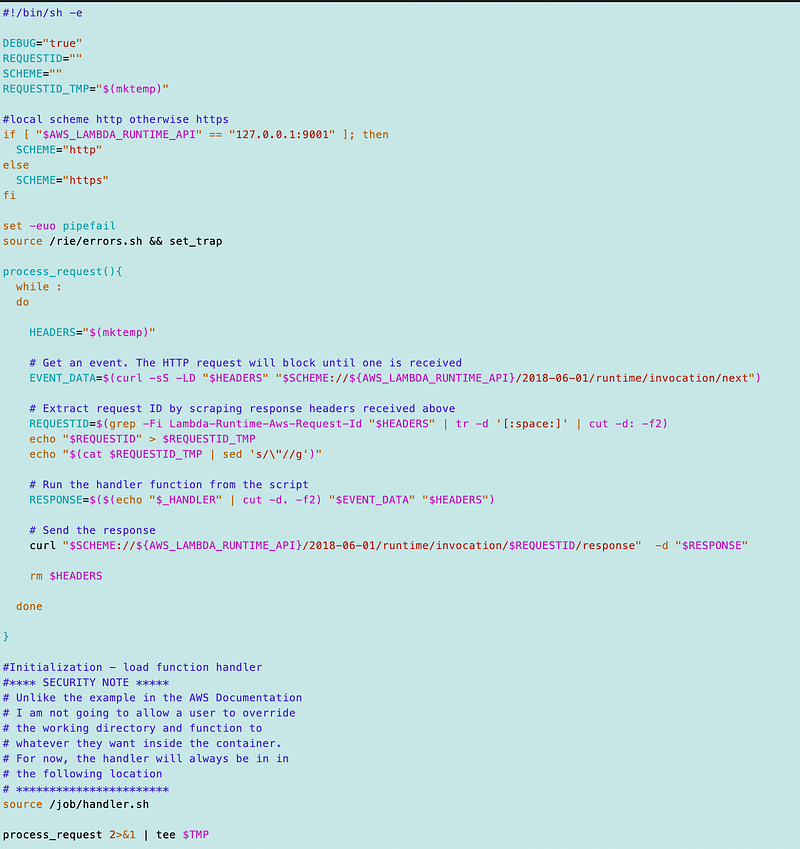
Directory: job

handler.sh
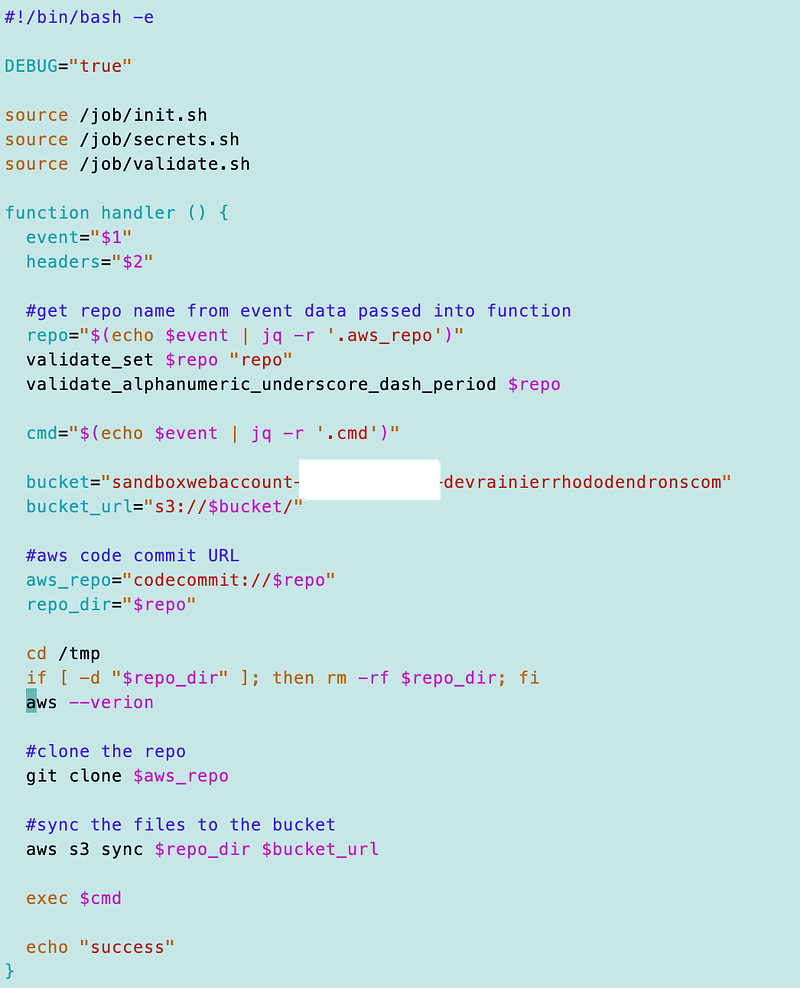
init.sh, secrets.sh, and validate.sh do not really matter for the purposes of this problem and were covered in prior posts in this series.

Well, after thinking this over for a bit, I spent way too much time on this already so I’m going to back to read-only git credentials in a secret like I wrote about here:

Update. I figured this out and will publish the solution in my next post and link to it here:

https://readmedium.com/git-and-github-security-8728bef0a057

Follow for updates.

Teri Radichel | © 2nd Sight Lab 2023

About Teri Radichel:
~~~~~~~~~~~~~~~~~~~~
⭐️ Author: Cybersecurity Books
⭐️ Presentations: Presentations by Teri Radichel
⭐️ Recognition: SANS Award, AWS Security Hero, IANS Faculty
⭐️ Certifications: SANS ~ GSE 240
⭐️ Education: BA Business, Master of Software Engineering, Master of Infosec
⭐️ Company: Penetration Tests, Assessments, Phone Consulting ~ 2nd Sight Lab
Need Help With Cybersecurity, Cloud, or Application Security?
~~~~~~~~~~~~~~~~~~~~~~~~~~~~~~~~~~~~~~~~~~~~~~~~~~~~~~~~~~~~~
🔒 Request a penetration test or security assessment
🔒 Schedule a consulting call
🔒 Cybersecurity Speaker for Presentation
Follow for more stories like this:
~~~~~~~~~~~~~~~~~~~~~~~~~~~~~~~~~~~~~~~~~~~~~~~~~~~~~~~~~~~~~ 
❤️ Sign Up my Medium Email List
❤️ Twitter: @teriradichel
❤️ LinkedIn: https://www.linkedin.com/in/teriradichel
❤️ Mastodon: @teriradichel@infosec.exchange
❤️ Facebook: 2nd Sight Lab
❤️ YouTube: @2ndsightlab

Git Remote Codecommit
Remote Codecommit
Not A Git Command
Bug
Error Message
Recommended from ReadMedium

