
Doctor.ai, an AI-Powered Virtual Voice Assistant for Health Care
Build a chatbot with AWS Lex and Neo4j
By Sixing Huang, Derek Ding, Emil Pastor, Irwan Butar Butar, Shiny Zhu. Supported by Maruthi Prithivirajan, Joshua Yu and Daniel Ng from Neo4j.
I think a pinnacle of the future of health-care will be building the virtual medical coach to promote self-driving healthy humans. Acknowledging there’s no shortage of obstacles, I remain confident it will be built and fully clinically validated someday.
The futuristic statement above was written by Eric Topol in his book Deep Medicine. According to the context, what Topol meant by a virtual medical coach was in fact a voice AI assistant. This assistant manages and learns from a vast amount of data, including personal medical records, health statuses, and scientific literature. On the one hand, it can make health recommendations, explain medical concepts and create alerts for the patients. On the other hand, it can assist the doctors in making better decisions.
The COVID-19 global pandemic makes it clear that we need to make health care accessible to more people. In this regard, a voice assistant provides some nice advantages over smartphone or computer apps. Firstly, it is hands-free. A doctor in a surgery room is not going to tap a phone or type a keyboard. Secondly, a substantial proportion of the global population can neither write nor code. And let’s not forget that many are visually impaired. Thirdly, voice input is faster than typing. For languages such as Chinese, voice can be twice as fast as typing. Last but not least, a smart voice assistant can trigger an emergency alert when the patient is alone and incapacitated. This last point is especially important for single senior citizens.

In my opinion, because the natural language understanding and meta-learning are still in their infancy, a virtual voice agent with bona fide artificial general intelligence will be far in the future. But that does not mean that we cannot build a voice agent with lots of practical functions today. In fact, many software building blocks are already available. We just need to put the pieces together. For example, with AWS Lex we can quickly build a chatbot that understands natural languages.
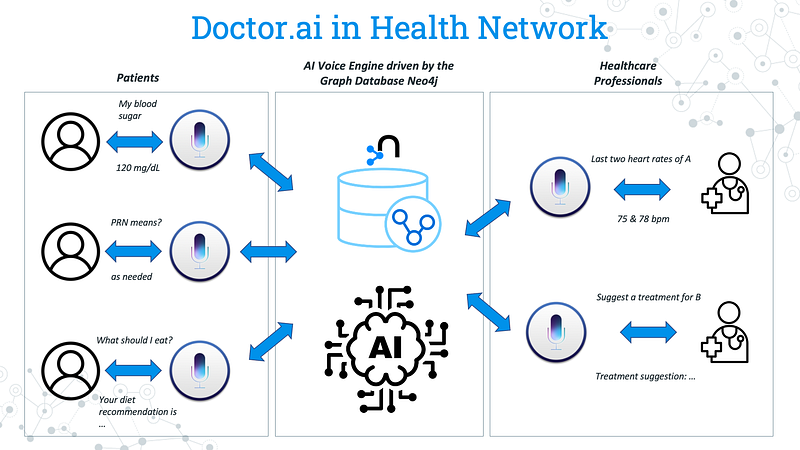
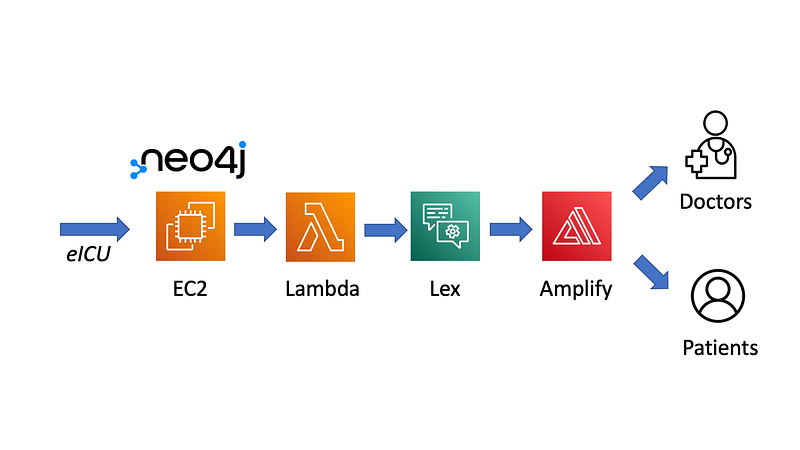
Between 3 and 5 December 2021, four Neo4j fellow engineers and I — with the support of Neo4j — have participated in the Singapore Healthcare AI Datathon & EXPO 2021. We have built a virtual voice assistant called Doctor.ai. Doctor.ai was built on top of the eICU dataset. We ran Neo4j on AWS as our backend database. Lex served as our voice agent and it was connected to Neo4j via Lambda. Finally, we put together a frontend based on the React Simple Chatbot by Lucas Bassetti.
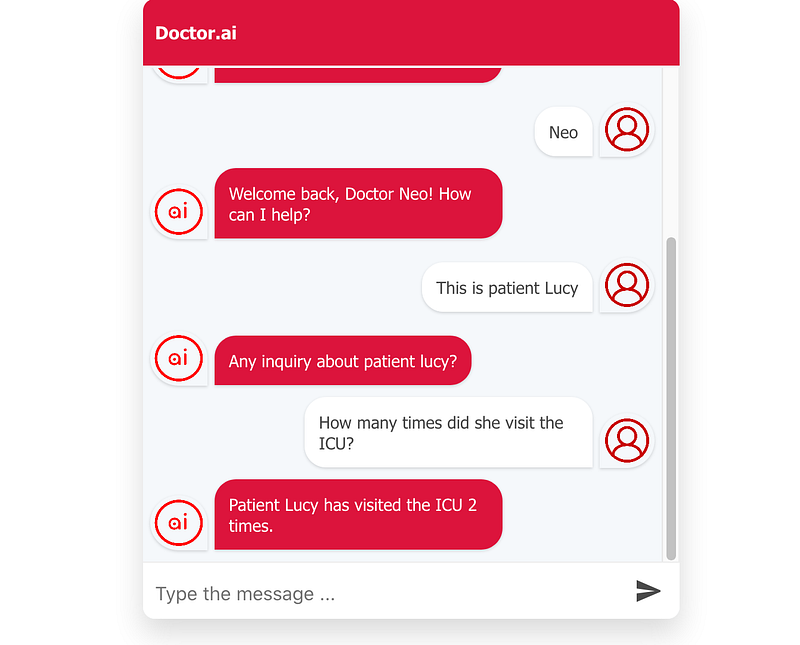
Doctor.ai can serve both the patients and the doctors in English conversations. On the one hand, patients can query their own medical records but not someone else’s. On the other hand, doctors can ask for patients’ medical histories, such as their past ICU visits, diagnoses and received treatments. In addition, Doctor.ai can do rudimentary treatment recommendations for certain patients via the Neo4j Graph Data Science Library. When combined with AWS Kendra, Doctor.ai can even explain medical terms and fetch answers from medical literature.
In this article, I am going to walk you through the setup of Doctor.ai and explain some of its functions, so that you can also have your own clone of Doctor.ai. I did strip some advanced features such as user authentification in this demo though. The code is hosted in my Github repository here:
1. eICU Data
Doctor.ai is built on the eICU dataset. According to the official documentation, this dataset is “populated with data from a combination of many critical care units throughout the continental United States. The data in the collaborative database covers patients who were admitted to critical care units in 2014 and 2015”. It contains lab results, demographic information, diagnoses, treatments and other pertinent information over 200,000 ICU visits of more than 139,000 patients. We used the full dataset as our stand-in medical records to develop Doctor.ai. You can also get a preview out of the demo dataset.
If you want to use the full dataset, you should first apply for the credentialed access to it (follow the instruction here). You need to complete the CITI “Data or Specimens Only Research” course and obtain the completion report. Afterwards, fill out the form in PhysioNet and they will examine and approve your application within days. Finally, you will be able to request access to the data stored in Big Query from the Google Cloud Platform.
For this project, we only need to download six tables from the eicu_crd and eicu_crd_derived databases:
eicu_crd_derived diagnosis_categories icustay_detail pivoted_labeicu_crd diagnosis microlab treatment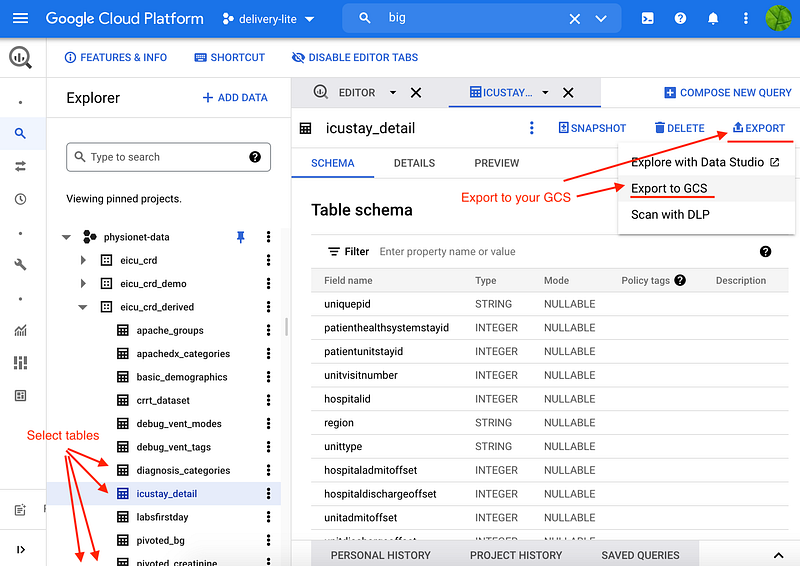
The download needs to go through Google Cloud Storage (GCS). Select each table, click EXPORT and Export to GCS, use the gz format and select one of your buckets as destination. Then you can download the data to your local machine from your bucket.
2. Architecture, SAM and manual configurations
Doctor.ai consists of a backend Neo4j database on an EC2 instance, the natural language understanding engine Lex and a frontend web application hosted by Amplify (Figure 4). In the datathon, we used the Neo4j Enterprise because it allowed us to regulate doctor/patient privileges via its Role-Based Access Control (RBAC) feature. We included Kendra as our FAQ engine there, too.
2.1 SAM
After the datathon, I have codified most of the infrastructure into an AWS Serverless Application Model (SAM) project. Clone the project from my Github link above. Create a key pair called cloudformation.pem for your EC2, chmod 400 it and place it into the project folder. With the SAM CLI, now you just need the following three commands to manipulate the infrastructure:
Choose a region such as us-east-1 where Lex is available. The deployment will be swift. It will output the ID of the Lex, the IP address and domain name of our Neo4j for the steps ahead.
Unfortunately, AWS SAM has some bugs here and there. For example, it cannot set up a Lex Alias (read here). When defined in SAM, Amplify cannot be built automatically, and it also has problems with environment variables. When Kendra FAQ is used, the imported bot errors out at the KendraSearchIntent. So we need to manually configure Neo4j, Lex and Amplify before Doctor.ai can go online.
2.2 EC2
First, log in your EC2 as the user “ubuntu” with your key pair:
ssh -i "cloudformation.pem" ubuntu@[your neo4j EC2 public domain name]You need to import the six tables into Neo4j. Although other options may exist, I recommend that you first transfer the six files into the /var/lib/neo4j/import folder in the EC2. And then log into Neo4j in your browser via this URL:
http://[your Neo4j EC IP address]:7474/browser/Enter the initial username “neo4j” and password “s00pers3cret” and you will be greeted with the familiar Neo4j Browser interface. Run the commands in neo4j_command.txt from my repository to import the data (adjust the file names if needed).
2.3 Lex
After the import, we can move on to Lex. First, make sure you are in the Lex V2 console (as long as Return to the V1 console is visible in the left panel).
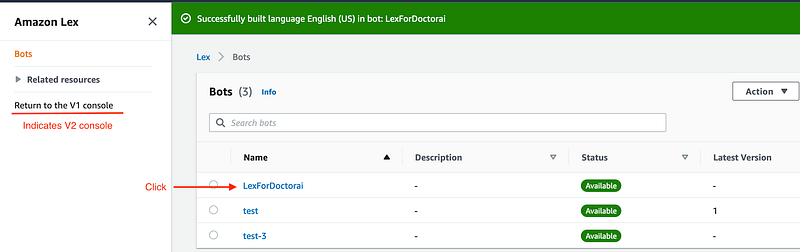
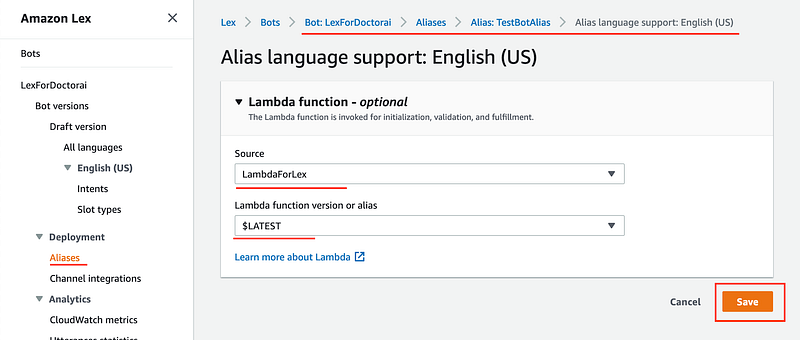
Click LexForDoctorai➡️ Aliases➡️ TestBotAlias ➡️ English (US) to reach the Lambda function page. Select LambdaForLex and $LATEST and click the Save button.
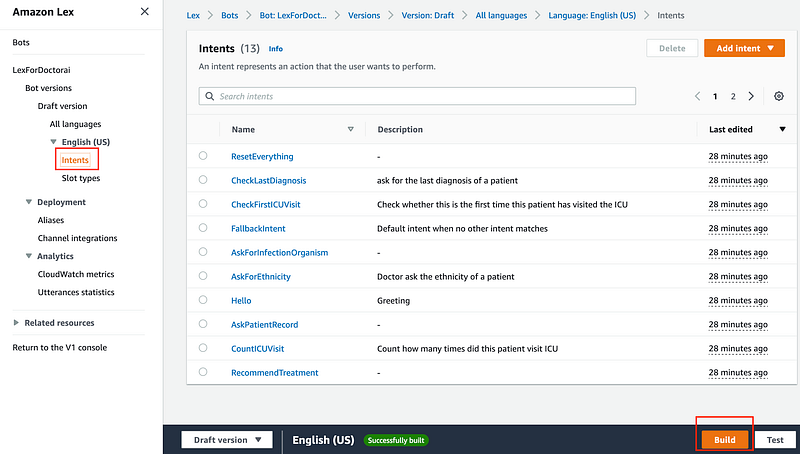
Finally, let’s build LexForDoctorai to test whether the bot is functional. Click Intents and click the Build button.
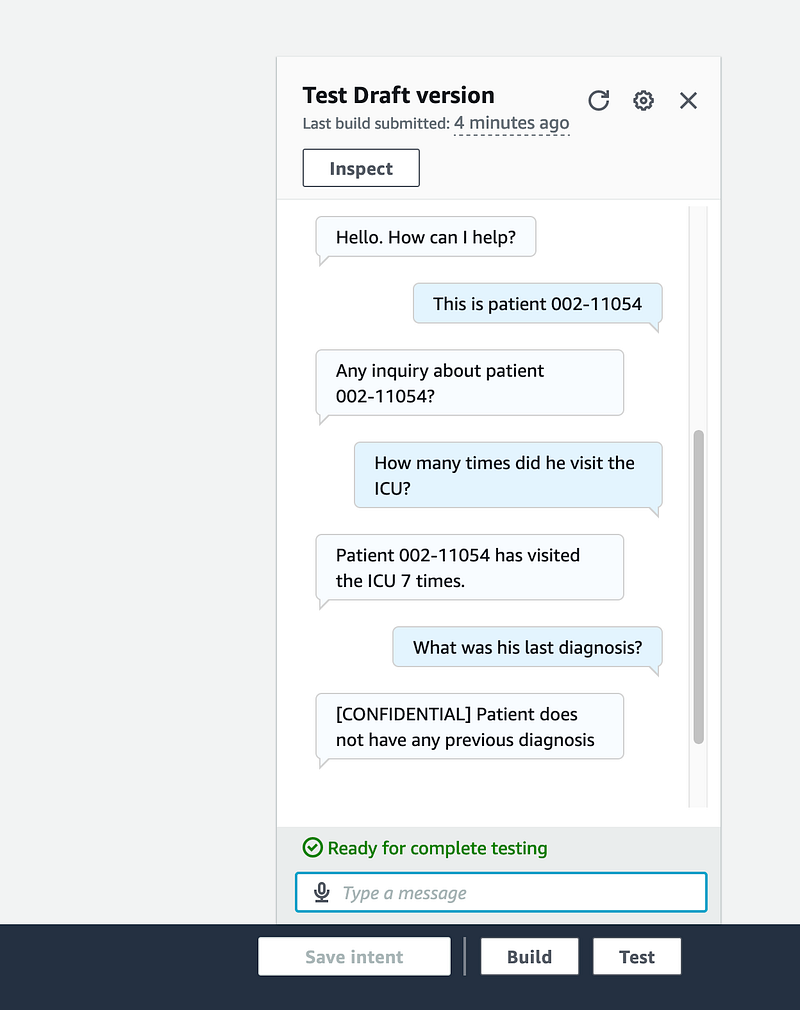
After the build, you can test LexForDoctorai by using the test console. Here, you can see that Doctor.ai could already hold a nice conversation.
2.4 Frontend
The test console from Lex is nice and powerful. It can both listen to and speak back to the user. However, we need a frontend so that we can deploy Doctor.ai as a web or smartphone application. We have put together a simple React frontend by Lucas Bassetti and hosted it on Amplify. I attempted to deploy the frontend in SAM but I encountered bugs. So let’s just manually deploy Amplify.
First, fork this repository to your Github account because Amplify can only retrieve codes from your own account.
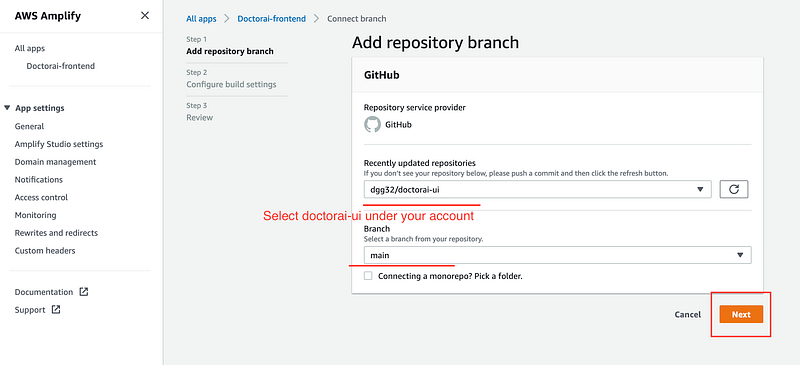
Once done, head over to the AWS Amplify page and click New app➡️ Host web app. Then select Github and Amplify will fetch all the repositories under your account. Choose doctorai-ui under your account. Click Next to the Configure build settings page, click open the Advanced settings and add five key pair environment variables: REACT_APP_AWS_ACCESS_KEY, REACT_APP_AWS_SECRET, REACT_APP_AWS_USERID, REACT_APP_LEX_botId and REACT_APP_AWS_REGION. They are your AWS access key, AWS secret access key, your AWS user id, the BotID (you can get this value from the sam deploy output) and your AWS region.
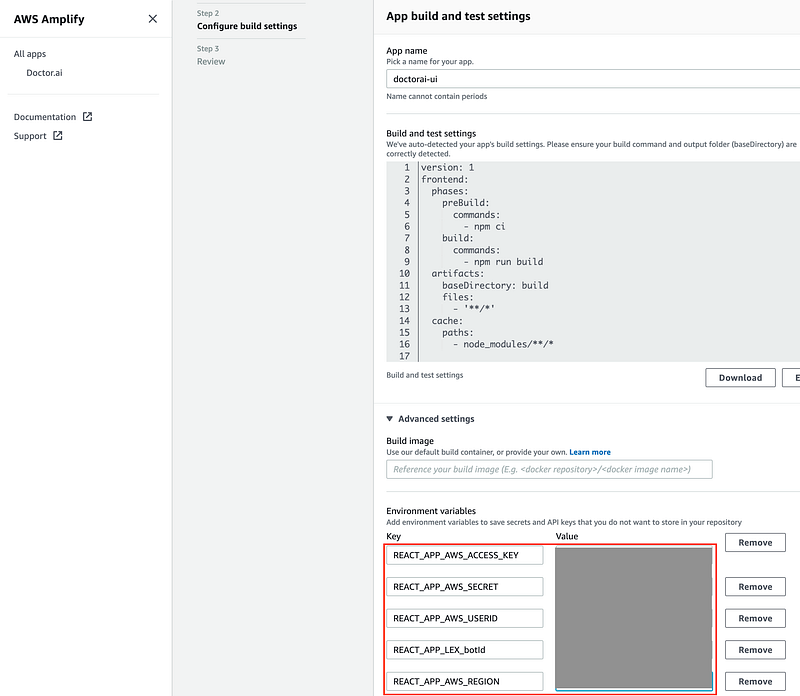
Then clickNext and Save and deploy.
3. How does Doctor.ai work
Before we move on to test Doctor.ai, let me explain a bit how Doctor.ai works. In essence, Doctor.ai is an information retrieval system. Even though it has a grasp of natural language and can understand contexts, it is not exactly a general conversationalist. It only understands a predefined set of inquiries. Therefore, we need to speak purposefully to Doctor.ai. For example, we can ask how many times a patient visited the ICU, whether he or she was ever infected with Staphylococcus aureus, and what kind of treatment he or she received. These “purposes” are called “intents” in Lex’s jargon.
Currently, Doctor.ai can fulfill the following intents: it checks whether this is the first ICU visit; it counts how many times a patient was admitted; it shows the past diagnoses, the lab results, and the isolated microorganisms; it can even recommend treatments. Augmented with some courtesy, command and test intents, Doctor.ai can hold a short conversation much like a human receptionist. Doctor.ai can also understand pronouns thanks to context understanding. We have trained Lex with sample utterances for each intent so that it can understand similar utterances in production. So when Doctor.ai is spoken to, it tries to classify the user inputs into one of the twelve intents. If the classification fails, Doctor.ai will fall back to a FallbackIntent.
It is interesting to know the difference between AWS Kendra and Lex. Kendra can give answers in the form of text excerpts out of its digested text corpus. In essence, it is much like a search engine for internal private data. But it cannot aggregate numeric data. For example, we cannot ask how many times a patient has been to the ICU, what was his average blood sugar level, or what were the last two diagnoses for a certain patient. In contrast, Lex can fulfill these inquiries with the help of Lambda functions. These functions query the backend Neo4j database through Neo4j driver. We used the graph database Neo4j because it can model those many intricate eICU dimensions intuitively and easily. It gives Lex the power to aggregate data across many aspects of the patients’ health histories. Lex can even recommend treatment with the help of GDS.
The treatment recommendation in Doctor.ai is based on user similarities. In principle, it works in the same way as those product recommendations in e-commerce sites. In details, Doctor.ai calculates pairwise cosine similarity between all the patients. Patients of the same gender, with age differences less than ten and with similarity scores higher than 0.9 are qualified as similar. We set these strict criteria because we want to avoid false positives. When a patient is in need of treatment recommendation, Doctor.ai first returns the treatments that his similar patients have received, and takes into account whether or not the suggested treatments are compatible with patient’s current diagnosis. If the treatments satisfy the constraints, Doctor.ai will recommend them to the doctor. But because of the stringent criteria and the scarcity of diagnosis and treatment data, currently only a small amount of patients will receive treatment recommendations.
To protect privacy, we can control whose records are visible to the patients and the doctors through user authentication and authorization. With Neo4j Enterprise, we can even use role-based access control (RBAC) to make some dimensions confidential. For example, we can make the dimension “ethnicity” inaccessible to the doctors but accessible to the patients themselves.
4. Test Doctor.ai
After all the theories and hard work, let’s test Doctor.ai. Use Chrome to open the Production branch URL in Amplify. Because the eICU data was anonymized, we used the pid as the patient’s name.
4.1 Diagnosis
We can read or type the following inquiries one by one and see how Doctor.ai replies.
Are you online?This is patient 002-43934How many times did he visit the ICU?What was the diagnosis?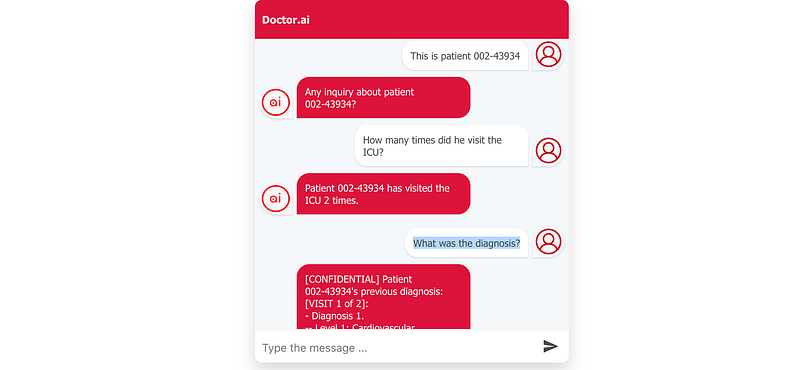
As you can see from the screenshot above or from your own test, Doctor.ai is able to tell us that the patient 002–43934 has visited the ICU twice because of cardiac arrest.
4.2 Lab results
Let’s say patient 002–33870 is in front of us and we want to know his glucose and hemoglobin levels:
Are you onlineThis is patient 002–33870What was his glucose level?What was his Hemoglobin level?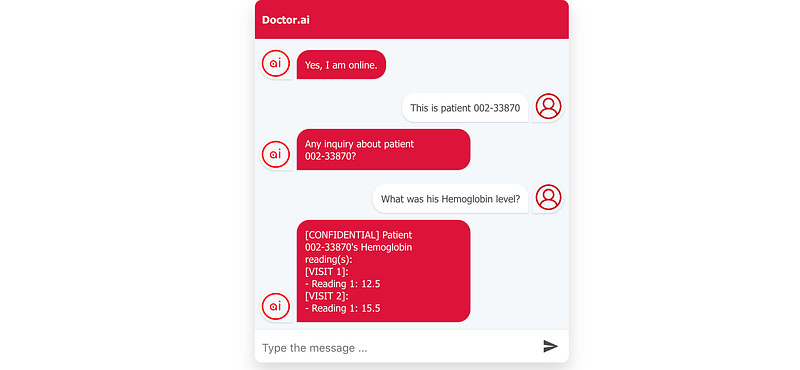
Doctor.ai quickly retrieves the glucose and hemoglobin readings from his last two ICU visits.
4.3 Treatment recommendation
Finally, let’s try to see which treatments Doctor.ai will recommend for patient 003–2482.
This is patient 003–2482What was the diagnosis?treatment recommendation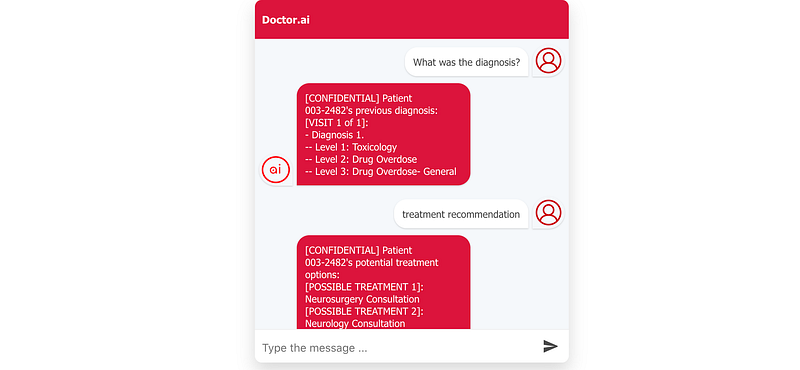
Interestingly, Doctor.ai recommends consulation to this patient who suffered from drug overdose in his last ICU visit. This recommendation looks odd at first glance. But drug overdose may impair brain functions so neurological consultation may be necessary for his full recovery.
Conclusion
In this project, we have put together Neo4j, AWS and the eICU dataset to build a small virtual voice assistant. Although Doctor.ai can fulfill only a limited set of inquiries in its current form, it is not hard to see its enormous potentials in health care: we can use it in ICU, psychiatric clinics and dentists. By changing the underlying data, we can even make it into a general purpose Q&A chatbot for other industries.
Doctor.ai still needs some more polishing to become a full-fledged product. Firstly, its voice recognition is powered by the Chrome browser, which is not always precise. Secondly, it often gets confused in the conversation. This is partially due to the fact that its context memory lasts only five minutes. But it is more likely that some of its configurations need optimizations. Thirdly, although eICU is a large dataset, many patients have incomplete records. And this makes information retrieval and machine learning difficult. We can also train it to understand more intents and improve its situational awareness. Also, you can add Kendra to the mix. Finally, although the Neo4j Community version is very powerful and can handle this demo effectively, it is not for production. So you should consider the Enterprise version or AuraDB instead.
So please try Doctor.ai and give us your feedbacks.
Updates:
A second article about Doctor.ai has been published on Neo4j’s official blog. It dives into the implementation of Lambda and Lex.
The third article is about the transfer of three knowledge graphs into Doctor.ai. They make Doctor.ai into a more knowledgeable chatbot.
The fourth article is based on the knowledge graphs from the third article. Doctor.ai can now make simple diagnoses based on symptoms or mutated genes thanks to the data from the knowledge graphs.
The fifth article is an attempt to distribute the graph to a P2P network.
The sixth article uses GPT-3 as NLU to improve performance, reduce development time and shrink code.
The seventh article Can Doctor.ai understand German, Chinese and Japanese? GPT-3 Answers: Ja, 一点点 and できます! shows that Doctor.ai can understand German, Chinese and Japanese thanks to GPT-3.
The eighth article improves Doctor.ai’s voice recognition with Alan AI.
The ninth article uses Synthea as the new stand-in data.
The tenth article uses GPT-3 to extract subject-verb-object from raw texts.
The 11th uses GPT-3 to ELI5 complicated medical concepts and make them easier to understand.
The 12th compares GPT-J and GPT-3 in Doctor.ai.
The 13th demonstrates a Bayesian knowledge graph.
The 14th article builds an ensemble chatbot based on Doctor.ai + GPT-3 + Kendra.


