
English to Cypher with GPT-3 in Doctor.ai
Navigate a medical knowledge graph using English
By Sixing Huang and Maruthi Prithivirajan

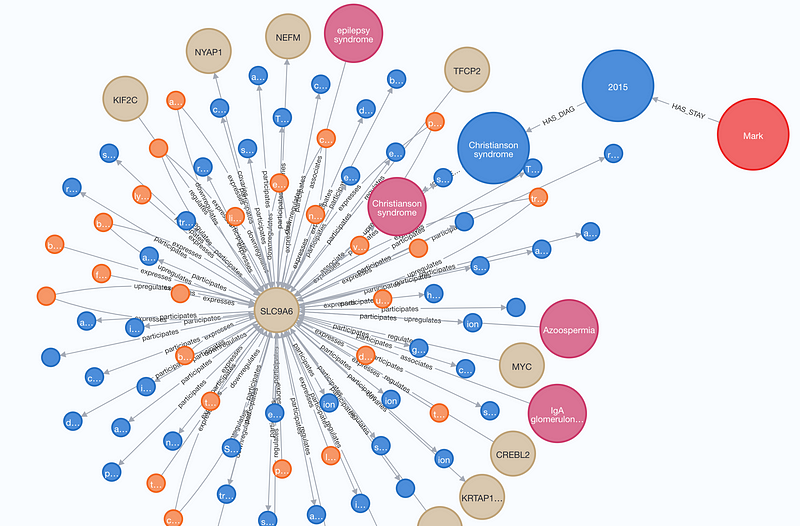
In December 2021, four Neo4j engineers, together with Maruthi and I, developed a medical chatbot called Doctor.ai (here and here) in the Singapore Healthcare AI Datathon & EXPO 2021 (Figure 1). Doctor.ai manages electronic health records in a Neo4j graph and interacts with its users in English thanks to AWS Lex.
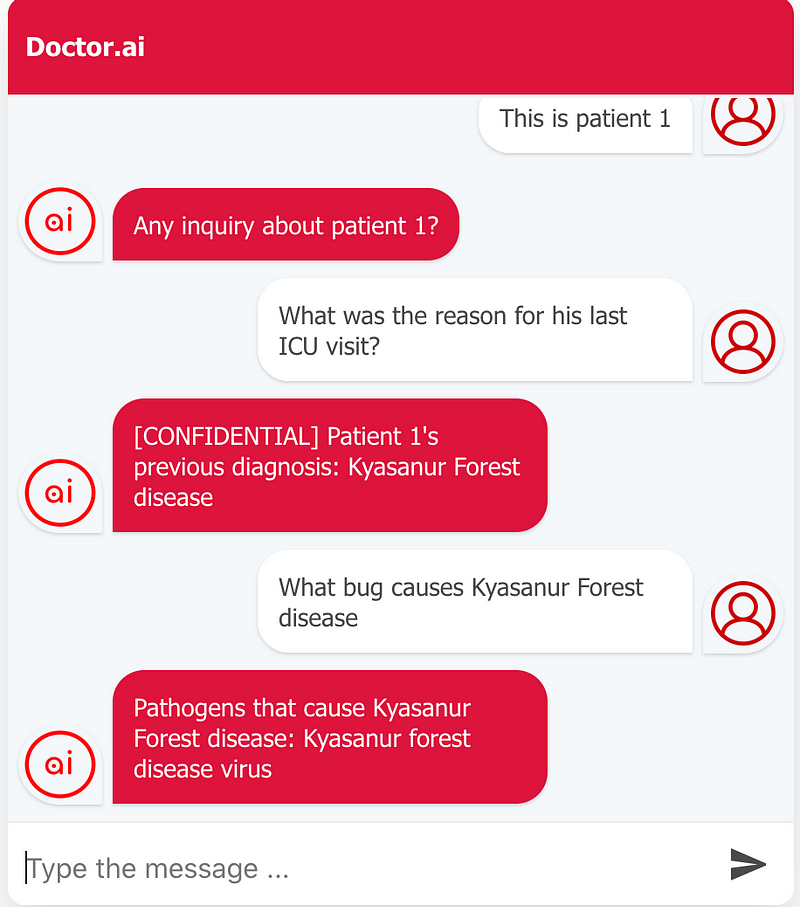
After the Datathon, we have continued to expand Doctor.ai. After the integration of three public knowledge graphs (here), Doctor.ai knows about diseases, genes, pharmaceutical compounds, symptoms and so on. This expansion connects patients’ health records to the medical knowledge network. In other words, it connects the specific to the general. Now we can understand each patient’s medical history in a much broader context. For example, after we ask for a patient’s last diagnosis, we can ask further what caused the disease and which drugs can be used (Figure 1).
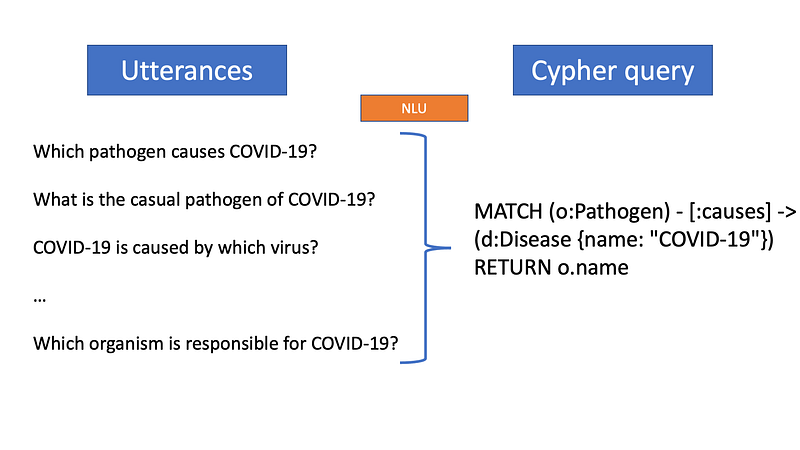
In natural languages, we can convey the same idea in many different ways, a.k.a. restatements. It is quite amazing that we humans can rephrase and restate a lot and our conversation partners can still understand us. But that is not the case for computers. Programming languages tend to have rigid syntaxes that we developers must adhere to. Violations will lead to program failures. And it is a natural language understanding (NLU) engine’s job to converge a variety of human restatements into a rigid programming statement (Figure 2). Doctor.ai used AWS Lex and Lambda as its NLU engine.
This is all well and good. Lex and Lambda worked as advertised. However, the development was very time consuming. Firstly, developers needed to get familiar with a range of new concepts such as intent, utterance, slot, slot type and context. Secondly, for each intent, the developers needed to provide multiple sample utterances, set up the slots and manage contexts. Finally, each intent was hooked up with a Lambda function where the Cypher query was synthesized. And Lambda programming took some getting used to because the developers first needed to learn the Lex-specific rules.
The question is: can we replace Lex and Lambda with something easy and powerful? The answer is yes. There is a new sheriff in town: GPT-3.
OpenAI’s GPT-3 has first stunned the tech world with its lifelike conversations. But that is just one of its many amazing abilities. Besides impersonating Steve Jobs, GPT-3 can perform a series of natural language tasks including summarization, grammar correction, code explanation, code correction, code translation, text-to-command and more. Even though human intervention is still needed here and there, GPT-3 alone can accomplish most of the tasks correctly. What’s more, it has the “cognitive” flexibility to improve its performance based on the human inputs. In our opinion, GPT-3 can be considered as one of game-changing technological iterations in NLU in recent years.
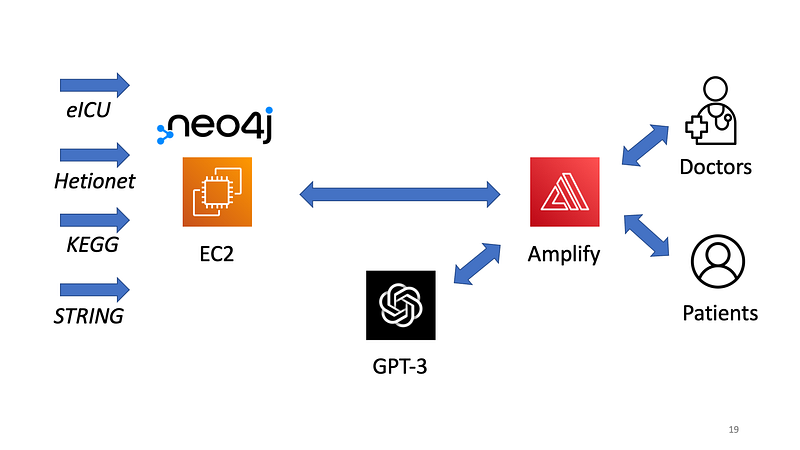
In this article, we are going to show you how to use GPT-3 in Doctor.ai. Figure 3 illustrates the architecture. We will just use its Text to command ability to convert our English questions into Cypher. But Text to Cypher is perhaps a better name in this case. The source code for this project is hosted in the Github repository here:
The Neo4j database dump file is here:
https://1drv.ms/u/s!Apl037WLngZ8hhj_0aRswHOOKm0p?e=7kuWsS
1. GPT-3 account
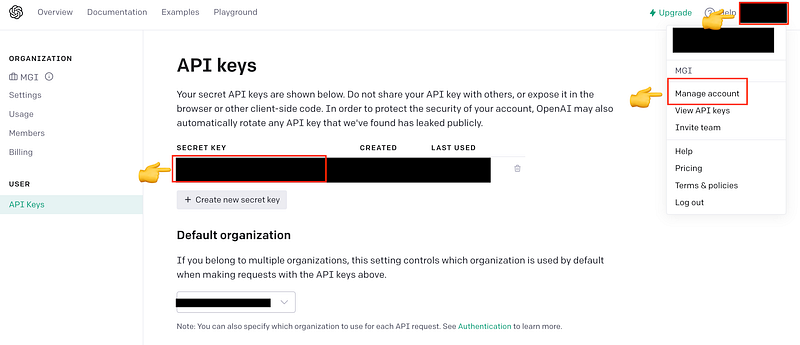
First, we need a GPT-3 account. Notice that not all regions are yet supported, for example China. Make sure your region is on this list. Once you get the account, you obtain a secret key (Figure 4). The initial credit of $18 should be more than enough to cover the whole project.
2. Set up a Neo4j backend on the cloud
We can host our Neo4j database on AWS, GCP or AuraDB (read here). You can also simply use my CloudFormation template below to set it up on AWS. The username is neo4j and the password is s00pers3cret.
In all cases, you can use our dump file above to restore the full database. For example in EC2, first login your instance as ubuntu and carry out the following bash commands:
When you set up EC2 or Compute, make sure that the port 7686 is open. In addition, port 7473 and 7474 are also needed for HTTPS and HTTP respectively. If you want to use AuraDB, you are going to need at least the Professional version because the amounts of nodes and edges in Doctor.ai’s knowledge graph exceed the hard limits of the Free version.
Test your Neo4j database before you move on. First, enter the the address in your browser:
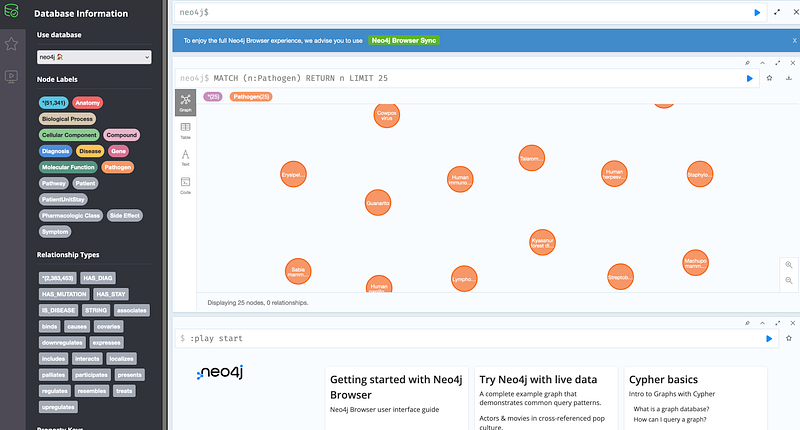
After the login, you should see the nodes and relations in the interface:
Now let’s test the connection using the bolt protocol in JavaScript. You first need the neo4j-driver.
Then enter node in your console and carry out the following commands:
If you see the output SARS-CoV-2, it is in this case worth celebrating!
3. GPT-3
Now we can use GPT-3 in Doctor.ai. We will modify the code in react-simple-chatbot by our colleague Irwan Butar Butar, which is in turn based on the work of Lucas Bassetti. And all the actions take place in just one file: DoctorAI_gpt3.js. In this file, we will take one English question at a time from the user, package it and send it to GPT-3. GPT-3 will convert it into a Cypher query. We execute this Cypher query against our backend database. Finally, we present the query result back to the user.
This is how GPT-3 works: you give it some English-Cypher pairs as examples. Such as:
If you have several expressions that should trigger the same response from GPT-3, you can put them together with “or” or “;” like this.
GPT-3 will learn and then generate Cypher queries for your next English question. There is no evidence that GPT-3 has been trained on Cypher before. But it can somehow deduce the Cypher syntaxes with just a few examples and write the Cypher codes anyway. That is amazing. You can test it yourself in the GPT-3 Playground:
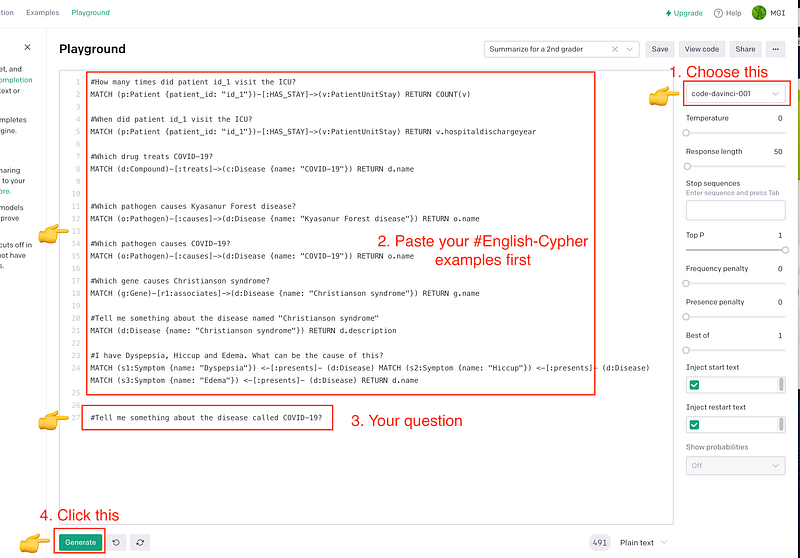
The English prompts start with a # symbol. When you click the Generate button, GPT-3 will generate the correct Cypher query in the next line:
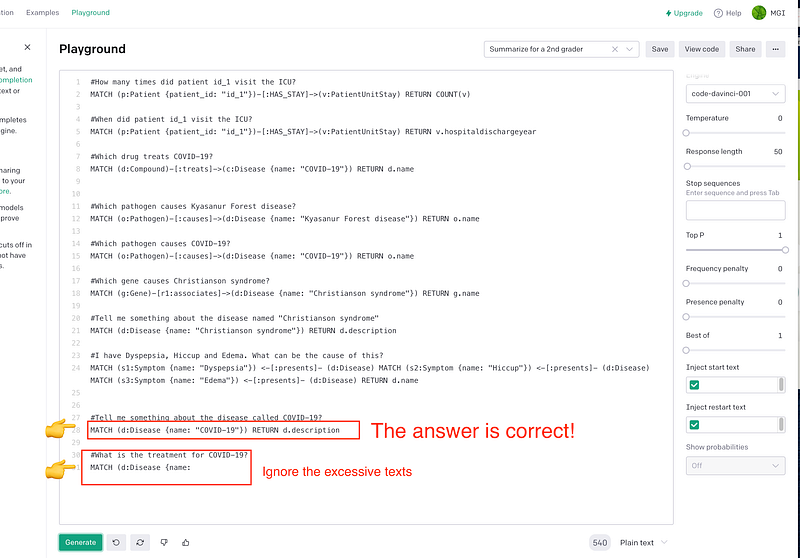
You will notice that there are excessive texts. You can control this by adjusting the Response length parameter on the right.
The GPT-3 part in DoctorAI_gpt3.js is just a codification of the demo above.
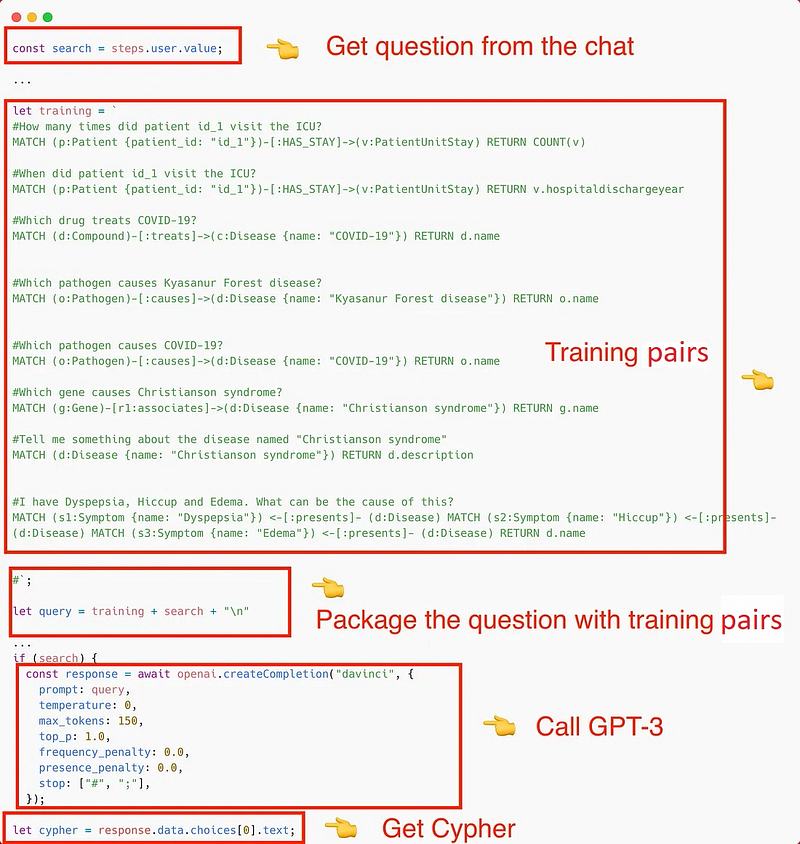
4. Query Neo4j with the GPT-3 Cypher
Once GPT-3 finishes the heavy-lifting, the rest will be quite straightforward. The JavaScript for Neo4j query is just an extension of Code 2 above.
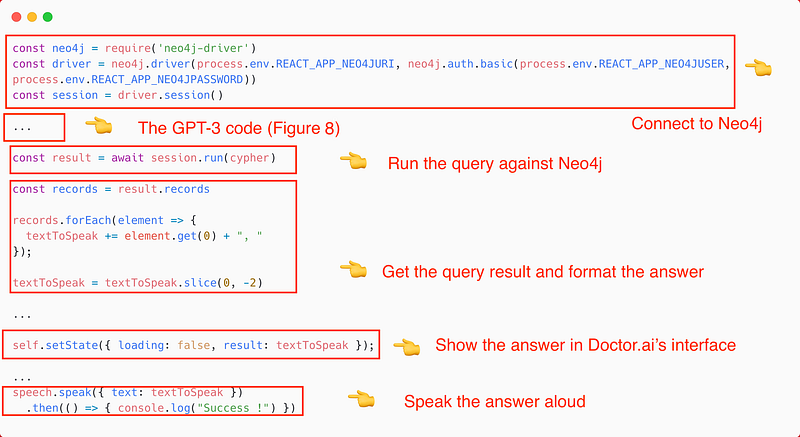
You can see the complete code in the Github repository.
5. Host the frontend
Now it is time to host the frontend. The procedure has already been described in my previous article Doctor.ai, an AI-Powered Virtual Voice Assistant for Health Care. There are just two small changes. Firstly, point Amplify to the current Github repository instead of the old one mentioned in the article. Secondly, the environment variables are completely different. Under Advanced settings in the Configure build settings page, set up the following four environment variables and fill in the correct values:
Be aware that on the client side, we first need to allow our browser to access the URL through the port 7687. This is necessary if our EC2 instance does not have an SSL. If you use AuraDB to host the backend, you don’t have this problem. But AuraDB Free is too small to host Doctor.ai as of this writing. Enter https://[EC_public_ip]:7687 in your browser’s address bar, click Advanced... ➡️ Accept the Risk and Continue (read here).


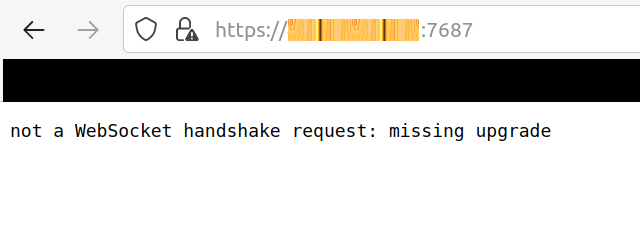
When you see the message in Figure 12, you are ready to go.
6. Test the GPT-3 Doctor.ai
Finally, we can test this new Doctor.ai and see the magic of GPT-3:
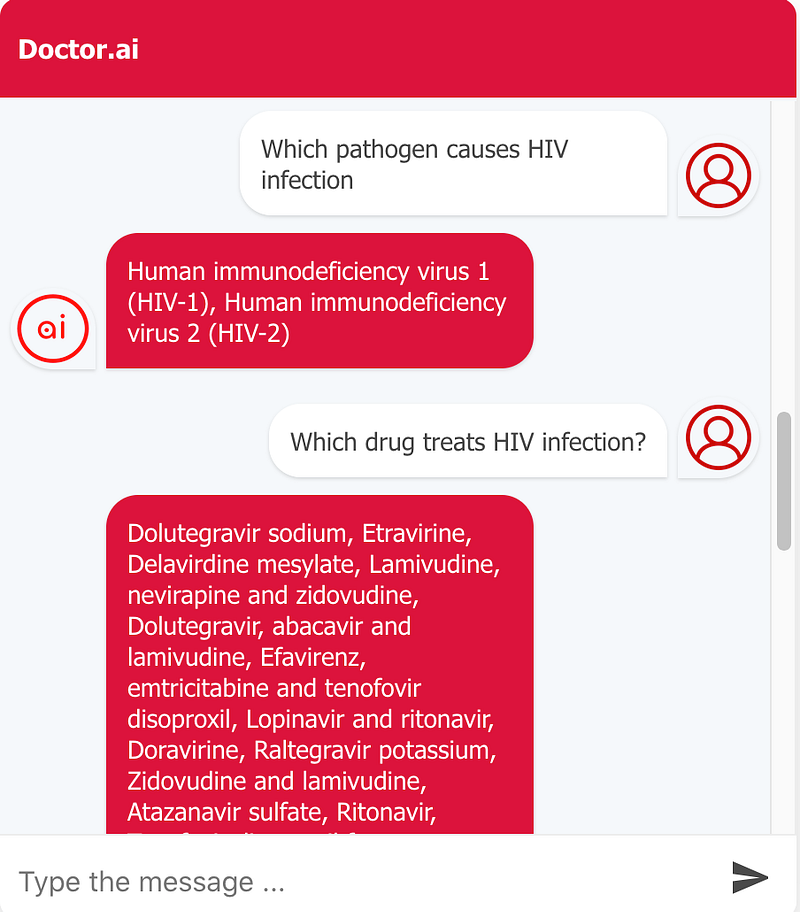
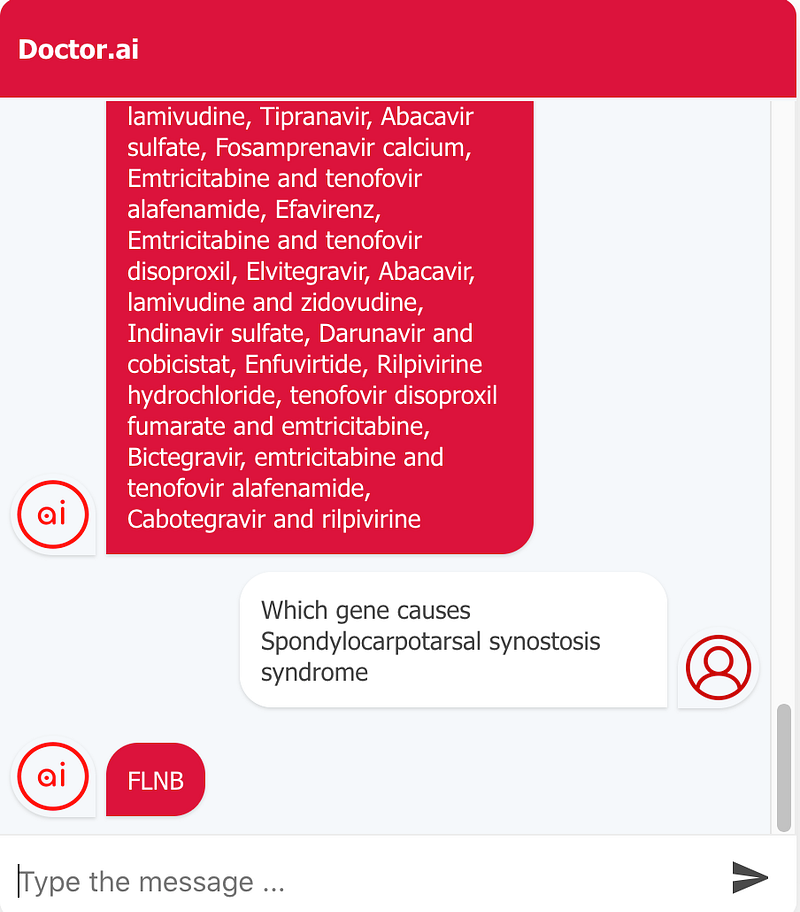
Here I asked Doctor.ai for some information about the HIV infection and the spondylocarpotarsal synostosis syndrome. These questions followed the patterns of our training examples. So there was little surprise that they worked well. Let’s rephrase our questions and see whether Doctor.ai can still understand our intents:
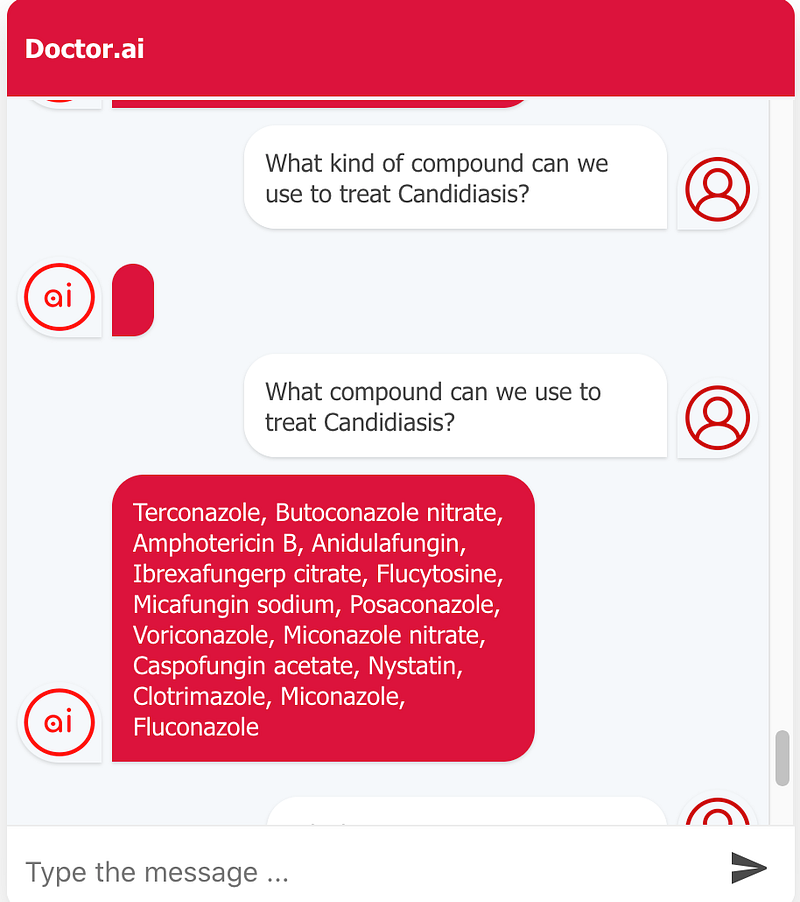
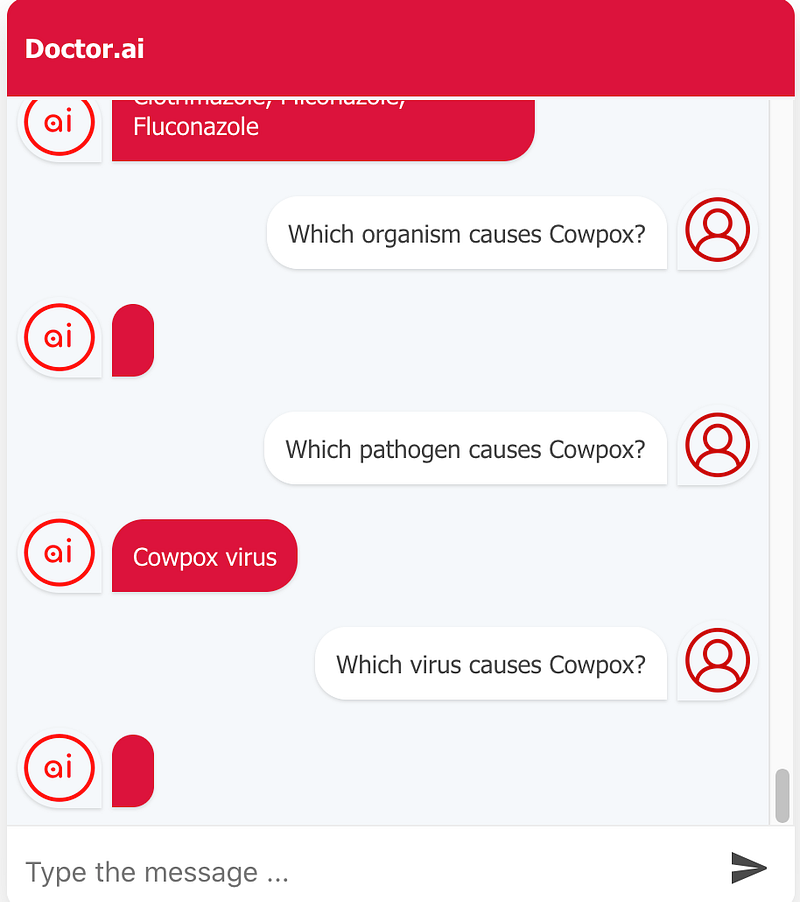
Doctor.ai stumbled on the restatements at first. It could recognize some statements but not the other semantically identical statements. To improve Doctor.ai, we can provide it with more examples. Let’s just add one extra example pair in the training set:
With it, Doctor.ai is able to convert the keyword “organism” into “pathogen” before it constructs the Cypher query. In addition, it can generalize this to cover other similar questions, too.
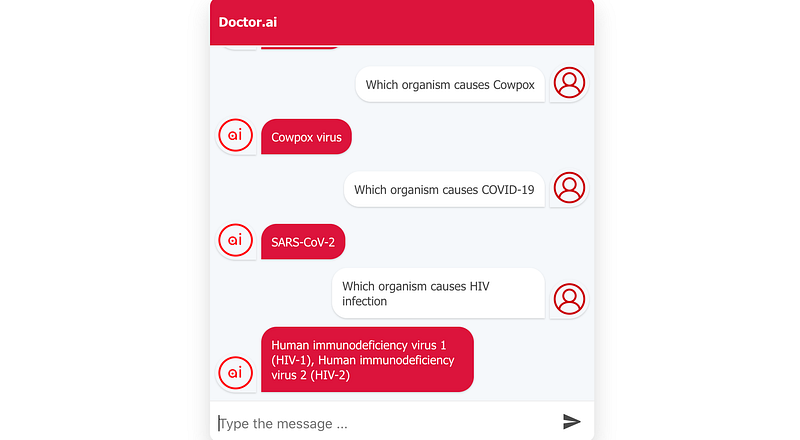
Finally, let’s test whether Doctor.ai can understand pronouns.
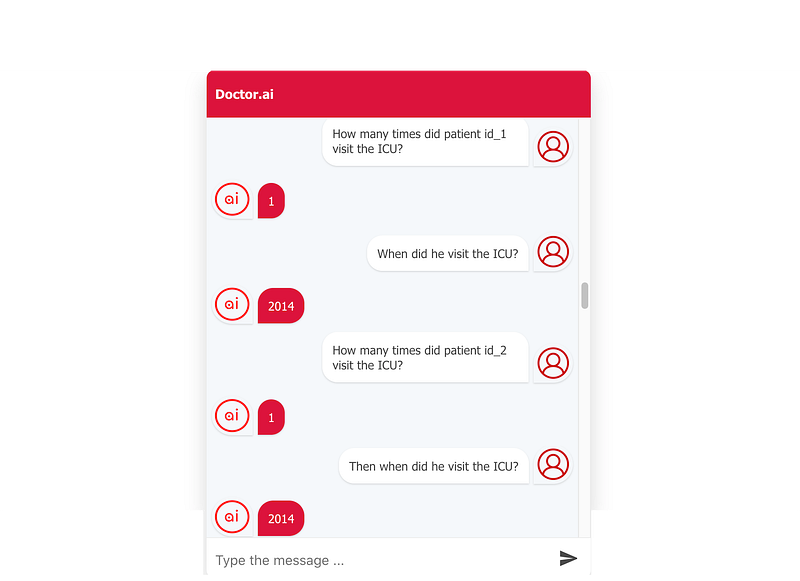
Here we see an error. Patient id_2 visited the ICU in 2015. After careful examination, it is clear that GPT-3 inquired about the admission time of Patient id_1 instead of id_2. So when GPT-3 encountered pronouns such as “he” or “she”, it assumed that we refer to the first mentioned instead of the last mentioned in the conversation.
Conclusion
GPT-3 is a scary game changer. In many cases, its natural language understanding rivals that of human speakers and it just needs a handful of training data. It is easy to extend. If it makes a mistake, we can just add one or two right answers to the training set and GPT-3 will generalize that correction to other similar cases. For developers, it is much easier to present some examples to GPT-3 than writing many lines of rigid programming statements. Before GPT-3, we saw a lot of code repetitions in Doctor.ai’s Lambda. The configuration of Lex was also labor-intensive. And GPT-3 changed all those. With just 60 extra lines of code in the frontend, it replaces the big fat Lex and Lambda. It is safe to say that GPT-3 can drastically reduce development and testing time and shrink the code for other natural language related projects, too.
But is it perfect? No. As this project has demonstrated, it has difficulties in understanding pronouns. It was somehow fixated on the first-mentioned instead of the last-mentioned. That is certainly not human-like. Also, some restatements can outwit GPT-3. But for me, these are just minor issues.
This article just scratches a bit of GPT-3. The English-Cypher pairs in the example code are far from being exhaustive. We can make many more to cover the whole knowledge graph in Doctor.ai. Also GPT-3 can be fine-tuned for better performance with fine-tuning jobs. The possibility is endless.
We encourage you to use GPT-3 for your own NLU projects. And tell us how you use it.
Update: my next article Can Doctor.ai understand German, Chinese and Japanese? GPT-3 Answers: Ja, 一点点 and できます! shows that Doctor.ai can understand German, Chinese and Japanese thanks to GPT-3.
Licenses
Hetionet is released as CC0. STRING is freely available under a ‘Creative Commons BY 4.0’ license, while academic users may freely use the KEGG website.


