
8. Understanding Airflow’s logical date
My personal notes from the book “Data Pipelines with Apache Airflow” by Bas Harenslak and Julian de Ruiter — Chapter 3, Part 4

Introduction
This series of posts recaps my learnings from the book by Bas Harenslak and Julian de Ruiter. If you like the content, you can purchase the book on Manning.
📚 Related Posts:
- Introduction to Airflow — Ch 2, Part 1
- Running Airflow Locally (in a Python Environment) — Ch 2, Part 2
- Running Airflow with Docker — Ch 2, Part 3
- Understanding Airflow User Interface — Ch 2, Part 4
- Scheduling DAGs in Airflow — Ch. 3, Part 1
- How to define the DAG “schedule_interval” parameter — Ch. 3, Part 2
- How to Process data incrementally in Airflow — Ch 3, Part 3
- Understanding Airflow’s logical dates — Ch 3, Part 4
Update Note
These notes are taken from the book “Data Pipelines with Apache Airflow” published in 2020. At that time, the execution_date was still used.
Conversely, the Airflow version available at the time of writing this article (October 2022) has deprecated the execution_date variable in favour of dag_run.logical_date . You can read more about it here.
I will hence use logical_date in the notes below but if you read the original text you will see execution_date .
Recap
The logical_date is the most important parameter among the ones you can use for workflows that involve a time-based process. The logical_date
represents the date and time for which a DAG is being executed.
Moreover, we can control when Airflow runs a DAG with three parameters: a start_date , a schedule_interval , and (optionally) an end_date .
You can read more about schedule_interval in this previous post: How to define the DAG “schedule_interval” parameter.
Fixed-length Intervals
Once we gave Airflow a start_date , a schedule_interval , and (optionally) a end_date , it starts to divide time into a series of scheduled intervals. For example:

If you remember, Airflow schedules the first execution of the DAG to run at the first scheduled interval after the start date (start + interval). This means that the first execution will happen as soon as possible after 2019–01–01 23:59:59. Then, the second interval will be executed shortly after 2019–01–02 23:59:59 and so on.
Using fixed-length intervals is very convenient as you know exactly for which interval a task is executing for (i.e. you know the start and the end of that given interval). If you were to use a cron expression instead, you would need to guess where the previous interval left off.
In other words, fixed-length intervals explicitly schedule tasks to run for each interval and provide exact information for each task (i.e. start and end parameters). Conversely, time-based intervals — such as cron expressions — execute tasks at a given time, without specifying the incremental interval the task is executing for.
Intervals are important to understand how logical dates are defined in Airflow. For instance, say you have a DAG with a daily schedule and consider the interval that should process data for 2019–01–03. In Airflow this interval will run shortly after 2019–01–03 23:59:59 because at that point we know that we will no longer receive data for 2019–01–03.
What will the logical_date for this interval be? In Airflow this will be marked as “2019–01–03”. This is because Airflow defines the logical date of a DAG as the start of the corresponding interval, not the moment at which the DAG is actually run.
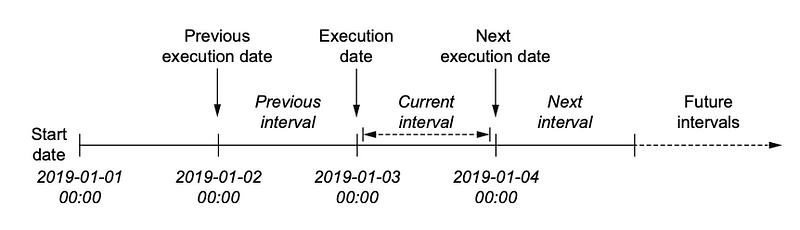
To recap, the interval from “2019–01–03 00:00:00” to “2019–01–03 23:59:59”, will be run on “2019–01–04 00:00:00” (or shortly after “2019–01–03 23:59:59”) because at this point we don’t expect any new data. Its logical date will be “2019–01–03 00:00:00” as Airflow defined the logical date as the “start of the interval”, not the moment when the DAG runs.
Dates and Time in Airflow
Airflow uses the Pendulum library to deal with dates and times. Pendulum is a drop-in replacement for the native Python datetime which means that you don’t have to worry much and that all methods that can be applied to Python datetime can also be applied to Pendulum.
For example:
from datetime import datetimedatetime.now().year
>>> 2022is equivalent to:
import pendulumpendulum.now().year
>>> 2022I hope this helps ❤️ See you in the next post!
References
Data Pipelines with Apache Airflow by Bas P. Harenslak and Julian Rutger de Ruiter


