
1. Introduction to Airflow: DAGs and Operators
My personal notes from the book “Data Pipelines with Apache Airflow” by Bas Harenslak and Julian de Ruiter — Chapter 2, Part 1

Introduction
This series of posts is meant to summarize my learnings from the book by Bas Harenslak and Julian de Ruiter. If you like the content, you can purchase the book on Manning.
Complete list:
Chapter 2: - 1. Introduction to Airflow - 2. Running Airflow Locally (in a Python Environment) - 3. Running Airflow with Docker - 4. Understanding Airflow User Interface
Pipeline Fundamentals
An Airflow pipeline consists of two main concepts:
- DAG
- Tasks/Operators
The DAG is the starting point of any Airflow pipeline. It is the workflow itself and it consists of one or more tasks. For example, you might want to perform a series of actions in your pipeline: connect to a URL, save images locally, send an email, etc. The entire process is what we call “workflow”, “pipeline”, or “dag”. The role of a DAG is to orchestrate the execution of a collection of operators. This means starting and stopping operators and ensuring that dependencies are met (more about this later).
You can think of a DAG as the “collector” of the pipeline tasks.
Tasks are instead the “actual work” and they are defined as instances of the Airflow operators. For example, let’s say that your task is to download the content from a website and you are going to accomplish this using the requests Python package. Since you want to run some Python code, you need to use a Python Operator. If you want to instead execute a Bash command, you will be using a Bash Operator and so on.
Pipeline tasks are defined by operators. You need to choose the operator depending on the type of task you want to perform.
If you really want to be “technical”, tasks are in reality “internal components of Airflow that are used to manage the state of operators and to display this state (started/finished) to the user. They can be thought of as a small wrapper or manager around an operator that ensures that the operator runs correctly”.
Personally, I find this definition more confusing and I like to think of tasks as an instance of operators. In either case, this picture can probably help to visualise the underlying concept:
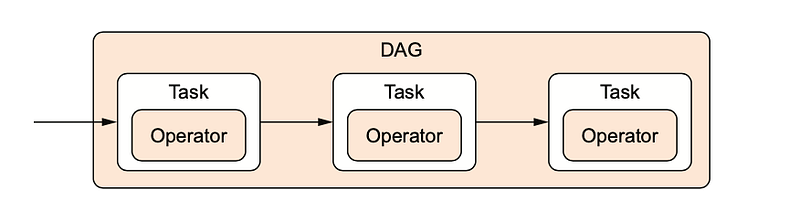
In summary, writing a pipeline consist of (1) defining a DAG and (2) defining the tasks you want to perform by choosing the correct operator.
Note: for any operator within the workflow, you reference the dag so that Airflow knows which tasks belong to which DAG.
Defining a DAG
A DAG object has 1 requirement argument, the “dag_id”. There are also plenty of other parameters that you can check out here. An example could be:
dag = DAG(dag_id="download_rocket_launches")or
dag = DAG(dag_id="download_rocket_launches",
          start_date=airflow.utils.dates.days_ago(14),
          schedule_interval=None
)
In this second example, we are defining:
- A dag_id: the name displayed in the Airflow user interface.
- A start_time: the datetime at which the workflow should first start running.
- A schedule_interval=None: it means that the DAG will not run automatically and you need to trigger it manually from Airflow (more about scheduling later).
Defining an Operator
Airflow has many built-in operators to perform different tasks. You can also define and import your custom operator. Some operators perform generic work (such as the BashOperator which is used to run a bash command or the PythonOperator which runs a Python function), while others have more specific use cases (e.g. the EmailOperator which can be used to send an email or the SimpleHTTPOperator which can be used to call an HTTP endpoint).
The important idea is that each operator performs a single piece of work.
Example of Bash Operator:
download_launches = BashOperator(
    task_id="download_launches",
    bash_command="curl -o /tmp/launches.json -L 'https://ll.thespacedevs.com/2.0.0/launch/upcoming",
)
For this operator, we are defining:
- A task_id: the name of the task displayed in the Airflow UI.
- A bash command to execute.
- A reference to the DAG variable.
Example of Python Operator:
get_pictures = PythonOperator(
    task_id="get_pictures",
    python_callable=_get_pictures,
    dag=dag,
)
Notice that the PythonOperator has a python_callable parameter. Here you need to put the name of a Python function you have previously defined. Although not required, it is good practice to keep the function name _get_pictures equal to the task_id.
For example:
How do I choose an operator?
There is no unique answer to this question. However, as a rule of thumb, you can think that simple tasks (e.g. downloading data from a website) which can be accomplished with few commands in bash (in this case, we are simply using the curl command) should use the BashOperator. More complex tasks (e.g. parsing JSON results, selecting image URLs from it, and downloading the corresponding files) are better suited to a custom Python function.
Task Dependencies
Each operator performs a single unit of work and all the operators together form the “workflow”. Operators run independently from one another but we can define “dependencies” among them. In other words, within the workflow, you can define the order of execution.
To set dependencies among tasks you can use this syntax:
downlaod_launches >> get_picturesThe arrows set the order of execution of tasks. In this case,download_launches will run before get_pictures.
Complete Code Example
I hope this helps ❤️ See you in the next post!
References
Data Pipelines with Apache Airflow by Bas P. Harenslak and Julian Rutger de Ruiter


