
10 Decision Points for a Micro-Frontend Approach
How do you decide whether micro-frontends are right for your project, and if so, how do you proceed?

In an era where certain JavaScript frameworks become out of favor at lightening speed, frontend developers are busy rewriting applications using new, emerging ways all the time.
We are desperately searching for a possibility to jump onto the latest and greatest things, without worrying about the baggage of legacy code. In simple terms, we want to decouple components. This appealing idea is called micro-frontends.
What is the micro-frontend approach? The term micro-frontend first came up in the ThoughtWorks Technology Radar in November 2016. It extends the concepts of microservices to frontend development.
This approach is to split the browser-based code into micro-frontends by breaking down the whole application. Sub-application is likely implemented by a vertical team from backend to frontend. This ensures that every sub-application is independently developed, tested, and deployed.
We adopted Cam Jackson’s micro-frontends approach in our projects. Based on our first-hand experience, we would like to share ten decision points for micro-frontends.
1. Do You Make a Decision Based on Popularity?
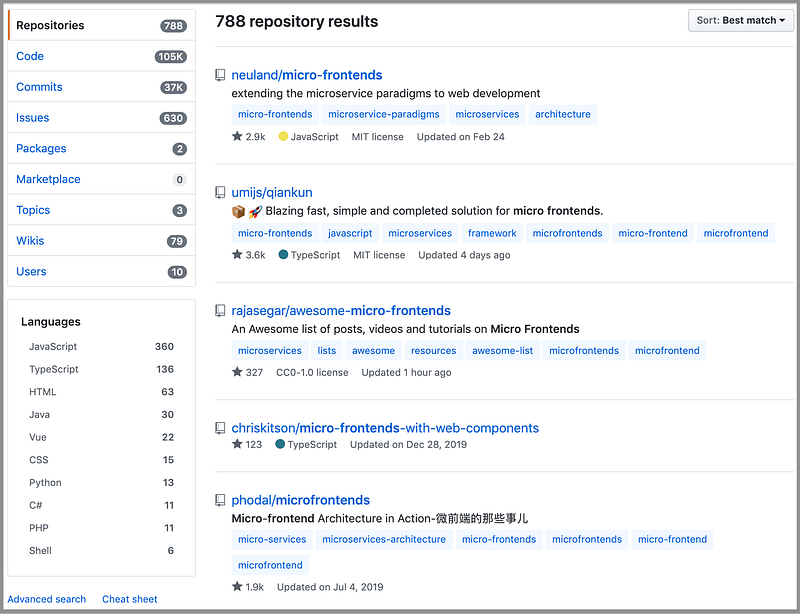
The micro-frontend approach is popular. If you search for “micro frontends” in GitHub, there are 788 related repositories.
If you search for “micro apps”, another term for micro-frontends, in GitHub, there are 167 related repositories.
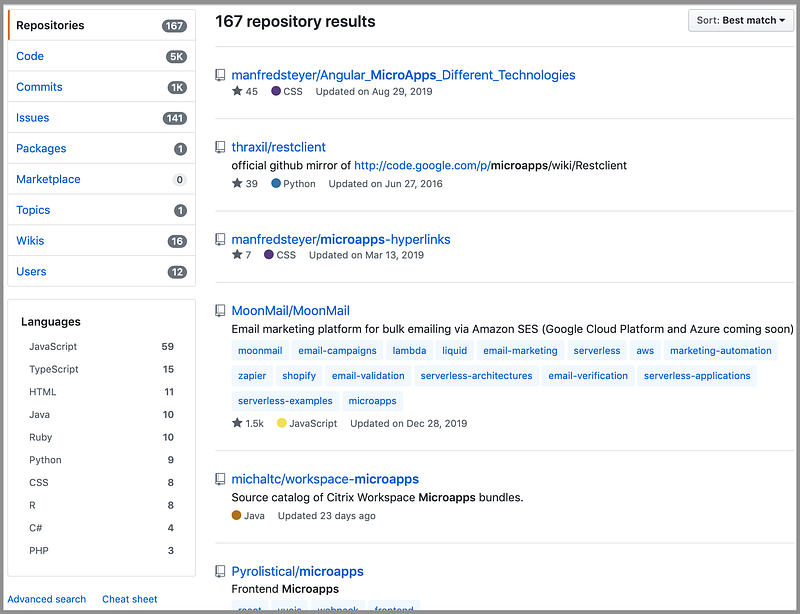
In total, there are about 1000 repositories, with various approaches. Popularity means demand. It also means no conclusion on this subject yet. It is a hard problem, but it is a highly desired solution.
2. Does Your Use Case Fit a Micro-Frontend?
There are five major use cases for micro-frontends:
2.1. The micro-frontend approach targets large scale software
It breaks down a monolithic problem into a few more manageable pieces.
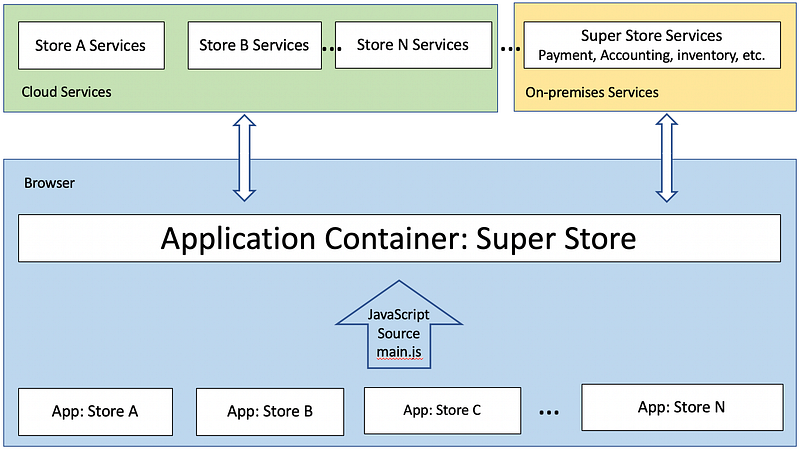
In the following example, a superstore is too large to develop. It makes sense to have an application container, and add one store each time when an individual store (software) is ready.
2.2. The micro-frontend approach is very popular with legacy code
New, cool, powerful frontend technology comes up every day. It is such a headache to deal with obsolete-yet-well-functioning existing code. Wrap it with a micro-frontend, and ship it to the past. Then starting a new technology without baggage is very, very tempting. This model has been repeatedly adopted with Angular.js and Angular 2+.
2.3. The micro-frontend approach meets the need of organization independence
Each team has the autonomy to pick its own way. Within language compatibility, it is free to choose JavaScript or TypeScript, per se.
A team can choose its own repositories, third-party tools, common libraries, CSS techniques, etc. This model is based on team size and style.
2.4. The micro-frontend approach could be selected with less control over the software
This software may come from another organization or even another company.
Despite that it might be a small component, for whatever reason, there is no luxury to host it in a normal way. Plugging this type of software into an application container as a micro-frontend is an easy way.
2.5. The micro-frontend approach might be personal preference
A person may choose this technology simply for the love of that technology. They are willing to try out this technology and do whatever it takes to make it work.
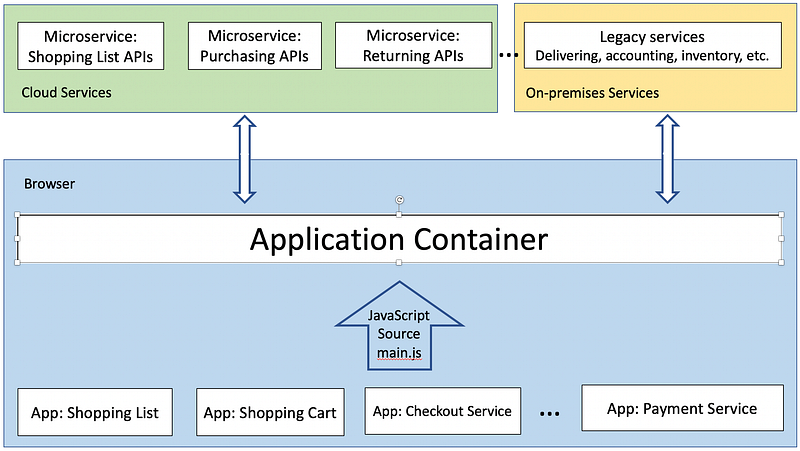
For the following case, regardless of whether there are many proven methods, such as React’s composition pattern, it still can be implemented using the micro-frontend approach.
Does your use case fit any of these scenarios?
3. Do You Need the Benefits of Micro-Frontends?
What are the benefits of micro-frontends?
- The codebase of each micro-frontend becomes smaller. This component approach makes each micro-frontend’s code more coherent. Hence, it achieves the software development goal of decoupling.
- Each micro-frontend can have its own choice of technology and framework. It can be independently implemented, tested, upgraded, updated, and deployed. It provides flexibility to the teams.
- Micro-frontends encourage vertical teams that are structured based on portions of the whole application. A vertical team typically includes feature owners, UX designers, product managers, backend developers, frontend developers, and quality assurance engineers.
Are these benefits important to you?
4. Can You Live With the Drawbacks That Are Inherited From Micro-Frontends?
What are the drawbacks of micro-frontends?
- Micro-frontends are designed for decoupled or loosely-coupled components. If you try to put too many dependencies among them, it may result in a debugging nightmare.
- The plumbing to enable micro-frontends is complicated. Rendering foreign unknown components increases complexity. It requires technical expertise to resolve external loading problems, and the debugging process probably is time-consuming. In addition, you may face issues regarding Single Sign-On (SSO), global CSS, etc.
- Each micro-frontend may have duplicated code or functionality. For example, the React library may be included with each micro-frontend. This increases the bundle size and memory consumption.
- At runtime, it costs extra time to dynamically or lazily load micro-frontends.
- As the user interfaces are designed by multiple teams, UX design might not be consistent across micro-frontends.
Can you live with these drawbacks?
5. What Type of Micro-Frontend Approach Will You Choose?
Among the many approaches that can reasonably be called micro-frontends, Cam Jackson listed five types:
5.1. Server-side template composition
This type of approach renders HTML on the server-side based on URLs. Microapps shows a demo that is composed of six micro-frontends: Root, Angular 1, Hyperapp 0, React 15, Surplus 0, and Vue 2.
It is a simple approach to illustrate the concept. The following setting is part of the webpack server configuration:
5.2. Build-time integration
This type of approach publishes each micro-frontend as a package and then lets the application container build them as library dependencies.
The following is an example of a package.json that is based on Cam Jackon’s micro-frontend demo:
{
  "name": "@feed-me/container",
  "version": "1.0.0",
  "description": "A food delivery web app",
  "dependencies": {
    "@feed-me/browse-restaurants": "^1.2.3",
    "@feed-me/order-food": "^4.5.6",
    "@feed-me/user-profile": "^7.8.9"
  }
}
5.3. Runtime integration via iframes
iframe represents a nested browsing context, embedded in another HTML page. It is the simplest approach to compose applications together with a good degree of isolation for styling and global variables.
Starting from HTML5, iframe can be sandboxed with some degree of security. However, iframe tends to mess up routing, history, and deep-linking.
As an ancient technology, iframe is simple and powerful, yet it is easily abused.
5.4. Runtime integration via JavaScript
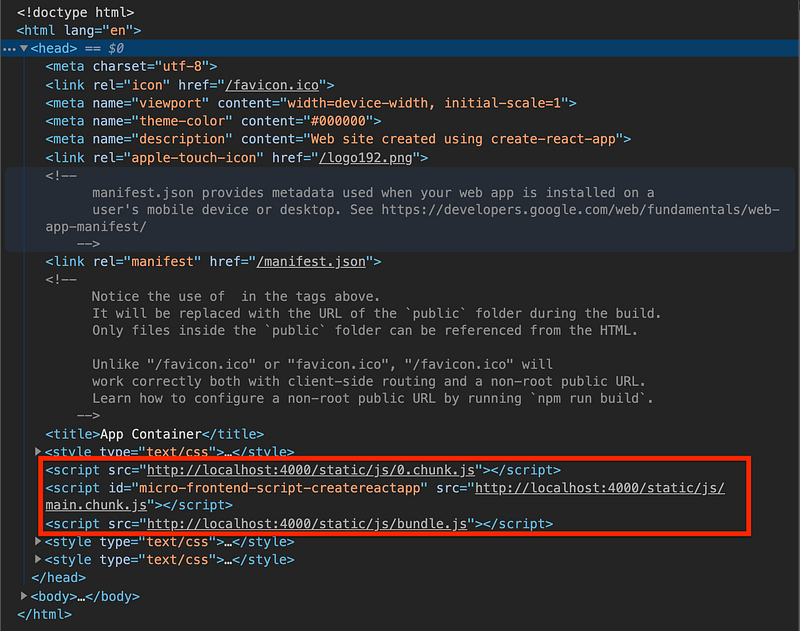
This is the approach that we have taken, improved from Cam Jackson’s algorithm. This is a flexible JavaScript approach.
Each micro-frontend is included on the page using multiple <script> tags, based on progressive loading’s chunk count. Once the last chunk is loaded, a global entry point is called to render the micro-frontend.
5.5. Run-time integration via Web Components
Web Components is a suite of different technologies allowing you to create reusable custom elements. It consists of three main technologies: custom elements, shadow DOM, and HTML templates.
It is a special type of “Runtime integration via JavaScript”. The only difference is that you prefer using the Web Components way. Cam Jackson provides an example for Web Components micro-frontends:
<html>
  <head>
    <title>Feed me!</title>
  </head>
  <body>
    <h1>Welcome to Feed me!</h1>

    <!-- These scripts don't render anything immediately -->
    <!-- Instead they each define a custom element type -->
    <script src="https://browse.example.com/bundle.js"></script>
    <script src="https://order.example.com/bundle.js"></script>
    <script src="https://profile.example.com/bundle.js"></script>

    <div id="micro-frontend-root"></div>

    <script type="text/javascript">
      // These element types are defined by the above scripts
      const webComponentsByRoute = {
        '/': 'micro-frontend-browse-restaurants',
        '/order-food': 'micro-frontend-order-food',
        '/user-profile': 'micro-frontend-user-profile',
      };
      const webComponentType = webComponentsByRoute[window.location.pathname];

      // Having determined the right web component custom element type,
      // we now create an instance of it and attach it to the document
      const root = document.getElementById('micro-frontend-root');
      const webComponent = document.createElement(webComponentType);
      root.appendChild(webComponent);
    </script>
  </body>
</html>
From these choices, which type of micro-frontend approach will you choose?
6. Will You Pick Up an Existing Micro-Frontend Approach?
You can adopt Cam Jackson’s micro-frontend approach as we did. You can come up with your own, homegrown solution, or you can pick up some other approaches.
The following are approaches described in Awesome Micro Frontends:
- Mosaic — Project Mosaic is Zalando’s take on micro-frontends and is a complete framework for it.
- Single-spa: Canopy’s approach to micro-frontends is about composing multiple SPAs.
- OpenComponents: This is an open-source, “batteries included” micro-frontend framework.
- Polymer Project: This is Google’s take on building Web Components that still have some nice tooling.
- NUT: This is a framework born for micro-frontends, which is used internally in Netease. Currently, it supports Vue, React, etc.
- Podium: This is a server-side composition of micro-frontends.
- Piral: This is an open-source framework for next-generation portal applications using micro-frontends built with React.
There is no dominant micro-frontend approach yet. You can always pick up an existing solution to start with.
7. How Many Micro-Frontends Will You Have?
Micro-frontends bring another dimension to how you perform frontend development.
From one end of the spectrum, we have seen the use case to break down an application into two parts: the legacy code and the newly developing code. On the other extreme side, we have also seen the approach to make many little micro-frontends, including global types, time service, i18n service, etc.
There are no strict criteria concerning which way is correct. It is totally based on your use case and the dynamics of your team. You may want to consider the following facts when designing micro-frontends:
- Do you want to compose multiple micro-frontends in the same view?
- Do you want to combine multiple routes into one micro-frontend?
- Do you want to share data and/or states between micro-frontends?
- Do you want to keep micro-frontends at runtime or bundle them into a single application at build-time?
- Can your micro-frontend service run across domains?
- Will your micro-frontend service deploy to the cloud, on-premises, or both?
These facts will impact how you architect your micro-frontends, and how to choose a micro-frontend framework.
The more micro-frontends you have, the less coupling you end up with, assuming that you build modules properly. However, managing each micro-frontend is also an overhead.
The number of micro-frontends needs to be carefully designed.
8. How Do You Structure Micro-Frontend Repositories?
For a micro-frontend project, micro-frontends can be kept in separate repositories, or a monorepo, which is a source control pattern where all of the source code is kept in a single repository.
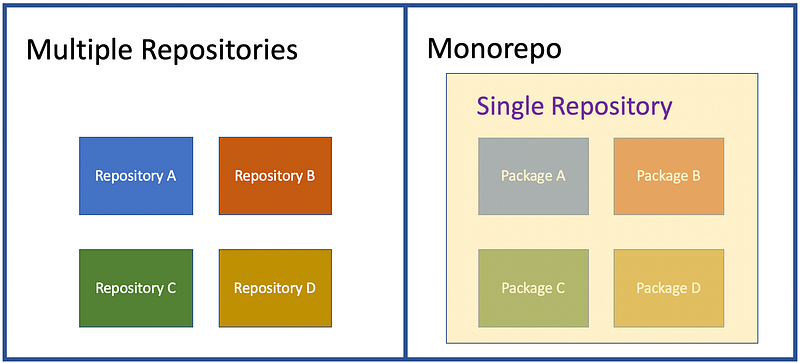
There is also another choice: the combination of both.
We have used all flavors of repositories. Each of them has pros and cons.
The application container, as well as each micro-frontend, is kept in its own repository
For this micro-frontend series, we used two repositories — one for the application container, and one for the micro-frontend. Various branches are used to serve different purposes.
These two repositories are independently managed and free from each other. However, some branches are inter-connected and need to be carefully managed to be matched properly during runtime.
For example, the chunked micro-frontend needs to be launched by our improved version of the application container. For all our work, concurrently provides good assistance.
It aids us in launching multiple executables in one command. Also, the alias that is saved in the Bash profile helps to track which repositories for which testbeds.
The application container and all micro-frontends are kept in a monorepo, such as lerna
The centralized location helps to identify everything in one repository. One package change can be reflected to others without npm link. Many popular open-source projects adopt this pattern, like Babel, React, Parcel, and a lot more.
However, it takes extra effort to set up a monorepo. As each package grows and the package number grows, the maintenance overhead grows as well. It is not fun to search for something and it ends up with a huge list.
Separately, I edited a wrong package.json, because multiple package.json files exist. It is a little ironic that we use micro-frontends to make a monolithic task manageable, but meanwhile, we create a monorepo to be monolithic.
In addition, tooling for monorepo support may be limited. For example, VS Code debugging only works at the top level. We have to go to each package to use this built-in feature.
Combination of multiple repositories and monorepos
We have multiple projects adopting monorepos. We also have multiple projects existing in single repositories.
The nature to aggregate user interface across the company puts us in the situation to utilize multiple repositories and monorepos. So far so good, and we are able to administrate micro-frontends successfully with the combination.
What will be your choice? If you build from scratch, which one will be your preference, multiple repositories or a monorepo?
9. How Many Frameworks Do You Want to Use?
Strictly speaking, React is a library, not a framework. To make it simple, we loosely use the term framework here.
It is said that micro-frontend architecture supports launching applications built with various frameworks.
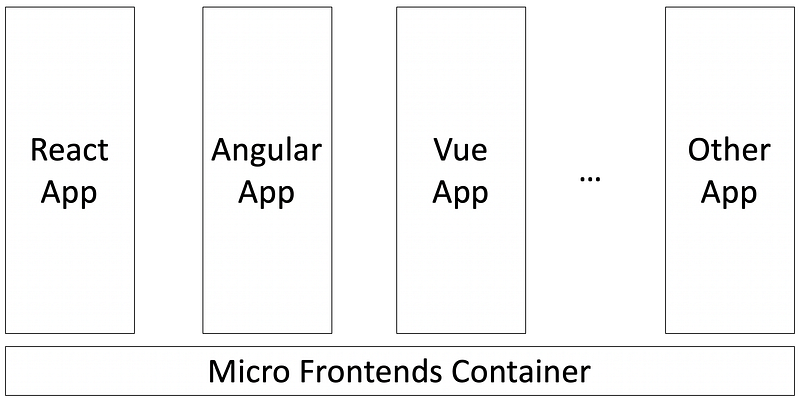
This is a correct statement, but it should be avoided as much as possible. Putting multiple frameworks together means larger footprints, less optimization, more upgrading problems, and more integration issues.
Using a micro-frontend approach to combine multiple applications (frameworks) is always a business requirement to aggregate legacy code as well as different products among teams.
What else can you do to speed up the delivery? Most organizations cannot afford to spend mammoth amounts of time to rewrite a new user interface using newer and better technologies.
A lot of times, we have no other choice but to live with partial or whole existing products. We have seen many cases, such as keeping Angular.js legacy code while moving on to Angular 2+, and keeping Backbone.js legacy code while moving on to React.
If you start from scratch, stick to one chosen framework if possible. There are many architectural deliberations built into a framework.
Should it be Model-View-Controller (MVC), Model-View-Presenter (MVP), or Model-View-View-Model (MVVM)? Is React just the View in MVC? Is Angular MVC or MVVM?
This is only the beginning. There are more questions about dependency management, DOM manipulation, testing, deployment, utilities, etc.
It usually takes a strong team, large community, and many years of improvement to make a solid framework. The rule of thumb is to explore the capabilities of the chosen framework first.
If you have a choice, how many frameworks do you want to use?
10. How Much Experimental Work Can You Afford?
It is always a frontend developer’s dream that all frameworks work together seamlessly.
It is always a business’s vision to have an aggregated user interface that piece all software together with the least amount of work.
We chose Cam Jackson’s algorithm because other solutions do not work for our existing software. We have to do this in a semi-do-it-yourself way. Also, his work is well-received in our community. So far, it works out quite well.
The reality is that you are considering using the micro-frontend approach since you have reached the end of this long article.
Where do you go from here?
You can pick one of the existing solutions and make it work for your use case, or you can go a step further to pioneer some new solutions. With time and expertise, software engineers can do amazing things.
How much experimental work can you afford? The next big thing might just start from this.
Conclusion
The software industry is constantly searching for an easy and powerful solution for user interface development. The micro-frontend approach is one of the promising choices. Happy exploring!
Part of this work is contributed by Jonathan Ma.
Thanks for reading. I hope this was helpful.
Series
This is a series about micro-frontend. The following is a list of other articles:
- “5 Steps to Turn a Random React Application Into a Micro Front End”
- “3 Steps to Turn a Random React Application Into a Micro-Frontend Container”
- “Build Your Own Micro-Frontend Ecosystem”
- “You Don’t Have to Lose Optimization for Micro-Frontends”
- “6 Steps to Create a Multi-Version React Application”
- “Micro Frontends Using Webpack 5 Module Federation”


