
Micro Frontends Using Webpack 5 Module Federation
An in-depth guide on Webpack 5 module federation for micro frontends

Webpack is a well-established static module bundler for modern JavaScript applications. It has more than 57k stars on GitHub and over 13 million weekly downloads from npm registry. It released version 5 on October 10, 2020, which brings a number of changes:
- Improved build performance with Persistent Caching.
- Improved Long-Term Caching with better algorithms and defaults.
- Improved bundle size with better Tree Shaking and Code Generation.
Most importantly, Webpack 5 has a new feature, Module Federation, which allows multiple webpack builds to work together. One application can dynamically run code from another bundle or build, on the client and the server. This is the foundation of micro frontends.
Each webpack build can be a host, which is a container to load other builds. It can also serve as a remote, which is a micro frontend to be loaded. Each application can be a remote and a host that is consumable and consumer of any other federated modules in the system. Bidirectional-hosts, and even omnidirectional-hosts, can be set up easily with webpack configurations.
In addition, module federation does not need to load the main entry point or another entire application. It only needs to load the needed code, i.e. a few kilobytes of code. This approach works with any JavaScript code without redundant packages for shared utilities and components.
Module Federation Examples
Webpack is known for its complexity and steep learning curve. This is the official website talking about module federation.
The page is not long, but it took us a while to grasp the concepts.
Luckily, webpack also provides a lot of examples, such as the module federation examples repository, which showcases how module federation is used. We are going to take a close look at Basic One-Way Example to understand the concepts and the key plugin, ModuleFederationPlugin. Webpack applies plugins to configure features.
These examples can be installed by the following command:
git clone https://github.com/module-federation/module-federation-examples.gitThere are more than 20 examples, which cover applications written in React, Angular, and Vue.
Basic One-Way Example is located at module-federation-examples/basic-host-remote. This example shows a basic host application loading a remote component.
app1is a host application that loadsButtoncomponent from a remote application,app2.app2is a remote standalone application that exposesButtoncomponent.
Module Folders
A local module is a normal module that is part of the current build. A remote module is a module that is not part of the current build, and it is loaded from a so-called container at the runtime.
In this simple example, app1 is a normal module, and app2 is a remote module. The following is the folder structure.
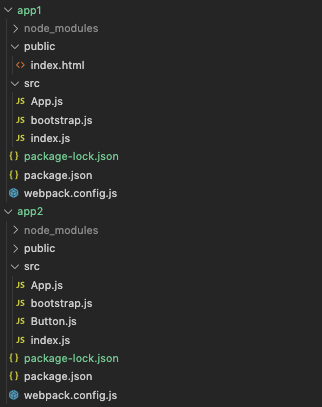
app1 and app2 are almost identical, except app2 has src/Button.js. This file will be used in app2 as a local button, and loaded in app1 as a remote button.
Module Code
We are going over module code in app1 and app2 one by one.
src/App.js
src/App.js is React code that renders two headings and one button.
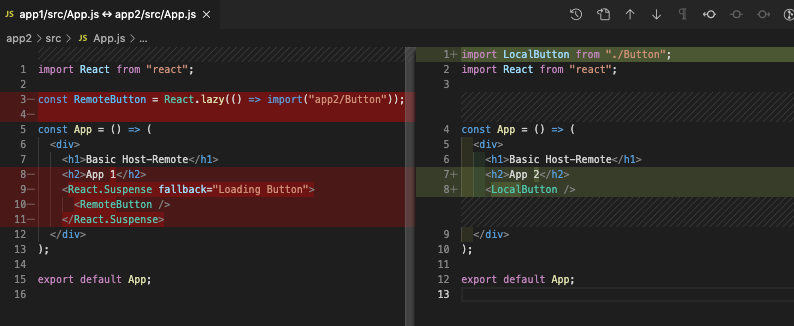
The left side (app1) dynamically loads the remote button at line 3, which is wrapped in <Suspense> at lines 9–11.
The right side (app2) statically loads the local button at line 1 and puts it at line 8.
src/bootstrap.js
This is src/bootstrap.js, which is identical for app1 and app2.
Line 5 renders App to the element with the id, root.
src/index.js
This is src/index.js, which invokes bootstrap.

The left side (app1) statically imports the code at line 1 and executes it at line 2.
The right side (app2) dynamically imports the bootstrap code.
Both ways work similarly; they asynchronously load shared modules in the initial chunk.
It is easier to use the dynamic import way in app2.
In order to make the way in app1 work, it needs three steps:
- Configure the rule in
webpack.config.jsto request the chunk when the bundle is required.
3. Make bootstrap() call, which will wait until the chunk is available.
src/Button.js
src/Button.js only exists in app2, which is used by both app1 and app2.
public/index.html
This is public/index.html, which is identical for app1 and app2.
src/package.json
This is src/package.json, which configures the packages for the module.
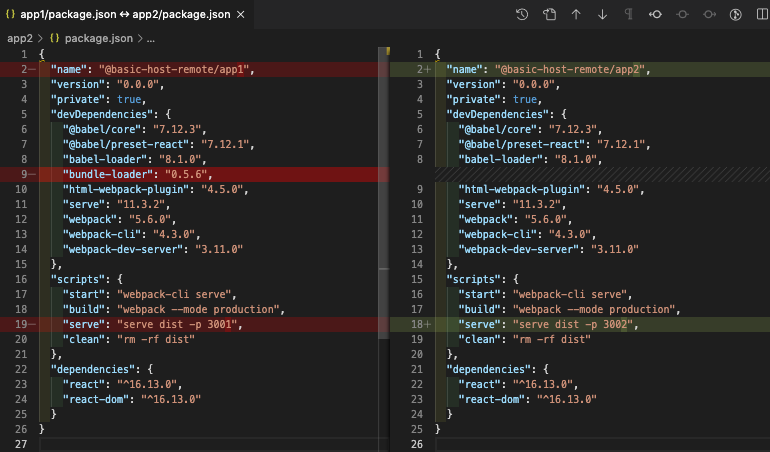
The left side (app1) devDependencies includes bundle-loader at line 9.
The left side (app1) runs the production build at port 3001 (line 19).
The right side (app2) runs the production build at port 3002 (line 18).
Both sides have React version set to ^16.13.0.
src/webpack.config.js
This is src/webpack.config.js, which includes key configuration for module federation.

Both sides define entry to be ./src/index at line 6.
The left side (app1) starts dev server at port 3001 (line 10).
The right side (app2) starts dev server at port 3002 (line 10).
The left side (app1) configures the bundle-loader rule for bootstrap.js (lines 17–23). This is not needed for app2.
The left side (app1) configures how to load remote components (lines 34–49). The key plugin is ModuleFederationPlugin, which defines the following settings as a host app:
name: It defines the container name,app1.remotes: It defines the remote app,app2, onapp2@http://localhost:3002/remoteEntry.js.shared: It defines how modules are shared in the share scope. Here, modules arereactandreact-dom. Only a single version of the shared module is allowed ({ singleton: false }).
The right side (app2) configures how to expose remote components (lines 27–44). The key plugin is ModuleFederationPlugin, which defines the following settings as a remote app:
name: It defines the container name,app2.library.type: It defines the library type,var. The available options arevar,module,assign,this,window,self,global,commonjs,commonjs2,commonjs-module,amd,amd-require,umd,umd2,jsonp, andsystem.library.name: It defines the library name,app2.filename: It defines the exposed filename,remoteEntry.js, using relative path inside theoutput.pathdirectory.exposes: It defines modules to be exposed.app2exposes./Buttonfrom./src/Button.shared: It defines how modules are shared in the share scope. Here, modules arereactandreact-dom. Only a single version of the shared module is allowed ({ singleton: false }).
The following is the interface of SharedConfig:
Run Basic One-Way Example
We have examined all the files. Let’s run it.
- Step 1: In the
module-federation-examples/basic-host-remote/app2directory, executenpm start. Verify it is up athttp://localhost:3002. - Step 2: In the
module-federation-examples/basic-host-remote/app1directory, executenpm start. Verify it is up athttp://localhost:3001.
You may wonder why we start app2 first. It is because app1 is dependent on app2.
What if we start app1 first?
We will see the following error on http://localhost:3001.
Uncaught (in promise) TypeError: react__WEBPACK_IMPORTED_MODULE_0___default(...).lazy is not a function
    at eval (App.js:8)
    at Module../src/App.js (node_modules_babel-loader_lib_index_js_ruleSet_1_rules_1_src_bootstrap_js.js:22)
    at __webpack_require__ (main.js:514)
    at eval (bootstrap.js?./node_modules/babel-loader/lib/index.js??ruleSet[1].rules[1]:6)
    at Module../node_modules/babel-loader/lib/index.js??ruleSet[1].rules[1]!./src/bootstrap.js (node_modules_babel-loader_lib_index_js_ruleSet_1_rules_1_src_bootstrap_js.js:36)
    at __webpack_require__ (main.js:514)
    at eval (bootstrap.js:3)
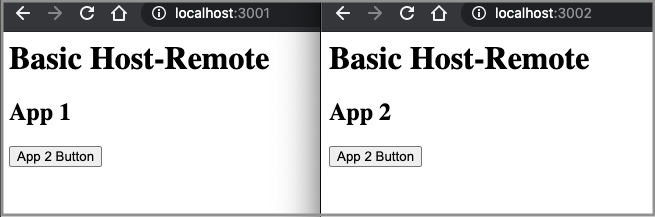
Well, it is still fixable. We need to refresh http://localhost:3001 after app2 starts. This is how bi-direction modules work: Start both apps and then visit the webpages.
As expected, Basic One-Way Example shows a basic host application loading a remote component.
Basic Example Variations
For the basic example, both app1 and app2 use React ^16.13.0. We change app1 to use React 16.5.0, which does not support lazy loading. app2 is changed to React 17.0.1. These changes are made in src/package.json.

React 16.5.0 does not support hooks either. To make it more interesting, we also add a hook in src/Button.js.
Although app1’s React 16.5.0 does not support lazy loading and hooks, it displays the hook button from app2 properly. When the button is clicked, the value increases. The two apps work independently.
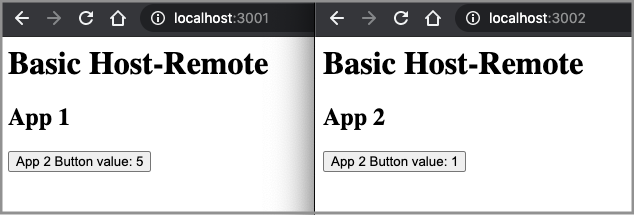
The example works since app1 uses the compiled code from app2. However, there is a warning on the console:
Unsatisfied version 17.0.1 of shared singleton module react-dom (required =16.5.0)What if we change both apps’ shared setting in src/webpack.config.js?
shared: {
  react: { singleton: false },
  "react-dom": { singleton: false },
}
Restart both apps and app1 crashes on http://localhost:3001:
Uncaught (in promise) TypeError: react__WEBPACK_IMPORTED_MODULE_0___default(...).lazy is not a function
    at eval (App.js:8)
    at Module../src/App.js (node_modules_babel-loader_lib_index_js_ruleSet_1_rules_1_src_bootstrap_js.js:22)
    at __webpack_require__ (main.js:514)
    at eval (bootstrap.js?./node_modules/babel-loader/lib/index.js??ruleSet[1].rules[1]:6)
    at Module../node_modules/babel-loader/lib/index.js??ruleSet[1].rules[1]!./src/bootstrap.js (node_modules_babel-loader_lib_index_js_ruleSet_1_rules_1_src_bootstrap_js.js:36)
    at __webpack_require__ (main.js:514)
    at eval (bootstrap.js:3)
What if we change app1 to use React 16.6.0, which supports lazy loading?
Restart app1, and it does not throw the lazy loading error. Instead, it throws an error on the hook call:
Uncaught Error: Invalid hook call. Hooks can only be called inside of the body of a function component. This could happen for one of the following reasons:
1. You might have mismatching versions of React and the renderer (such as React DOM)
2. You might be breaking the Rules of Hooks
3. You might have more than one copy of React in the same app
See https://reactjs.org/link/invalid-hook-call for tips about how to debug and fix this problem.
    at resolveDispatcher (react.development.js:1476)
    at useState (react.development.js:1507)
    at Button (Button.js:10)
    at updateFunctionComponent (react-dom.development.js:13644)
    at mountLazyComponent (react-dom.development.js:13903)
    at beginWork (react-dom.development.js:14475)
    at performUnitOfWork (react-dom.development.js:17014)
    at workLoop (react-dom.development.js:17054)
    at HTMLUnknownElement.callCallback (react-dom.development.js:149)
    at Object.invokeGuardedCallbackDev (react-dom.development.js:199)
What if we change app1 to use React 16.8.0, which supports hooks?
Restart app1, and it throws the same error.
What if we change app1 to use React 17.0.1?
Restart app1, and there is no error and no warning.
When package.json or webpack.config.js is modified, it is recommended to restart the application. It is also a good idea to keep two app settings in sync.
Conclusion
With the power and convenience of Webpack 5, module federation provides a promising way to micro frontends.
We are excited about Webpack 5's module federation. How about you?
Thanks for reading. I hope this was helpful. You can see my other Medium publications here.


