avatarJennifer Fu

Free AI web copilot to create summaries, insights and extended knowledge, download it at here

24499

Abstract

natives to use <code>--force</code> or <code>--legacy-peer-deps</code>.</p><ul><li>The <code>-f</code> or <code>--force</code> argument will force npm to fetch remote resources even if a local copy exists on disk.</li><li>The <code>--legacy-peer-deps</code> argument will ignore all <code>peerDependencies</code> when installing, in the style of npm version 4 through version 6.</li></ul><p id="75f8">The <code>--legacy-peer-deps</code> argument can bypass missing peer dependency issues. It produces the same result as npm 6, except that the output is simplified.</p><div id="d336"><pre> npm <span class="hljs-selector-tag">i</span> <span class="hljs-attr">--legacy-peer-deps</span></pre></div><div id="6e78"><pre><span class="hljs-attribute">added</span> <span class="hljs-number">15</span> packages, and audited <span class="hljs-number">15</span> packages in <span class="hljs-number">4</span>s</pre></div><div id="f815"><pre><span class="hljs-attribute">found</span> <span class="hljs-number">0</span> vulnerabilities</pre></div><p id="aadd">Here is the <code>npm ls</code> result:</p><div id="a892"><pre> npm <span class="hljs-keyword">ls</span> npm7@1<span class="hljs-number">.0</span><span class="hljs-number">.0</span> /Users/fuje/npm7 ├── grommet@2<span class="hljs-number">.16</span><span class="hljs-number">.2</span> └── UNMET DEPENDENCY react@>= <span class="hljs-number">16.12</span><span class="hljs-number">.0</span></pre></div><div id="64e7"><pre><span class="hljs-attribute">npm</span> ERR! code ELSPROBLEMS <span class="hljs-attribute">npm</span> ERR! missing: react@>= <span class="hljs-number">16</span>.<span class="hljs-number">12</span>.<span class="hljs-number">0</span>, required by npm7@<span class="hljs-number">1</span>.<span class="hljs-number">0</span>.<span class="hljs-number">0</span></pre></div><div id="3f1e"><pre>npm <span class="hljs-keyword">ERR</span>! A complete <span class="hljs-keyword">log</span> of this <span class="hljs-keyword">run</span> can be found <span class="hljs-keyword">in</span>: npm <span class="hljs-keyword">ERR</span>! /Users/fuje/.npm/_logs/2020-12-21T22_33_04_827Z-debug.<span class="hljs-keyword">log</span></pre></div><p id="8af3">For missing peer dependency errors, <code>--force</code> is not able to resolve the problem. We could add the missing peer dependencies — this approach will be taken in workspace examples.</p><p id="a5ad">Here we remove the peer dependency, <code>react</code>, from the <code>package.json</code> file.</p> <figure id="1484"> <div> <div>

            <iframe class="gist-iframe" src="/gist/JenniferFuBook/9d12e406a55942bac8ee5ebab1e49b4f.js" allowfullscreen="" frameborder="0" height="undefined" width="undefined">
          </div>
        </div>
    </figure></iframe></div></div></figure><p id="bbe7">Since React is part of grommet’s peer dependencies, it will be installed along with grommet by the <code>--force</code> command:</p><div id="d58b"><pre>$ npm i <span class="hljs-comment">--force</span>

npm WARN <span class="hljs-keyword">using</span> <span class="hljs-comment">--force Recommended protections disabled.</span> npm WARN ERESOLVE overriding peer dependency npm WARN Found: react<span class="hljs-variable">@17</span><span class="hljs-number">.0</span><span class="hljs-number">.1</span> npm WARN node_modules<span class="hljs-operator">/</span>react npm WARN peer react@">= 16.6.1" <span class="hljs-keyword">from</span> grommet<span class="hljs-variable">@2</span><span class="hljs-number">.16</span><span class="hljs-number">.2</span> npm WARN node_modules<span class="hljs-operator">/</span>grommet npm WARN grommet@"^2.16.1" <span class="hljs-keyword">from</span> the root project npm WARN <span class="hljs-number">4</span> more (react<span class="hljs-operator">-</span>dom, styled<span class="hljs-operator">-</span>components, grommet<span class="hljs-operator">-</span>icons, markdown<span class="hljs-operator">-</span><span class="hljs-keyword">to</span><span class="hljs-operator">-</span>jsx) npm WARN npm WARN Could <span class="hljs-keyword">not</span> resolve dependency: npm WARN peer react@">= 15.5.4 < 16 || 16.x" <span class="hljs-keyword">from</span> react<span class="hljs-operator">-</span><span class="hljs-keyword">desc</span><span class="hljs-variable">@4</span><span class="hljs-number">.1</span><span class="hljs-number">.2</span> npm WARN node_modules<span class="hljs-operator">/</span>grommet<span class="hljs-operator">/</span>node_modules<span class="hljs-operator">/</span>react<span class="hljs-operator">-</span><span class="hljs-keyword">desc</span> npm WARN react<span class="hljs-operator">-</span><span class="hljs-keyword">desc</span>@"^4.1.2" <span class="hljs-keyword">from</span> grommet<span class="hljs-variable">@2</span><span class="hljs-number">.16</span><span class="hljs-number">.2</span> npm WARN node_modules<span class="hljs-operator">/</span>grommet npm WARN ERESOLVE overriding peer dependency npm WARN Found: react<span class="hljs-variable">@17</span><span class="hljs-number">.0</span><span class="hljs-number">.1</span> npm WARN node_modules<span class="hljs-operator">/</span>react npm WARN peer react@">= 16.6.1" <span class="hljs-keyword">from</span> grommet<span class="hljs-variable">@2</span><span class="hljs-number">.16</span><span class="hljs-number">.2</span> npm WARN node_modules<span class="hljs-operator">/</span>grommet npm WARN grommet@"^2.16.1" <span class="hljs-keyword">from</span> the root project npm WARN <span class="hljs-number">4</span> more (react<span class="hljs-operator">-</span>dom, styled<span class="hljs-operator">-</span>components, grommet<span class="hljs-operator">-</span>icons, markdown<span class="hljs-operator">-</span><span class="hljs-keyword">to</span><span class="hljs-operator">-</span>jsx) npm WARN npm WARN Could <span class="hljs-keyword">not</span> resolve dependency: npm WARN peer react@">= 15.5.4 < 16 || 16.x" <span class="hljs-keyword">from</span> react<span class="hljs-operator">-</span><span class="hljs-keyword">desc</span><span class="hljs-variable">@4</span><span class="hljs-number">.1</span><span class="hljs-number">.2</span> npm WARN node_modules<span class="hljs-operator">/</span>grommet<span class="hljs-operator">/</span>node_modules<span class="hljs-operator">/</span>react<span class="hljs-operator">-</span><span class="hljs-keyword">desc</span> npm WARN react<span class="hljs-operator">-</span><span class="hljs-keyword">desc</span>@"^4.1.2" <span class="hljs-keyword">from</span> grommet<span class="hljs-variable">@2</span><span class="hljs-number">.16</span><span class="hljs-number">.2</span> npm WARN node_modules<span class="hljs-operator">/</span>grommet</pre></div><div id="5efc"><pre><span class="hljs-attribute">added</span> <span class="hljs-number">59</span> packages, and audited <span class="hljs-number">59</span> packages in <span class="hljs-number">16</span>s</pre></div><div id="b0d9"><pre><span class="hljs-number">1</span> <span class="hljs-keyword">package</span> <span class="hljs-title"></span><span class="hljs-keyword">is</span> looking <span class="hljs-keyword">for</span> funding run npm fund <span class="hljs-keyword">for</span> details</pre></div><div id="0e1d"><pre><span class="hljs-attribute">found</span> <span class="hljs-number">0</span> vulnerabilities</pre></div><p id="1a6d">There is an error for <code>react-desc</code>, because the installed React 17.0.1 is not in the required range of <code>>= 15.5.4 < 16 || 16.x</code>.</p><p id="b82b">The issue is not visible with the default <code>npm ls</code>:</p><div id="5bca"><pre><span class="hljs-variable"> </span>npm ls npm7<span class="hljs-variable">@1</span>.<span class="hljs-number">0.0</span> /Users/fuje/npm7 └── grommet<span class="hljs-variable">@2</span>.<span class="hljs-number">16.2</span></pre></div><p id="c63e">However, the problem is noticeable with <code>npm ls react</code> (see the <code>invalid</code> flag):</p><div id="91c7"><pre> npm ls react npm7<span class="hljs-symbol">@1</span><span class="hljs-number">.0</span><span class="hljs-number">.0</span> /Users/fuje/npm7 └─┬ grommet<span class="hljs-symbol">@2</span><span class="hljs-number">.16</span><span class="hljs-number">.2</span> ├─┬ grommet-icons<span class="hljs-symbol">@4</span><span class="hljs-number">.5</span><span class="hljs-number">.0</span> │ ├─┬ grommet-styles<span class="hljs-symbol">@0</span><span class="hljs-number">.2</span><span class="hljs-number">.0</span> │ │ └── react<span class="hljs-symbol">@17</span><span class="hljs-number">.0</span><span class="hljs-number">.1</span> deduped │ └── react<span class="hljs-symbol">@17</span><span class="hljs-number">.0</span><span class="hljs-number">.1</span> deduped ├─┬ markdown-<span class="hljs-keyword">to</span>-jsx<span class="hljs-symbol">@6</span><span class="hljs-number">.11</span><span class="hljs-number">.4</span> │ └── react<span class="hljs-symbol">@17</span><span class="hljs-number">.0</span><span class="hljs-number">.1</span> deduped ├─┬ react-desc<span class="hljs-symbol">@4</span><span class="hljs-number">.1</span><span class="hljs-number">.2</span> │ └── react<span class="hljs-symbol">@17</span><span class="hljs-number">.0</span><span class="hljs-number">.1</span> deduped invalid ├─┬ react-dom<span class="hljs-symbol">@17</span><span class="hljs-number">.0</span><span class="hljs-number">.1</span> │ └── react<span class="hljs-symbol">@17</span><span class="hljs-number">.0</span><span class="hljs-number">.1</span> deduped ├── react<span class="hljs-symbol">@17</span><span class="hljs-number">.0</span><span class="hljs-number">.1</span> └─┬ styled-components<span class="hljs-symbol">@5</span><span class="hljs-number">.2</span><span class="hljs-number">.1</span> └── react<span class="hljs-symbol">@17</span><span class="hljs-number">.0</span><span class="hljs-number">.1</span> deduped</pre></div><div id="b0bd"><pre><span class="hljs-attribute">npm</span> ERR! code ELSPROBLEMS <span class="hljs-attribute">npm</span> ERR! invalid: react@<span class="hljs-number">17</span>.<span class="hljs-number">0</span>.<span class="hljs-number">1</span> /Users/fuje/npm7/node_modules/react</pre></div><div id="5411"><pre>npm <span class="hljs-keyword">ERR</span>! A complete <span class="hljs-keyword">log</span> of this <span class="hljs-keyword">run</span> can be found <span class="hljs-keyword">in</span>: npm <span class="hljs-keyword">ERR</span>! /Users/fuje/.npm/_logs/2020-12-21T22_51_04_652Z-debug.<span class="hljs-keyword">log</span></pre></div><p id="8949">npm 7 uses the Arborist algorithm to generate the <code>node_modules</code> tree, which is a logical graph of dependencies. This approach makes peer dependencies a first-class concept. The Arborist algorithm is an enabler for peer dependencies to be installed automatically and correctly. This installation requires the validity of the package tree.</p><h1 id="3013">Package and Yarn Lock Files</h1><p id="998f">With npm 7, <code>package.json</code> files are no longer mutated to include extra metadata. Instead, the extra metadata are stored in lock files.</p><p id="75c7">The following is the difference between npm 6's <code>package-lock.json</code> (115 lines) and npm 7's <code>package-lock.json</code> (1,087 lines). At a glance, a lot of extra information is added by npm 7, where <code>package-lock.json</code> contains everything that npm needs to fully build the package tree.</p><figure id="81ba"><img src="https://cdn-images-1.readmedium.com/v2/resize:fit:800/1*2u0iOzUu3C-HsRp5FRaeTQ.png"><figcaption></figcaption></figure><p id="a5f0"><code>package-lock.json</code> files generated by npm 7 have a newer format, using <code>"lockfileVersion": 2</code> (line 4 in the above screenshot). This format is backward-compatible with npm 6 format using <code>"lockfileVersion": 1</code>, but older npm clients will print a warning about the version mismatch.</p><p id="f4cb">In addition to <code>package-lock.json</code> files, <code>yarn.lock</code> files can be used as the source of package metadata and resolution guidance, if available. Prior to npm 7, <code>yarn.lock</code> files were ignored.</p><p id="3214">However, <a href="https://blog.npmjs.org/post/621733939456933888/npm-v7-series-why-keep-package-lockjson"><code>yarn.l</code>ock files do not re<code>place package-</code>lock.json files</a>. Since <code>yarn.lock</code> files do not fully address npm’s needs, relying on them exclusively would limit the ability to produce optimal package installs or add features in the future.</p><h1 id="00b0">Workspaces</h1><p id="0391"><a href="https://github.com/npm/rfcs/blob/latest/implemented/0026-workspaces.md">Workspace support is a major feature</a> in npm 7. It provides a method to manage multiple packages from within a singular top-level root package. npm reused the term <code>workspace</code>, which has been used by Yarn and pnpm for a similar feature. npm 7 is workspace-aware. It will properly install dependencies without duplicating the common ones. This workspace-aware feature reduces duplicated packages for <a href="https://readmedium.com/10-decision-points-for-micro-frontends-approach-4ebb4b59f40">micro front-end approaches</a>. Potentially, workspaces can radically improve the performance and memory usage with large combined projects of multiple shared dependencies.</p><p id="9a5c">The optional <code>workspaces</code> field in <code>package.json</code> is an array of file patterns that describes locations for each workspace that needs to be symlinked to the top level <code>node_modules</code>. This concept has been applied to <a href="https://github.com/lerna/lerna">lerna</a>, a tool to manage JavaScript projects with multiple packages. The <code>workspaces</code> location can be direct paths or globs (filenames with wildcard characters).</p><p id="9c8f">We are giving a few examples to demonstrate workspaces. These examples are operated on the npm 7 window.</p><p id="5cbd">In the following <code>package.json</code> file, <code>workspace-a</code> is defined at lines 12 - 14.</p> <figure id="4ed4"> <div> <div>

            <iframe class="gist-iframe" src="/gist/JenniferFuBook/c00f1f5e18e8812c290e1be5aaaa0ce1.js" allowfullscreen="" frameborder="0" height="undefined" width="undefined">
          </div>
        </div>
    </figure></iframe></div></div></figure><p id="f28f"><code>workspace-a</code> is a workspace/directory created at the root level. Inside the <code>workspace-a</code> directory, there is a <code>package.json</code> file:</p>
    <figure id="a4f5">
        <div>
          <div>
            
            <iframe class="gist-iframe" src="/gist/JenniferFuBook/2e200cc7c7fba62c72713d3e9c5da912.js" allowfullscreen="" frameborder="0" height="undefined" width="undefined">
          </div>
        </div>
    </figure></iframe></div></div></figure><p id="909c">At the root level, we execute <code>install i</code>.</p><div id="74ba"><pre>$ <span class="hljs-built_in">npm</span> i</pre></div><div id="d2c1"><pre><span class="hljs-attribute">added</span> <span class="hljs-number">5</span> packages, and audited <span class="hljs-number">6</span> packages in <span class="hljs-number">2</span>s</pre></div><div id="80ac"><pre><span class="hljs-attribute">found</span> <span class="hljs-number">0</span> vulnerabilities</pre></div><p id="6585">Five packages, including React, are installed:</p><div id="e21d"><pre><span class="hljs-variable">$ </span>npm ls

npm7<span class="hljs-variable">@1</span>.<span class="hljs-number">0.0</span> /Users/fuje/npm7 └── workspace-a<span class="hljs-variable">@1</span>.<span class="hljs-number">0.0</span> -> <span class="hljs-regexp">/Users/fuje</span><span class="hljs-regexp">/npm7/workspace</span>-a</pre></div><div id="0b37"><pre><span class="hljs-variable"> </span>npm ls react npm7<span class="hljs-variable">@1</span>.<span class="hljs-number">0.0</span> /Users/fuje/npm7 └─┬ workspace-a<span class="hljs-variable">@1</span>.<span class="hljs-number">0.0</span> -&gt; <span class="hljs-regexp">/Users/fuje</span><span class="hljs-regexp">/npm7/workspace</span>-a └── react<span class="hljs-variable">@17</span>.<span class="hljs-number">0.1</span></pre></div><div id="4b6d"><pre> ls -al node_modules total 8 drwxr-xr-x <span class="hljs-number"> 9 </span>fuje staff <span class="hljs-number"> 288 </span>Dec<span class="hljs-number"> 21 </span>23:26 . drwxr-xr-x <span class="hljs-number"> 6 </span>fuje staff <span class="hljs-number"> 192 </span>Dec<span class="hljs-number"> 21 </span>23:26 .. drwxr-xr-x <span class="hljs-number"> 3 </span>fuje staff <span class="hljs-number"> 96 </span>Dec<span class="hljs-number"> 21 </span>23:26 .bin -rw-r--r-- <span class="hljs-number"> 1 </span>fuje staff <span class="hljs-number"> 1675 </span>Dec<span class="hljs-number"> 21 </span>23:26 .package-lock.json drwxr-xr-x <span class="hljs-number"> 7 </span>fuje staff <span class="hljs-number"> 224 </span>Dec<span class="hljs-number"> 21 </span>23:26 js-tokens drwxr-xr-x <span class="hljs-number"> 10 </span>fuje staff <span class="hljs-number"> 320 </span>Dec<span class="hljs-number"> 21 </span>23:26 loose-envify drwxr-xr-x <span class="hljs-number"> 6 </span>fuje staff <span class="hljs-number"> 192 </span>Dec<span class="hljs-number"> 21 </span>23:26 object-assign drwxr-xr-x <span class="hljs-number"> 11 </span>fuje staff <span class="hljs-number"> 352 </span>Dec<span class="hljs-number"> 21 </span>23:26 react lrwxr-xr-x <span class="hljs-number"> 1 </span>fuje staff <span class="hljs-number"> 14 </span>Dec<span class="hljs-number"> 21 </span>23:26 workspace-a -> ../workspace-a</pre></div><p id="6931">The last line shows that <code>node_modules/workspace-a</code> symlinks to <code>workspace-a</code>.</p><p id="baf8">Here is the directory structure:</p><figure id="addb"><img src="https://cdn-images-1.readmedium.com/v2/resize:fit:800/1*cXPYdF44GqSFc6RYkVLH5Q.png"><figcaption></figcaption></figure><p id="1f79">What if we create a directory, <code>packages</code>, and move <code>workspace-a</code> inside it?</p><p id="3ac2">Here is the root-level <code>package.json</code> file, which will pick up all workspaces inside the <code>packages</code> directory.</p><div id="51b3"><pre>{ <span class="hljs-string">"name"</span>: <span class="hljs-string">"npm7"</span>, <span class="hljs-string">"version"</span>: <span class="hljs-string">"1.0.0"</span>, <span class="hljs-string">"description"</span>: <span class="hljs-string">""</span>, <span class="hljs-string">"main"</span>: <span class="hljs-string">"index.js"</span>, <span class="hljs-string">"scripts"</span>: { <span class="hljs-string">"test"</span>: <span class="hljs-string">"echo "</span><span class="hljs-keyword">Error</span>: <span class="hljs-keyword">no</span> <span class="hljs-keyword">test</span> specified<span class="hljs-string">" && exit 1"</span> }, <span class="hljs-string">"keywords"</span>: [], <span class="hljs-string">"author"</span>: <span class="hljs-string">""</span>, <span class="hljs-string">"license"</span>: <span class="hljs-string">"ISC"</span>, <span class="hljs-string">"workspaces"</span>: [ <span class="hljs-string">"packages/*"</span> ] }</pre></div><p id="6c0d">Run the following commands after executing <code>install i</code>:</p><div id="e68d"><pre><span class="hljs-variable"> </span>npm ls npm7<span class="hljs-variable">@1</span>.<span class="hljs-number">0.0</span> /Users/fuje/npm7 └── workspace-a<span class="hljs-variable">@1</span>.<span class="hljs-number">0.0</span> -&gt; <span class="hljs-regexp">/Users/fuje</span><span class="hljs-regexp">/npm7/packages</span><span class="hljs-regexp">/workspace-a</span></pre></div><div id="1080"><pre> npm <span class="hljs-keyword">ls</span> react npm7@1<span class="hljs-number">.0</span><span class="hljs-number">.0</span> /Users/fuje/npm7 └─┬ <span class="hljs-keyword">workspace</span>-a@1<span class="hljs-number">.0</span><span class="hljs-number">.0</span> -> /Users/fuje/npm7/packages/<span class="hljs-keyword">workspace</span>-a └── react@17<span class="hljs-number">.0</span><span class="hljs-number">.1</span></pre></div><div id="c673"><pre>$ ls -al node_modules total 8 drwxr-xr-x <span class="hljs-number"> 9 </span>fuje staff <span class="hljs-number"> 288 </span>Dec<span class="hljs-number"> 21 </span>23:34 . drwxr-xr-x <span class="hljs-number"> 6 </span>fuje staff <span class="hljs-number"> 192 </span>Dec<span class="hljs-number"> 21 </span>23:34 .. drwxr-xr-x <span class="hljs-number"> 3 </span>fuje staff <span class="hljs-number"> 96 </span>Dec<span class="hljs-number"> 21 </span>23:34 .bin -rw-r--r-- <span class="hljs-number"> 1 </span>fuje staff <span class="hljs-number"> 1693 </span>Dec<span class="hljs-number"> 21 </span>23:34 .package-lock.json drwxr-xr-x <span class="hljs-number"> 7 </span>fuje staff <span class="hljs-number"> 224 </span>Dec<span class="hljs-number"> 21 </span>23:34 js-tokens drwxr-xr-x <span class="hljs-number"> 10 </span>fuje staff <span class="hljs-number"> 320 </span>Dec<span class="hljs-number"> 21 </span>23:34 loose-envify drwxr-xr-x <span class="hljs-number"> 6 </span>fuje staff <span class="hljs-number"> 192 </span>Dec<span class="hljs-number"> 21 </span>23:34 object-assign drwxr-xr-x <span class="hljs-number"> 11 </span>fuje staff <span class="hljs-number"> 352 </span>Dec<span class="hljs-number"> 21 </span>23:34 react lrwxr-xr-x <span class="hljs-number"> 1 </span>fuje staff <span class="hljs-number"> 23 </span>Dec<span class="hljs-number"> 21 </span>23:34 workspace-a -> ../packages/workspace-a</pre></div><p id="b6cc">In the above output, one copy of React is installed inside the <code>node_modules</code> directory.</p><p id="d6f2">The following is the updated directory structure:</p><figure id="c943"><img src="https://cdn-images-1.readmedium.com/v2/resize:fit:800/1*W4OWJNgzcoTWvVWS1OT_Qg.png"><figcaption></figcaption></figure><p id="25c0">What if we create another workspace, <code>workspace-b</code>, inside the <code>packages</code> directory?</p><p id="689c">Inside the <code>workspace-b</code> directory, there is a <code>package.json</code> file that uses the same version of React as the workspace, <code>workspace-a</code>.</p> <figure id="c129"> <div> <div>

            <iframe class="gist-iframe" src="/gist/JenniferFuBook/ba1d065f171dfe052bc85129641431e1.js" allowfullscreen="" frameborder="0" height="undefined" width="undefined">
          </div>
        </div>
    </figure></iframe></div></div></figure><p id="fdea">Run the following commands after executing <code>install i</code>:</p><div id="4f61"><pre>$ npm <span class="hljs-keyword">ls</span>

npm7@1<span class="hljs-number">.0</span><span class="hljs-number">.0</span> /Users/fuje/npm7 ├── <span class="hljs-keyword">workspace</span>-a@1<span class="hljs-number">.0</span><span class="hljs-number">.0</span> -> /Users/fuje/npm7/packages/<span class="hljs-keyword">workspace</span>-a └── <span class="hljs-keyword">workspace</span>-b@1<span class="hljs-number">.0</span><span class="hljs-number">.0</span> -> /Users/fuje/npm7/packages/<span class="hljs-keyword">workspace</span>-b</pre></div><div id="4c45"><pre> npm <span class="hljs-keyword">ls</span> react npm7@1<span class="hljs-number">.0</span><span class="hljs-number">.0</span> /Users/fuje/npm7 ├─┬ <span class="hljs-keyword">workspace</span>-a@1<span class="hljs-number">.0</span><span class="hljs-number">.0</span> -&gt; /Users/fuje/npm7/packages/<span class="hljs-keyword">workspace</span>-a │ └── react@17<span class="hljs-number">.0</span><span class="hljs-number">.1</span> └─┬ <span class="hljs-keyword">workspace</span>-b@1<span class="hljs-number">.0</span><span class="hljs-number">.0</span> -&gt; /Users/fuje/npm7/packages/<span class="hljs-keyword">workspace</span>-b └── react@17<span class="hljs-number">.0</span><span class="hljs-number">.1</span> deduped</pre></div><div id="f70f"><pre> ls -al node_modules total 8 drwxr-xr-x <span class="hl

Options

js-number"> 10 </span>fuje staff <span class="hljs-number"> 320 </span>Dec<span class="hljs-number"> 21 </span>23:41 . drwxr-xr-x <span class="hljs-number"> 6 </span>fuje staff <span class="hljs-number"> 192 </span>Dec<span class="hljs-number"> 21 </span>23:41 .. drwxr-xr-x <span class="hljs-number"> 3 </span>fuje staff <span class="hljs-number"> 96 </span>Dec<span class="hljs-number"> 21 </span>23:41 .bin -rw-r--r-- <span class="hljs-number"> 1 </span>fuje staff <span class="hljs-number"> 1941 </span>Dec<span class="hljs-number"> 21 </span>23:41 .package-lock.json drwxr-xr-x <span class="hljs-number"> 7 </span>fuje staff <span class="hljs-number"> 224 </span>Dec<span class="hljs-number"> 21 </span>23:41 js-tokens drwxr-xr-x <span class="hljs-number"> 10 </span>fuje staff <span class="hljs-number"> 320 </span>Dec<span class="hljs-number"> 21 </span>23:41 loose-envify drwxr-xr-x <span class="hljs-number"> 6 </span>fuje staff <span class="hljs-number"> 192 </span>Dec<span class="hljs-number"> 21 </span>23:41 object-assign drwxr-xr-x <span class="hljs-number"> 11 </span>fuje staff <span class="hljs-number"> 352 </span>Dec<span class="hljs-number"> 21 </span>23:41 react lrwxr-xr-x <span class="hljs-number"> 1 </span>fuje staff <span class="hljs-number"> 23 </span>Dec<span class="hljs-number"> 21 </span>23:41 workspace-a -> ../packages/workspace-a lrwxr-xr-x <span class="hljs-number"> 1 </span>fuje staff <span class="hljs-number"> 23 </span>Dec<span class="hljs-number"> 21 </span>23:41 workspace-b -> ../packages/workspace-b</pre></div><p id="4801">In the above output, [email protected] is deduped. Still, one copy of React is installed inside the <code>node_modules</code> directory.</p><p id="1a2e">The following is the updated directory structure:</p><figure id="9fc6"><img src="https://cdn-images-1.readmedium.com/v2/resize:fit:800/1*M2bS-fNv3DdsP8mkqpeUMw.png"><figcaption></figcaption></figure><p id="c480">What if we create the third workspace, <code>workspace-c</code>, inside the <code>packages</code> directory?</p><p id="6f15">Inside the <code>workspace-c</code> directory, there is a <code>package.json</code> file that uses grommet along with its peer dependencies, including a different version of React.</p> <figure id="19db"> <div> <div>

            <iframe class="gist-iframe" src="/gist/JenniferFuBook/b303cb4aa7ec1b23ea8f16fa5018d82d.js" allowfullscreen="" frameborder="0" height="undefined" width="undefined">
          </div>
        </div>
    </figure></iframe></div></div></figure><p id="bb4a">Run the following commands after executing <code>install i</code>:</p><div id="3464"><pre>$ npm <span class="hljs-keyword">ls</span>

npm7@1<span class="hljs-number">.0</span><span class="hljs-number">.0</span> /Users/fuje/npm7 ├── scheduler@0<span class="hljs-number">.19</span><span class="hljs-number">.1</span> extraneous ├── <span class="hljs-keyword">workspace</span>-a@1<span class="hljs-number">.0</span><span class="hljs-number">.0</span> -> /Users/fuje/npm7/packages/<span class="hljs-keyword">workspace</span>-a ├── <span class="hljs-keyword">workspace</span>-b@1<span class="hljs-number">.0</span><span class="hljs-number">.0</span> -> /Users/fuje/npm7/packages/<span class="hljs-keyword">workspace</span>-b └── <span class="hljs-keyword">workspace</span>-c@1<span class="hljs-number">.0</span><span class="hljs-number">.0</span> -> /Users/fuje/npm7/packages/<span class="hljs-keyword">workspace</span>-c</pre></div><div id="1fa0"><pre><span class="hljs-attribute">npm</span> ERR! code ELSPROBLEMS <span class="hljs-attribute">npm</span> ERR! extraneous: scheduler@<span class="hljs-number">0</span>.<span class="hljs-number">19</span>.<span class="hljs-number">1</span> /Users/fuje/npm7/node_modules/scheduler</pre></div><div id="3e1b"><pre>npm <span class="hljs-keyword">ERR</span>! A complete <span class="hljs-keyword">log</span> of this <span class="hljs-keyword">run</span> can be found <span class="hljs-keyword">in</span>: npm <span class="hljs-keyword">ERR</span>! /Users/fuje/.npm/_logs/2020-12-21T23_54_29_774Z-debug.<span class="hljs-keyword">log</span></pre></div><div id="d7c1"><pre> npm <span class="hljs-keyword">ls</span> react npm7@1<span class="hljs-number">.0</span><span class="hljs-number">.0</span> /Users/fuje/npm7 ├─┬ <span class="hljs-keyword">workspace</span>-a@1<span class="hljs-number">.0</span><span class="hljs-number">.0</span> -&gt; /Users/fuje/npm7/packages/<span class="hljs-keyword">workspace</span>-a │ └── react@17<span class="hljs-number">.0</span><span class="hljs-number">.1</span> ├─┬ <span class="hljs-keyword">workspace</span>-b@1<span class="hljs-number">.0</span><span class="hljs-number">.0</span> -&gt; /Users/fuje/npm7/packages/<span class="hljs-keyword">workspace</span>-b │ └── react@17<span class="hljs-number">.0</span><span class="hljs-number">.1</span> └─┬ <span class="hljs-keyword">workspace</span>-c@1<span class="hljs-number">.0</span><span class="hljs-number">.0</span> -&gt; /Users/fuje/npm7/packages/<span class="hljs-keyword">workspace</span>-c ├─┬ grommet@2<span class="hljs-number">.16</span><span class="hljs-number">.2</span> │ ├─┬ grommet-icons@4<span class="hljs-number">.5</span><span class="hljs-number">.0</span> │ │ ├─┬ grommet-styles@0<span class="hljs-number">.2</span><span class="hljs-number">.0</span> │ │ │ └── react@16<span class="hljs-number">.14</span><span class="hljs-number">.0</span> deduped │ │ └── react@16<span class="hljs-number">.14</span><span class="hljs-number">.0</span> deduped │ ├─┬ markdown-to-jsx@6<span class="hljs-number">.11</span><span class="hljs-number">.4</span> │ │ └── react@17<span class="hljs-number">.0</span><span class="hljs-number">.1</span> │ ├─┬ react-desc@4<span class="hljs-number">.1</span><span class="hljs-number">.2</span> │ │ └── react@16<span class="hljs-number">.14</span><span class="hljs-number">.0</span> deduped │ └── react@16<span class="hljs-number">.14</span><span class="hljs-number">.0</span> deduped ├─┬ react-dom@16<span class="hljs-number">.14</span><span class="hljs-number">.0</span> │ └── react@16<span class="hljs-number">.14</span><span class="hljs-number">.0</span> deduped ├── react@16<span class="hljs-number">.14</span><span class="hljs-number">.0</span> └─┬ styled-components@5<span class="hljs-number">.2</span><span class="hljs-number">.1</span> └── react@16<span class="hljs-number">.14</span><span class="hljs-number">.0</span> deduped</pre></div><div id="b741"><pre> ls -al node_modules total 48 drwxr-xr-x <span class="hljs-number"> 41 </span>fuje staff <span class="hljs-number"> 1312 </span>Dec<span class="hljs-number"> 22 </span>00:04 . drwxr-xr-x <span class="hljs-number"> 6 </span>fuje staff <span class="hljs-number"> 192 </span>Dec<span class="hljs-number"> 22 </span>00:04 .. drwxr-xr-x <span class="hljs-number"> 5 </span>fuje staff <span class="hljs-number"> 160 </span>Dec<span class="hljs-number"> 22 </span>00:04 .bin -rw-r--r-- <span class="hljs-number"> 1 </span>fuje staff <span class="hljs-number"> 23615 </span>Dec<span class="hljs-number"> 22 </span>00:04 .package-lock.json drwxr-xr-x <span class="hljs-number"> 16 </span>fuje staff <span class="hljs-number"> 512 </span>Dec<span class="hljs-number"> 22 </span>00:04 @babel drwxr-xr-x <span class="hljs-number"> 6 </span>fuje staff <span class="hljs-number"> 192 </span>Dec<span class="hljs-number"> 22 </span>00:04 @emotion drwxr-xr-x <span class="hljs-number"> 6 </span>fuje staff <span class="hljs-number"> 192 </span>Dec<span class="hljs-number"> 22 </span>00:04 ansi-styles drwxr-xr-x <span class="hljs-number"> 6 </span>fuje staff <span class="hljs-number"> 192 </span>Dec<span class="hljs-number"> 22 </span>00:04 babel-plugin-syntax-jsx drwxr-xr-x <span class="hljs-number"> 9 </span>fuje staff <span class="hljs-number"> 288 </span>Dec<span class="hljs-number"> 22 </span>00:04 camelize drwxr-xr-x <span class="hljs-number"> 9 </span>fuje staff <span class="hljs-number"> 288 </span>Dec<span class="hljs-number"> 22 </span>00:04 chalk drwxr-xr-x <span class="hljs-number"> 9 </span>fuje staff <span class="hljs-number"> 288 </span>Dec<span class="hljs-number"> 22 </span>00:04 color-convert drwxr-xr-x <span class="hljs-number"> 9 </span>fuje staff <span class="hljs-number"> 288 </span>Dec<span class="hljs-number"> 22 </span>00:04 color-name drwxr-xr-x <span class="hljs-number"> 7 </span>fuje staff <span class="hljs-number"> 224 </span>Dec<span class="hljs-number"> 22 </span>00:04 css-color-keywords drwxr-xr-x <span class="hljs-number"> 7 </span>fuje staff <span class="hljs-number"> 224 </span>Dec<span class="hljs-number"> 22 </span>00:04 css-to-react-native drwxr-xr-x <span class="hljs-number"> 6 </span>fuje staff <span class="hljs-number"> 192 </span>Dec<span class="hljs-number"> 22 </span>00:04 debug drwxr-xr-x <span class="hljs-number"> 6 </span>fuje staff <span class="hljs-number"> 192 </span>Dec<span class="hljs-number"> 22 </span>00:04 escape-string-regexp drwxr-xr-x <span class="hljs-number"> 7 </span>fuje staff <span class="hljs-number"> 224 </span>Dec<span class="hljs-number"> 22 </span>00:04 globals drwxr-xr-x <span class="hljs-number"> 6 </span>fuje staff <span class="hljs-number"> 192 </span>Dec<span class="hljs-number"> 22 </span>00:04 has-flag drwxr-xr-x <span class="hljs-number"> 9 </span>fuje staff <span class="hljs-number"> 288 </span>Dec<span class="hljs-number"> 22 </span>00:04 hoist-non-react-statics drwxr-xr-x <span class="hljs-number"> 7 </span>fuje staff <span class="hljs-number"> 224 </span>Dec<span class="hljs-number"> 22 </span>00:04 js-tokens drwxr-xr-x <span class="hljs-number"> 8 </span>fuje staff <span class="hljs-number"> 256 </span>Dec<span class="hljs-number"> 22 </span>00:04 jsesc drwxr-xr-x <span class="hljs-number"> 637 </span>fuje staff <span class="hljs-number"> 20384 </span>Dec<span class="hljs-number"> 22 </span>00:04 lodash drwxr-xr-x <span class="hljs-number"> 10 </span>fuje staff <span class="hljs-number"> 320 </span>Dec<span class="hljs-number"> 22 </span>00:04 loose-envify drwxr-xr-x <span class="hljs-number"> 7 </span>fuje staff <span class="hljs-number"> 224 </span>Dec<span class="hljs-number"> 22 </span>00:04 markdown-to-jsx drwxr-xr-x <span class="hljs-number"> 6 </span>fuje staff <span class="hljs-number"> 192 </span>Dec<span class="hljs-number"> 22 </span>00:04 ms drwxr-xr-x <span class="hljs-number"> 6 </span>fuje staff <span class="hljs-number"> 192 </span>Dec<span class="hljs-number"> 22 </span>00:04 object-assign drwxr-xr-x <span class="hljs-number"> 12 </span>fuje staff <span class="hljs-number"> 384 </span>Dec<span class="hljs-number"> 22 </span>00:04 polished drwxr-xr-x <span class="hljs-number"> 6 </span>fuje staff <span class="hljs-number"> 192 </span>Dec<span class="hljs-number"> 22 </span>00:04 postcss-value-parser drwxr-xr-x <span class="hljs-number"> 15 </span>fuje staff <span class="hljs-number"> 480 </span>Dec<span class="hljs-number"> 22 </span>00:04 prop-types drwxr-xr-x <span class="hljs-number"> 11 </span>fuje staff <span class="hljs-number"> 352 </span>Dec<span class="hljs-number"> 22 </span>00:04 react drwxr-xr-x <span class="hljs-number"> 9 </span>fuje staff <span class="hljs-number"> 288 </span>Dec<span class="hljs-number"> 22 </span>00:04 react-is drwxr-xr-x <span class="hljs-number"> 7 </span>fuje staff <span class="hljs-number"> 224 </span>Dec<span class="hljs-number"> 22 </span>00:04 regenerator-runtime drwxr-xr-x <span class="hljs-number"> 12 </span>fuje staff <span class="hljs-number"> 384 </span>Dec<span class="hljs-number"> 22 </span>00:04 scheduler drwxr-xr-x <span class="hljs-number"> 8 </span>fuje staff <span class="hljs-number"> 256 </span>Dec<span class="hljs-number"> 22 </span>00:04 shallowequal drwxr-xr-x <span class="hljs-number"> 9 </span>fuje staff <span class="hljs-number"> 288 </span>Dec<span class="hljs-number"> 22 </span>00:04 source-map drwxr-xr-x <span class="hljs-number"> 7 </span>fuje staff <span class="hljs-number"> 224 </span>Dec<span class="hljs-number"> 22 </span>00:04 supports-color drwxr-xr-x <span class="hljs-number"> 6 </span>fuje staff <span class="hljs-number"> 192 </span>Dec<span class="hljs-number"> 22 </span>00:04 to-fast-properties drwxr-xr-x <span class="hljs-number"> 7 </span>fuje staff <span class="hljs-number"> 224 </span>Dec<span class="hljs-number"> 22 </span>00:04 unquote lrwxr-xr-x <span class="hljs-number"> 1 </span>fuje staff <span class="hljs-number"> 23 </span>Dec<span class="hljs-number"> 22 </span>00:04 workspace-a -> ../packages/workspace-a lrwxr-xr-x <span class="hljs-number"> 1 </span>fuje staff <span class="hljs-number"> 23 </span>Dec<span class="hljs-number"> 22 </span>00:04 workspace-b -> ../packages/workspace-b lrwxr-xr-x <span class="hljs-number"> 1 </span>fuje staff <span class="hljs-number"> 23 </span>Dec<span class="hljs-number"> 22 </span>00:04 workspace-c -> ../packages/workspace-c</pre></div><p id="aa2f"><code>npm i</code> now lists extraneous dependencies based on their location in the <code>node_modules</code> tree.</p><p id="2962">Despite the extraneous error about [email protected], everything else is installed successfully. [email protected] is installed at the root level, as well as in <code>workspace-a</code>, <code>workspace-b</code>. It is accessible by [email protected] in <code>workspace-c</code>. [email protected] is installed and shared in <code>workspace-c</code>.</p><p id="cfe5">The following is the updated directory structure:</p><figure id="9229"><img src="https://cdn-images-1.readmedium.com/v2/resize:fit:800/1*8fchukrk0PScA-eA4usiWg.png"><figcaption></figcaption></figure><p id="b252">Do you want to do further dedupe?</p><p id="a3d0">Yes, and npm-dedupe provides this functionality. It searches the local package tree and attempts to simplify the overall structure by moving dependencies further up the tree, where they can be more effectively shared by multiple dependent packages.</p><div id="41a7"><pre> <span class="hljs-built_in">npm</span> dedupe <span class="hljs-built_in">npm</span> WARN registry Using stale data <span class="hljs-keyword">from</span> https:<span class="hljs-regexp">//registry.npmjs.org/</span> because the host <span class="hljs-keyword">is</span> inaccessible -- are you offline? <span class="hljs-built_in">npm</span> WARN registry Using stale data <span class="hljs-keyword">from</span> https:<span class="hljs-regexp">//registry.npmjs.org/</span> due to a request error during revalidation.</pre></div><div id="4a1c"><pre><span class="hljs-comment">removed 5 packages, and changed 1 package in 19s</span></pre></div><div id="1ccc"><pre><span class="hljs-number">1</span> <span class="hljs-keyword">package</span> <span class="hljs-title"></span><span class="hljs-keyword">is</span> looking <span class="hljs-keyword">for</span> funding run `npm fund` <span class="hljs-keyword">for</span> details</pre></div><div id="791b"><pre> npm <span class="hljs-keyword">ls</span> react npm7@1<span class="hljs-number">.0</span><span class="hljs-number">.0</span> /Users/fuje/npm7 ├─┬ <span class="hljs-keyword">workspace</span>-a@1<span class="hljs-number">.0</span><span class="hljs-number">.0</span> -> /Users/fuje/npm7/packages/<span class="hljs-keyword">workspace</span>-a │ └── react@17<span class="hljs-number">.0</span><span class="hljs-number">.1</span> ├─┬ <span class="hljs-keyword">workspace</span>-b@1<span class="hljs-number">.0</span><span class="hljs-number">.0</span> -> /Users/fuje/npm7/packages/<span class="hljs-keyword">workspace</span>-b │ └── react@17<span class="hljs-number">.0</span><span class="hljs-number">.1</span> deduped └─┬ <span class="hljs-keyword">workspace</span>-c@1<span class="hljs-number">.0</span><span class="hljs-number">.0</span> -> /Users/fuje/npm7/packages/<span class="hljs-keyword">workspace</span>-c ├─┬ grommet@2<span class="hljs-number">.16</span><span class="hljs-number">.2</span> │ ├─┬ grommet-icons@4<span class="hljs-number">.5</span><span class="hljs-number">.0</span> │ │ ├─┬ grommet-styles@0<span class="hljs-number">.2</span><span class="hljs-number">.0</span> │ │ │ └── react@16<span class="hljs-number">.14</span><span class="hljs-number">.0</span> deduped │ │ └── react@16<span class="hljs-number">.14</span><span class="hljs-number">.0</span> deduped │ ├─┬ markdown-to-jsx@6<span class="hljs-number">.11</span><span class="hljs-number">.4</span> │ │ └── react@17<span class="hljs-number">.0</span><span class="hljs-number">.1</span> deduped │ ├─┬ react-desc@4<span class="hljs-number">.1</span><span class="hljs-number">.2</span> │ │ └── react@16<span class="hljs-number">.14</span><span class="hljs-number">.0</span> deduped │ └── react@16<span class="hljs-number">.14</span><span class="hljs-number">.0</span> deduped ├─┬ react-dom@16<span class="hljs-number">.14</span><span class="hljs-number">.0</span> │ └── react@16<span class="hljs-number">.14</span><span class="hljs-number">.0</span> deduped ├── react@16<span class="hljs-number">.14</span><span class="hljs-number">.0</span> └─┬ styled-components@5<span class="hljs-number">.2</span><span class="hljs-number">.1</span> └── react@16<span class="hljs-number">.14</span><span class="hljs-number">.0</span> deduped</pre></div><p id="5667">After this dedupe, five packages are removed. Among them, [email protected] is removed from <code>workspace-a</code> and <code>workspace-b</code>. There is only one copy of [email protected] at the root level.</p><p id="9c97">npm 7.0.15 is the initial implementation of workspaces, and more workspace capabilities are on the way.</p><p id="a832">The <code>npm run-prefix</code> command enables the execution of a script in a specific workspace from the root directory.</p><p id="a615">The following are examples to run the test scripts for <code>workspace-a</code>, <code>workspace-b</code>, and <code>workspace-c</code>.</p><div id="e5cc"><pre>$ npm <span class="hljs-keyword">run</span><span class="language-bash"> --prefix packages/workspace-a <span class="hljs-built_in">test</span></span></pre></div><div id="3080"><pre>> workspace-a@<span class="hljs-number">1.0</span>.<span class="hljs-number">0</span> test > echo <span class="hljs-string">"Error: no test specified"</span> && <span class="hljs-keyword">exit</span> <span class="hljs-number">1</span></pre></div><div id="ff2e"><pre>Error: no test specified npm ERR! code <span class="hljs-number">1</span> npm ERR! path <span class="hljs-regexp">/Users/</span>fuje<span class="hljs-regexp">/npm7/</span>packages/workspace-a npm ERR! command failed npm ERR! command sh -c echo <span class="hljs-string">"Error: no test specified"</span> && <span class="hljs-keyword">exit</span> <span class="hljs-number">1</span></pre></div><div id="82be"><pre>npm <span class="hljs-keyword">ERR</span>! A complete <span class="hljs-keyword">log</span> of this <span class="hljs-keyword">run</span> can be found <span class="hljs-keyword">in</span>: npm <span class="hljs-keyword">ERR</span>! /Users/fuje/.npm/_logs/2020-12-22T00_09_02_798Z-debug.<span class="hljs-keyword">log</span>

$ npm <span class="hljs-keyword">run</span> --prefix packages/workspace-b <span class="hljs-keyword">test</span></pre></div><div id="8777"><pre>> workspace-b@<span class="hljs-number">1.0</span>.<span class="hljs-number">0</span> test > echo <span class="hljs-string">"Error: no test specified"</span> && <span class="hljs-keyword">exit</span> <span class="hljs-number">1</span></pre></div><div id="7e06"><pre>Error: no test specified npm ERR! code <span class="hljs-number">1</span> npm ERR! path <span class="hljs-regexp">/Users/</span>fuje<span class="hljs-regexp">/npm7/</span>packages/workspace-b npm ERR! command failed npm ERR! command sh -c echo <span class="hljs-string">"Error: no test specified"</span> && <span class="hljs-keyword">exit</span> <span class="hljs-number">1</span></pre></div><div id="fbdb"><pre>npm <span class="hljs-keyword">ERR</span>! A complete <span class="hljs-keyword">log</span> of this <span class="hljs-keyword">run</span> can be found <span class="hljs-keyword">in</span>: npm <span class="hljs-keyword">ERR</span>! /Users/fuje/.npm/_logs/2020-12-22T00_09_09_524Z-debug.<span class="hljs-keyword">log</span>

$ npm <span class="hljs-keyword">run</span> --prefix packages/workspace-c <span class="hljs-keyword">test</span></pre></div><div id="33ac"><pre>> workspace-c@<span class="hljs-number">1.0</span>.<span class="hljs-number">0</span> test > echo <span class="hljs-string">"Error: no test specified for workspace-c"</span> && <span class="hljs-keyword">exit</span> <span class="hljs-number">1</span></pre></div><div id="3575"><pre>Error: no test specified <span class="hljs-keyword">for</span> workspace-c npm ERR! code <span class="hljs-number">1</span> npm ERR! path <span class="hljs-regexp">/Users/</span>fuje<span class="hljs-regexp">/npm7/</span>packages/workspace-c npm ERR! command failed npm ERR! command sh -c echo <span class="hljs-string">"Error: no test specified for workspace-c"</span> && <span class="hljs-keyword">exit</span> <span class="hljs-number">1</span></pre></div><div id="fd14"><pre>npm <span class="hljs-keyword">ERR</span>! A complete <span class="hljs-keyword">log</span> of this <span class="hljs-keyword">run</span> can be found <span class="hljs-keyword">in</span>: npm <span class="hljs-keyword">ERR</span>! /Users/fuje/.npm/_logs/2020-12-22T00_09_17_392Z-debug.<span class="hljs-keyword">log</span></pre></div><h1 id="9e44">Other Changes</h1><p id="a5e5">Besides peer dependencies, package and yarn lock files, and workspaces, npm 7 made the following changes:</p><ul><li>npm uses the <code>package.exports</code> field, making it no longer possible to <code>require()</code> npm’s internal modules.</li><li><code>npx</code> has been completely rewritten to use the <code>npm exec</code> command. There are various changes in functionality. Most noticeable one is a prompt if the module you are trying to run is not yet installed.</li><li>The output of <code>npm audit</code> has significantly changed both in the human-readable and <code>--json</code> output styles.</li><li>There are more modified npm CLI commands, such as <code>npm fund</code>, <code>npm pack</code>, <code>npm publish</code>, <code>npm test</code>, etc.</li></ul><h1 id="234c">Conclusion</h1><p id="e1eb">npm has been released with many new features and improvements, including breaking changes.</p><p id="48be">Try it out and get ready to upgrade your projects.</p><p id="c7a6">If you want to check out features of other releases, take a look at the following articles:</p><ul><li><a href="https://readmedium.com/5-features-in-npm-10-fd50fb396b2f">5 Features in npm 10</a></li><li><a href="https://readmedium.com/bea4631a96d6">Exploring New Features in npm 9</a></li><li><a href="https://betterprogramming.pub/what-might-be-coming-in-npm-9-6985cf2678a6">A Quick Glance at npm 8 Features and Predictions for npm 9 — A Close Look at ES Modules (ESM)</a></li></ul><p id="ca81">Here is a list of Node.js:</p><ul><li><a href="https://readmedium.com/90d1b99d99ff">7 Major Features of Node.js 21</a></li><li><a href="https://readmedium.com/741a206cb84b">6 Major Features of Node.js 20</a></li><li><a href="https://betterprogramming.pub/6-major-features-of-node-js-19-b98e28b9670c">6 Major Features of Node.js 19</a></li><li><a href="https://betterprogramming.pub/5-major-features-of-node-js-18-5f4a164cc9fc">5 Major Features of Node.js 18</a></li><li><a href="https://betterprogramming.pub/3-major-features-of-node-js-17-4bee7135df02">3 Major Features of Node.js 17</a></li><li><a href="https://betterprogramming.pub/a-quick-look-at-the-node-js-16-features-d616e8b2f29">A Quick Look at the Node.js 16 Features</a></li><li><a href="https://readmedium.com/whats-new-in-node-js-15-fc24e87e2590">What’s New in Node.js 15</a></li></ul><p id="1df5">Thanks for reading.</p><div id="5fd0"><pre>Want to Connect?

If you are interested,<span class="hljs-built_in"> check </span>out my directory of web development articles.</pre></div></article></body>

The Step-by-Step Guide to Understanding and Adopting npm 7

Detailed explanations for npm 7 features, including peer dependencies, package and yarn lock files, workspaces, etc.
Image credit: Author

[email protected] was released on October 13, 2020, and was shipped with Node.js v15.0.0 on October 20, 2020.

npm 7 is a major release, which includes many new features:

  • Peer dependency automatic installation
  • Package and yarn lock files enhancement
  • Workspace support
  • Use of package.exports
  • npx changes
  • npm CLI command changes

Let’s go into details to explore what they are and how to use them.

Use NVM to Explore npm

In a previous article, we have provided instructions on how to use NVM (Node Version Manager) to manage Node and npm versions. In our environment, we had Node 12.16.0 and npm 6.14.8 installed. By running nvm install node, we installed Node 15.4.0 and npm 7.0.15.

We have two windows open: One is set to npm 6, and the other one is set to npm 7.

  • On the npm 6 window, we have the following:
$ nvm use 12
Now using node v12.16.0 (npm v6.14.8)
  • On the npm 7 window, we have the following:
$ nvm use 15
Now using node v15.4.0 (npm v7.0.15)

Now we are ready to explore.

Peer Dependencies

Starting from version 4, npm dropped support for installing peer dependencies automatically due to the technical challenges of the deduplication algorithm. But starting from version 7, npm resumed automatically installing peer dependencies with help from the Arborist algorithm.

There are three peer dependency changes in npm 7:

  • Automatically install peer dependencies along with packages that peer-depend on them.
  • Ensure that a validly matching peer dependency is found at or above the peer dependency’s location in the node_modules tree.
  • If peer dependencies are omitted from the installation, create a tree which could have peer dependencies added correctly.

Let’s see how npm 7 works.

In each npm window, initialize an npm project:

(If both npm 6 and npm 7 yield the same result, we only attach the result from npm 7.)

$ npm init -y
Wrote to /Users/fuje/npm7/package.json:
{
  "name": "npm7",
  "version": "1.0.0",
  "description": "",
  "main": "index.js",
  "scripts": {
    "test": "echo \"Error: no test specified\" && exit 1"
  },
  "keywords": [],
  "author": "",
  "license": "ISC"
}

Add a peer dependency (lines 12 -14) in the generated package.json file:

On the npm 6 window, the peer dependency, React, is not installed by npm 6:

$ npm i
npm notice created a lockfile as package-lock.json. You should commit this file.
npm WARN npm6@1.0.0 requires a peer of react@>= 16.12.0 but none is installed. You must install peer dependencies yourself.
npm WARN npm6@1.0.0 No description
npm WARN npm6@1.0.0 No repository field.
up to date in 0.572s
found 0 vulnerabilities

This can be verified by npm ls:

$ npm ls
npm6@1.0.0 /Users/fuje/npm6
└── UNMET PEER DEPENDENCY react@>= 16.12.0
npm ERR! peer dep missing: react@>= 16.12.0, required by npm6@1.0.0

On the npm 7 window, the peer dependency, React, is installed by npm 7:

$ npm i
added 4 packages, and audited 4 packages in 5s
found 0 vulnerabilities

This can be verified by npm ls:

$ npm ls
npm7@1.0.0 /Users/fuje/npm7
└── react@17.0.1

Generally speaking, npm 7 output is shorter and clearer. npm i simply states that four packages are installed inside node_modules. npm ls only prints the first level of dependencies by default. It can print more of the tree by using --depth=<n> to set a specific depth, or it can use --all to print all of them.

The following command verifies that there are four packages installed inside node_modules.

$ ls -l node_modules/
total 0
drwxr-xr-x   7 fuje  staff  224 Dec 21 21:38 js-tokens
drwxr-xr-x  10 fuje  staff  320 Dec 21 21:38 loose-envify
drwxr-xr-x   6 fuje  staff  192 Dec 21 21:38 object-assign
drwxr-xr-x  11 fuje  staff  352 Dec 21 21:38 react

So far, so good.

Then we add a dependency, grommet, at lines 15 - 17:

grommet is a library of reusable UI components that helps developers create web applications. It has peer dependencies and dependencies, which are defined as follows:

On the npm 6 window, grommet is installed with missing peer dependency warnings:

$ npm i
npm WARN npm6@1.0.0 requires a peer of react@>= 16.12.0 but none is installed. You must install peer dependencies yourself.
npm WARN grommet@2.16.2 requires a peer of react@>= 16.6.1 but none is installed. You must install peer dependencies yourself.
npm WARN grommet@2.16.2 requires a peer of react-dom@>= 16.6.1 but none is installed. You must install peer dependencies yourself.
npm WARN grommet@2.16.2 requires a peer of styled-components@>= 5.1 but none is installed. You must install peer dependencies yourself.
npm WARN grommet-icons@4.5.0 requires a peer of react@>= 16.6.0 but none is installed. You must install peer dependencies yourself.
npm WARN grommet-icons@4.5.0 requires a peer of react-dom@>= 16.6.0 but none is installed. You must install peer dependencies yourself.
npm WARN grommet-icons@4.5.0 requires a peer of styled-components@>= 5.x but none is installed. You must install peer dependencies yourself.
npm WARN markdown-to-[email protected] requires a peer of react@>= 0.14.0 but none is installed. You must install peer dependencies yourself.
npm WARN react-desc@4.1.2 requires a peer of react@>= 15.5.4 < 16 || 16.x but none is installed. You must install peer dependencies yourself.
npm WARN grommet-styles@0.2.0 requires a peer of react@>= 16.4.1 but none is installed. You must install peer dependencies yourself.
npm WARN grommet-styles@0.2.0 requires a peer of react-dom@>= 16.4.1 but none is installed. You must install peer dependencies yourself.
npm WARN grommet-styles@0.2.0 requires a peer of styled-components@>= 4.X but none is installed. You must install peer dependencies yourself.
npm WARN npm6@1.0.0 No description
npm WARN npm6@1.0.0 No repository field.
added 15 packages from 9 contributors and audited 15 packages in 12.523s
found 0 vulnerabilities

Missing peer dependency warnings are displayed as errors with the npm ls command:

$ npm ls
npm6@1.0.0 /Users/fuje/npm6
├─┬ grommet@2.16.2
│ ├─┬ grommet-icons@4.5.0
│ │ ├── grommet-styles@0.2.0
│ │ ├── UNMET PEER DEPENDENCY react@>= 16.4.1
│ │ ├── UNMET PEER DEPENDENCY react-dom@>= 16.4.1
│ │ └── UNMET PEER DEPENDENCY styled-components@>= 4.X
│ ├─┬ hoist-non-react-statics@3.3.2
│ │ └── react-is@16.13.1
│ ├─┬ markdown-to-jsx@6.11.4
│ │ ├── prop-types@15.7.2 deduped
│ │ └── unquote@1.1.1
│ ├─┬ polished@3.6.7
│ │ └─┬ @babel/[email protected]
│ │   └── regenerator-runtime@0.13.7
│ ├─┬ prop-types@15.7.2
│ │ ├─┬ loose-envify@1.4.0
│ │ │ └── js-tokens@4.0.0
│ │ ├── object-assign@4.1.1
│ │ └── react-is@16.13.1 deduped
│ ├── UNMET PEER DEPENDENCY react@>= 16.6.0
│ ├── react-desc@4.1.2
│ ├── UNMET PEER DEPENDENCY react-dom@>= 16.6.0
│ └── UNMET PEER DEPENDENCY styled-components@>= 5.x
├── UNMET PEER DEPENDENCY react@>= 16.12.0
├── UNMET PEER DEPENDENCY react-dom@>= 16.6.1
└── UNMET PEER DEPENDENCY styled-components@>= 5.1
npm ERR! peer dep missing: react@>= 16.12.0, required by npm6@1.0.0
npm ERR! peer dep missing: react@>= 16.6.1, required by grommet@2.16.2
npm ERR! peer dep missing: react-dom@>= 16.6.1, required by grommet@2.16.2
npm ERR! peer dep missing: styled-components@>= 5.1, required by grommet@2.16.2
npm ERR! peer dep missing: react@>= 16.6.0, required by grommet-icons@4.5.0
npm ERR! peer dep missing: react@>= 0.14.0, required by markdown-to-jsx@6.11.4
npm ERR! peer dep missing: react@>= 15.5.4 < 16 || 16.x, required by react-desc@4.1.2
npm ERR! peer dep missing: react-dom@>= 16.6.0, required by grommet-icons@4.5.0
npm ERR! peer dep missing: styled-components@>= 5.x, required by grommet-icons@4.5.0
npm ERR! peer dep missing: react@>= 16.4.1, required by grommet-styles@0.2.0
npm ERR! peer dep missing: react-dom@>= 16.4.1, required by grommet-styles@0.2.0
npm ERR! peer dep missing: styled-components@>= 4.X, required by grommet-styles@0.2.0

On the npm 7 window, the program exits installation with peer dependency errors:

$ npm i
npm ERR! code ERESOLVE
npm ERR! ERESOLVE unable to resolve dependency tree
npm ERR! 
npm ERR! Found: react@16.14.0
npm ERR! node_modules/react
npm ERR!   peer react@">= 16.12.0" from the root project
npm ERR!   peer react@">= 16.6.1" from grommet@2.16.2
npm ERR!   node_modules/grommet
npm ERR!     grommet@"^2.16.1" from the root project
npm ERR!   5 more (react-desc, styled-components, grommet-icons, ...)
npm ERR! 
npm ERR! Could not resolve dependency:
npm ERR! peer react@"17.0.1" from react-dom@17.0.1
npm ERR! node_modules/react-dom
npm ERR!   peer react-dom@">= 16.6.1" from grommet@2.16.2
npm ERR!   node_modules/grommet
npm ERR!     grommet@"^2.16.1" from the root project
npm ERR!   peer react-dom@">= 16.8.0" from styled-components@5.2.1
npm ERR!   node_modules/styled-components
npm ERR!     peer styled-components@">= 5.1" from grommet@2.16.2
npm ERR!     node_modules/grommet
npm ERR!       grommet@"^2.16.1" from the root project
npm ERR!     1 more (grommet-icons)
npm ERR!   1 more (grommet-icons)
npm ERR! 
npm ERR! Fix the upstream dependency conflict, or retry
npm ERR! this command with --force, or --legacy-peer-deps
npm ERR! to accept an incorrect (and potentially broken) dependency resolution.
npm ERR! 
npm ERR! See /Users/fuje/.npm/eresolve-report.txt for a full report.
npm ERR! A complete log of this run can be found in:
npm ERR!     /Users/fuje/.npm/_logs/2020-12-21T22_26_52_067Z-debug.log

The above error message shows alternatives to use --force or --legacy-peer-deps.

  • The -f or --force argument will force npm to fetch remote resources even if a local copy exists on disk.
  • The --legacy-peer-deps argument will ignore all peerDependencies when installing, in the style of npm version 4 through version 6.

The --legacy-peer-deps argument can bypass missing peer dependency issues. It produces the same result as npm 6, except that the output is simplified.

$ npm i --legacy-peer-deps
added 15 packages, and audited 15 packages in 4s
found 0 vulnerabilities

Here is the npm ls result:

$ npm ls
npm7@1.0.0 /Users/fuje/npm7
├── grommet@2.16.2
└── UNMET DEPENDENCY react@>= 16.12.0
npm ERR! code ELSPROBLEMS
npm ERR! missing: react@>= 16.12.0, required by npm7@1.0.0
npm ERR! A complete log of this run can be found in:
npm ERR!     /Users/fuje/.npm/_logs/2020-12-21T22_33_04_827Z-debug.log

For missing peer dependency errors, --force is not able to resolve the problem. We could add the missing peer dependencies — this approach will be taken in workspace examples.

Here we remove the peer dependency, react, from the package.json file.

Since React is part of grommet’s peer dependencies, it will be installed along with grommet by the --force command:

$ npm i --force
npm WARN using --force Recommended protections disabled.
npm WARN ERESOLVE overriding peer dependency
npm WARN Found: react@17.0.1
npm WARN node_modules/react
npm WARN   peer react@">= 16.6.1" from grommet@2.16.2
npm WARN   node_modules/grommet
npm WARN     grommet@"^2.16.1" from the root project
npm WARN   4 more (react-dom, styled-components, grommet-icons, markdown-to-jsx)
npm WARN 
npm WARN Could not resolve dependency:
npm WARN peer react@">= 15.5.4 < 16 || 16.x" from react-desc@4.1.2
npm WARN node_modules/grommet/node_modules/react-desc
npm WARN   react-desc@"^4.1.2" from grommet@2.16.2
npm WARN   node_modules/grommet
npm WARN ERESOLVE overriding peer dependency
npm WARN Found: react@17.0.1
npm WARN node_modules/react
npm WARN   peer react@">= 16.6.1" from grommet@2.16.2
npm WARN   node_modules/grommet
npm WARN     grommet@"^2.16.1" from the root project
npm WARN   4 more (react-dom, styled-components, grommet-icons, markdown-to-jsx)
npm WARN 
npm WARN Could not resolve dependency:
npm WARN peer react@">= 15.5.4 < 16 || 16.x" from react-desc@4.1.2
npm WARN node_modules/grommet/node_modules/react-desc
npm WARN   react-desc@"^4.1.2" from grommet@2.16.2
npm WARN   node_modules/grommet
added 59 packages, and audited 59 packages in 16s
1 package is looking for funding
  run `npm fund` for details
found 0 vulnerabilities

There is an error for react-desc, because the installed React 17.0.1 is not in the required range of >= 15.5.4 < 16 || 16.x.

The issue is not visible with the default npm ls:

$ npm ls
npm7@1.0.0 /Users/fuje/npm7
└── grommet@2.16.2

However, the problem is noticeable with npm ls react (see the invalid flag):

$ npm ls react
npm7@1.0.0 /Users/fuje/npm7
└─┬ grommet@2.16.2
  ├─┬ grommet-icons@4.5.0
  │ ├─┬ grommet-styles@0.2.0
  │ │ └── react@17.0.1 deduped
  │ └── react@17.0.1 deduped
  ├─┬ markdown-to-jsx@6.11.4
  │ └── react@17.0.1 deduped
  ├─┬ react-desc@4.1.2
  │ └── react@17.0.1 deduped invalid
  ├─┬ react-dom@17.0.1
  │ └── react@17.0.1 deduped
  ├── react@17.0.1
  └─┬ styled-components@5.2.1
    └── react@17.0.1 deduped
npm ERR! code ELSPROBLEMS
npm ERR! invalid: react@17.0.1 /Users/fuje/npm7/node_modules/react
npm ERR! A complete log of this run can be found in:
npm ERR!     /Users/fuje/.npm/_logs/2020-12-21T22_51_04_652Z-debug.log

npm 7 uses the Arborist algorithm to generate the node_modules tree, which is a logical graph of dependencies. This approach makes peer dependencies a first-class concept. The Arborist algorithm is an enabler for peer dependencies to be installed automatically and correctly. This installation requires the validity of the package tree.

Package and Yarn Lock Files

With npm 7, package.json files are no longer mutated to include extra metadata. Instead, the extra metadata are stored in lock files.

The following is the difference between npm 6's package-lock.json (115 lines) and npm 7's package-lock.json (1,087 lines). At a glance, a lot of extra information is added by npm 7, where package-lock.json contains everything that npm needs to fully build the package tree.
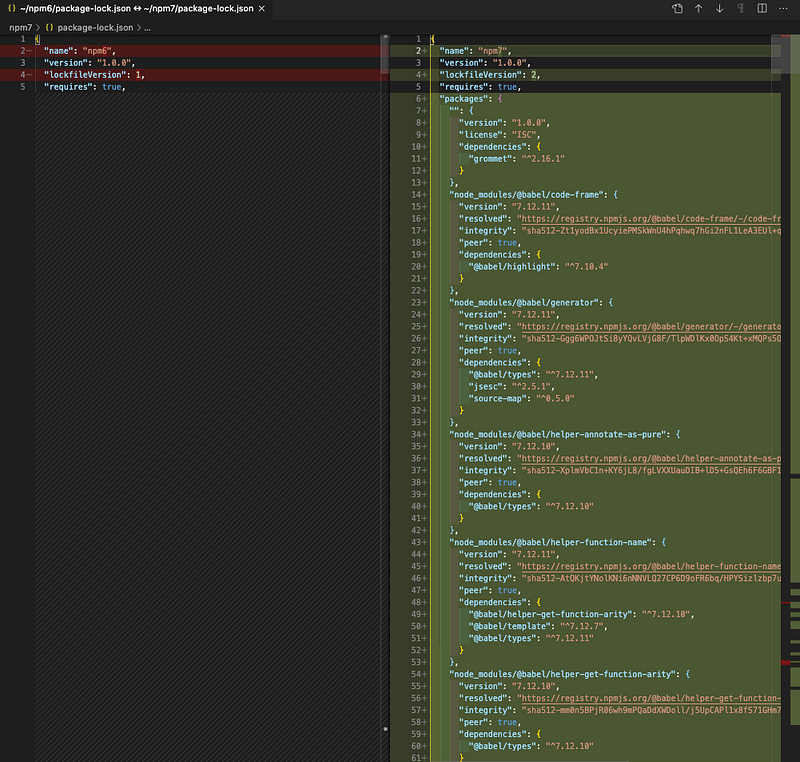
package-lock.json files generated by npm 7 have a newer format, using "lockfileVersion": 2 (line 4 in the above screenshot). This format is backward-compatible with npm 6 format using "lockfileVersion": 1, but older npm clients will print a warning about the version mismatch.

In addition to package-lock.json files, yarn.lock files can be used as the source of package metadata and resolution guidance, if available. Prior to npm 7, yarn.lock files were ignored.

However, yarn.lock files do not replace package-lock.json files. Since yarn.lock files do not fully address npm’s needs, relying on them exclusively would limit the ability to produce optimal package installs or add features in the future.

Workspaces

Workspace support is a major feature in npm 7. It provides a method to manage multiple packages from within a singular top-level root package. npm reused the term workspace, which has been used by Yarn and pnpm for a similar feature. npm 7 is workspace-aware. It will properly install dependencies without duplicating the common ones. This workspace-aware feature reduces duplicated packages for micro front-end approaches. Potentially, workspaces can radically improve the performance and memory usage with large combined projects of multiple shared dependencies.

The optional workspaces field in package.json is an array of file patterns that describes locations for each workspace that needs to be symlinked to the top level node_modules. This concept has been applied to lerna, a tool to manage JavaScript projects with multiple packages. The workspaces location can be direct paths or globs (filenames with wildcard characters).

We are giving a few examples to demonstrate workspaces. These examples are operated on the npm 7 window.

In the following package.json file, workspace-a is defined at lines 12 - 14.

workspace-a is a workspace/directory created at the root level. Inside the workspace-a directory, there is a package.json file:

At the root level, we execute install i.

$ npm i
added 5 packages, and audited 6 packages in 2s
found 0 vulnerabilities

Five packages, including React, are installed:

$ npm ls
npm7@1.0.0 /Users/fuje/npm7
└── workspace-a@1.0.0 -> /Users/fuje/npm7/workspace-a
$ npm ls react
npm7@1.0.0 /Users/fuje/npm7
└─┬ workspace-a@1.0.0 -> /Users/fuje/npm7/workspace-a
  └── react@17.0.1
$ ls -al node_modules
total 8
drwxr-xr-x   9 fuje  staff   288 Dec 21 23:26 .
drwxr-xr-x   6 fuje  staff   192 Dec 21 23:26 ..
drwxr-xr-x   3 fuje  staff    96 Dec 21 23:26 .bin
-rw-r--r--   1 fuje  staff  1675 Dec 21 23:26 .package-lock.json
drwxr-xr-x   7 fuje  staff   224 Dec 21 23:26 js-tokens
drwxr-xr-x  10 fuje  staff   320 Dec 21 23:26 loose-envify
drwxr-xr-x   6 fuje  staff   192 Dec 21 23:26 object-assign
drwxr-xr-x  11 fuje  staff   352 Dec 21 23:26 react
lrwxr-xr-x   1 fuje  staff    14 Dec 21 23:26 workspace-a -> ../workspace-a

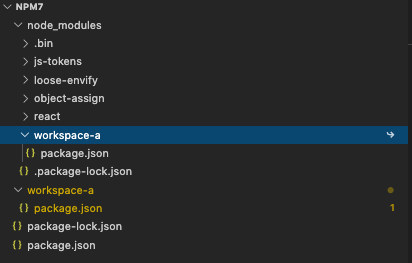
The last line shows that node_modules/workspace-a symlinks to workspace-a.

Here is the directory structure:
What if we create a directory, packages, and move workspace-a inside it?

Here is the root-level package.json file, which will pick up all workspaces inside the packages directory.

{
  "name": "npm7",
  "version": "1.0.0",
  "description": "",
  "main": "index.js",
  "scripts": {
    "test": "echo \"Error: no test specified\" && exit 1"
  },
  "keywords": [],
  "author": "",
  "license": "ISC",
  "workspaces": [
    "packages/*"
  ]
}

Run the following commands after executing install i:

$ npm ls
npm7@1.0.0 /Users/fuje/npm7
└── workspace-a@1.0.0 -> /Users/fuje/npm7/packages/workspace-a
$ npm ls react
npm7@1.0.0 /Users/fuje/npm7
└─┬ workspace-a@1.0.0 -> /Users/fuje/npm7/packages/workspace-a
  └── react@17.0.1
$ ls -al node_modules
total 8
drwxr-xr-x   9 fuje  staff   288 Dec 21 23:34 .
drwxr-xr-x   6 fuje  staff   192 Dec 21 23:34 ..
drwxr-xr-x   3 fuje  staff    96 Dec 21 23:34 .bin
-rw-r--r--   1 fuje  staff  1693 Dec 21 23:34 .package-lock.json
drwxr-xr-x   7 fuje  staff   224 Dec 21 23:34 js-tokens
drwxr-xr-x  10 fuje  staff   320 Dec 21 23:34 loose-envify
drwxr-xr-x   6 fuje  staff   192 Dec 21 23:34 object-assign
drwxr-xr-x  11 fuje  staff   352 Dec 21 23:34 react
lrwxr-xr-x   1 fuje  staff    23 Dec 21 23:34 workspace-a -> ../packages/workspace-a

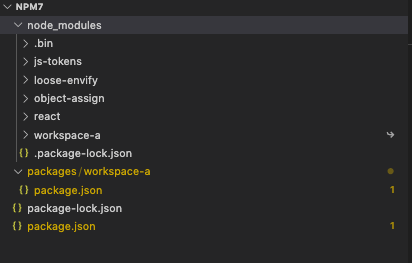
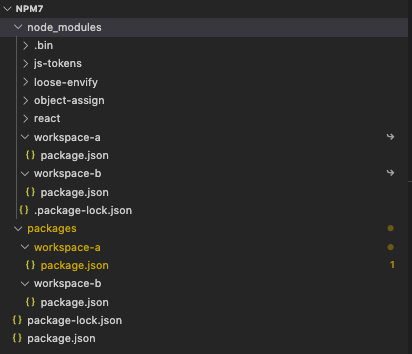
In the above output, one copy of React is installed inside the node_modules directory.

The following is the updated directory structure:
What if we create another workspace, workspace-b, inside the packages directory?

Inside the workspace-b directory, there is a package.json file that uses the same version of React as the workspace, workspace-a.

Run the following commands after executing install i:

$ npm ls
npm7@1.0.0 /Users/fuje/npm7
├── workspace-a@1.0.0 -> /Users/fuje/npm7/packages/workspace-a
└── workspace-b@1.0.0 -> /Users/fuje/npm7/packages/workspace-b
$ npm ls react
npm7@1.0.0 /Users/fuje/npm7
├─┬ workspace-a@1.0.0 -> /Users/fuje/npm7/packages/workspace-a
│ └── react@17.0.1
└─┬ workspace-b@1.0.0 -> /Users/fuje/npm7/packages/workspace-b
  └── react@17.0.1 deduped
$ ls -al node_modules
total 8
drwxr-xr-x  10 fuje  staff   320 Dec 21 23:41 .
drwxr-xr-x   6 fuje  staff   192 Dec 21 23:41 ..
drwxr-xr-x   3 fuje  staff    96 Dec 21 23:41 .bin
-rw-r--r--   1 fuje  staff  1941 Dec 21 23:41 .package-lock.json
drwxr-xr-x   7 fuje  staff   224 Dec 21 23:41 js-tokens
drwxr-xr-x  10 fuje  staff   320 Dec 21 23:41 loose-envify
drwxr-xr-x   6 fuje  staff   192 Dec 21 23:41 object-assign
drwxr-xr-x  11 fuje  staff   352 Dec 21 23:41 react
lrwxr-xr-x   1 fuje  staff    23 Dec 21 23:41 workspace-a -> ../packages/workspace-a
lrwxr-xr-x   1 fuje  staff    23 Dec 21 23:41 workspace-b -> ../packages/workspace-b

In the above output, [email protected] is deduped. Still, one copy of React is installed inside the node_modules directory.

The following is the updated directory structure:
What if we create the third workspace, workspace-c, inside the packages directory?

Inside the workspace-c directory, there is a package.json file that uses grommet along with its peer dependencies, including a different version of React.

Run the following commands after executing install i:

$ npm ls
npm7@1.0.0 /Users/fuje/npm7
├── scheduler@0.19.1 extraneous
├── workspace-a@1.0.0 -> /Users/fuje/npm7/packages/workspace-a
├── workspace-b@1.0.0 -> /Users/fuje/npm7/packages/workspace-b
└── workspace-c@1.0.0 -> /Users/fuje/npm7/packages/workspace-c
npm ERR! code ELSPROBLEMS
npm ERR! extraneous: scheduler@0.19.1 /Users/fuje/npm7/node_modules/scheduler
npm ERR! A complete log of this run can be found in:
npm ERR!     /Users/fuje/.npm/_logs/2020-12-21T23_54_29_774Z-debug.log
$ npm ls react
npm7@1.0.0 /Users/fuje/npm7
├─┬ workspace-a@1.0.0 -> /Users/fuje/npm7/packages/workspace-a
│ └── react@17.0.1
├─┬ workspace-b@1.0.0 -> /Users/fuje/npm7/packages/workspace-b
│ └── react@17.0.1
└─┬ workspace-c@1.0.0 -> /Users/fuje/npm7/packages/workspace-c
  ├─┬ grommet@2.16.2
  │ ├─┬ grommet-icons@4.5.0
  │ │ ├─┬ grommet-styles@0.2.0
  │ │ │ └── react@16.14.0 deduped
  │ │ └── react@16.14.0 deduped
  │ ├─┬ markdown-to-jsx@6.11.4
  │ │ └── react@17.0.1
  │ ├─┬ react-desc@4.1.2
  │ │ └── react@16.14.0 deduped
  │ └── react@16.14.0 deduped
  ├─┬ react-dom@16.14.0
  │ └── react@16.14.0 deduped
  ├── react@16.14.0
  └─┬ styled-components@5.2.1
    └── react@16.14.0 deduped
$ ls -al node_modules
total 48
drwxr-xr-x   41 fuje  staff   1312 Dec 22 00:04 .
drwxr-xr-x    6 fuje  staff    192 Dec 22 00:04 ..
drwxr-xr-x    5 fuje  staff    160 Dec 22 00:04 .bin
-rw-r--r--    1 fuje  staff  23615 Dec 22 00:04 .package-lock.json
drwxr-xr-x   16 fuje  staff    512 Dec 22 00:04 @babel
drwxr-xr-x    6 fuje  staff    192 Dec 22 00:04 @emotion
drwxr-xr-x    6 fuje  staff    192 Dec 22 00:04 ansi-styles
drwxr-xr-x    6 fuje  staff    192 Dec 22 00:04 babel-plugin-syntax-jsx
drwxr-xr-x    9 fuje  staff    288 Dec 22 00:04 camelize
drwxr-xr-x    9 fuje  staff    288 Dec 22 00:04 chalk
drwxr-xr-x    9 fuje  staff    288 Dec 22 00:04 color-convert
drwxr-xr-x    9 fuje  staff    288 Dec 22 00:04 color-name
drwxr-xr-x    7 fuje  staff    224 Dec 22 00:04 css-color-keywords
drwxr-xr-x    7 fuje  staff    224 Dec 22 00:04 css-to-react-native
drwxr-xr-x    6 fuje  staff    192 Dec 22 00:04 debug
drwxr-xr-x    6 fuje  staff    192 Dec 22 00:04 escape-string-regexp
drwxr-xr-x    7 fuje  staff    224 Dec 22 00:04 globals
drwxr-xr-x    6 fuje  staff    192 Dec 22 00:04 has-flag
drwxr-xr-x    9 fuje  staff    288 Dec 22 00:04 hoist-non-react-statics
drwxr-xr-x    7 fuje  staff    224 Dec 22 00:04 js-tokens
drwxr-xr-x    8 fuje  staff    256 Dec 22 00:04 jsesc
drwxr-xr-x  637 fuje  staff  20384 Dec 22 00:04 lodash
drwxr-xr-x   10 fuje  staff    320 Dec 22 00:04 loose-envify
drwxr-xr-x    7 fuje  staff    224 Dec 22 00:04 markdown-to-jsx
drwxr-xr-x    6 fuje  staff    192 Dec 22 00:04 ms
drwxr-xr-x    6 fuje  staff    192 Dec 22 00:04 object-assign
drwxr-xr-x   12 fuje  staff    384 Dec 22 00:04 polished
drwxr-xr-x    6 fuje  staff    192 Dec 22 00:04 postcss-value-parser
drwxr-xr-x   15 fuje  staff    480 Dec 22 00:04 prop-types
drwxr-xr-x   11 fuje  staff    352 Dec 22 00:04 react
drwxr-xr-x    9 fuje  staff    288 Dec 22 00:04 react-is
drwxr-xr-x    7 fuje  staff    224 Dec 22 00:04 regenerator-runtime
drwxr-xr-x   12 fuje  staff    384 Dec 22 00:04 scheduler
drwxr-xr-x    8 fuje  staff    256 Dec 22 00:04 shallowequal
drwxr-xr-x    9 fuje  staff    288 Dec 22 00:04 source-map
drwxr-xr-x    7 fuje  staff    224 Dec 22 00:04 supports-color
drwxr-xr-x    6 fuje  staff    192 Dec 22 00:04 to-fast-properties
drwxr-xr-x    7 fuje  staff    224 Dec 22 00:04 unquote
lrwxr-xr-x    1 fuje  staff     23 Dec 22 00:04 workspace-a -> ../packages/workspace-a
lrwxr-xr-x    1 fuje  staff     23 Dec 22 00:04 workspace-b -> ../packages/workspace-b
lrwxr-xr-x    1 fuje  staff     23 Dec 22 00:04 workspace-c -> ../packages/workspace-c

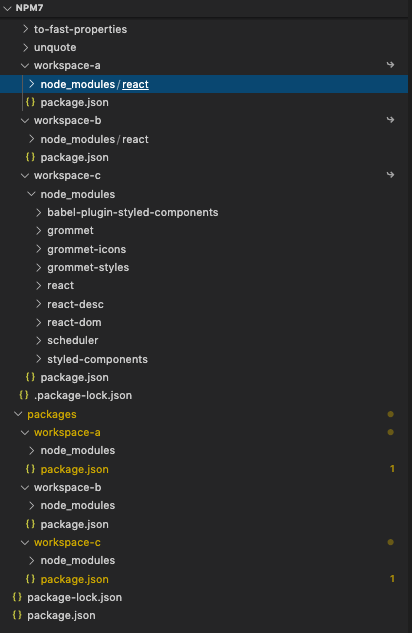
npm i now lists extraneous dependencies based on their location in the node_modules tree.

Despite the extraneous error about [email protected], everything else is installed successfully. [email protected] is installed at the root level, as well as in workspace-a, workspace-b. It is accessible by [email protected] in workspace-c. [email protected] is installed and shared in workspace-c.

The following is the updated directory structure:
Do you want to do further dedupe?

Yes, and npm-dedupe provides this functionality. It searches the local package tree and attempts to simplify the overall structure by moving dependencies further up the tree, where they can be more effectively shared by multiple dependent packages.

$ npm dedupe
npm WARN registry Using stale data from https://registry.npmjs.org/ because the host is inaccessible -- are you offline?
npm WARN registry Using stale data from https://registry.npmjs.org/ due to a request error during revalidation.
removed 5 packages, and changed 1 package in 19s
1 package is looking for funding
  run `npm fund` for details
$ npm ls react
npm7@1.0.0 /Users/fuje/npm7
├─┬ workspace-a@1.0.0 -> /Users/fuje/npm7/packages/workspace-a
│ └── react@17.0.1
├─┬ workspace-b@1.0.0 -> /Users/fuje/npm7/packages/workspace-b
│ └── react@17.0.1 deduped
└─┬ workspace-c@1.0.0 -> /Users/fuje/npm7/packages/workspace-c
  ├─┬ grommet@2.16.2
  │ ├─┬ grommet-icons@4.5.0
  │ │ ├─┬ grommet-styles@0.2.0
  │ │ │ └── react@16.14.0 deduped
  │ │ └── react@16.14.0 deduped
  │ ├─┬ markdown-to-jsx@6.11.4
  │ │ └── react@17.0.1 deduped
  │ ├─┬ react-desc@4.1.2
  │ │ └── react@16.14.0 deduped
  │ └── react@16.14.0 deduped
  ├─┬ react-dom@16.14.0
  │ └── react@16.14.0 deduped
  ├── react@16.14.0
  └─┬ styled-components@5.2.1
    └── react@16.14.0 deduped

After this dedupe, five packages are removed. Among them, [email protected] is removed from workspace-a and workspace-b. There is only one copy of [email protected] at the root level.

npm 7.0.15 is the initial implementation of workspaces, and more workspace capabilities are on the way.

The npm run-prefix command enables the execution of a script in a specific workspace from the root directory.

The following are examples to run the test scripts for workspace-a, workspace-b, and workspace-c.

$ npm run --prefix packages/workspace-a test
> workspace-a@1.0.0 test
> echo "Error: no test specified" && exit 1
Error: no test specified
npm ERR! code 1
npm ERR! path /Users/fuje/npm7/packages/workspace-a
npm ERR! command failed
npm ERR! command sh -c echo "Error: no test specified" && exit 1
npm ERR! A complete log of this run can be found in:
npm ERR!     /Users/fuje/.npm/_logs/2020-12-22T00_09_02_798Z-debug.log

$ npm run --prefix packages/workspace-b test
> workspace-b@1.0.0 test
> echo "Error: no test specified" && exit 1
Error: no test specified
npm ERR! code 1
npm ERR! path /Users/fuje/npm7/packages/workspace-b
npm ERR! command failed
npm ERR! command sh -c echo "Error: no test specified" && exit 1
npm ERR! A complete log of this run can be found in:
npm ERR!     /Users/fuje/.npm/_logs/2020-12-22T00_09_09_524Z-debug.log

$ npm run --prefix packages/workspace-c test
> workspace-c@1.0.0 test
> echo "Error: no test specified for workspace-c" && exit 1
Error: no test specified for workspace-c
npm ERR! code 1
npm ERR! path /Users/fuje/npm7/packages/workspace-c
npm ERR! command failed
npm ERR! command sh -c echo "Error: no test specified for workspace-c" && exit 1
npm ERR! A complete log of this run can be found in:
npm ERR!     /Users/fuje/.npm/_logs/2020-12-22T00_09_17_392Z-debug.log

Other Changes

Besides peer dependencies, package and yarn lock files, and workspaces, npm 7 made the following changes:

  • npm uses the package.exports field, making it no longer possible to require() npm’s internal modules.
  • npx has been completely rewritten to use the npm exec command. There are various changes in functionality. Most noticeable one is a prompt if the module you are trying to run is not yet installed.
  • The output of npm audit has significantly changed both in the human-readable and --json output styles.
  • There are more modified npm CLI commands, such as npm fund, npm pack, npm publish, npm test, etc.

Conclusion

npm has been released with many new features and improvements, including breaking changes.

Try it out and get ready to upgrade your projects.

If you want to check out features of other releases, take a look at the following articles:

Here is a list of Node.js:

Thanks for reading.

Want to Connect?

If you are interested, check out my directory of web development articles.
Programming
NPM
Npx
JavaScript
Nodejs
Recommended from ReadMedium