
Use NVM to Manage Node.js and NPM Versions
A practical guide for NVM

This article was published for nvm
0.37.2, node.js 15, and npm 7. All concepts in this article still work. However, you can check out the following articles for updated examples:
Node.js 15 was released on October 20, 2020. It comes with npm 7 and many new features. Are you ready to try it out?
But wait a minute: node.js 15 and npm 7 come with breaking changes. Will the upgrade mess up your existing projects?
Yes, potentially it could.
Luckily, we have NVM (Node Version Manager), which can help us mitigate the risk. Let’s take a walkthrough nvm and be confident enough to upgrade node.js and npm versions.
Install NVM
nvm manages node.js and npm versions. It’s designed to be installed per-user and invoked per-shell. nvm works on any POSIX-compliant shell (sh, dash, ksh, zsh, bash), in particular on these platforms: unix, macOS, and windows WSL.
nvm can be installed by curl or wget command:
$ curl -o- https://raw.githubusercontent.com/nvm-sh/nvm/v0.37.2/install.sh | bash$ wget -qO- https://raw.githubusercontent.com/nvm-sh/nvm/v0.37.2/install.sh | bashThe script, install.sh, clones the nvm repository to ~/.nvm, and attempts to add the source lines from the snippet below to the correct profile file (~/.bash_profile, ~/.zshrc, ~/.profile, or ~/.bashrc).
export NVM_DIR="$([ -z "${XDG_CONFIG_HOME-}" ] && printf %s "${HOME}/.nvm" || printf %s "${XDG_CONFIG_HOME}/nvm")"
[ -s "$NVM_DIR/nvm.sh" ] && \. "$NVM_DIR/nvm.sh" # This loads nvm
In the profile file, such as ~/.bash_profile, we see these lines added:
export NVM_DIR="/Users/fuje/.nvm"
[ -s "$NVM_DIR/nvm.sh" ] && . "$NVM_DIR/nvm.sh"  # This loads nvm
[ -s "$NVM_DIR/bash_completion" ] && \. "$NVM_DIR/bash_completion"  # This loads nvm bash_completion
Use NVM
After nvm is installed, we can use the following command to install the latest version of node.js:
$ nvm install node
Downloading and installing node v15.4.0...
Downloading https://nodejs.org/dist/v15.4.0/node-v15.4.0-darwin-x64.tar.xz...
######################################################################## 100.0%
Computing checksum with shasum -a 256
Checksums matched!
Now using node v15.4.0 (npm v7.0.15)
The above output states that npm 7.0.15 is used along with node.js 15.4.0. This can be verified:
$ node -v
v15.4.0
$ npm -v
7.0.15
We can also specify the exact version to be installed. The semantic version format is defined by SemVer:
$ nvm install 10.14.0
Downloading and installing node v10.14.0...
Downloading https://nodejs.org/dist/v10.14.0/node-v10.14.0-darwin-x64.tar.xz...
######################################################################## 100.0%
Computing checksum with shasum -a 256
Checksums matched!
Now using node v10.14.0 (npm v6.4.1)
If the specific version has already been installed, it will not be reinstalled:
$ nvm install 10.14.0
v10.14.0 is already installed.
Now using node v10.14.0 (npm v6.4.1)
We can list all installed versions:
$ nvm ls
->     v10.14.0
       v10.15.0
       v10.16.0
       v12.16.0
        v13.9.0
        v15.4.0
         system
default -> 12.16.0 (-> v12.16.0)
node -> stable (-> v15.4.0) (default)
stable -> 15.4 (-> v15.4.0) (default)
iojs -> N/A (default)
unstable -> N/A (default)
lts/* -> lts/fermium (-> N/A)
lts/argon -> v4.9.1 (-> N/A)
lts/boron -> v6.17.1 (-> N/A)
lts/carbon -> v8.17.0 (-> N/A)
lts/dubnium -> v10.23.0 (-> N/A)
lts/erbium -> v12.20.0 (-> N/A)
lts/fermium -> v14.15.1 (-> N/A)
The arrow in the above output shows that the current version of node.js is 10.14.0. It also shows the values for default (12.16.0), node (15.4.0), and stable (15.4.0).
nvm use changes the current version:
$ nvm use 12.16.0
Now using node v12.16.0 (npm v6.14.8)
$ nvm use 10.16.0
Now using node v10.16.0 (npm v6.14.5)
$ nvm use 13.9.0
Now using node v13.9.0 (npm v6.13.7)
$ nvm use default
Now using node v12.16.0 (npm v6.14.8)
$ nvm use node
Now using node v15.4.0 (npm v7.0.15)
$ nvm use stable
Now using node v15.4.0 (npm v7.0.15)
You may wonder how v10.16.0 uses a later version of npm than v13.9.0. This can be achieved with the following commands:
$ nvm use 10.16.0
$ npm install -g npm@6.14.5
The following command will get the latest supported npm version on the current node version:
$ nvm install-latest-npmnvm use sets a specific version for the current shell. If you start a new shell, the newly set node.js version will be lost.
How can we make a specific node version persistent?
The default version is the one that carries over to all shells. nvm alias can set the default version.
$ nvm alias default 10.16.0A .nvmrc file can be created for convenience, which takes SemVer format, or node, or default. Afterward, nvm use, nvm install, nvm exec, nvm run, and nvm which will use the version specified in the .nvmrc file if no version is supplied on the command line.
$ cat .nvmrc
15.4.0
$ nvm use
Found '/Users/fuje/.nvmrc' with version <15.4.0>
Now using node v15.4.0 (npm v7.0.15)
We can check the current version with the following command:
$ nvm current
v15.4.0
ls-remote lists all available versions, but be prepared for a very long list.
$ nvm ls-remoteMore specifically, providing a partial version can narrow down the available list.
$ nvm ls-remote 15
        v15.0.0
        v15.0.1
        v15.1.0
        v15.2.0
        v15.2.1
        v15.3.0
->      v15.4.0
nvm which shows the path to the executable to where it was installed. We have installed node.js of 10.14.0, 10.15.0, and 10.16.0. Here is nvm which results:
$ nvm which 10.14.0
/Users/fuje/.nvm/versions/node/v10.14.0/bin/node
$ nvm which 10.15.0
/Users/fuje/.nvm/versions/node/v10.15.0/bin/node
$ nvm which 10.16.0
/Users/fuje/.nvm/versions/node/v10.16.0/bin/node
$ nvm which 10.15
/Users/fuje/.nvm/versions/node/v10.15.0/bin/node
$ nvm which 10.12
N/A: version "v10.12" is not yet installed.
You need to run "nvm install 10.12" to install it before using it.
$ nvm which 10
/Users/fuje/.nvm/versions/node/v10.16.0/bin/node
A specific node version can be used directly to run an app:
$ nvm run 10.15.0 app.jsAlternatively, the following command runs node app.js with the PATH pointing to node 10.15.0.
$ nvm exec 10.15.0 node app.jsIf you want to find more nvm commands, run the help command:
$ nvm --helpUpgrade NVM
We can use nvm to upgrade node.js and npm. How can we upgrade nvm itself?
Let’s try.
Before the upgrade, we have nvm 0.34.0.
$ nvm --version
0.34.0
We upgrade it to version 0.37.2.
$ curl -o- https://raw.githubusercontent.com/nvm-sh/nvm/v0.37.2/install.sh | bash
  % Total    % Received % Xferd  Average Speed   Time    Time     Time  Current
                                 Dload  Upload   Total   Spent    Left  Speed
100 13527  100 13527    0     0  23046      0 --:--:-- --:--:-- --:--:-- 23083
=> nvm is already installed in /Users/fuje/.nvm, trying to update using git
=> => Compressing and cleaning up git repository
=> nvm source string already in /Users/fuje/.bash_profile
=> bash_completion source string already in /Users/fuje/.bash_profile
=> Close and reopen your terminal to start using nvm or run the following to use it now:export NVM_DIR="$HOME/.nvm"
[ -s "$NVM_DIR/nvm.sh" ] && \. "$NVM_DIR/nvm.sh" # This loads nvm
[ -s "$NVM_DIR/bash_completion" ] && \. "$NVM_DIR/bash_completion" # This loads nvm bash_completionAs the output stated, we need to close and reopen the terminal to use the new version:
$ nvm --version
0.37.2
Compared to version 0.34.0, version 0.37.2 added the feature of nvm set-colors for console output.

By default, nvm ls shows the following colors:
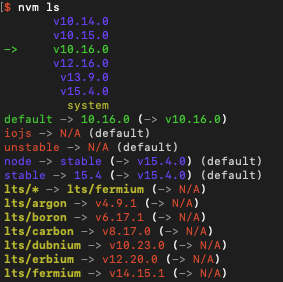
Set to new colors:
$ nvm set-colors cgYmWnvm ls displays the output with new colors:

Conclusion
nvm makes it easy to manage node.js and npm versions. Following the instructions in this article, you can upgrade to node.js 15 and npm 7, or any other versions.
- 7 Major Features of Node.js 21
- 6 Major Features of Node.js 20
- 6 Major Features of Node.js 19
- 5 Major Features of Node.js 18
- 3 Major Features of Node.js 17
- A Quick Look at the Node.js 16 Features
- What’s New in Node.js 15
- 5 Features in npm 10
- Exploring New Features in npm 9
- A quick glance at npm 8 features and predictions for npm 9
- The Step-by-Step Guide to Understanding and Adopting npm 7
Thanks for reading.
Want to Connect?If you are interested, check out my directory of web development articles.


