avatarClark

Free AI web copilot to create summaries, insights and extended knowledge, download it at here

3322

Abstract

he same approach to organizing their user interface components. Having said that, it is not perfect — the amount of negative space above tabs is unnecessary; the good news is that Safari is redesigned for the new macOS, and that release will feature a much better design that is more minimal.</p><p id="3a9e">Overall, the design for the current version is almost <b>detailed</b>, and it will become much better in the next release.</p><p id="79a8">When it comes to using the browser and not making any slips, Safari is very stable and doesn’t intrude on my view.</p><p id="631a">There have been situations when I was watching a video in Picture-in-Picture mode and browsing other tabs, and my browsing experience did not clutter. Instead, I could simply move the video window to the side and multitask.</p><p id="0f09">It is not perfect, though. For example: clicking on the URL bar to navigate a website obstructs almost 30 percent of the view of your current tab. I wish it was designed more minimally.</p><p id="615d">Also, the sidebar pushes the entire content from a tab to the right making multitasking more difficult.</p><p id="6833">I think the design of Safari is not very <b>obtrusive</b>; however, some design changes could make it more usable.</p><p id="a3bf">Lastly, the user interface of this browser is perhaps one of the biggest reasons I love using it. It is not forced into looking minimal. Instead, it is <b>functional</b> and simultaneously <b>minimal</b> — the kind of design we strive for</p><h1 id="b96a">Performance</h1><figure id="21a4"><img src="https://cdn-images-1.readmedium.com/v2/resize:fit:800/1*syHMRlNoJrSFDBTs1RS1yw.png"><figcaption>Image from the official <a href="https://www.apple.com/safari/">Apple</a>’s website</figcaption></figure><p id="a253">To get a good understanding of the performance of Safari, I will analyze three important aspects of it:</p><ol><li>App Launch Speed</li><li>Managing basic tabs and websites</li><li>Using demanding websites</li></ol><p id="6a81">The browser takes around 4 seconds to launch on my slow Intel MacBook Pro from 2016. However, I still consider that pretty fast since many competitors such as Chrome and Firefox take longer to open.</p><p id="8758">For the basic tabs and websites, I launched four websites and three windows from Safari:</p><ul><li>Medium’s list for articles I haven’t read</li><li>YouTube subscription feed</li><li>Product hunt for checking the latest app releases</li><li>A 20-minute story from Mac O’Clock</li></ul><p id="f641">The Three Safari windows consist of:</p><ul><li>The default window which shows my four tabs</li><li>My router panel alongside network tool websites such as SpeedTest</li><li>Four tabs of shopping websites</li></ul><p id="d25a">I had a little bit of a stutter switching between tabs, but to my surprise, no page needed a reload as everything was stored on the memory. So perhaps 8GBs of memory is just enough for most web browsing demands.</p><p id="e93d">One of the major issues with Safari’s performance is limiting the amount of memory each tab is allowed to use. Sometimes, demanding web pages make the fan spin and slow down the computer; however, it is temporary and won’t last a noticeable time.</p><p id="c2c0">For the big test, rather the real test, I launched a couple of CPU and GPU-d

Options

emanding websites. Unfortunately, the experience was not even decent. It was workable to some extent, but, overall, I wouldn’t recommend opening more than two tabs of websites that demand a lot of resources.</p><p id="e7c7">For my testings, the following websites caused mouse lag and stutter throughout the browser and the operating system:</p><ul><li>Artboard Studio to create post thumbnails</li><li>4K video from YouTube without even putting it on fullscreen</li><li>Webflow to build a website from my design</li></ul><p id="935e">Unfortunately, if you own a 4K monitor, the experience will get even worst.</p><p id="9c9f">I launched all of those websites on Chrome as well as Opera and noticed minor performance improvements. But, unfortunately, those browsers take considerably more RAM than Safari.</p><h2 id="cc51">Asking for your opinion</h2><p id="d901">How well has Safari served you? Has it provided a good experience? Do you recommend it to friends and family? I would love to hear your comments; make sure to inform me in the response section.</p><p id="62db">I also would like to know what apps/services you want me to review for the following posts on my blog. I’ll make sure to include your comment in the post.</p><p id="a0ec">Thanks for reading my reasonings and review of Safari for Mac. If you enjoyed this story, let me know in the response section, and perhaps give it a few claps.</p><p id="5a97">Here are more stories you might find interesting.</p><div id="ad7e" class="link-block"> <a href="https://readmedium.com/10-mac-apps-for-august-ce12220a8a26"> <div> <div> <h2>10 Mac Apps For August</h2> <div><h3>Supercharge your Mac with these fantastic apps.</h3></div> <div><p>medium.com</p></div> </div> <div> <div style="background-image: url(https://miro.readmedium.com/v2/resize:fit:320/1*9oXdow6vkmV6UtCKmnuH2A.jpeg)"></div> </div> </div> </a> </div><div id="6735" class="link-block"> <a href="https://readmedium.com/10-iphone-apps-for-july-dd87e7fade88"> <div> <div> <h2>10 iPhone Apps For July</h2> <div><h3>Fantastic apps in the category of health, privacy, news, and education.</h3></div> <div><p>medium.com</p></div> </div> <div> <div style="background-image: url(https://miro.readmedium.com/v2/resize:fit:320/1*[email protected])"></div> </div> </div> </a> </div><div id="0e68" class="link-block"> <a href="https://readmedium.com/live-text-replacement-app-for-older-iphones-macs-a3c00a42ed08"> <div> <div> <h2>Live-Text Replacement App For Older iPhones & Macs</h2> <div><h3>An app that will help you save money from buying a new iPhone or Mac</h3></div> <div><p>medium.com</p></div> </div> <div> <div style="background-image: url(https://miro.readmedium.com/v2/resize:fit:320/1*vbHwXNfng4p7vST0wjVAXw.png)"></div> </div> </div> </a> </div></article></body>

Why Safari Is The Best Browser For Mac!
Image from the official Medium’s website

In the previous story, I discussed why the default Mail app on the macOS is more than enough for most people. In this story, I will bring my reasons why Safari is the best browser for Mac.

I have been a long-time Safari user. It is a fantastic lightweight browser that doesn’t take a toll on the battery life of your Mac. One of the best features of this browser is its performance. Every HTML5 website opens rather quickly, and you won’t experience any lag or stutter while surfing the web.

As a disclaimer: This review is done on a baseline MacBook Pro with an Intel chipset from 2016; therefore, the performance might be different based on your machine, especially since the M1 chips are so vastly quicker for processing tasks.
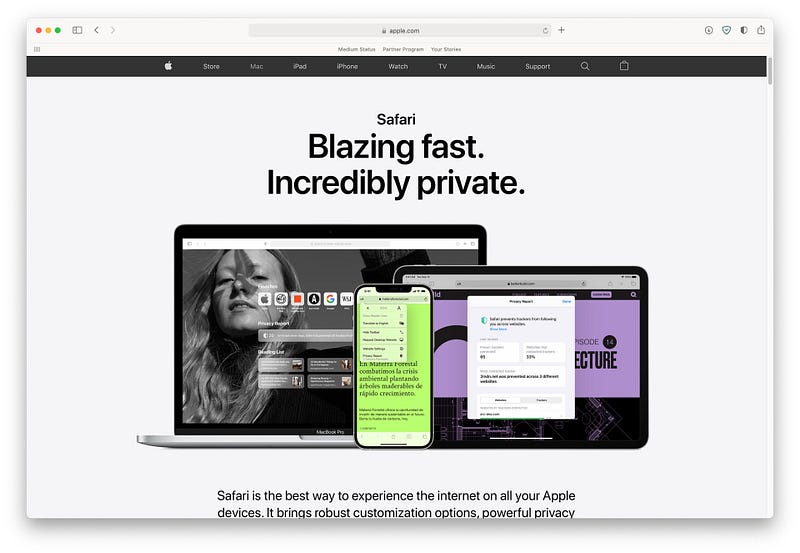
Image from the official Apple’s website

For this story, I will review Safari and explain why it is the best browser for Mac. This review will consist of design-specific features that might be interesting for you to know.

Design
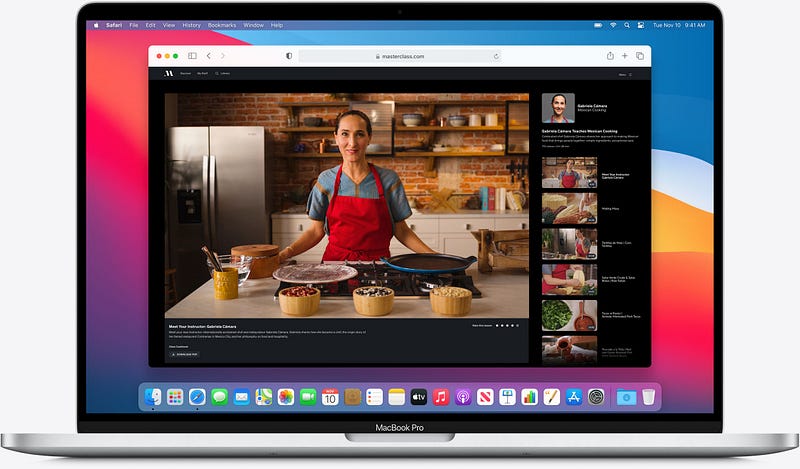
Image from the official Apple’s website

In this story, I will analyze the design by talking about these three important questions. Hopefully. by the end of this section, you will grasp a good idea of the overall design of Safari.

  1. How Detailed Is It Designed?
  2. How Unobtrusive Is It?
  3. How Beautiful Is It?

The appearance of software tells half the story of how well it is made. Sometimes, we need to take a long time to use the product and figure out how well it is designed. Safari, in terms of user experience, is a decent product. It doesn’t fail in providing the basic expectations one has from surfing the web.

The toolbar has a great structure, and everything is organized based on how we use it. The option to customize it and move the buttons anywhere on the toolbar is a plus one. Also, having a sidebar button to show our bookmarks alongside the reading list is convenient.

I haven’t seen many browsers taking the same approach to organizing their user interface components. Having said that, it is not perfect — the amount of negative space above tabs is unnecessary; the good news is that Safari is redesigned for the new macOS, and that release will feature a much better design that is more minimal.

Overall, the design for the current version is almost detailed, and it will become much better in the next release.

When it comes to using the browser and not making any slips, Safari is very stable and doesn’t intrude on my view.

There have been situations when I was watching a video in Picture-in-Picture mode and browsing other tabs, and my browsing experience did not clutter. Instead, I could simply move the video window to the side and multitask.

It is not perfect, though. For example: clicking on the URL bar to navigate a website obstructs almost 30 percent of the view of your current tab. I wish it was designed more minimally.

Also, the sidebar pushes the entire content from a tab to the right making multitasking more difficult.

I think the design of Safari is not very obtrusive; however, some design changes could make it more usable.

Lastly, the user interface of this browser is perhaps one of the biggest reasons I love using it. It is not forced into looking minimal. Instead, it is functional and simultaneously minimal — the kind of design we strive for

Performance
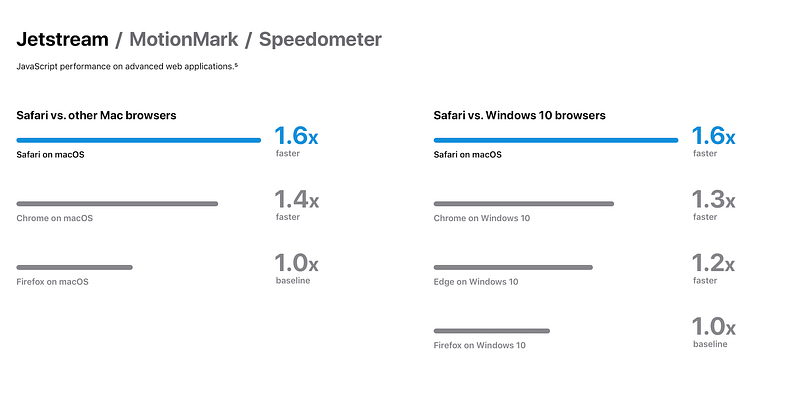
Image from the official Apple’s website

To get a good understanding of the performance of Safari, I will analyze three important aspects of it:

  1. App Launch Speed
  2. Managing basic tabs and websites
  3. Using demanding websites

The browser takes around 4 seconds to launch on my slow Intel MacBook Pro from 2016. However, I still consider that pretty fast since many competitors such as Chrome and Firefox take longer to open.

For the basic tabs and websites, I launched four websites and three windows from Safari:

  • Medium’s list for articles I haven’t read
  • YouTube subscription feed
  • Product hunt for checking the latest app releases
  • A 20-minute story from Mac O’Clock

The Three Safari windows consist of:

  • The default window which shows my four tabs
  • My router panel alongside network tool websites such as SpeedTest
  • Four tabs of shopping websites

I had a little bit of a stutter switching between tabs, but to my surprise, no page needed a reload as everything was stored on the memory. So perhaps 8GBs of memory is just enough for most web browsing demands.

One of the major issues with Safari’s performance is limiting the amount of memory each tab is allowed to use. Sometimes, demanding web pages make the fan spin and slow down the computer; however, it is temporary and won’t last a noticeable time.

For the big test, rather the real test, I launched a couple of CPU and GPU-demanding websites. Unfortunately, the experience was not even decent. It was workable to some extent, but, overall, I wouldn’t recommend opening more than two tabs of websites that demand a lot of resources.

For my testings, the following websites caused mouse lag and stutter throughout the browser and the operating system:

  • Artboard Studio to create post thumbnails
  • 4K video from YouTube without even putting it on fullscreen
  • Webflow to build a website from my design

Unfortunately, if you own a 4K monitor, the experience will get even worst.

I launched all of those websites on Chrome as well as Opera and noticed minor performance improvements. But, unfortunately, those browsers take considerably more RAM than Safari.

Asking for your opinion

How well has Safari served you? Has it provided a good experience? Do you recommend it to friends and family? I would love to hear your comments; make sure to inform me in the response section.

I also would like to know what apps/services you want me to review for the following posts on my blog. I’ll make sure to include your comment in the post.

Thanks for reading my reasonings and review of Safari for Mac. If you enjoyed this story, let me know in the response section, and perhaps give it a few claps.

Here are more stories you might find interesting.

Tech
Technology
Mac
Apple
Safari
Recommended from ReadMedium