avatarClark

Free AI web copilot to create summaries, insights and extended knowledge, download it at here

6407

Abstract

, which is a plus one living in this day and age with much digital privacy concerns.</p><p id="7775">🔐 Privacy: No personal data collection</p><p id="6778">💳 Price: 4.99</p><p id="f9c7">☑️ Compatibility: 📱iPhone, 📱iPad</p><p id="92d0">🧩 Design: Decent looking</p><p id="2dfa">🔗 Download: <a href="https://apps.apple.com/us/app/geotrainer-geography-quiz/id527868789">AppStore</a></p><p id="1317">🌐 Research: <a href="https://geotrainer.app">Website</a></p><figure id="b645"><img src="https://cdn-images-1.readmedium.com/v2/resize:fit:800/1*ogaI2ngmXMOphs_gJXOu1A.png"><figcaption></figcaption></figure><h2 id="78c6">#5. NetNewsWire</h2><p id="ad8b">I’ve been looking for a decent RSS reader app on the web. Most of them are either expensive, or they become expensive with their monthly payments. Searching the app store for a news reading app might be an easy task, but finding something that is both free and open source is a little difficult.</p><p id="ccd5">Until I found this app: The NetNewsWire. I know, the name is a little weird, but it is such a great app, specially since it is free.</p><p id="c461">I love how it can automatically detect RSS feeds based on the websites you add. Not only that, but I love how it can synchronize your feeds with iCloud, so they are available on all your devices.</p><p id="4d2f">A feature I enjoyed using from this app is its clipboard detection. You simply copy a website’s url from Safari and go to the app. Touch the add button, and it will automatically add the website from the clipboard.</p><p id="1b17">NetNewsWire can integrate with a good deal of RSS reading services. It is also semi-customizable. If you are looking for a free app that collects no data and shows the latest news, then give this app a try.</p><p id="0ecd">🔐 Privacy: No personal data collection</p><p id="beff">💳 Price: Free!</p><p id="15a1">☑️ Compatibility: 📱iPhone, 📱iPad, 💻 Mac</p><p id="e29c">🧩 Design: Decent looking</p><p id="63b9">🔗 Download: <a href="https://apps.apple.com/us/app/netnewswire-rss-reader/id1480640210">AppStore</a></p><p id="e297">🌐 Research: <a href="https://netnewswire.com">Website</a></p><figure id="6c98"><img src="https://cdn-images-1.readmedium.com/v2/resize:fit:800/1*OJm-UVd5U_2Fz8vBzH8z3Q.png"><figcaption></figcaption></figure><h2 id="d8a1">#6. Pearl</h2><p id="fe1e">Sometime, all we need for the day is an inspirational quote. Occasionally, we might be our best inspiration, and what better way to be reminded of that than our iPhones?</p><p id="8689">Pearl is a super simple app that does one thing. It simply records your text, and reminds you of them in the form of notifications.</p><p id="ccf3">You can customize it to show up to 9 notifications per day. You can set a time to specify when they should show up.</p><p id="5292">Furthermore, you can, of course, use this app for other purposes, but I found that inspirational quotes help me get motivate throughout the day.</p><p id="cdcf">🔐 Privacy: No data collection</p><p id="fccd">💳 Price: 0.99</p><p id="c6ee">☑️ Compatibility: 📱iPhone, 📱iPad, 💻 Mac</p><p id="2d8f">🧩 Design: Decent looking</p><p id="788d">🔗 Download: <a href="https://apps.apple.com/us/app/pearl-wellness-reminders/id1567837432">AppStore</a></p><p id="7f49">🌐 Research: <a href="https://www.cephalopod.studio/pearl">Website</a></p><figure id="4f15"><img src="https://cdn-images-1.readmedium.com/v2/resize:fit:800/1*L-__99DcaxaSPFaNY1EmaQ.png"><figcaption></figcaption></figure><h2 id="931d">#7. AirMatters</h2><p id="fc85">If you live in an industrial city, you will (unfortunately) have to deal with poor air quality. Before COVID, I resisted wearing a mask, but seeing how it literally saves lives, I have become a fan of it. Now, I’m semi-protected against COVID and dangerous particles in the air.</p><p id="be6f">How do I know if the air quality is poor? I use AirMatters with its companion Apple Watch app that helps me quickly get a glance into how my surrounding neighborhood is affected by air pollution.</p><p id="71c0">AirMatters does not solely show air quality. It can connect with (some) third-party accessories such as air purifiers. The app is inexpensive, and free with advertisements.</p><p id="a8b3">🔐 Privacy: No personal data collection</p><p id="5daf">💳 Price: Subscription $0.99 per year</p><p id="1430">☑️ Compatibility: ⌚️Apple Watch, 📱iPhone, 📱iPad</p><p id="b2f1">🧩 Design: Decent looking</p><p id="d8ed">🔗 Download: <a href="https://apps.apple.com/us/app/air-matters/id477700080#?platform=iphone">AppStore</a></p><p id="5dd5">🌐 Research: <a href="https://air-matters.com">Website</a></p><figure id="a3a5"><img src="https://cdn-images-1.readmedium.com/v2/resize:fit:800/1*M2I4Hz3HPjBRdhPc1NYFNA.png"><figcaption></figcaption></figure><h2 id="ca57">#8. Calendar Buddy</h2><p id="1aa2">Once you have too much on your plate, planning the day could be a difficult task. Calendar Buddy is here to the rescue.</p><p id="c268">It is an app which allows you to:</p><ul><li>Plan your days</li><li>Finish off to-do tasks</li><li>Create goals</li></ul><p id="7368">This app is more than a simple calendar app. It can help you log your mood. You can browse and select between different activities and plan a goal. For example, you could create a goal in which you set yourself for reading at least 30 pages every day.</p><p id="cc52">You can even create multiple tasks for a specific day and check them off in the day’s view alongside your sessions and events.</p><p id="18e0">I believe many people will benefit from vast features this app offers, but I think students who can’t dedicate much budget into purchasing multiple apps, and only use their iPhones, can greatly benefit from it.</p><p id="bceb">🔐 Privacy: No data collection</p><p id="4516">💳 Price: Subscription with different plans</p><p id="736f">☑️ Compatibility: 📱iPhone</p><p id="530e">🧩 Design: Decent looking</p><p id="54a0">🔗 Download: <a href="https://apps.apple.com/sk/app/calendar-buddy-day-planner/id1548197606">AppStore</a></p><p id="5d4d">🌐 Research: <a href="https://www.calendarbuddy.app">Website</a></p><figure id="8a50"><img src="https://cdn-images-1.readmedium.com/v2/resize:fit:800/1*oZQ_EJPj5pJ2upFLt_FGDQ.png"><figcaption></figcaption></figure><h2 id="b831">#9. Portal</h2><p id="5e94">If I have been asked to come up with the name of apps that are revolutionary in terms of design and fu

Options

nctionality, the Portal would be in the top ten of them. It is that good!</p><p id="2b65">Portal is an experience which reconnects you to the nature. It comes with professionally recordings of nature from fantastic places around the world. All the sounds are in 3D and high quality. I don’t know if they are in Dolby Atmos, but they feel like it, specially on an iPad.</p><p id="96f7">The app supports HomeKit, which allows you to set a mood based on your selected sound to change the light colors in your room.</p><p id="901b">You can set a task which shows your written task on the display and runs a timer for 25 minutes, giving you a pomodoro-like experience.</p><p id="1732">Lastly, there are more timer features in the app. You can set it up as a way to wake you up in the morning with your selected sound of nature — A relaxing way to wake up.</p><p id="2280">If you are looking for a way to stay away from distractions with the sound of nature, then give Portal a try.</p><p id="61f0">🔐 Privacy: No data collection</p><p id="355e">💳 Price: Subscription 39.99 per year</p><p id="e29b">☑️ Compatibility: 📱iPhone, 📱iPad</p><p id="8893">🧩 Design: Aesthetically pleasing</p><p id="0092">🔗 Download: <a href="https://apps.apple.com/us/app/portal-escape-into-nature/id1436994560">AppStore</a></p><p id="9791">🌐 Research: <a href="https://portal.app">Website</a></p><figure id="0a50"><img src="https://cdn-images-1.readmedium.com/v2/resize:fit:800/1*-lmwN8ctousckrim5jG6Tg.png"><figcaption></figcaption></figure><h2 id="392e">#10. V for Wiki</h2><p id="d992">I love to experience apps with fantastic designs. V for Wiki is one of them, and it is a such a pleasure to use. Don’t get me wrong, the default Wikipedia app has a great design, specially for iOS, but, nothing comes close to what this app is offering.</p><p id="3e8d">V for Wiki offers an intuitive, gorgeous user interface which allows accessibility to many articles on wikipedia. The interface consists of four tabs:</p><ol><li>Gallery view, which shows most read articles with beautiful imagery</li><li>History, which reveals all your visited and searched articles on the platform</li><li>Bookmarks, which shows all your saved articles</li><li>Nearby, that shows articles relevant to your location</li></ol><p id="aba7">The app can load wikipedia in all languages, which is great to browse for what is trending in a specific region.</p><p id="d612">If you are looking for a wikipedia app that is a joy to use, and offers great typography to read content, then give one a try.</p><p id="3f01">🔐 Privacy: No data collection</p><p id="a68a">💳 Price: 5.99</p><p id="f687">☑️ Compatibility: ⌚️Apple Watch, 📱iPhone, 📱iPad</p><p id="7892">🧩 Design: Aesthetically pleasing</p><p id="5c65">🔗 Download: <a href="https://apps.apple.com/app/id993435362">AppStore</a></p><p id="c030">🌐 Research: <a href="https://v-for-wiki.com">Website</a></p><p id="fb18">Thank you for reading this edition of top iPhone apps for the month of July. I hope you enjoyed reading this story. If you have any comments, recommendations, and apps you would like to see in the next edition of this story, let me know in the response section.</p><p id="908b">Here are the previous editions for the top iPhone apps.</p><div id="9b27" class="link-block"> <a href="https://readmedium.com/10-iphone-apps-for-june-718ca2799ff7"> <div> <div> <h2>10 iPhone Apps For June</h2> <div><h3>10 iPhone apps that will make your phone better.</h3></div> <div><p>medium.com</p></div> </div> <div> <div style="background-image: url(https://miro.readmedium.com/v2/resize:fit:320/1*HyNW8fniuvePGfj9vLQdbg.jpeg)"></div> </div> </div> </a> </div><div id="2781" class="link-block"> <a href="https://readmedium.com/10-iphone-apps-for-the-month-of-may-2f0d5adfa241"> <div> <div> <h2>10 iPhone Apps For The Month Of May</h2> <div><h3>May this month be with you.</h3></div> <div><p>medium.com</p></div> </div> <div> <div style="background-image: url(https://miro.readmedium.com/v2/resize:fit:320/1*DsHkM7zwR1iSEGCorlaOEA.jpeg)"></div> </div> </div> </a> </div><div id="7737" class="link-block"> <a href="https://readmedium.com/it-is-april-and-these-are-some-iphone-apps-you-should-try-9cae27519fc6"> <div> <div> <h2>It Is April and These Are Some iPhone Apps You Should Try</h2> <div><h3>From organizing your digital content to feeling inspired every day of your life</h3></div> <div><p>medium.com</p></div> </div> <div> <div style="background-image: url(https://miro.readmedium.com/v2/resize:fit:320/1*2XHT82YIxuUWHQbVgBcKCA.jpeg)"></div> </div> </div> </a> </div><div id="83e2" class="link-block"> <a href="https://readmedium.com/10-valuable-iphone-apps-for-march-e85e93ba2496"> <div> <div> <h2>10 Valuable iPhone Apps for March</h2> <div><h3>10 amazing applications to help you use your iPhone in an intuitive way.</h3></div> <div><p>medium.com</p></div> </div> <div> <div style="background-image: url(https://miro.readmedium.com/v2/resize:fit:320/1*WaqbHADmqHr-EFzmmFrmAg.png)"></div> </div> </div> </a> </div><div id="c56a" class="link-block"> <a href="https://readmedium.com/10-valuable-iphone-apps-for-february-ebbbfbfffec6"> <div> <div> <h2>10 Valuable iPhone Apps for February</h2> <div><h3>In this article, I will introduce 10 iPhone apps to manage your finances, create to-do tasks, track your habits, calm…</h3></div> <div><p>medium.com</p></div> </div> <div> <div style="background-image: url(https://miro.readmedium.com/v2/resize:fit:320/1*EDu5-Ap9gJvSXxc27DvILA.png)"></div> </div> </div> </a> </div></article></body>

10 iPhone Apps For July
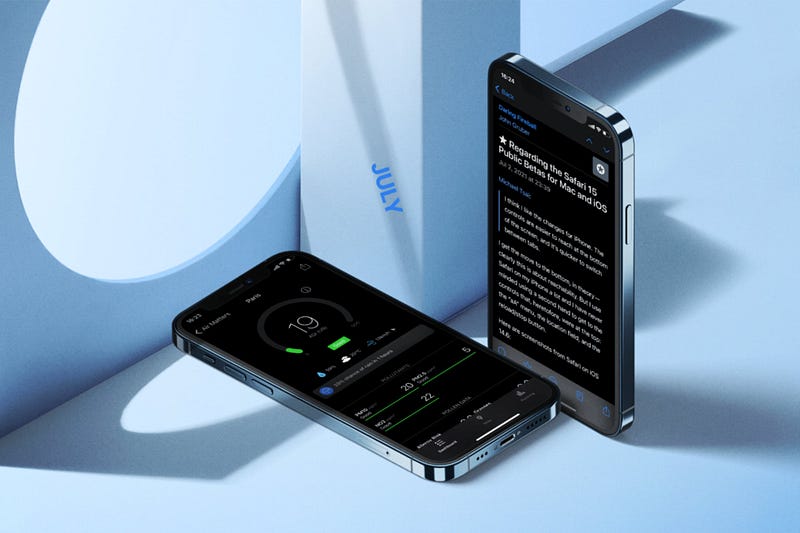
It’s July, we have spent half of 2021 (mostly, and hopefully) at home working remotely. Our lucky ones got vaccinated. Seeing how more people are getting protected from COVID makes me feel so hopeful for a better future.

For this month, I have prepared some fantastic apps for your iPhone, of which many will run on your iPad as well. We’ll read about apps in the category of health, privacy, news, and education.
#1. Moodmonk

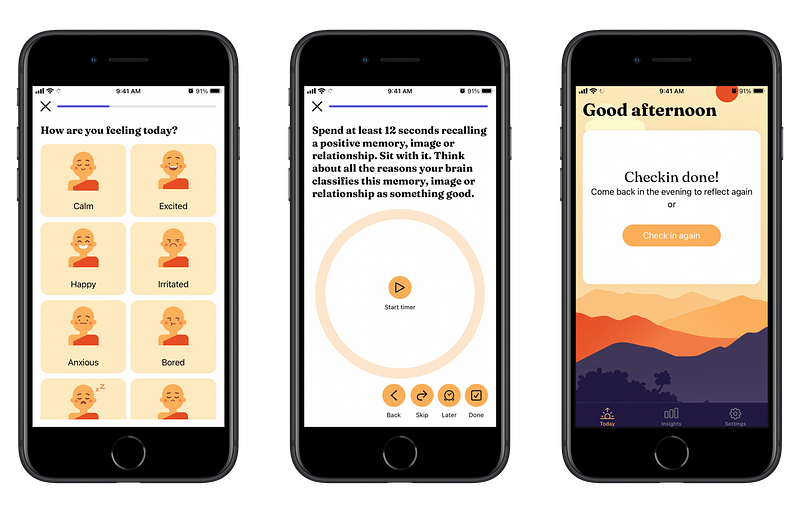
Our mood defines how the day is going. If we feel content, we can focus on bringing more value into our lives. If we feel disappointed or unhappy, negative thoughts flow in our brain. No matter how joyful of a day you’ve had, if you are not feeling joy, you won’t be able to think positively. That is why it is important to track our mood.

Moodmonk is an app that helps you keep track of your mood. It isn’t a simple mood tracking app. Whilst recording your mood, you will be asked to provide answer for certain questions. Questions that are specifically designed to challenge you on why you feel the way you do.

The functionalities of this app doesn’t stop there. It offers much more relevant health practices. Things such as:

  • Offering content based on your moods’ reflection.
  • Practices based on your daily mood to help overcome negativity.
  • Progress-view that analyzes your mood throughout the day.

What you should know beforehand is that this app is not a medical replacement solution. It can only reveal what you know about yourself. That is why on its App Store page, it is clearly written, that if you are experiencing heavy mood swings, consult a medical professional.

Having said that, I believe the combination of the help from a medical professional, alongside the features this app provides, will help you tackle most of the mood issues you might have.

🔐 Privacy: No personal data collection

💳 Price: $3.99

☑️ Compatibility: 📱iPhone

🧩 Design: Decent looking

🔗 Download: AppStore

🌐 Research: Website
#2. DontText

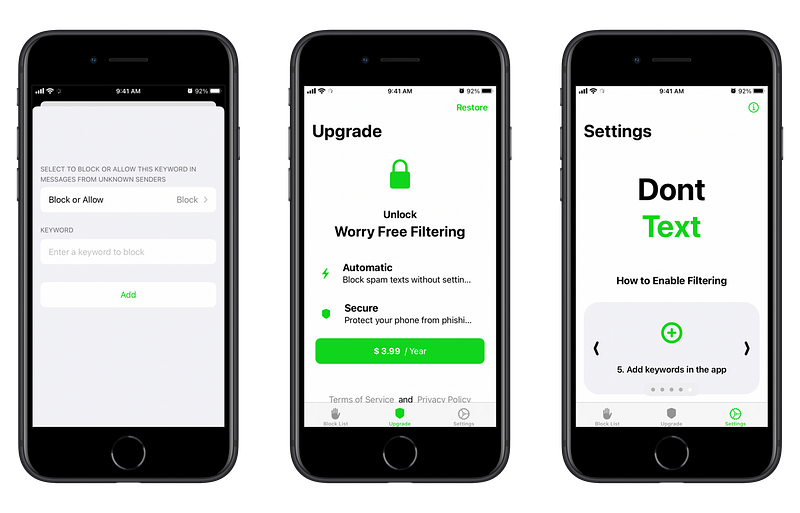
I don’t know where you live, but in my country, we get at least 3 to 5 spam messages. Yes, digital privacy in my country is a nightmare. But, at least I can do something about it. That is why, I’m introducing a useful utility called DontText.

It integrates with the built-in settings app and helps you get rid of annoying spams in your inbox. The setup process is straightforward, and the app works as it should.

All you need to do, is to write down a couple of keywords that you see in your spam messages. For me, they were: discount, sale, and offer. When I added these words, my inbox became quiet.

The app is not free, nor has a one-time payment option, however, it comes with an inexpensive yearly subscription which makes it worth buying.

If you are tired of receiving spam text messages, then give DontText a try.

🔐 Privacy: No personal data collection

💳 Price: Subscription $3.99 per year

☑️ Compatibility: 📱iPhone, 📱iPad

🧩 Design: Decent looking

🔗 Download: AppStore

🌐 Research: Website
#3. Headlines

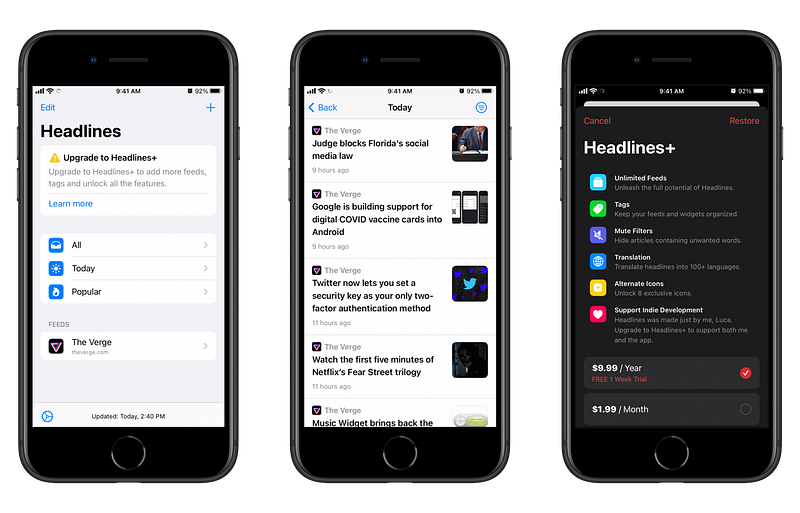
Headlines is an RSS reader that focuses on simplicity. It has a simple user interface where you’ll be able to check your feed based on its popularity.

One of the unique features I’ve found in Headlines is the use of tags. Using tags, you can organize your feed. I used a tag for all Apple news websites, and another one for my gaming needs.

There is also the possibility to filter articles that contain certain words or phrases you dislike. For example: get rid of any article with the keyword “leak”, so you could keep the element of surprise for upcoming Apple events.

Headlines also comes with home screen widgets, and the ability to change its icon. If you own an iPhone and an iPad, and want to use a simple RSS app, then give this one a chance.

🔐 Privacy: No personal data collection

💳 Price: Multiple In-App Purchases

☑️ Compatibility: 📱iPhone, 📱iPad

🧩 Design: Decent looking

🔗 Download: AppStore

🌐 Research: Website
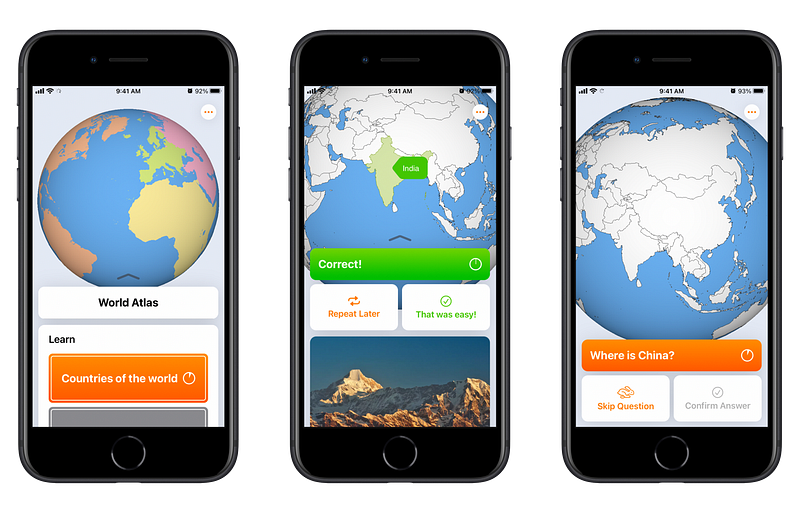
#4. geotrainer

Back at school, one of the courses I enjoyed learning about was geography. It always amazed me how wonderful of a planet this is. I enjoyed learning about cultures, countries, and how continents came to look the way they do now.

It has been more than ten years since I finished school, and I have always wanted to find a solution to refresh my memory. Then I found geotrainer. It is a small app that helps you learn more about earth.

The app is filled with quizzes that not only tests your knowledge, but also provides great educational resources from Wikipedia. The user interface is also easy to understand, and the app does not collect any data, which is a plus one living in this day and age with much digital privacy concerns.

🔐 Privacy: No personal data collection

💳 Price: $4.99

☑️ Compatibility: 📱iPhone, 📱iPad

🧩 Design: Decent looking

🔗 Download: AppStore

🌐 Research: Website
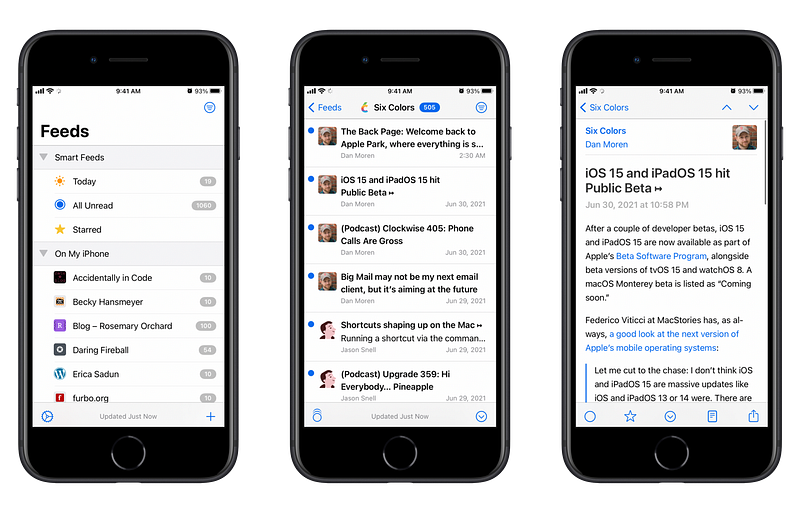
#5. NetNewsWire

I’ve been looking for a decent RSS reader app on the web. Most of them are either expensive, or they become expensive with their monthly payments. Searching the app store for a news reading app might be an easy task, but finding something that is both free and open source is a little difficult.

Until I found this app: The NetNewsWire. I know, the name is a little weird, but it is such a great app, specially since it is free.

I love how it can automatically detect RSS feeds based on the websites you add. Not only that, but I love how it can synchronize your feeds with iCloud, so they are available on all your devices.

A feature I enjoyed using from this app is its clipboard detection. You simply copy a website’s url from Safari and go to the app. Touch the add button, and it will automatically add the website from the clipboard.

NetNewsWire can integrate with a good deal of RSS reading services. It is also semi-customizable. If you are looking for a free app that collects no data and shows the latest news, then give this app a try.

🔐 Privacy: No personal data collection

💳 Price: Free!

☑️ Compatibility: 📱iPhone, 📱iPad, 💻 Mac

🧩 Design: Decent looking

🔗 Download: AppStore

🌐 Research: Website
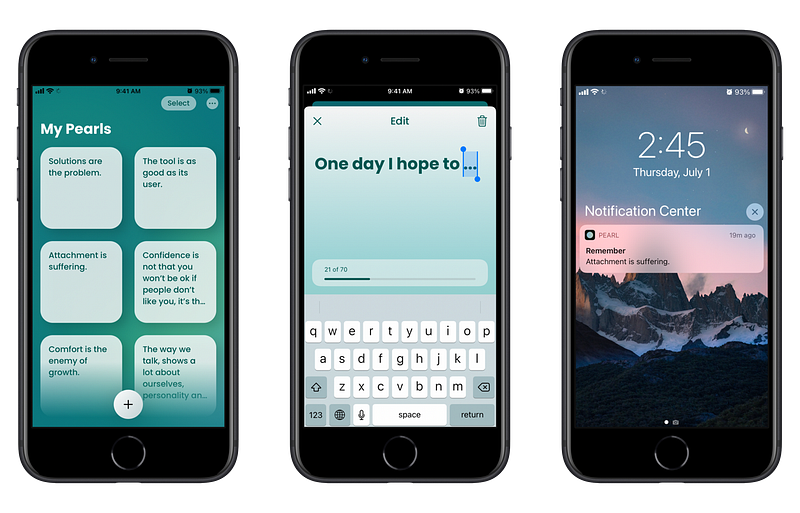
#6. Pearl

Sometime, all we need for the day is an inspirational quote. Occasionally, we might be our best inspiration, and what better way to be reminded of that than our iPhones?

Pearl is a super simple app that does one thing. It simply records your text, and reminds you of them in the form of notifications.

You can customize it to show up to 9 notifications per day. You can set a time to specify when they should show up.

Furthermore, you can, of course, use this app for other purposes, but I found that inspirational quotes help me get motivate throughout the day.

🔐 Privacy: No data collection

💳 Price: $0.99

☑️ Compatibility: 📱iPhone, 📱iPad, 💻 Mac

🧩 Design: Decent looking

🔗 Download: AppStore

🌐 Research: Website
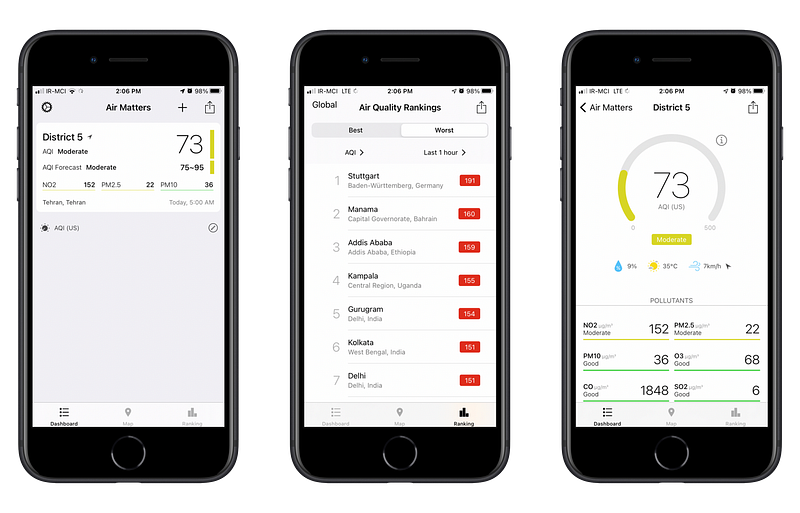
#7. AirMatters

If you live in an industrial city, you will (unfortunately) have to deal with poor air quality. Before COVID, I resisted wearing a mask, but seeing how it literally saves lives, I have become a fan of it. Now, I’m semi-protected against COVID and dangerous particles in the air.

How do I know if the air quality is poor? I use AirMatters with its companion Apple Watch app that helps me quickly get a glance into how my surrounding neighborhood is affected by air pollution.

AirMatters does not solely show air quality. It can connect with (some) third-party accessories such as air purifiers. The app is inexpensive, and free with advertisements.

🔐 Privacy: No personal data collection

💳 Price: Subscription $0.99 per year

☑️ Compatibility: ⌚️Apple Watch, 📱iPhone, 📱iPad

🧩 Design: Decent looking

🔗 Download: AppStore

🌐 Research: Website
#8. Calendar Buddy

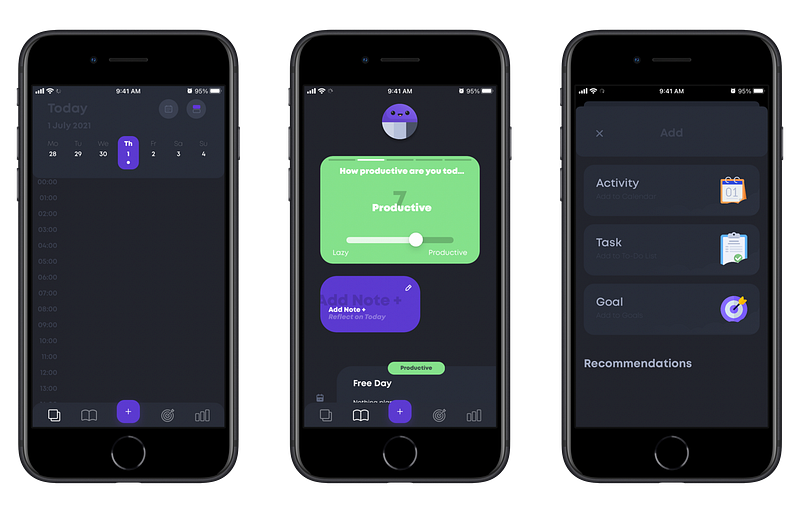
Once you have too much on your plate, planning the day could be a difficult task. Calendar Buddy is here to the rescue.

It is an app which allows you to:

  • Plan your days
  • Finish off to-do tasks
  • Create goals

This app is more than a simple calendar app. It can help you log your mood. You can browse and select between different activities and plan a goal. For example, you could create a goal in which you set yourself for reading at least 30 pages every day.

You can even create multiple tasks for a specific day and check them off in the day’s view alongside your sessions and events.

I believe many people will benefit from vast features this app offers, but I think students who can’t dedicate much budget into purchasing multiple apps, and only use their iPhones, can greatly benefit from it.

🔐 Privacy: No data collection

💳 Price: Subscription with different plans

☑️ Compatibility: 📱iPhone

🧩 Design: Decent looking

🔗 Download: AppStore

🌐 Research: Website
#9. Portal

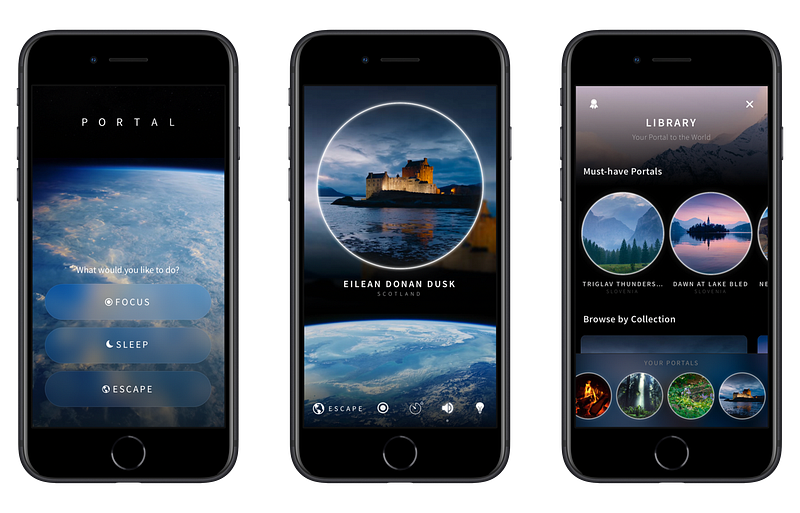
If I have been asked to come up with the name of apps that are revolutionary in terms of design and functionality, the Portal would be in the top ten of them. It is that good!

Portal is an experience which reconnects you to the nature. It comes with professionally recordings of nature from fantastic places around the world. All the sounds are in 3D and high quality. I don’t know if they are in Dolby Atmos, but they feel like it, specially on an iPad.

The app supports HomeKit, which allows you to set a mood based on your selected sound to change the light colors in your room.

You can set a task which shows your written task on the display and runs a timer for 25 minutes, giving you a pomodoro-like experience.

Lastly, there are more timer features in the app. You can set it up as a way to wake you up in the morning with your selected sound of nature — A relaxing way to wake up.

If you are looking for a way to stay away from distractions with the sound of nature, then give Portal a try.

🔐 Privacy: No data collection

💳 Price: Subscription $39.99 per year

☑️ Compatibility: 📱iPhone, 📱iPad

🧩 Design: Aesthetically pleasing

🔗 Download: AppStore

🌐 Research: Website
#10. V for Wiki

I love to experience apps with fantastic designs. V for Wiki is one of them, and it is a such a pleasure to use. Don’t get me wrong, the default Wikipedia app has a great design, specially for iOS, but, nothing comes close to what this app is offering.

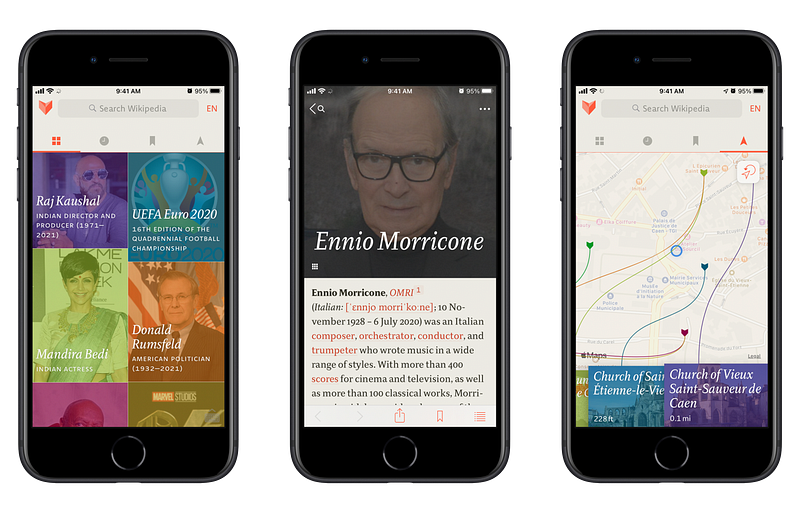
V for Wiki offers an intuitive, gorgeous user interface which allows accessibility to many articles on wikipedia. The interface consists of four tabs:

  1. Gallery view, which shows most read articles with beautiful imagery
  2. History, which reveals all your visited and searched articles on the platform
  3. Bookmarks, which shows all your saved articles
  4. Nearby, that shows articles relevant to your location

The app can load wikipedia in all languages, which is great to browse for what is trending in a specific region.

If you are looking for a wikipedia app that is a joy to use, and offers great typography to read content, then give one a try.

🔐 Privacy: No data collection

💳 Price: $5.99

☑️ Compatibility: ⌚️Apple Watch, 📱iPhone, 📱iPad

🧩 Design: Aesthetically pleasing

🔗 Download: AppStore

🌐 Research: Website

Thank you for reading this edition of top iPhone apps for the month of July. I hope you enjoyed reading this story. If you have any comments, recommendations, and apps you would like to see in the next edition of this story, let me know in the response section.

Here are the previous editions for the top iPhone apps.

Apple
Apps
Technology
Tech
iPhone
Recommended from ReadMedium