avatarClark

Free AI web copilot to create summaries, insights and extended knowledge, download it at here

8662

Abstract

ally snore. I can also find out how long I had a deep sleep and track my mood.</p><p id="2fec">This app gives you great data to overcome your health issues with your doctor. Just give it a try for a month and show the result to a medical professional.</p><p id="e011">My experience with using Restly on my iPhone 7 was not great as the app had some bugs, and it is quite slow to use. The user interface is not modern, and I wish it followed Apple human interface guidelines for making the app feel native for the iPhone.</p><p id="52ec">Unfortunately, it is not available for the iPads, but I do hope they release a specific version for the iPad users. I don’t think the HomePod can do this but a wonderful use case for Restly would be the app running on the HomePod and tracking your sleep. That way you don’t have to keep your iPhone plugged in throughout the night.</p><p id="f4ff">The app does collect significant amount of data and is quite heavy being 219 MB. So if you are worried about your privacy, then I suggest taking a look at the App Privacy section of Restly on the AppStore and check out their website.</p><p id="a01a">The yearly subscription of Restly is 49.99, and you can download it for free from the AppStore.</p><div id="3fc3" class="link-block"> <a href="https://apps.apple.com/us/app/sleep-tracker-sounds-restly/id1489713577"> <div> <div> <h2>‎Sleep tracker &amp; Sounds: Restly</h2> <div><h3>‎Stress and anxiety keep you up all night? Restly will help you define sleep deprivation triggers and get rid of…</h3></div> <div><p>apps.apple.com</p></div> </div> <div> <div style="background-image: url(https://miro.readmedium.com/v2/resize:fit:320/0*QjFHPdsFnXKXTbu6)"></div> </div> </div> </a> </div><figure id="20fe"><img src="https://cdn-images-1.readmedium.com/v2/resize:fit:800/1*wrPcd2sXQzIpdc6ikPdXSg.png"><figcaption>Mini Converter Screenshot</figcaption></figure><h2 id="c84d">Mini Converter</h2><p id="cea3">I believe that a good unit conversion app is a must-have for everyone to install on their Apple devices. Sure, you can use Siri or the Spotlight search to do some basic unit conversion but if you want to have a more advanced option, I suggest giving Mini Converter a try.</p><p id="b89e">It is a small app coming at 1.1 MB, and it works for both iPhones and iPads. The user interface on the iPad is not great, but since the app is relatively new, I am hopeful for the new updates to enhance the visual design on larger screens.</p><p id="1547">A couple of awesome points to mention:</p><ul><li>No data collection whatsoever</li><li>Support for dark mode</li><li>Support for Slide Over and Split View</li><li>No advertisements</li><li>Support for Voice Over.</li></ul><p id="fa20">Mini Converter supports the conversion units such as temperature, area, volume, mass, and much more. I do need to note that it does support currency conversion which is updated daily, but it is a paid option.</p><p id="c1d0">I have seen many unit conversion apps, and the only thing I miss about other apps are the beautiful colorful user interfaces, other than that, Mini Converter is functionally almost the same as the rest.</p><p id="c3a6">Mini Converter comes with In-App Purchases which has tipping options as well as a monthly subscription option of 0.49/m to help you convert currencies. You can download Mini Converter for free from the AppStore.</p><div id="70fc" class="link-block"> <a href="https://apps.apple.com/us/app/miniconverter-unit-converter/id1546357720"> <div> <div> <h2>‎MiniConverter: Unit Converter</h2> <div><h3>‎MiniConverter is a simple, powerful currency & unit converter with a great user experience. It's free-to-use and…</h3></div> <div><p>apps.apple.com</p></div> </div> <div> <div style="background-image: url(https://miro.readmedium.com/v2/resize:fit:320/0*lucpNB64rvDsB-vD)"></div> </div> </div> </a> </div><figure id="eacb"><img src="https://cdn-images-1.readmedium.com/v2/resize:fit:800/1*Qu79hhZRm8c8cbUcmy7xRQ.png"><figcaption>Plantie Screenshot</figcaption></figure><h2 id="4490">Plantie</h2><p id="4e4a">The Pomodoro technique is embraced by many individuals who are great at productivity and managing their time while being in the zone of extreme focus. Many people depend on this technique to get work done, that is when the use of technology could greatly benefit us, and it is where Plantie comes into play.</p><p id="c1b7">Plantie is a fun, visually interesting app that gives you a timer and a tree. Your objective is to start the timer, commence your work until the timer hits zero. You do that for a couple of times, and you will see the tree give you its fruits.</p><p id="3115">I personally don’t like gamification in any area of my digital life because it is used to make us addicted to the technology, however, there are moments when certain apps use it properly to enhance our experience. I think Plantie is one of them.</p><p id="fc5c">It is important to have Plantie running and open. The moment you switch to another app, your task will be interrupted and once you reopen Plantie, it will ask you to make a choice of 3 options:</p><ol><li>Stop the task</li><li>Stop the task after 30 seconds</li><li>Never interrupt a task</li></ol><p id="bc67">The user interface is beautiful and the experience is alright, however, the app doesn’t seem to follow Apple Human Interface Guidelines and you won’t have a dedicated iPad interface.</p><p id="d8b9">One of the annoying things is the placement of advertisements at the bottom of the screen and there is no way to get rid of it. I wish the developer would have included an In-App Purchase to help us get rid of it, however, it is only a problem if you keep getting distracted by the app. My suggestion is to put your phone on a stand alongside your laptop and dim the screen brightness, so it won’t distract you.</p><p id="87bb">You can download plantie for free from the AppStore.</p><div id="f23d" class="link-block"> <a href="https://apps.apple.com/us/app/plantie-stay-focused/id1135988868"> <div> <div> <h2>‎Plantie - Stay focused</h2> <div><h3>‎Plantie is a time management app that allows you to grow and harvest your favorite fruits while stay focused on your…</h3></div> <div><p>apps.apple.com</p></div> </div> <div> <div style="background-image: url(https://miro.readmedium.com/v2/resize:fit:320/0*svYShGiQl9dEckdt)"></div> </div> </div> </a> </div><figure id="2175"><img src="https://cdn-images-1.readmedium.com/v2/resize:fit:800/1*tZEiuLHtdKv5Ukd5UlTqoA.png"><figcaption>eXpenso Screenshot</figcaption></figure><h2 id="6dde">eXpenso</h2><p id="89d7">Managing your finances can be a drag if you don’t have a system for it. Some professionals go to the extent of creating multiple spreadsheets and calculating their budgets with complex formulas. Some go for the simple route and keep a handy notebook nearby and log their expenditure. A certain group of people like me don’t want to deal with complicated programs nor do we like the simple route. That is where eXpenso comes to the rescue.</p><p id="9efe">With this easy-to-use iPhone app, you can quickly log your expenses and use emojis as the icon for the category of what you paid for. The app is both fun and practical.</p><p id="7e7e">eXpenso is a relatively new app and still has such a long way to go. I like the fact that it doesn’t collect too much data and the app size is less than 10 MB.</p><p id="5c80">The problems I came across with are some minor bugs, not supporting currencies and lack of an iPad version.</p><p id="f21f">You can download eXpenso for free from the AppStore.</p><div id="6fcd" class="link-block"> <a href="https://apps.apple.com/us/app/expenso-expense-tracker/id1527149758"> <div> <div> <h2>‎eXpenso: Expense Tracker</h2> <div><h3>‎Have you ever wondered how much money you spend every month? eXpenso creates healthy financial habits that reduce…</h3></div> <div><p>apps.apple.com</p></div> </div> <div> <div style="background-image: url(https://miro.readmedium.com/v2/resize:fit:320/0*WlbTsq1e7ivEd

Options

wak)"></div> </div> </div> </a> </div><figure id="8cde"><img src="https://cdn-images-1.readmedium.com/v2/resize:fit:800/1*B0SKEV2v1gh2ahi5i0oNIQ.png"><figcaption>Plant Jammer Screenshot</figcaption></figure><h2 id="af21">Plant Jammer</h2><p id="fe07">Plant Jammer offers dishes based on the ingredients available at your house. This way you won’t have to spend a lot of time surfing the internet to find which food would suit your needs.</p><p id="e3ff">Offering dishes is not the only thing Plant Jammer does. It can help you:</p><ul><li>Create folders with your own dishes in it</li><li>Learn to cook from many available tutorials</li><li>Use artificial intelligence to create recipes for your diet</li><li>Plan what to eat on each day of the week</li><li>Add items to your shopping list</li></ul><p id="f1e9">Plant Jammer’s user interface is ok, not great though, and it does heavily rely on your internet connection.</p><p id="83d3">There is an iPad version available, but it looks like a stretched out phone version and looks ridiculous on my 12.9" iPad.</p><p id="8edc">The app has an In-App purchase with an annual price of 23.49. If you are looking to replace your meal with plant-based diets then this app is a great deal for you.</p><p id="29e3">You can download Plant Jammer for free from the AppStore.</p><div id="ea31" class="link-block"> <a href="https://apps.apple.com/us/app/plant-jammer-stop-food-waste/id1386136046"> <div> <div> <h2>‎Plant Jammer - Stop Food Waste</h2> <div><h3>‎Empty your fridge and stop food waste! Create recipes and start cooking delicious vegetarian recipes, discover new…</h3></div> <div><p>apps.apple.com</p></div> </div> <div> <div style="background-image: url(https://miro.readmedium.com/v2/resize:fit:320/0*ffLGBD9HJqr0rEne)"></div> </div> </div> </a> </div><figure id="7b09"><img src="https://cdn-images-1.readmedium.com/v2/resize:fit:800/1*XLRDVEaJ1goV0G1VWFN8EQ.png"><figcaption>Dinero Screenshot</figcaption></figure><h2 id="dca9">Dinero</h2><p id="7cc7">Tracking your subscription is super important if you want to properly manage your finance. If you don’t track them, they will accumulate without you knowing and after some time, you will be disappointed for not saving up many hundreds of dollars from your bank account.</p><p id="500f">Using Dino is super simple. Just tap on the plus button, choose the subscription provider, enter the amount and tap on continue. After entering the date you will be retuned to the home screen and see the total amount of your expenses as well as your active subscriptions.</p><p id="0190">Dinero has a beautiful design with support for dark mode, a good iPad version which is usable but not great, and support for home screen widgets.</p><p id="7473">With Dinero Plus, you will be able to use the app on Mac, iPad, and iPhone, alongside many other features. Dinero Plus is available through an In-App Purchase for 4.99.</p><p id="1353">Dinero doesn’t collect any data, so if you are looking for an app that could track your subscriptions and respects your privacy then try this one.</p><p id="a813">You can download Dinero for free from the AppStore.</p><div id="11f5" class="link-block"> <a href="https://apps.apple.com/us/app/dinero-subscription-manager/id1545370811"> <div> <div> <h2>‎Dinero: Subscription Manager</h2> <div><h3>‎With Dinero you can track your favourite subscriptions, so you never loose track of your subscriptions ever again…</h3></div> <div><p>apps.apple.com</p></div> </div> <div> <div style="background-image: url(https://miro.readmedium.com/v2/resize:fit:320/0*5EnuXqDvbd78LfSw)"></div> </div> </div> </a> </div><figure id="93a3"><img src="https://cdn-images-1.readmedium.com/v2/resize:fit:800/1*FgeIyGjqPY1wcjCiYe7y2g.png"><figcaption>Inspire</figcaption></figure><h2 id="46c3">Inspire</h2><p id="ebaf">People like me need fuel to work in the morning and tolerate some difficult parts of life. Every day, I get out of bed and try to readjust my body into the working mode. To achieve that state, I need:</p><ol><li>Coffee</li><li>Music</li><li>Inspirational Content</li></ol><p id="9a94">The first two items are easy to get but getting inspired every day? It takes a toll on me.</p><p id="3361">I’m currently reading a book called The Infinite Game by Simon Sinek and I believe once I’m done reading it, I will have a “vision”, and a “why” then I won’t need to get inspired every day. Until then, I will use Inspire.</p><p id="d958">Inspire is a simple app that helps me read a couple of inspirational quotes from famous people like Steve Jobs and feel energized for the day ahead.</p><p id="8a6c">The great thing about Inspire is that it is available for iPhone, iPad, and Apple Watch, and also it does not collect any data.</p><p id="09b4">The issues I found with it are lack of categorization, and a stretched-out phone experience for the iPad version. The last issue is the size of this app — It is 27.9 MB and I can’t believe an app as simple as this could be around 30 MB.</p><p id="6859">All the issues aside, I believe it is important for our mental health to stay positive in life and I think Inspire is an app that helps us toward a positive mindset.</p><p id="620a">You can download Inspire for free from the AppStore.</p><div id="464e" class="link-block"> <a href="https://apps.apple.com/us/app/inspire-quotes-for-life/id968360768"> <div> <div> <h2>‎Inspire - Quotes for Life</h2> <div><h3>‎Simple yet beautiful Inspirational and Motivational Quotes app with awesome features on the App Store is here…</h3></div> <div><p>apps.apple.com</p></div> </div> <div> <div style="background-image: url(https://miro.readmedium.com/v2/resize:fit:320/0*wfwrHVfgUIaa1DGO)"></div> </div> </div> </a> </div><p id="5366">If you have any interesting apps that you would like to see in the next monthly release of these article, you can suggest them in the response section.</p><p id="b315">I would like to thank you for reading this article. This is the third edition of my monthly list of apps, and I’m learning a lot about taking screenshots and writing better.</p><p id="0ee2">In my previous articles, I used some online tools to showcase the screenshots I took from the apps. Now I have a different strategy. I am careful taking screenshots with minimal clutter from the operating system, and also, I use a shortcut from the Shortcuts app to generate a frame around the screenshots to create a clean export for my medium articles. If you know any methods, apps, tips, and tricks which would help me generate better screenshots then I would appreciate hearing about them in the response section.</p><p id="9e10">I also appreciate if you give this article some claps and share it with your friends on social media.</p><p id="1206">Below you will find the previous editions:</p><div id="d8ff" class="link-block"> <a href="https://readmedium.com/10-valuable-iphone-apps-for-march-e85e93ba2496"> <div> <div> <h2>10 Valuable iPhone Apps for March</h2> <div><h3>10 amazing applications to help you use your iPhone in an intuitive way.</h3></div> <div><p>medium.com</p></div> </div> <div> <div style="background-image: url(https://miro.readmedium.com/v2/resize:fit:320/1*WaqbHADmqHr-EFzmmFrmAg.png)"></div> </div> </div> </a> </div><div id="a158" class="link-block"> <a href="https://readmedium.com/10-valuable-iphone-apps-for-february-ebbbfbfffec6"> <div> <div> <h2>10 Valuable iPhone Apps for February</h2> <div><h3>In this article, I will introduce 10 iPhone apps to manage your finances, create to-do tasks, track your habits, calm…</h3></div> <div><p>medium.com</p></div> </div> <div> <div style="background-image: url(https://miro.readmedium.com/v2/resize:fit:320/1*EDu5-Ap9gJvSXxc27DvILA.png)"></div> </div> </div> </a> </div></article></body>

It Is April and These Are Some iPhone Apps You Should Try
The year practically starts in April with the sprung of trees and flowers. The whole fresh air and a new hope for a better brighter future seeing people getting vaccinated. What a great feeling. To improve your day, I have prepared ten iPhone apps which will help you in so many areas of your life, it starts from organizing some of your digital content to feeling inspired every day of your life.

This edition is for the month of April, and at the end of this article you’ll see many more apps for the previous months.
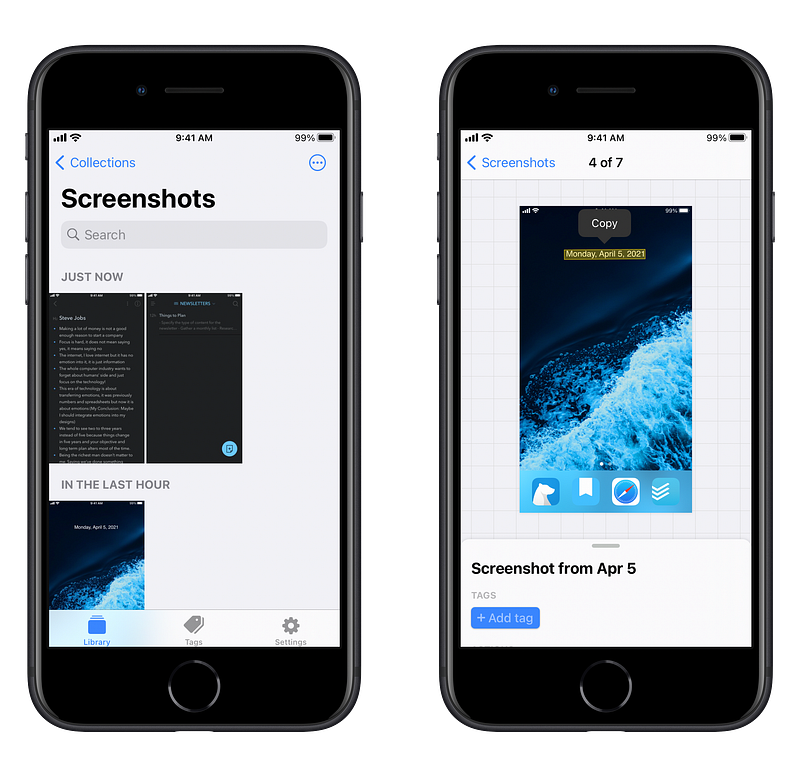
FlyScreen Screenshot

FlyScreen

Every time you use a technology that works, a subtle sparkle of happiness happens in your head and FlyScreen is one of those apps that not only works, but also gives you a smile. The basic goal of this app is to create a shortcut for people who want to make the best use of their time.

My #1 use case for this app was trying to connect with people on Clubhouse. Unfortunately, Clubhouse doesn’t let you copy the links inside a user’s profile. That is when FlyScreen comes handy.

One of the coolest things I found was the link detection, just select a text, and navigate to a website.

Besides text recognition, FlyScreen does a wonderful job categorizing your screenshots. It can even help you get rid of the duplicates which is super handy in my opinion.

At the moment, the only supported language is English, however since the app is relatively new, I have high hopes for the addition of French and other amazing languages.

FlyScreen is available for iPhones and iPads. The iPad experience is not great because every time I tried to open the app, it kept asking me to add a tag. Having said that, it makes use of the side navigation panel and I like the design of it for larger devices.

In terms of privacy, the app collects minimum data to work with which I guess is probably to enhance the service, but I would have loved it if it didn’t ask for any data tracking.

You can download FlyScreen for free for the AppStore.
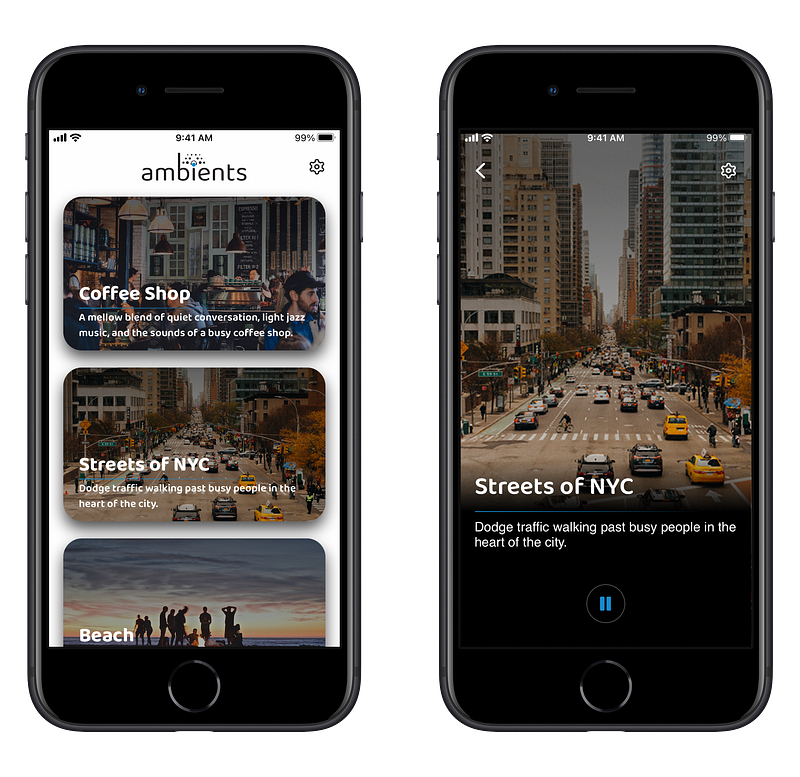
Ambients Screenshot

Ambients

There is this word called flow. Many people only get their work done once they are in the state of flow. I am one of those people who need motivation and focus to prepare myself going in to the flow mode and that is when I usually use my Apple Music library and play Max Richer scores. However, due to the nature of this pandemic, I work from home and the feeling of being in the office or even a café does not exist, so I use Ambients.

Ambient’s goal is to create an atmosphere in which you feel distanced from typical day-to-day things and helps you focus when you want to study or work.

Having said that, it can be used to help you go into a meditative state by playing the “Beach” track or help you relax by visualizing yourself in the streets of New York city.

Ambients is available for iPhones and iPads, however, the iPad experience feels like using a stretched out phone app, so I suggest using the iPhone version until the developer creates a dedicated iPad experience.

Ambients has a wide selection of audio experiences however to use the app without advertisements you’ll need to pay a one-time fee of $4.99.

The only concern I have with such a simple app is the amount of personal data it requires for functioning well. If you care about privacy, I suggest checking the App Privacy section and read through all the different data types it needs to function.

You can download Ambients for free from the AppStore.
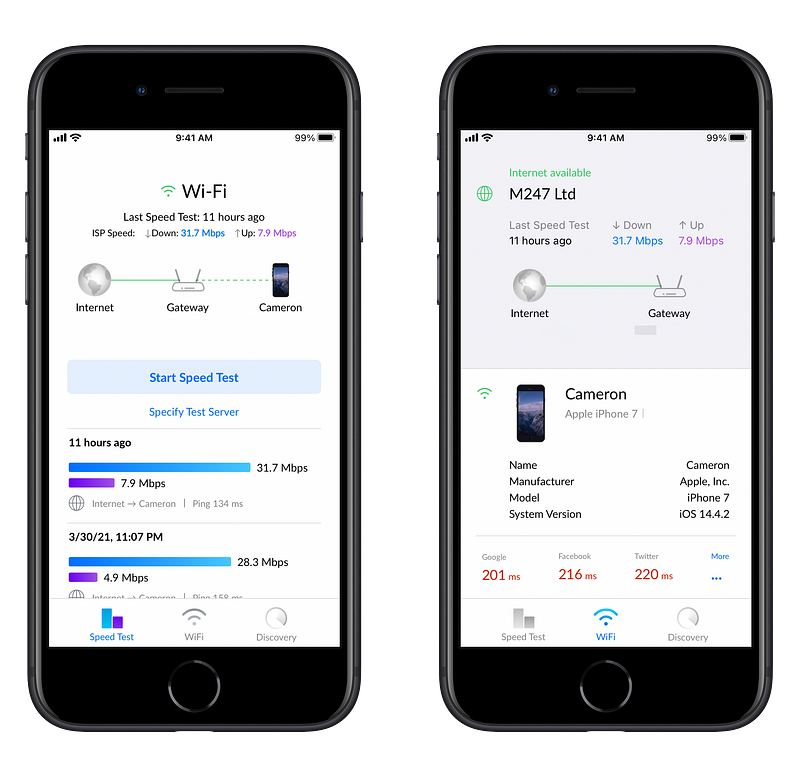
WiFiman Screenshot

WiFiman

When it comes to managing your networking equipments, you will need to use simple services to help you find any potential problems. In my case, that was finding out which ports on the router were open to the outside world, so I could close those I wouldn’t need and prevent a security disaster.

Security is not the only reason to use WiFiman. I use it to monitor all the connected devices on my network as well as running speed tests to see the performance of my internet connection.

I used to use the SpeedTest app by Ookla but since I live in a country where our internet connection is heavily censored, the use of a VPN is essential not just for protection but also to get around censorship. The SpeedTest is mostly fitting when you want to check your connection speed with a local server.

To test out the connection speed with a server overseas, WiFiman is one of the best tools available, and it can also give you precise numbers on your ping time with some of the most used websites.

WiFiman doesn’t track much data from you and is available for iPhones and iPads. The app on iPad doesn’t have a proper user interface and needs a redesign to use all the potential of a larger screen.

You can download Ubiquiti WiFiman for free from the AppStore.
Restly

Restly

A bad sleep is detrimental to your overall health. The quality of your sleep affects your general mood for the next day, and it states how energized you’ll be as well. Matt Walker the neuroscientist who famously talked about Sleep Is Your Super Power gave us a remarkable perspective on how important a good sleep is.

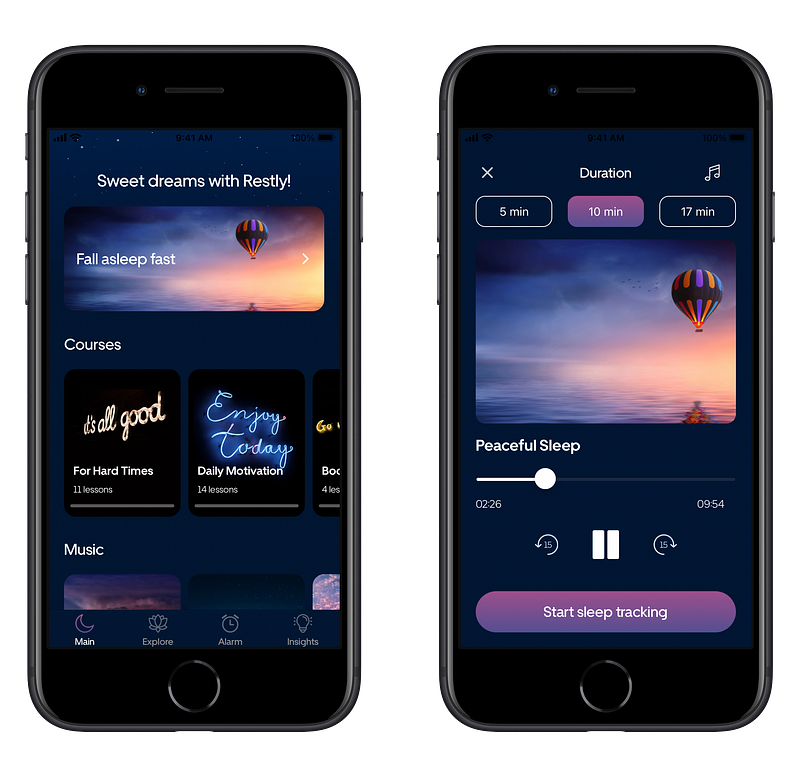
Restly is an iPhone app that can help you improve your sleep, but that is not the only thing it does. You can meditate, set an alarm for waking up early which interestingly will give you an optimal time to go to bed, and of course help you monitor your sleep.

I’ve been tracking my sleep with Restly, and I know when I usually snore. I can also find out how long I had a deep sleep and track my mood.

This app gives you great data to overcome your health issues with your doctor. Just give it a try for a month and show the result to a medical professional.

My experience with using Restly on my iPhone 7 was not great as the app had some bugs, and it is quite slow to use. The user interface is not modern, and I wish it followed Apple human interface guidelines for making the app feel native for the iPhone.

Unfortunately, it is not available for the iPads, but I do hope they release a specific version for the iPad users. I don’t think the HomePod can do this but a wonderful use case for Restly would be the app running on the HomePod and tracking your sleep. That way you don’t have to keep your iPhone plugged in throughout the night.

The app does collect significant amount of data and is quite heavy being 219 MB. So if you are worried about your privacy, then I suggest taking a look at the App Privacy section of Restly on the AppStore and check out their website.

The yearly subscription of Restly is $49.99, and you can download it for free from the AppStore.
Mini Converter Screenshot

Mini Converter

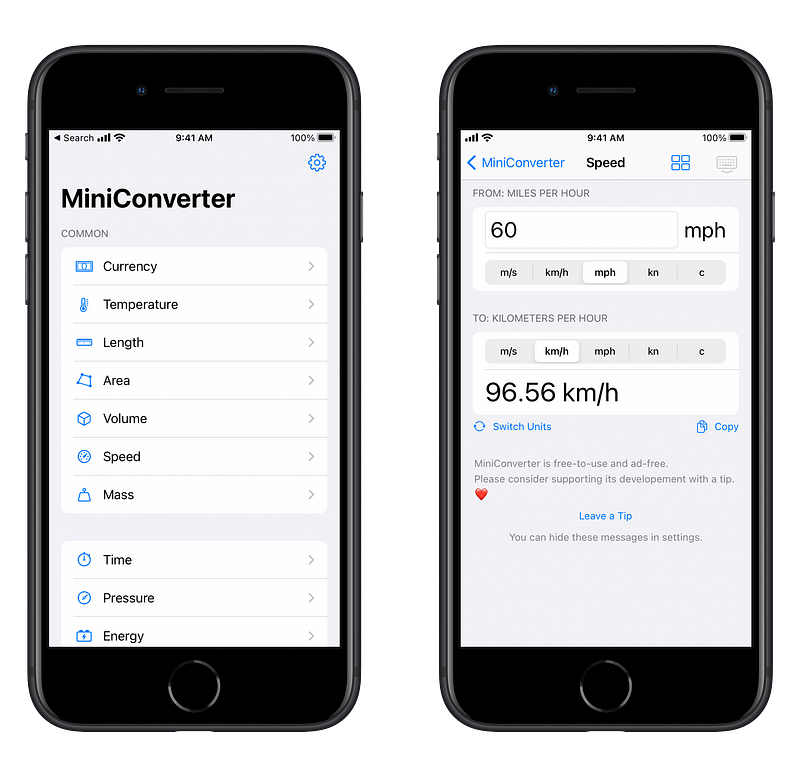
I believe that a good unit conversion app is a must-have for everyone to install on their Apple devices. Sure, you can use Siri or the Spotlight search to do some basic unit conversion but if you want to have a more advanced option, I suggest giving Mini Converter a try.

It is a small app coming at 1.1 MB, and it works for both iPhones and iPads. The user interface on the iPad is not great, but since the app is relatively new, I am hopeful for the new updates to enhance the visual design on larger screens.

A couple of awesome points to mention:

  • No data collection whatsoever
  • Support for dark mode
  • Support for Slide Over and Split View
  • No advertisements
  • Support for Voice Over.

Mini Converter supports the conversion units such as temperature, area, volume, mass, and much more. I do need to note that it does support currency conversion which is updated daily, but it is a paid option.

I have seen many unit conversion apps, and the only thing I miss about other apps are the beautiful colorful user interfaces, other than that, Mini Converter is functionally almost the same as the rest.

Mini Converter comes with In-App Purchases which has tipping options as well as a monthly subscription option of $0.49/m to help you convert currencies. You can download Mini Converter for free from the AppStore.
Plantie Screenshot

Plantie

The Pomodoro technique is embraced by many individuals who are great at productivity and managing their time while being in the zone of extreme focus. Many people depend on this technique to get work done, that is when the use of technology could greatly benefit us, and it is where Plantie comes into play.

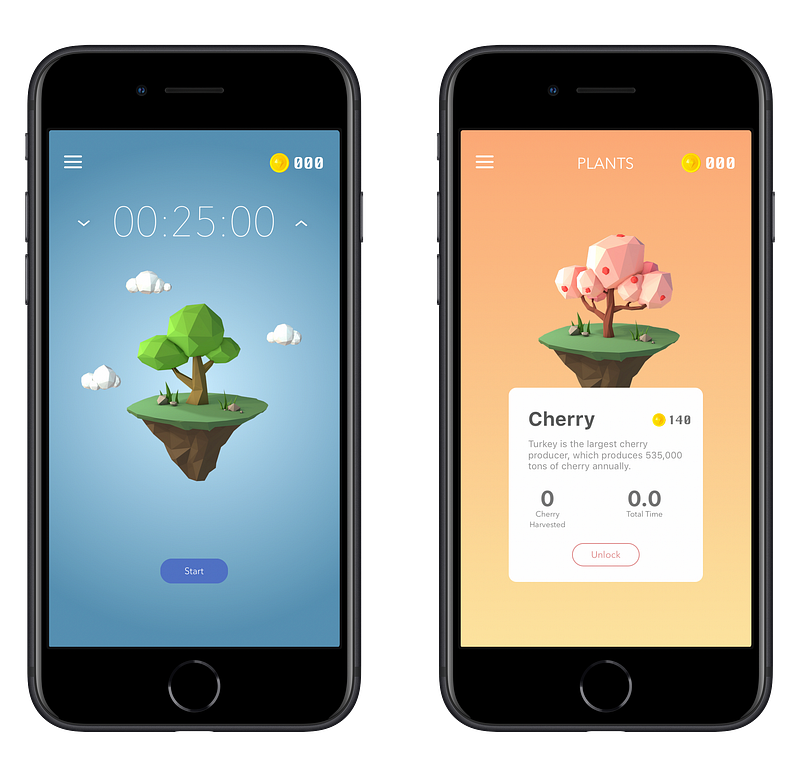
Plantie is a fun, visually interesting app that gives you a timer and a tree. Your objective is to start the timer, commence your work until the timer hits zero. You do that for a couple of times, and you will see the tree give you its fruits.

I personally don’t like gamification in any area of my digital life because it is used to make us addicted to the technology, however, there are moments when certain apps use it properly to enhance our experience. I think Plantie is one of them.

It is important to have Plantie running and open. The moment you switch to another app, your task will be interrupted and once you reopen Plantie, it will ask you to make a choice of 3 options:

  1. Stop the task
  2. Stop the task after 30 seconds
  3. Never interrupt a task

The user interface is beautiful and the experience is alright, however, the app doesn’t seem to follow Apple Human Interface Guidelines and you won’t have a dedicated iPad interface.

One of the annoying things is the placement of advertisements at the bottom of the screen and there is no way to get rid of it. I wish the developer would have included an In-App Purchase to help us get rid of it, however, it is only a problem if you keep getting distracted by the app. My suggestion is to put your phone on a stand alongside your laptop and dim the screen brightness, so it won’t distract you.

You can download plantie for free from the AppStore.
eXpenso Screenshot

eXpenso

Managing your finances can be a drag if you don’t have a system for it. Some professionals go to the extent of creating multiple spreadsheets and calculating their budgets with complex formulas. Some go for the simple route and keep a handy notebook nearby and log their expenditure. A certain group of people like me don’t want to deal with complicated programs nor do we like the simple route. That is where eXpenso comes to the rescue.

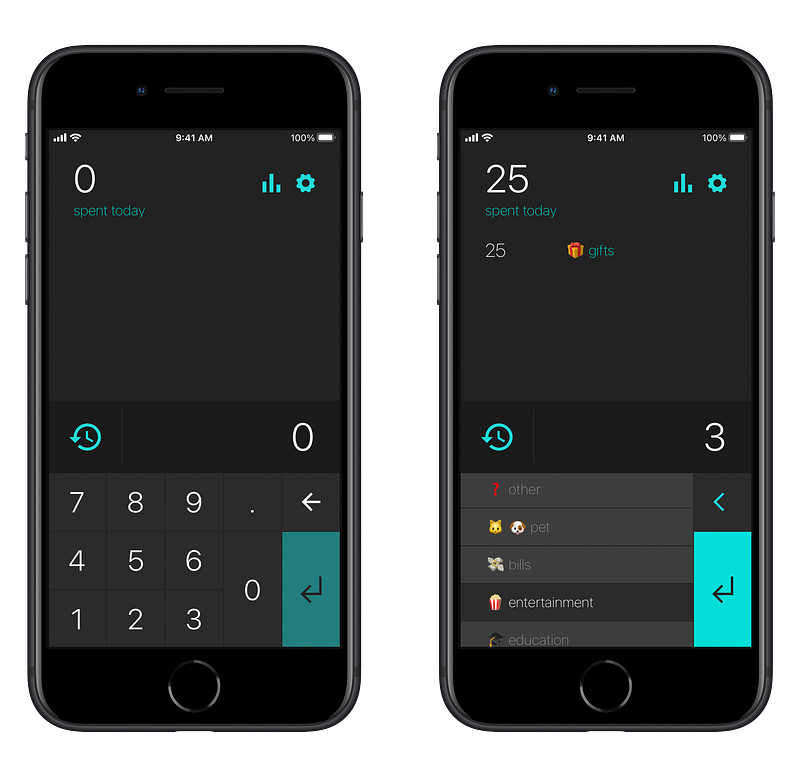
With this easy-to-use iPhone app, you can quickly log your expenses and use emojis as the icon for the category of what you paid for. The app is both fun and practical.

eXpenso is a relatively new app and still has such a long way to go. I like the fact that it doesn’t collect too much data and the app size is less than 10 MB.

The problems I came across with are some minor bugs, not supporting currencies and lack of an iPad version.

You can download eXpenso for free from the AppStore.
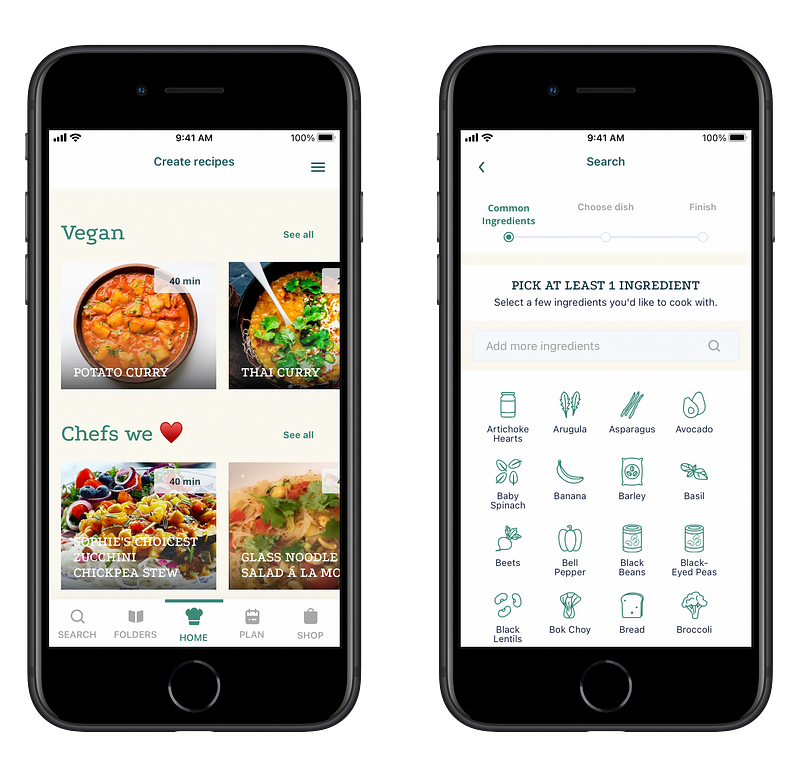
Plant Jammer Screenshot

Plant Jammer

Plant Jammer offers dishes based on the ingredients available at your house. This way you won’t have to spend a lot of time surfing the internet to find which food would suit your needs.

Offering dishes is not the only thing Plant Jammer does. It can help you:

  • Create folders with your own dishes in it
  • Learn to cook from many available tutorials
  • Use artificial intelligence to create recipes for your diet
  • Plan what to eat on each day of the week
  • Add items to your shopping list

Plant Jammer’s user interface is ok, not great though, and it does heavily rely on your internet connection.

There is an iPad version available, but it looks like a stretched out phone version and looks ridiculous on my 12.9" iPad.

The app has an In-App purchase with an annual price of $23.49. If you are looking to replace your meal with plant-based diets then this app is a great deal for you.

You can download Plant Jammer for free from the AppStore.
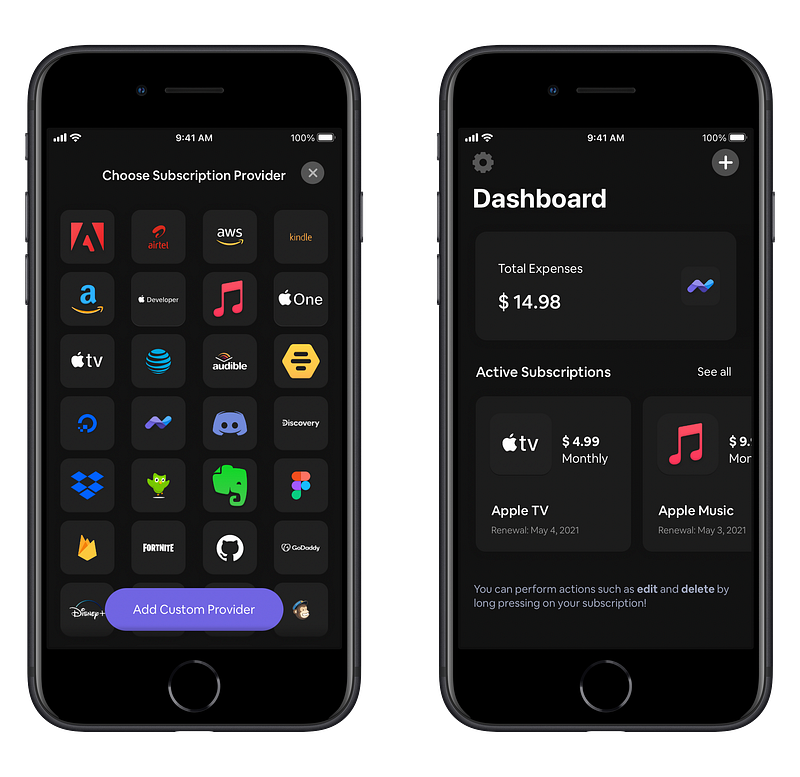
Dinero Screenshot

Dinero

Tracking your subscription is super important if you want to properly manage your finance. If you don’t track them, they will accumulate without you knowing and after some time, you will be disappointed for not saving up many hundreds of dollars from your bank account.

Using Dino is super simple. Just tap on the plus button, choose the subscription provider, enter the amount and tap on continue. After entering the date you will be retuned to the home screen and see the total amount of your expenses as well as your active subscriptions.

Dinero has a beautiful design with support for dark mode, a good iPad version which is usable but not great, and support for home screen widgets.

With Dinero Plus, you will be able to use the app on Mac, iPad, and iPhone, alongside many other features. Dinero Plus is available through an In-App Purchase for $4.99.

Dinero doesn’t collect any data, so if you are looking for an app that could track your subscriptions and respects your privacy then try this one.

You can download Dinero for free from the AppStore.
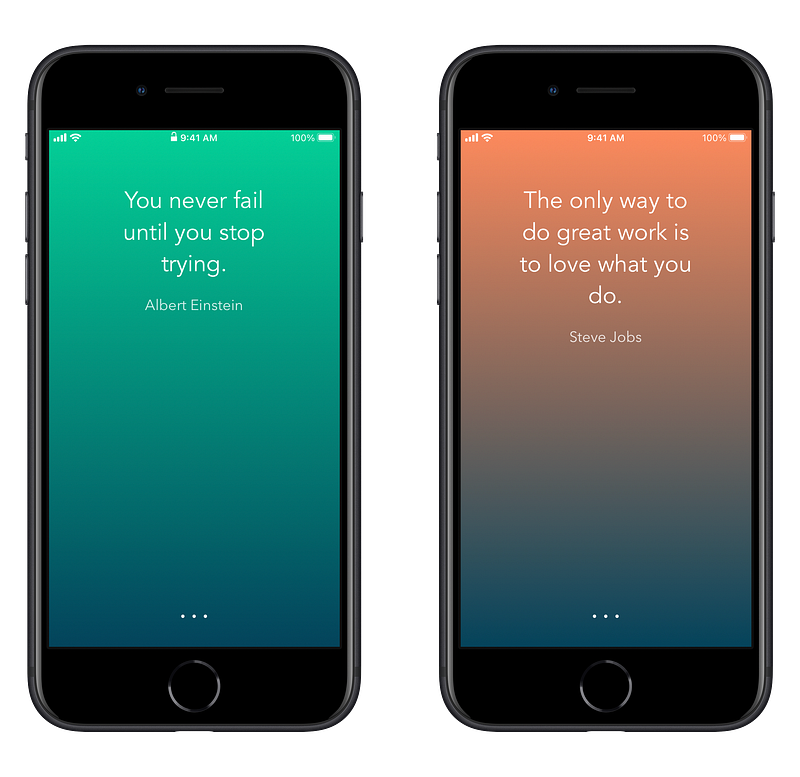
Inspire

Inspire

People like me need fuel to work in the morning and tolerate some difficult parts of life. Every day, I get out of bed and try to readjust my body into the working mode. To achieve that state, I need:

  1. Coffee
  2. Music
  3. Inspirational Content

The first two items are easy to get but getting inspired every day? It takes a toll on me.

I’m currently reading a book called The Infinite Game by Simon Sinek and I believe once I’m done reading it, I will have a “vision”, and a “why” then I won’t need to get inspired every day. Until then, I will use Inspire.

Inspire is a simple app that helps me read a couple of inspirational quotes from famous people like Steve Jobs and feel energized for the day ahead.

The great thing about Inspire is that it is available for iPhone, iPad, and Apple Watch, and also it does not collect any data.

The issues I found with it are lack of categorization, and a stretched-out phone experience for the iPad version. The last issue is the size of this app — It is 27.9 MB and I can’t believe an app as simple as this could be around 30 MB.

All the issues aside, I believe it is important for our mental health to stay positive in life and I think Inspire is an app that helps us toward a positive mindset.

You can download Inspire for free from the AppStore.

If you have any interesting apps that you would like to see in the next monthly release of these article, you can suggest them in the response section.

I would like to thank you for reading this article. This is the third edition of my monthly list of apps, and I’m learning a lot about taking screenshots and writing better.

In my previous articles, I used some online tools to showcase the screenshots I took from the apps. Now I have a different strategy. I am careful taking screenshots with minimal clutter from the operating system, and also, I use a shortcut from the Shortcuts app to generate a frame around the screenshots to create a clean export for my medium articles. If you know any methods, apps, tips, and tricks which would help me generate better screenshots then I would appreciate hearing about them in the response section.

I also appreciate if you give this article some claps and share it with your friends on social media.

Below you will find the previous editions:

Apple
Apps
Productivity
Creativity
Technology
Recommended from ReadMedium