avatarClark

Free AI web copilot to create summaries, insights and extended knowledge, download it at here

2757

Abstract

text from them.</li><li>Export a PDF file with none-selectable text in a PDF format to allows text selection.</li></ul><p id="fd6f">I usually complain about apps that take a lot of storage on my Mac, but Scan Things is around 200 MB, which is great since it shows the engine is built-in within the app.</p><p id="c0a7">If you own an intel-based Mac and want to have an app that not only recognizes text in any Image and PDF files, but also a variety of objects in them too, then give Scan Things a try. The app is relatively cheap and is worth the price.</p><p id="cc6f">🔐 Privacy: No data collection</p><p id="a9d5">💳 Price: iOS & iPadOS: 4.99 | Mac: 9.99</p><p id="8cca">☑️ Compatibility: 📱iPhone, 📱iPad, 💻 Mac</p><p id="6670">🧩 Design: Aesthetically pleasing</p><p id="2c95">🔗 Download: iOS & iPadOS: <a href="https://apps.apple.com/us/app/scan-thing-scan-anything/id1542730895">AppStore</a> | Mac: <a href="https://apps.apple.com/us/app/scan-thing-scan-everything/id1556313108?mt=12">AppStore</a></p><p id="fddd">🌐 Research: <a href="https://scanthing.app">Website</a></p><h1 id="9c97">and, TextSniper</h1><figure id="08e2"><img src="https://cdn-images-1.readmedium.com/v2/resize:fit:800/1*txZA6gjlb8KJ9boEcExTww.jpeg"><figcaption>Image of TextSniper from the developer’s mediakit on their official website</figcaption></figure><p id="658d"><a href="https://textsniper.app/?ref=nimasakhtemani">TextSniper</a> allows you to capture text (in several languages) and copy them into your clipboard.</p><p id="911e">TextSniper is a utility where it utilizes a shortcut to recognize what is on your screen. In my opinion, an outstanding use case for this application would be of an engineer who wants to capture a text from a virtual machine running on their Mac. The use cases extends far beyond what we understand.</p><p id="73ae">The simplicity of pushing a few keys and accomplishing a task where it would normally take one a long time to write is astonishing in TextSniper.</p><p id="0131">TextSniper is packed with amazing features, some are:</p><ul><li>Privacy: Does not collect any data</li><li>Runs offline: Doesn’t need an internet connection</li><li>Makes use of advance OCR to recognize more than 7 languages</li><li>Can speak the text that was recognized</li><li>Utilizes Apple Silicon which means great performance and super low impact on RAM and efficient use of your Mac’s battery</li><li>Barcode and QR code recognition</li></ul><p id="6950">If you are looking for a way to not only capture text from photos but from anywhere on your screen then don’t miss this app. It is a precious utility that will save you minutes of typing.</p><p id="c7b5">🔐 Privacy: No data collection</p><p id="01c5">💳 Price: $11.99</p><p id="64f0">

Options

☑️ Compatibility: 💻 Mac</p><p id="3590">🧩 Design: Decent looking</p><p id="d27f">⭐️ Rating: 4.7 out of 5 (73 ratings)</p><p id="22ff">🔗 Download: <a href="https://apps.apple.com/us/app/textsniper-ocr-simplified/id1528890965?mt=12">AppStore</a></p><p id="1138">🌐 Research: <a href="https://textsniper.app/?ref=nimasakhtemani">Website</a></p><p id="c2b5">Thank you for reading this story. I know many Mac users are still using the Intel-based machines that run x86 apps and love how far the Apple supports their device. I also know many people who use iPhones 7, 8, and X. But, they are missing out on features that are specific to the newer models which can increase their interest in making a purchase which might not be necessary. I hope this story has helped you save some money.</p><p id="451f">Here are other stories of mine you might find interesting.</p><div id="a975" class="link-block"> <a href="https://readmedium.com/10-notable-features-of-macos-monterey-8b85457ebde7"> <div> <div> <h2>10 Notable Features of macOS Monterey</h2> <div><h3>Thins you’ll get on the new macOS Monterey</h3></div> <div><p>medium.com</p></div> </div> <div> <div style="background-image: url(https://miro.readmedium.com/v2/resize:fit:320/1*UYII5Uk42YQJJeQR4H4bYA.png)"></div> </div> </div> </a> </div><div id="d1be" class="link-block"> <a href="https://readmedium.com/5-replacement-apps-for-textedit-on-macos-dd52d6ec547a"> <div> <div> <h2>5 Replacement Apps For TextEdit on macOS</h2> <div><h3>A list of five note-taking apps that don’t need to rely on powerful hardware.</h3></div> <div><p>medium.com</p></div> </div> <div> <div style="background-image: url(https://miro.readmedium.com/v2/resize:fit:320/1*6te0ZxtOZp-34sNfXhfYfw.jpeg)"></div> </div> </div> </a> </div><div id="d003" class="link-block"> <a href="https://readmedium.com/10-mac-apps-for-june-55a6ff7ab4c"> <div> <div> <h2>10 Mac Apps For June</h2> <div><h3>June is an important month for many people who love tech. In this story I’ll introduce 10 apps that are useful to…</h3></div> <div><p>medium.com</p></div> </div> <div> <div style="background-image: url(https://miro.readmedium.com/v2/resize:fit:320/1*1m_h8lVvaEzw7hOJKTVP7Q.jpeg)"></div> </div> </div> </a> </div></article></body>

Live-Text Replacement App For Older Macs & iPhones
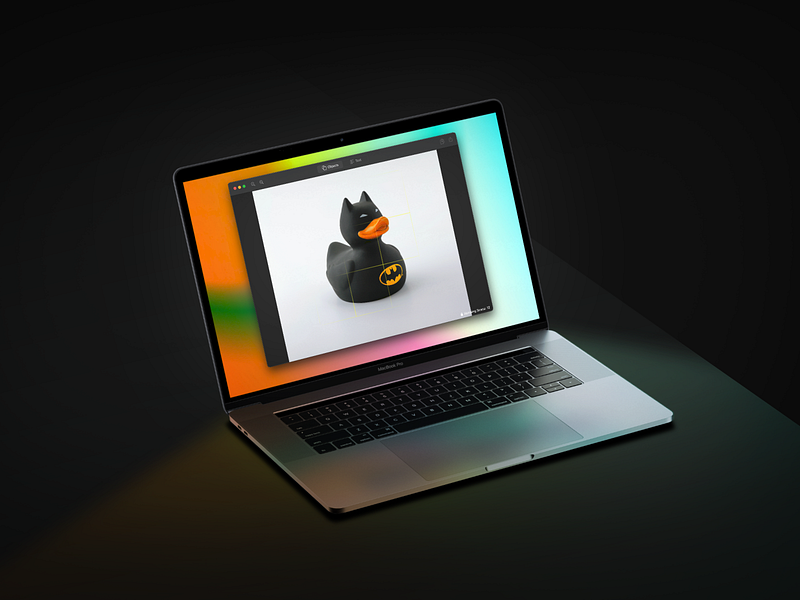
One of the highlights of the Word Wide Developer Conference 21 was a feature called LiveText. It can help recognize text in almost anything on your photos or while using the view finder in your Camera app.

The sad news is that this feature is only available on iPhones with A12 Bionic chip and newer models. So, if you own any iPhone without these chips, you can’t use the Live Text feature. But, I have a solution for you, and this story is about an app that can replace most of the functionalities you would get from the Live Text feature.

Introducing Scan Things

Scan Things is a fantastic privacy-friendly app that works on almost all iPhones and Macs. It works offline and depending on the processor on your device, it can handle object/text recognition quickly.

I have talked about this app in my monthly app reviews, which you can find the link below.

The great thing about Scan Things is how fine it is developed. On my over 4-year-old iPhone 7, the app runs fast and smooth. The phone doesn’t even get warm.

Thanks to this app on your iPhone, you can do the following:

  • Scan objects, people, plants, animals, and art.
  • Crop the object from the camera and either save it in your photo gallery or share it with another app.
  • Scan any text from a book or other objects using the camera or an image file.
  • Use the in-app engine to capture the text in selectable format.
  • Copy the captured text into the clipboard to use in other apps.
  • Share the scanned image with almost any app.

The Scan Things app is also available as a separate paying option on the Mac App Store, where you can use the app with the following features:

  • Use the Open-With feature in your finder for any file to open them in the Scan Things app and crop the object or select the text from them.
  • Export a PDF file with none-selectable text in a PDF format to allows text selection.

I usually complain about apps that take a lot of storage on my Mac, but Scan Things is around 200 MB, which is great since it shows the engine is built-in within the app.

If you own an intel-based Mac and want to have an app that not only recognizes text in any Image and PDF files, but also a variety of objects in them too, then give Scan Things a try. The app is relatively cheap and is worth the price.

🔐 Privacy: No data collection

💳 Price: iOS & iPadOS: $4.99 | Mac: $9.99

☑️ Compatibility: 📱iPhone, 📱iPad, 💻 Mac

🧩 Design: Aesthetically pleasing

🔗 Download: iOS & iPadOS: AppStore | Mac: AppStore

🌐 Research: Website

and, TextSniper
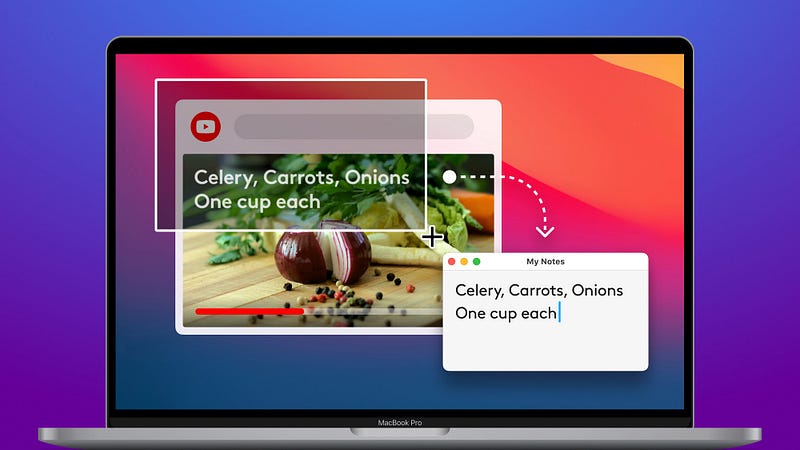
Image of TextSniper from the developer’s mediakit on their official website

TextSniper allows you to capture text (in several languages) and copy them into your clipboard.

TextSniper is a utility where it utilizes a shortcut to recognize what is on your screen. In my opinion, an outstanding use case for this application would be of an engineer who wants to capture a text from a virtual machine running on their Mac. The use cases extends far beyond what we understand.

The simplicity of pushing a few keys and accomplishing a task where it would normally take one a long time to write is astonishing in TextSniper.

TextSniper is packed with amazing features, some are:

  • Privacy: Does not collect any data
  • Runs offline: Doesn’t need an internet connection
  • Makes use of advance OCR to recognize more than 7 languages
  • Can speak the text that was recognized
  • Utilizes Apple Silicon which means great performance and super low impact on RAM and efficient use of your Mac’s battery
  • Barcode and QR code recognition

If you are looking for a way to not only capture text from photos but from anywhere on your screen then don’t miss this app. It is a precious utility that will save you minutes of typing.

🔐 Privacy: No data collection

💳 Price: $11.99

☑️ Compatibility: 💻 Mac

🧩 Design: Decent looking

⭐️ Rating: 4.7 out of 5 (73 ratings)

🔗 Download: AppStore

🌐 Research: Website

Thank you for reading this story. I know many Mac users are still using the Intel-based machines that run x86 apps and love how far the Apple supports their device. I also know many people who use iPhones 7, 8, and X. But, they are missing out on features that are specific to the newer models which can increase their interest in making a purchase which might not be necessary. I hope this story has helped you save some money.

Here are other stories of mine you might find interesting.

Apple
Mac
Apps
Technology
Tech
Recommended from ReadMedium