
Test with NUnit- Create a Test Project and Realize The Execution Order
NUnit is an open source testing framework. It supports .NET framework and .NET core. Earlier releases used the NUnit license but NUnit 3 released under the MIT license.
This article is on the very early stage for learning NUnit. We will talk about the following topics in this article.
- Create an NUnit program on Visual Studio
- Write contents for the test program
- Other useful Attributes
- Assertion
Create an NUnit program on Visual studio
Install NUnit framework
- Open NuGet Package Manager Console and type the following commands.
install-package NUnit -Version 3.8.1
install-package NUnit3TestAdapter -Version 3.8.0
Create a NUnit program
- Right click on the solution explorer.
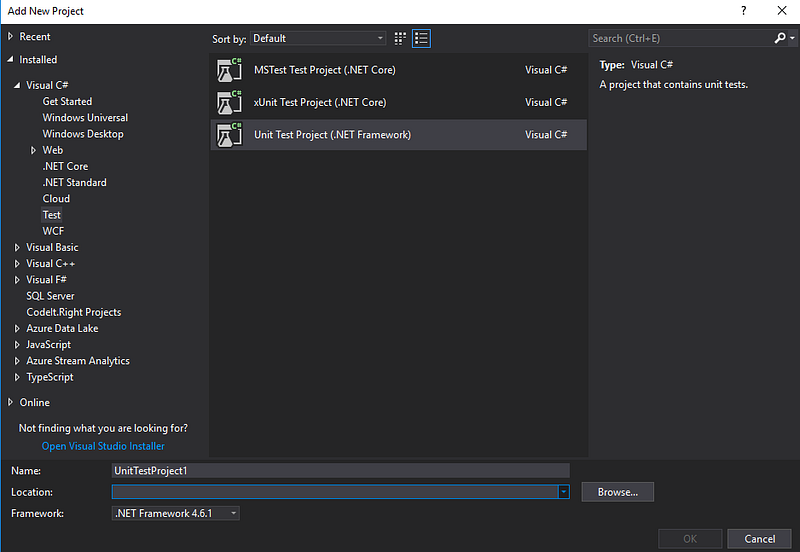
- Select Add -> New Project.
- Choose Visual C# -> Test -> Unit Test Project (.NET Framework)
Add NUnit library in the project
using NUnit.FrameworkLaunch the tests
- Test -> Run -> All Tests
Open the test explorer
- Test -> Windows -> Test Explore
Write contents for the test program
1.The naming rules
- For the project: [The project for testing].UnitTest
- For the test class: [The class for testing]Test
2.The execution orders for the test fixture level
We have SetUpFixture and TestFixture on the fixture level. One SetUpFixture may have many TestFixtures. The execution priority of the fixture level will be the following list.
OneTimeSetUp (SetUpFixture)-- (MyFixture1)--BeforeTest (Fixture)
{Test level}
AfterTest (Fixture)-- (MyFixture2)--BeforeTest (Fixture)
{Test level}
AfterTest (Fixture)OneTimeTearDown (SetUpFixture)OneTimeSetup and OneTimeTeardow
- We can put OneTimeSetup or OneTimeTeardown on SetUpFixture or TestFixture.
- OneTimeSetup will execute before the first test fixture starts.
- OneTimeTeardown will execute after the first test fixture ends.
using System;
using NUnit.Framework;
namespace NUnit.Tests
{
  [SetUpFixture]
  public class SuccessTestSetup
  {
    [OneTimeSetUp]
    public void TestStartup(){}
    [OneTimeTearDown]
    public void TestTearDown(){}
  }
}
BeforeTest and AfterTest
- We can only put OneTimeSetup or OneTimeTeardown on SetUpFixture or TestFixture.
- OneTimeSetup will execute before the first test fixture starts. OneTimeTeardown will execute after the first test fixture ends.
using System;
using NUnit.Framework;
namespace NUnit.Tests
{
    public class PrintAttribute : TestActionAttribute
    {
        public override void BeforeTest(TestDetails testDetails)
        {
            Console.WriteLine("The test will start.");
        }
public override void AfterTest(TestDetails testDetails)
{
Console.WriteLine("The test was completed.");
}
}[TestFixture]
[Print]
public class MyFixture1
{
[Test]
public void DoTest()
{
// Tests with the data
}
}
}3.The attributes of the test level
One TestFixture may have many Test. The execution priority of the test level will be the following list.
-- (MyFixture1)--BeforeTest(Fixture)-- (MyTest1)--SetUp
BeforeTest
Test
TearDown
AfterTest-- (MyTest2) --SetUp
BeforeTest
Test
AfterTest
TearDown-- (MyFixture1) --AfterTest (Fixture)Setup and Teardown
- We can only put Setup and Teardown in TestFixture.
- Setup will execute before each test starts. Teardown will execute when each test end.
using System;
using NUnit.Framework;
namespace NUnit.Tests
{
    public class SuccessTests
    {
        [TestFixture]
         Class TestGroup1 : TestBase
         {
             [SetUp]
             public void TestGroup1Startup(){}
             [Test]
             public void MyTest1(){}
             [Test]
             public void MyTest2(){}
             [Teardown]
             public void TestGroup1Teardown(){}
}
}
}4. The contents for the test
The naming rules for the test function can use [The class for testing]_ [Scenario]_[ExpectedBehavior]
We can follow the 3A principles to write the content of the test function.
- Arrange: arrange all necessary preconditions and inputs.
- Act: act on the object or method under test.
- Assert: assert that the expected results have occurred.
5. Summary
The execution priority will be the following list.
OneTimeSetUp (SetUpFixture)-- (MyFixture1)--BeforeTest (Fixture)-- (MyTest1)--SetUp
BeforeTest
Test
TearDown
AfterTest-- (MyTest2) --SetUp
BeforeTest
Test
AfterTest
TearDown-- (MyFixture1)--AfterTest (Fixture)-- (MyFixture2)--BeforeTest (Fixture)-- (MyTest1)--SetUp
BeforeTest
Test
TearDown
AfterTest-- (MyTest2) --SetUp
BeforeTest
Test
AfterTest
TearDown)-- (MyFixture2)--AfterTest (Fixture)OneTimeTearDown (SetUpFixture)Other useful Attributes
1. Parameterized Tests
For different test functions, we can put the parameters to the TestCase attribute.
- Suppose that we have already had a test function.
- The following code reuses the function by parameterized the test case.
[Test]
[TestCase(2, 1, 3)]
[TestCase(1, 2, 3)]
[TestCase(1, 1, 2)]
public void Math_WhenCalled_ReturnTheSumArgument(int a, int b, int expectResult)
{
var result = _math.Sum(a, b); Assert.That(result, Is.EqualTo(expectResult));
}2. Ignoring Tests
Sometimes we want to escape specific test case then we can use Ignore attribute.
[Test]
[Ignore("Ignore it")]
public void Math_WhenCalled_ReturnTheSumArgument(int a, int b, int expectResult)
{
var result = _math.Sum(a, b); Assert.That(result, Is.EqualTo(expectResult));
}Assertion
Condition Asserts
Methods that test a specific condition are named for the condition they test and take the value tested as their first argument and, optionally a message as the second. — from NUnit.org
The following two statements have the same effect.
- Assert.IsTrue( bool condition );
Assert.IsTrue(result.ToString() == "[]");- Assert.That( Object, IResolveConstraint, String, Object[]);
Assert.That(result.ToString(), Is.EqualTo("[]"), "API Result")Exception Asserts
Assert.DoesNotThrow simply verifies that the delegate does not throw an exception. — from NUnit.org
- Assert.DoesNotThrow( TestDelegate code );
Assert.DoesNotThrow(() => DoSomething);Summary
Thanks for your patient. I am Sean. I work as a software engineer.
This article is my note. Please feel free to give me advice if any mistakes. I am looking forward to your feedback.
Please feel free to clap if this article can help you. Thank you.
You can also subscribe my page on Facebook.
Related topics
How to use the two-way binding in Knout.js and ReactJS?
Learn how to use SignalR to build a chatroom application
My reflection of
APM & Logging Services:
IT & Network:
Database:
Software testing:
Debugging:
DevOps:


