
Test Components in the Next.js Project with Jest and Enzyme- Part 1. Steps for the Environment setting

Introduction
Jest is one of the popular test libraries and it comes from Facebook. There are many resources for us to set the environment.
For CRA (create-react-app), there is a built-in jest testing and test script and we won't have to do advanced settings. However, it becomes complicated when trying to apply Jest to the Next.js project for testing React components.
This article includes the following topics.
- Prepare a Next.js project
- Install packages
- Initialize jest.config.js
- Initialize babel.config.js
- Create a test suite with the test case
- Wrap up
- Launch the test
Step 1. Prepare a Next.js project
You may have the following options.
- Create a Next.js project with the create-next-app commands
npx create-next-app testproject2. Turn the CRA project into the Next.js project
- Then create next.config.js manually if you need it
const nextConfig = {};
module.exports = nextConfig;
Step 2. Install packages
- Install packages for babel and Enzyme
npm install --save-dev @babel/plugin-syntax-jsx @babel/plugin-transform-runtime @babel/preset-env @babel/preset-react babel-jest babel-plugin-transform-es2015-modules-commonjs babel-preset-es2015 enzyme enzyme-adapter-react-16 jest @babel/plugin-proposal-decorators- Install Jest globally
npm install jest -gStep 3. Initialize jest.config.js
- Create jest.config.js
- Create jest-transformer.js manually
Step 4. Initialize babel.config.js
Next.js will take babel.config.js as the first priority if it exists and it will conflict with next.config.js.
The tricky way I use to deal with this problem is to generate this file in the sub-folder and move out when the test is triggered.
Create a config folder and create babel.config.js in the folder.
Step 5. Create a test suite with the test case
Create __test__folder with index.test.js
Enzyme
Enzyme is a JavaScript test utility for testing React components. Shallow rendering is an isolate test method that won’t include children.
Jest APIs
- describe Define a test suite. A test suite may contain one or more test cases.
- it Define a test case.
- expect
Step 6. Wrap up
- Create a Windows script to move out the config file to the root folder when the test is triggered
- Delete a Windows script to delete the config file when the test is finished
- Edit package.json
- Create setupTests.js in the src folder
- The structure of the project will look like the following screen-shot
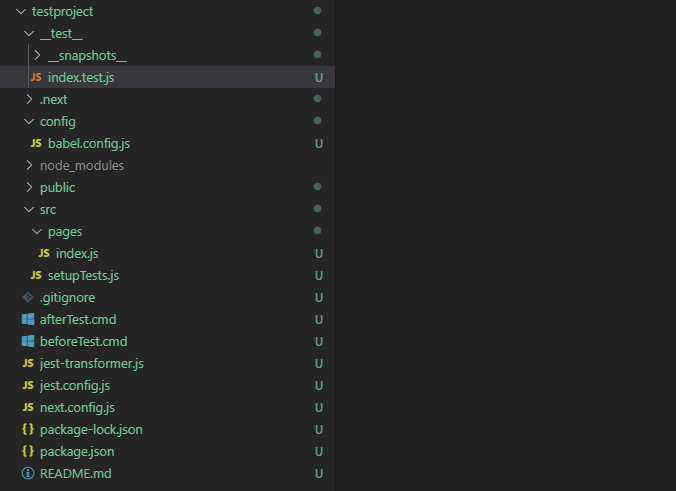
Step 7. Launch the test
- Launch the test with the following commands
npm run test- Check the terminal for the output messages
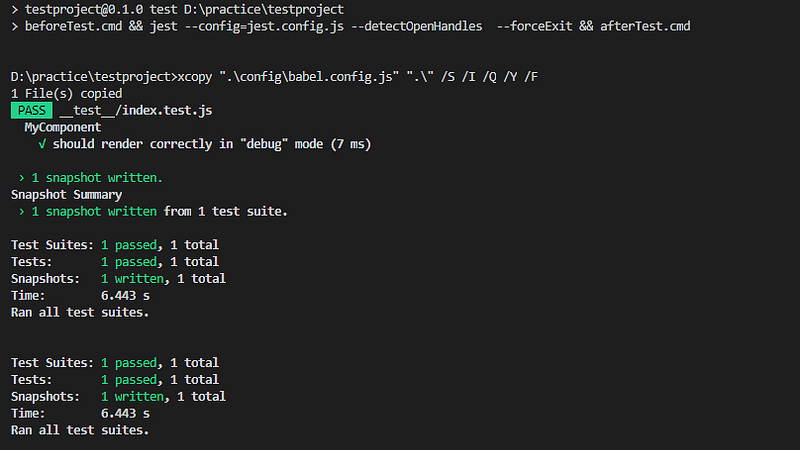
References
- [Getting Started · Jest](https://jestjs.io/docs/en/getting-started
- React Unit Test with Jest 單元測試
- javascript — Jest encountered an unexpected token — Stack Overflow
- Testing React components with Jest and Enzyme | Hacker Noon
- javascript — Babel 6 regeneratorRuntime is not defined — Stack Overflow]
- Testing React with Jest and Enzyme I | by Dominic Fraser | CodeClan | Medium
- Jest | 將 Unit Test (單元測試)導入 Redux 專案 — feat.React, Enzyme | by 神Q超人 | Enjoy life enjoy coding | Medium
- How to test React-Redux connected Components — RWieruch
- Using With Webpack · Jest
Summary
Thanks for your patient. I am Sean. I work as a software engineer.
This article is my note. Please feel free to give me advice if any mistakes. I am looking forward to your feedback.
- The Facebook page for articles
- The latest side project: Daily Learning
Related topics
How to use the two-way binding in Knout.js and ReactJS?
Learn how to use SignalR to build a chatroom application
My reflection of
IT & Network:
Database:
Software testing:
Debugging:
DevOps: