
Sorting Out The Risk of the Triangulation Exploit
Exploring iMessage attack paths and surface
~~~~~~~~~~~~~~~~~~~~~~~~~~~~~~~~~~~~~~~~~~~~~~~~~~~~~~~~~
⚙️ Check out my series on Automating Cybersecurity Metrics. The Code.
🔒 Related Stories: iPhone Security | OS and IoT Security
💻 Free Content on Jobs in Cybersecurity | ✉️ Sign up for the Email List
~~~~~~~~~~~~~~~~~~~~~~~~~~~~~~~~~~~~~~~~~~~~~~~~~~~~~~~~~
Here’s what I am trying to understand. I saw Eugene Kaspersky recommend turning off iMessage altogether on Twitter to prevent the attack that infected their users. The problem with that is that when you turn off iMessage you also turn off end to end encryption between Apple users.
TL;DR at the end of the post.
Someone told me, well iMessage has a huge attack surface. I’m absolutely sure that is true. iMessage definitely needs some love after reading the following presentation and CVEs below.
However, this leads me to a prior post I wrote about security controls. Instead of throwing out a security control, should we be addressing the underlying problem that creates a risk?
In this case, it seems that the implementation of certain parts of iMessage code is the problem. Reading through the presentation below, additional validation of Apple code is certainly required. But all the vulnerabilities mentioned are now patched and every new exploit is generally patched once Apple knows about it.
End to end encryption is important for your security. It ensures that no one but the two people communicating can read the messages they send to each other. If there is a way for someone to read messages two apple users send to each other then one of the following must be true:
- Apple is lying.
- They made a mistake.
It is nearly impossible to know which one it is, but with research such as is outlined in the presentation below and patches, the problems can be fixed either way.
Apple offers a bug bounty. I have heard mixed reviews on it, but at least they have one, unlike some companies. *ahem.*
So instead of throwing out end-to-end encryption, can we focus on the flaws that led to the Triangulation attack Kaspersky wrote about and get them fixed?
What I want to understand about iOS Triangulation
I had a few questions after I saw Eugene Kaspersky say you should turn off iMessage. He may be 100% absolutely correct that iMessage is a problem. He is a very astute security professional with years of experience. But here are my questions:
- Does the possibility to execute this specific attack still exist in the latest versions of Apple iOS?
- Is the method used in the attack still available even if the particular flaw used in the attack is patched due to some underlying weakness in iOS?
- Is the risk of the last point so great that I should turn off end to end encryption?
- Can I reduce the attack surface in other ways such as with Apple iPhone lockdown mode and reducing the different features I use on my phone such as iMessage apps?
In other words, is the risk of an attack so great that I should send unencrypted messages from my iPhone? I don’t see how that could be advisable, ever. I’m still looking into it. Here’s what I’ve found so far.
The specific flaw appears to be patched — update your phone
Apple said this flaw was patched back in February and the Kaspersky post does not indicate there is any new compromise.
This is pretty much all the information we have on the subject — at the time of this writing.
However, I did notice something curious today. Read the section on suggestions for Apple users below.
One bug fixed, but other exploits still possible?
Related to the Triangulation bug reported by Kaspersky I did a quick search on iMessage security and found this amazing presentation by Natalie Silvanovich of Google. This presentation and the bugs discovered are pretty impressive.
The code with the bugs in it, not so much. If the underlying root cause of these software flaws are not addressed, new attacks could continue to appear similar to the Triangulation malware. Perhaps a similar flaw facilitated the triangulation attack. Let’s look at how these vulnerabilities work.
I’ve sorted out the CVEs below in an attempt to determine the root cause of these types of attacks, what features you would need to use, and if lockdown mode would help.
Visual Voicemail
CVE-2019–8613 Must have carrier that supports visual voicemail and must enable visual voicemail on iPhone. Limited information leak.
Fixed.
CVE-2019–8626 Must be using iOS email app. One vulnerability exploitable in iOS 11.3 DoS only in 12.
Fixed.
iMessage
CVE-2019–8624 — deserialization does not validate the field length in DigitalTap message processing. “low quality bug.”
Fixed.
CVE-2019–8661 — heap overflow when deserializing URL. Mac Only using bookmarks. I read that as not on iPhone? So you have to be checking iMessages on your computer? I don’t ever do that and don’t recommend it.
Fixed.
CVE-2019–8646 — deserialization bug that allows info leak and file access. Code must be using NSKeyedUnarchiver deserialization with file backed NSData objects. Code fails to validate file length and can bypass check to see that it is a local file. Visit a URL and leak information in parameters.
Note: So, perhaps lockdown mode which prevents auto-opening URLs prevents this?
Fixed.
CVE-2019–8647 — NSArray seems to have lack of validation of the data in it. If you use this class you need to make sure all the references remain in tact and are correct.
Fixed.
CVE-2019–8641 — Decoding class (deserialization?) can read object out of bounds. Classic buffer validation problems.
Fixed.
CVE-2019–8660 — This bug references NSURL. So my question remains. If you are using lockdown mode and do not auto-preview links and don’t open anything sketchy — is this a problem?
Fixed.
So yes, iOS and iMessage have had a lot of CVEs, but so has almost every other operating system and software application in existence. The point is, what is the root cause, how do we prevent them, and how can we protect ourselves?
So what is the real culprit here?
The root cause of every CVE above is failure to validate every piece of data properly in the iMessage code base. (Or it is intentional for the conspiracy theorists and those who don’t trust any government or corporation.)
I also have another question. Does Apple really need to use serialization in this code base, because it is known to be incredibly hard to validate properly and was the source of so many Java bugs that someone from Oracle said they were going to stop using it altogether.
If you are going to use serialization because there is no other viable alternative— then you need to be extremely careful that every single piece of data gets validated properly — and it’s much harder to do if you’re using serialization.
So Apple has some repeated issues in their code to address. If they continue to allow these types of bugs to reach production, similar exploits may occur.
Suggestions for Apple
I would suggest the following to developers at Apple that wrote this code and the QA teams who are testing it (and yes, I know it’s not easy):
- Validate every single input to the code.
- Validate before you use the variable or data it in the code!
- Determine if you really need serialization or there is some safer alternative.
- Use automation, code reviews, and penetration testing to find these problems before the bug bounty researchers do. But bug bounties are good!
- Figure out who is failing to validate the variables in their code and understand why. Train or remove repeat offenders.
These tricky bugs illustrate why I will again suggest that code reviews are not obsolete. How are automated tools going to find all these bugs? You have to know something about how the application works. If the code is written in a clean manner, it should be possible to catch some of these bugs before they even get to QA. For those who don’t write clean code, refer to #5 above. Overly complicated code is not good code.
Also, QA teams or penetration testers should be testing and fuzzing code for these types of problems. Understand bounds checking and ensure that each variable is tested for faulty inputs.
How do these bugs relate to Triangulation?
Even though the Kaspersky team reported this attack only affected older versions of iOS, similar attacks could occur if the underlying code that made the attack possible has not been fixed.
Although Apple has addressed the specific CVEs in the list above and many others in their security updates, how are they addressing the root cause — how these bugs make it to a production environment in the first place? I would be curious to know if and how they have addressed that problem.
Suggestions for iPhone users
Check your iPhone to make sure it is the latest version from Apple. As you can see every CVE above has been fixed. Apparently Apple also patched the specific flaw that allowed Triangulation to exist in February. Keep your phone up to date. As new vulnerabilities are discovered, they will be patched, and most users are not subject to the kind of crafty attacks that nation states and security firms face.
However, if you have this malware on your phone it may be preventing you from getting updates. Perhaps that is why people at Kaspersky were still using old versions of iOS even though they are a security company and should know better. The malware tricked them into running old versions and prevented the updates. Occasionally, for software I’m using, I will check what the latest version is and then compare it to the version on my host, just as I did recently with git on Ubuntu. The default from AWS was an old version until I pointed to a new repository.
If the malware has deeply infected your phone at a low level, it may not be easy to tell you’re not on the latest version. A complete reset may be in order if you are truly concerned and don’t know how to sort out the technical details or inspect network traffic to find a compromise. Low level malware may be showing you false version information.
Turn on lockdown mode if you feel you may be targeted by such an attack. That prevents at least some of the attack surface because iMessages won’t automatically visit links to give you previews of them. That is the functionality that some of the CVEs above use. If a link exploits a flaw in iMessage it won’t work. You have to copy the link to a browser to open it. Of course, if you choose to open a sketchy link in your browser, you’re out of luck with that too. Be wary of the links you click and URLs you open.
If you are very concerned, don’t use Apple iMessage Apps or Visual Voicemail. Every new whiz bang gadget you use on your phone is a new potential bug and attack surface.
You may opt to use an alternate application for email or messaging, but I have some caveats on that approach in the next section.
Although iMessage provides end to end encryption for active messages between users it does not provide end to end encryption if you back up your messages to iCloud. Here’s how to turn that on.
I also personally turn off the automagic device sharing for reasons explained in my book at the bottom of this post.
You can also create separate Apple logins for different devices to make sure data is not shared (presuming Apple doesn’t have a bug that shares data between Apple users.)
About Kaspersky’s Malware Checker
Kaspersky’s tool to check if you are infected requires you to provide your Apple iTunes password. I haven’t reviewed the code completely but I would be reluctant to do that with code provided by a Russian security company without understanding exactly what it does. I have not had time to review it in a lot of detail. It may be totally fine. I am just always wary of providing a user name and password unless I am very sure what a piece of software is doing if the one asking me for the password is not the company hosting my data.
There are other ways to see if you have been infected mentioned here:
While the malware attempts to delete traces of the attack from devices, it still leaves signs of infection, like system file modifications that prevent the installation of iOS updates, abnormal data usage, and the injection of deprecated libraries.
Only install applications from trusted sources.
Only use the features you really need if you have concerns.
I’ve written before how I also have different phones for different purposes. I have a phone where I should never get a message — if I do — it’s suspect. The only unexpected message I did not explicitly request that I’ve gotten on that phone was from China. ?!
You can inspect the traffic your phone sends and what your phone connects to in order to see if it’s sending anything suspicious. Put your phone on a locked down WiFi network and turn off mobile network connections. Inspect the traffic via wifi. Or, do what Kaspersky did and make a backup of your phone and inspect the traffic that way.
Check the IP addresses to which your phone is connecting and what is in the packets. Look at the domain names and DNS request. Check the URL parameters and payloads and hidden fields in packets for sensitive data.
Bleeping Computer provides a list of domains you can check for in this article:
Here’s a tip if you are using pfsense. Monitor your WAN for DNS requests using this filter (port 53 TCP or UDP).
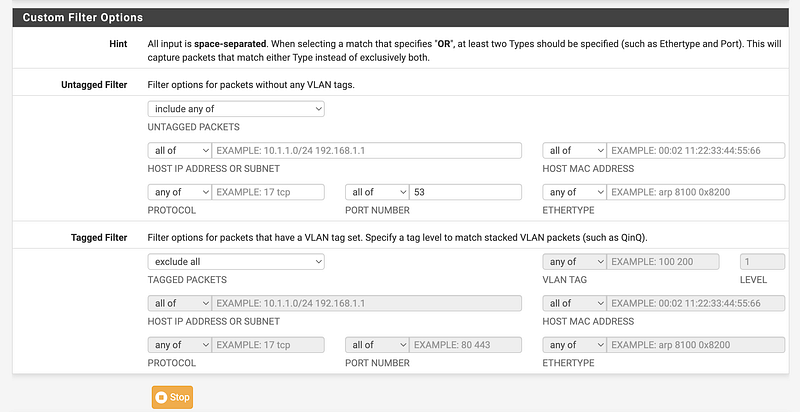
You’ll see all the domains your devices are making DNS queries for:
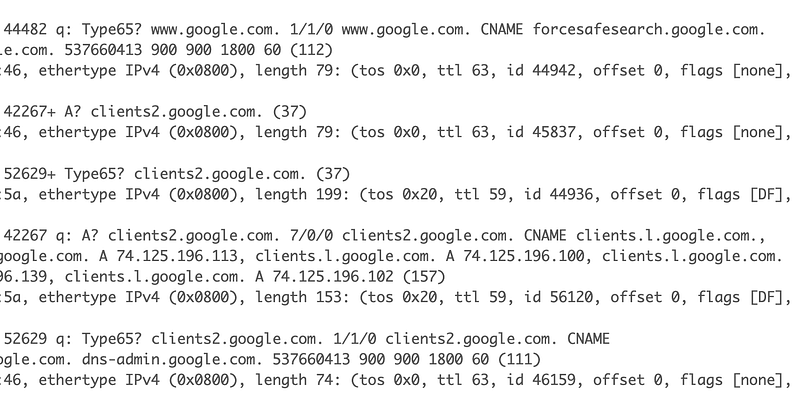
Unless of course you allow DNS over HTTPS, in which case you can’t see this traffic.
However, the attackers could change the domains. How do you resolve that? You need to understand what is normal for your network and look for things that are abnormal. That means you need to be constantly monitoring to identify attacks.
Is Apple working with the US government?
Before you jump to conclusions, understand this.
You may never know for sure.
Be aware that the Russian government is known for spreading misinformation. They use it to try to influence people around the world.
However, the US government is involved in spying — as is every other government on the face of the planet. If you want to know more about that, check out the related book reviews on the topic:
Spying is unfortunately necessary for national security — and it can save lives when used for good. It can also be used for evil by people on power trips with self-serving intentions.
It is plausible that the US government was trying to obtain information related to the Russian government’s plans in Ukraine and Apple coordinated with them. Or an insider at Apple did unbeknownst to the company. Or it could have been some other government. Or Russia is creating a distraction to hide the fact that they performed the attack themselves. I don’t know.
Speculation is kind of pointless. Spend your time on facts and solutions to known problems instead!
One way to avoid a foreign government spying on you is to buy products developed — and tested — in your own country (or allied countries).
If you don’t trust your own government and products made in your own country, you might try to use a products like Signal and Proton mail, but even products like that have to comply with various laws.
Be aware that these third-party applications such as Signal have also been subject to attack. Nothing is fool-proof.
If those applications are running on an operating system provided by Apple, it is plausible that Apple could still access the data in those applications if some flaw exists.
For very sensitive communications or documents you might opt to use encryption keys you control when sending messages, but even various encryption protocols are known to have weaknesses, so you’ll need to read up on that and make sure you are always using the latest recommended implementation.
Generally, I think that using an elliptical curve encryption protocol is best as long as you configure it properly, but even without that you are providing a deterrent when using your own encryption keys — if you properly protect them. If someone can obtain your encryption keys you’re encrypted information is as good as plain text. I wrote about storing your encryption keys on a Yubikey here:
For the most sensitive data, in the end, everything depends on proper implementation and keeping all software components up to date, limiting the attack surface, and monitoring network communications, if you are in need of that much security.
But in reality, most people are not going to be subject to such crafty attacks. Those who use zero day exploits (a topic in my book) save them for the most valuable targets. Taking some reasonable steps like keeping your phone up to date and limiting the apps and features you use to only what you really need will probably be good enough for a lot of people when it comes to this particular attack. For other types of attacks, use strong passwords and multi-factor authentication (MFA).
What’s been causing the slow iPhones?
Now I have one last interesting tidbit to mention.
I heard various people including someone close to me saying their phones were running slow and his battery would drain quickly. Today I asked that person to check the version of his phone.
When he told me about the problem originally, I suggested it was a software problem. That was before we knew about Triangulation. I’ve seen this problem before. Many years ago, Apple had a software bug that caused iPhones to run slowly — including mine. A lot of people bought new batteries or new phones. Once Apple fixed the bug the phones worked fine again. They even had to pay some people who bought new phones because they thought their phones were obsolete.
A bit of research led me to this:
This time around — was malware preventing an update to resolve the root cause of the draining battery and slow phone? If you are experiencing a slow phone and battery issues, you might want to check for malware to see if your phone is not updating, or just reset your OS. Turn on lockdown mode if you are especially concerned after you reset your phone. This problem should be fixed now.
In Summary ~ Triangulation
Although I’m writing about iPhone malware here, I mainly focus on cloud and application security as explained on my out of date website (I’ve been busy and no time to update it).
That said, the information I provided above is more than I got out of a recent security class that claims to teach mobile security.
I could dive in to understand all the details of the malware and iOS code if I had to, but I’ll leave that to the people who focus on mobile malware. When I perform penetration tests, I do not install any software on my own devices so you’ll need to ask someone else if you need that type of testing.
I am pretty busy so I have not reviewed the Kaspersky attack in detail, but I wanted to address the questions I posed at the top of this post. I wanted to understand if I or others I know could be infected and what to do about it, so I took a time out to address those questions. I also have generally had a concern about the recommendation to turn off end to end encryption.
I read that the flaws that allow this particular attack are already patched. Update your phone.
I have skimmed the code in the application they sent out to see if you are infected and wrote about that above. I am not personally going to use it but will review the devices I have on hand using the other methods I described.
Turn on Lockdown mode if you have sensitive data on your phone, avoid unnecessary features, use a different application for sending text messages if you are especially concerned, but do not turn off iMessage and thereby end to end encryption.
I provided some additional recommendations in the details above for those who are ultra concerned.
With what I know so far, I would ****NOT**** recommend turning off iMessage and end-to-end encryption on an iPhone until if and when some additional information comes to light to support that.
As always, new information may change my mind!
Follow for updates.
Teri Radichel | © 2nd Sight Lab 2023
About Teri Radichel:
~~~~~~~~~~~~~~~~~~~~
⭐️ Author: Cybersecurity Books
⭐️ Presentations: Presentations by Teri Radichel
⭐️ Recognition: SANS Award, AWS Security Hero, IANS Faculty
⭐️ Certifications: SANS ~ GSE 240
⭐️ Education: BA Business, Master of Software Engineering, Master of Infosec
⭐️ Company: Penetration Tests, Assessments, Phone Consulting ~ 2nd Sight Lab
Need Help With Cybersecurity, Cloud, or Application Security?
~~~~~~~~~~~~~~~~~~~~~~~~~~~~~~~~~~~~~~~~~~~~~~~~~~~~~~~~~~~~~
🔒 Request a penetration test or security assessment
🔒 Schedule a consulting call
🔒 Cybersecurity Speaker for PresentationFollow for more stories like this:
~~~~~~~~~~~~~~~~~~~~~~~~~~~~~~~~~~~~~~~~~~~~~~~~~~~~~~~~~~~~~
❤️ Sign Up my Medium Email List
❤️ Twitter: @teriradichel
❤️ LinkedIn: https://www.linkedin.com/in/teriradichel
❤️ Mastodon: @teriradichel@infosec.exchange
❤️ Facebook: 2nd Sight Lab
❤️ YouTube: @2ndsightlab


