RIP ChatGPT: Google’s Mind-Blowing AI Features Will Blow Your Mind!
Everything you need to know is unveiled!

Google recently held its highly anticipated Google IO event, and let me tell you, it was quite the buzz!
Just 12 days ago, this exciting event took place and one of the major highlights was the official launch of several AI features.
Now, let’s dive into the juicy details.
During this event, the incredibly talented Google team, led by none other than the visionary CEO Sundar Pichai, spilled the beans on their latest and greatest developments in the world of AI.
They gave us a sneak peek into the amazing AI models and products they have been tirelessly working on, all with the aim of bringing groundbreaking experiences to users like you and me.
But here’s the best part — there’s even more to come!
The Google team has a whole lineup of exciting AI tools and features that they’re planning to unleash upon the world. It’s like a treasure trove of innovation just waiting to be discovered.
And there are even some more AI tools and features that the Google team is planning to launch.
Let me share some of the best ones with you.
1. Bard: The New AI Chatbot
This AI chatbot was initially launched in the US and the UK, but guess what? It has spread its wings and is now available in a whopping 180 countries across the globe!
But hold on, there’s more!
Google has taken it up a notch by adding support for Japanese and Korean languages. And that’s not all — they’re gearing up to support a mind-blowing 40 additional languages in the near future. Talk about breaking down language barriers!
Now, here’s the best part. Ever since Bard made its grand entrance, I’ve been diving headfirst into its world of possibilities.
Every day, I eagerly explore its features and functionalities because, let me tell you, as an AI enthusiast, I find Bard absolutely mesmerizing. It’s like peering into the future and seeing how AI can transform our lives in extraordinary ways.
In case you’re not familiar with Bard, think of it as a cousin to ChatGPT, another incredible AI language model.
With Bard, you can interact with the system using all sorts of prompts. Want information? It’s got you covered. Fancy a chat? Bard’s ready for a conversation. Need assistance in different domains? You can count on Bard to lend a virtual hand.
Here are some of the prompts that I mostly use.
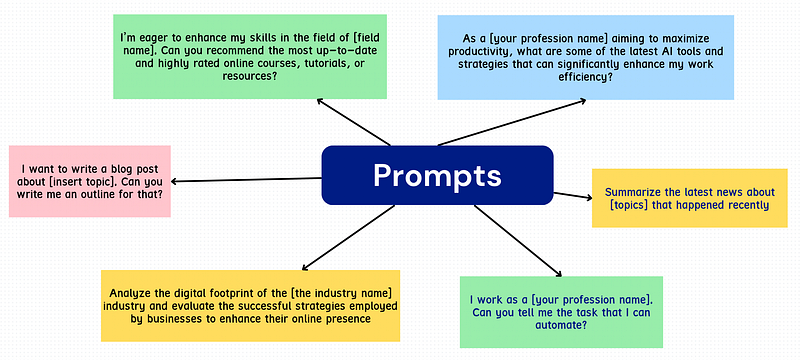
Besides that, here are some of the blog posts that you can read if you want to know more about Bard.
- Goodbye ChatGPT: Bard Takes AI to Next Level with These Mind-Blowing Features
- Bard: The New AI Chatbot That Could Replace ChatGPT
- Bard vs ChatGPT: A Head-to-Head Comparison of the Two Leading AI Chatbots
With all of these, you will get a clear understanding of what is Bard and how you can use it to a full extent.
2. Help Me Write Feature in Gmail
Big companies like Microsoft and Canva have been adding cool AI features to their products.
But now it’s Google’s turn to jump on the AI bandwagon and make their product even better. And guess which product they’re adding AI functionality to? Yep, it’s Gmail, the email service that most of us use every day!
So, let me tell you about this awesome new feature called “Help me write” in Gmail. I use Gmail a lot. Whenever I’m chatting with clients or sending important documents for my startup, I rely on Gmail.
But you know what takes up a good chunk of my time? Writing the perfect email.
I always want to make sure my content sounds just right and meets the expectations of the recipient. I even double-check everything before hitting that send button.
But now, thanks to this AI feature, I can simply ask for help! All I need to do is provide a little description of what I want the email to say, based on the message I received.
And guess what happens? The AI magically generates a well-written email for me, just the way I want it. It’s like having my own personal writing assistant!
I can’t tell you how much time this feature saves me. I can now use that extra time for more important stuff, like focusing on crucial tasks or even taking a breather.
It’s a game-changer, really.
Oh, and here’s a little bonus for you. Most people don’t know all the cool tricks and tips to make the most out of Gmail. So, I wrote this awesome blog post that explains everything.
3. Immersive View for Routes
You know what?
I’m terrible with directions. I can visit a place once and still not remember how to get back there. And honestly, I hate asking people for directions. That’s why I rely on Google Maps like it’s my personal navigation superhero.
But hold on, because the Google team is cooking up something even more awesome. They’re planning to launch a new feature that will let you see your entire trip in advance, and in a way that’s super clear and easy to follow. How cool is that?
Not only will you be able to plan your route, but you’ll also get all sorts of handy information. Want to know the air quality before you head out? No problem.
Curious about the traffic situation? They’ve got you covered. And hey, why not throw in the weather forecast while they’re at it? Google Maps is about to become your one-stop shop for all things trip-related.
Now, here’s the thing.
The feature is still being rolled out, so it might not be available for everyone just yet. But trust me, it’s worth the wait. Once it’s up and running for everyone, you’ll be able to plan your trips like a pro and have all the information you need at your fingertips.
4. Magic Editor for Your Photos
If you’ve been following me, you might have come across some pretty neat AI tools that can work wonders with your images. They can help you erase unwanted objects, enhance your photos, and all sorts of cool stuff.
Well, guess what? Google is stepping up its game by adding a fantastic feature called Magic Editor to its popular product, Google Photos.
Now, let me break it down for you.
With this Magic Editor, you have the power to easily move objects around in your photos. Imagine this: you have a picture where you can only see half of a table, but you wish you could see the whole thing.
No worries! With the Magic Editor, you can simply drag that table around and make it visible in its entirety. It’s like having a magic wand for photo editing!
And that’s not all. Google has big plans to bring even more AI-powered features to their range of other apps.
So, get ready to see some mind-blowing advancements in the way we use technology across different Google products. They’re continuously working to make our lives easier and more exciting with the help of artificial intelligence.
5. AI on Google Docs, Google Sheets, and Google Slides
Well, Google is not only bringing AI to Gmail, Google Photos, and Google Maps, but they’re also integrating AI features into other popular tools like Google Docs, Google Sheets, and Google Slides. They’re really going all out to make our lives easier and more efficient!
Let me break it down for you:
- Google Docs:
Now, inside Google Docs, you can tap into the power of AI by simply asking it to write things for you. Say you need a blog post or a job description for a specific role. Just use the “Help me write” feature, and AI will do the heavy lifting by generating the content you need. It’s like having your own personal writing assistant right at your fingertips.
- Google Sheets:
Moving on to Google Sheets, you’ll be amazed at what AI can do for organization and data management.
With the “Help me organize” feature, you can write prompts to create an agenda or ask it to generate a table based on specific data. AI will take care of the rest, effortlessly creating the structure and format you need. It’s like having an organizational guru by your side.
- Google Slides:
Last but not least, we have Google Slides.
When it comes to creating captivating visuals for your presentations, AI has got your back.
With the “Help me visualize” feature, all you need to do is write a prompt describing the visual you have in mind. AI will then suggest a variety of visuals based on your description, giving you options to choose from and making your presentation shine like never before.
6. Google’s MusicLM Lets You Craft Masterpieces with Ease!
You won’t believe what Google is up to!
They’re not only adding cool features to their existing tools, but they’re also launching brand new tools with mind-blowing AI capabilities. And one of these new tools is called MusicLM.
Now, MusicLM is exactly what it sounds like — a tool that lets you create music with just your words.
How awesome is that?
All you need to do is write some prompts, and MusicLM will work its magic to generate different types of music for you. Whether you’re into hip-hop, classical tunes, or any other genre, MusicLM has got you covered.
Just imagine the possibilities! You can unleash your creativity and bring your musical ideas to life without needing any technical know-how or fancy instruments.
With MusicLM, all you need is your imagination and a few simple prompts to create your own unique compositions.
That’s it for now.
There are a number of other AI tools and features that the Google team is planning to launch. Maybe I will write another post for that.
Hope you like it.
That’s it — thanks.
Consider becoming a Medium member if you appreciate reading stories like this and want to help me as a writer. It costs $5 per month and gives you unlimited access to Medium content. I’ll get a little commission if you sign up via my link.