avatarCasey Botticello

Free AI web copilot to create summaries, insights and extended knowledge, download it at here

2858

Abstract

e><figure id="f4c9"><img src="https://cdn-images-1.readmedium.com/v2/resize:fit:800/1*Tj9qHfow2vG-P-JYlzyY5w.png"><figcaption></figcaption></figure><h2 id="2da8">Step 5.</h2><p id="f943">Customize your featured page’s layout.</p><figure id="f999"><img src="https://cdn-images-1.readmedium.com/v2/resize:fit:800/1*wvqhM1XortGYTgADr8JxzQ.png"><figcaption></figcaption></figure><p id="8077">Under Layout, choose whether you want to display stories in a specific tag or featured stories (custom stories you hand-pick from your publication’s recent story list).</p><figure id="9e33"><img src="https://cdn-images-1.readmedium.com/v2/resize:fit:800/1*bgmbN_XsElYHQ9D2ks-l0Q.png"><figcaption></figcaption></figure><p id="7cb2">If you choose <b>Stories in a tag</b>, any stories with that tag will be automatically included.</p><figure id="7bfd"><img src="https://cdn-images-1.readmedium.com/v2/resize:fit:800/1*W8AARzIKQpJh0bNubX3NNw.png"><figcaption></figcaption></figure><p id="58b3">If you choose <b>Featured stories</b>, you’ll need to add stories manually to populate the section. To do that, click <b>Choose a story</b><i></i>in the section template and pick a story from the drop-down list. You can also start typing in a story’s section title to narrow down the selection.</p><figure id="c7af"><img src="https://cdn-images-1.readmedium.com/v2/resize:fit:800/1*5iJ_VId4913oTbf_knVXkQ.png"><figcaption></figcaption></figure><p id="3a03">To finish your newly created feature page, click save.</p><h1 id="53ca">Notes About Medium Feature Pages</h1><ul><li>Feature pages exist even when they are not linked to a publication’s navigation bar (content is indexed by search engines and is public if you have the URL).</li><li>The feature page header image should be at least 1200px wide and 350px tall.</li><li>Feature pages cannot have <a href="https://readmedium.com/medium-homepage-promo-section-512e178bac6a">promo sections</a> added to them like the homepage of your publication can.</li></ul><p id="066d"><a href="undefined">Casey Botticello</a></p><figure id="5f44"><img src="https://cdn-images-1.readmedium.com/v2/resize:fit:800/1*yxZs_V4qKTyOtgwmCpL28g.png"><figcaption></figcaption></figure><p id="40f3"><i>Thanks for reading this article! Leave a comment below if you have any questions. Be sure to sign up for the <a href="http://bit.ly/MBG-Footer-1"><b>Blogging Guide newsletter</b></a>, to get the latest tips, tricks, and news about writing on Medium and to join our Facebook group, <a href="http://bit.ly/Medium-Facebook-Group-Footer-Link"><b>Medium Writing</b></a>, to share your latest Medium posts and connect with other writers.</i></p><div id="aa87" class="link-block"> <a href="https://bloggingguide.substack.com"> <div> <div> <h2>Blogging Guide</h2> <div><h3>Learn How to

Options

Make Money Writing Online | Medium · Substack · Amazon KDP · Social Media Marketing · SEO · Building a…</h3></div> <div><p>bloggingguide.substack.com</p></div> </div> <div> <div style="background-image: url(https://miro.readmedium.com/v2/resize:fit:320/0*SCNTu_9hLTMcprwl)"></div> </div> </div> </a> </div><h2 id="f06d">If you liked this article, here are some other articles you may enjoy:</h2><div id="7f95" class="link-block"> <a href="https://readmedium.com/medium-publication-sections-3616c64494db"> <div> <div> <h2>Medium Publication Sections</h2> <div><h3>The four section types available to Medium publication editors</h3></div> <div><p>medium.com</p></div> </div> <div> <div style="background-image: url(https://miro.readmedium.com/v2/resize:fit:320/1*EcR5zDqwMapkW9ibQzO3Yg.png)"></div> </div> </div> </a> </div><div id="9930" class="link-block"> <a href="https://readmedium.com/how-to-choose-the-perfect-image-for-your-medium-article-ece08b33a67b"> <div> <div> <h2>How to Choose the Perfect Featured Image for Your Medium Article</h2> <div><h3>Medium story featured image</h3></div> <div><p>medium.com</p></div> </div> <div> <div style="background-image: url(https://miro.readmedium.com/v2/resize:fit:320/1*Z4lbZoIYRjScPCpKky5dgw.png)"></div> </div> </div> </a> </div><figure id="9b15"><img src="https://cdn-images-1.readmedium.com/v2/resize:fit:800/1*WVlPA9DlzNCkryxXqGVxcg.png"><figcaption></figcaption></figure><p id="2458"><b>Casey Botticello</b> is a partner at Black Edge Consulting. Black Edge Consulting is a strategic communications firm, specializing in online reputation management, digital marketing, and crisis management. Prior to founding Black Edge Consulting, he worked for BGR Group, a bipartisan lobbying and strategic communications firm.</p><p id="c43e">Casey is the founder of the Cryptocurrency Alliance, a Super PAC dedicated to cryptocurrency and blockchain advocacy. He is a graduate of The University of Pennsylvania, where he received his B.A. in Urban Studies.</p><blockquote id="3534"><p><i>You can connect with him on <a href="https://www.linkedin.com/in/caseybotticello/"><b>LinkedIn</b></a>, <a href="https://twitter.com/caseybotticello"><b>Twitter</b></a>, <a href="https://www.facebook.com/groups/mediumwriting"><b>Facebook</b></a>, or by visiting his website, <a href="https://www.bloggingguide.org"><b>Blogging Guide</b></a>.</i></p></blockquote></article></body>

Medium Publications

Medium Publication Feature Pages

How to create a feature page for your Medium publication
Source: Casey Botticello of Blogging Guide

What Are Medium Publication’s Feature Pages?

Feature pages act as a landing page or a specialized collection of your Medium publication’s contents.

For example, in this publication that you are reading (Blogging Guide), I have a number of feature pages used to group articles by topic. One of them is called Medium Writer Tips:
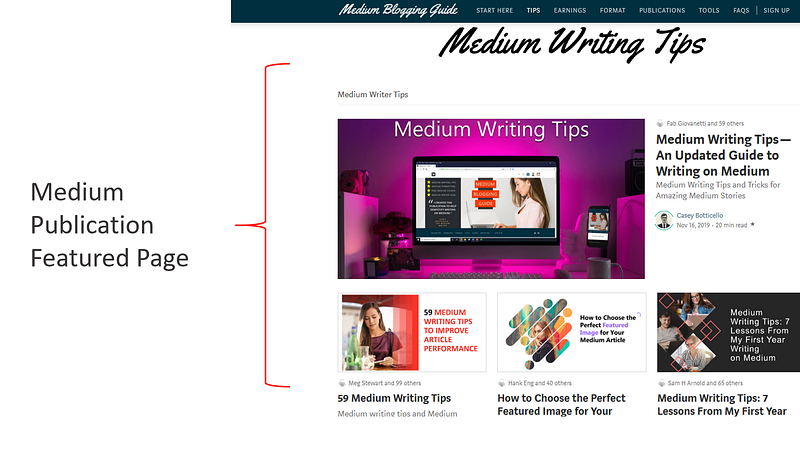
The page exists as a sub-directory of your publication:

medium.com/blogging-guide/medium-writing-tips

In this example, I have put together a list of articles that all relate to Medium writing tips.

How To Create a Feature Page

Step 1.

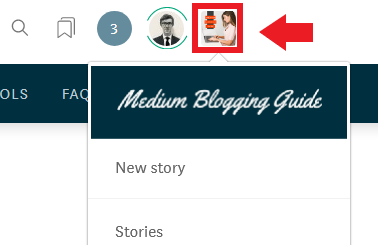
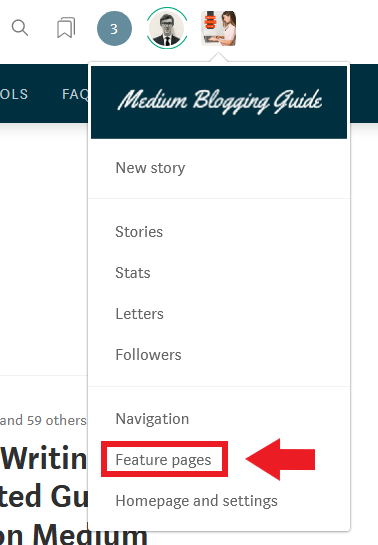
To create a feature page, go to your publication homepage and click on the publication avatar.
Step 2.

Select the feature pages button from the drop down menu.
Step 3.

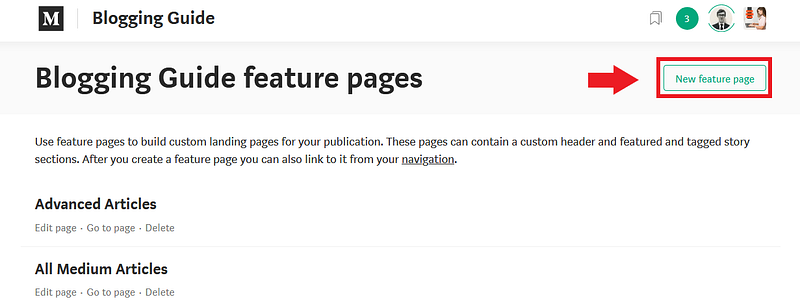
Click the new feature page button.
Step 4.

Fill out the information associated with your new feature page. The feature page title, link and description are required.
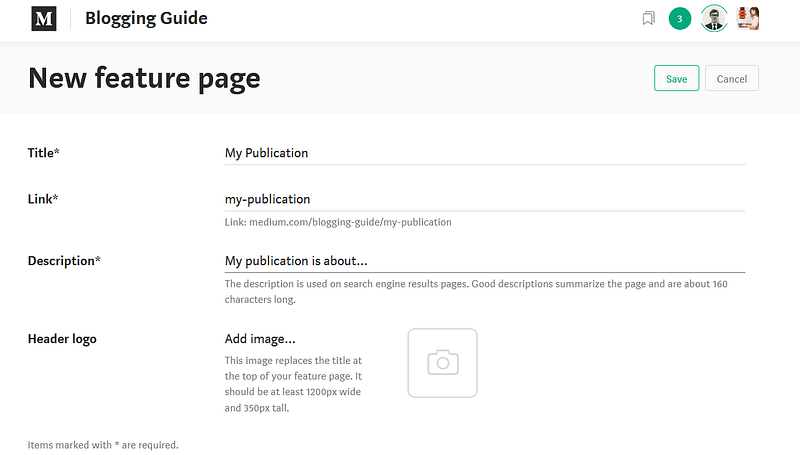
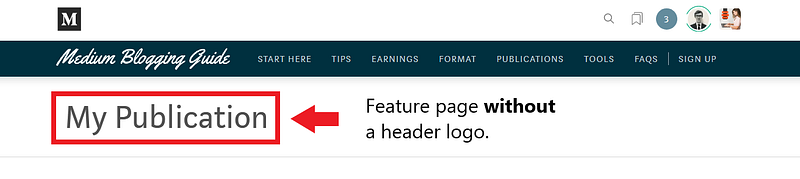
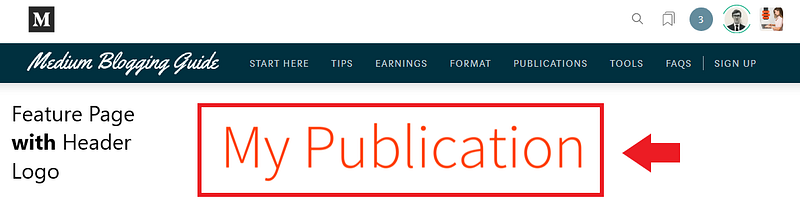
If you choose to add a header logo (optional), your header logo will be shown in place of the page title for that page only.

Below is a comparison of a page with a header logo and without one:
Step 5.

Customize your featured page’s layout.
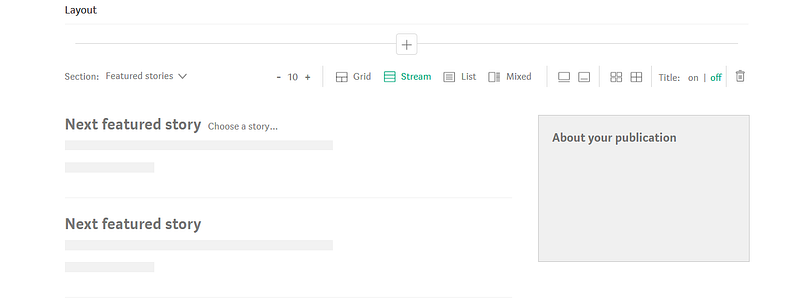
Under Layout, choose whether you want to display stories in a specific tag or featured stories (custom stories you hand-pick from your publication’s recent story list).
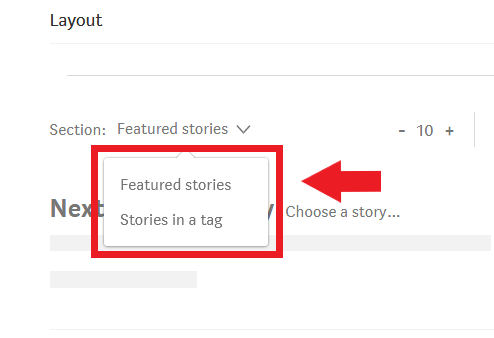
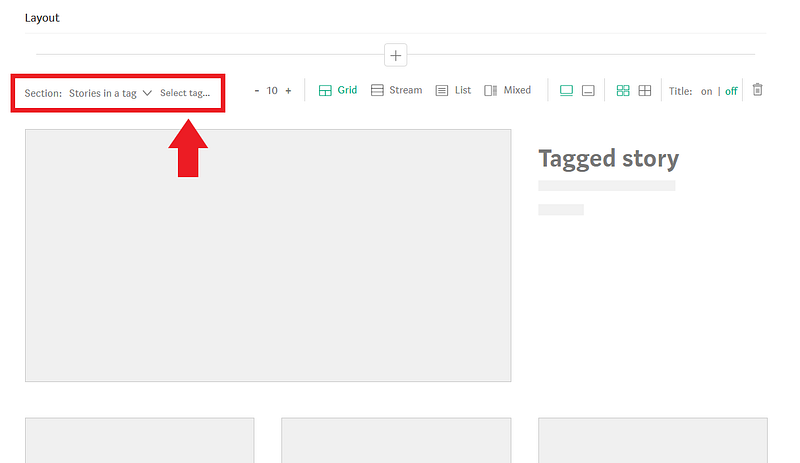
If you choose Stories in a tag, any stories with that tag will be automatically included.
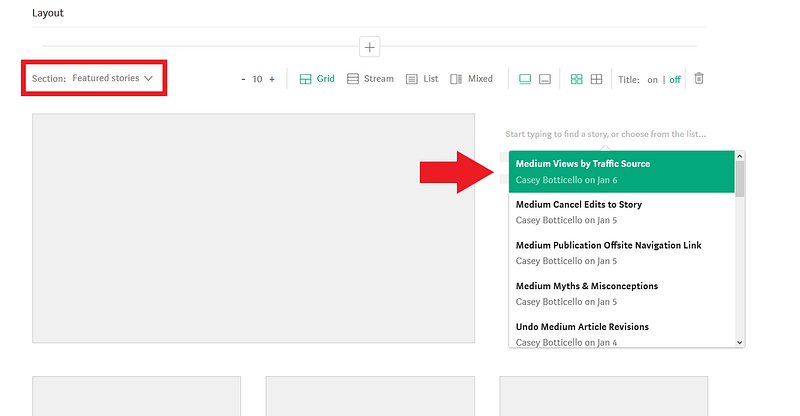
If you choose Featured stories, you’ll need to add stories manually to populate the section. To do that, click Choose a storyin the section template and pick a story from the drop-down list. You can also start typing in a story’s section title to narrow down the selection.
To finish your newly created feature page, click save.

Notes About Medium Feature Pages

  • Feature pages exist even when they are not linked to a publication’s navigation bar (content is indexed by search engines and is public if you have the URL).
  • The feature page header image should be at least 1200px wide and 350px tall.
  • Feature pages cannot have promo sections added to them like the homepage of your publication can.

Casey Botticello

Thanks for reading this article! Leave a comment below if you have any questions. Be sure to sign up for the Blogging Guide newsletter, to get the latest tips, tricks, and news about writing on Medium and to join our Facebook group, Medium Writing, to share your latest Medium posts and connect with other writers.

If you liked this article, here are some other articles you may enjoy:

Casey Botticello is a partner at Black Edge Consulting. Black Edge Consulting is a strategic communications firm, specializing in online reputation management, digital marketing, and crisis management. Prior to founding Black Edge Consulting, he worked for BGR Group, a bipartisan lobbying and strategic communications firm.

Casey is the founder of the Cryptocurrency Alliance, a Super PAC dedicated to cryptocurrency and blockchain advocacy. He is a graduate of The University of Pennsylvania, where he received his B.A. in Urban Studies.

You can connect with him on LinkedIn, Twitter, Facebook, or by visiting his website, Blogging Guide.

Medium
Publication
Design
Writing
Format
Recommended from ReadMedium