avatarCasey Botticello

Free AI web copilot to create summaries, insights and extended knowledge, download it at here

2390

Abstract

ar as a clickable link to the URL of your choosing.</p><h1 id="e23e">How to Add the Homepage Promo Section to Your Medium Publication</h1><p id="0acb">To add a new Promo Section to your publication layout, go to your publication Homepage and settings section > Homepage > create a new section > choose Promo from the drop-down menu.</p><p id="ad04">You can choose to include a section title, image, headline text, button and specify a custom background color. Whichever combination of elements you choose, they will appear as a clickable link to the URL of your choosing.</p><h1 id="e839">Additional Notes on Medium’s Homepage Promo</h1><ul><li>The Promo section cannot be added to Feature Pages within a publication. It can only be added your publication’s homepage.</li><li>You can add multiple Homepage Promo sections to your Medium publication (no limit)</li><li>Each Homepage Promo section can be uniquely customized.</li><li>Uploaded images are displayed at either maximum height of 175px or maximum width of 600px.</li><li>Homepage promos can contain GIFs (not just standard images).</li></ul><p id="3b05"><a href="undefined">Casey Botticello</a></p><figure id="5f44"><img src="https://cdn-images-1.readmedium.com/v2/resize:fit:800/1*yxZs_V4qKTyOtgwmCpL28g.png"><figcaption></figcaption></figure><p id="59d2"><i>Thanks for reading this article! Leave a comment below if you have any questions. Be sure to sign up for the <a href="https://mediumbloggingguide.substack.com/"><b>Blogging Guide newsletter</b></a>, to get the latest tips, tricks, and news about writing on Medium and to join our Facebook group, <a href="http://bit.ly/Medium-Facebook-Group-Footer-Link"><b>Medium Writing</b></a>, to share your latest Medium posts and connect with other writers.</i></p><div id="0037" class="link-block"> <a href="https://bloggingguide.substack.com"> <div> <div> <h2>Blogging Guide</h2> <div><h3>Learn How to Make Money Writing Online | Medium · Substack · Amazon KDP · Social Media Marketing · SEO · Building a…</h3></div> <div><p>bloggingguide.substack.com</p></div> </div> <div> <div style="background-image: url(https://miro.readmedium.com/v2/resize:fit:320/0*_GNiD_m4LhlhOEEm)"></div> </div> </div> </a>

Options

 </div><h2 id="55cd">If you liked this article, here are some other articles you may enjoy:</h2><div id="5f56" class="link-block">
      <a href="https://readmedium.com/medium-vs-wordpress-97f9974005d0">
        <div>
          <div>
            <h2>Medium vs. WordPress</h2>
            <div><h3>Should writers use Medium or create their own self hosted blog?</h3></div>
            <div><p>medium.com</p></div>
          </div>
          <div>
            <div style="background-image: url(https://miro.readmedium.com/v2/resize:fit:320/1*ysZaimnLTZIXec3a3aBhfg.png)"></div>
          </div>
        </div>
      </a>
    </div><div id="e2c8" class="link-block">
      <a href="https://readmedium.com/medium-curation-jail-4898c030bfca">
        <div>
          <div>
            <h2>Medium Curation Jail</h2>
            <div><h3>What is Medium curation jail and how do you escape?</h3></div>
            <div><p>medium.com</p></div>
          </div>
          <div>
            <div style="background-image: url(https://miro.readmedium.com/v2/resize:fit:320/1*WADpVnrlCp6bu52UZBJ49w.png)"></div>
          </div>
        </div>
      </a>
    </div><figure id="0e12"><img src="https://cdn-images-1.readmedium.com/v2/resize:fit:800/1*WVlPA9DlzNCkryxXqGVxcg.png"><figcaption></figcaption></figure><p id="87fc"><b>Casey Botticello</b> is a partner at Black Edge Consulting. Black Edge Consulting is a strategic communications firm, specializing in online reputation management, digital marketing, and crisis management. Prior to founding Black Edge Consulting, he worked for BGR Group, a bipartisan lobbying and strategic communications firm.</p><p id="c43e">Casey is the founder of the Cryptocurrency Alliance, a Super PAC dedicated to cryptocurrency and blockchain advocacy. He is a graduate of The University of Pennsylvania, where he received his B.A. in Urban Studies.</p><blockquote id="b539"><p><i>You can connect with him on <a href="https://www.linkedin.com/in/caseybotticello/"><b>LinkedIn</b></a>, <a href="https://twitter.com/caseybotticello"><b>Twitter</b></a>, <a href="https://www.facebook.com/groups/mediumwriting"><b>Facebook</b></a>, or by visiting his website, <a href="https://www.bloggingguide.org"><b>Blogging Guide</b></a>.</i></p></blockquote></article></body>

Medium Publications

Medium Homepage Promo Section

How to add a homepage promotion section to your Medium publication
Source: Casey Botticello of Blogging Guide

When you create your own publication, there are several useful features that you gain access to. These features are only accessible to editors/owners of Medium publications (a good reason to consider managing or creating your own publication). One of the most useful custom features is the publication Homepage Promo Section.

The Homepage Promotions Sections (also known as the Promo Section) enables writers to add custom blocks to their publications that directly link your readers to a post, a feature page, or even, an external link (outside of Medium).

The Promo Section in a Medium Publication allows writers to directly link to a page outside of Medium.

I emphasize this point because Medium offers writers very few ways to direct traffic to external sources. This makes the Promo Section extremely valuable if used properly. What are some effective uses of this tool?

  • Direct readers to your blog, website, external portfolio
  • Link to an e-commerce store where a product is sold
  • Link to a sign up form/lead generation form for your mailing list

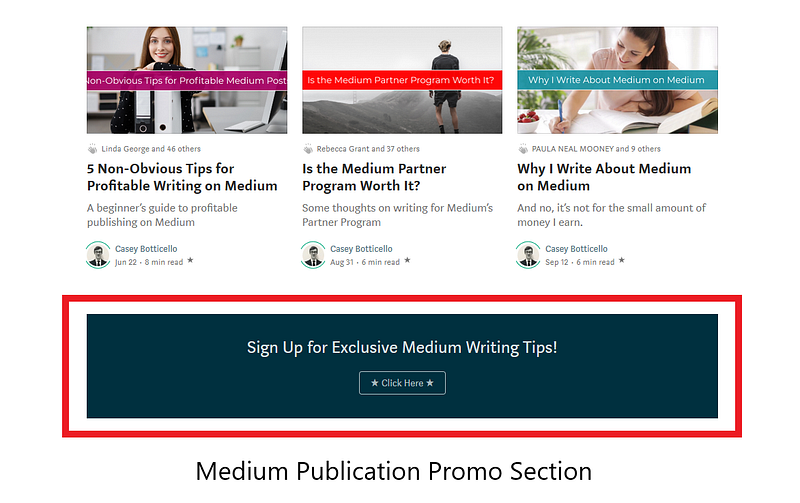
Below is an example from one of my publications, Blogging Guide:
Below is another example. The promo section renders well on mobile devices in addition to desktop:
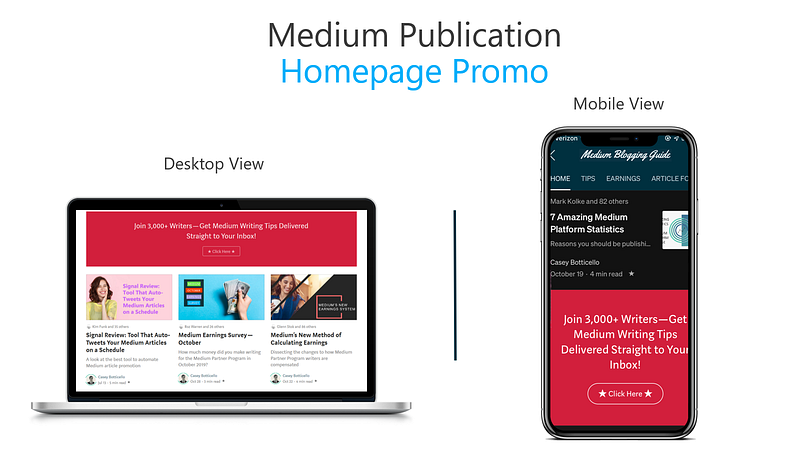
You can choose to include a section title, image, headline text, button and specify a custom background color. Whichever combination of elements you choose, they will appear as a clickable link to the URL of your choosing.

How to Add the Homepage Promo Section to Your Medium Publication

To add a new Promo Section to your publication layout, go to your publication Homepage and settings section > Homepage > create a new section > choose Promo from the drop-down menu.

You can choose to include a section title, image, headline text, button and specify a custom background color. Whichever combination of elements you choose, they will appear as a clickable link to the URL of your choosing.

Additional Notes on Medium’s Homepage Promo

  • The Promo section cannot be added to Feature Pages within a publication. It can only be added your publication’s homepage.
  • You can add multiple Homepage Promo sections to your Medium publication (no limit)
  • Each Homepage Promo section can be uniquely customized.
  • Uploaded images are displayed at either maximum height of 175px or maximum width of 600px.
  • Homepage promos can contain GIFs (not just standard images).

Casey Botticello

Thanks for reading this article! Leave a comment below if you have any questions. Be sure to sign up for the Blogging Guide newsletter, to get the latest tips, tricks, and news about writing on Medium and to join our Facebook group, Medium Writing, to share your latest Medium posts and connect with other writers.

If you liked this article, here are some other articles you may enjoy:

Casey Botticello is a partner at Black Edge Consulting. Black Edge Consulting is a strategic communications firm, specializing in online reputation management, digital marketing, and crisis management. Prior to founding Black Edge Consulting, he worked for BGR Group, a bipartisan lobbying and strategic communications firm.

Casey is the founder of the Cryptocurrency Alliance, a Super PAC dedicated to cryptocurrency and blockchain advocacy. He is a graduate of The University of Pennsylvania, where he received his B.A. in Urban Studies.

You can connect with him on LinkedIn, Twitter, Facebook, or by visiting his website, Blogging Guide.

Medium
Publication
Promo
Writing Tips
Design
Recommended from ReadMedium