
Looking for Packet Leaks After Implementing an IPSEC VPN
ACM.475 And some interesting traffic anomalies and perhaps a pfSense bug
In the last post I was looking at potential DNS leaks when using a VPN.
In this post, I looked at my network traffic to see if any other type of traffic might be leaking besides DNS.
So first of all, I find it annoying that I’m still seeing IPv6 Router Advertisements on my network. I can’t fully disable IPv6 on my pfSense the way I used to be able to do that and I need to look into that further.
So long story short I just want to look at what is odd or abnormal in packets and for now I’m going to ignore that IPv6 traffic. It’s an advertisement and I don’t see anything responding so unless something is hidden from my by the firewall it is just noise.
I have segregated networks for different things. When there’s no one else in the house I can lock them all down except the one I’m using to avoid on the VPN to avoid confusion.
Initially I blocked all traffic to the interfaces to those other networks but I forgot I had some float rules potentially overriding those interface-specific rules with an allow set to process immediately. I had to add the blocking rules to the top of my float list. If you don’t know what I’m talking about I’m using pfSense and I wrote about how to configure network rules in other posts.
So what would you expect to see in that case after you lock down all the networks?
Good Traffic
The firewall needs to connect to the ISP in order to connect to the Internet. There’s a gateway to the Internet provided by your ISP that has an IP address and you’ll probably see some of that in your logs when your firewall initially starts up and connects to the Internet. Your router needs to communicate with the ISP to send traffic to it.
Then, for the VPN, all the traffic sent through the VPN tunnel should be heading over to the IP address associated with the gateway for the VPN tunnel (on AWS in my case).
You’ll see your WAN IP address communicating with the VPN gateway IP address.
Anomalous Traffic
What I would expect is that all other traffic gets blocked since all my traffic from my laptop should be going through the VPN tunnel.
No other traffic should be allowed in or out besides whatever the firewall needs to do to connect to the ISP, and also possibly get some updates from the firewall vendor.
And those annoying IPv6 router advertisements I’m going to look into a bit more. Where are those coming from — the Netgate or UDM device? Why can’t I just turn all that off completely in a way that actually stops that? I’ve written about how certain configurations that used to work on the 3100 no longer work on the 6100.
There will also be some scanner traffic coming from the Internet of course.
Scanners lead to scammers
Sources of unrequested network traffic from the past few months
medium.com
What I would not expect to see is any request and response traffic outside of the VPN other than what is expected once the VPN is established. An IPSEC VPN creates a tunnel and I created routing rules to send all traffic from my laptop through that tunnel to AWS. No traffic from my laptop should be destined for the Internet from the firewall itself. In addition, all other devices on the network should be blocked.
I explain why that is in my other recent posts:
Therefore I should see no request and response traffic other than what the firewall is sending itself to do what it needs to do. And what I see makes me question a few things.
Start a packet capture to view anomalous traffic
As I’ve shown before, start a packet capture on pfSense to look at anomalous traffic.
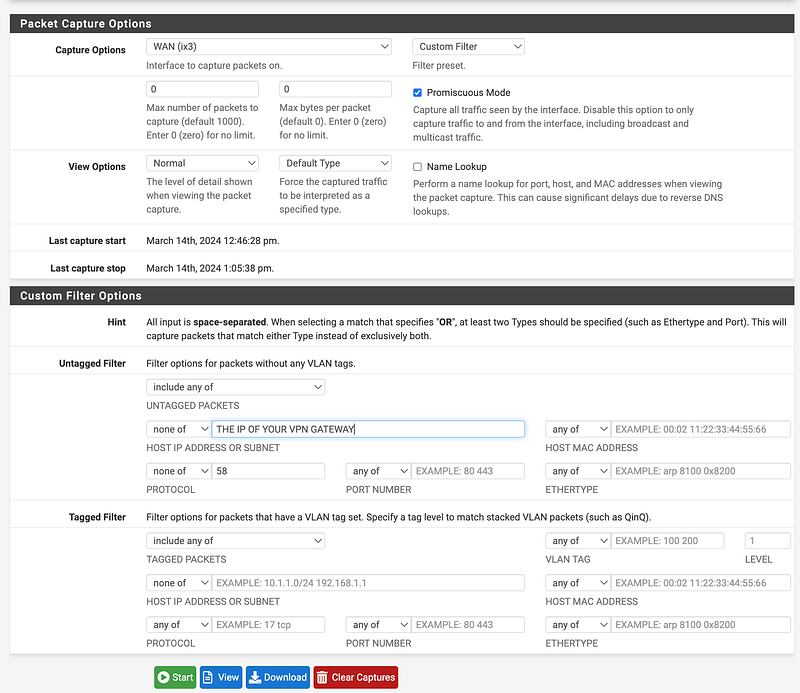
Here’s how I configured the packet capture:
- Look at WAN traffic
- Normal initially to keep it simple
- HOST IP — none of: [Your VPN Gateway IP] — that should be normal traffic
- Protocol— none of: 58 which is the number for the IPv6 router advertisement protocol
That allows me to see just what shouldn’t be there.
So I start looking at the traffic and I see something odd. I see requests and responses to and from the Apple network (17.0.0.0/8).
I’ve written about all the noise on Apple Macintosh systems in the past. All that traffic makes it hard to distinguish between what is legitimate and what is not.
The particular IP address that my system was trying to access:
17.57.144.42
According to the page below that’s for Apple’s push service which I am still trying to figure out how to disable completely.
17.57.144.42Aus-se-courier-vs.push-apple.com.akadns.net
What does “se” stand for? South east? US? Maybe…
Well, that IP list is going to come in handy because if I can’t turn off the push service I can at least block the IPs.
Here’s the odd thing. I see requests and responses. This is when I realized my float rules might be a problem as mentioned above.

I create a float rule to block any and all apple traffic to or from 17.0.0.0/8. I put Apple in the description.
Now it’s easier to find which IP address is sending traffic to and receiving traffic from Apple. I can search for Apple when monitoring the firewall traffic and then filter on just that rule ID if I need to. At that point I can see that the Apple traffic is coming from the UDM Pro and related wifi network, not my laptop so that’s good.
So after blocking all that and looking in my packet capture I can see other interesting things.
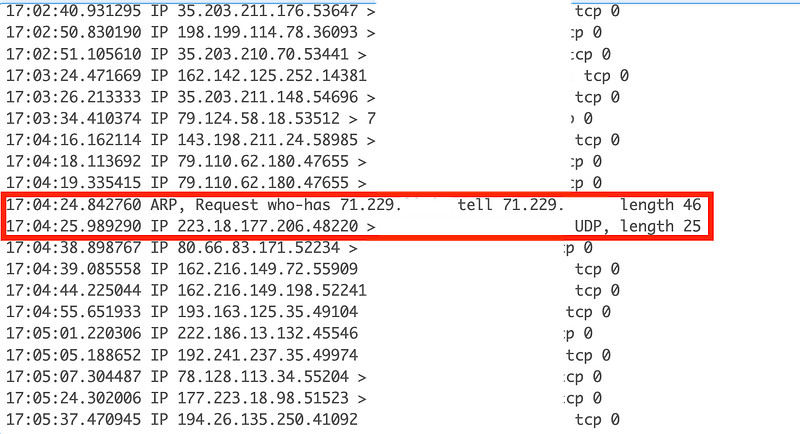
One of the things I see is an ARP request form the Comcast network. If my firewall is trying to connect to Comcast using DHCP perhaps that is normal. But what is interesting is that neither of the IP address in this request are related to my network. Misconfiguration? Problem? I would need to look into this in more detail to see if there’s problem here.
Also, right after that I see a packet from Hong Kong that actually has data. Related? Coincidence?
I explain how to find where addresses are coming from in this post:
More strange ARP requests and Apple trying to send traffic to my network even though all the devices that could respond are blocked.


Um. What?
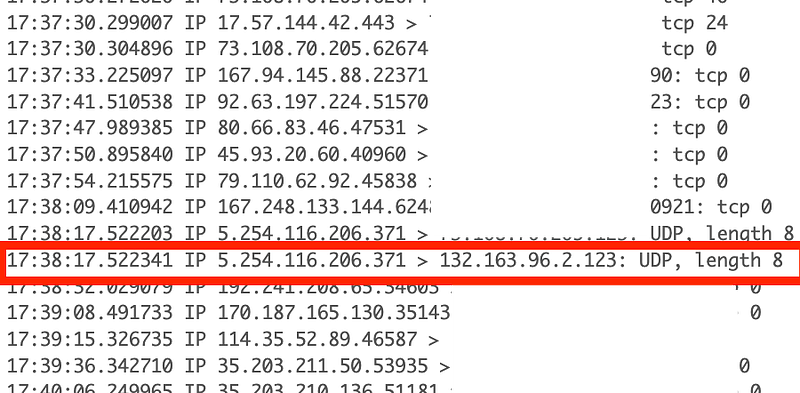
Neither one of the IP addresses in the packet capture below are on my network. I do use the NIST time service but what is that address from Germany doing requesting the time somehow through my firewall? What is going on there?
I also see a ton of DNS traffic. It could be legitimate, but what I need to look at is whether those DNS request contain any extra bits and bytes in the various fields in the DNS protocol that my indicate DNS exfiltration. These requests are going to CloudFlare so I would hope that are inspecting for that sort of thing without compromising customer data, if possible.
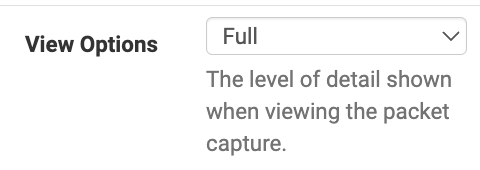
To see more information about those DNS queries I can filter on only port 53 change the packet capture to full.
What I can see is that all those DNS requests — and responses — are coming to and from the UDM Pro network and interface even though I’m blocking all traffic from that Interface in my float rule. So it appears that my WAN is sending DNS request from the interface I have my UDM plugged into even though I’ve specified to block all traffic from that Interface.
That seems like a pfSense or Netgate bug, no?
So I add a rule to my WAN interface to block all traffic from the interface subnets where I have the UDM Pro plugged in. Now I see no DNS traffic.
For a while. Then it returns. Somehow that traffic is getting through even though it is blocked. I have some NAT rules set up related to DNS. Perhaps that’s how this is happening?
Well, that was fun but I have work to do. Hopefully someone who specializes in incident response, network monitoring, and such can look into all these anomalies further. I’ll keep poking around as time allows.
It doesn’t appear that my VPN is leaking traffic but there are some other strange traffic anomalies I’d like to understand better.
Questions, questions that will not be answered in this post — but after you implement your VPN — check to see if it’s really working or not and if it has a leak of any kind and look to see if you have any unexpected traffic on your network.
Follow for updates.
Teri Radichel | © 2nd Sight Lab 2024
About Teri Radichel:
~~~~~~~~~~~~~~~~~~~~
⭐️ Author: Cybersecurity Books
⭐️ Presentations: Presentations by Teri Radichel
⭐️ Recognition: SANS Award, AWS Security Hero, IANS Faculty
⭐️ Certifications: SANS ~ GSE 240
⭐️ Education: BA Business, Master of Software Engineering, Master of Infosec
⭐️ Company: Penetration Tests, Assessments, Phone Consulting ~ 2nd Sight Lab
Need Help With Cybersecurity, Cloud, or Application Security?
~~~~~~~~~~~~~~~~~~~~~~~~~~~~~~~~~~~~~~~~~~~~~~~~~~~~~~~~~~~~~
🔒 Request a penetration test or security assessment
🔒 Schedule a consulting call
🔒 Cybersecurity Speaker for PresentationFollow for more stories like this:
~~~~~~~~~~~~~~~~~~~~~~~~~~~~~~~~~~~~~~~~~~~~~~~~~~~~~~~~~~~~~
❤️ Sign Up my Medium Email List
❤️ Twitter: @teriradichel
❤️ LinkedIn: https://www.linkedin.com/in/teriradichel
❤️ Mastodon: @teriradichel@infosec.exchange
❤️ Facebook: 2nd Sight Lab
❤️ YouTube: @2ndsightlab


