avatarTeri Radichel

Free AI web copilot to create summaries, insights and extended knowledge, download it at here

8184

Abstract

   <div><h3>ARIN experienced depletion of its IPv4 Free Pool on 24 September 2015, however we are still processing and approving…</h3></div>
            <div><p>www.arin.net</p></div>
          </div>
          <div>
            <div style="background-image: url(https://miro.readmedium.com/v2/resize:fit:320/0*DXB5wQYMikVDeoCV)"></div>
          </div>
        </div>
      </a>
    </div><p id="d734"><b>IANA (Internet Assigned Numbers Authority)</b> handles the global coordination of numbers assignment. You can read more about assignment of IP addresses here.</p><div id="2dda" class="link-block">
      <a href="https://www.iana.org/numbers">
        <div>
          <div>
            <h2>Number Resources</h2>
            <div><h3>We are responsible for global coordination of the Internet Protocol addressing systems, as well as the Autonomous…</h3></div>
            <div><p>www.iana.org</p></div>
          </div>
          <div>
            <div style="background-image: url(https://miro.readmedium.com/v2/resize:fit:320/)"></div>
          </div>
        </div>
      </a>
    </div><p id="cb2a">Just a note on obtaining your own IP range. If you are in the market for an IP range and buy it from someone who has used it before, make sure it is not blacklisted. Attackers and spammers have used certain IP ranges for nefarious purposes and those IPs have been blocked by companies around the world. If you obtain one of those IP ranges you might have problems using it.</p><div id="2caa" class="link-block">
      <a href="https://www.arin.net/blog/2022/04/12/blocklist/">
        <div>
          <div>
            <h2>Help! My Newly Allocated IPv4 Block is on a Blocklist</h2>
            <div><h3>Last week, we fulfilled 73 requests off the ARIN IPv4 Waiting list. In the past, some individuals have experienced…</h3></div>
            <div><p>www.arin.net</p></div>
          </div>
          <div>
            <div style="background-image: url(https://miro.readmedium.com/v2/resize:fit:320/)"></div>
          </div>
        </div>
      </a>
    </div><h2 id="a98e">Where in the world is that IP address coming from?</h2><p id="fa88">Generally, the owner of the IP range is in the location associated with the registry — but not always. For example, if you see an IPv4 address that starts with 77 (77.x.x.x) that is generally coming from Europe and often from Russia.</p><p id="47fe">You can find the full list of allocation of IP addresses to registries here:</p><div id="0177" class="link-block">
      <a href="https://www.iana.org/assignments/ipv4-address-space/ipv4-address-space.xhtml">
        <div>
          <div>
            <h2>IANA IPv4 Address Space Registry</h2>
            <div><h3>The allocation of Internet Protocol version 4 (IPv4) address space to various registries is listed here. Originally…</h3></div>
            <div><p>www.iana.org</p></div>
          </div>
          <div>
            <div style="background-image: url(https://miro.readmedium.com/v2/resize:fit:320/)"></div>
          </div>
        </div>
      </a>
    </div><p id="021f">Sometimes, companies obtain addresses that are not associated with their locations. This could be due to the fact that they need an IPv4 range and it’s hard to get them now, so companies opt to get a range from an organization other than the one associated with their location. In other cases, an attacker may wish to obtain an IP range in another location to blend in with normal traffic. But eventually those ranges get blacklisted, so attackers use many other tactics besides that to blend into normal traffic.</p><p id="b40e">For example, attackers make heavy use of cloud traffic now from AWS, Google, Azure, and others to hide and cover their tracks.</p><div id="ab29" class="link-block">
      <a href="https://readmedium.com/hackers-as-cloud-customers-45b44654908b">
        <div>
          <div>
            <h2>Hackers as Cloud Customers</h2>
            <div><h3>How SolarWinds Hackers used AWS and Azure</h3></div>
            <div><p>medium.com</p></div>
          </div>
          <div>
            <div style="background-image: url(https://miro.readmedium.com/v2/resize:fit:320/1*xQNhrk2iNAqSW7Dx5eVi2Q.png)"></div>
          </div>
        </div>
      </a>
    </div><h2 id="7137">Who owns that IP address?</h2><p id="d066">If you want to know who owns an IP address, you can look that up in one of the registries above. If you do this a lot you’ll start to memorize which IP ranges are associated with which registry. If you aren’t sure, some of the registries will redirect you to the correct registry if necessary.</p><p id="5776">If you have an IP address you want to look up, head over to the registry website. I’m going to use arin.net.</p><p id="f439">The search box at the top right of the page allows you to search the site or <i>Whois </i>— which means searching the IP database.</p><figure id="311a"><img src="https://cdn-images-1.readmedium.com/v2/resize:fit:800/1*ij7XInvFLNRh_HGmmm4TdQ.png"><figcaption></figcaption></figure><p id="ae62">I can enter 8.8.8.8 and get information about that IP address:</p><figure id="a4ca"><img src="https://cdn-images-1.readmedium.com/v2/resize:fit:800/1*jhV5K1HEVF6pftshcvNIJQ.png"><figcaption></figcaption></figure><p id="993b">I already knew the answer but that happens to be Google.</p><p id="a4be">Scroll down farther and you can see the name and address of the owner.</p><figure id="9664"><img src="https://cdn-images-1.readmedium.com/v2/resize:fit:800/1*Db57DJ8L-J9xb-4xoxPs4A.png"><figcaption></figcaption></figure><p id="e940">Scroll down even further and you can find related information:</p><figure id="d489"><img src="https://cdn-images-1.readmedium.com/v2/resize:fit:800/1*J6yiSH0AiyJ5uG_lnJ3rrQ.png"><figcaption></figcaption></figure><p id="925a">In this case it is all Google.</p><p id="64b7">Let’s look at another address. I’m going to pull an IP address off the MaxMind high risk IP address list. MaxMind offers some products and services that help you look up IP addresses and integrate that functionality into products.</p><div id="6ee9" class="link-block">
      <a href="https://www.maxmind.com/en/high-risk-ip-sample-list">
        <div>
          <div>
            <h2>Sample List of High Risk IP Addresses | MaxMind</h2>
            <div><h3>undefined</h3></div>
            <div><p>undefined</p></div>
          </div>
          <div>
            <div style="background-image: url(https://miro.readmedium.com/v2/resize:fit:320/)"></div>
          </div>
        </div>
      </a>
    </div><p id="d144">I looked up this address:</p><figure id="9dae"><img src="https://cdn-images-1.readmedium.com/v2/resize:fit:800/1*NRwKcuLlyvtjbgTPrfnCrQ.png"><figcaption></figcaption></figure><p id="b77a">I scroll down to see information about the organization:</p><figure id="ca74"><img src="https://cdn-images-1.readmedium.com/v2/resize:fit:800/1*qTwJwPFay-r5KIHYXXi9vQ.png"><figcaption></figcaption></figure><p id="7d0c">Scrolling down further, it says AT&amp;T is a related organization:</p><figure id="bed8"><img src="https://cdn-images-1.readmedium.com/v2/resize:fit:800/1*a6tdn8DqJdHi0pU9OvzB8g.png"><figcaption></figcaption></figure><p id="d8ea">Presumably the first organization got the IP range from AT&amp;T. Perhaps they are up to something nefarious but it may also be that their servers were somehow compromised and being used in an attack unbeknownst to the organization. More research would be required to understand the details. I wrote about how your equipment may be used in attacks here:</p><div id="cb5a" class="link-block">
      <a href="https://readmedium.com/your-home-router-may-be-committing-crimes-9f0d4445e6dc">
        <div>
          <div>
            <h2>Your Home Router May Be Committing Crimes</h2>
            <div><h3>Why network traffic analysis is so important</h3></d

Options

iv> <div><p>medium.com</p></div> </div> <div> <div style="background-image: url(https://miro.readmedium.com/v2/resize:fit:320/1*Xc1RGb-wuhCaWFtoP9b7yw.png)"></div> </div> </div> </a> </div><p id="1d1f">Another thing to be aware of is that the registry may be manipulated and the information may not be correct. I have reported issues to these registries when I found suspicious data and they fixed the problem.</p><p id="218d">One thing some organizations like to do is to make it hard for you to block a contiguous range of IP addresses in your firewall logs by the way they make IP assignments. Sometimes you can look up the surrounding IP addresses to find a broader single range to block rather than numerous smaller ranges. I wrote about that here:</p><div id="04ef" class="link-block"> <a href="https://readmedium.com/concatenating-ip-ranges-and-other-firewall-rule-tricks-29377934c75d"> <div> <div> <h2>Concatenating IP Ranges And Other Firewall Rule Tricks</h2> <div><h3>Tips for fewer firewall rules when you’re trying to block traffic from a network</h3></div> <div><p>medium.com</p></div> </div> <div> <div style="background-image: url(https://miro.readmedium.com/v2/resize:fit:320/1*amOT6AhL7D9Xy3D_Ylslbw.png)"></div> </div> </div> </a> </div><h2 id="95aa">What if you only have a domain name?</h2><p id="00ed">If you only have a domain name you can look up the IP address using a few simple commands.</p><p id="e017">On Linux or Mac, use dig.</p><p id="383e">For example I wanted to know what this domain name related to in my logs — dap.digitalgov.gov.</p><p id="6b3e">I ran a dig command:</p><div id="ce2d"><pre><span class="hljs-keyword">dig </span>dap.<span class="hljs-keyword">digitalgov.gov</span></pre></div><figure id="d1f5"><img src="https://cdn-images-1.readmedium.com/v2/resize:fit:800/1*em4dxNUnAcbz5JkGLMutlA.png"><figcaption></figcaption></figure><p id="1662">I can see the IP addresses. I already know the answer but who owns those IP addresses? Let’s look it up.</p><p id="1383">Those IP ranges belong to Amazon.</p><figure id="3fe3"><img src="https://cdn-images-1.readmedium.com/v2/resize:fit:800/1*aEeJkCr9kdbeuauYgo0shg.png"><figcaption></figcaption></figure><p id="5c45">If you are familiar with AWS (Amazon Web Services) you may have also noticed CloudFront in the output above which is a Content Delivery Network (CDN) service provided by Amazon.</p><figure id="3017"><img src="https://cdn-images-1.readmedium.com/v2/resize:fit:800/1*iXo9G0dguzptf9444eGkzQ.png"><figcaption></figcaption></figure><p id="1238">Here’s what a CDN can do for you:</p><div id="c59f" class="link-block"> <a href="https://readmedium.com/how-a-content-delivery-network-cdn-can-help-your-website-c6c01b02feab"> <div> <div> <h2>How a Content Delivery Network (CDN) Can Help Your Website</h2> <div><h3>ACM.254 What is CloudFront and why do we want to use it?</h3></div> <div><p>medium.com</p></div> </div> <div> <div style="background-image: url(https://miro.readmedium.com/v2/resize:fit:320/1*Ll9VwTyWhfLX5BktG3DaYA.png)"></div> </div> </div> </a> </div><p id="7a85">Here’s why CDNs can make reviewing your network logs challenging at times. You might only see the CDN domain name in your logs and not the domain name that was originally requested.</p><div id="8e3f" class="link-block"> <a href="https://readmedium.com/cdn-security-wishlist-aa44102982d2"> <div> <div> <h2>CDN Security Wishlist</h2> <div><h3>One way content delivery networks make security harder</h3></div> <div><p>medium.com</p></div> </div> <div> <div style="background-image: url(https://miro.readmedium.com/v2/resize:fit:320/1*5oY5R7JZouHcdennQ1sLJQ.png)"></div> </div> </div> </a> </div><p id="58f6">In order to figure out which domain name was originally requested you’ll need your DNS logs or to monitor your traffic real time as requests are made to DNS servers to retrieve content. You will only be able to inspect the DNS traffic real time if you can see it. If your systems use DNS over HTTPS you might not be able to see it.</p><div id="8b32" class="link-block"> <a href="https://readmedium.com/check-dns-requests-if-youre-not-using-dns-over-https-f845031aaf22"> <div> <div> <h2>Check DNS Requests — if you’re not using DNS over HTTPS</h2> <div><h3>How to determine if your machine is contacting something it shouldn’t be</h3></div> <div><p>medium.com</p></div> </div> <div> <div style="background-image: url(https://miro.readmedium.com/v2/resize:fit:320/1*CtAYXQErVvk-GYaYVm3NTA.png)"></div> </div> </div> </a> </div><p id="cabf">DNS over HTTPS is beneficial because it hides your DNS requests. However, it also makes it hard to inspect traffic. If you disallow DNS over HTTPS on your network you can head over to Diagnostics > Packet capture on PFSense, for example, and limit the traffic to port 53 and review the DNS requests your systems are making. Once you have the domain names, you can look up the IP addresses as shown above and then figure out who owns them.</p><figure id="cfd6"><img src="https://cdn-images-1.readmedium.com/v2/resize:fit:800/1*1S2Ww8IOib5TNz11Zl-_eg.png"><figcaption></figcaption></figure><p id="d2d0">Sometimes if you see a number of strange domain names in quick succession or repeated intervals, that can be an indication of malware. But it takes time to understand how to review all the traffic and determine what is normal or benign for your particular network.</p><p id="2117">Internet Registries deal not only with IP Addresses but also <a href="https://readmedium.com/public-and-private-autonomous-system-numbers-asns-5ad20e175b13">ASNs</a>. I’m going to write about the latter in the next post.</p><figure id="b5d0"><img src="https://cdn-images-1.readmedium.com/v2/resize:fit:800/1*WbozR61zMxCWn4zQcckSmw.png"><figcaption></figcaption></figure><p id="c707">Follow for updates.</p><p id="4a3a">Teri Radichel | <i>© <a href="https://2ndsightlab.com/?source=post_page---------------------------">2nd Sight Lab</a> 2024</i></p><div id="8b5f"><pre><span class="hljs-section">About Teri Radichel:

⭐️ Author: Cybersecurity Books
⭐️ Presentations: Presentations by Teri Radichel
⭐️ Recognition: SANS Award, AWS Security Hero, IANS Faculty
⭐️ Certifications: SANS ~ GSE 240
⭐️ Education: BA Business, Master of Software Engineering, Master of Infosec
⭐️ Company: Penetration Tests, Assessments, Phone Consulting ~ 2nd Sight Lab</pre></div><div id="caae"><pre><span class="hljs-section">Need Help With Cybersecurity, Cloud, or Application Security?
~~~~~~~~~~~~~~~~~~~~~~~~~~~~~~~~~~~~~~~~~~~~~~~~~~~~~~~~~~~~~</span>
🔒 Request a penetration test or security assessment
🔒 Schedule a consulting call
🔒 Cybersecurity Speaker for Presentation</pre></div><div id="afb0"><pre>Follow <span class="hljs-keyword">for</span> more stories like <span class="hljs-keyword">this</span>:

❤️ Sign Up my Medium Email List ❤️ Twitter: <span class="hljs-meta">@teriradichel</span> ❤️ LinkedIn: https:<span class="hljs-comment">//www.linkedin.com/in/teriradichel</span> ❤️ Mastodon: <span class="hljs-meta">@teriradichel</span><span class="hljs-meta">@infosec</span>.exchange ❤️ Facebook: 2nd Sight Lab ❤️ YouTube: @2ndsightlab</pre></div><figure id="5610"><img src="https://cdn-images-1.readmedium.com/v2/resize:fit:800/0*H9Ew1KCl-29nZiPR.jpeg"><figcaption></figcaption></figure></article></body>

Who Owns That IP Address?

ACM.460 About Internet Registries

~~~~~~~~~~~~~~~~~~~~~~~~~~~~~~~~~~~~~~~~~~~~~~~~~~~~~~~

⚙️ Check out my series on Automating Cybersecurity Metrics | Code

🔒 Related Stories: Network Security | Data Breaches

💻 Free Content on Jobs in Cybersecurity | ✉️ Sign up for the Email List

~~~~~~~~~~~~~~~~~~~~~~~~~~~~~~~~~~~~~~~~~~~~~~~~~~~~~~~

In the last post, I wrote about IPv6 Attacks.

In the next few posts I’m going to write about topics relevant to something else I’m deploying on AWS. I’ve explained what the Internet Registries are before but it was intertwined in another topic. I need to explain what these are again for anyone who missed it because it is relevant to some other topics I’m going to write about.

There are a few governing bodies of the Internet who assign IP addresses to entities — organizations, individuals, governments, etc. I’m going to explain using IPv4 but the same concepts apply to IPv6. I’ve written about why I’m using IPv4 on my network in other posts.

This could change over time but currently the organizations (called Regional Internet Registries) that assign public IP addresses that are used on the Internet are as follows:

AFRINIC — African Network Information Center

APNIC — Asia Pacific Network Information Centre

ARIN — American Registry for Internet Numbers

LACNIC — Latin America and Caribbean Network Information Center

RIPE — Réseaux IP Européens (European IP Registry)

When someone wants to get a public IP range that they can use on the Internet, in some cases they will create an account and request one from one of these organizations. The Internet registries assign and track who owns those IP ranges. However, for those who want an IPv4 address range may need to get it from a third party as the original IP addresses have all been allocated by ARIN, for example. You can still get IPv6 ranges.

Besides having an IP range assigned by one of the above organizations, those who want an IP range might get one from a larger organization that has purchased a range and allocates subsets of IP ranges to their customers.

You can also request a transfer of an IP address. Here is more information on obtaining an IPv4 address from ARIN. The other registries will have similar pages.

IANA (Internet Assigned Numbers Authority) handles the global coordination of numbers assignment. You can read more about assignment of IP addresses here.

Just a note on obtaining your own IP range. If you are in the market for an IP range and buy it from someone who has used it before, make sure it is not blacklisted. Attackers and spammers have used certain IP ranges for nefarious purposes and those IPs have been blocked by companies around the world. If you obtain one of those IP ranges you might have problems using it.

Where in the world is that IP address coming from?

Generally, the owner of the IP range is in the location associated with the registry — but not always. For example, if you see an IPv4 address that starts with 77 (77.x.x.x) that is generally coming from Europe and often from Russia.

You can find the full list of allocation of IP addresses to registries here:

Sometimes, companies obtain addresses that are not associated with their locations. This could be due to the fact that they need an IPv4 range and it’s hard to get them now, so companies opt to get a range from an organization other than the one associated with their location. In other cases, an attacker may wish to obtain an IP range in another location to blend in with normal traffic. But eventually those ranges get blacklisted, so attackers use many other tactics besides that to blend into normal traffic.

For example, attackers make heavy use of cloud traffic now from AWS, Google, Azure, and others to hide and cover their tracks.

Who owns that IP address?

If you want to know who owns an IP address, you can look that up in one of the registries above. If you do this a lot you’ll start to memorize which IP ranges are associated with which registry. If you aren’t sure, some of the registries will redirect you to the correct registry if necessary.

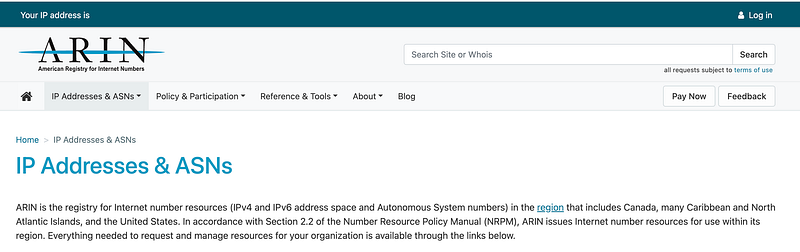
If you have an IP address you want to look up, head over to the registry website. I’m going to use arin.net.

The search box at the top right of the page allows you to search the site or Whois — which means searching the IP database.

I can enter 8.8.8.8 and get information about that IP address:
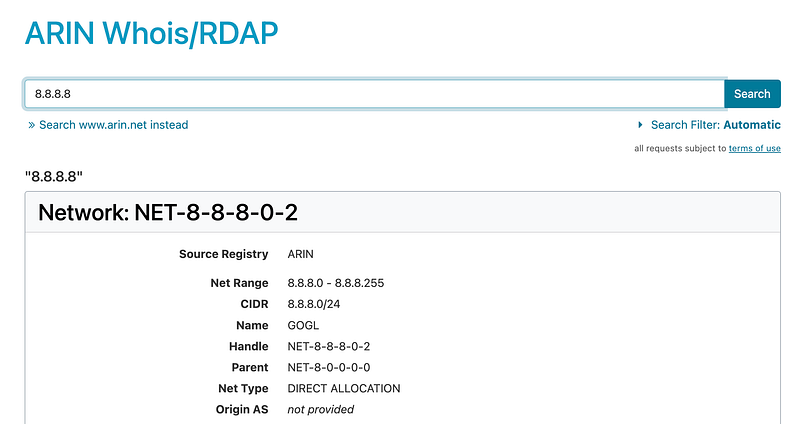
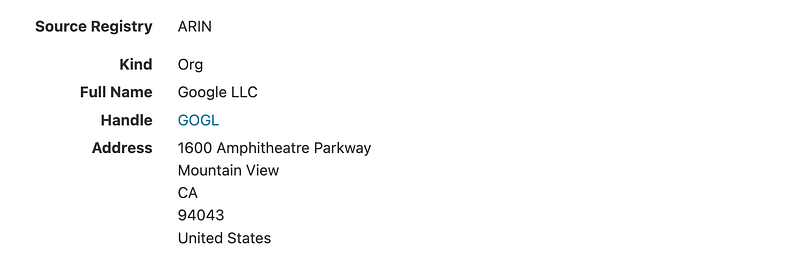
I already knew the answer but that happens to be Google.

Scroll down farther and you can see the name and address of the owner.
Scroll down even further and you can find related information:
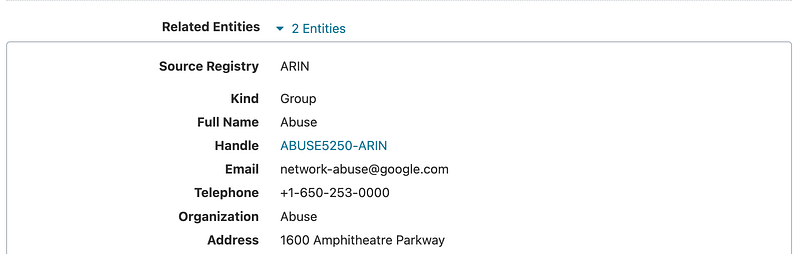
In this case it is all Google.

Let’s look at another address. I’m going to pull an IP address off the MaxMind high risk IP address list. MaxMind offers some products and services that help you look up IP addresses and integrate that functionality into products.

I looked up this address:

I scroll down to see information about the organization:
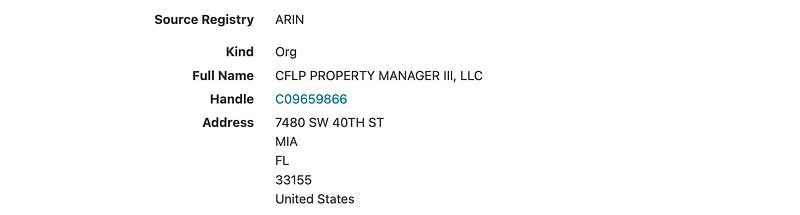
Scrolling down further, it says AT&T is a related organization:
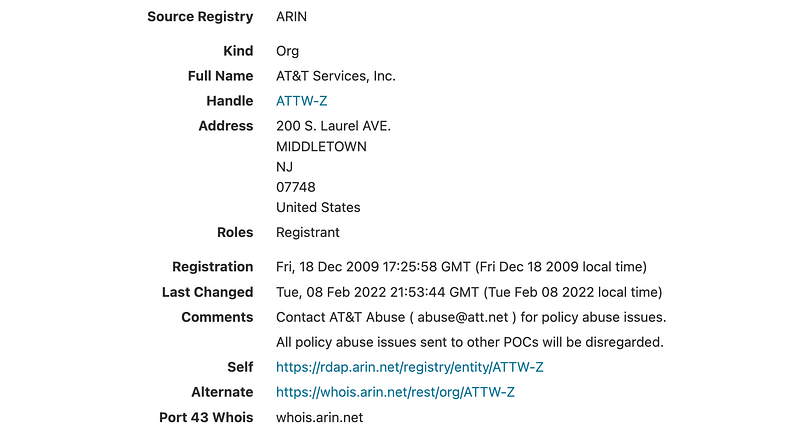
Presumably the first organization got the IP range from AT&T. Perhaps they are up to something nefarious but it may also be that their servers were somehow compromised and being used in an attack unbeknownst to the organization. More research would be required to understand the details. I wrote about how your equipment may be used in attacks here:

Another thing to be aware of is that the registry may be manipulated and the information may not be correct. I have reported issues to these registries when I found suspicious data and they fixed the problem.

One thing some organizations like to do is to make it hard for you to block a contiguous range of IP addresses in your firewall logs by the way they make IP assignments. Sometimes you can look up the surrounding IP addresses to find a broader single range to block rather than numerous smaller ranges. I wrote about that here:

What if you only have a domain name?

If you only have a domain name you can look up the IP address using a few simple commands.

On Linux or Mac, use dig.

For example I wanted to know what this domain name related to in my logs — dap.digitalgov.gov.

I ran a dig command:

dig dap.digitalgov.gov
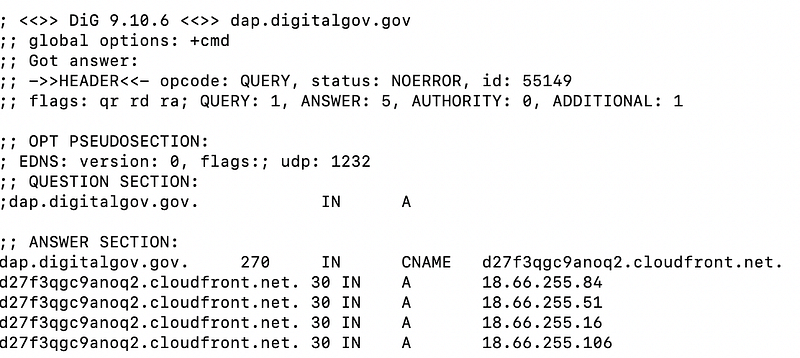
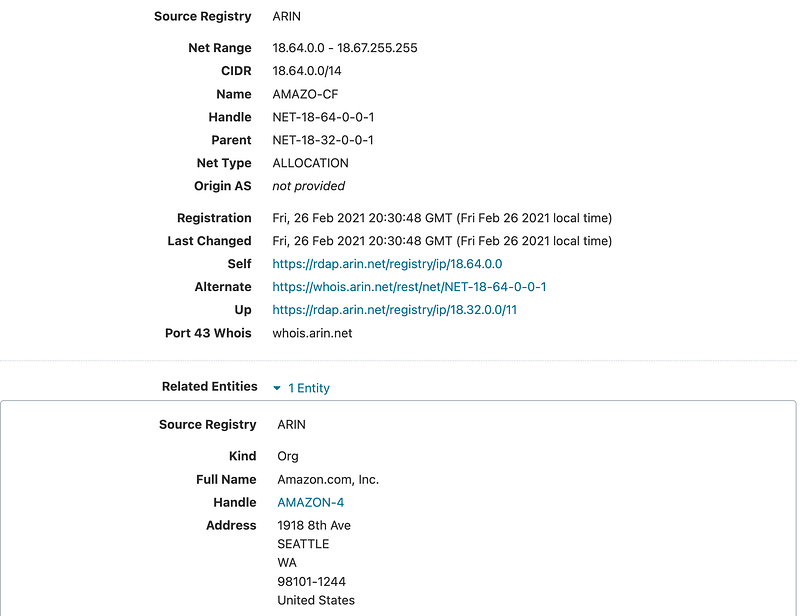
I can see the IP addresses. I already know the answer but who owns those IP addresses? Let’s look it up.

Those IP ranges belong to Amazon.
If you are familiar with AWS (Amazon Web Services) you may have also noticed CloudFront in the output above which is a Content Delivery Network (CDN) service provided by Amazon.
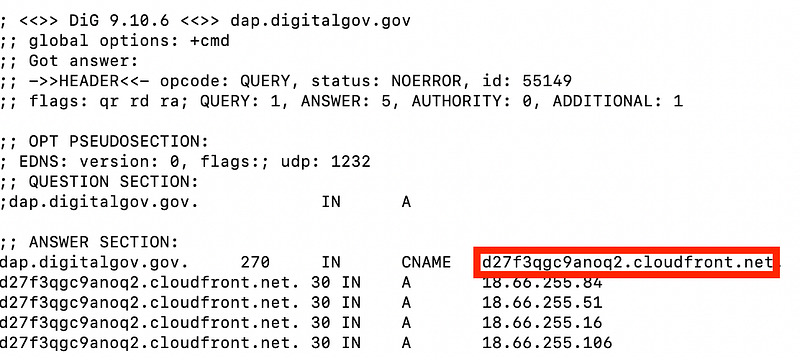
Here’s what a CDN can do for you:

Here’s why CDNs can make reviewing your network logs challenging at times. You might only see the CDN domain name in your logs and not the domain name that was originally requested.

In order to figure out which domain name was originally requested you’ll need your DNS logs or to monitor your traffic real time as requests are made to DNS servers to retrieve content. You will only be able to inspect the DNS traffic real time if you can see it. If your systems use DNS over HTTPS you might not be able to see it.

DNS over HTTPS is beneficial because it hides your DNS requests. However, it also makes it hard to inspect traffic. If you disallow DNS over HTTPS on your network you can head over to Diagnostics > Packet capture on PFSense, for example, and limit the traffic to port 53 and review the DNS requests your systems are making. Once you have the domain names, you can look up the IP addresses as shown above and then figure out who owns them.
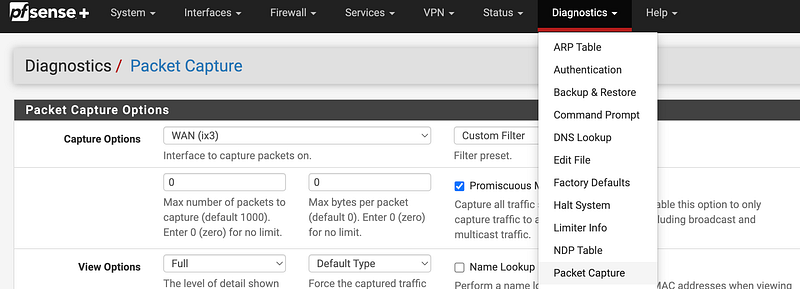
Sometimes if you see a number of strange domain names in quick succession or repeated intervals, that can be an indication of malware. But it takes time to understand how to review all the traffic and determine what is normal or benign for your particular network.

Internet Registries deal not only with IP Addresses but also ASNs. I’m going to write about the latter in the next post.
Follow for updates.

Teri Radichel | © 2nd Sight Lab 2024

About Teri Radichel:
~~~~~~~~~~~~~~~~~~~~
⭐️ Author: Cybersecurity Books
⭐️ Presentations: Presentations by Teri Radichel
⭐️ Recognition: SANS Award, AWS Security Hero, IANS Faculty
⭐️ Certifications: SANS ~ GSE 240
⭐️ Education: BA Business, Master of Software Engineering, Master of Infosec
⭐️ Company: Penetration Tests, Assessments, Phone Consulting ~ 2nd Sight Lab
Need Help With Cybersecurity, Cloud, or Application Security?
~~~~~~~~~~~~~~~~~~~~~~~~~~~~~~~~~~~~~~~~~~~~~~~~~~~~~~~~~~~~~
🔒 Request a penetration test or security assessment
🔒 Schedule a consulting call
🔒 Cybersecurity Speaker for Presentation
Follow for more stories like this:
~~~~~~~~~~~~~~~~~~~~~~~~~~~~~~~~~~~~~~~~~~~~~~~~~~~~~~~~~~~~~ 
❤️ Sign Up my Medium Email List
❤️ Twitter: @teriradichel
❤️ LinkedIn: https://www.linkedin.com/in/teriradichel
❤️ Mastodon: @teriradichel@infosec.exchange
❤️ Facebook: 2nd Sight Lab
❤️ YouTube: @2ndsightlab

Ip Address
Registry
Security
Cybersecurity
Network
Recommended from ReadMedium