avatarTeri Radichel

Free AI web copilot to create summaries, insights and extended knowledge, download it at here

4799

Abstract

</a>
    </div><p id="38ea">That entry currently comes up like this:</p><figure id="fe67"><img src="https://cdn-images-1.readmedium.com/v2/resize:fit:800/1*amOT6AhL7D9Xy3D_Ylslbw.png"><figcaption></figcaption></figure><p id="6501">The owner is someone in Bangladesh, apparently.</p><figure id="6ec7"><img src="https://cdn-images-1.readmedium.com/v2/resize:fit:800/1*wJ18waXHwUGpSZk161u5vA.png"><figcaption></figcaption></figure><p id="b142">So do you have to create all those firewall rules if you want to block that network? Here’s the interesting thing. Take a look at the handle that has the IP range:</p><figure id="e919"><img src="https://cdn-images-1.readmedium.com/v2/resize:fit:800/1*M9JE93vtHvFj5a2Yl58s1A.png"><figcaption></figcaption></figure><p id="cc77">That’s strange. One IP short of the last IP for a single CIDR bock: 203.76.110.255. I wonder who owns that CIDR bock. Let’s check.</p><div id="f23c" class="link-block">
      <a href="https://search.arin.net/rdap/?query=203.76.110.255">
        <div>
          <div>
            <h2>ARIN Whois/RDAP</h2>
            <div><h3>ARIN is a nonprofit, member-based organization that administers IP addresses &amp; ASNs in support of the operation and…</h3></div>
            <div><p>search.arin.net</p></div>
          </div>
          <div>
            <div style="background-image: url(https://miro.readmedium.com/v2/resize:fit:320/)"></div>
          </div>
        </div>
      </a>
    </div><p id="2d63">Well what do you know:</p><figure id="b8f3"><img src="https://cdn-images-1.readmedium.com/v2/resize:fit:800/1*KO8LAcSL3x-qa4WAQkycoQ.png"><figcaption></figcaption></figure><p id="a6c1">Yes, it’s the same owner.</p><p id="45e0">What if we change the first IP in the range to:</p><div id="cdf8"><pre><span class="hljs-number">203.76.108.0</span></pre></div><p id="1dfb">Yep. Look it up in ARIN. Same owner.</p><div id="0e83" class="link-block">
      <a href="https://search.arin.net/rdap/?query=203.76.108.0">
        <div>
          <div>
            <h2>ARIN Whois/RDAP</h2>
            <div><h3>ARIN is a nonprofit, member-based organization that administers IP addresses &amp; ASNs in support of the operation and…</h3></div>
            <div><p>search.arin.net</p></div>
          </div>
          <div>
            <div style="background-image: url(https://miro.readmedium.com/v2/resize:fit:320/)"></div>
          </div>
        </div>
      </a>
    </div><p id="18ec">So instead of entering all those CIDR blocks in our firewall rules, change the first and last IP in the range:</p><div id="e4f7"><pre><span class="hljs-number">203.76.108.0</span>–<span class="hljs-number">203</span>.<span class="hljs-number">76</span>.<span class="hljs-number">110</span>.<span class="hljs-number">255</span></pre></div><p id="f801">And now you get the following CIDRS:</p><div id="2629"><pre><span class="hljs-number">203.76.108.0</span>/<span class="hljs-number">23</span>

<span class="hljs-number">203.76.110.0</span>/<span class="hljs-number">24</span></pre></div><p id="4d0c">Now you can reduce the number of firewall rules you need to create.</p><div id="c13a"><pre>Tip: A well-architected network will consider firewall rules <span class="hljs-keyword">when</span> allocating CIDR <span class="hljs-keyword">block</span> ranges <span class="hljs-keyword">and</span> IP addresses. <span class="hljs-keyword">When</span> you are <span class="hljs-keyword">in</span> the cloud you can <span class="hljs-keyword">use</span> various network constructs <span class="hljs-keyword">to</span> deal <span class="hljs-keyword">with</span> changing IP addresses. That<span class="hljs-symbol">'s</span> something I <span class="hljs-keyword">cover</span> <span class="hljs-keyword">in</span> my cloud security classes.</pre></div><p id="6474">Here’s another one. <b>Zenworks</b> has been frequenting my logs. The IP addresses hitting my network tend to resolve to a /24 CIDR like this:</p><div id="90eb"><pre><span class="hljs-number">23.251.102.0</span>/<span class="hljs-number">24</span></pre></div><div id="721a" class="link-block"> <a href="https://search.arin.net/rdap/?query=23.251.102.0"> <div> <div> <h2>ARIN Whois/RDAP</h2> <div><h3>ARIN is a nonprofit, member-based organization that administers IP addresses & ASNs in support of the operation and…</h3></div> <div><p>search.arin.net</p></div> </div> <div> <div style="background-image: url(https://miro.readmedium.com/v2/resize:fit:320/)"></div> </div> </div> </a> </div><p id="48bc">That’

Options

s a fairly small range. They show up a lot and the IPs are sometimes nearly contiguous. I wonder who owns the next 24 block:</p><div id="8257"><pre><span class="hljs-number">23.251.103.0</span>/<span class="hljs-number">24</span></pre></div><div id="3891" class="link-block"> <a href="https://search.arin.net/rdap/?query=23.251.103.0"> <div> <div> <h2>ARIN Whois/RDAP</h2> <div><h3>ARIN is a nonprofit, member-based organization that administers IP addresses & ASNs in support of the operation and…</h3></div> <div><p>search.arin.net</p></div> </div> <div> <div style="background-image: url(https://miro.readmedium.com/v2/resize:fit:320/)"></div> </div> </div> </a> </div><p id="279f">Well, look at that. Also Zenworks.</p><p id="ab6b">I went through looking at all the different /24 blocks and I could nearly block the whole /8 range. There were just a few other networks sprinkled in between. What I noticed is that the owners breaking up this contiguous IP range were always the same ones: Speedyhost and UCloud. In this case you can take a look at these other companies and what they do and see if you need any of them connecting to your network or vice versa. You might just opt to block the full /8 range altogether and be done with it. Make a note of what you did in the rule description.</p><p id="f1cb"><b>What about a network that doesn’t fall neatly into a contiguous set of IP ranges.</b> They are hitting your network from a lot of disparate IPs. Let’s say you found this IP address scanning your network. I don’t know if this IP is involved in network scanning this is just an example.</p><div id="55c8"><pre><span class="hljs-number">138.197.0.0</span></pre></div><p id="3357">You look it up and see that it belongs to <b>Digital Ocean</b>. IPs on their network ranges are often in my network logs. Scroll down in the record to the “Entity” portion and click on the link next to the handle (DO-13 in the example below).</p><figure id="7359"><img src="https://cdn-images-1.readmedium.com/v2/resize:fit:800/1*cuFsl0EG9UG1JZttWoziUQ.png"><figcaption></figcaption></figure><p id="f454">Scroll down and you can see 57 related networks. If you wanted to, you could block all those networks. If you block all of IPV6 already, you could skip those and only enter the IPV4 ranges. I’m not necessarily saying you should do that. But you could….if you want block all the scanning from that network. As mentioned in a past post, this will also block some legitimate websites. How many depends on your particular Internet access needs.</p><figure id="4dd9"><img src="https://cdn-images-1.readmedium.com/v2/resize:fit:800/1*VXBnyhjXULewCpb8uX-eng.png"><figcaption></figcaption></figure><p id="0c80">This last tip won’t create less firewall rules but you’ll spend less time investigating IP addresses from networks that only send you scanning traffic by simply blocking the whole network range all at once if you don’t need access to or from it.</p><p id="de4d">I know, too much fun with IP addresses.</p><p id="4fd9">Follow for updates.</p><p id="4a3a">Teri Radichel | <i>© <a href="https://2ndsightlab.com/?source=post_page---------------------------">2nd Sight Lab</a> 2021</i></p><div id="8b5f"><pre><span class="hljs-section">About Teri Radichel:

⭐️ Author: Cybersecurity Books
⭐️ Presentations: Presentations by Teri Radichel
⭐️ Recognition: SANS Award, AWS Security Hero, IANS Faculty
⭐️ Certifications: SANS ~ GSE 240
⭐️ Education: BA Business, Master of Software Engineering, Master of Infosec
⭐️ Company: Penetration Tests, Assessments, Phone Consulting ~ 2nd Sight Lab</pre></div><div id="caae"><pre><span class="hljs-section">Need Help With Cybersecurity, Cloud, or Application Security?
~~~~~~~~~~~~~~~~~~~~~~~~~~~~~~~~~~~~~~~~~~~~~~~~~~~~~~~~~~~~~</span>
🔒 Request a penetration test or security assessment
🔒 Schedule a consulting call
🔒 Cybersecurity Speaker for Presentation</pre></div><div id="3b5e"><pre>Follow <span class="hljs-keyword">for</span> more stories like <span class="hljs-keyword">this</span>:

❤️ Sign Up my Medium Email List ❤️ Twitter: <span class="hljs-meta">@teriradichel</span> ❤️ LinkedIn: https:<span class="hljs-comment">//www.linkedin.com/in/teriradichel</span> ❤️ Mastodon: <span class="hljs-meta">@teriradichel</span><span class="hljs-meta">@infosec</span>.exchange ❤️ Facebook: 2nd Sight Lab ❤️ YouTube: @2ndsightlab</pre></div><figure id="5610"><img src="https://cdn-images-1.readmedium.com/v2/resize:fit:800/0*H9Ew1KCl-29nZiPR.jpeg"><figcaption></figcaption></figure></article></body>

Concatenating IP Ranges And Other Firewall Rule Tricks

Tips for fewer firewall rules when you’re trying to block traffic from a network

~~~~~~~~~~~~~~~~~~~~~~~~~~~~~~~~~~~~~~~~~~~~~~~~~~~~~~~~~

⚙️ Check out my series on Automating Cybersecurity Metrics. The Code.

🔒 Related Stories: Network Security | AWS Security | Cloud Architecture

💻 Free Content on Jobs in Cybersecurity | ✉️ Sign up for the Email List

~~~~~~~~~~~~~~~~~~~~~~~~~~~~~~~~~~~~~~~~~~~~~~~~~~~~~~~~~

This is the next in a series of blog posts about inspecting network traffic and creating firewall rules to limit your risk. The series started here:

The last post covered logs you need to spot C2 traffic:

This is a quick post to help you decipher certain IP Registry records and reduce the number of rules you have to add in your firewall ruleset potentially.

As I look up IP addresses, I often find creative (shall we say) entries for CIDR block ranges. Also some companies may slice and dice their network traffic up so you’ll have multiple records for a single contiguous IP range.

I’m not to go into all the details for defining IP ranges in CIDR block notation, but let’s just say that these two IP ranges:

10.0.0.010.0.0.255 and 10.0.1.010.0.1.255

can be expressed as:

10.0.0.0/24 and 10.0.1.0/24

OR

10.0.0.0/23

So if you can concatenate IP ranges, then you will be able to create less firewall rules. The more rules your firewall has to process, the more it has to work (and the more you have to type and manage).

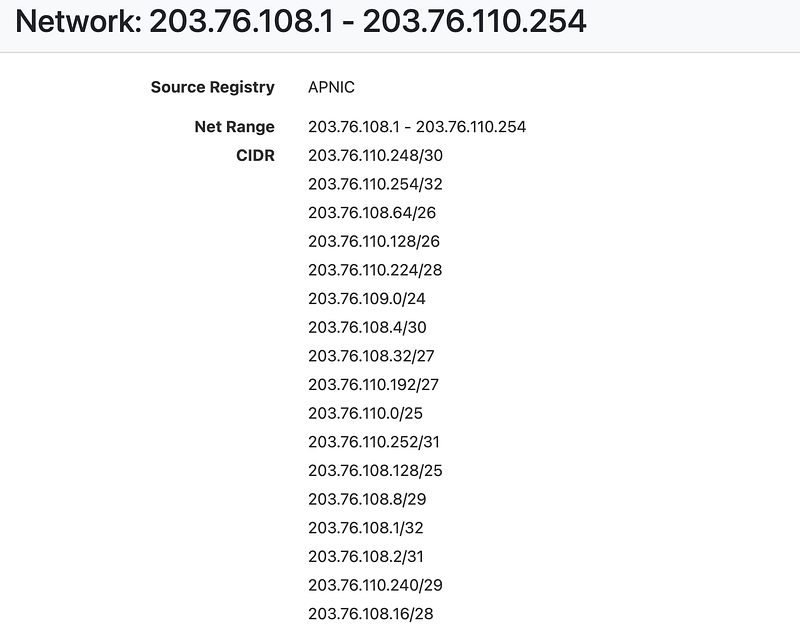
Let’s look at an interesting entry on ARIN for this IP address which happened to be in my logs today: 203.76.110.234.

That entry currently comes up like this:
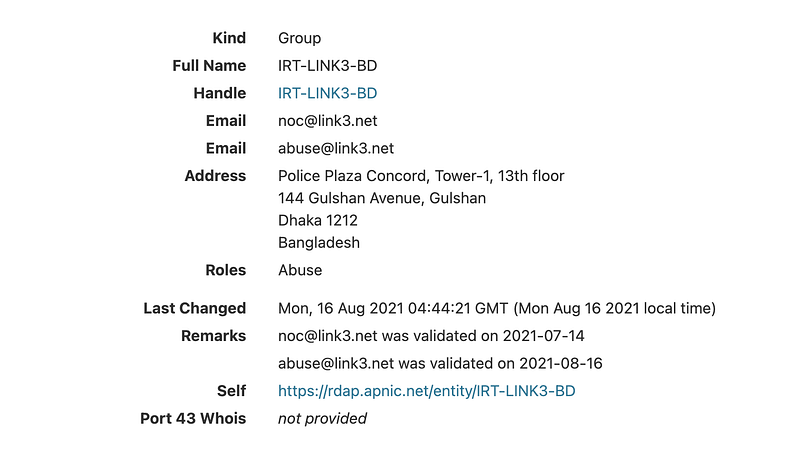
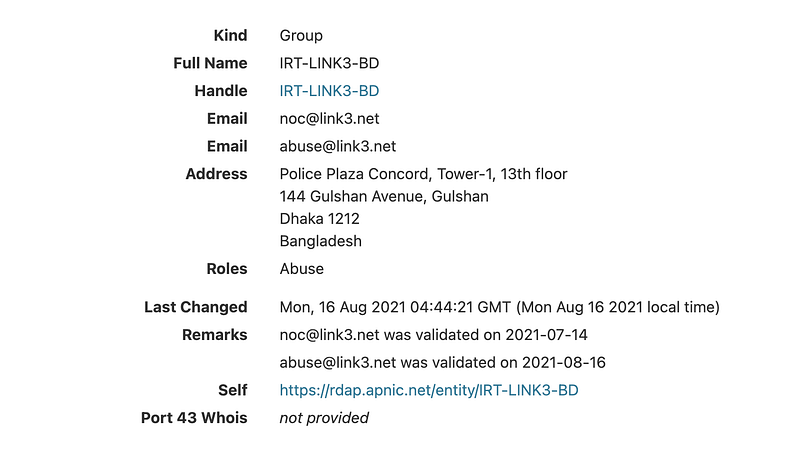
The owner is someone in Bangladesh, apparently.
So do you have to create all those firewall rules if you want to block that network? Here’s the interesting thing. Take a look at the handle that has the IP range:

That’s strange. One IP short of the last IP for a single CIDR bock: 203.76.110.255. I wonder who owns that CIDR bock. Let’s check.

Well what do you know:
Yes, it’s the same owner.

What if we change the first IP in the range to:

203.76.108.0

Yep. Look it up in ARIN. Same owner.

So instead of entering all those CIDR blocks in our firewall rules, change the first and last IP in the range:

203.76.108.0203.76.110.255

And now you get the following CIDRS:

203.76.108.0/23
203.76.110.0/24

Now you can reduce the number of firewall rules you need to create.

Tip: A well-architected network will consider firewall rules when allocating CIDR block ranges and IP addresses. When you are in the cloud you can use various network constructs to deal with changing IP addresses. That's something I cover in my cloud security classes.

Here’s another one. Zenworks has been frequenting my logs. The IP addresses hitting my network tend to resolve to a /24 CIDR like this:

23.251.102.0/24

That’s a fairly small range. They show up a lot and the IPs are sometimes nearly contiguous. I wonder who owns the next 24 block:

23.251.103.0/24

Well, look at that. Also Zenworks.

I went through looking at all the different /24 blocks and I could nearly block the whole /8 range. There were just a few other networks sprinkled in between. What I noticed is that the owners breaking up this contiguous IP range were always the same ones: Speedyhost and UCloud. In this case you can take a look at these other companies and what they do and see if you need any of them connecting to your network or vice versa. You might just opt to block the full /8 range altogether and be done with it. Make a note of what you did in the rule description.

What about a network that doesn’t fall neatly into a contiguous set of IP ranges. They are hitting your network from a lot of disparate IPs. Let’s say you found this IP address scanning your network. I don’t know if this IP is involved in network scanning this is just an example.

138.197.0.0

You look it up and see that it belongs to Digital Ocean. IPs on their network ranges are often in my network logs. Scroll down in the record to the “Entity” portion and click on the link next to the handle (DO-13 in the example below).
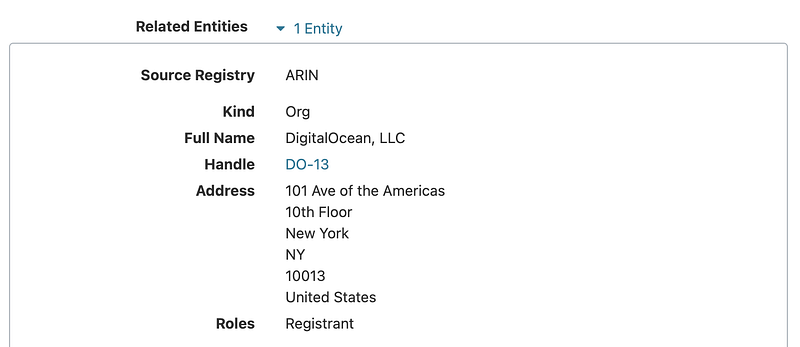
Scroll down and you can see 57 related networks. If you wanted to, you could block all those networks. If you block all of IPV6 already, you could skip those and only enter the IPV4 ranges. I’m not necessarily saying you should do that. But you could….if you want block all the scanning from that network. As mentioned in a past post, this will also block some legitimate websites. How many depends on your particular Internet access needs.
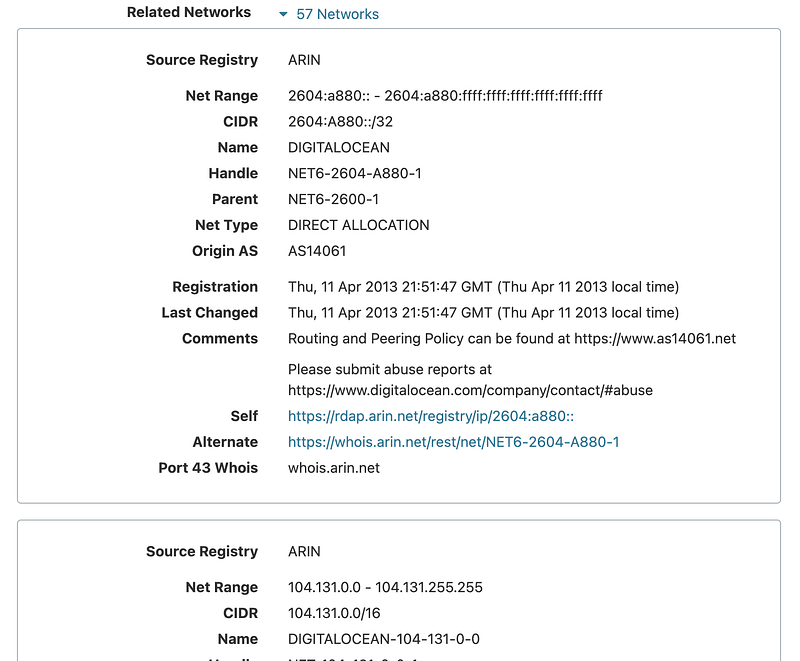
This last tip won’t create less firewall rules but you’ll spend less time investigating IP addresses from networks that only send you scanning traffic by simply blocking the whole network range all at once if you don’t need access to or from it.

I know, too much fun with IP addresses.

Follow for updates.

Teri Radichel | © 2nd Sight Lab 2021

About Teri Radichel:
~~~~~~~~~~~~~~~~~~~~
⭐️ Author: Cybersecurity Books
⭐️ Presentations: Presentations by Teri Radichel
⭐️ Recognition: SANS Award, AWS Security Hero, IANS Faculty
⭐️ Certifications: SANS ~ GSE 240
⭐️ Education: BA Business, Master of Software Engineering, Master of Infosec
⭐️ Company: Penetration Tests, Assessments, Phone Consulting ~ 2nd Sight Lab
Need Help With Cybersecurity, Cloud, or Application Security?
~~~~~~~~~~~~~~~~~~~~~~~~~~~~~~~~~~~~~~~~~~~~~~~~~~~~~~~~~~~~~
🔒 Request a penetration test or security assessment
🔒 Schedule a consulting call
🔒 Cybersecurity Speaker for Presentation
Follow for more stories like this:
~~~~~~~~~~~~~~~~~~~~~~~~~~~~~~~~~~~~~~~~~~~~~~~~~~~~~~~~~~~~~ 
❤️ Sign Up my Medium Email List
❤️ Twitter: @teriradichel
❤️ LinkedIn: https://www.linkedin.com/in/teriradichel
❤️ Mastodon: @teriradichel@infosec.exchange
❤️ Facebook: 2nd Sight Lab
❤️ YouTube: @2ndsightlab

Cidr
Network Security
Firewall
Home Networking
Ip Address
Recommended from ReadMedium